Descript vs OpusClip for Video Ads: What One 30-Second Cut Costs in Each
Cutting an ad from a 10-minute video costs a dollar or less on any plan Descript or OpusClip lists a price for, plus whatever AI credits Descript's Create clips tool spends.

Mauricio Valdivia
·11 min
In both tools, you pay for the minutes you upload
Cut one 30-second ad out of a 10-minute video, and both tools charge you for the whole upload. Descript counts it as 10 media minutes, and OpusClip counts it as 10 credits.
On Descript's paid plans, that upload works out to between 13 and 40 cents. On OpusClip's, it's between 48 cents and $1.00. Descript also charges AI credits on top of that when its Create clips tool finds the 30 seconds for you.
None of the five top-ranking search results we read prices that one job in both tools, so we priced it ourselves. We didn't test Descript or OpusClip for this post. Their figures come from their own pages, which we read from Spain on November 6, 2026, plus one archived copy of a Descript help article. The Novoads side is our own render.
What Descript and OpusClip count when you upload a video
Descript's media minutes
Descript's paid plans come with two monthly allowances, media minutes and AI credits. Its help article on usage defines the first in one plain sentence. "Media minutes are the time you use when uploading or recording media in Descript." That same sentence was on the page in January 2026, so this isn't a new way of counting.
A media minute has no price of its own, though. What it costs depends on the plan you buy, which is why the same 10 minutes cost different amounts on different plans. Descript's prices and allowances are per editor, and its pricing page describes media minutes as "imported or recorded media processed in Descript."
Descript's AI credits
AI credits, the second meter, are harder to price ahead of time. Create clips, the Descript tool that "turns long-form content into shorts," spends them, and so does Underlord, which the pricing page calls "our AI video co-editor."
The usage article says two Underlord requests "that look alike can cost different credit amounts." It adds that when Underlord runs a tool for you, the credits pay for both Underlord working out what to do and the tool doing the work. Afterward, as the article puts it, "your Usage tab shows exactly what each run cost." For two tools, Studio Sound and Remove Filler Words, it does list a ceiling of 30 credits per file.
OpusClip's credits
OpusClip counts just one thing. Its help article on credits says "Currently, processing clips will cost 1 credit per minute of the original video imported." A 10-minute video uses 10 credits, and that charge covers the clips cut from it.
Partial minutes round down to the whole minute, and anything shorter than a minute is billed as one. If only a stretch of a long recording matters, the article points you to the Processing timeframe slider, which sets the part that gets processed.
Some features cost extra. OpusClip's help center says a viral hook "turns the first few seconds of your video into a polished, scroll-stopping opening," and it prices one hook added in the editor at 2 credits. During a clipping run, hooks for up to 10 clips cost 20 credits.
What one 10-minute upload costs on each plan
Prices as of November 6, 2026, in US dollars, as each vendor's pricing page showed them to a visitor from Spain. The last column is our arithmetic. We divided each plan's price by its allowance and multiplied by the 10 minutes or 10 credits the upload uses.
| Plan | Price | Allowance | One 10-minute upload |
|---|---|---|---|
| Descript Free | $0 | 60 media minutes a month, 100 AI credits once | No cost, 720p exports with a watermark |
| Descript Hobbyist | $24 a month, or $16 a month on annual billing | 600 media minutes and 400 AI credits a month | 40 cents monthly, 27 cents annual |
| Descript Creator | $35 a month, or $24 a month on annual billing | 1,800 media minutes and 800 AI credits a month | 19 cents monthly, 13 cents annual |
| Descript Business | $65 a month, or $50 a month on annual billing | 2,400 media minutes and 1,500 AI credits a month | 27 cents monthly, 21 cents annual |
| Descript media top-up | $25 for 5 hours (Creator and Business) | 300 media minutes, valid 12 months | 83 cents |
| OpusClip Free | $0 | 60 credits a month | No cost, watermarked, non-commercial use only |
| OpusClip Starter | $15 a month, monthly only | 150 credits a month | $1.00 |
| OpusClip Pro, one pack | $29 a month, or $174 a year | 300 credits a month, or 3,600 a year | 97 cents monthly, 48 cents yearly |
Descript's plans
Descript sells Hobbyist, Creator and Business on monthly or annual billing. Creator on annual billing is the cheapest paid plan in the table for the 10-minute upload, at 13 cents. Hobbyist on monthly billing is Descript's most expensive paid plan, at 40 cents, because it comes with a third of Creator's minutes.
If you run out, Descript sells extra media minutes at $5.00 an hour, which puts 10 more minutes at 83 cents. Top-ups are only available on Creator and Business, and they expire 12 months after purchase. The top-ups page also says they're non-refundable.
OpusClip's plans
OpusClip sells Starter monthly only, at $15 for 150 credits. That's 10 cents a credit, so the upload costs $1.00. Pro comes in packs, and one pack is $29 a month for 300 credits. That puts the upload at 97 cents.
Paid yearly, a Pro pack is $174 for 3,600 credits, and the credits article says you get the full year's credits at purchase. That halves the price of a credit, in line with the "50% discount" the article lists for yearly plans, and brings the upload down to 48 cents.
OpusClip prices its plans lower in some countries (Brazil, Mexico and India among them), and Spain pays the same as the US. If you're reading from somewhere else, you may see lower prices than these.
What the last column assumes
Every figure in the table's last column rests on three assumptions.
- You use up the whole allowance. Descript says unused media minutes and AI credits "don't roll over into the next cycle," so a Descript plan you barely use costs far more per upload than the table shows.
- You spend your OpusClip credits before they expire. OpusClip's credits article says monthly ones "expire in 60 days, so they roll over for one additional month," and yearly ones expire 12 months after purchase.
- Descript's AI credits come on top. The Descript rows price the upload by media minutes alone and leave out what a Create clips run spends, so a Descript cut made that way costs the cents shown plus those credits.
We think that makes OpusClip easier to budget for a plain clip, since its credits article ties the cost of clipping to the length of what you upload.
Cutting several ads from one upload
The table prices one ad, but the upload costs the same whether you cut one ad from it or five. In OpusClip, the clips from one processing run are covered by that run's credits. In Descript, the help page on the media library says you can add a file you've already uploaded to another project "without re-uploading or consuming additional media minutes." So every extra ad you cut from the same recording lowers the cost of each one. Create clips is the exception, since every run of it spends AI credits of its own.
What each tool says it does for an ad
Descript's clips, captions and exports
Descript describes itself as "an AI video and audio editor that lets you edit by editing text." The Hobbyist plan card lists Create Clips among its AI tools, and the help page on repurposing says Create clips and its sister tools "create editable drafts you can refine, share, or export."
You can make up to 20 clips in a run. You set each clip's length, anywhere from 10 seconds to 5 minutes. A 30-second ad fits well inside that range. The presets include portrait (9:16) and square (1:1) layouts.
Descript's help page on captions says the app builds them "straight from your script, so they're timed and synced automatically with your media." The pricing page lists dynamic captions, the animated kind, as unlimited on every plan. On Hobbyist, you export at 1080p without a watermark, and on Creator, you export at 4K.
Our Descript review goes further into what its AI credits buy beyond clips.
OpusClip's clip lengths, hooks and aspect ratios
OpusClip pitches advertisers directly. Its page for them says you can "Generate quality short video ads, scale ad A/B testing, and reduce CPC using OpusClip." That's the company's claim, and we haven't measured it.
For a 30-second ad, the setting that matters is clip length. The help center says it defaults to "Auto (0m-3m)" and that you can pick a clip length before a project is processed. The pricing page lists 0-1m as the shortest option.
OpusClip's viral hook starts at Pro. Its help page lists the feature on the Trial, Pro, Max and Business plans, and the Pro plan card adds it to everything in Starter. But the plan comparison shows a check mark in the Auto hook row for every plan, Starter included, and the help page puts the switch for the viral hook inside that Auto hook setting. So we'd check what Auto hook does on Starter before paying for Pro to get it. On monthly Pro, one viral hook added in the editor brings the 10-minute job to $1.16. On yearly Pro, it comes to 58 cents.
Aspect ratios are where OpusClip's pages disagree. The plan comparison on its pricing page shows only vertical 9:16 on Free and Starter. Square 1:1 and landscape 16:9 are on Pro and Business. Its help page on aspect ratios lists 4:5 portrait as well. If you're making a 4:5 feed ad, we'd check the editor on the plan you're buying first.
Our OpusClip review covers its other extras and what its users say.
Watermarks and commercial use on each plan
Terms and help pages as we read them on November 6, 2026.
| Plan | Watermark | What the vendor's pages say about use |
|---|---|---|
| Descript Free | Yes, bottom-right, and exports stop at 720p | Your own personal or internal business use, and you own your input and AI output as far as the law protects them |
| Descript Hobbyist, Creator, Business | No | The same terms as Free |
| OpusClip Free | Yes, and clips stop being exportable after three days | Internal, personal, non-commercial use |
| OpusClip Starter and Pro | No | Licensed for commercial uses, subject to the terms |
Descript's free exports and terms
Descript's free plan stops at 720p, and its export help says free exports "include a Descript watermark in the bottom-right corner." Upgrading to Hobbyist, Creator or Business "removes the watermark from all future exports," so Hobbyist is the cheapest Descript plan that gets you a clean file.
Descript's terms, last updated February 25, 2025, license the service "for your own personal or internal business use." As for what its AI tools make, the terms say that as between you and Descript, "you own all right, title, and interest in and to any Input and Output, to the extent protectable under applicable law."
Stock media inside Descript has its own rules. The help page for the media panel says "GIPHY GIFs and stickers can't be used commercially," while other stock content "may be used in most commercial, personal, and editorial projects." We'd keep GIPHY stickers out of an ad for that reason.
OpusClip's free plan, trial and terms
OpusClip's free plan exports with a watermark, and its pricing page says that after three days "the clips will no longer be exportable." Its help center says a free Pro trial turns into a free account after seven days, and that "videos exported during the trial will include the OpusClip watermark." The watermark help page says those watermarks come off your free and trial projects on their own once you move to a paid plan.
OpusClip's terms, effective November 17, 2025, tie commercial use to paying. They limit you to "your own internal, personal, non-commercial use," but if you're "a user of Paid Services," they say "you are licensed to use the Services for commercial uses," with the agreement's other terms still applying. In our reading, that means a paid ad needs a paid plan, which makes Starter, at $15 a month, the cheapest OpusClip plan you can run one from. Starter's plan card also lists watermark removal.
Where Novoads fits, when there's no footage yet
Descript and OpusClip both start from footage you already have. In Novoads, you write a prompt, and a video model renders the take you'd otherwise have to film. The two jobs don't compare directly, and cutting an ad from footage you've already shot costs far less in either tool than rendering new footage here.
What a 30-second take costs in Novoads
A 30-second Seedance 2.5 take costs 210 credits in Novoads. That's at 720p, the model's default resolution here. Our credits cost 4.9 cents each on Plus and 7.5 cents on Starter. So the take comes to about $10.29 on Plus and $15.75 at Starter's rate. That's also more than the 200 credits that come with a month of Starter.
At 480p, the take costs 90 credits, which fits inside a month of Starter. That's about $4.41 on Plus and $6.75 at Starter's rate.
We made the film in the strip below with Seedance 2.5, from one prompt that gave each shot a timestamp. All seven cuts landed within half a second of where the prompt put them. The finished file was ready 7 minutes 12 seconds after we submitted the prompt. At today's price, those 20 seconds cost 140 credits. The running brand in it is made up, built on our N mark.

Made in Novoads with Seedance 2.5 · one prompt with a timestamp for each shot, a 20-second vertical brand film at 720p, eight shots and no dialogue · 140 credits at today's price · rendered 2026-09-08
If you want to direct a take like this one, our Seedance 2.5 prompt guide shows how to write the prompt.
Our plans
Novoads is paid from the first month, and you'll find every plan on our pricing page.
- Starter is $15 a month for 200 credits, sold monthly only.
- Plus is $49 a month for 1,000 credits. On annual billing, it comes to $39 a month.
- Ultra starts at $129 a month for 3,000 credits.
Our pricing FAQ says all videos generated with Novoads are fully licensed for commercial use.
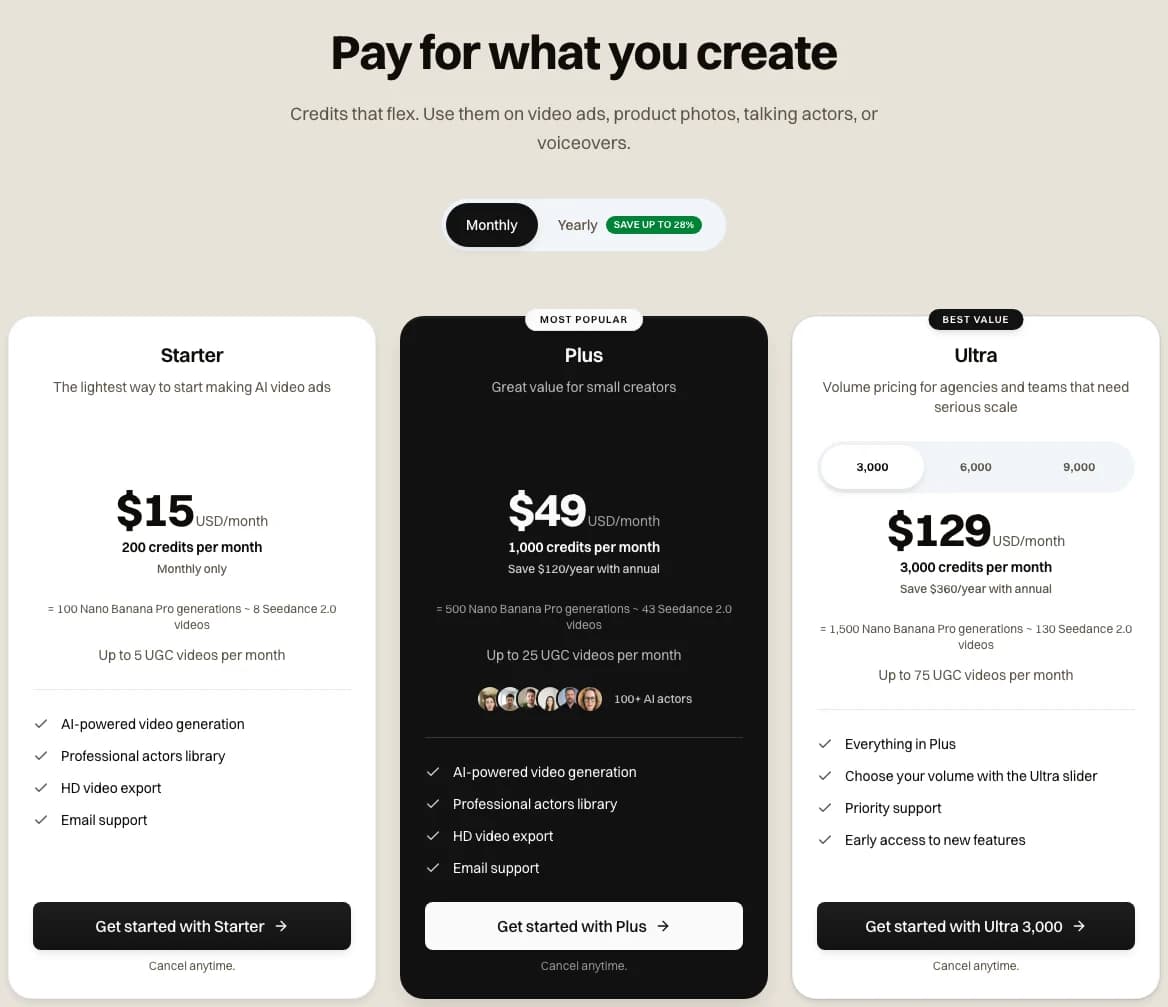
Our pricing page with monthly billing selected, 2026-11-06
No footage to cut yet?
Write a prompt and render a vertical take for your ad in Novoads. Plans start with Starter, at $15 a month for 200 credits.
See our plansWhich tool to pay for, depending on the ad you're making
Matching the tool to the job
- Use Descript when your ad is buried somewhere in a talk, demo or interview, and you want to cut it by editing the words, clean up the audio and caption it, all in one place.
- Use OpusClip when you want it to pull several short clips out of a long video for you, and you want to know the credit cost before you upload.
- Choose Descript Creator on annual billing if you upload a lot of footage, since it's the cheapest paid plan we priced per uploaded minute.
- Choose OpusClip Pro if you want the viral hook or square and landscape exports, since OpusClip's pages put both on Pro and up.
- Use Novoads when the footage doesn't exist yet and the ad needs a scene you haven't shot.
Three checks before your first upload
- Check the length of the video you're about to upload, because both tools bill for its minutes no matter how much of it ends up in your ad.
- In OpusClip, set the clip length to 0-1m before processing starts, and narrow the Processing timeframe slider if the ad you want is in one stretch of the video.
- In Descript, run Create clips once and check what it cost in the Usage tab before you plan a month of cuts around it.
If you already have the footage, the cut is cheap in either tool. Our CapCut vs Descript and OpusClip vs CapCut comparisons price the same kind of job in a third editor, and our guide to repurposing winning ads covers how to get new concepts out of an ad that already works.
Frequently Asked Questions
Is OpusClip legal to use for ads?
OpusClip is sold by Opusclip Inc., a Delaware corporation, under terms effective November 17, 2025. Those terms limit you to your own internal, personal, non-commercial use unless you're a paid user, in which case they license you for commercial uses, subject to the agreement's other terms. In our reading, that makes Starter, at $15 a month, the cheapest OpusClip plan you can run a paid ad from.
What is Descript AI?
Descript calls itself an AI video and audio editor that lets you edit by editing text. Its help center says AI features such as Create clips and the Underlord co-editor spend AI credits, while uploads and recordings spend media minutes. Each paid plan comes with a monthly allowance of both, and unused minutes and credits don't roll over.
What are some alternatives to Descript?
For cutting short clips out of long videos, OpusClip is the closest match we know of, and its own site calls it "the Descript alternative built to help you grow your social presence." We've also compared Descript with CapCut in a separate post. If the footage doesn't exist yet, an AI ad maker such as Novoads renders it from a prompt instead.
What is Opus video editing?
In video editing, Opus usually means OpusClip, the clipping tool from Opusclip Inc. Its help center says it charges 1 credit per minute of the video you import. On its Starter plan, a 10-minute video comes to $1.00.
Key Takeaways
- Both tools charge by the minute of footage you upload, no matter how long the ad you cut from it runs.
- Priced by media minutes alone, the upload costs 13 to 40 cents on Descript's paid plans. A Create clips run adds AI credits on top.
- That upload costs $1.00 on OpusClip Starter, which is sold monthly only. On Pro, it's 97 cents billed monthly or 48 cents billed yearly.
- Free exports carry a watermark in both tools. OpusClip's terms license commercial use to paid users, so in our reading its cheapest plan for a paid ad is Starter, at $15 a month.
- If there's no footage yet, a 30-second Seedance 2.5 take costs 210 credits in Novoads. That's about $10.29 on Plus, so cutting footage you've already shot costs less in either editor.