OpusClip vs CapCut: What It Costs to Turn a 10-Minute Video Into an Ad
Cutting a 10-minute video costs $1.00 on OpusClip's Starter plan, and CapCut's page calls its editor free to use. We price the cut in both tools and look at what each one's terms allow in a paid ad.

Mauricio Valdivia
·11 min

A 10-minute video costs 10 OpusClip credits to cut
OpusClip charges 1 credit for every minute of video you import. So a 10-minute recording costs 10 credits to cut into short clips. That's $1.00 on its Starter plan and about 48 cents on Pro billed yearly, whatever clip length you pick. CapCut's page for the same job calls its auto video editor "completely free to use," though an older CapCut guide caps the no-cost minutes at 60 a month. None of the top search results we could open prices that cut in both tools or says whether the clip can run as a paid ad.
We didn't test OpusClip or CapCut for this post. Their figures come from each company's own pages, the two app stores and one Internet Archive copy, all read from Spain on November 5, 2026. The Novoads side is our own render.
What cutting a 10-minute video costs in each tool
Prices as of November 5, 2026, in the currency each page showed us. CapCut's pricing page changes by region, so its euro card is what a visitor from Spain sees, and its dollar card comes from the archive copy.
| OpusClip | CapCut | |
|---|---|---|
| A 10-minute source video | 10 credits, 1 per minute | No charge, by its auto video editor page |
| That cut in dollars | $1.00 on Starter, about 97 cents on Pro monthly, about 48 cents on Pro yearly | Nothing, up to 60 minutes a month by a June 2025 guide |
| First paid plan, monthly | Starter, $15 for 150 credits | Pro, EUR 29.99 for a visitor from Spain, or USD 19.99 on the US card of November 3 |
| Watermark-free export | Any paid plan | Pro, by an August 2026 guide, though an October 2026 guide says long videos to shorts come without watermarks |
| Free plan | 60 credits a month, watermarked | Standard, which a CapCut guide calls the free version |
How OpusClip counts the minutes
According to its help center, OpusClip bills processing by the minutes of the source video, at 1 credit each. The help center's own example puts a 30-minute video at 30 credits. A video shorter than a minute rounds up to 1 credit, and partial minutes round down. So a recording that runs a little past 10 minutes still costs 10 credits. If you only need part of the recording, you can set the "Processing timeframe" slider to that stretch when you submit the video.
The clip length you ask for doesn't change the cost. The length setting starts on Auto, which runs from 0 to 3 minutes. On every plan, Free included, you can also pick a set range, and the shortest is 0 to 1 minute. Either way, you pay for the minutes you import, so a short ad cut costs the same 10 credits as a 3-minute one. For those credits you usually get several clips to choose from. OpusClip's help center says to expect 3 to 14 clips from a source of 3 to 10 minutes.
In dollars, Starter is $15 a month for 150 credits, and it's sold on monthly billing only. That puts the 10-credit cut at $1.00. Pro is $29 a month for 300 credits. On that plan the same cut is about 97 cents. OpusClip's help center says credits on a yearly plan come at a 50% discount against monthly plans. That brings the cut to about 48 cents on Pro billed yearly.
A viral hook costs extra. OpusClip charges 20 credits per clipping run for it on its Trial, Pro, Max and Business plans, and it's off by default. Turn it on and the cut comes to 30 credits, or about $2.90 on Pro monthly. Our OpusClip review goes through the rest of its plans.
What CapCut's pages say about the same cut
CapCut Web has a tool called Long video to shorts, and CapCut's auto video editor page lists its steps. You upload a video, choose a length and a caption template, and click Convert. On cost, CapCut's pages give three different answers.
- The auto video editor page says the editor "is completely free to use and includes all its smart tools without charges."
- CapCut's AI shorts maker page says you can create unlimited AI-generated Shorts.
- An older CapCut guide, dated June 16, 2025, says, "Convert 60-minute videos into short films at no cost each month. Upgrade to Pro for an additional 240 minutes monthly."
We read that last line as 60 minutes a month at no cost, plus 240 more on Pro. The pages don't settle which of the three applies to an account today. Whichever one you go by, a 10-minute cut costs nothing, though a busy month could run into the guide's limit.
Watermarks on the exported clip
OpusClip puts its logo watermark on clips from the Free plan and the free trial. Its help center says upgrading to a paid plan removes the watermark automatically, including from earlier Free and trial projects. And according to the pricing page, Free clips can't be exported after 3 days.
CapCut's own guides disagree.
- CapCut's watermark guide, dated August 20, 2026, says "you need CapCut Pro for no watermark," and notes that a few templates and features stamp a watermark on the export unless you have premium.
- The same guide shows how to delete the CapCut logo card at the end of a project by hand.
- A CapCut guide dated October 9, 2026 says its long videos to shorts feature comes "without watermarks."
So whether a CapCut cut exports clean without Pro depends on which of its pages you go by.
Prices by country, promotions and dates
By CapCut's own account, Pro's price depends on your region, your device and whatever promotions are running. CapCut also tries out limited-time promotional prices on some users, so the price you see can differ from one account to the next. Its pricing page calls the displayed prices a reference only and says you'll see the final price, with taxes and offers, after you sign in. For a visitor from Spain, the page showed Pro at EUR 29.99 a month with 650 monthly AI credits. The Internet Archive saved the page as a US visitor saw it on November 3, 2026. That copy showed Pro at USD 19.99 a month with 1,200 credits. Our CapCut pricing breakdown covers the rest of its plans.
OpusClip showed us its prices in US dollars. Its US App Store listing has the same prices for in-app purchases, Starter at $15.00 and Pro Monthly at $29.00. OpusClip announced its 4.0 release on November 2, 2026. The announcement offers Pro on monthly billing at 40% off for the first month. It's a launch promotion we saw on the same day as these prices, so the table sticks with the standing price. OpusClip's help articles aren't dated, so any line here that cites one carries the day we read it.
Captions, brand templates and credit rules
OpusClip's captions and brand templates
OpusClip's pricing page, read November 5, 2026, lists AI captions with emoji and keyword highlighting on the Free plan, which keeps the watermark. Starter's card adds animated captions in more than 20 languages and removes the watermark.
OpusClip's pages disagree on brand templates. Starter's card lists 1 brand template and Pro's card lists 2. The comparison table on the same page, though, gives Pro up to 4, and OpusClip's page for advertisers promises up to 5 shared brand templates.
The credit rules don't line up either.
- The credits article says monthly credits last 60 days before they expire, so unused ones carry into the next month.
- The same article says a yearly plan's credits all arrive at purchase and stay good for 12 months, but the credits FAQ for OpusClip's agent product has yearly credits arriving monthly.
- The plans article says you can buy top-up credits from your subscription page, while another article says you can't buy extra minutes or seats on their own.
CapCut's captions and credits
CapCut's AI caption page says captions on CapCut Web are free to use, in more than 20 languages. But its Standard vs Pro guide, dated September 23, 2026, says the auto caption generator is exclusive to Pro users. The Long video to shorts tool asks you to pick a caption template, and we read a caption template as one of the "text templates" that CapCut's Materials License counts as library material. That matters for ads, as the next section explains.
One CapCut credit is worth $0.01, according to its help center. Pro came with 650 monthly AI credits for a visitor from Spain, and the US card in the archive listed 1,200. CapCut's help pages also disagree on bought credits.
- A page dated March 25, 2026 says they stay valid for 2 years.
- A page dated a day later says purchased credits don't expire, and that you can buy credits on CapCut Web and CapCut Desktop.
What each tool's terms allow in an ad
OpusClip's terms for paid plans
OpusClip's terms of service, effective November 17, 2025, limit you to using the service for your own internal and personal purposes, never commercially and never for a third party's benefit. Then they make an exception for paying users, who are "licensed to use the Services for commercial uses," subject to the rest of the terms. We read that to mean any clip meant to run as an ad should come from a paid plan, and Free clips carry the watermark anyway. OpusClip's page for advertisers pitches this job directly, with short video ads and ad A/B tests made from long videos.
CapCut's US guide and the license we could read
CapCut's US guide to product image-to-video ads, published August 13, 2026, says, "Creating a video in CapCut does not make every asset suitable for advertising." The guide is about turning product images into ads rather than cutting long videos, but that sentence applies to any video made in CapCut. It asks you to confirm, before you export, that each template, visual, font, effect and music track allows the use, territory, period and platform you have in mind. It also warns against inferring rights from a "commercial" label, and it ends the section with "This is a workflow check, not legal advice."
The version of CapCut's Materials License we read from Spain was last updated January 22, 2026. Several of its lines matter for an ad.
- Content that uses any library material is for personal and non-commercial use unless the platform marks that material otherwise.
- Materials marked "commercial" carry a limited right to use the content in online advertising, subject to the license's restrictions.
- A video that mixes them with non-commercial materials can only be used non-commercially.
- The materials can't go into ads for tobacco, pharmaceutical, healthcare, herbal or medical products.
The same license says US users fall under a separate CapCut US Materials License Agreement. We couldn't see that agreement, so its terms stay out of this comparison. CapCut's guide makes the same point, saying the non-US license's permissions "cannot clear a US ad by themselves." CapCut's terms of service, in the version we read (last updated April 15, 2026), say "We don't own your User Content" and point to the Materials License for what you may do with CapCut's own content.
What each tool's music library allows
OpusClip's music article says its library is licensed and "generally free from copyright claims." It asks you to follow the NCS usage policy and paste each track's credit line into your video description, and trial users can't add library music at all. Read the NCS policy itself before you put a library track under a paid ad.
CapCut's license says its library Sounds are for personal, non-commercial videos, and that you shouldn't use a Sound for any commercial purpose unless you've obtained the rights yourself. Its Commercial Sounds may be shown within CapCut, TikTok and TikTok for Business. Anywhere else, a Meta or YouTube ad included, you need separate permission from the rights holders.
How the two apps are rated in the stores
Ratings as of November 5, 2026, from the US store pages.
| OpusClip | CapCut | |
|---|---|---|
| App Store | 4.9 from 8.9K ratings | 4.6 from 1.1M ratings |
| Google Play | 2.7 from 448 reviews | 3.5 from 13.1M reviews |
OpusClip's Google Play score is more than two stars below its App Store score, on hundreds of reviews against thousands of ratings. CapCut's two scores are about a star apart, both on counts in the millions. Google Play also shows CapCut with an Editors' Choice badge and more than a billion downloads.
When there's no footage to cut yet
OpusClip and CapCut both need a recording you already have. If you don't have one yet, Novoads makes a new clip from a written prompt, which is a different job with its own price.
What a new 30-second clip costs
Novoads makes that clip with Seedance 2.5, which renders at 720p unless you choose another resolution. A full 30-second take costs 210 credits. On Plus, where a credit works out to $0.049, that's $10.29. At 480p the same take is 90 credits. On Plus that's $4.41.
That's more than either cut above, but the sums aren't like for like. OpusClip's dollar and CapCut's no-charge cut are prices for editing a recording that already exists, so they don't include whatever that recording cost to make. Our Starter plan's 200 monthly credits aren't enough for one 210-credit take. The smallest top-up adds 100 credits for $12. Starter plus one top-up comes to $27 and leaves 90 credits after the take.
CapCut sells Seedance 2.5 clips too, to its Pro and Ultra members, billed by the second in credits. Our CapCut vs Canva comparison sets those clips against Canva's.
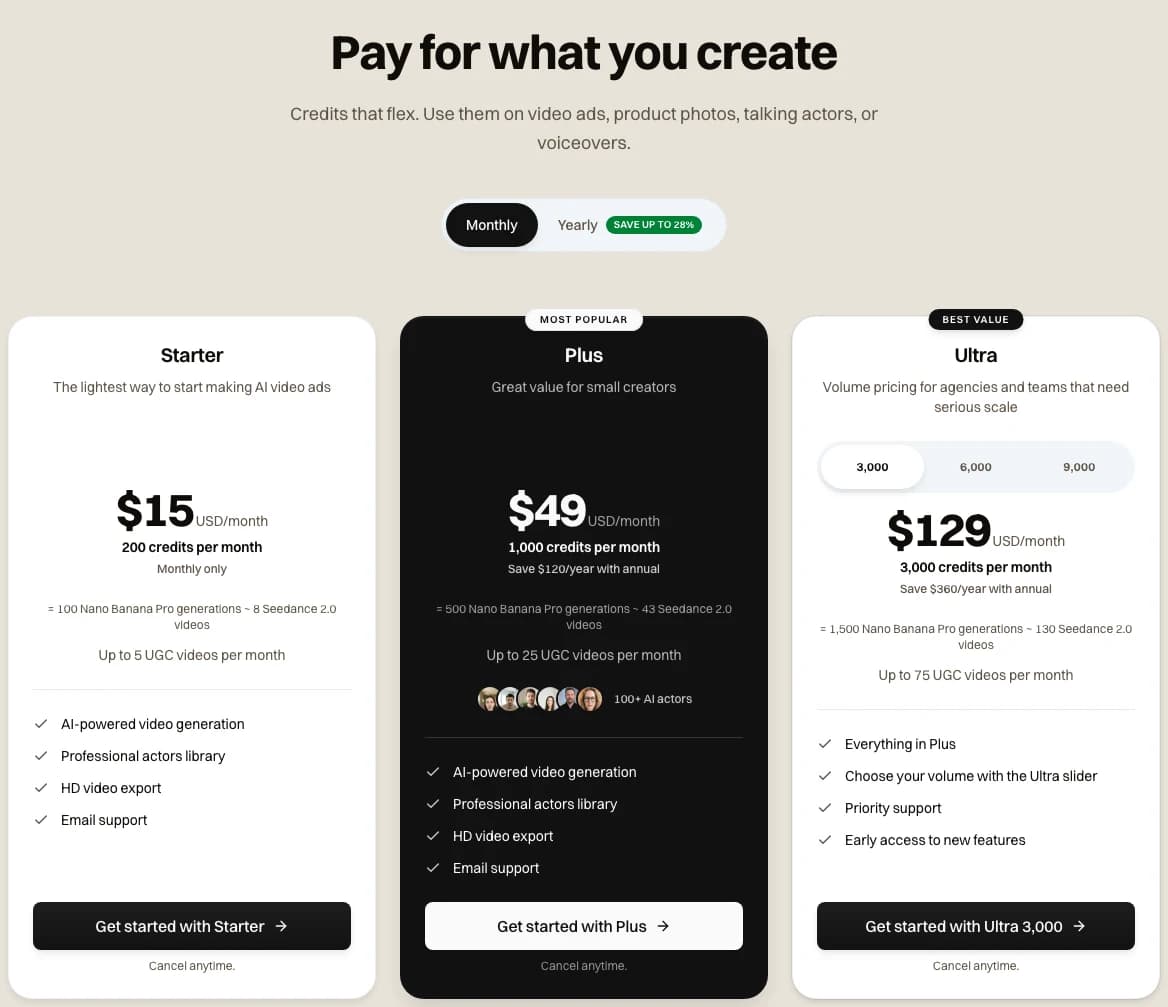
Our pricing page with Monthly selected, captured 2026-11-05
Our pricing page lists three plans.
- Starter, $15 a month for 200 credits, monthly billing only
- Plus, $49 a month for 1,000 credits, or $39 a month billed yearly
- Ultra, from $129 a month for 3,000 credits, or $99 a month billed yearly
Every Novoads plan is paid from its first month. Our pricing FAQ says "All videos generated with Novoads are fully licensed for commercial use."
The film behind the strip
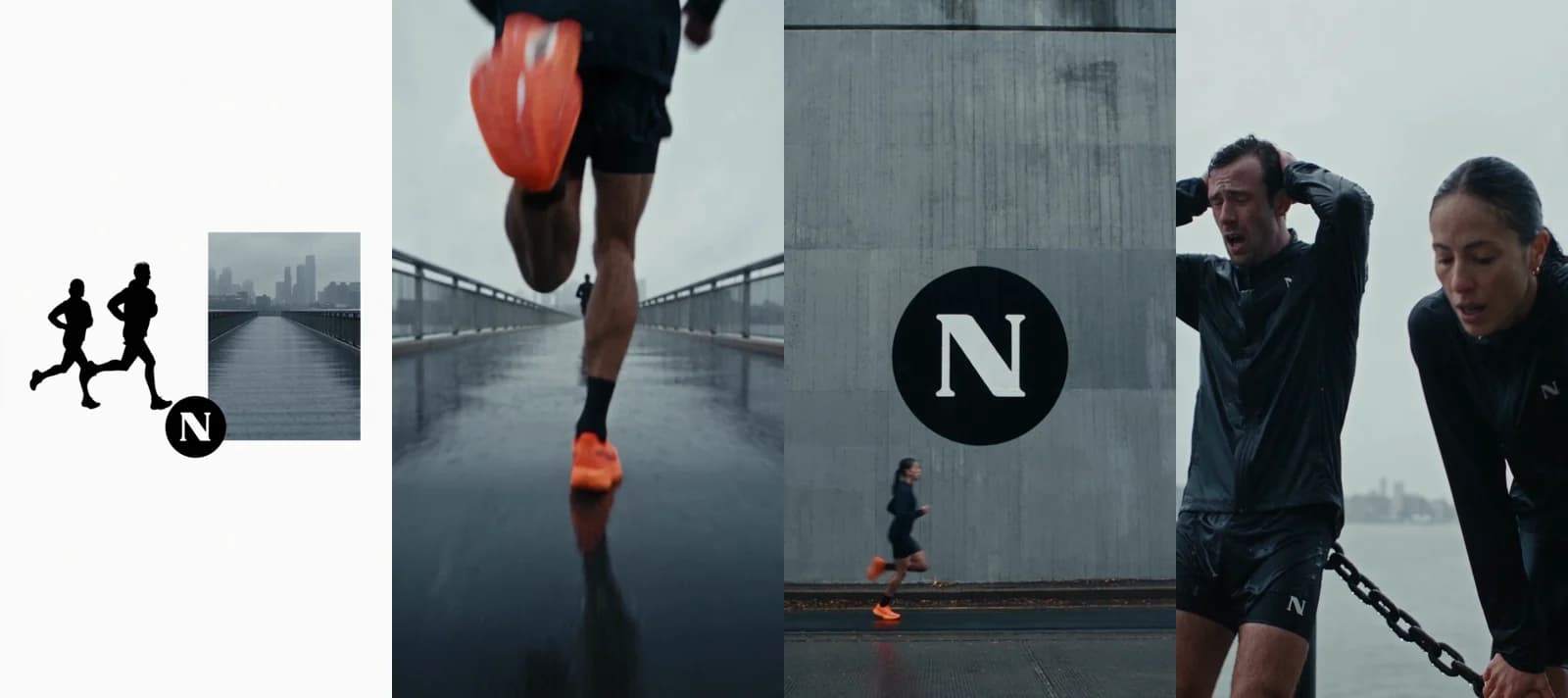
Made in Novoads with Seedance 2.5 · a new 20-second vertical film from one timed prompt, eight shots at 720p, 140 credits at today's price, rendered 2026-09-08
The strip comes from a new 20-second film we made with one timed prompt in September. It's eight shots for a mock running label built on our N mark, with no dialogue. Each of its seven cuts landed within half a second of the time the prompt set, and the kit, shoes and logo stayed the same in every shot. The render came back in 7 minutes 12 seconds. The same 20 seconds costs 140 credits today, and none of it was cut from existing footage.
If you're weighing Novoads against CapCut, our CapCut alternative page goes through how they compare.
Nothing filmed yet?
Write the scene and Novoads makes a new clip of up to 30 seconds with Seedance 2.5.
Compare Novoads and CapCutWhich tool to open for which job
Each of the three suits a different starting point.
- Open OpusClip when you have a long recording and want a batch of short cuts from it, at a dollar per 10 minutes of footage on Starter. Pick a paid plan if the clips will run as ads, since that's where its terms grant commercial use.
- Open CapCut when you want the cut at no charge and plan to finish it by hand. Before the clip runs as an ad, check each template, font, effect and sound under the license that applies to you, as CapCut's own guide asks.
- Open Novoads when there's no footage yet and you need a new clip from a prompt. It costs more per clip because it makes the footage instead of cutting it.
If you're only comparing editors, CapCut vs Descript prices a 30-second ad in each, and our Descript review covers what Descript's credits cost. For another editor's watermarks and credits, see our Kapwing review.
Frequently Asked Questions
Is OpusClip safe to use?
OpusClip's pricing page lists SOC II Type 2 compliance, and its terms license paying users for commercial use, subject to the rest of the terms. On November 5, 2026, its US App Store rating was 4.9 from 8.9K ratings. Google Play showed 2.7 from 448 reviews the same day. We didn't test OpusClip or audit its security for this post.
What are the downsides of CapCut?
CapCut's own pages say the prices it shows are a reference until you sign in, and that they change with region, device and any promotion on offer. CapCut treats subscriptions as virtual goods that generally don't support refunds, and you have to cancel at least 24 hours before renewal to avoid the next charge. The version of its Materials License we read from Spain limits content that uses library materials to personal, non-commercial use unless a material is marked otherwise. Its Commercial Sounds may be shown within CapCut, TikTok and TikTok for Business, and using them anywhere else needs separate permission.
Which CapCut is better?
CapCut's Standard vs Pro guide, dated September 23, 2026, calls Standard the free version and says motion tracking and the auto caption generator are exclusive to Pro. The guide prices Pro at $19.99 a month or $179.99 a year. For a visitor from Spain, CapCut's pricing page showed Pro at EUR 29.99 a month on November 5, 2026, so check what your own account shows after you sign in. If you plan to buy credits, CapCut sells them on CapCut Web and CapCut Desktop.
Can you run an OpusClip or CapCut clip as a paid ad?
OpusClip's terms grant commercial use to paying users, and Free clips carry a watermark, so a clip meant for an ad should come from a paid plan. CapCut's US guide to product image-to-video ads says creating a video in CapCut doesn't make every asset suitable for advertising, and it asks you to check each template, visual, font, effect and music track before you export. The CapCut license we could read keeps library materials non-commercial unless they're marked commercial. We couldn't see CapCut's US agreement, so nothing here describes what it allows.
Key Takeaways
- OpusClip charges 1 credit for each minute you import, however long the clips come out. So 10 minutes of footage costs $1.00 on Starter. On Pro billed yearly, it's about 48 cents.
- CapCut's auto video editor page calls the editor completely free to use, but a CapCut guide from June 2025 caps the no-cost minutes at 60 a month. Its guides also disagree on whether you need Pro for a watermark-free export.
- OpusClip's terms grant commercial use to paying users. CapCut's US guide to product image-to-video ads warns that creating a video in CapCut doesn't make every asset suitable for advertising, and the license we could read keeps library materials non-commercial unless they're marked otherwise.
- On November 5, 2026, OpusClip's Google Play score trailed its App Store score by more than two stars. The App Store showed 4.9 and Google Play 2.7.
- With no footage to start from, Novoads makes a new 30-second Seedance 2.5 take for 210 credits. On Plus that's $10.29, more than either cut, but it's a different job.