CapCut Pricing 2026: Plans, Seedance 2.5 Limits and Ad Costs
What CapCut's Free, Pro, Ultra and Teams plans cost, how many seconds of Seedance 2.5 its AI video page lists for Pro and Ultra, and what one 30-second AI ad costs.

Mauricio Valdivia
·13 min

CapCut's AI video page listed up to 100 seconds of Seedance 2.5 a month for Pro
CapCut costs nothing to download, and it prices its paid plans by region. From Spain, its web pricing page showed us Pro at EUR 29.99 a month and Ultra at EUR 68. Teams was EUR 14.99 a month per seat.
On October 31, 2026, CapCut's AI video generator page also had a line you won't find on the pricing page. Its Pro card read "Up to 100 seconds of Seedance 2.5 video per month (720p)." The next line on the card said "Output may vary by model, resolution, and region." Ultra's card listed up to 235 seconds a month, also at 720p.
Those seconds don't square with the credits on the same card, so we wouldn't plan a budget around them. The number you can actually work with is the rate listed under them, which starts Seedance 2.5 at $0.12 a second in the first month. At that rate, a 30-second clip costs $3.60, which is less than we charge for the same clip in Novoads.
We didn't test CapCut for this post. We read every CapCut page we quote on October 31, 2026, as a visitor from Spain, which is why the web prices are in euros. The dollar prices come from Apple's US App Store and CapCut's own pages, each with its date. The Novoads side comes from our own pricing page and one of our own renders.
Do you have to pay for CapCut?
No. Downloading the app costs nothing, and the web pricing page starts with a Free plan at EUR 0. Apple's US App Store lists CapCut as free with in-app purchases, and Google Play's listing mentions in-app purchases too. You pay for Pro to get the export setting that hides the watermark and the monthly AI credits you spend on CapCut's AI video.
What the Free plan includes
CapCut's Free card promises "the basics you need to create," and the two it names are templates to start fast and basic editing tools. The card lists no monthly AI credits and no seconds of Seedance 2.5, which start on Pro. If you mostly edit clips you've shot yourself, the basics are probably enough to start.
The watermark and the logo clip at the end
CapCut's guide to exporting without a watermark, dated August 20, 2026, covers two different things. Many projects end with a short clip that shows the CapCut logo, and the guide says you can delete it from the end of the timeline. The export setting that hides the watermark is another matter, and there the guide says "you need CapCut Pro for no watermark." It adds that some templates or features may force a watermark unless you pay. So you can drop the logo clip on Free, but CapCut puts the setting that hides the watermark on Pro.
What "Standard" means depends on the page
CapCut's Standard vs Pro guide, dated September 23, 2026, calls Standard the plan "commonly referred to as the free version." Other CapCut pages treat it as something you pay for.
- CapCut's terms of service, last updated April 15, 2026, list "CapCut Standard (where applicable)" among the services you pay for.
- Apple's US App Store sells an item called "Standard Monthly Subscription" at $9.99.
- A help page dated April 8, 2026, says Standard's benefits are "primarily designed for app (mobile) use."
- The web pricing page we saw from Spain has no Standard plan at all.
We read Standard as a paid mobile tier that some app stores sell. CapCut's pages don't agree on it, so go by the plan names your own store shows you.
The "Free" in the AI video generator's heading
The AI video generator page's main heading reads "Free AI Video Generator & AI Video Maker Powered by Seedance 2.5." Further down the same page, though, only the Pro and Ultra cards list seconds of Seedance 2.5. The page's FAQ says CapCut "provides 7-day free trial to this AI video generator," and the pricing page's FAQ says new users can start a 7-day trial of Pro without a credit card. As far as these pages show, the free part of that heading means the editor and the trial, while the Seedance 2.5 lines are on the paid cards.
CapCut's prices on the web, in the App Store and on a PC
Prices as of October 31, 2026, in euros, as CapCut's web pricing page showed them to a visitor from Spain. The last column comes from the AI video generator page, whose plan cards show the same prices with a Seedance 2.5 line added.
| Plan | Monthly | Yearly | AI credits a month | Seedance 2.5 on the AI video page |
|---|---|---|---|---|
| Free | EUR 0 | EUR 0 | None listed | None listed |
| Pro | EUR 29.99 | EUR 259.99 | 650 | Up to 100 seconds a month (720p) |
| Ultra | EUR 68 | EUR 779 | 7,483 | Up to 235 seconds a month (720p) |
| Teams | EUR 14.99 per seat | EUR 120 per seat | 650 per seat | None listed |
CapCut's AI video page says you pay for an annual plan in full for one year, and that the yearly discount covers one annual term.
Discounts, taxes and prices that differ by account
- The pricing page calls its prices "for reference only" and asks you to sign in to see the final price, taxes and any offers for your account.
- CapCut's terms say the fees it displays don't include taxes.
- The AI video page's plan section showed "Monthly up to 39% off" and "Yearly up to 29% off" when we read it. Ultra's card had an "Up to 40% off" badge.
- CapCut says eligibility for those offers depends on your subscription status and history, and that subscriptions renew at the regular price unless you cancel.
- A help page dated April 8, 2026, says CapCut is testing limited-time promotional prices with selected users, so not every account sees the same price.
- Another help page, dated September 23, 2026, says Pro's price can vary by region, device and available promotions.
We take those badges as a sign that the euro prices may be promotional, in which case a renewal could cost more than your first payment.
Dollar prices in Apple's US App Store
Apple's US App Store lists CapCut's in-app purchases by item name. On October 31, 2026, the list showed these items.
- "Standard Monthly Subscription" at $9.99, in five separate rows
- "Pro Monthly Subscription" at $19.99, in two rows
- "Monthly Subscription" at $19.99, and another at $7.99
- "Yearly Subscription" at $89.99
Apple doesn't say which plan each item buys. Nothing we read says whether an iPhone Pro subscription comes with the web card's 650 credits or its Seedance 2.5 line. Google Play's US listing also shows in-app purchases, but we couldn't see its price list.
Dollar prices on CapCut's own pages
CapCut's Standard vs Pro guide, dated September 23, 2026, puts Pro at $19.99 a month for individual users. It gives $179.99 for a year and says a team plan starts at around $24.99 a month. The guide adds that prices vary by region, platform, taxes and promotional discounts, so read it as a dated guide rather than a price quote.
The pricing page itself was in dollars in the copy the Internet Archive saved on October 28, 2026. That copy listed these plans.
- Pro at USD 19.99 a month, with 1,200 monthly AI credits
- Ultra at USD 79 a month, with 8,645 monthly AI credits
- Teams at USD 12.49 a month per seat, with 1,200 monthly AI credits per seat
The dollar copy has the same first-month Seedance 2.5 rates as the euro cards, from $0.12 a second on Pro. But its Pro card has nearly double the euro card's 650 credits.
What you pay to use CapCut on a PC
A CapCut help page dated April 8, 2026, says membership features on a PC require a Pro subscription, so a PC buyer is looking at Pro's price. CapCut's terms say you can pay with an Apple ID, a Google account or a CapCut account on the web, and they point to the purchase page or the app store listing for the price. On a computer, the web cards above are the price list we could see, in euros from Spain and in dollars in the archived copy. We couldn't see the desktop app's own checkout.
How CapCut charges for Seedance 2.5 and other AI video
If you haven't used the model, our guide to what Seedance 2.5 is explains what it makes and how long a take can run.
You pay for Seedance 2.5 in credits, by the second
CapCut's article on bringing Seedance 2.5 to CapCut PC, dated August 7, 2026, says Pro and Ultra members use the model "through Credit consumption" and are billed by the second. The plan cards price it in dollars instead. Pro's card lists Seedance 2.5 from $0.12 a second and Ultra's from $0.18, both marked "first month." None of the CapCut pages we read says how many credits a second of Seedance 2.5 takes.
How many credits each plan includes
On the cards we saw from Spain, Pro comes with 650 AI credits a month and Ultra with 7,483. Teams has 650 per seat. Other CapCut pages give Pro more credits than that and put two different prices on a credit.
- A help page dated April 8, 2026, says Pro's AI credits "increased from 550 to 1200."
- The dollar copy of the pricing page from October 28 also lists 1,200 for Pro.
- CapCut's help center says each credit "is equivalent to $0.01 USD" (page dated March 25, 2026).
- A page on credit types from the same day gives "$4.99 for 100 credits" as its example price for credits you buy.
- That page says credits that come with a plan last one billing cycle.
- One help page says credits you buy last two years from purchase, and another says they never expire.
The Seedance 2.0 Mini lines on the pricing page
The pricing page doesn't repeat the seconds of Seedance 2.5. Its cards give seconds for a different model, Seedance 2.0 Mini.
- On Pro, "Generate up to 240s at 720p or 600s at 480p with Seedance 2.0 Mini"
- On Ultra, "Generate up to 1,700s at 720p or 4,300s at 480p with Seedance 2.0 Mini"
- On both, "Use up to 58% fewer credits with Seedance 2.0 Mini," at first-month rates from $0.007 a second at 480p on Pro and $0.009 on Ultra
Those are seconds of a different model, so they don't tell you how much Seedance 2.5 a plan covers.
Why Pro's numbers don't add up (our arithmetic)
Put the Pro card's own numbers together and they disagree.
- Pro comes with 650 credits a month.
- At CapCut's $0.01 a credit, that's $6.50.
- Spent at the first-month rate of $0.12 a second, that covers about 54 seconds of Seedance 2.5.
- The AI video page's Pro card lists up to 100 seconds.
Ultra doesn't follow Pro's pattern either. Its card lists 7,483 credits and up to 235 seconds. If the seconds came out of the credits, that would be about 31.8 credits a second, while Pro's card works out to 6.5 credits a second for the same model.
So the 54 seconds is only what two of CapCut's numbers imply when you put them together. It doesn't measure what a Pro account actually gets.
One explanation fits, though it's only our guess. The dollar copy of the pricing page from October 28 gave Pro 1,200 credits. The $0.12 rate works out to 12 credits a second at CapCut's credit value. At that pace, 1,200 credits last exactly 100 seconds. So CapCut may have written the 100-second line for the dollar card and shown it unchanged to a visitor from Spain, whose Pro card lists 650 credits.
Either way, CapCut says Seedance 2.5 "appears as a selectable model as it becomes available in your region," so the line doesn't promise that any given account can use the model. We didn't run a generation to see which models an account can pick.
What a 30-second Seedance 2.5 ad costs on CapCut and in Novoads
We priced one 30-second Seedance 2.5 clip on each side, using CapCut's plan card and our own credit prices.
CapCut's first-month rate
Pro's card lists Seedance 2.5 from $0.12 a second in the first month. At that rate, 30 seconds costs $3.60. At Ultra's first-month rate of $0.18, it's $5.40. Both rates are for eligible accounts in their first month, and the Pro and Ultra cards don't list a rate for the months after.
Seedance 2.5 in Novoads
We also offer Seedance 2.5 in Novoads, where it costs 7 credits a second at 720p. A 30-second take is 210 credits. Plus is $49 a month for 1,000 credits. That's about 4.9 cents a credit, which puts the take at about $10.29. Starter's 200 credits a month don't cover a take that long.
So for the same model and length, CapCut's first-month rate is cheaper ($3.60 against our $10.29 on Plus).
We made the film below in Novoads with Seedance 2.5 on September 8, 2026.
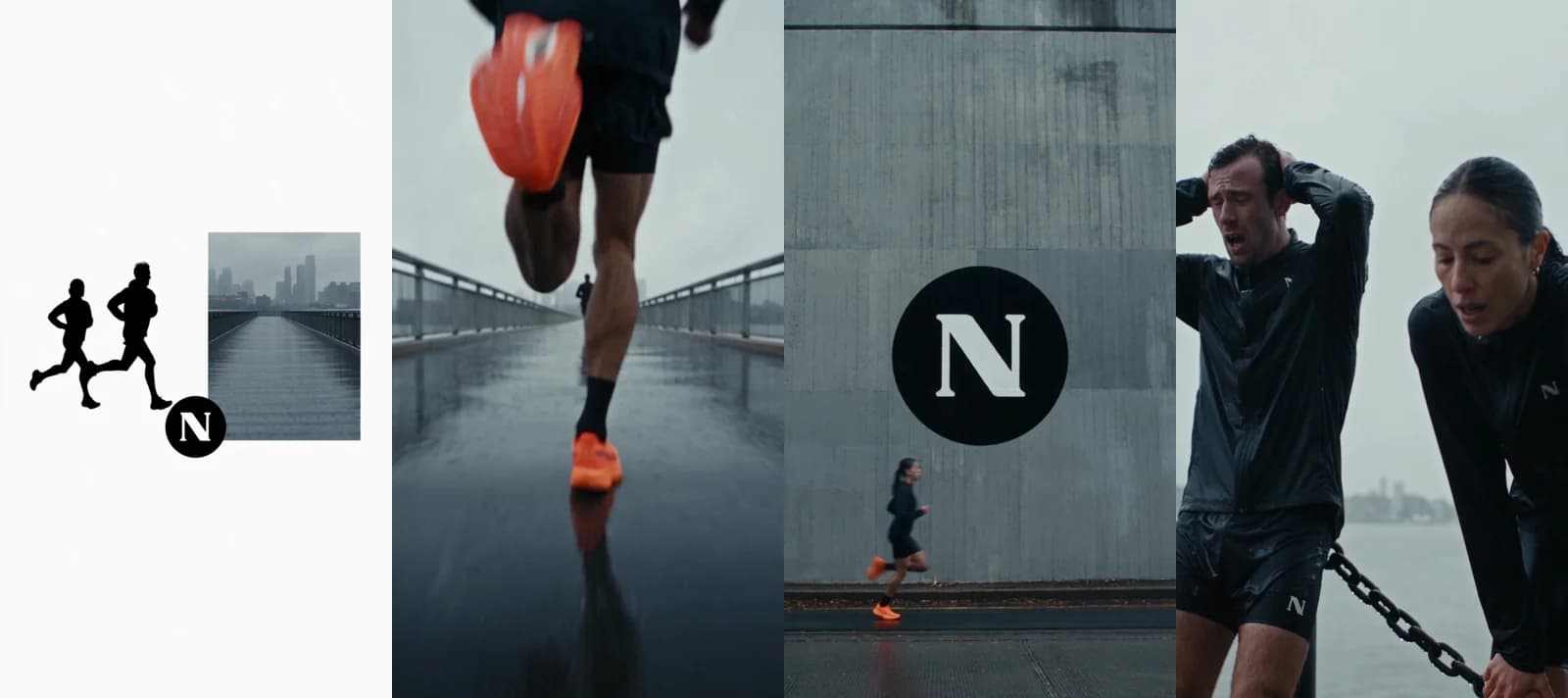 Made in Novoads with Seedance 2.5 · a 20-second vertical film for a mock running brand, every shot timed in one prompt · 720p, no dialogue · costs 140 credits today · rendered 2026-09-08
We gave each of the film's eight shots a time in one prompt, and all seven cuts landed within half a second of those times. The kit, the orange shoes and the round logo stayed the same from shot to shot. The render took 7 minutes 12 seconds to come back. The same 20 seconds costs 140 credits today. Our Seedance 2.5 prompt guide shows how we direct a 30-second take in one prompt, and our Kling and Seedance comparison weighs the two models for ads.
Two Wan 3.0 clips instead
If price matters more to you than the model, Wan 3.0 is the cheaper way to fill 30 seconds in Novoads. It's been open to every Novoads customer since October 30, 2026, though it isn't the default model. A clip runs up to 15 seconds, so a 30-second ad takes two. A 15-second clip costs 27 credits. That's at 720p, Wan 3.0's default resolution. Two clips come to 54 credits.
On Plus, that's about $2.65, which is less than CapCut's first-month price for 30 seconds of Seedance 2.5. On Starter, at 7.5 cents a credit, it's about $4.05. Wan 3.0 is a different model from Seedance 2.5, so judge the clips as well as the price.
Our plans
On October 31, 2026, our pricing page showed these monthly plans.
- Starter at $15 a month for 200 credits, billed monthly only
- Plus at $49 a month for 1,000 credits, or $39 a month billed annually
- Ultra at $129 a month for 3,000 credits, or $99 a month billed annually
You'll find the yearly prices and the bigger Ultra sizes on our pricing page.
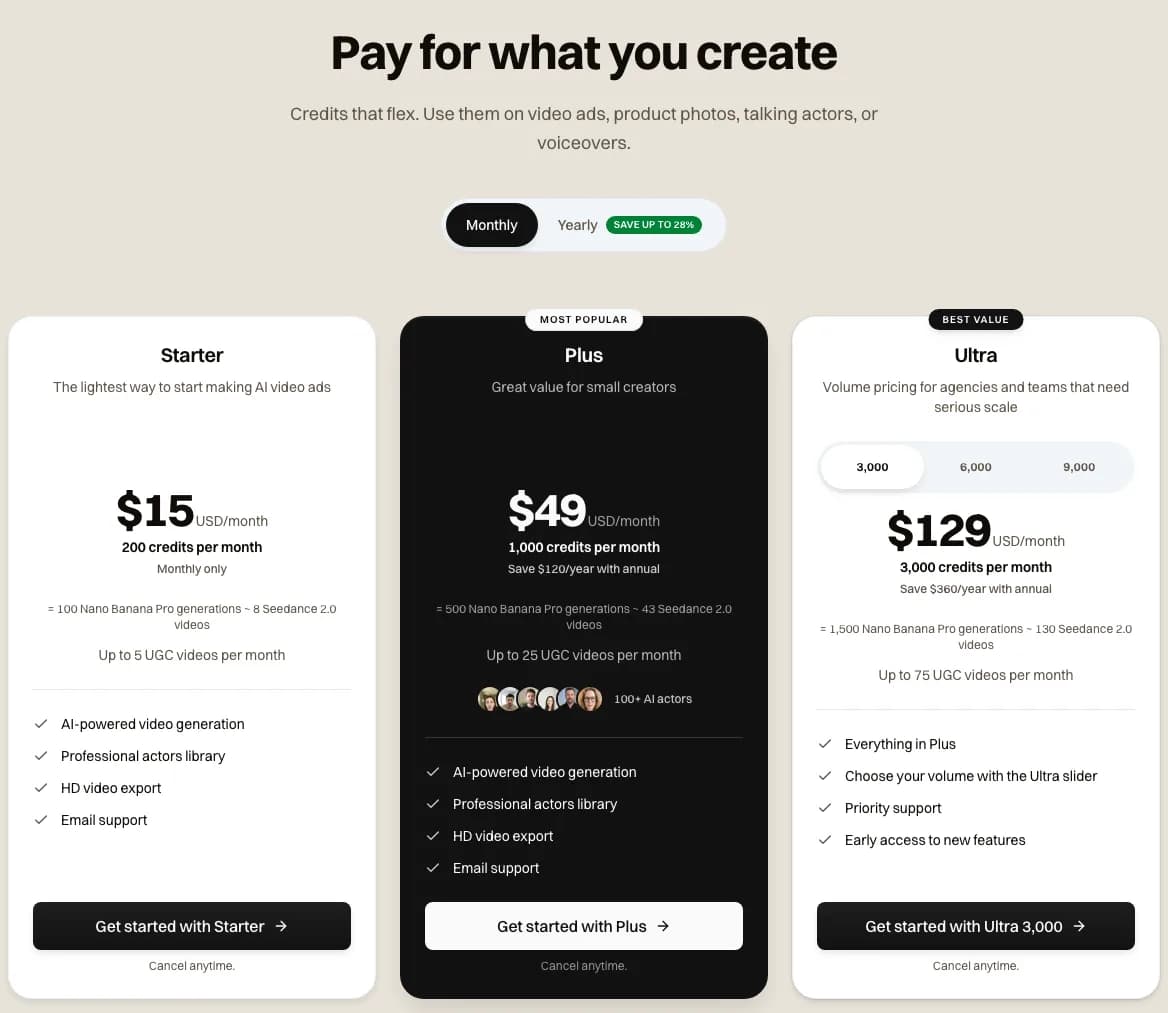 Novoads pricing with monthly billing selected, captured 2026-10-31. The Starter card asks $15 for 200 credits a month and is monthly only. Plus asks $49 for 1,000 credits, and Ultra $129 for 3,000.
Managing or canceling a CapCut Pro subscription
Canceling and renewals
CapCut subscriptions renew automatically, and you cancel wherever you bought the plan.
- Cancel through the Apple ID, Google account or CapCut account you paid with, before the current period ends. CapCut's terms, last updated April 15, 2026, say you keep the paid features until that period runs out.
- Do it at least 24 hours before the renewal date. A help page dated March 25, 2026, says that if you don't, the account is charged for a new cycle.
- Watch for a notice the day before. Another help page from the same day says CapCut may send one, and that you cancel on the subscription page on the web, PC or mobile, wherever you subscribed.
- If you're on CapCut's 7-day Pro trial, the pricing page's FAQ says you can cancel anytime before it ends.
Plan changes and refunds
You can't switch plans in the middle of a cycle. CapCut's help page on plan changes, dated March 26, 2026, suggests canceling, waiting for the billing period to end and then subscribing to the plan you want.
CapCut's pages give two different answers on refunds. The terms offer a full refund if you cancel within 14 calendar days of subscribing, but only if you haven't used the paid features in any form since then. Country-specific terms can change that. The help page on forgotten cancellations calls subscriptions virtual goods that generally can't be refunded, though it points to an appeal for cases like double billing. Read the terms for your country before you count on that window.
CapCut or Canva for making ads?
It depends on what your ads are made of. We didn't test CapCut and Canva side by side, so this is our reading. CapCut is built around a video timeline, so it's where we'd cut and caption footage you've already shot. Canva is built around design templates, which makes it quicker for ads made of images, text and your brand colors. If your ads are mostly short vertical videos, start with CapCut. If they're mostly static, start with Canva.
Our Canva pricing guide covers what Canva costs, and our AI ad generator vs Canva comparison looks at what each one makes across five ad types. For another editor's prices, see our VEED pricing breakdown.
CapCut's ratings, and who it suits for ads
Ratings in the app stores and on Trustpilot
We read these ratings on October 31, 2026.
- 4.6 out of 5 from 1.1M ratings on Apple's US App Store
- 3.5 stars from 13.1M reviews on Google Play in the US, with 1B+ downloads and an Editors' Choice badge
- A TrustScore of 1.2 from 1,373 reviews on Trustpilot, 88% of them one-star, on a profile CapCut hasn't claimed
A 1.2 next to a 4.6 suggests different people leave ratings on the two sites. We'd take the low score as a reason to read the renewal and refund rules above before you subscribe.
Who CapCut suits for ads
In our reading, CapCut is an editor first. If you shoot your own footage or work with creators, it gives you a capable editor on the Free plan and a paid tier for exports without a watermark and for its AI tools. Its AI video is an add-on priced by the second, and the seconds on its cards don't match its own credit numbers. CapCut's site menu also links to Pippit, an AI creative agent, and our Pippit pricing guide covers what it costs.
If you'd rather have the ad generated than edited, that's what Novoads does. You pick an AI actor, add a script or a product image, and download a finished video in vertical, square or wide format. You pay from the first month, and plans start with Starter at $15 for 200 credits. Our CapCut alternative page compares the two side by side.

Frequently Asked Questions
Which is better, Canva or CapCut?
It depends on what your ads are made of. In our reading, CapCut is the better pick for cutting and captioning video you've shot, since it's built around a video timeline, while Canva is quicker for ads made of images, text and brand templates. If you'd rather have the video ad generated than edited, an AI ad generator such as Novoads does a different job from both.
Do you have to pay for the app CapCut?
No. Downloading CapCut costs nothing, and its web pricing page lists a Free plan at EUR 0 with templates and basic editing tools. You need Pro for the export setting that hides the watermark and for monthly AI credits. On October 31, 2026, the pricing page showed Pro at EUR 29.99 a month to a visitor from Spain. Its FAQ also says new users can start a 7-day Pro trial without a credit card.
How do I manage my CapCut Pro subscription?
Manage it where you bought it. CapCut's terms say you cancel through the Apple ID, Google account or CapCut account you paid with, before the current period ends, and you keep Pro until then. CapCut's help center says to cancel at least 24 hours before the renewal date. It also says you can't switch plans mid-cycle, so to change plans you cancel, let the period end and subscribe to the new one.
What is the price of CapCut Pro for PC?
According to a CapCut help page dated April 8, 2026, you need Pro for membership features on a PC. On October 31, 2026, CapCut's web pricing page showed Pro at EUR 29.99 a month to a visitor from Spain. The yearly price was EUR 259.99. A copy of the same page saved on October 28, 2026, showed USD 19.99 a month. CapCut's Standard vs Pro guide, dated September 23, 2026, gives $19.99 too, and CapCut says Pro's price can vary by region, device and promotions.
Key Takeaways
- On October 31, 2026, CapCut's web pricing page showed Pro at EUR 29.99 a month to a visitor from Spain. Ultra was EUR 68 a month, and Teams was EUR 14.99 a month per seat.
- CapCut's AI video page listed up to 100 seconds of Seedance 2.5 a month on Pro, at 720p, with a note that output may vary by model, resolution and region. Ultra's card listed up to 235 seconds.
- Pro's card lists 650 credits a month, and CapCut values a credit at $0.01. By our arithmetic, that covers about 54 seconds at the first-month rate, so don't plan around the 100-second line.
- On CapCut, 30 seconds of Seedance 2.5 costs $3.60 at the first-month rate for eligible accounts. In Novoads the same clip takes 210 credits, about $10.29 on Plus, so CapCut costs less for that model.
- A CapCut plan renews through the store that sold it. Cancel at least 24 hours before the renewal date. You can't switch plans mid-cycle.