Canva Pricing: Every Plan, Pro's AI Limits, and What One Ad Costs
Canva Pro costs $18.00 a month or $144.00 a year in the US. Under Pro's AI limits, a two-clip video ad starts at $1.20, and we compare that with Novoads.

Mauricio Valdivia
·14 min
A Canva Pro video clip costs 60 cents or more
Canva Pro costs $18.00 a month or $144.00 a year for one person in the US, before tax. Those are the prices on the copy of Canva's pricing page that the Internet Archive saved on October 26, 2026. The same copy gives Pro an AI allowance of up to 200 uses of Premium AI tools, or up to 20 uses of Ultra AI tools, each month. Canva's video clip maker is an Ultra tool, and its feature page of October 23 says it makes one 16:9 clip of up to eight seconds per prompt.
That cap puts a floor under the cost of every video ad you make on Pro. Spread the monthly fee over 20 clips and you're paying at least 90 cents a clip. On yearly billing, it's at least 60 cents. A pair of clips makes an ad of 10 to 15 seconds. On monthly Pro, that pair starts at $1.80, and on yearly Pro it starts at $1.20. We worked out those floors from Canva's own figures.
Canva's website wouldn't open for us on October 31, 2026, so every Canva figure here comes from dated copies of its pages in the Internet Archive, or from the app stores and Trustpilot. We didn't test Canva for this post. The Novoads side comes from our own price list and a render we made in Novoads.
What Canva Free and a Pro trial give you
What Free included on October 26
Canva Free costs nothing, and Canva says it's available to anyone. Its card on the October 26 copy of the pricing page listed 1.6M+ templates and 5GB of cloud storage. It also listed one Brand Kit with only three colors, plus Canva Grow's ad insights and AI ad creation, the same ad line that's on Pro's card.
For AI, the FAQ on that same copy gave Free up to 20 uses of Standard or Premium AI tools a month, and no access to Ultra tools. We haven't read a later copy, so check Free's AI line on the live page before you plan around it. Free's allowance resets at midnight UTC on the first of each month, according to Canva's help page of October 3.
With no Ultra access, Free users couldn't make video clips, at least on that copy. Canva's video page of October 23 lists Pro, Business, Enterprise and Nonprofit users as the ones who can, each with a limited number a month.
A Pro trial gets Free's AI allowance
Canva offers a 30-day trial of Pro, according to one of its guides from October 19. Canva's help page of October 3 gives a Pro trial up to 20 uses of Standard or Premium AI tools and no access to Ultra tools, the same line it gives Free. So you can't make a single video clip on a trial, and you get Pro's full allowance only once you pay.
Business has a trial too. That help page gives it the same AI line, and Canva's FAQ says you won't be billed while it runs. Nonprofits are a separate case. The FAQ says they can get a free subscription with all of Pro's premium features, plus team and collaboration tools, for one team of up to 50 users.
Canva's plans and prices in the US
These prices and allowances come from the October 26, 2026 copy of Canva's US pricing page, in US dollars and before tax.
| Plan | US price, before tax | AI allowance a month | Brand Kits | Cloud storage |
|---|---|---|---|---|
| Free | No cost | Up to 20 Standard or Premium uses, no Ultra | 1, three colors only | 5GB |
| Pro | $18.00 a month or $144.00 a year, one person | Up to 200 Premium uses, or up to 20 Ultra uses | 5 | 100GB |
| Business | $25.00 a month or $250.00 a year, per person | Up to 400 Premium uses, or up to 40 Ultra uses | 100, with approvals | 500GB |
| Enterprise | Contact Sales | Up to 400 Premium uses, or up to 40 Ultra uses | 1,000, with tiered approvals | 1TB |
Pro and Business, as we read them
Which price goes with Pro and which with Business is our reading of the archived page, and Apple's US App Store backs it up. On October 31, 2026, the store sold Canva Pro Monthly at $18.00 and Canva Business Monthly at $25.00. Its yearly Pro product cost $143.99, a cent under the web price.
Pro is a one-person plan, since Canva says only one person can use a Pro account. Business is priced per person. A US copy of the pricing page from August 5 showed Pro at $180.00 a year, so check the yearly price on the day you buy. If you're comparing tools, our InVideo pricing breakdown works out what a 30-second InVideo ad costs.
Other countries, tax and the 50% off buttons
Canva's help center says Business pricing depends on your location and the number of people on your plan. We only read the US prices, so yours may differ. Canva's prices exclude applicable tax, so your bill can come in above the list price.
The archived pricing page also showed "Get 50% off*" buttons on Pro and Business. That's a promotion whose terms weren't on the page, so check what it covers before you count on it.
Business seats and the old Teams plan
Canva's FAQ says Business works on a pay-as-you-grow model, where you pay only for the team members who accept your invitation. But its help page on Business billing, saved October 8, also describes billing by seats, and the seat rules read differently.
On a seat plan, Canva says seats are billed in the next cycle even if an invite hasn't been accepted yet. If you invite someone and there's no empty seat, a new paid seat may be added. An empty seat can also stay billable until you remove it. Yearly seat plans are paid by the year but billed every three months.
Canva Teams, the older team plan, is closed to new sign-ups and upgrades. Existing teams stay on it unless they switch or cancel.
AI Pass and AI top-ups
AI Pass is Canva's add-on for more AI. Its help page of September 21 prices it at USD $100 per person per month, globally. In Canva's words, it gives Pro 40x more AI and Business 20x more. The same help page says it isn't available on Free, Education or Enterprise, during a trial, on a prepaid plan, or on a subscription managed through the App Store or Google Play. Canva's AI Pass page of October 6 says you don't need it to use AI features.
Business users who subscribe online can also buy AI top-ups. A top-up is a one-time purchase that adds the same amount of AI as their monthly allowance, and it's valid for 30 days.
How Canva's AI allowance works
Three tiers and one monthly pool
Canva's pricing page of October 26 sorts its AI tools into Standard, Premium and Ultra. Some AI tools, such as Translate and Magic Write, can be used abundantly and don't count toward your allowance. On Pro and Business, Standard tools don't draw from it either, though Canva notes that fair use limits may apply. Premium and Ultra tools share one allowance, which varies by plan and resets each month.
Canva's FAQ says the allowance ranges assume you use one type of tool (Standard, Premium or Ultra) rather than a mix. Harder tasks, or a mix of tools, can bring your total uses down to the lower end of the range. Canva calls the figures estimates that assume simple tasks and lower-consumption tools, and it says actual usage may be lower. So treat Pro's 200 and 20 as ceilings, each one for a single tier.
Which tier each tool uses
- Creating ads with Canva Grow's AI counts as Premium, and Canva says limits apply.
- Image to Video is Premium too. It animates a picture from your prompt or from a motion the AI suggests.
- Making video clips with Canva AI counts as Ultra. The pricing table says the tool is powered by Canva AI, while Canva's video page of October 23 credits Google's Veo-3.
- Conversational design with Canva AI is Ultra as well.
- Creating an image with Canva AI is Standard on the pricing table. But Canva's help page of October 3 puts image creation in more than one tier, because you pick the quality.
- Anything you generate in third-party apps from Canva's Marketplace doesn't count toward the allowance, and those apps' own subscriptions or limits may apply.
Resets, pauses and team allowances
A paid plan's allowance resets on your billing date, and a yearly plan still resets every month, according to the October 3 help page. On Business and the other team plans, each member gets their own allowance, and nothing is pooled across the team.
Once you hit the limit, you can keep using AI tools with short pauses between tasks. That doesn't apply to Ultra tools, so you can't make another clip until your allowance resets.
When Canva added Veo 3 in June 2025, its newsroom post set an initial limit of 5 video generations a month. That limit is from 2025, so plan around the FAQ's figures above.
What one ad costs in Canva and in Novoads
A static ad in Canva
As we read it, a static ad built from a Canva template doesn't draw on the AI allowance, so on a paid plan it adds nothing to the fee. Templates come with the plan, and on paid plans the allowance counts only Premium and Ultra tools.
Ads made with Canva Grow's AI do draw on Premium uses. If one ad takes one use, monthly Pro's fee spread over 200 Premium uses comes to 9 cents an ad. Yearly Pro works out to $12.00 a month, or 6 cents an ad. Our static ads guide shows examples of the format and how to make them with AI.
A 10- to 15-second video ad in Canva
Canva's video page of October 23 says Create a Video Clip, powered by Google's Veo-3, turns a text prompt into a 16:9 video of up to eight seconds with synchronized audio. Canva says each prompt generates one video. Pro's allowance is up to 200 Premium uses or up to 20 Ultra uses a month, and clips draw from the Ultra side.
Those figures set our floors for a video ad on Pro.
- Monthly Pro's fee spread over its 20 Ultra uses comes to at least 90 cents a clip.
- Yearly Pro, at $12.00 a month, comes to at least 60 cents a clip.
- An ad of 10 to 15 seconds needs a pair of clips. The pair costs at least $1.80 on monthly Pro and $1.20 on yearly.
- If each clip takes one use, Pro covers ten pairs a month at most.
- A Business seat raises the Ultra side to up to 40 uses for $25.00 a month. That puts the floors at 62.5 cents a clip and $1.25 a pair.
We didn't test joining two clips in Canva's editor, so the pair price covers the clips and nothing else. Canva lists Image to Video as a Premium tool, which could make a moving ad cheaper than an Ultra clip. We couldn't find how long its clips run on the pages we read, so we left it out of this math.
The same ads in Novoads
In Novoads, we price every image and clip in credits, and you pay from the first month.
- Starter is $15 a month for 200 credits, billed monthly. That's 7.5 cents a credit.
- Plus is $49 a month for 1,000 credits. That's 4.9 cents a credit on monthly billing. Billed yearly, Plus comes to $39 a month.
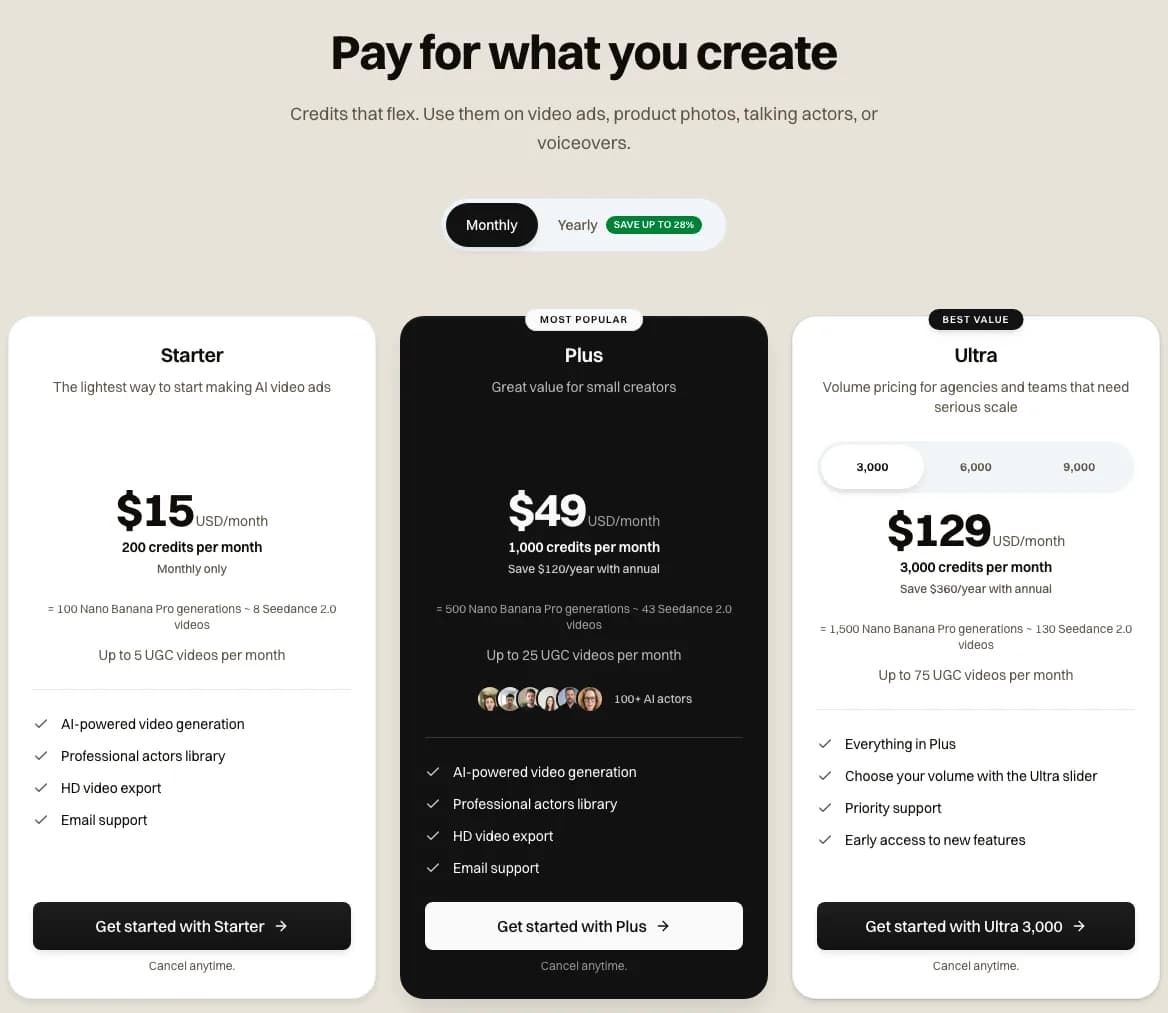 Our pricing page with monthly prices, 2026-10-31. Starter, $15 a month for 200 credits. Plus, $49 for 1,000 credits. Ultra from $129 for 3,000 credits.
For a static ad, we priced two image models.
- A Nano Banana Pro image at 2K costs 2 credits. That's 15 cents on Starter and about 10 cents on Plus.
- A GPT Image 2.5 image costs 1 credit at medium quality and 2 at high. At medium, that's about 8 cents on Starter and about 5 cents on Plus.
 Made in Novoads with Nano Banana Pro · four 4:5 static ads at 2K for one product, our merch cap, with Spanish headlines · 8 credits at today's price, 2 per image · rendered 2026-09-01
For video, we priced two models at 720p. Wan 3.0 makes takes of 4 to 15 seconds, with sound on by default.
- An 8-second Wan 3.0 take, the length of Canva's longest clip, costs 14 credits. That's $1.05 on Starter and about 69 cents on Plus.
- A 10-second Wan 3.0 take costs 18 credits. That's $1.35 on Starter and about 88 cents on Plus.
- A 15-second Wan 3.0 take costs 27 credits. That's about $2.03 on Starter and about $1.32 on Plus.
- A 10-second Seedance 2.5 take costs 70 credits. That's $5.25 on Starter and about $3.43 on Plus.
- A 15-second Seedance 2.5 take costs 105 credits. That's about $7.88 on Starter and about $5.15 on Plus.
Where Canva costs less, and where we do
On these numbers, Canva costs less in four places.
- A static ad from a template, or one made with Standard tools, adds nothing to a paid plan.
- If a Grow ad takes one Premium use, its 9 cents beats a Nano Banana Pro image on Starter, at 15 cents. It's about even with the same image on Plus.
- At its floor of $1.80, a pair of Canva clips costs less than either Seedance 2.5 take above. It also costs less than a 15-second Wan 3.0 take on Starter.
- At its yearly floor, one Canva clip comes to 60 cents. An 8-second Wan 3.0 take on Plus is about 69 cents.
Novoads costs less in four other places.
- A GPT Image 2.5 image on Plus, at about 5 cents, costs less than a Premium use on Canva's monthly or yearly billing.
- One 10-second Wan 3.0 take on Plus, at about 88 cents, costs less than a pair of Canva clips on monthly or yearly billing.
- On Starter, that same take costs $1.35, which is under the monthly pair but over the yearly pair at its floor.
- An 8-second Wan 3.0 take on Plus, at about 69 cents, costs less than one clip on monthly Pro.
What the prices leave out
You're buying different things on the two sides. A Canva clip is a 16:9 shot of up to eight seconds. A Wan 3.0 take runs up to 15 seconds in one generation. The Seedance 2.5 takes priced here run 10 or 15 seconds. We haven't compared resolutions, and nothing in this post says either side looks better.
Once Pro's Ultra uses run out, you'll need the reset, a Business seat or AI Pass before you can make another clip, because Ultra tools get no short pauses. Plus's monthly credits cover 55 ten-second Wan 3.0 takes. Pro's allowance covers ten pairs of clips at most. And a Pro trial can't make clips at all.
Using Canva designs in paid ads
What Canva's content license allows
Canva's content license, in the copy saved on October 23, 2026, lets you use Canva designs that contain Canva's content, free or Pro, in "advertising and promotional projects", commercials included, "without any reproduction quantity limit". That section leaves out Pro Music, Popular Music, Branded Content and Education Content.
Each Pro Content license covers one Canva design. Free users pay for each license, and a subscriber gets a new one automatically each time they export a new design with that content.
The limits an advertiser runs into
- You can use Pro Music in online ads, such as pre-roll, mid-roll and post-roll ads in a YouTube video. You can't use it in TV, cinema, radio, podcast or billboard ads.
- Un-edited Pro Content in online publications, videos included, is capped at 480,000 total pixels per file. The cap doesn't apply on a site published through Canva's own website publishing, or in a Canva-hosted design embedded on another site.
- Among its prohibited uses, the license lists placing a person shown in Canva's content in a bad light. Its examples include images in ads for "pharmaceutical or healthcare, herbal or medical products", and it names dietary supplements and personal hygiene products among them.
- Branded Content is for personal use only, unless its source information says otherwise.
If you sell supplements, read that list before you put a stock photo of a person in an ad.
AI output, in Canva and in Novoads
Canva's video page says you can use designs generated with Canva AI for any purpose, commercial projects included, as long as you follow its AI Product Terms and Terms of Use. It adds that you may not have exclusive rights to your AI-generated designs.
On the Novoads side, our pricing FAQ says every video generated with Novoads is fully licensed for commercial use.
How Canva's users rate it
The app stores
Apple's US App Store rated Canva 4.9 from 3.6M ratings on October 31, 2026. Google Play showed 4.8 stars from 27.6M reviews the same day. Its listing counts 500M+ downloads.
Trustpilot, G2 and Capterra
Trustpilot gave Canva a TrustScore of 4.0 from 8,079 reviews when we read it that day. Of those, 51% gave the top score and 29% the lowest. Trustpilot's page also says Canva hasn't replied to negative reviews. We couldn't see G2 or Capterra on October 31, so we have no score from either. The store ratings and Trustpilot's split are far apart, and we didn't read the reviews behind either one.
Who Canva suits for ads, and where Novoads fits
Who Canva suits
We think Canva is a design tool first. It suits you if your ads are mostly statics built from templates and Brand Kits, and a few short clips a month are all the video you need. Ad insights from Canva Grow come with all four plans, and ad tagging comes with Business and Enterprise.
It suits you less if an ad needs a single take longer than eight seconds, or more video than ten pairs of clips a month. For a person on camera, Canva's video page offers talking heads made from a photo, a selfie or an available AI avatar, through a button that reads "Generate AI Avatars with D-ID". We didn't price that option. Our comparison of an AI ad generator and Canva shows what each one makes across five ad types.
Where Novoads fits beside Canva
If you keep Canva as your design tool, you can make your video ads in Novoads. An AI actor can read your script on camera, or a model such as Seedance 2.5 or Wan 3.0 can turn a prompt into a take. Our Canva alternative page compares the two, and our pricing page lists every plan.

Canva or CapCut for video ads
If you're weighing Canva against CapCut for video, our CapCut pricing guide covers CapCut's plans and its Seedance 2.5 limits, and it has its own section on choosing between the two for ads.
Frequently Asked Questions
Why is Canva charging me $30 a month?
We can't see your bill, so we can't tell which plan it's for. On the October 26, 2026 copy of Canva's US pricing page, Pro cost $18.00 a month and Business cost $25.00 a month per person, before tax. Tax can push a bill above those figures, and so can extra Business members. Canva also says Business pricing depends on your location. On seat billing, Canva's help center says an invite can add a paid seat before anyone accepts it, and an empty seat stays billable until you remove it. If you're on Canva Teams, an older team plan that's closed to new sign-ups, you stay on it unless you switch or cancel.
Can I purchase Canva Pro for lifetime?
Not on any Canva page we read. The October 26, 2026 copy of the US pricing page sold Pro by the month or by the year. Canva's help center also lists prepaid plans of one day, one week, one month or one year. None of those pages offered a lifetime purchase.
How much is 1 year of Canva Pro?
It's $144.00 a year in the US, before tax, on the October 26, 2026 copy of Canva's pricing page. That works out to $12.00 a month for one person. Apple's US App Store sold Pro yearly at $143.99 on October 31. A US copy of the pricing page from August 5 showed $180.00 a year. The October 26 copy also carried 'Get 50% off*' buttons for a promotion whose terms weren't on the page.
Is it worth paying for Canva?
For design work, we think Pro earns its $18.00 a month if you make statics often. It comes with 3.6M+ templates and five Brand Kits, plus Standard AI tools that don't use your allowance. The case is thinner for video ads. Pro gives up to 200 Premium uses or up to 20 Ultra uses a month. Clips draw on the Ultra side, so ten pairs of clips a month is the most you'll get. If your ads need an AI actor on camera, or a single take longer than eight seconds, that's the video work Novoads is built for.
Key Takeaways
- Canva Pro costs $18.00 a month or $144.00 a year for one person in the US, before tax. Business costs $25.00 a month or $250.00 a year per person. Those prices come from the October 26, 2026 copy of Canva's pricing page.
- On the same page, Pro's AI allowance is up to 200 uses of Premium AI tools, or up to 20 uses of Ultra AI tools, each month. Canva calls those figures estimates, and harder tasks use more.
- Create a Video Clip is an Ultra tool, and Canva's video page of October 23 says it makes one 16:9 clip of up to eight seconds per prompt. By our math, each clip costs at least 90 cents on monthly Pro, or at least 60 cents on yearly billing.
- A 10- to 15-second Canva ad needs a pair of clips. Its floor is $1.80 on monthly Pro and $1.20 on yearly. A Pro trial can't make clips at all, because it gets Free's allowance, which has no Ultra access.
- In Novoads, one 10-second Wan 3.0 take costs about 88 cents on Plus, which is less than a pair of Canva clips on monthly or yearly billing. Canva costs less for template statics. And if a Grow ad takes one Premium use, its 9 cents beats a Nano Banana Pro image on Starter.
Sources
- •Canva pricing page, Internet Archive copy of October 26, 2026
- •Canva Help Center: AI access, Internet Archive copy of October 3, 2026
- •Canva AI video generator page, Internet Archive copy of October 23, 2026
- •Canva Content License Agreement, Internet Archive copy of October 23, 2026
- •Canva on Apple's US App Store