OpusClip Review for Ads: What 1 Credit per Minute Buys
OpusClip cuts short clips from long videos you already have, at 1 credit per minute processed, and bills hooks, dubbing and posting on top. We read its plans, ratings and limits for ad makers on November 3, 2026.

Mauricio Valdivia
·12 min
The first OpusClip review on Google comes from a rival
Type "opus clip review" into Google and the top result is a post on Creatify's blog. Creatify sells its own AI tool for making video ads. Its review, dated December 8, 2024, says OpusClip's Pro plan "expands this to 3,600 per month". But OpusClip's own help center gives Pro 300 processing minutes a month, or 3,600 a year.
Two of the top five results are written reviews we could open (Creatify's and one on eesel's blog), and both come from companies that sell software of their own. Neither gives a rating with the number of reviews behind it. The other three are a Reddit thread and a G2 page we couldn't read, plus a YouTube video.
We didn't test OpusClip for this post. Every OpusClip figure here comes from its own pages, help center and plan cards, which we read on November 3, 2026, or from public ratings we read the same day, each with its count. The Novoads section shows a render of ours from October 20.
What OpusClip does with a long video
As of November 3, 2026, OpusClip's help center calls it "the #1 video clipping tool". You give it a long video, it cuts short clips out of it, and it can publish them to your social accounts. The help center also says how many clips to expect, depending on how long the source is.
- A video of 10 to 30 minutes gives 5 to 21 clips.
- A video of 30 to 60 minutes gives 23 to 32 clips.
Clips you can test as ads
OpusClip's page for advertisers sells the clips as ad material, made "to generate ad variations quickly for advertising testing". A webinar, a podcast episode or a founder's talk becomes a batch of vertical clips, and each one is a candidate ad. It's close to repurposing a winning ad, except that you start from a long recording instead of an ad that already ran.
Captions come on every plan from Starter up, animated and in more than 20 languages, according to the pricing page. The advertisers page puts their accuracy at "over 97%", which is OpusClip's own figure and one we didn't check. If what you film is mostly you talking to a phone camera, our Captions review looks at an app built around that kind of footage.
Auto Edit, Recipes and hooks in OpusClip 4.0
OpusClip announced 4.0 in a post dated November 2, 2026, one day before we read it, so these pages may still change. Its headline feature is Auto Edit, which the post sums up as "Built for talking videos." You drop in raw footage or a link, switch on speech cleanup, captions and B-roll, and a finished video comes back. Recipes save that setup so your next video "gets edited the same way", which suits a team that turns the same weekly show into ads.
The post also covers Viral Hook, which gives "your first few seconds a hook style from our template library", and Motion Graphics, which turns what you say into animated icons, numbers and charts. Clipping is still there, though the post calls it "just one part of OpusClip now".
Which aspect ratios you get
OpusClip's pages don't all list the same aspect ratios.
| OpusClip page | Aspect ratios it lists |
|---|---|
| Help article on aspect ratios | 9:16, 1:1, 16:9 and 4:5 |
| Pricing page, among what Pro adds to Starter | 9:16, 1:1 and 16:9 |
| Plans article, Pro plan | 16:9, 1:1 and 9:16 |
Because the pricing page lists those ratios among Pro's additions, we'd check before buying Starter for square or wide ads.
Vertical clips cut from wide footage are crops, and OpusClip's FAQ gives the numbers.
- A 1920 x 1080 source cut to 9:16 comes out at 608 x 1080.
- Anything under 1080 pixels on a side is then upsampled to 1080 x 1920.
By our math, a vertical clip keeps about a third of the wide frame's width. A product on the table or a slide behind the speaker can fall outside that slice.
Agent Opus is a separate product
OpusClip's help center says Agent Opus "creates videos from ideas, scripts, images and supported audio or video inputs", and it lists product ads among those videos. Agent Opus shares OpusClip's credits, but it charges for each second of finished video, so the clipper's per-minute rate doesn't apply.
What OpusClip's credits buy
Prices and credit rules as of November 3, 2026, from OpusClip's help center and pricing page.
One credit for each minute you process
OpusClip's help center says "Currently, processing clips will cost 1 credit per minute of the original video imported." Its own example is a 30-minute video that uses 30 credits. The same page sets three rules for what gets counted.
- Credits count whole minutes. A video under a minute costs 1 credit. Partial minutes are rounded down, so a 4.5-minute video counts as 4.
- Only the part you process counts. A "Processing timeframe" slider lets you pick the stretch you want when you submit the video.
- The rate covers processing and nothing else. Hooks, motion graphics, dubbing, upscaling, AI B-roll and posting to X cost extra, each priced on its own help page.
The rate isn't new. Creatify's review listed "1 minute = 1 credit" for OpusClip in December 2024, and OpusClip's 4.0 post doesn't mention credits.
The API has a higher floor. OpusClip's API docs set a 10-credit minimum per project, "about 10 minutes of clip time", and say it doesn't apply to jobs sent through the web app.
Extras billed on top
Each extra has its own rate on OpusClip's help pages.
| Extra | Credits |
|---|---|
| Viral hook on a clipping run of up to 10 clips | 20 per run |
| Viral hook added in the editor | 2 per hook |
| Motion graphics added by Auto Edit | 6 per minute of uploaded video |
| Dubbing into 25 languages in your cloned voice (Pro and Business) | 10 per minute |
| AI upscaling | 11 per 10-second block |
| AI B-roll chosen when you create a project | priced per minute, shown before you add it |
| Posting to X | 3 per clip, per X account |
Viral hook is off by default when you clip, and the hook page lists it for Trial, Pro, Max and Business, with no mention of Starter. On a 20-minute webinar, adding the hook doubles the credits the run uses. Stock B-roll costs nothing, and so do motion graphics you add by hand in the editor.
OpusClip's plans
| Plan | Price | Credits | Also on the card |
|---|---|---|---|
| Free | $0 | 60 a month | watermark, clips exportable for 3 days, up to 1080p |
| Starter | $15 a month, monthly billing only | 150 a month | no watermark, animated captions |
| Pro | $29 a month, or $174 a year | 300 a month per pack | more aspect ratios, dubbing, unused credits roll over for 2 months, 2 seats per pack (up to 4) |
| Business | custom pricing | custom |
There's also a Max plan with 1,500 credits a month per pack. It's sold only through Agent Opus, and its credits work in OpusClip too. The prices above are the ones OpusClip shows in the US and much of Europe. It charges less in some countries, including Brazil, Mexico and India.
Divide each price by its credits and you get the cost of a processed minute, by our math.
- Starter, 10 cents a minute ($15 for 150 credits)
- Pro billed monthly, about 9.7 cents ($29 for 300)
- Pro billed yearly, about 4.8 cents ($174 for 3,600 a year)
OpusClip's help center says yearly plans price credits at half the monthly rate, and the card matches. Process a whole 20-minute recording and you use 20 credits. That's $2 on Starter and about 97 cents on yearly Pro, before any extras.
How long the credits last
OpusClip's pages don't describe expiry the same way.
- The credits page says monthly-plan credits expire after 60 days, which rolls them over for one more month.
- The same page says a yearly plan's credits all arrive at purchase and expire after 12 months.
- Agent Opus's credits FAQ says yearly credits "arrive monthly at the same rate as the monthly plan" and roll over for 2 months.
- The Pro card on the pricing page says unused credits roll over for 2 months.
- If you cancel, the credits page says leftover credits keep their original expiry date, while an older help page, dated August 21, 2025, says they expire at the end of the billing cycle.
If you plan to bank credits, ask OpusClip's support which rule covers your plan before you count on them.
OpusClip's trial and a launch promotion
The pricing page's buttons say "Start your free trial" and "No credit card required" but don't say how long it lasts. The help center describes a 7-day Pro trial that turns into a Free account when it ends. Trial exports carry the OpusClip watermark, and trial accounts can't use Seedance 2.0 or export in 4K. OpusClip's page for advertisers gives the same 7-day trial 90 minutes of processing. That's about 30 clips, the page says.
The 4.0 post offers 40% off the first month of Pro on monthly billing. It's a launch promotion, so it could end any day.
What OpusClip users say
Ratings as of November 3, 2026.
| Where | Rating | Count | Note |
|---|---|---|---|
| Trustpilot, opus.pro profile | 4.0 out of 5 | 513 reviews | 63% five-star, 20% one-star |
| App Store, US | 4.9 out of 5 | 8.8K ratings | |
| Google Play | 2.7 out of 5 | 435 reviews | the listing doesn't say which country it counts |
| G2 | not read | not read | the page didn't open for us |
The two app stores are more than two stars apart. Trustpilot also shows that OpusClip replied to 100% of its negative reviews. OpusClip's homepage says "Used by 20M+ creators and businesses", while its Google Play listing says 16M+.
What the complaints are about
The complaints on the first two pages of Trustpilot reviews keep coming back to support, uploads and credits. Google Play has the upload complaint too.
- A two-star review from October 28 says "I've been waiting 5 days for a response concerning distorted audio on their end."
- A one-star review from October 3 says "Cannot reach support. Paying customer for years."
- A one-star review from September 10 says "Uploaded fails constantly. The one time it didn't the clips were only like 14 seconds."
- On Google Play, a one-star review from August 5 says the app "takes 10 or 15 minutes to upload a 5 minute video, then half the time it fails."
- A three-star review from October 6 says "The one massive issue I have is with the free version after three days." That's the Free plan's export window.
- A two-star review from August 29 says "The fact that they take away all your unused credit after the 12 month window is dishonorable".
Many of the five-star reviews on the same pages praise the support team, one from October 19 for "almost Instant replies". Another, from October 1, says "It saves us a lot of time editing our clips and is simpler to use than premiere pro." We couldn't read Reddit's threads or G2's page, so neither is part of this review.
Where OpusClip stops for an ad maker
It only cuts what you filmed
Everything in OpusClip's clipper starts from a recording. Its help center calls OpusClip "the main product for turning long videos into short clips", and the hook page says a viral hook "doesn't add new footage, change your voice, or extend your timeline". The hook plays over the opening you already shot.
That matters for ads. B-roll can cover a cutaway (stock on Starter, AI-made video on Pro and up), but the speaker and the room stay whatever you filmed. Every clip from one recording shows the same face in the same place, and when an audience tires of that look, new footage is the fix we'd reach for (more in our piece on creative fatigue). A new opening is also the fastest way to test whether the first seconds are what's losing people, which your hook rate will show.
Free clips and commercial use
OpusClip's terms, effective November 17, 2025, allow "internal, personal, non-commercial use", and they license commercial use to users of paid services. Free clips also carry a watermark and can't be exported after 3 days. If the clips are going into ads, we'd budget for a paid plan from day one.
New footage inside OpusClip
For video made from scratch, OpusClip offers Agent Opus, which bills each second of the finished video at the rate of the mode you pick. Prices as of November 3, 2026, from its FAQ.
| Agent Opus mode | Credits a second | A 30-second video | Best for, by its FAQ |
|---|---|---|---|
| Standard | 1 | 30 credits | narrated explainers and stories |
| Standard+ | 3 | 90 credits | videos with people or text on screen |
| Premium | 7 | 210 credits | multi-shot scenes, dialogue and ads |
| Ultra | 12 | 360 credits | photorealistic visuals |
The FAQ lists Premium and Ultra for Pro and Max plans only. Agent Opus sells its own Pro plan at $348 a year for 3,600 credits, according to its pricing page. By our math that's about 9.7 cents a credit. At that rate, a 30-second Premium video comes to about $20. The same video in Standard comes to about $3. The pages we read don't say whether OpusClip's $174 Pro unlocks Premium, though the credits FAQ says the two products share one balance.
You pay for every generated edit too, even one that misses, and each video gets one free retry, according to the same FAQ. Seedance 2.0 is in there as well. The Agent Opus Pro card lists "Full access to all video models including Seedance 2.0", and the FAQ says a model you pick by hand bills at the rate the app shows for it. None of the OpusClip pages we read give that rate for Seedance 2.0, and trial accounts can't use it at all. Opus Labs, a separate product on the same OpusClip login, offers Seedance 2.5 as the Premium option in its AI Expand tool.
How Novoads makes a new opening from a prompt
With Novoads, you write the prompt and the line, and a video model makes the clip with no recording behind it. We made the run below in Novoads, and no OpusClip tool touched it.
Three openings for one candle
On October 20, 2026, we made three openings for one unbranded candle. Each is a vertical 6-second Seedance 2.0 Mini clip at 720p. All three start from the same Nano Banana Pro still of one AI-generated creator, so her face and her living room stay put while the first line changes. In hook A, a callout, she holds the jar up to the camera and says "If you work from home, your workday never really ends."
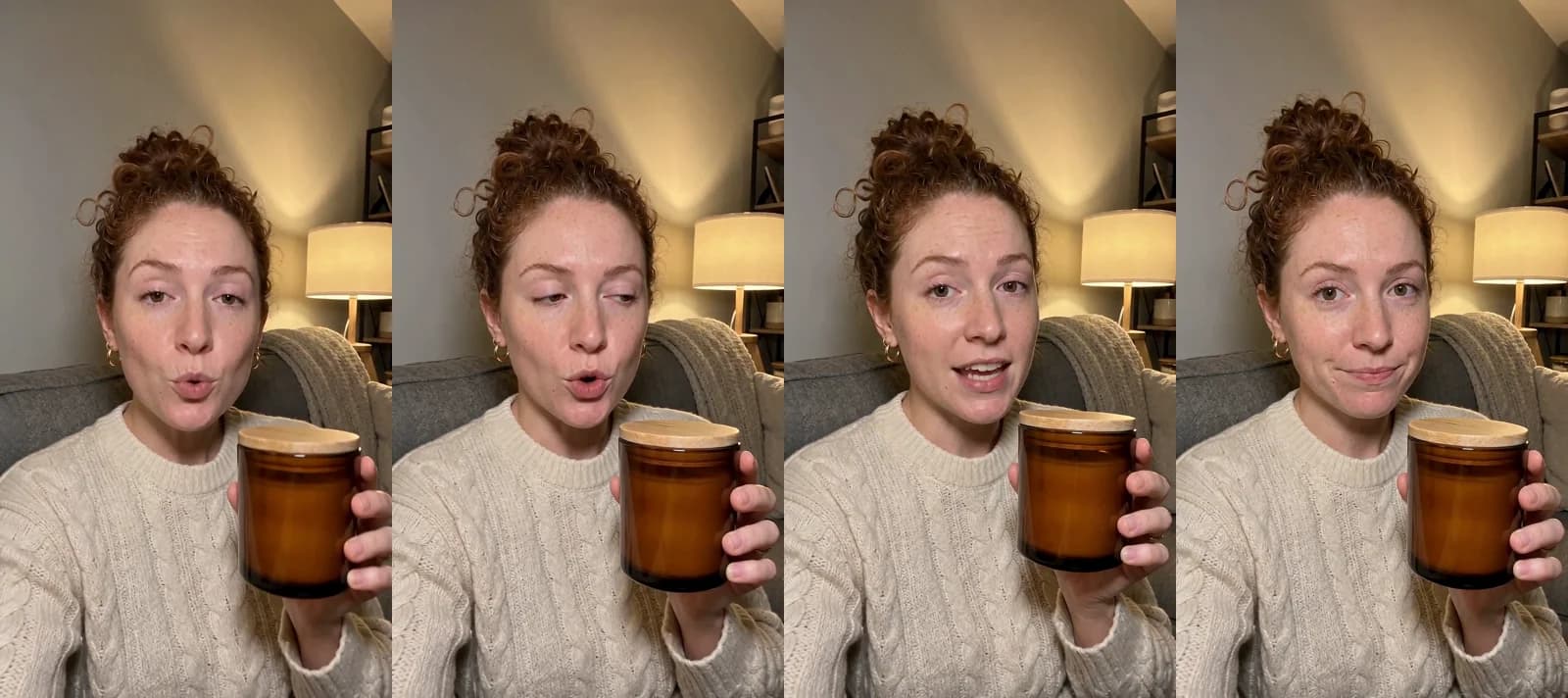 Made in Novoads with Seedance 2.0 Mini · hook A of three 6-second vertical openings for one unbranded candle, a callout to people who work from home · 6 credits · rendered 2026-10-20
Every line came out word for word, though hook C, the proof opening, had one visual miss on its shelf. You test hook variations by making several openings for one product and keeping the rest of the ad the same, and here each one was a 6-credit clip.
What the openings cost
Hook A cost 6 credits, the same as that clip costs today. By our math that's 45 cents on Novoads Starter or about 29 cents on Plus. The whole set came to 18 credits, or $1.35 on Starter.
Clipping is cheaper when the footage exists. On OpusClip's yearly Pro, processing a 20-minute recording costs about 97 cents by our math. Its help center says a source that long gives 5 to 21 clips. If the ad you want is already in a recording, OpusClip is the cheaper way to get many cuts of it.
Novoads plans
You pay for Novoads from the first month. Starter is $15 a month for 200 credits, billed monthly only. Plus is $49 a month for 1,000 credits. Billed yearly, it's $39 a month. Ultra starts at $129 a month for 3,000 credits. Every plan, with what its credits buy, is on our pricing page.
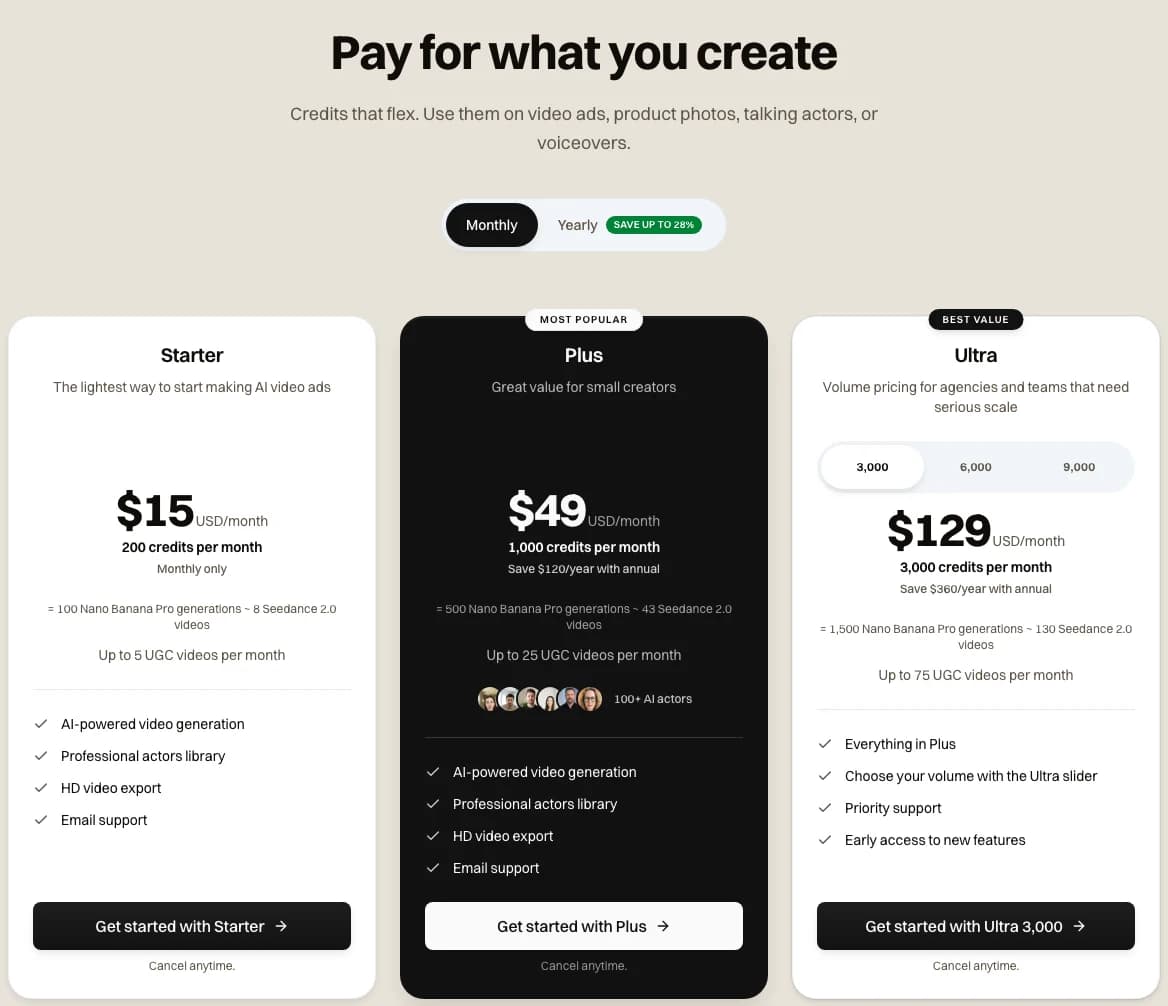 Screenshot: novoads.ai/pricing with Monthly selected, taken 2026-11-03
Make the opening your recording is missing
Write the first line, pick a video model and download a vertical clip to put ahead of the footage you already have.
See the plansPick the tool by whether the footage exists
OpusClip's clipper starts from footage you already have. It charges 1 credit for each minute it processes, and each extra has its price on its own help page. For an ad maker with webinars, podcasts or founder videos on file, that's a cheap way to get a batch of variations to test. If you'd rather cut the clips yourself, a manual editor is another route: our CapCut pricing breakdown covers one, and our Descript review covers a second.
But the clipper can't film what isn't in the recording. For that, OpusClip sells Agent Opus by the finished second, and Novoads makes new openings from a prompt, like the candle run above. Before you pay for any of these, check whether your next ad needs more cuts of a recording you have or an opening nobody has filmed yet.
Frequently Asked Questions
Is OpusClip completely free?
No. OpusClip's Free plan gives you 60 credits a month, but its pricing page says Free clips carry a watermark and can't be exported after 3 days. OpusClip's terms, effective November 17, 2025, allow internal, personal, non-commercial use and license commercial use to users of paid plans. Paid plans start with Starter at $15 a month for 150 credits. Pro is $29 a month or $174 a year (OpusClip's pricing page, read November 3, 2026).
Is OpusClip good on Reddit?
We couldn't read Reddit's threads about OpusClip, so we can't say what they conclude. The ratings we could read on November 3, 2026, disagree with each other. Trustpilot's opus.pro profile showed 4.0 from 513 reviews. The US App Store showed 4.9 from 8.8K ratings, and Google Play showed 2.7 from 435 reviews. The recent Trustpilot complaints are about slow support, failed uploads and expiring credits, while many five-star reviews on the same pages praise the support team.
What is better than OpusClip?
It depends on the job. If you're cutting a long recording you already have into short clips, OpusClip is built for exactly that, at 1 credit per minute processed according to its help center (read November 3, 2026). For new footage, OpusClip sells Agent Opus, which bills each second of the finished video. Its Premium mode, the one its FAQ marks for ads, costs 210 credits for a 30-second video. Novoads makes new openings and scenes from a prompt instead. A 6-second opening made with Seedance 2.0 Mini costs 6 credits. On Novoads Starter, that's 45 cents by our math.
How much does OpusClip cost per minute of video?
OpusClip's help center says processing currently costs 1 credit per minute of the original video. It counts whole minutes, rounds partial minutes down and charges 1 credit for a video under a minute. By our math that's 10 cents a minute on Starter and about 4.8 cents on Pro billed yearly. Viral hooks, dubbing, upscaling, AI B-roll and posting to X cost extra credits (help center, read November 3, 2026).
Key Takeaways
- OpusClip's help center says processing currently costs 1 credit per minute of the original video. It counts whole minutes, and only the stretch you select gets processed.
- Extras cost more on top of that rate, such as 20 credits for a viral hook on a clipping run and 10 credits a minute for dubbing on Pro and Business.
- On November 3, 2026, OpusClip's Starter plan was $15 a month for 150 credits. Billed yearly, Pro works out to about 4.8 cents a processed minute by our math.
- Trustpilot's opus.pro profile showed 4.0 from 513 reviews on November 3, 2026, and the recent complaints there are about slow support, failed uploads and expiring credits.
- The clipper only cuts footage you already have. Agent Opus, OpusClip's tool for new footage, bills by the finished second, and Novoads makes a 6-second Seedance 2.0 Mini opening for 6 credits.