Captions AI Review: What It Does for Ads and Where It Falls Short
Captions is a strong iPhone video editor whose avatar model and link-to-ad tool can make talking ads, but its own help pages limit platforms, scripts and credits in ways an ad team should check before paying.

Mauricio Valdivia
·11 min

Captions is an iPhone app first, and its pages say so
On October 21, 2026, Captions' US App Store listing showed 4.7 out of 5 from 38,681 ratings, while its Google Play listing, under the name Captions Lite, showed 4.1 from 18,560. One brand, two very different apps.
That gap is a fair summary of this review. Captions fits a creator or a small brand that films and edits on an iPhone and wants captions, AI edits and avatar talking videos in one app; for that person, its July avatar model and its paste-a-link ad tool are good reasons to pay. An ad team that works on computers or Android phones, or that tests many versions a month, should read the limits below first, because Captions' own help pages set them.
We have not used Captions hands-on. This review is built from Captions' own dated pages, four public ratings read on October 21, 2026, and our own render of the same kind of ad: a 10-second talking-actor spot made in Novoads on October 9, 2026.
What Captions is in October 2026
An editor first, now with avatars and ads
The App Store still lists the app as "Captions: AI Edits Your Video", and its help centre describes it as "an AI-powered video editing app that automatically generates, styles, and animates captions for your videos". Its captioning page lists the languages for captions and translation, from Afrikaans to Zulu. Around that editor Captions has built generation: talking videos from a text prompt, ads from a product link, a library of AI avatars and AI twins of the user.
The company behind it now calls itself Mirage. Mirage's site lists Captions as one of its products and calls it "Your workspace for making video", and Captions' homepage FAQ, read October 21, 2026, says: "We recently merged Mirage Studio with our other product, Captions."
July 28: one avatar model behind every face
Captions' launch post, dated July 28, 2026, announced Mirage Avatar X as "our newest avatar model", and it says: "Avatar X now powers all Captions' AI avatars and AI twins." Its avatar feature page says the same. That "all" is the company's own claim. No independent source we found confirms it, and the post does not say whether twins made before the launch moved to the new model.
The same post makes three practical promises:
- a personal twin "only takes ten seconds of source footage, recorded directly in Captions";
- custom avatars can be generated from a text prompt;
- videos can be horizontal or vertical, for whichever platform the ad runs on.
It also says most people won't know the difference between videos you filmed and videos starring your twin. That is a marketing line, and nothing in this review tests it.
Avatar X was still Captions' current model when we read the site on October 21, 2026. Its newest blog post, dated August 17, 2026, says: "We created four anchor personalities with Avatar X." Developers can buy the same model through Mirage's API, whose pricing page (last modified August 13, 2026) lists it at $0.15 per second, billed in 6-second increments; how that rate compares with fal's is a separate story.
What else shipped in 2026
Captions' changelog, last modified September 22, 2026, carries three entries that matter for ads:
- August 2026, Avatar Looks: save new looks for an avatar and reuse them across Prompt to Video and other avatar projects.
- August 2026, Create AI Twin from Video Upload: set up a twin by uploading a video, not only by recording in the app.
- July 2026, Legacy Web Signups Redirect: new signups on the old Captions Desktop app are disabled, and new users go to Captions on Web.
The ad tool is older than the avatar model: "AI Ads from URL" sits under November 2025. Saved looks matter more for ads than for one-off videos, because one actor has to stay consistent across every ad variation.

What Captions does well when the job is an ad
A finished talking video from one prompt
For an advertiser, Prompt to Video is the headline feature. Its help page, last modified August 17, 2026, says it turns "text prompts into fully edited AI talking videos". A Mirage-generated actor delivers the script to camera as the A-roll, generated images and clips fill the B-roll, and the model adds transitions, sound effects, music, zooms and cuts. The same page says it works in 39 languages and that "You retain full rights to all videos created."
For a first draft of a talking ad, that is a lot of editing done before anyone opens a timeline. It is also the feature whose cost Captions publishes most plainly, which we come back to below.
An ad built from a product link
AI Ads is the tool aimed squarely at advertisers. Its help page, last modified August 18, 2026, describes it as a way to "auto-create marketing videos with AI avatars, scripts, and voiceover" from a product URL, in five steps:
- Open AI Creator and select AI Ads.
- Paste the URL of the page you want an ad for.
- Review and edit the title, product name, description and images.
- Review and edit the script.
- Choose an avatar.
The same page says "all videos made using AI Ads can be used for commercial use", and that you can upload images and GIFs to use in the video. For a store with a clean product page, that is a short path from a link to a UGC-style draft.
Twins, a stock library and saved looks
Captions' avatar guide, last modified August 19, 2026, offers "200+ ready-made avatars", custom avatars described in a text prompt, and AI twins recorded from a short video of yourself. Its subscriptions page lists "Mirage-generated actors" and "Up to 30 AI Twins" among the features of Max. For a founder whose face is the brand, a twin is the draw; turning a photo into a spokesperson avatar is the other common route to the same kind of ad.
Captions on the footage you shoot
The captioning itself still serves ads made from real footage. By its help page (last modified September 24, 2026), same-language captions work on videos up to 10 minutes long on iOS and desktop, and captions in another language or dubbing on videos up to 5 minutes. How good those captions are depends on the transcript underneath, which is why transcription quality sets the ceiling on ad captions.
Where Captions falls short for an ad team
Most of the product lives on the iPhone
Captions says plainly where its full product runs:
- Prices: its pricing page, read October 21, 2026, footnotes "Features and prices reflect iOS plans only."
- Computers: new users on a computer go to Captions on Web (the July 2026 redirect above), and Captions' feature page, last modified August 18, 2026, says "not all features are available on the web and Captions Web (Legacy) versions of the app".
- Android: the app is Captions Lite, which its help page (last modified July 29, 2026) says "brings essential manual video editing to your phone" and "is only available on Android".
None of that is hidden. It does mean an ad team should test Captions on the exact device it will use, because a review of the iPhone app is not a review of the web app.
Limits printed in its own help pages
Four more limits come straight from Captions' help centre, each with the date of the page that states it:
- Ad scripts top out at a minute. AI Ads scripts are "limited to 1 minute" and must run between 10 and 800 characters (August 18, 2026).
- Every generation spends credits. The credits page (September 21, 2026) says AI work uses credits whether or not the project is ever exported or saved. Every discarded take costs.
- Extra credits are not for every plan. The same page offers top-up credits only to existing Teams and Business customers and Frontier 4x users.
- The cheaper plan can watermark avatar videos. The watermark page (September 21, 2026) says AI Creator used on a Basic plan exports with a watermark for users who are not grandfathered.
For one creator, these are details. For an ad team that renders ten hooks to keep one, the credit rules shape the month more than the price of the plan does.
Four ratings, read on October 21, 2026
| Site | Listing | Rating | Count |
|---|---|---|---|
| App Store (US) | Captions: AI Edits Your Video | 4.7 of 5 | 38,681 ratings |
| Google Play (US) | Captions Lite | 4.1 of 5 | 18,560 ratings |
| Trustpilot | captions.ai | 4.5 of 5 | 517 reviews |
| G2 | Captions by Mirage | 4.4 of 5 | 44 reviews |
Trustpilot's split is the one to read closely: 69% of its 517 reviews gave five stars and 19% gave one, and the page itself warned that the company "hasn't invited customers recently, so reviews may not be representative". G2's 44 reviews are a small sample, read from G2's search results because its product page was not visible to our fetcher. Capterra's page was not visible to the fetcher at all, so it is not in the table.
None of these numbers rates the ad tools on their own. The App Store figure covers the iPhone editor, and the Google Play figure covers Captions Lite, the manual editor; read them as ratings of two different apps.
What Captions costs, briefly
Captions' pricing page, read October 21, 2026, lists Max at $24.99 a month for 500 credits, with no yearly price shown, as an iOS price in US dollars per its own footnote, and Max's feature list in the help centre includes Mirage-generated actors. Its credits page prices Prompt to Video at "16 credits every 6 seconds" on average. By that rate, a 30-second talking video comes to about 80 credits, close to $4 of a Max month. The full plan ladder, the Android-only Lite tier and what each credit buys are in our Captions pricing breakdown.
Who Captions fits, and who should look elsewhere
Captions fits when:
- one person films, edits and posts from an iPhone;
- you want a talking video from a prompt, or a draft ad from a product page, with the editing done for you;
- your own face is the brand and a twin of you is worth paying for;
- captions on footage you shot matter as much as the avatars do.
Look elsewhere when:
- your team works on computers or Android phones, where Captions' own pages describe a narrower app;
- you test many ad versions a month and want to buy extra credits on any plan;
- your ad scripts run longer than the one minute AI Ads allows.
For the second group, our comparison of Captions alternatives sorts the field by price and fit, and how AI avatar video generators work covers the wider category and what separates the tools in it.
How Novoads makes the same talking ad
Novoads makes a vertical talking ad from a script and an AI actor you pick, and bills it by the started minute of video. We ran the same kind of job Captions' Prompt to Video and AI Ads do, and kept the numbers.
Our run: a 10-second coffee ad
On October 9, 2026, we made a 10-second ad through the Novoads connector. Library actor Roberto, voiced by Abraham, leans on a kitchen island and says: "I stopped buying coffee on the way to work. I picked up a little pour-over set, and it takes me four minutes at home. Honestly, no regrets. Link's below if you're curious." The render came back in 71 seconds and was billed as one started minute, 200 credits at 720p. A local speech-to-text check with whisper.cpp heard the script back word for word.
 Talking actor · library actor Roberto reads a 10-second script about a pour-over coffee set, made through the Novoads connector · 200 credits at 720p · rendered 2026-10-09
That is one presenter, one script and a vertical frame, the same shape as the talking videos Captions makes. Our run does not cover what Captions does best: editing footage you filmed yourself, and building a twin from a short clip of you. Captions also brings a public track record of tens of thousands of store ratings.
The same 30 seconds on each side
The price is where the two products differ most, and the math runs in Captions' favor for short clips:
- Novoads: a talking actor costs 200 credits per started minute at 720p, or 100 at 480p. A 30-second ad is $9.80 of a Plus month ($49 for 1,000 credits), or all of a Starter month ($15 for 200 credits).
- Captions: by its published average for Prompt to Video, the same 30 seconds is about 80 credits, close to $4 of a Max month.
Per 30-second talking clip, Captions is cheaper. What changes the math on our side: a 60-second take costs the same 200 credits as a 30-second one, 480p halves the price to $4.90 of a Plus month, and top-up credit packs are sold on every plan.
Built for testing ad versions
The Novoads TikTok ads page shows the rest of the job: vertical framing from the first frame, 100+ actors to rotate so the audience keeps seeing new faces, and a choice of video models to match each trend.
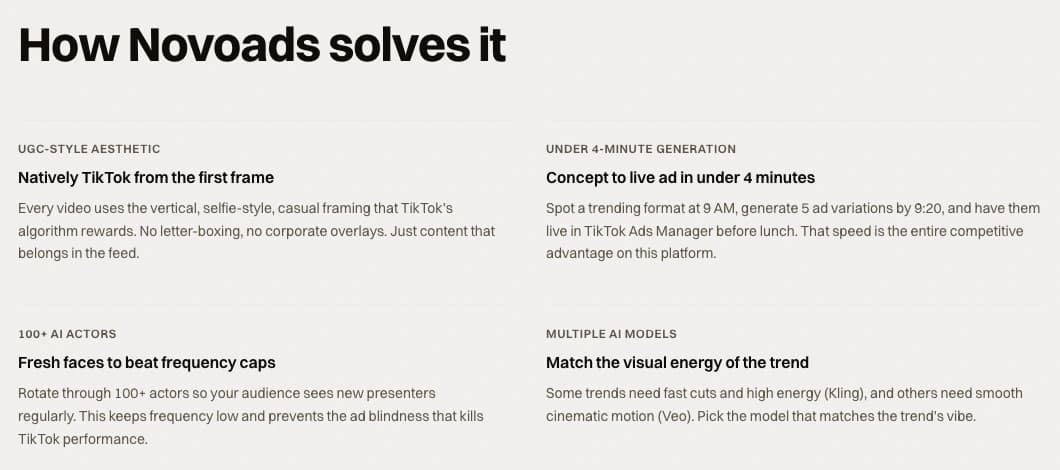 Screenshot: novoads.ai/use-cases/anuncios-video-ia-para-tiktok, the "How Novoads solves it" cards for TikTok ads, taken 2026-10-22
For the B-roll, the engines are a tie: Captions' credits page lists Google Veo 3.1 and Seedance 2.0, and both are in Novoads too, at per-model prices published on a ladder that starts at $15 a month. Where Captions starts an ad from a product URL, Novoads starts from a product photo: in Novoads, Product-to-Ad turns an uploaded product image into an ad image for 1 credit. If you test hooks in volume, writing ten openings for one ad is the method, and the per-clip prices above are the numbers to multiply; making native 9:16 variants for TikTok covers the format side.
Judge it on the device your ads are made on
Captions is a capable editor that grew an avatar studio and an ad tool, and it is at its best in one person's hands on one iPhone. If that is how your ads get made, the July avatar model and the link-to-ad flow are worth a month on Max. If a team makes your ads on computers, in batches, judge Captions on the limits its own help pages print, then price a talking ad where you will actually make it.
The tool that wins is the one that fits the place your ads are made. To see the same talking ad on your own script, start one in Novoads.
Frequently Asked Questions
Is Captions AI worth it?
It depends on where you make videos. On October 21, 2026, Captions' US App Store listing showed 4.7 out of 5 from 38,681 ratings, and its pricing page listed Max at $24.99 a month for 500 credits as an iOS price; Max's feature list in the help centre includes Mirage-generated actors and up to 30 AI twins. For one creator editing on an iPhone, that buys captions, AI edits, avatar videos and a link-to-ad tool in one app. For an ad team on a computer, Captions' own feature page says not all features are available on the web, and on Android the app is Captions Lite, a manual editor, so check the platform you will use before paying.
What can you do with the Captions app?
By Captions' own help pages: add AI captions and translations to video you record or import; make a fully edited talking video from a text prompt with Prompt to Video, in 39 languages (help page last modified August 17, 2026); build a UGC-style ad from a product URL with AI Ads (last modified August 18, 2026); and pick from 200+ ready-made avatars, describe a custom one in a prompt or make an AI twin of yourself (last modified August 19, 2026). Captions says its Mirage Avatar X model now powers those avatars and twins. What you get depends on your plan and on whether you use the iPhone app, Captions on Web or Captions Lite on Android.
How do you generate captions using AI?
In Captions, the help page last modified September 24, 2026 gives three steps on iOS: import or record your video, select the language spoken in it, then choose No Translation or a language to translate into. By the same page, same-language captions work on videos up to 10 minutes long on iOS and desktop and up to 5 minutes on Android, and captions in another language up to 5 minutes. On the web, the same page routes you through an editing style first, with a Captions only tab if you want nothing else.
What is the best app to add captions to videos?
It depends on the device and the job. For footage you filmed yourself, Captions is built for it: its help page (last modified September 24, 2026) covers AI captions and translation on iOS and on Captions on Web, and its Android app, Captions Lite, lists importing, adding and translating captions on both its free and Lite plans (help page last modified July 29, 2026). If the video is an ad made with an AI actor rather than footage you shot, judge tools on what a finished ad costs and which devices they run on, not on captions alone.
Key Takeaways
- Captions says its Mirage Avatar X model, announced in a post dated July 28, 2026, now powers all of its AI avatars and AI twins. That is the company's own claim, not an outside test.
- For ads, its strongest tools are Prompt to Video, which turns a text prompt into an edited talking video, and AI Ads, which builds a UGC-style ad from a product URL with a script of up to one minute.
- The full product is the iPhone app: Captions' pricing page says its prices reflect iOS plans only, its feature page says not all features are on the web, and the Android app is Captions Lite, a manual editor.
- Read on October 21, 2026: App Store 4.7 from 38,681 ratings, Google Play (Captions Lite) 4.1 from 18,560, Trustpilot 4.5 from 517 reviews with 19% one-star, and G2 4.4 from 44 reviews.
- Per 30-second talking clip, Captions' published average (about 80 credits, close to $4 of Max) beats a Novoads talking actor (200 credits, $9.80 of Plus); Novoads bills the started minute, so 60 seconds costs the same and 480p halves it.