CapCut vs Canva for Video Ads: 30-Second vs 8-Second AI Clips
CapCut's desktop page says one Seedance 2.5 generation can run up to 30 seconds and Canva's page puts its AI clip at up to eight, so we set the two clips, their costs by visitor and their ad rules side by side.

Mauricio Valdivia
·13 min
The AI clip spec the CapCut vs Canva comparisons skip
Search for a CapCut vs Canva comparison and you'll find long lists of templates, editing tools and plan prices. What you won't find, in any of the comparisons we could read in full, is how long an AI clip from either app can run or what shape it comes in. For a video ad, that's the spec that decides whether your hook, the product shot and the offer fit in one take. Some of those pages also call CapCut entirely free, though CapCut's own export guide says you need Pro to export without a watermark.
So we went to each maker's own pages. CapCut's Seedance 2.5 page for CapCut Desktop says a single generation can run up to 30 seconds. Canva's AI video generator page says a clip from its Create a Video Clip tool lasts eight seconds at most, in 16:9. Both are ceilings for one generation, and neither maker offers its clip on its free plan.
We didn't test CapCut or Canva for this post. CapCut's figures come from its own pages as a visitor from Spain saw them on November 3, 2026. Canva's site didn't load for us, so its figures come from the Internet Archive's copies of Canva's pages, each with its copy's date. CapCut's own guide says its prices vary by region, so every CapCut price here names the visitor it was shown to. The Novoads side is a render we made ourselves, plus our live pricing page.
CapCut or Canva for a video ad, in short
We'd open CapCut for a vertical product ad built on one long take, and Canva for a feed of statics with short branded clips. That's our reading of the makers' own pages, and every line in these two lists comes from one of them.
Use CapCut when
- the ad is one continuous shot of a person and a product, since CapCut Desktop's page puts a single Seedance 2.5 generation at up to 30 seconds
- you need a vertical frame, because 9:16 is one of the ratios that page names
- you'll cut, caption and voice the ad in one app, with an avatar and a matching voice picked inside CapCut's AI video workflow
- you'll turn a horizontal clip vertical, which CapCut's reframe guide does with its Auto reframe feature
Use Canva when
- most of what you run is statics and carousels built from templates
- you manage several brands, since Canva's Brand Kit page says you can run up to five
- one design has to go out in many sizes, which Canva's resize tools handle
- eight seconds or less of AI footage is enough, such as a product reveal behind a headline
The two AI clips side by side
Every cell comes from a maker's own page, and the sections after the table name each page with its date.
| CapCut Desktop | Canva's Create a Video Clip | |
|---|---|---|
| Longest single take | Up to 30 seconds | Up to eight seconds |
| Shapes named | 9:16, 1:1, 3:4, 16:9, 4:3, 21:9, Fit, Original | 16:9 |
| Resolution | 480p or 720p, 1080p "coming soon" | Not given |
| Sound | Not given for the clip | Synchronized audio |
| Model named | Seedance 2.5 | Google's Veo-3 |
| Clips per prompt | Not given | One |
| Who gets it | Pro and Ultra, billed per second | Pro, Business, Enterprise and Nonprofit, not Canva Free |
Up to 30 seconds against up to eight
Under a heading about 30-second generation, CapCut's page for Seedance 2.5 on CapCut Desktop says "A single generation can run up to 30 seconds, which gives a scene enough room to establish context, develop movement, and land on a clear ending beat." That's the most one generation can run, and it doesn't mean every take runs that long. It's also CapCut Desktop's figure, so we don't claim it for CapCut's web or phone apps. And the model isn't a fresh arrival there, since CapCut announced Seedance 2.5 on CapCut PC in a post dated August 7, 2026.
The same page mentions 15 seconds, and that number is easy to misread. When you import a reference video that runs too long, CapCut sends it to a trimmer "so you can cut it down to 15 seconds or less." That limit is on the reference footage you feed in.
Canva's eight seconds belongs to one tool. Canva's page says Create a Video Clip runs on Google's Veo-3 and makes a 16:9 video from a written prompt, with synchronized audio and a length of eight seconds at most. Canva's other AI video routes run to different lengths. Its Image to Video help, in a copy from October 26, 2026, says "Generated videos are fixed at 5 seconds," and those come without audio. Magic Video, per a help copy from April 1, 2026, trims and sequences the clips and photos you give it into a 60-second vertical video, so it assembles footage you already have.
Shape and resolution
CapCut's settings step names six fixed ratios, 9:16 among them, plus Fit and Original. Its resolution list offers 480p and 720p. The third option, 1080p, is marked "coming soon," so a Seedance 2.5 take on CapCut Desktop comes at one of the lower two today.
Canva's page describes the clip as 16:9, and that's the only shape it names. Canva's help suggests there's more to it. Its prompting tips, in a copy from February 12, 2026, say that opening Video clip from Canva AI on the homepage lets you pick preferences "including Style, Aspect ratio, Framing, and Lighting." We couldn't see which ratios that preference offers. Image to Video keeps your image's original aspect ratio, per its help, so a vertical picture should give you a vertical clip. Canva's page doesn't give a resolution for the clip.
Sound, model and clips per prompt
Canva's page says the clip's synchronized audio includes dialogue, sound design and even music, and that one video comes back for each prompt. The CapCut pages we read give no sound spec for a Seedance 2.5 take. They treat voiceover, captions and music as editing steps. As for the models, CapCut's desktop page says its generator is "Powered by Seedance 2.5 & GPT Image 2," while Canva's page names Google's Veo-3.
What one AI clip costs, by visitor
CapCut prices seconds of a model, and its prices change by region, while Canva sells an allowance of uses, so the two don't line up neatly. CapCut's figures in this section are as of November 3, 2026, unless a line gives another date. For every plan on each ladder, see our CapCut pricing breakdown and our Canva pricing guide.
CapCut's Pro card for a visitor from Spain
On CapCut's desktop Seedance 2.5 page, a visitor from Spain sees Pro at EUR 29.99 a month. The card says "Up to 100 seconds of Seedance 2.5 video per month (720p)" and adds that output "may vary by model, resolution, and region." It also lists 650 monthly AI credits. Those 100 seconds are a monthly total at 720p.
The card doesn't add up on CapCut's own numbers, though.
- CapCut's credits help, dated March 25, 2026, says each credit equals $0.01.
- The card prices Seedance 2.5 "from $0.12/sec (first month)," so a second costs at least 12 credits.
- At that rate, 650 credits ÷ 12 = at most about 54 seconds a month.
- The card itself says up to 100 seconds.
So we'd treat the 100 seconds as the card's wording and wouldn't plan a month around it.
The US card, from an archive copy
We couldn't see CapCut's prices as a US visitor. The Internet Archive's US copy of CapCut's pricing page, made on November 3, 2026, shows Pro at USD 19.99 a month. That card lists 1,200 monthly AI credits. At 12 credits a second, those would cover 100 seconds. It shows the same first-month rate for Seedance 2.5, and CapCut's post of August 7, 2026 says Pro and Ultra members use the model through credits, billed by the second.
That rate is a first-month offer with conditions. CapCut's AI video page says "Eligibility depends on your subscription status and history" and that "Subscriptions renew at the regular price unless canceled." The per-second rate after the first month wasn't on the cards we read. CapCut's pricing page also calls its prices "for reference only" and says signing in shows the final pricing, taxes and offers for your account. At the first-month "from" rate, our arithmetic puts a single take at these prices.
- A 15-second take is 15 × $0.12 = $1.80.
- A 30-second take is 30 × $0.12 = $3.60.
Canva's clip comes out of an allowance
Canva doesn't sell clips by the second. Each clip comes out of an allowance, and Canva's pages set that allowance out in their archive copies.
- Its AI video page says Pro, Business, Enterprise and Nonprofit users can make "a limited number of cinematic video clips per month."
- Its US pricing page, in the copy of November 1, 2026, files the clip tool under Ultra AI, and its Free column reads "No Ultra AI access."
- Its AI usage help, in a copy from October 3, 2026, gives Pro, Teams and Nonprofits a shared monthly allowance of "up to 200 uses for Premium AI tools, OR up to 20 uses for Ultra AI tools."
- Its AI terms, in a copy from October 19, 2026, say "AI Usage Limits are operational controls and not fixed entitlements."
So at one use a clip, a Pro allowance tops out at 20 clips a month, and Canva doesn't promise even that. If your whole allowance went to clips, each one would cost at least a twentieth of your plan's monthly price. Our Canva pricing guide has the plan prices to divide.
Dreamina has its own plans
You'll also run into Dreamina, at dreamina.capcut.com. It's a separate product with its own plans and credits, so none of its prices appear in this comparison.
Editing, captions and templates for ads
The AI clip is raw footage. The editing around it is what makes it an ad, and that's where the two apps differ most.
CapCut builds the edit around the clip
CapCut pitches its desktop app to marketers directly, and its pages describe an editor built around the generated clip.
- Its Seedance 2.5 page says you can "Bulk generate multi-version TVC & marketing footage with PC exclusive multi-timeline bulk editing for fast asset iteration."
- Its AI video page puts the voice inside the same flow ("Under 'Voiceover', pick a digital avatar and a matching voice").
- If a clip comes out horizontal, CapCut's guide from October 10, 2026 opens Auto reframe on CapCut Desktop and tells you to "select a vertical frame, such as 9:16 and 3:4."
- Its business templates page offers "free, editable business templates" for clips and stories.
Captions, where CapCut's own pages disagree
Two CapCut pages give two answers on whether AI captions cost extra.
- CapCut's caption tool page says "the AI caption feature on CapCut Web is free to use without any hidden costs."
- Its Standard vs Pro guide, dated September 23, 2026, lists an auto caption generator among tools that are "exclusive to Pro users."
The first line names CapCut Web and the second names no app, so they may describe different apps, but neither page says so. Check captions on your own plan before you build a workflow on them. Canva's video editor page, in its copy from October 26, 2026, offers to "Generate and style captions in one click."
Canva's templates, resizing and brand tools
Canva's strength is its design library. Its US pricing page, in the November 1, 2026 copy, lists "3.6M+ templates (including premium)" for Pro. Its video resize page (copy of October 23, 2026) calls Magic Switch a premium tool that "instantly makes your video fit any aspect ratio," which helps when you start from a 16:9 clip and need a vertical cut. Its Brand Kit page (copy of October 6, 2026) says you can "create and manage up to 5 separate brands."
For ads in particular, Canva has Canva Grow. Its page, in a copy from September 18, 2026, says you drop in a prompt and a website link to get ads for your brand, and that you can "Launch ads across Meta, TikTok, and LinkedIn directly from Canva." Our comparison of AI ad generators and Canva covers what Grow makes, and our Canva review covers Canva's plans and AI features in full.
Watermarks on the export
The two makers handle watermarks in opposite ways.
- CapCut's export guide (August 20, 2026) says "you need CapCut Pro for no watermark."
- The same guide says many CapCut projects end on a short card with the CapCut logo, which you can delete from the end of the timeline.
- Canva's video editor page, in its October 26, 2026 copy, says Canva Pro exports carry no watermark even when you use paid elements.
- On Canva Free, the same page says, a watermark shows up only when you add Pro or paid elements.
Running the clips in a paid ad
Each maker's terms decide what you can run, and the two read very differently. We quote them as written.
CapCut's materials license
CapCut's materials license covers its library, meaning the clips, stickers, effects and fonts it calls platform materials, plus its licensed music. We read the version a visitor from Spain gets, last updated January 22, 2026. That version says a US user is governed by a separate CapCut US materials license instead, which we didn't read.
The license ties commercial use to a mark and gives music rules of its own.
- "Dual Use Materials will be made available with specific marks (e.g., 'commercial use', 'commercial' marks) on the Platform."
- If your video "incorporates both Dual Use Material and Non-commercial Use Material, you can only use such content for the personal and non-commercial use, but not for any commercial use or purpose."
- "You shouldn't use a Sound for any commercial purpose" unless you've obtained the necessary rights to use the music that way.
- Commercial users "may show or share their video that includes a Commercial Sound within CapCut, TikTok and TikTok for Business," and any use outside those platforms needs separate permission from the rights holders.
The ad categories CapCut's license lists
Among the things the license says you must not do with its materials, it lists using them in or in connection with "advertising or promotional materials for tobacco products, pharmaceutical, healthcare, herbal or medical products (including without limitation dietary supplements, digestive aids, herbal supplements, personal hygiene or birth control products)."
What CapCut's terms say about your videos
CapCut's terms of service, in the version shown to a visitor from Spain (last updated April 15, 2026), say "We don't own your User Content." They also say "You shall be solely responsible for content uploaded to or made by using CapCut." We didn't find a line in those terms, or in the materials license, that speaks to commercial use of what CapCut's AI generates. The terms leave the commercial use of CapCut's own content to the materials license, and like the license, they send a US user to a separate US version.
What Canva's terms say about AI output
Canva answers the question on its AI video page and spells out the conditions in its terms.
- The FAQ on Canva's AI video page, in the October 26, 2026 copy, says designs generated with Canva AI can go to personal or commercial projects "as long as you follow our AI Product Terms and Terms of Use," and warns that your rights to what the AI makes may not be exclusive.
- Canva's AI product terms (copy of October 19, 2026) let you use your output "for any lawful purpose," provided you comply with the terms and accept that the use is at your own risk.
- For music, Canva's content license (copy of October 23, 2026) allows Pro Music in online ads, and its example is an ad that plays before, during or after a YouTube video.
How Novoads sells the same Seedance 2.5 model
Novoads isn't a full video editor like CapCut or a design suite like Canva. It's where you make the ad itself, from a prompt or a template, and Seedance 2.5 is one of the video models in it. You can run it at three resolutions, up to 1080p, in vertical, square or horizontal frames. That top setting is the one CapCut's desktop page still marks "coming soon."
The take in this strip came from a one-line prompt in Novoads on September 21, 2026. It's a five-second vertical take at 1080p. It cost 60 credits and came back in under nine minutes.
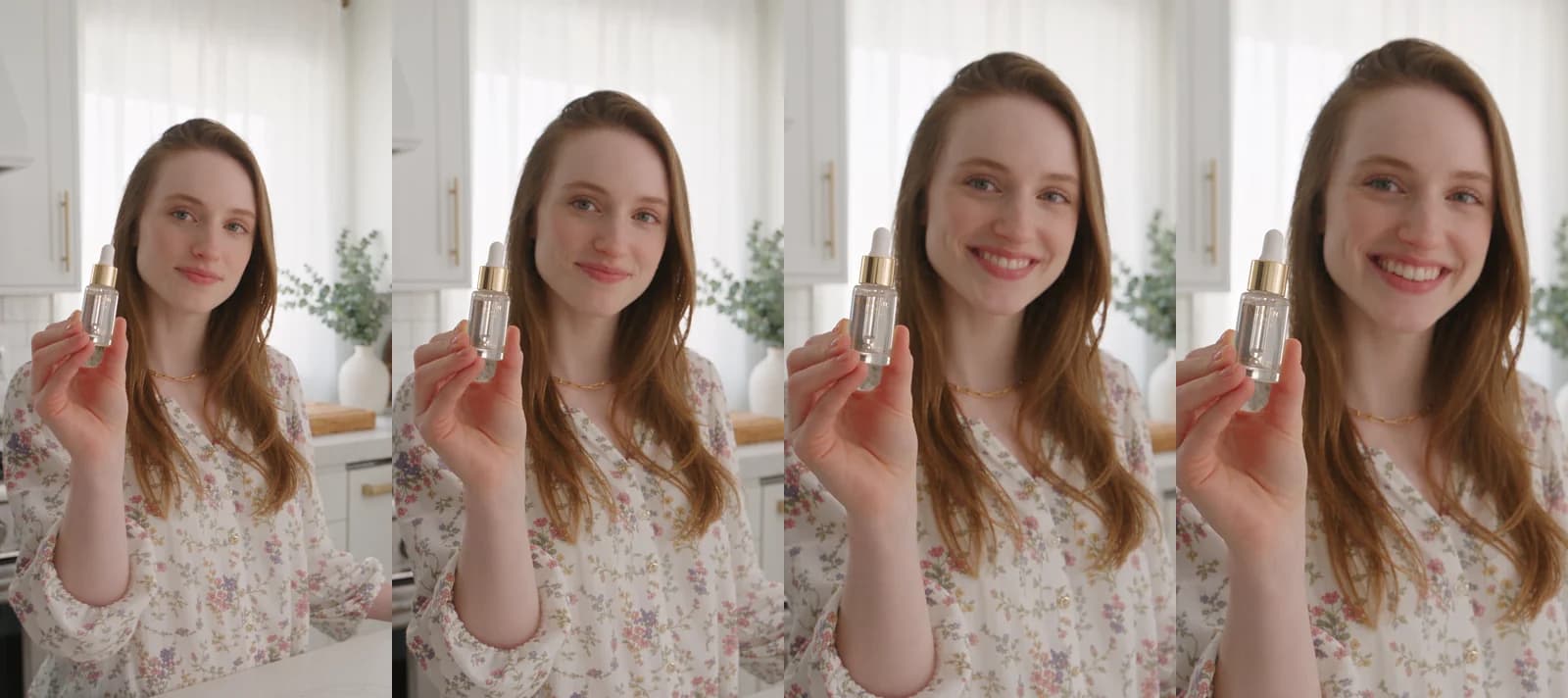
Made in Novoads with Seedance 2.5 · prompt: an auburn-haired woman in a floral blouse lifts a gold-capped dropper bottle toward the lens in a white kitchen and smiles · 5 s, 9:16, 1080p · 60 credits · rendered 2026-09-21 in 8 min 38 s
What Seedance 2.5 costs in Novoads
Novoads prices Seedance 2.5 in credits, by length and resolution, and a credit's dollar value depends on your plan.
- Starter is $15 a month for 200 credits, which is $0.075 a credit.
- Plus gives 1,000 credits a month at $0.049 a credit.
Each dollar figure in this table is the take's credits times that plan's rate.
| Seedance 2.5 take | Credits | On Starter | On Plus |
|---|---|---|---|
| 5 s at 720p | 35 | about $2.63 | about $1.72 |
| 15 s at 720p | 105 | about $7.88 | about $5.15 |
| 30 s at 720p | 210 | $15.75 | $10.29 |
| 5 s at 1080p | 60 | $4.50 | $2.94 |
The 30-second take needs 210 credits. That's more than the 200 credits Starter gives you each month.
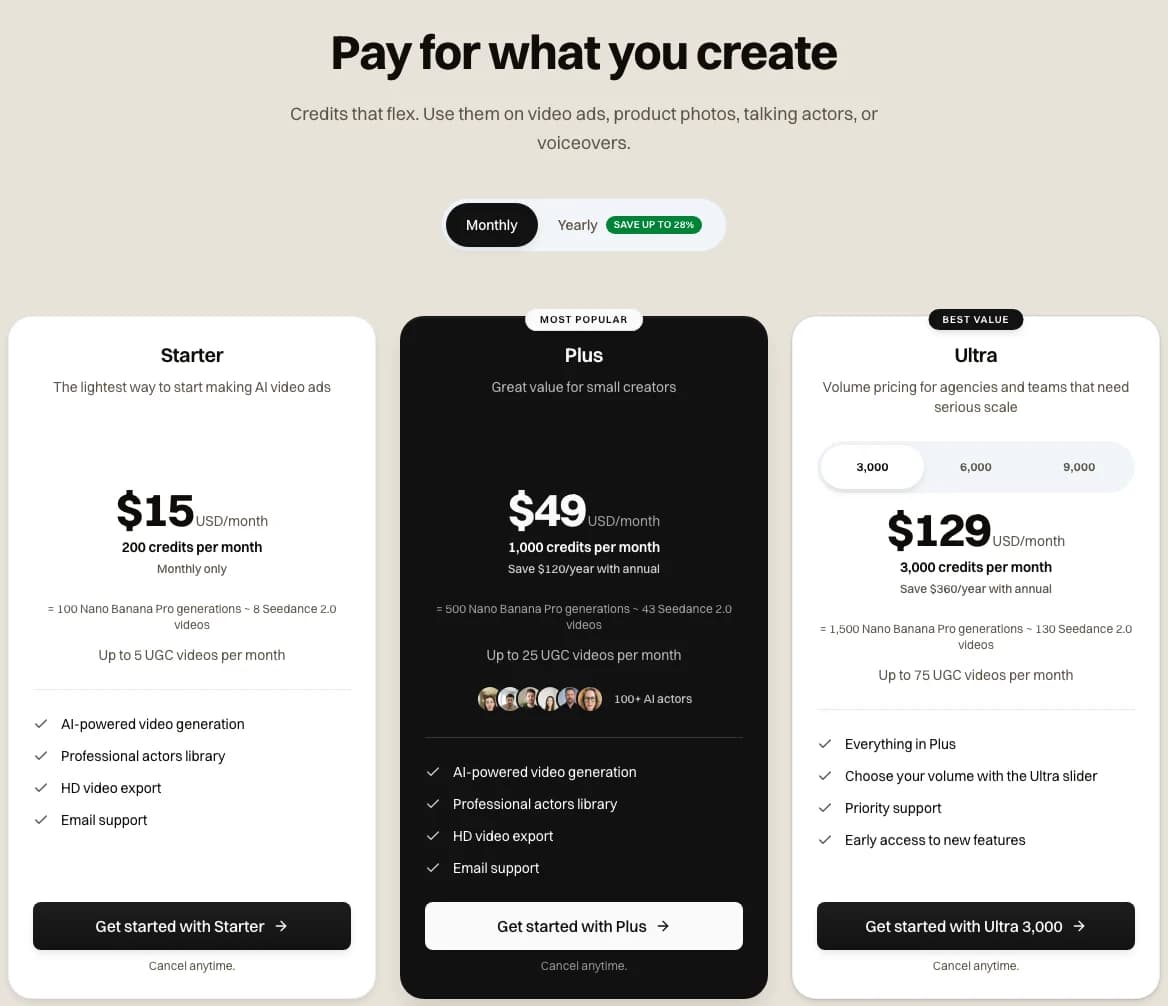
Screenshot of novoads.ai/en/pricing with Monthly selected, taken 2026-11-03
Every plan is on our pricing page, and every Novoads plan is paid from the first month. Our pricing FAQ says every video made with Novoads carries a full license for commercial use. For more on the model itself, see what Seedance 2.5 is and our Seedance 2.5 prompt guide, and for the shapes each ad network takes, our video ad specs by platform.
Where CapCut costs less
In CapCut's first month, a second of Seedance 2.5 costs less there than in Novoads. Both sides of this comparison are the same model.
- On CapCut in the first month, 15 seconds cost $1.80 at the "from" rate of $0.12 a second.
- On Novoads Plus, 15 seconds at 720p cost about $5.15 (105 credits).
- On Novoads Starter, the same take costs about $7.88.
- At 480p, our lowest Seedance 2.5 setting, 15 seconds cost 45 credits, about $2.21 on Plus.
What CapCut's cards don't show is the rate after that first month, and its desktop page still lists 1080p as coming soon. We haven't set Canva's clip against ours, because Canva's runs on a different model. If you're weighing CapCut for ad work, our CapCut alternative page sets Novoads beside it.
Make a 1080p Seedance 2.5 take for your next ad
Write the prompt, pick a vertical frame and 1080p, and the take comes back in minutes. Starter is $15 a month for 200 credits.
See Novoads next to CapCutFrequently Asked Questions
Which is better for video ads, CapCut or Canva?
For a vertical video ad built on one long take, we'd pick CapCut, because its desktop page says one Seedance 2.5 generation can run up to 30 seconds and names 9:16 among its ratios (read November 3, 2026). For statics, carousels and short branded clips, we'd pick Canva. Its AI video page caps a generated clip at eight seconds (archive copy of October 26, 2026), and its templates, Brand Kit and resizing tools are built for design work.
Can you use CapCut in Canva?
You can bring a finished CapCut video into Canva as an upload. CapCut's Standard vs Pro guide (September 23, 2026) says both Standard and Pro users can save a video in 8K. Canva's upload help, in an archive copy of October 2, 2026, says Canva downscales uploaded 4K videos to 1080p. So a 4K export from CapCut would end up at 1080p once it's in Canva.
What are the downsides of CapCut for ads?
Several come from CapCut's own pages. Its export guide (August 20, 2026) says you need Pro for no watermark, and its Seedance 2.5 takes are for Pro and Ultra members, billed by the second. Its materials license, in the version a visitor from Spain gets, keeps its library Sounds out of commercial use unless you've obtained the rights, and lets a commercial user share Commercial Sounds only within CapCut, TikTok and TikTok for Business. The same license lists 'advertising or promotional materials for tobacco products, pharmaceutical, healthcare, herbal or medical products' among the uses of its materials it doesn't allow. On November 3, 2026, CapCut's unclaimed Trustpilot profile showed a rating of 1.2. That came from 1,380 reviews.
Can Canva make vertical AI videos?
Canva's AI video page, in its archive copy of October 26, 2026, describes Create a Video Clip as making a 16:9 video and names no other shape. Canva's prompting tips, in a copy from February 12, 2026, say that opening Video clip from Canva AI on the homepage lets you set preferences that include aspect ratio, though we couldn't see which ratios it offers. Canva's Image to Video help (copy of October 26, 2026) says its five-second clips keep your image's original aspect ratio, so a vertical picture should give you a vertical clip.
Key Takeaways
- CapCut Desktop's Seedance 2.5 page says one generation can run up to 30 seconds, and it marks 1080p as coming soon (read November 3, 2026).
- Canva's AI video page, in its archive copy of October 26, 2026, says its Create a Video Clip tool runs eight seconds at most, in 16:9 and with sound, and Canva's help names an aspect-ratio preference.
- CapCut bills Seedance 2.5 by the second to Pro and Ultra members, from $0.12 a second in the first month, and a visitor from Spain saw Pro at EUR 29.99 a month.
- Canva's clip comes out of an Ultra AI allowance, which Canva calls an operational control rather than a fixed entitlement, and Canva Free has no Ultra AI access.
- Novoads sells the same Seedance 2.5 model at 1080p today, the resolution CapCut's page lists as coming soon, but CapCut's first-month rate per second is lower than ours.