Canva Review for Ads: Strong Statics, an 8-Second AI Clip
A Canva review for ad makers, with dates. We cover its strong templates and statics, its AI clip of up to eight seconds, Canva Grow and what reviewers report.

Mauricio Valdivia
·11 min

Canva covers static ads far better than video ads
If you're deciding whether Canva can carry your ads, it helps to split the question in two. One half is the editor, where you turn a template into a finished static ad. The other half is Canva's AI, where you turn a prompt into a video clip or a draft ad. Canva is strong on the first, and its reviewers say so. The second is narrower than the reviews we read let on.
We could read three reviews in full from the first page of results for "canva review", and none of them mentions the clip's length, the Veo model behind it or Canva Grow, Canva's ad tool. And one of the Trustpilot pages on that same first page is an unclaimed profile for canva-design.com, which isn't Canva's own. We're writing for people who make ads, so we'll leave presentations and print aside.
Canva's site wouldn't open for us, so every Canva detail below comes from the Internet Archive's dated copies of Canva's own pages, and every rating carries its date. We haven't tested Canva for this post. The ads you'll see are ones we made in Novoads.
Templates, Brand Kits and Bulk Create for static ads
Canva's ad maker page, as saved on October 11, 2026, lists ads for Instagram, YouTube, Google Ads, Facebook, X and print. It describes the flow as choosing a template, customizing it and publishing it, and it says you can redesign a Facebook ad for Instagram too.
Millions of templates and up to five brands
We took the template and plan figures from Canva's US pricing page as saved on November 1, 2026, and the brand count from its Brand Kit page as saved on October 6, 2026.
- Canva Free lists 1.6M+ templates, and Pro lists 3.6M+ with the premium ones included.
- Free gets one Brand Kit, limited to three colors.
- On Pro, the Brand Kit page says you can create and manage up to five separate brands in one place.
- Magic Resize, which resizes a design for any format one at a time or in bulk, is on Pro, Business and Enterprise.
- Bulk design creation, which Canva describes as generating multiple versions of your designs in one go, is on those same paid plans.
For ad work, those last two matter more than the template count.
Bulk Create for ad variants
Bulk Create is the tool behind those multiple versions. You connect a table of data, such as headlines or prices, and Canva makes a version of your design from each row. Canva's help page, as saved on October 3, 2026, says you can select up to 300 rows and 150 columns. The tool is on Pro, Teams, Business, Enterprise, Education and Nonprofits, and it only works on desktop.
That's the closest thing Canva has to a testing setup for statics. If you're making variants to test, our guide to how many ad creatives you need goes through Meta's limits on that.
Four statics from one prompt in Novoads
Static ads are where Canva is strongest, so that's the fair place to show what we make. Canva added its own image model, Canva Craft, on October 22, 2026. Its newsroom post says Craft makes images at 2K in any aspect ratio and that it went to all Canva users that day. So in Canva you can generate the picture, then set the words and the layout in the editor.
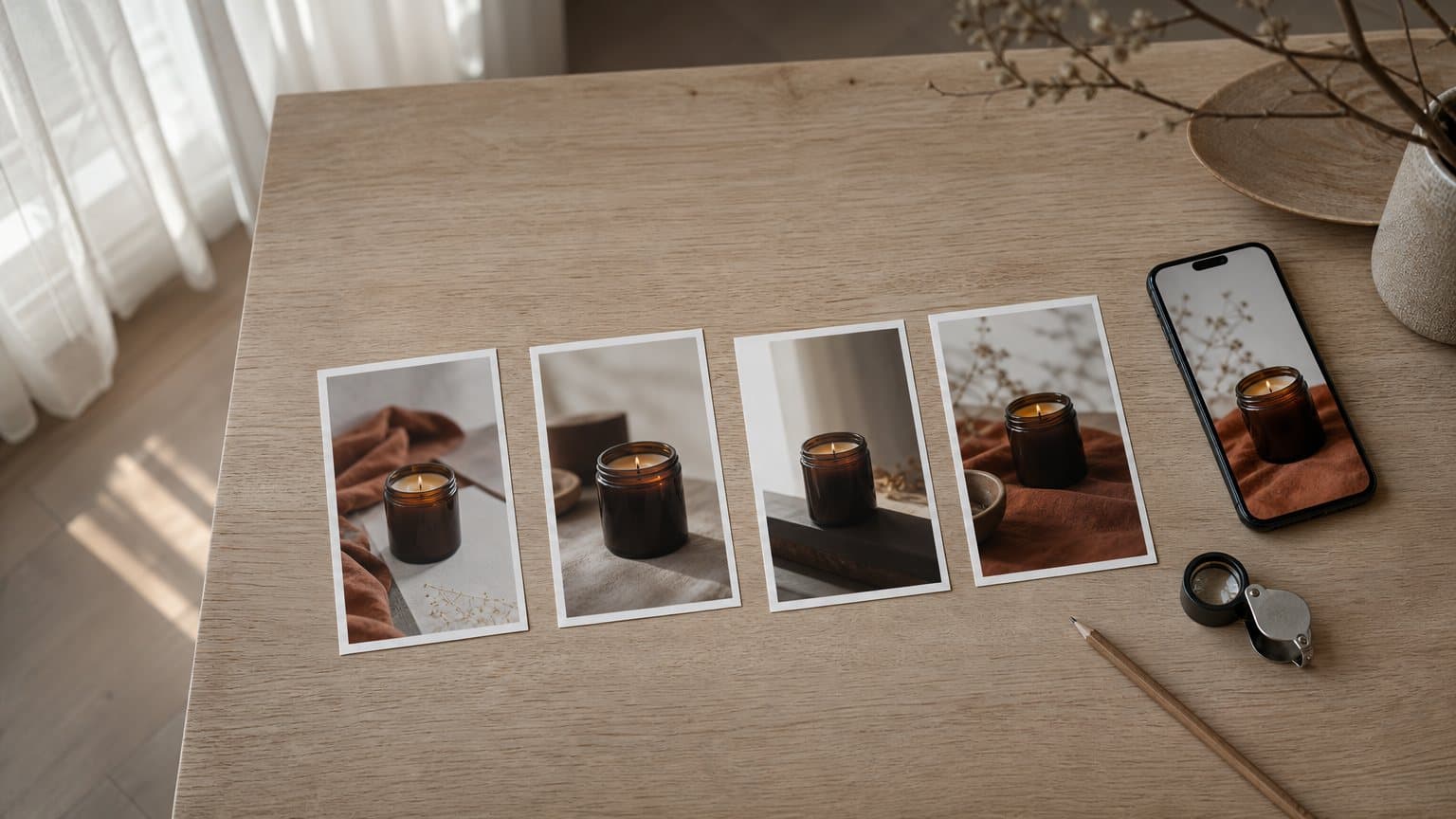
We made the four statics below in Novoads on October 20, 2026, with one Nano Banana Pro call. Each is a 4:5 ad of an unlabeled amber candle jar. The model set the headline and the subhead itself, and they're legible on all four. The call cost 8 credits.
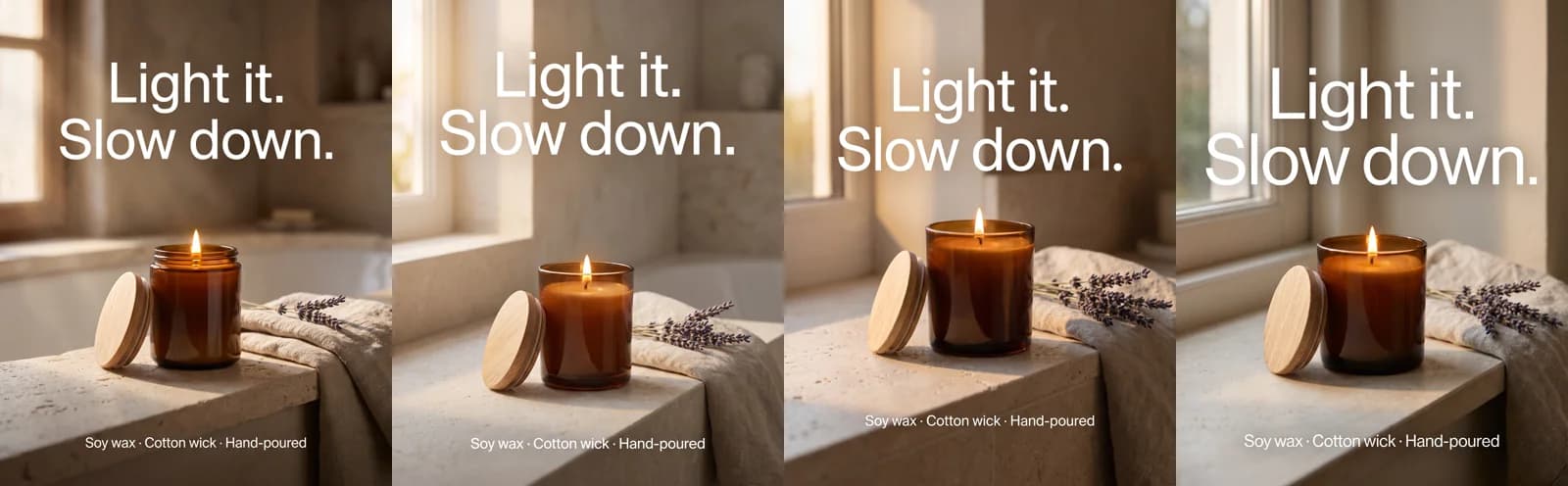 Made in Novoads with Nano Banana Pro · one call returned four 4:5 statics at 2K, wording set by the model and legible on each · 8 credits for the set · 2026-10-20
In Canva you set the layout by hand and build on your Brand Kit, which gives you exact control. A model call like ours returns finished variations you can test before anyone opens an editor. Our static ads guide covers sizes and text limits platform by platform.
What Canva's own page says about its AI video clip
Canva's AI video generator page, as saved on October 26, 2026, fills in what the three reviews we read in full leave out.
Up to eight seconds at 16:9, one clip per prompt
The page says Canva AI's Create a Video Clip, powered by Google's Veo-3, takes your text prompt and makes a 16:9 video, eight seconds at the longest, with sound synchronized to the picture. You get one video per prompt. Pro, Business, Enterprise and Nonprofit users can make a limited number of these clips each month.
Treat the eight seconds as a ceiling. The page says "up to", and nothing on it says every clip runs that long.
What the page says about shape and resolution
The page describes the clip as 16:9. Canva's prompting tips, as saved on February 12, 2026, say the Video clip option (you reach it through Canva AI on Canva's homepage) adds preferences for style, aspect ratio, framing and lighting. That help page doesn't list the ratios, so we can't tell you whether vertical is one of them.
The AI video page doesn't give a resolution for the clip. Canva's download help page, in a copy from October 26, 2026, sets limits on exports instead.
- Canva Free lets you download an MP4 at up to 1920 by 1080.
- Pro, Teams, Nonprofits and Education can download up to 3840 by 2160.
Those limits apply to exporting a finished design, and they don't tell you what resolution the clip itself comes out at.
The clip has been on Canva's page since mid-2025
None of this is new. Canva's newsroom introduced Create a Video Clip on June 18, 2025, as a Canva AI feature on Google's Veo 3 model. A copy of the AI video page from July 3, 2025, already described the same clip, at 16:9 and 8 seconds with synchronized audio. The newer copy says "up to eight seconds", and the rest of the description reads the same.
So if you read a review that treats the clip as a recent addition, it's describing something Canva has offered for more than a year.
Canva's other video tools, and how long each runs
The eight-second limit applies only to Create a Video Clip. Canva has other ways to make video with AI, and each one has its own limits. Our CapCut vs Canva comparison puts Canva's clip next to CapCut's.
Image to Video makes five-second clips without sound
Canva's Image to Video help page, in a copy from October 26, 2026, says the clips are fixed at five seconds.
- Some generations may come out at three seconds for now, the same page says.
- The clip copies the shape of the picture you start from, so a vertical product photo gives you a vertical clip.
- There's no audio in the clip.
- You can use it on Canva Free while the month's AI allowance lasts.
Magic Video edits footage you already have
Magic Video starts with your own clips and photos. A copy of Canva's help page from April 1, 2026, says the tool trims, styles and sequences them into a 60-second vertical video with several scenes, and that it's included on every Canva plan, Free too. You still need the footage, so it's more of an editing shortcut than a way to make new shots.
Talking heads through HeyGen and D-ID
For a person talking to camera, Canva sends you to partner apps.
- A copy of Canva's script-to-video page from October 6, 2026, says you can turn a script into a talking-head video with the HeyGen app, once you've signed in to your HeyGen account.
- That page says you get three video credits a month to make three-minute videos.
- The AI video page also has a button to generate AI avatars with D-ID.
- Canva's AI usage help page adds that third-party subscriptions or limits may apply.
Canva Grow for making and publishing ads
Canva Grow is Canva's ad tool, and none of those three reviews mentions it.
How Grow turns a prompt and a website link into ads
Grow's page, as saved on September 18, 2026, says you give it a prompt and your website's link and get back ads tailored to your brand, which you can then edit and customize in Canva. Canva unveiled Grow 2.0 at Cannes Lions, and its post on the launch says Grow makes static and video ads.
The US pricing page lists AI ad creation with Canva Grow as a Premium AI tool with limits. So making ads in Grow draws on the same monthly AI allowance as Canva's other Premium and Ultra tools.
Where Grow publishes, and who has it
The Grow page says it supports Meta, LinkedIn and TikTok, with more platforms on the way.
- Grow is on every Canva plan, Free included.
- Plans differ in how many ad accounts you can connect, though that page doesn't give numbers.
- There's no limit on the campaigns you launch and analyze through it.
Canva's release said Grow 2.0 would roll out from June 25, 2026, to all users across North America, Australia and the United Kingdom, and that access would expand to more markets in the following months. We couldn't see where it's rolled out since, so if you're outside those regions, check inside your own account.
Ads made elsewhere can go out through Grow
Canva's Grow 2.0 post says you can push ads to Meta, TikTok and LinkedIn whether they were created in Grow, designed in the Canva editor or uploaded from another source. So an ad you made in another tool can go out through Grow too. We go deeper into what Grow makes, ad type by ad type, in AI ad generator vs Canva.
What reviewers report about Canva
We read every rating in this section on November 3, 2026, unless a line gives an older copy's date.
Canva's Trustpilot profile and a look-alike
Canva's own Trustpilot profile showed a TrustScore of 4.0 from 8,152 reviews. The stars split sharply, with five-star reviews at 51% of the total and one-star reviews at 29%. Trustpilot shows the profile as claimed and notes that Canva hasn't replied to negative reviews.
A second Trustpilot profile turns up among the first results for "canva review". It's titled Canva Design Reviews, for the address canva-design.com, and it's unclaimed, with a 2.2 from 52 reviews. That isn't Canva's rating, so it's worth checking which profile a score comes from before you weigh it.
What one- and two-star reviewers complain about
We read 80 recent one- and two-star reviews on Canva's profile, posted between late September and early November 2026. Billing, canceling and refunds come up most, and ease of use comes second. One reviewer in late October wrote, "Cancellation was reinstated without notice and subscription was charged again." Another, in late September, wrote, "The learning curve is too great and I find that it doesn’t have the functionality I need".
Support comes up too. A two-star review from the end of October says, "The AI I had to interact with was a time waste." Keep in mind these are the unhappy reviewers, and most of Canva's Trustpilot reviews give four or five stars. Still, if you make ads, those complaints are a reason to check how billing and canceling work before your team signs up.
G2, Capterra and the app stores
Software review sites and the app stores rate Canva higher than Trustpilot does. The G2 and Capterra figures come from their pages as saved in October 2026.
- On G2 (copy of October 18), Canva holds 4.7 out of 5 from 7,757 reviews.
- G2 reviewers tag ease of use (1,727 times) and templates (1,260) as pros most often. The most tagged cons are limited features and limited options, and the expensive tag comes up 471 times.
- On Capterra (copy of October 9), Canva has a 4.7 from 13,458 reviews. Customer service is its lowest sub-score, at 4.4.
- Capterra's summaries count social media design as 98% positive and frequent glitches and slowdowns as 71% negative, with lost work on large projects among those complaints.
- Apple's US App Store shows 4.9 out of 5 from 3.6M ratings.
- Google Play's US listing shows 4.8 from 27.6M reviews. The same listing counts 500M+ downloads.
Price, the AI allowance and AI Pass
Pro's US list price
These are US prices, from Canva's pricing page as saved on November 1, 2026. Canva Pro is $18 a month, or $144 billed yearly. Our Canva pricing guide has the whole plan ladder.
How many clips the allowance covers
Every AI tool on a Canva plan draws on one monthly allowance, and Canva puts the clip tool in its Ultra AI tier.
- The pricing page says Standard, Premium and Ultra AI tools share an allowance that varies by plan, and it marks the clip tool's row as English only.
- Canva Free has no Ultra AI access, and Canva's help page says a Pro trial doesn't include Ultra tools either, so neither can make the clip.
- The November pricing page doesn't give a count for Pro, just a multiple (10x more AI than Canva Free).
- A copy of Canva's AI usage help page from October 3, 2026, gives Pro, Teams and Nonprofits up to 200 uses of Premium AI tools or up to 20 uses of Ultra AI tools a month.
So up to 20 clips a month is the ceiling, and that's only when nothing else draws on the allowance.
Canva's AI product terms say the limits are operational controls and not fixed entitlements, so that count can change. Once your Ultra uses run out, Canva's help page says you wait for the monthly reset.
AI Pass and short pauses
AI Pass is Canva's add-on for more AI. Its help page, as saved on November 2, 2026, prices it at $100 per person per month worldwide, recurring monthly. The same page says Pro, Teams and Nonprofits subscribers get 40x more AI with it, and that once you're past your limit, premium AI features keep working with short pauses. Canva's AI usage help page says Ultra tools aren't part of those short pauses, so you still have to wait for the reset to make more clips.
How Novoads fits alongside Canva for ads
Novoads makes static and video ads from one balance of credits. Every plan is paid, starting with month one.
Statics on Nano Banana Pro
Nano Banana Pro is the model behind the strip above, and we price it by the image.
- An image at 1K or 2K costs 2 credits, and one at 4K costs 4.
- On Starter a credit works out to $0.075, so a 2-credit image is 15 cents.
- On Plus a credit is $0.049, which makes it about 10 cents.
- The strip above cost 8 credits, or 60 cents on Starter.
Our post on Nano Banana Pro for ad creative shows more of how it handles headlines.
Video ads in vertical, square and wide shapes
Canva's page describes the clip it makes from a prompt as 16:9 and eight seconds at most. In Novoads, Kling v3 Pro and Seedance 2.0 run up to 15 seconds with sound on by default, and all three models below make vertical as well as wide clips. Prices are as of November 3, 2026, and the dollar figures are our own arithmetic per credit.
| Model in Novoads | Lengths | Shapes | Example clip | On Starter | On Plus |
|---|---|---|---|---|---|
| Kling v3 Pro | 3 to 15 seconds | 16:9, 9:16, 1:1 | 10 seconds, 20 credits | $1.50 | about 98 cents |
| Seedance 2.0 at 720p | 4 to 15 seconds | 16:9, 9:16, 1:1, 4:3, 3:4, 21:9 | 8 seconds, 36 credits | $2.70 | about $1.76 |
| Google Veo 3.1 | 4, 6 or 8 seconds | 16:9, 9:16 | any length, 72 credits | $5.40 | about $3.53 |
By Canva's own numbers, its clip can cost less than ours. Pro is $18 a month, and Canva's help page gives it up to 20 Ultra uses. Spent only on clips, that's 90 cents a clip at best. A Veo 3.1 clip in Novoads is 72 credits at any length, or $5.40 on Starter. What you get for the difference is your pick of model, clips up to 15 seconds, and 9:16 listed for every model in the table. Our Kling vs Seedance comparison goes further into how those two differ for ads.
What the plans cost
- Starter is $15 a month for 200 credits, and it's billed monthly only.
- Plus is $49 a month for 1,000 credits, or $39 a month billed yearly.
- Ultra starts at $129 a month for 3,000 credits.
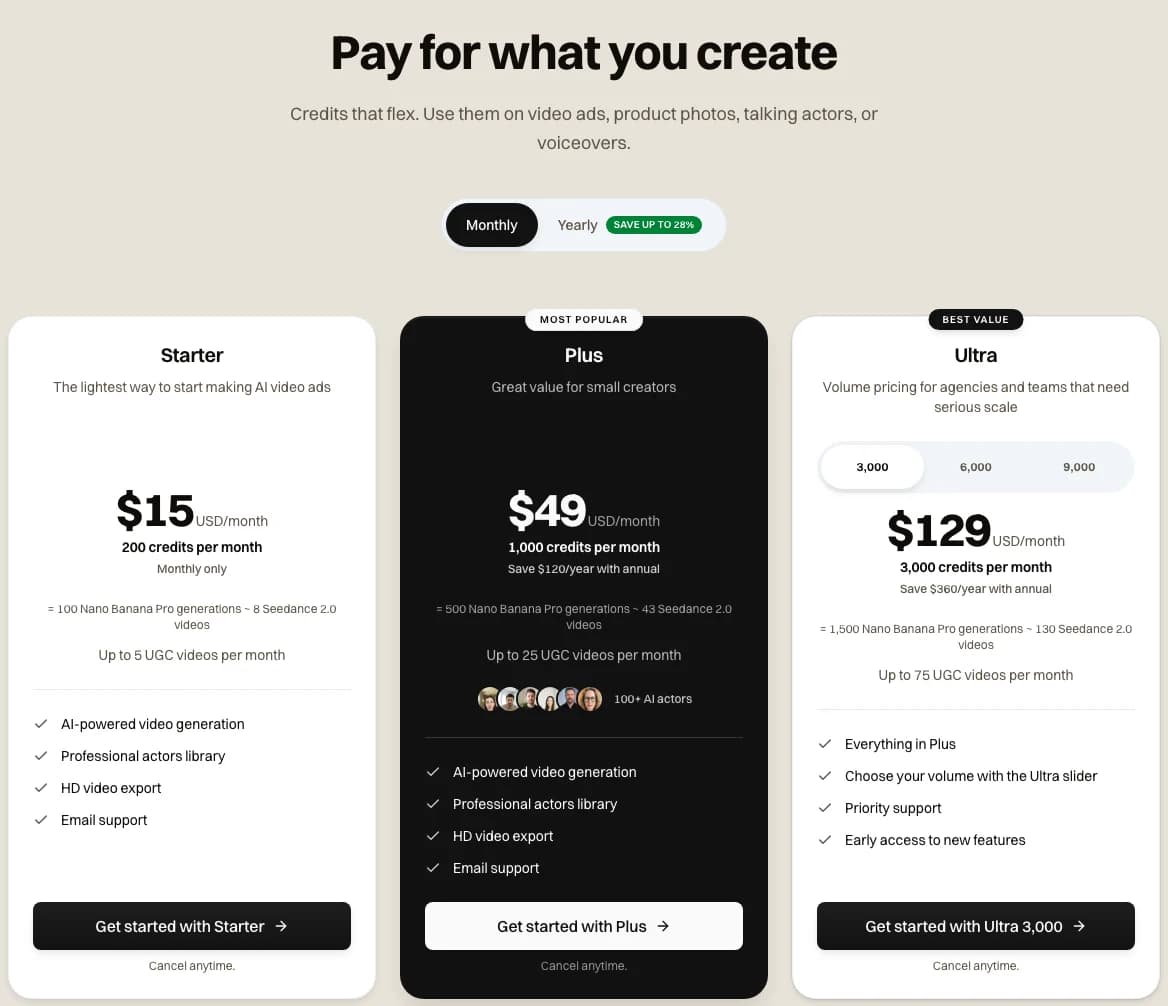 Novoads pricing page, Monthly selected, with each plan's credits and what they buy · 2026-11-03
Our pricing page lists every plan and what it buys. If you're weighing the two tools for your team, our Canva alternative page puts them side by side.
Need prompt-made video ads past eight seconds?
Novoads makes statics on Nano Banana Pro and video ads up to 15 seconds on Kling v3 Pro and Seedance 2.0, in vertical, square or wide.
See Novoads next to CanvaIf most of your ads are statics built on a Brand Kit, Canva Pro covers them well. If you need clips made from a prompt that run past eight seconds, or a choice of video models, you'll want a second tool for that part.
Frequently Asked Questions
Is Canva good for making ads?
For static ads, yes. Its templates, Brand Kits, Magic Resize and Bulk Create cover most of what a small team needs, and G2 reviewers tag ease of use and templates as its top pros. For video ads, it's narrower. Canva's AI video page describes the clip it makes from a prompt as 16:9 and up to eight seconds long. Beyond that, you get five-second Image to Video clips, Magic Video edits of your own footage, and the HeyGen and D-ID apps.
Can Canva's AI make vertical video ads?
Canva's AI video page, as saved on October 26, 2026, describes Create a Video Clip as 16:9 and up to eight seconds. Canva's prompting tips from February 2026 say the Video clip option offers an aspect ratio preference but don't list the ratios, so we can't confirm a vertical option there. Image to Video keeps your picture's shape, so a vertical picture gives you a vertical clip, five seconds long with no sound.
Can you use Canva's AI output in paid ads?
Canva says you can use Canva AI for both personal and commercial projects, and its AI product terms let you use the output for any lawful purpose as long as you follow those terms and accept the risk. Canva also warns that an AI design might not be yours alone, that other users can get similar output, and that it's your job to check a design suits commercial use. Its content license allows Pro Music in online ads but not in TV, cinema, radio, podcast or billboard ads.
Why is Canva charging me more than I expected?
We can't see your account, but three things help explain a higher charge. Canva Pro lists at $18 a month or $144 a year in the US (pricing page as saved on November 1, 2026). AI Pass, an add-on for more AI, is $100 per person per month and recurs monthly. And in the one- and two-star Trustpilot reviews we read on November 3, 2026, billing, canceling and refunds came up more than any other subject.
Key Takeaways
- Canva is strongest for static ads, with millions of templates, Brand Kits, Magic Resize and Bulk Create on its paid plans.
- Canva's own AI video page describes Create a Video Clip as a 16:9 clip of up to eight seconds, made from a text prompt with Google's Veo-3. The page has said so since mid-2025.
- Canva's other video tools have their own limits, and Canva Grow turns a prompt and your site's address into ads it can publish to Meta, LinkedIn and TikTok.
- Canva's own Trustpilot profile scored 4.0 on November 3, 2026, and billing and canceling lead the complaints in its one- and two-star reviews.
- Novoads adds video ads of up to 15 seconds in vertical, square or wide shapes on Kling v3 Pro and Seedance 2.0, plus statics on Nano Banana Pro at 2 credits an image.