Facebook Ads MCP: Make 9:16 Ads in Claude, Launch Them on Meta
Meta's ads MCP server, in open beta since April 29, 2026, lets Claude or ChatGPT build Meta campaigns that start paused. It makes no video or image, so the 9:16 creative comes from a second connector, priced in credits and checked against Meta's specs.

Mauricio Valdivia
·12 min
Meta's MCP server builds the campaign, and you bring the video
On April 29, 2026, Meta announced its ads AI connectors in open beta. They're a hosted MCP server and an ads command line tool, and they let an AI agent work inside your Meta ad account. On accounts that have access, an agent like Claude or ChatGPT can now create campaigns, ad sets and ads through Meta's own server, and everything it creates starts paused. But none of the tools on Meta's lists makes a video or an image, so the 9:16 creative those ads run on is still yours to make. We made a test clip through a second connector for 6 credits and checked it against Meta's own specs.
We haven't used Meta's server ourselves. Meta's half of this post comes from Meta's own pages, read October 28, 2026, and the creative half is our own run through the Novoads connector in Claude Code.
What Meta's ads MCP server is, and where it stands
Meta's developer docs describe it as a Meta-hosted MCP server that lets you manage Meta ads directly from an AI agent. It's one of Meta's ads AI connectors, alongside the ads CLI.
One hosted server at one address
Meta runs the server itself, at https://mcp.facebook.com/ads, so there's nothing for you to install or host. Its developer docs say it works with any MCP-compatible AI agent, and the announcement says the MCP route needs no developer credentials, API setup or coding. The ads CLI, which Meta introduced the same day for people who'd rather script their account, also creates everything paused by default.
Meta's server can create and edit campaigns, ad sets and ads in the account you connect. That's a step past Google's own ads MCP server, which Google lists as read-only in its current release (we went through it in our post on Google's ads MCP server).
Open beta since April 29, still rolling out
Six months after the announcement, Meta's post still calls the connectors an open beta. A note at the top of the same post, dated July 16, 2026, adds two later changes. You can now connect any AI app through your own developer app, and admins can set ads MCP server rules. We didn't find a general availability announcement on any Meta page as of October 28, 2026.
Open beta also doesn't mean every account has every tool. Meta's help article warns that you may not have access to all of these tools and features yet. And in its July 16 developer post, Meta says it's rolling out tool access gradually for accounts that connect through their own app. If your agent can't see a tool you've read about, that's probably why.
The agents Meta lists
Meta's help article names four supported agents (ChatGPT, Claude, Claude Code and Perplexity) and gives all four the same server URL. Each name links to that agent's own setup steps. For Claude that's Anthropic's custom connector guide, and for Claude Code it's the remote HTTP server option in Claude Code's MCP docs. If you use a different agent or platform, the help article sends you to Meta's developer docs.

Connecting Meta's server to Claude, ChatGPT or Claude Code
Signing in, and the permissions a token needs
Meta's get-started page lists three ways to sign in.
- OAuth through Facebook Login for Business. Your MCP client opens Meta's login dialog, you approve the permissions it asks for, and there's no token to set up by hand.
- A user access token.
- A system user access token. Only tokens with the Employee role work. Admin-role system user tokens can't reach the server.
If you sign in with a token, it needs ads_mcp_management plus either ads_read or ads_management at a minimum. Meta lists other permissions, such as catalog_management and business_management, that unlock more of the tools.
Connecting through your own Meta app
The standard route doesn't need a Meta app of your own. Since July 16, 2026, though, you can connect through one, and Meta says that allows deeper, more customizable integrations. In Claude Code it takes a single command, which passes your Meta app ID as the OAuth client ID.
claude mcp add --transport http --client-id <META_APP_ID> meta-ads https://mcp.facebook.com/ads
In ChatGPT, you connect through your own app in developer mode, with OAuth, the same server URL and your Meta app ID as the OAuth client ID. Agencies and partners that manage data for other businesses have one more step. Meta asks them to submit the app for review and request Advanced Access on ads_mcp_management.
One custom connector on Claude's Free plan
Anthropic offers custom remote MCP connectors on its Free, Pro, Max, Team and Enterprise plans, but Free users are limited to one custom connector. So if you want Meta's server and a creative connector side by side in claude.ai, you'll need a paid Claude plan.
What the server can do once it's connected
Seven tool groups, and the count we saw
Meta's developer docs sort the tools into seven groups.
- Comprehensive reporting
- Ad creation and management
- Catalog creation and management
- Signals and datasets
- Help and troubleshooting
- A/B tests and conversion lift studies
- Activity logs
When we read Meta's category pages on October 28, 2026, they listed 86 tool names. Ad creation and management had 28 of them, and catalogs had 29. Treat those numbers as a snapshot, though, since Meta says it keeps adding tools. Its help article suggests asking your agent which ones are available.
Everything starts paused, and activating it spends money
Any campaign, ad set or ad the server creates starts paused, and Meta's docs say your AI client asks for confirmation before activation. Meta's help article says all ads are paused by default until you set them live. The tool that turns a paused campaign, ad set or ad on is ads_activate_entity, and Meta describes it as the step that starts spending budget. From then on you're paying for delivery, the same as with any other campaign (we broke down what Facebook and Instagram ads cost separately).
Creatives, previews and the Ad Library
Six of the tools cover the creative and the reporting around it.
ads_create_creativemakes a single-image link ad creative. Placement customization, and multi-media optimization with images, videos or both, are marked limited availability.ads_get_ad_imagesandads_get_ad_videoslist the media already uploaded to an ad account.ads_get_ad_previewrenders a preview of an ad in a placement such as Feed, Story or Reels.ads_library_searchsearches the public Meta Ad Library.ads_get_ad_entitiesis the main reporting tool. It returns spend, impressions, CTR, CPC, CPM and conversions, with breakdowns and date ranges.
None of the tools on those seven pages generates an image or a video. Going by Meta's lists, the server works with media that already exists, which is why the creative is the half you bring.
Meta's two pages disagree on uploads
Meta's help article says the agent can create single image, single video, carousel and product media carousel creatives, and upload image or video assets to the ad account's library. But the developer tool table lists no upload tool, and it marks videos in ads_create_creative as limited availability. So we wouldn't count on uploading a video through the server on every account yet. Ask your agent which tools it sees before you build a workflow around one.
The guardrails Meta puts around an agent
Your authorization on every action
Meta's help article says any action taken on your behalf requires your authorization through the AI agent. Add the paused default, and a campaign the agent builds shouldn't spend anything until someone confirms the activation.
Rules an admin sets per ad account
If you have full control of a business portfolio, you can set rules for what agents may do on each ad account or catalog, and the server enforces them. You'll find them in Meta Business Suite under Settings, then Integrations, then Ads MCP server, where you allow or block actions such as creating campaigns, editing budgets or editing catalogs. A partner you've given access can set rules on the shared account too, and those rules apply only to the partner's own people.
Meta's developer page on rules says they're in limited availability. The help article adds that if Ads MCP server doesn't show up under Integrations, you don't have the feature yet.
Budget caps, and Meta's line on bans
A rule doesn't have to block budget edits altogether. It can cap budgets instead, and Meta's example blocks any request to set a budget over $1,000.
Meta also answers the worry about bans directly. Its help article says using the ads MCP server on its own doesn't put your account at risk, and that bans typically come from breaking Meta's advertising standards, such as running noncompliant ad content. We'd still set a budget cap on any account an agent touches, because a wrong budget is the mistake that costs money fastest.
The creative Meta's server expects
Whatever the agent builds, the image or video still has to meet Meta's specs for each placement, and Reels and Feed don't ask for the same thing. Specs as of October 28, 2026.
| Placement | File types | Ratio | Resolution | Length | Max file size |
|---|---|---|---|---|---|
| Instagram Reels video | MP4, MOV | 9:16 | 1440 x 2560 | 0 seconds to 15 minutes | 4GB |
| Facebook Reels video | MP4, MOV, GIF | 9:16 recommended | 1440 x 2560 | No maximum | 4GB |
| Instagram Feed video | MP4, MOV, GIF | 9:16 | 1080 x 1920 | 1 second to 60 minutes | 4GB |
| Facebook Feed video | MP4, MOV, GIF | 4:5 | 1440 x 1800 | 1 second to 241 minutes | 4GB |
| Instagram Reels image | JPG, PNG | 9:16 | 1440 x 2560 | Still image | 30MB |
For Reels video, Meta lists 1440 x 2560 among its design recommendations, but the hard floor is lower. Instagram Reels videos under 30 seconds need a minimum width of 250 pixels. At 30 seconds or longer, the minimum is 500 pixels.
Reels safe zones
Meta asks you to keep three margins of a Reels asset clear of text, logos and other key elements.
- The top 14%
- The bottom 35%
- 6% on each side
That keeps them from being cropped, hidden behind the profile icon or the call-to-action, or pushed against the edges of phones taller than 9:16. Meta also calls captions optional but recommended on Reels, and sound optional but strongly recommended.
The music rule
Meta's Instagram Reels spec says Reels ads shouldn't contain licensed music, and it recommends original audio or royalty-free music from the Meta Sound Collection instead. If you're adding a generated track, the rights questions around AI music are a topic of their own, and we've covered what the Udio lawsuit means for advertisers.
Making the 9:16 creative with Novoads
Novoads' MCP connector lets the same agent that drives Meta's server make the video or image first, with the price quoted in credits before anything renders.
Adding the connector next to Meta's
The connector's address is https://novoads.ai/api/mcp, and you sign in with OAuth, so there's no API key. In claude.ai you add it through Customize, then Connectors, then Add custom connector. That's the same kind of custom connector Meta's help article points Claude users to for Meta's own server. Our connector page has the steps for Claude Code, Cursor, VS Code and any other client that supports MCP over Streamable HTTP with OAuth.
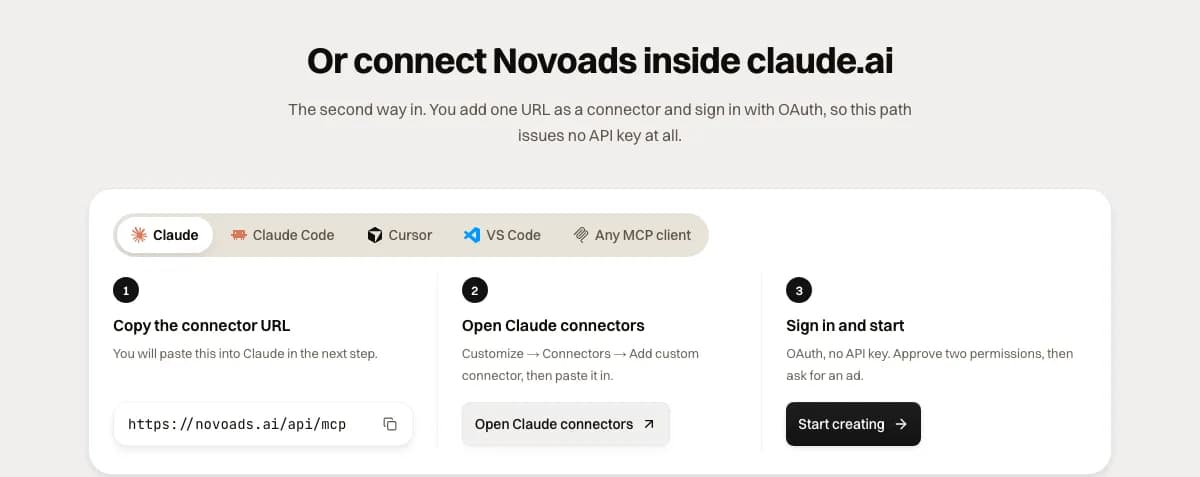 The claude.ai steps on the Novoads connector page, with tabs for Claude Code, Cursor, VS Code and any MCP client, captured 2026-10-28
The connector's tools, and which ones spend credits
The connector page lists 10 tools, and 5 of them spend credits. Those are analyze_ad, generate_video, generate_image, generate_captions and remove_background. The other five read, price or report, and they cost nothing to call. They include estimate_cost, which tells you what a generation would cost, what your balance is and whether it covers it. Credits come out of your plan, priced the same as in the app.
What a clip or an image costs
Credit prices as of October 28, 2026.
- 6 credits for a 6-second Seedance 2.0 Mini clip at 720p
- 10 credits for Mini's default 10 seconds at 720p (Mini renders at 480p or 720p only)
- 23 credits for 5 seconds of Seedance 2.0 at 720p, 45 at 1080p and 110 at 4k
- 1 credit for one image at the connector's default (GPT Image 2.5 Sunburst at medium quality), and 2 at high quality
Novoads is paid from the first month. Starter is $15 a month for 200 credits. That works out to 7.5 cents a credit. Plus is $49 a month for 1,000 credits. That brings a credit down to 4.9 cents, and the other plans are on the pricing page. Our test clip below cost 6 credits. On Starter that's 45 cents, and on Plus it's about 29 cents.
Our 6-credit run from Claude Code
We made the clip below on October 20, 2026, in a Claude Code session through the connector. It's a 6-second, 9:16 selfie-style clip of a woman in a bright kitchen holding up a plain sage-green insulated bottle. The session called estimate_cost first, then generate_video with Seedance 2.0 Mini at 720p, then get_generation for the finished file. It cost 6 credits, and you can see every call in our Claude ads skill post.
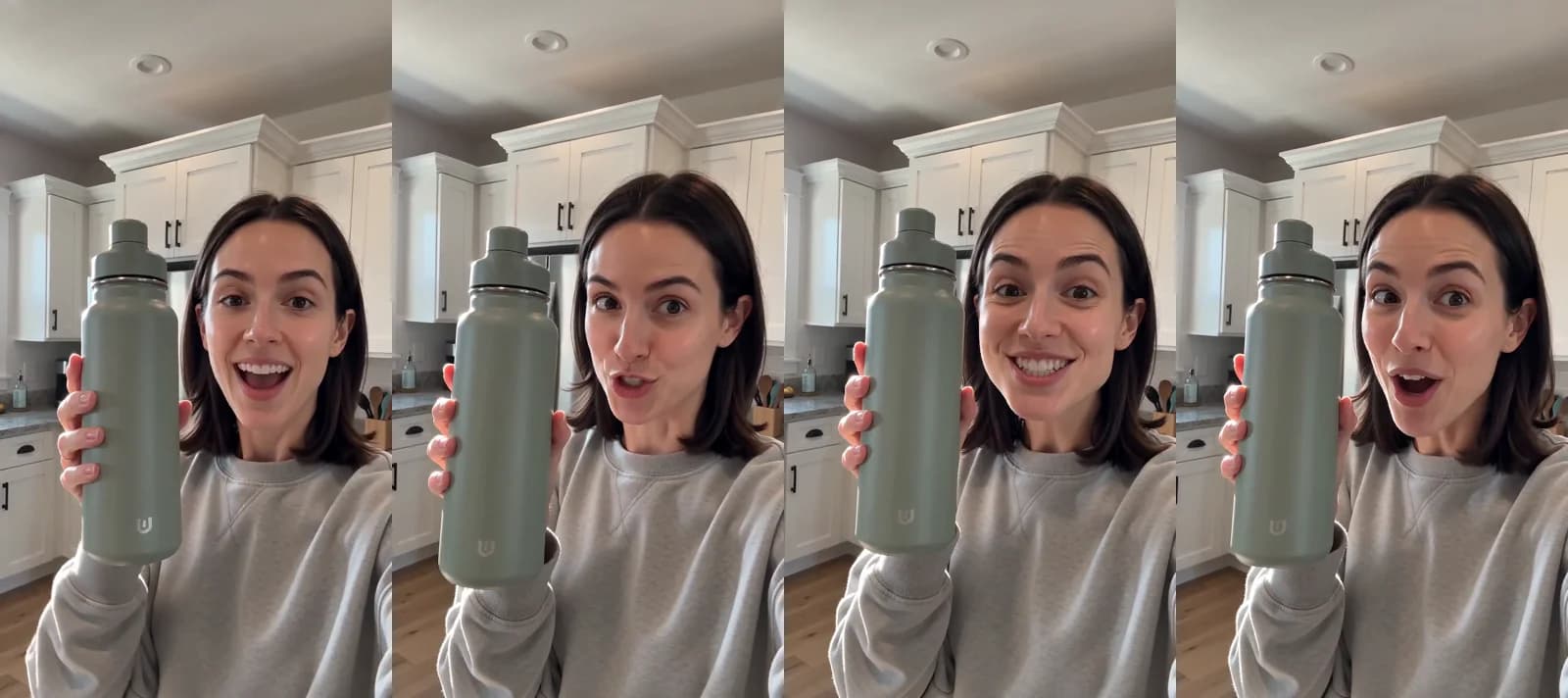 Seedance 2.0 Mini · made from Claude Code through the Novoads MCP connector (estimate_cost, generate_video, get_generation) · a 6-second 9:16 selfie clip with a sage-green bottle · 6 credits · rendered 2026-10-20
Checking the clip against Meta's specs
The file came back at 720x1280 and 6.08 seconds, with audio. Against Meta's Instagram Reels spec, it passes on three counts and misses on one.
- The 9:16 ratio matches.
- The length is well inside the Reels limit.
- Its width clears Meta's 250-pixel minimum for Reels ads under 30 seconds.
- It falls short of Meta's recommended 1440 x 2560.
Mini doesn't render above 720p. Seedance 2.0 can also render at 1080p and 4k. At 1080p you'd get a 1080 x 1920 file, which is still under Meta's recommendation. We'd test hooks at 720p and pay for a sharper tier only on the version that wins.
Getting the file into your ad account
get_generation returns a time-limited link to the finished file, and that file is what goes to Meta. Novoads doesn't upload, place or run anything on your ad account, so the hand-off is up to you or your agent.
- Download the finished file before the link expires.
- Upload it to your ad account's media library, either in Ads Manager or through the server if your account shows an upload tool. If you'd rather script that step, Meta's ads CLI uploads local media files when it creates or updates a creative, and it accepts .mp4 and .mov video.
- If the server handles video creatives on your account, have the agent build the ad paused and preview it in the Reels placement.
We haven't confirmed whether Meta's creative tool can take a link to the file instead of an upload, so we'd plan on uploading it. If Facebook is your main placement, start with our page on AI video ads for Facebook.
When a third-party Meta ads server fits better
Meta's server isn't the only way to reach Meta ads from an agent. Several companies run their own Meta ads MCP servers. We read the pages of four of them on October 28, 2026, and they pitch themselves quite differently.
- Pipeboard calls Meta's official connector the safest single-platform option and sells itself as the cross-platform choice, managing Meta, Google, TikTok, Snap and Reddit ads from one login.
- AdKit says every change is a draft by default and nothing touches your Meta account until you approve it. It connects as a reviewed Meta Tech Partner through the official Marketing API.
- Composio lets you connect Meta ads once and use that connection across different AI assistants. It lists a free Hobby plan with 100,000 tool calls a month and says it isn't affiliated with Meta.
- Adspirer mentions Meta's hosted server by name and pitches itself as a separate cross-platform route for workflows that also need Google, Amazon, LinkedIn, TikTok or ChatGPT Ads. It lists a free tier of 15 tool calls a month.
None of the Meta pages we read names a price for Meta's own server. Pipeboard's comparison table lists it as "Free (open beta)", but that's Pipeboard's description. What you do pay for is the ad budget, once something is activated.
If your account is Meta-only, we'd start with Meta's own server. A third-party server makes more sense when you need one login across several ad platforms, or a draft-and-approve screen your team can review. On the creative side, we compared 15 AI video MCP servers in a separate roundup.
Setting it up in the right order
- Check your Claude plan. Running Meta's server and a creative connector together in claude.ai takes a paid plan, since a Free account is limited to one custom connector.
- Add Meta's server, sign in with Facebook Login for Business, and ask the agent which tools your account has.
- Have an admin with full control set ads MCP server rules in Meta Business Suite, starting with a budget cap.
- Add the Novoads connector, run
estimate_cost, and make a 9:16 test clip at 720p. - Get the file into your ad account as described above, then activate the paused ad yourself once the Reels preview looks right.
You'll know the setup works when the Reels preview shows your clip on a paused ad and the campaign hasn't spent anything. If your team already makes creative with agent skills, our five-stage Claude Code workflow for Meta ad creative fits in before step 4.
Make your first clip at 720p, check it against the Reels row in Meta's table, and don't let the agent build the ad until it passes.
Frequently Asked Questions
Can Meta's ads MCP server make the video or image for an ad?
Not with the tools Meta listed on October 28, 2026. Its seven tool groups cover reporting, ad and campaign creation, catalogs, signals, help, A/B tests and activity logs, and none of those tools generates media. The server works with images and videos that already exist, so you make the 9:16 creative first (through the Novoads connector in the same Claude session, for example) and then upload the file to your ad account.
Key Takeaways
- Meta announced its ads AI connectors, including the ads MCP server at mcp.facebook.com/ads, in open beta on April 29, 2026. We found no general availability announcement on Meta's pages as of October 28, 2026.
- Meta's help article lists ChatGPT, Claude, Claude Code and Perplexity as supported agents. A Free claude.ai account is limited to one custom connector, so running Meta's server next to a creative connector in claude.ai takes a paid Claude plan.
- Everything the server creates starts paused, and activating it is what starts spending budget. An admin with full control can block agent actions or cap budgets per ad account in Meta Business Suite.
- None of the tools on Meta's category pages generates an image or a video. The 9:16 creative is the half you bring, and it has to meet Meta's specs for the placement.
- Our test clip cost 6 credits (45 cents on Starter) through the Novoads connector in Claude Code. You upload the finished file to your ad account yourself, because Novoads doesn't place or run ads.