Suno Prompts for Ad Music: Beds That Leave Room for a Voice
How to write Suno prompts for a bed under a voice-over, from Suno's advice on leaving air for narration to the v6 models, the Variety slider and names that may stop a song, plus a music request we ran in Novoads.

Mauricio Valdivia
·13 min
The Suno prompt pages we read never mention a voice-over
The search results for "suno prompts" that we could open on November 3, 2026 were all written for songs. One is a Suno user's playlist that shows the style line behind each track, one is a YouTube tutorial (we read its description, not the video) and one is a prompt-builder site. Nothing we read on those three pages gives a prompt for music that sits under someone talking. A Reddit thread and a Medium post near the top wouldn't open for us.
Suno's own instrumental generator page does have a line for it. Under the heading "Give the picture a musical bed," it says, "Mention whether the arrangement should leave air for narration or make room for a visual change." The page has no date and names no model, so it isn't v6 guidance. The Internet Archive's copy from September 22, 2026 already has the same sentence. And the page never mentions ads, so using the line for an ad is our own step.
What we say about Suno comes from its own pages, read on November 3, 2026, and from Internet Archive copies of guides it has since taken down. We date each help article by its last edit. We didn't test Suno's app for this post. The only run in it is ours, a music request we sent through the Novoads API on October 31.
Suno's Create screen and its prompt boxes today
Several of Suno's help articles on making music were edited on September 9, 2026, the day Suno announced v6. Older ones are still up and describe earlier layouts, which is why we date each one.
Simple, Advanced and Sounds, and the older Custom mode
Suno's article on Sounds, edited September 9, 2026, says, "At the top, you will find Simple, Advanced, and Sounds." The v6 FAQ adds, "You can give complex and diverse styles/instructions to v6 using Simple mode." We take that to mean you can write a whole scene into Simple mode.
Articles edited December 19, 2025 call the fuller form Custom mode, where you get "a space to enter your own lyrics" and can "Toggle Instrumental if you prefer not using lyrics." Since these pages don't say whether Advanced is Custom under a new name, we use each page's own word for it.
v6, v6-wild and v6-mini, by plan
Suno's v6 FAQ says, "All models prior to v6 have been retired." Its article on current models, also edited September 9, 2026, describes the three that are left.
- v6 is "our most advanced model," with "stronger control and precision when you want your idea to come through clearly." It's for Pro and Premier subscribers.
- v6-wild "Leans into unexpected choices, genre-blending, and results that push further from the prompt," says Suno's article on what's new in v6. It's for Pro and Premier too.
- v6-mini is "Available for all users."
The current-models article's tip is "Start with v6 when you want the most control over your result, or try v6-wild when you're looking for a creative surprise." For a bed under a voice, we'd start on v6, because a take that wanders from the prompt is harder to talk over. Each generation gives you two songs, and our Suno pricing breakdown has what they cost on each Suno plan. Our post on the v6 launch covers what else changed.
The Variety slider and your style tags
The v6 FAQ names a control that changes your style prompt for you. "The Variety slider is designed to introduce variety in your outputs by adjusting and updating your style prompts," it says, adding, "If you'd like to retain full control of your style tags, reduce the Variety slider to 0." You chose the instruments and the energy of an ad bed on purpose, so we'd set Variety to 0 for the first take and raise it only when the takes start to sound alike.
Song length and the style box
Suno says all three v6 models "support up to 8 minutes per generation," and its article on song length adds, "Use Extend to pick up where your song leaves off and add more music to the end." Want a shorter song? None of the v6 articles we read gives a way to ask for one. A release note dated July 20, 2026 says, "Drag the new Duration slider in the Create form to pick your song length," and marks it "Available on Web using V5.5 model," which came before v6. We couldn't find a Suno page that says whether the slider works with v6, so for a short ad, plan on trimming the take yourself.
We found no character limit for the style box on the Suno pages we read. If you see a number elsewhere, treat it as somebody else's. Suno's glossary, edited November 17, 2025, asks for precision instead. "The more specific your musical vocabulary, the more control you have over your Suno creations!"
Section labels and older advice, with their dates
Labels for verses, choruses and endings
A release note from July 9, 2026 lists "Song structure labels" and says, "Add labels like 'Verse' and 'Outro' to organize your lyrics," with no brackets. Square brackets show up in Suno's older hub guide. The Internet Archive's copy from December 13, 2025 says, "For example, you can tag [Verse], [Chorus], [Bridge] to help it understand your song flow." That guide's address now opens Suno's home page. The only bracket we found on a live Suno page is in a release note from September 19, 2024, which suggests "including [female vocals] in the Lyrics section and excluding 'male vocals' in Exclude Styles."
For an instrumental bed, you'll mostly leave the lyrics box empty anyway. Suno's archived guide to making beats, in a copy from February 28, 2026, says, "If you're working in Custom mode, just leave the lyrics box blank." So the shape of a bed has to go in the description.
Sliders, the glossary and the beat guide
- Creative sliders. An article edited June 3, 2025 says, "Try Creative Sliders while making music in Custom mode," with "Weirdness goes from Safe to Chaos" and Style Influence running "from Loose to Strong." The v6 articles we read don't mention either slider, so check your own Create screen before you plan around them.
- The glossary. Edited November 17, 2025, it says to "Specify instrumentation for desired textures," setting "sparse piano and vocals" against "dense orchestral arrangement," and to "Combine tempo terms with genres."
- The beat guide. The Internet Archive's copy from February 28, 2026 says, "A strong prompt follows this order: tempo, genre, rhythm style, instruments, and mood." Its beginner example is "90 BPM hip hop beat, deep kick, crisp snare, warm bass, minimal melody."
Example prompts from Suno's own pages
Suno's own examples read more like a short description than a stack of tags.
- "A synth pop song about having fun all night" (Simple mode article, December 19, 2025)
- "an ethereal electro hypnotic instrumental with sweeping pads" (Android Simple mode article, December 19, 2025)
- "Make a song that feels like midnight on a rooftop" (v6 FAQ, September 9, 2026)
The undated beat maker page says, "A useful beat description can be short and specific at the same time. Name a style, mood, energy level and tempo feel, then add an image or setting that gives the track character."
Writing a bed that leaves room for the voice
What Suno's instrumental generator page says
This is one of Suno's tools pages, with no date and no model named. Read it as advice on how to word the description. Its section "Give the picture a musical bed." opens, "When the main event is a voice, image or live moment, an instrumental can give it shape without supplying a vocal of its own. For a podcast, describe a bed that leaves room around speech. For a video or presentation, tell Suno what the viewer is seeing and when the music should feel lighter, warmer or more active." The next paragraph holds the line this post is built on.
Plain language works well when it carries a picture. Describe a rainy rooftop, a sunlit kitchen or a crowded night market, then add the instruments and energy that belong there. Mention whether the arrangement should leave air for narration or make room for a visual change. If the result leans too busy, revise the description toward a lighter feel. If it misses the scene, swap the instruments, tempo or mood and generate again. You are giving the music a job, not filling a blank space.
The instrumental switch comes up in the page's opening paragraph. "Name the style, mood, instruments, tempo, energy or scene you have in mind, then turn on the instrumental option for a song with no vocals." The page never says ad, commercial or voice-over, and it mentions narration only once, in the line above.
How we turn that advice into an ad bed
The steps and prompts in this section are ours. We haven't run the prompts in Suno, so treat them as a first draft to test against your own voice-over.
- Start with what the viewer sees. The page asks for a picture, so describe the shot, like a bathroom shelf in morning light or a phone on a kitchen table. A label like "skincare ad" leaves the scene to chance.
- Give the music its job. Say whether it plays under the voice all the way through or comes up at the end when the voice stops.
- Ask for the air in Suno's own words. Write "leave air for narration" into the description, keep the melody simple and name the instruments that carry the track.
- Mark the visual change. Name the moment the product appears or the screen switches, and ask the music to lift there.
- Ask for an ending you can cut on. Suno's archived guide to royalty-free music, in a copy from December 13, 2025, says, "You can also add notes for transitions such as fades, rises, drops, or clean endings."
- Use each box for its own job. Put the genre, instruments and tempo feel in the style line, switch the instrumental option on and list vocals under Exclude Styles, where an article edited December 19, 2025 says to "Enter any information (instruments, etc) that you do not want in your track."
Four ad-bed prompts we wrote and haven't run
None of them names a brand, an artist or a song, and each one assumes you've listed vocals under Exclude Styles and switched the instrumental option on.
- Skincare serum, under a calm voice. "Soft, warm acoustic instrumental for a short skincare video. A sunlit bathroom shelf in the morning, felt piano, light brushed shaker, slow and calm. Leave air for narration throughout and keep the melody sparse. Lift gently when the serum bottle appears, then a clean ending."
- Budgeting app demo with a screen change. "Light, modern electronic instrumental under a voice-over for a phone app demo. Soft plucked synth, muted kick, steady mid-tempo pulse. Leave air for narration. Make room for a visual change when the screen switches from bills to savings, then end on a short resolved chord."
- Founder story at a coffee roastery. "Warm folk instrumental for a founder's story at a small coffee roastery at dawn. Fingerpicked acoustic guitar, upright bass, quiet room tone. Leave air for narration, a gentle rise under the last line, slow fade at the end."
- Sneaker sale with a fast read. "Punchy hip-hop instrumental for a sneaker sale video. City pavement at night, tight drums, deep bass, short muted guitar stabs. Keep the top of the mix open under a fast voice-over, hit harder on the cut to the product shot, stop dead on the last beat."
When the bed crowds the voice
Suno's page has a fix for a busy take, "revise the description toward a lighter feel," and in its section on backing tracks you sing or play over, it says to "change one decision at a time." We'd add two habits. Take an instrument out before you add another adjective, so you hear what that one change did. And judge each take with the voice-over playing on top, because a bed that sounds thin on its own can sit just right under a voice.
Artist names, brand names and Suno's terms
Names that may stop a song
Suno's moderation article, edited December 19, 2025, says songs "may not generate" if they include certain things, and its list starts with "The names of well known artists or people" and "Copyrighted or trademarked terms." The wording is "may not," and the article is older than v6. The v6 FAQ talks about references instead. "v6 can understand the feeling behind a reference and use it as the starting point for something original," it says. Suno's community guidelines, updated October 1, 2026, put "impersonating other people, artists, or organizations" on the list of what Suno prohibits.
For a bed, we'd describe the sound itself (the instruments, the era, the tempo feel and the mood) instead of naming who made it famous. That way, nothing in the prompt depends on a name that moderation may stop.
A jingle that sings your brand's name
Can a song sing your own brand's name? Suno doesn't say. The moderation article's line on "Copyrighted or trademarked terms" makes no exception for a brand that owns the mark, and we found nothing else on Suno's pages that settles it. Until Suno does, we'd keep the brand in the voice-over and the music instrumental.
Commercial use and the advertising line
Suno's FAQ on upcoming changes, edited August 10, 2026, says, "For any song that you download from the platform as a paying subscriber, you have the commercial rights to the music and can use it for commercial or personal use." On its pricing page, read November 3, 2026, the Free plan's card says "No commercial rights," and the Pro and Premier cards list "Commercial use rights." What a track costs on those plans is in our Suno pricing breakdown.
Suno's terms were last revised August 10, 2026 and have been in effect since September 3, 2026. They list things "You agree to not use the Service to" do, and one of them reads "advertise or offer to sell or buy any goods or services for any business purpose that is not specifically authorized." For the wider rights questions around AI music in ads, see our posts on the German ruling against Suno and on Sony's suit against Udio.
Speech and Sounds for ad makers
Speech, Suno's beta for spoken audio
On October 1, 2026, Suno opened its Speech beta to everyone. Its blog post says, "Speech lets you create spoken audio set to original background music," and that you "type an idea, a poem or something you've written, then describe the voice and musical style you have in mind." It also says, "And beta really does mean beta." We didn't try Speech for this post, so we can't say how its voices hold up reading a product script.
Sounds, for one-shots and loops
Sounds is the third option at the top of the Create screen. Suno's release note on it is dated January 27, 2026, and its help article, edited September 9, 2026, still calls it "a new, experimental feature." You choose between "One Shot (a single, short sound) or Loop (a seamless repeating clip)," and for "musical elements or background beds," the article suggests Loop.
For an ad, we'd reach for the one-shot, like the article's own example of a "cinematic whoosh transition sound" on the cut to your product. If a sound comes back the wrong length, the article says to "specify duration" in the prompt. The January release note says, "Pro or Premier subscription required." The September article names no plan, so check your own account before you build an ad around it.
How Novoads makes the bed under your voice-over
Where you can make music in Novoads
You can make a bed in Novoads two ways, with a call to our API or by asking for one through our MCP connector, which works with "Anything that speaks MCP over Streamable HTTP with OAuth," in the words of our MCP page. Our roundup of MCP servers for making ads compares it with the others. The editor doesn't generate music. Its music dialog has two tabs, Stock (Pixabay) and Upload, so a bed you made in Suno goes into your video through Upload. The picture under it takes its own kind of prompt, and our Grok Imagine prompts post reads one model's rules for that.
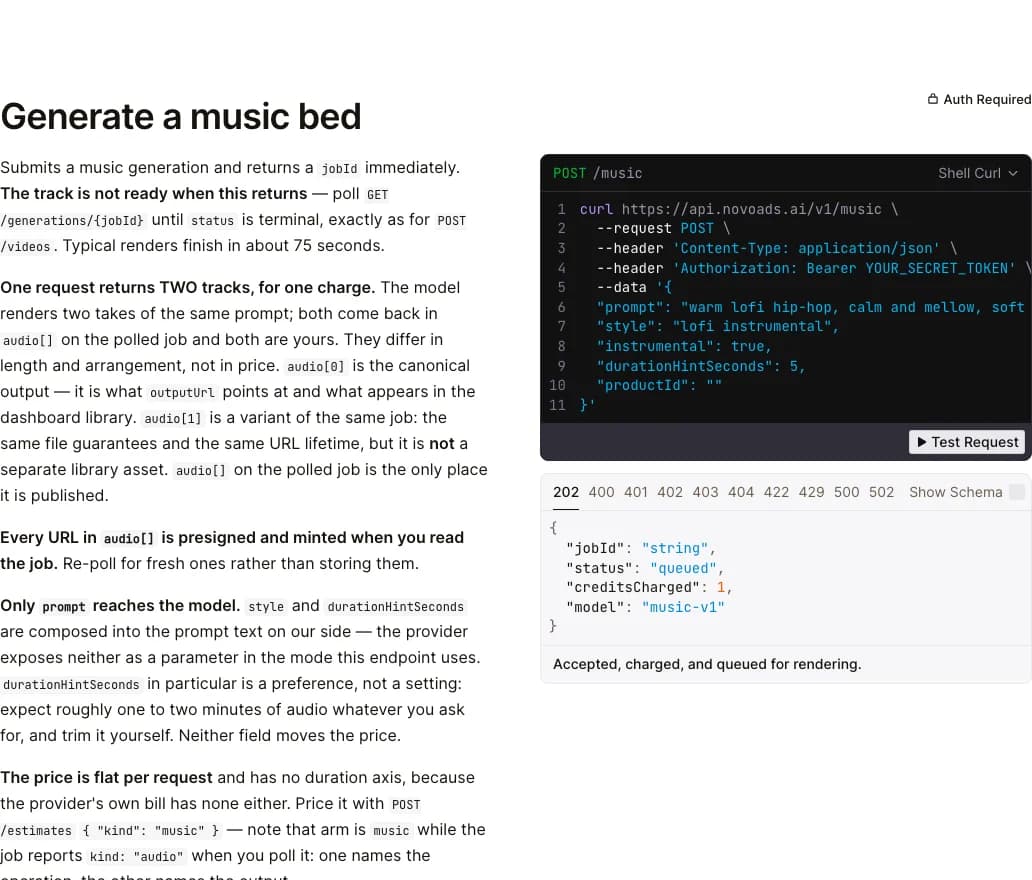
The music section of our API docs with its sample request and reply, screenshot taken 2026-11-01
The model gets a single piece of text. We fold your style line and the length you ask for into the prompt, and the provider caps that whole text at 500 characters, so leave room for the style line. Asking for a length doesn't set one. The API docs expect takes of about one to two minutes whatever you request, and they tell you to trim the audio yourself. Each request costs 2 credits for a pair of takes, whatever their length, and the first take is the one that shows up in your dashboard library.
Our October 31 request
On October 31, we sent our endpoint one prompt for a cheerful lo-fi pop instrumental to play under a wellness creator's Instagram story, starting on clean electric guitar. The job was done about 34 seconds after we sent it, well under the 75 seconds the API docs give as a typical render. It cost 2 credits. Both takes came back titled "Sunlit Sprout" by the model, and they ran 165 and 166 seconds. That's past the docs' one to two minutes, so for a short ad you'd cut the section you like out of a longer take.
What a bed costs on each plan
You pay for Novoads from your first month, on any plan. These are our prices as of November 3, 2026. On Starter, you get 200 credits a month for $15. That's $0.075 a credit, so one music request comes to 15 cents. On Plus, you get 1,000 credits a month for $49. At $0.049 a credit, a request costs about 10 cents. The same credits pay for the video and the voice-over in your ad, and our pricing page shows what each plan adds.
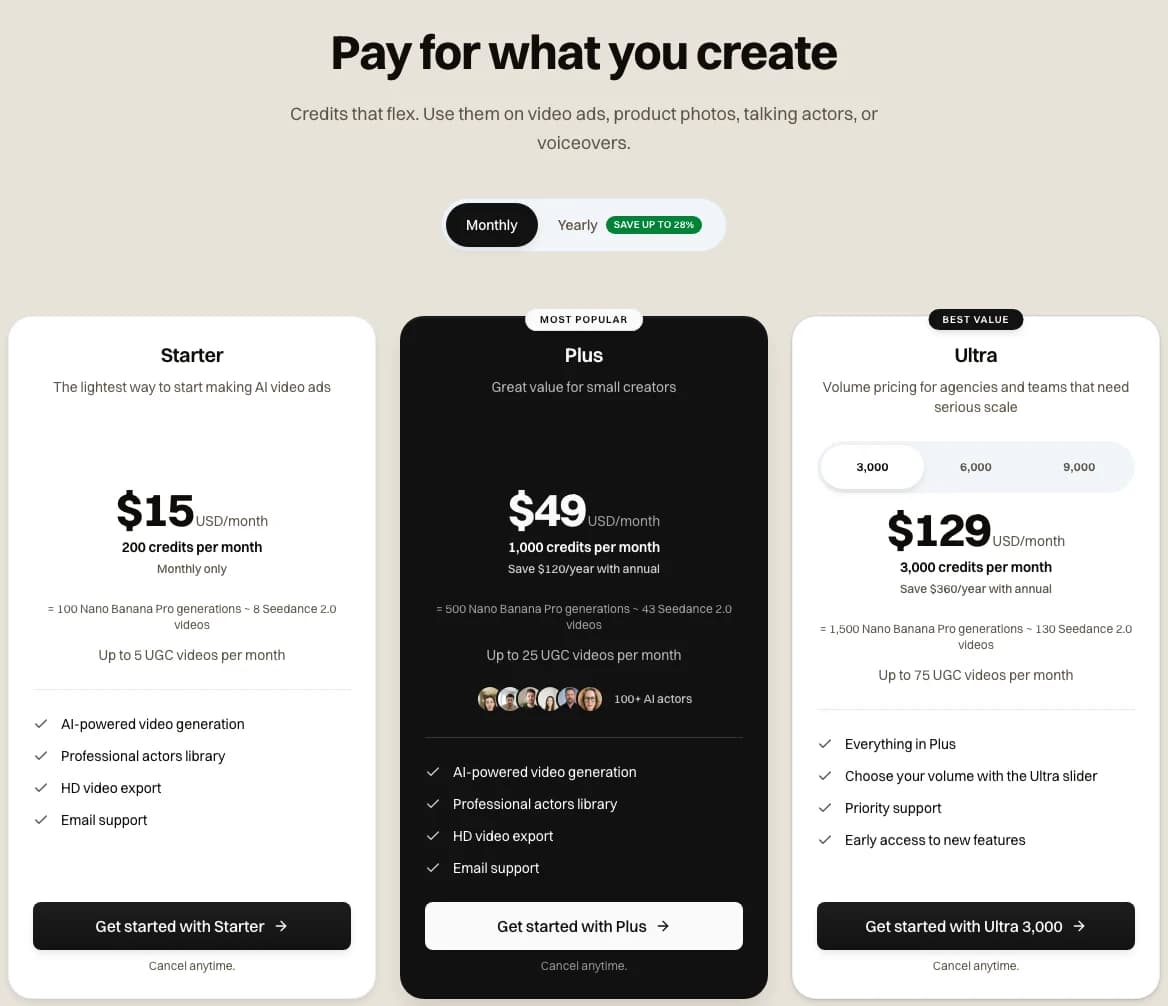
Starter, Plus and Ultra on our pricing page with Monthly billing selected, captured 2026-11-03
Make the bed and the ad from one balance
A music request is 2 credits for two takes, drawn from the same monthly credits as your video and voice-over. See what each plan adds.
Compare plansWhat to put in your next ad-bed prompt
Put the scene the viewer sees in the description, then a few instruments, the energy and the words "leave air for narration," and say where the product appears and how the track should end. Switch the instrumental option on, set Variety to 0 if you're on v6, and describe the sound instead of naming an artist. When a take crowds the voice, change one thing and generate again, and judge every take with the voice-over playing on top.
Frequently Asked Questions
How do I write a Suno prompt for music under a voice-over?
Switch on the instrumental option and describe the scene the viewer sees, the instruments and the energy. Suno's instrumental generator page also says to mention whether the arrangement should leave air for narration or make room for a visual change, and to revise toward a lighter feel when a take comes out too busy. That page doesn't mention ads, so using the line for an ad is our own step. We'd add where the product appears and how the track should end, set Variety to 0 on v6, and describe the sound instead of naming an artist.
Key Takeaways
- Suno's instrumental generator page tells you to mention whether the arrangement should leave air for narration or make room for a visual change. The page has no date, though the line was already there on September 22, 2026. It never mentions ads, so using the line for an ad bed is our own step.
- Suno's v6 FAQ says v6 and v6-wild are for Pro and Premier, and v6-mini is available to all users. It also says to turn the Variety slider down to 0 if you want full control of your style tags.
- We found no character limit for the style box on the Suno pages we read. The v6 articles among them give a ceiling of 8 minutes and no way to ask for a shorter song, so plan on trimming a take to fit your ad.
- Suno's moderation article says a song may not generate if it names a well-known artist or uses trademarked terms. Nothing we read says whether a jingle may sing your own brand's name, so we'd keep the name in the voice-over.
- In Novoads, a music request through the API or the MCP connector costs 2 credits and returns two takes. Ours from October 31 came back in about 34 seconds, and both takes ran long enough to need trimming.