Grok Imagine Prompts: xAI's Order for Stills and What a Clip Costs
xAI's own guide says to open a Grok Imagine still with one sentence that names the subject, its form, what holds it and the setting. We lay out that order, price a clip at xAI's per-second API rates and show a timed multi-shot prompt we ran on Seedance 2.5 in Novoads.

Mauricio Valdivia
·12 min
xAI's guide starts every new still with its subject
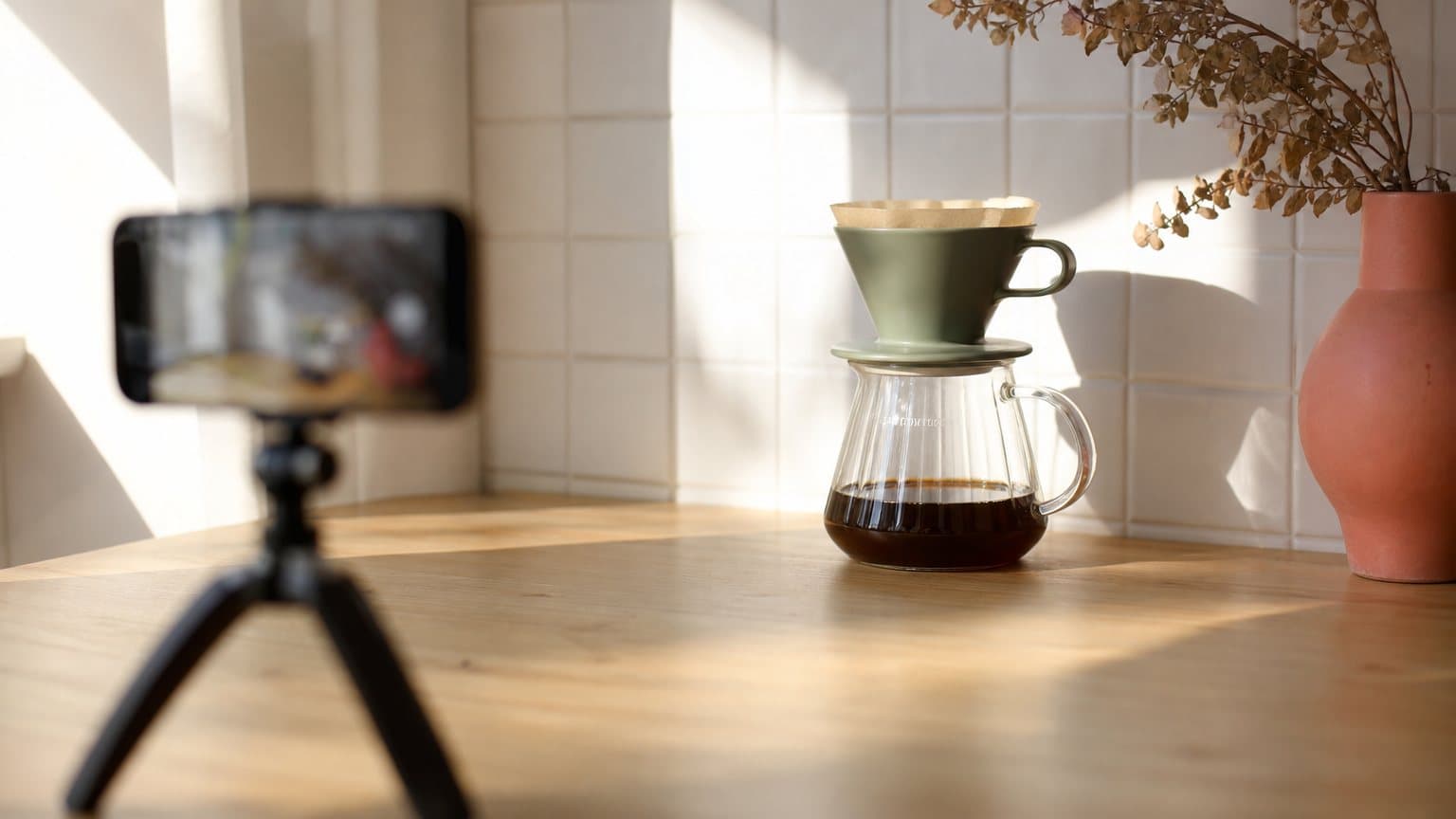
Under the heading "Write the subject first," xAI's Image Prompting Guide says, "Open with one sentence that names the subject, the state or form it is in, what holds or supports it, and the setting." Its example reads, "A matte sage-green ceramic pour-over dripper sitting on a glass carafe half full of coffee, on a pale oak counter against white square tile." The guide was last updated October 8, 2026, and it's written for stills made with Imagine Image 2.0, either a new image from text or an edit of one. It doesn't cover video, and xAI's video pages don't have a prompting guide of their own.
The prompt pages that rank for this search hand out lists of prompts to copy. None of the ones we opened quotes xAI's own order, and none prices a clip at xAI's per-second API rates. We didn't test Grok Imagine for this post. What we say about its prompts, prices and plans comes from xAI's docs, read November 3, 2026, and from dated Internet Archive copies of x.ai's plan and legal pages. The film near the end is one we ran ourselves, on Seedance 2.5 in Novoads.
The order xAI gives for a new still
The opening sentence and its four parts
The guide is part of xAI's developer docs, which now carry the SpaceXSI name. As we read its dripper line, the dripper is the subject, sitting is its state, the glass carafe holds it up, and the oak counter against white tile is the setting. After that sentence, the guide asks you to "describe the subject as something you could point at and recognize."
Why lead with the subject? The same page gives the reason. "A prompt that leads with mood, film stock, or a list of things to avoid produces a styled scene whose subject is a stand-in." The guide also asks for "prose that describes one photograph."
The guide's six-part order for a series
For a series of images, the guide says to "keep the same order in every prompt of a series," and it lays that order out in six parts.
- "Subject. What it is, its form, what holds or supports it, the setting."
- "Details and focal point. Key elements, materials, count, and the camera angle, written as one cluster that fills the frame."
- "Art direction. The color fields and the two or three props, each named: oak counter, white tile, linen towel, one brass spoon."
- "Light. The source, its direction, and how hard it is, for example hard afternoon sun from the left with on-camera fill flash."
- "Color. The subject's colors and the background colors as separate fields: sage green, dark amber, pale oak, white."
- "Composition. Crop, what the frame cuts off, and what stays sharp. One scene."
Under light, the guide adds, "Say what the highlights and shadows look like, and ask for an exposure bright enough to read the subject."
Two other orders on the same page
An edit follows a different order. "Edit when the subject and the layout are already right and one to three details need to change. Lead with those changes. Follow with one sentence that keeps the same subject, angle, crop, and prop placement." The guide's example swaps a watch strap. "Replace the metal watch strap with a brown leather strap with cream stitching. Keep the same wrist, the same shirt cuff, the same angle, and the same desk."
A single still that isn't part of a series gets a shorter outline. "A single still outside a series needs four to six sentences: subject and details, then setting, then light, then crop." In the guide's sneaker example, the first two sentences describe the shoes, and the setting doesn't show up until the third, "They stand on pale gray concrete against a warm off-white wall." So the subject leads every new still on the page, though it doesn't always share a sentence with the setting. An edit leads with the change instead.
More of xAI's advice on stills
Long avoid lists and vague materials
The guide argues against negative prompts. "A long avoid list is easy to ignore, and it spends the prompt on objects that then show up anyway." It says to keep a constraint only when it's a count or a specific object, and to pair it with the thing you want, as in "one stainless spoon resting on the saucer."
Materials work the same way. The guide tells you to describe the material, and it sets "brushed steel with fine horizontal grain," which "gives the model a surface to render," against "not shiny," which "gives it nothing to draw."
Aspect ratio, quality and the price of a still
The guide says to lock the aspect ratio across a series so the images hang together, and that 3:2 suits most photographs. The automatic quality setting, it says, currently gives you low quality on a new image and medium on an edit. When fine detail has to be recognizable, it tells you to pin medium quality and 2K.
Those settings also decide what a still costs on xAI's API. xAI prices Imagine Image 2.0 per image, and these are the rates as of November 3, 2026.
| Size and quality | Price per image |
|---|---|
| 1K, low | $0.04 |
| 2K, low | $0.06 |
| 1K, medium | $0.06 |
| 2K, medium | $0.08 |
Each input image, as in an edit, adds $0.01.
Checking a still and changing one detail
The guide's check on a finished image starts with one line. "The score that matters is whether the subject in the picture matches the subject in the prompt." The count has to match, each object has to be the one the prompt named, the picture has to be bright enough to see the subject, and "a matching background with the wrong subject is a miss."
When a still misses, the guide says to "save the prompt next to the image" and, on the next pass, to "change only the detail that failed and leave the rest of the original prompt in place." For ad work, that's the habit we'd keep above all the others, saving each approved prompt beside its image and changing one detail per retry.
Still prompts for ads, written to xAI's guide
We wrote these three prompts for this post, following the guide, and we haven't run them. Treat them as drafts to test.
A drink can for a feed ad, in the series order
This one keeps the series order, so its first sentence carries the subject, its form, what holds it and the setting.
A tall matte-white can of yuzu sparkling water standing in a shallow glass tray of crushed ice, on a white terrazzo bar counter against pale blue tile. The can is beaded with condensation, its plain yellow band faces the camera, and two lime wedges rest against its base, shot at counter height. One striped paper straw and a short glass tumbler stand beside the tray. Hard late-afternoon sun from the right throws a crisp shadow to the left, with an exposure bright enough to read the beads of water. The can is matte white with a yellow band, and the background is pale blue and white. A vertical crop that cuts the tumbler at the left edge, with the can sharp and the tile soft.
For a feed ad in 4:5, we'd generate at 3:4 and crop. An archive copy of xAI's API page from October 19, 2026, shows no 4:5 or 1.91:1 option. It says to crop those two from 3:4 and 16:9.
Earbuds for a sale post, as a single still
This one stands alone, so it follows the shorter outline, with the setting in its own sentence after the subject and its details.
An open white wireless earbuds case with both earbuds seated inside, resting on a stack of two clothbound books, shot from a high three-quarter angle. The lid stands open at a right angle, a small green charging light glows on the front, and the right earbud is turned slightly outward. The books sit on a walnut desk against a warm gray wall. Soft window light from the left leaves a gentle shadow on the right side of the case. An 85mm product photograph in a square crop, with the case and the earbuds sharp and the wall soft.
An edit for a second variant
This edit is for the can image, once its subject and layout are right. It leads with two changes and ends with one sentence that keeps the rest.
Change the tile behind the can from pale blue to warm terracotta, and swap the lime wedges for two slices of pink grapefruit. Keep the same can, the same tray of ice, the same angle and the same crop.
Sending the can image as the edit's input adds that $0.01 to the price of the still.
xAI's own ad prompts and the limits around them
Two Quality Mode prompts from May
xAI's own ad examples come from its May 6, 2026, post on Quality Mode, which pitched it as a way to "generate hero images, social assets, icons, and ad variations at scale." One example builds an event ad from two reference images.
Create an event ad for the Cybertruck in the first image. Maintain the same brand style as image 2 but make it Mars themed. Change the tagline to something different but maintain the tagline placement.
The other keeps one person the same in a casual, UGC-style shot.
Exact same woman, exact face, exact body, exact outfit from the reference image. UGC style, eating a piece of leftover birthday cake, picture from top down POV someone taking it, imperfect picture
Written for a model the API has retired
xAI launched Quality Mode as a model of its own, and the post said it "is now live for enterprise developers and teams via the Grok Imagine API." xAI's migration note says that model name was retired from the API effective November 2, 2026, and that requests sent to it now go to Imagine Image 2.0 with quality set to low. Our earlier post on Imagine Image 2.0 for ad creative covers that model's launch, and OpenAI's image model gets the same reading in our GPT Image 2 prompts post.
Reference images, and no published prompt length
How many reference images xAI accepts depends on the surface, and its pages from different dates give different numbers.
| Surface | Reference limit | Where xAI says it |
|---|---|---|
| Video 1.5 with references | Up to seven per generation | Launch post, July 31, 2026 |
| Video 1.5, reference-to-video | Up to 14 images and 3 voice references | Video overview, read November 3, 2026 |
| Image editing | Up to 5 source images per request, up from 3 | API release notes |
When a prompt uses several references, xAI's reference-to-video page says to refer to each image by its position in the list, starting at <IMAGE_0> for the first, and to give each one a single role and a fixed place in the scene. Our post on reference-to-video upload rules covers the same job on Seedance.
We didn't find a maximum prompt length anywhere in xAI's docs. Its video docs list "a prompt that is too long" among the reasons a request can be rejected, but they don't give the limit.
Video prompts and what one clip costs on xAI's API
What xAI's video pages tell you to write
There's only one prompting guide in xAI's docs, the one for images, and the video pages give shorter advice. The video overview says to "describe the shot, including camera movement, lighting, and sound." xAI's June 3, 2026, post on the Grok Imagine 1.5 preview says to "describe the camera move, the pacing, and the sound design, then set your resolution and clip length." For image-to-video, the still you send "becomes the first frame, and the prompt describes what happens next." Generated clips come with an audio track by default.
So the subject-first order applies only to stills. For a clip, xAI asks for the shot, the camera, the light and the sound. Our post on camera movement prompts goes deeper on direction words, and our Suno prompts guide covers writing a music bed if you'd rather add the sound afterward. xAI recommends Video 1.5 Lite for simple videos and Video 1.5 when you need references, voices, pinned frames or native 1080p.
Per-second prices by resolution
"You are charged for each second of video generated when using the API," xAI's model page says, and an image or video you send as input is charged too. As of November 3, 2026, xAI's pricing page (last updated October 10, 2026) lists these rates, in US dollars per second of output.
| xAI API model | 480p | 720p | 1080p |
|---|---|---|---|
| Grok Imagine Video 1.5 | $0.08 | $0.14 | $0.25 |
| Video 1.5 Lite | $0.02 | $0.03 | $0.14 |
Each input image adds $0.01 on either model. Video 1.5 renders 1080p natively from text or from a still, but its reference-to-video mode tops out at 720p. Video 1.5 Lite reaches 1080p by upscaling 720p.
What a clip comes to
A request runs from 1 to 15 seconds. The default is 8 seconds at 480p. The totals in this table apply the rates above, and the arithmetic is ours.
| Clip on xAI's API | Cost |
|---|---|
| Video 1.5, the default 8 seconds at 480p | $0.64 |
| Video 1.5, 8 seconds at 720p | $1.12 |
| Video 1.5, 8 seconds at 720p from one input image | $1.13 |
| Video 1.5, 15 seconds at 1080p | $3.75 |
| Video 1.5 Lite, 8 seconds at 720p | $0.24 |
xAI's own cookbook gives numbers in the same range. Its product-ad recipe starts from a single product photo and ends with an eight-second vertical ad, and xAI says a run "makes three images and one video, takes a couple of minutes, and cost about $1.35 when we ran it." Its talking-character recipe comes to "about 14 cents a second."
The API also means writing code. Requests are asynchronous, so you submit one, check back with the ID it returns, and download the clip when it's done.
Video in the Grok app and on xAI's plans
One weekly pool and a 720p cap
In the Grok app, a clip doesn't have a price of its own. xAI's FAQ says a change rolling out in June 2026 gives paid users "one shared weekly usage pool that you can spend however you like across any Grok product." It adds that "different products cost different amounts depending on how much compute that product requires." The pool shows as a percentage used, and once you hit the limit, the FAQ says you can pay as you go or upgrade to a higher subscription tier.
Resolution has a cap too. "720p videos automatically fall back to 480p once you hit the 720p cap for your tier." The FAQ doesn't say how large that cap is on any plan.
Two sets of xAI plans
New self-serve customers choose from The X Subscription plans, xAI's docs say, and existing Cursor, SuperGrok and X Premium plans continue, with switching optional. On November 3, 2026, those docs listed these prices for The X Subscription.
| The X Subscription plan | Price |
|---|---|
| Free | $0 |
| Plus | $8 a month |
| Premium | $30 a month |
| Super | $100 a month |
| Ultra | $200 a month |
These list prices leave out sales tax, and xAI's plan page says its prices don't include taxes or fees such as VAT.
What the plan cards say about video
In an archive copy of xAI's plan page from November 3, 2026, the Premium card lists "Make stunning AI images & videos." The Super card lists "Create 1080p, 15s videos." xAI's Grok page, in an archive copy from October 26, 2026, listed "Text-to-video up to 15 seconds at 720p" without naming a plan.
Watermarks and xAI's terms on Output
The watermark xAI adds in the app
xAI's FAQ says, "Generated images and videos include a Grok watermark to indicate that the content was created with AI. There is no setting to remove the watermark." It adds that "removing, altering, or obscuring the watermark or other provenance signals is prohibited under our Acceptable Use Policy."
The API page on watermarking covers a different case, saying "watermarking applies to text output from text generation requests." We didn't find a page that says whether images and videos made through the API carry the visible mark.
Attribution and AI disclosure in the terms
xAI's consumer terms were last updated October 27, 2026. An archive copy from November 2, 2026, carries this sentence on Output. "When using Output or SpaceXSI’s name, logos, trademarks, or other brand elements, you are required to obtain our permission and attribute your generation of the Output to the Service, as detailed in our Brand Guidelines." The same terms say, "When you generate Output using the Service, including through Agentic Actions, you may be required to apply or SpaceXSI may apply a disclosure stating that the content was generated or altered by artificial intelligence."
An archive copy of xAI's brand guidelines from October 19, 2026, says, "If you used Grok to generate text or images, please attribute them to SpaceXSI and Grok by displaying one of the following phrases in a legible and noticeable manner wherever the Grok-generated material is published or distributed." One of those phrases is "Created with Grok."
How we ran one timed prompt as a 20-second film in Novoads
Eight shots from one Seedance 2.5 prompt
A still prompt describes one photograph. A video ad with several shots needs a prompt that also says when each shot starts. We ran one in Novoads on September 8, 2026, on Seedance 2.5, a model we sell. We don't sell Grok Imagine, so this film isn't Grok output.
The prompt described a 20-second athletic brand film with no dialogue and no voiceover. The film is vertical, at 720p, and the prompt gave each of the eight shots its own start time. Between a white title card and a black end card, the shots include a sprint start beneath an overpass, orange shoes striding over a wet bridge, a puddle splash, the N mark painted across a concrete wall and two runners getting their breath back. The one reference image was our N mark, so the running label is a mock brand.
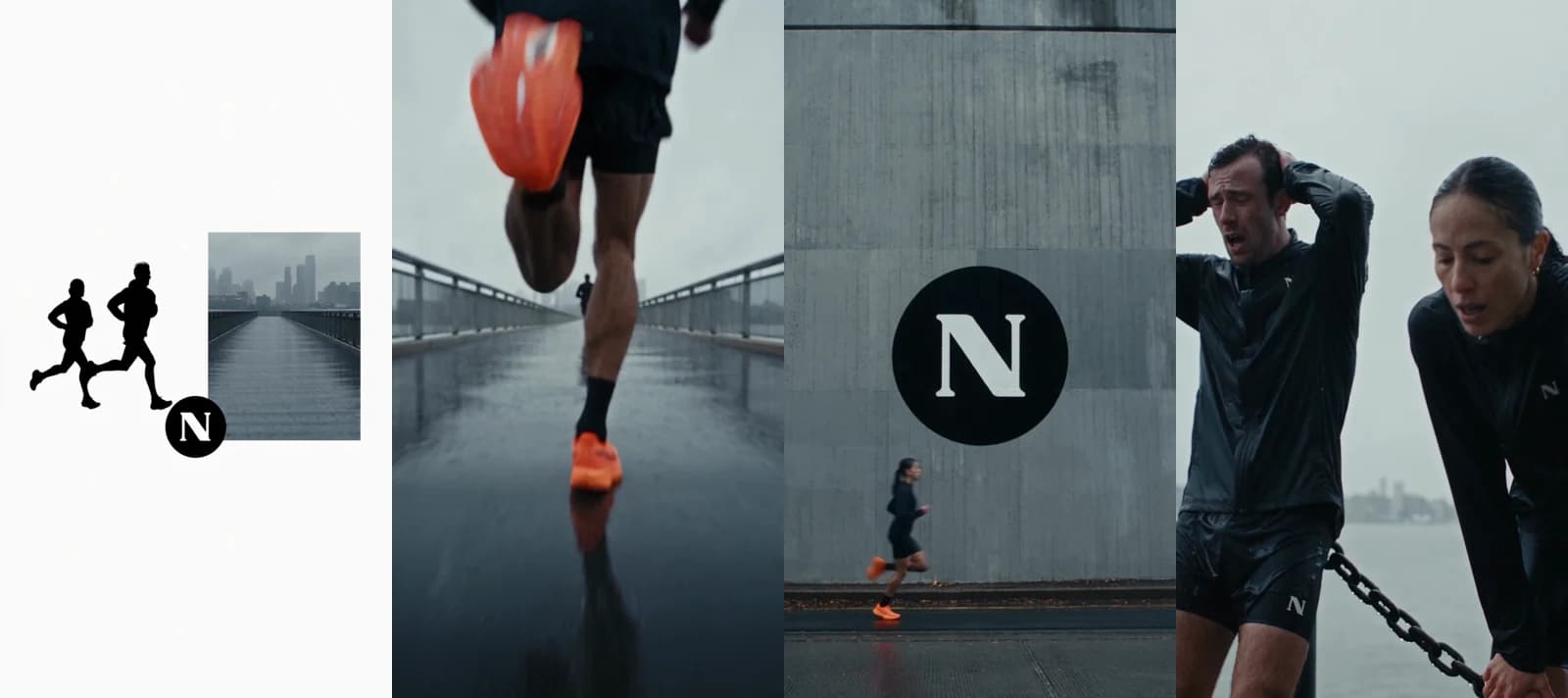
Made in Novoads with Seedance 2.5 · one timed prompt for a 20-second vertical film in eight shots, no dialogue · 720p · seven cuts, none more than 0.4 s off its timestamp · 140 credits today · rendered 2026-09-08
Where the cuts landed
We timed the cuts in the finished film. None of the seven misses its start time in the prompt by as much as half a second.
| Shot starts in the prompt | Cut in the film |
|---|---|
| 3 s | 3.4 s |
| 6 s | 6.0 s |
| 9 s | 8.9 s |
| 12 s | 12.0 s |
| 15 s | 14.8 s |
| 17 s | 17.0 s |
| 19 s | 18.9 s |
Every shot keeps the same black kit, orange shoes and logo, and the render came back in 7 minutes 12 seconds. The part we'd copy is the timing. Describe the film once, and give every shot its own start time. Our Seedance 2.5 prompt guide covers 30-second takes in Novoads, the video ad storyboard post turns a script into a shot list, and what Seedance 2.5 is covers the model.
What the film costs on our plans
You pay for Novoads from the first month. Starter is $15 a month for 200 credits, with monthly billing only. Plus is $49 a month for 1,000 credits. Billed annually, it's $39 a month. Ultra starts at $129 a month for 3,000 credits.
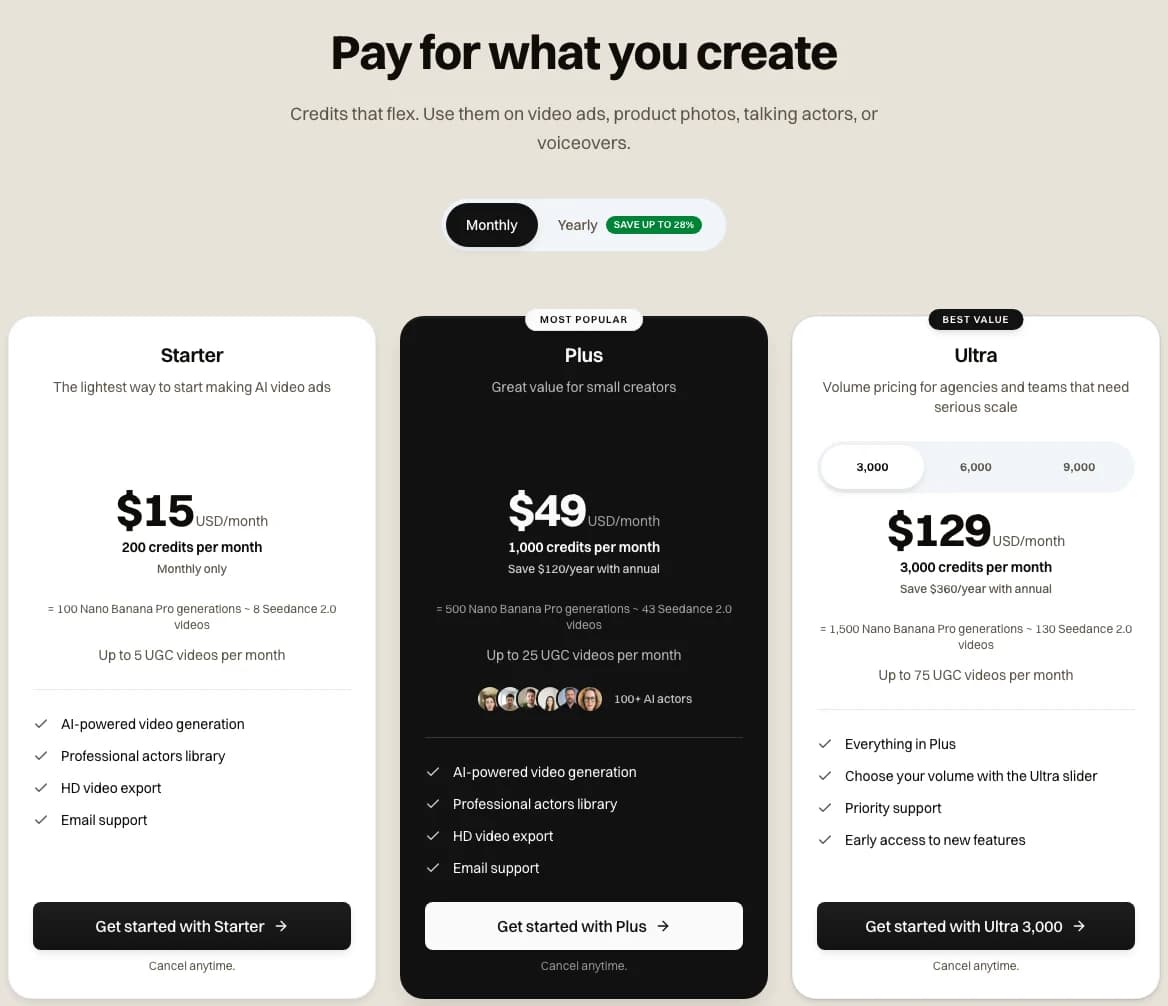
Our pricing page on the monthly view, where Starter is marked Monthly only and each card lists its credits · 2026-11-03
In Novoads, Seedance 2.5 at 720p costs 7 credits a second. So the 20-second film comes to 140 credits at today's price. The dollar figures in this table are our arithmetic, at $0.075 a credit on Starter and $0.049 on Plus.
| Seedance 2.5 in Novoads, 720p | Credits | On Starter | On Plus |
|---|---|---|---|
| One second | 7 | $0.525 | $0.343 |
| The 20-second film | 140 | $10.50 | $6.86 |
Starter's 200 credits cover one film like this a month, with 60 left over. Plus covers seven, with 20 to spare.
Per second of 720p video, xAI's API costs less than Seedance 2.5 does in Novoads, on either plan. But they're different models, and on the API you write the code that sends the requests and fetches the clips. One xAI request also tops out at 15 seconds, while this film ran 20 seconds from one prompt. You'll find every plan and its credits on our pricing page.
Time every shot in one prompt
Give each shot its own start time in a Seedance 2.5 prompt, and Novoads makes the whole film in one render. Starter includes 200 credits a month.
Compare plansFor a still on xAI's API, start from the guide's order and save each prompt beside its image. For a film with several shots, write each shot's start time into the prompt and check the cuts against those times.
Frequently Asked Questions
How should I structure a Grok Imagine prompt?
For a new still, xAI's Image Prompting Guide says to open with one sentence that names the subject, the state or form it's in, what holds or supports it, and the setting. For a series, it keeps one order in every prompt, starting with the subject and moving through details and focal point, art direction, light, color and composition. For an edit, it says to lead with the one to three changes, then keep the subject, angle, crop and prop placement the same. xAI's video pages don't have a prompting guide. The video overview just asks you to describe the shot, including camera movement, lighting and sound.
Key Takeaways
- xAI's Image Prompting Guide, last updated October 8, 2026, says to open a still with one sentence that names the subject, the state or form it's in, what holds or supports it, and the setting.
- That order is for stills, with two exceptions. An edit leads with the one to three details that change, and a single still outside a series puts its setting after the subject and its details.
- xAI's video pages have no prompting guide. They ask you to describe the shot, including camera movement, lighting and sound.
- Grok Imagine Video 1.5 costs $0.14 a second at 720p on xAI's API. By our arithmetic, an 8-second clip at that rate comes to $1.12.
- One timed Seedance 2.5 prompt in Novoads made a 20-second, eight-shot film, and every cut landed within half a second of its time in the prompt. That film costs 140 credits today.