GPT Image 2 Prompts for Ads: Write Them Like a Creative Brief
OpenAI's archived April guide says a GPT Image 2 ad prompt works best written like a creative brief. We ran OpenAI's own ad prompt and our rewrite, once each, and show what came back.

Mauricio Valdivia
·12 min
We rewrote OpenAI's own ad prompt and ran both
In April, OpenAI wrote a sentence on how to prompt GPT Image 2 for ads, and in the same section it published the ad prompt it ran. We could open two of the top five results for this search, and neither quotes that sentence or runs the prompt side by side with a rewrite. So we read OpenAI's guides, rewrote the prompt and ran both versions.
The sentence says to write the prompt like a creative brief. It comes from an April guide that OpenAI has since marked as archived. OpenAI's current guide doesn't repeat the line, so we quote both and say which is which.
We read those results and OpenAI's guides on November 3, 2026, when the guide with this advice carried an archive banner. Both images in this post come from our own run in Novoads, through its MCP connector, one take per prompt. We didn't call OpenAI's API.
What the archived guide says about ad prompts
The sentence, who wrote it and when
The advice is in OpenAI's Cookbook, in a recipe called GPT Image Generation Models Prompting Guide. The title covers GPT Image models in general, but the intro says its patterns and example prompts are "drawn from real production use cases for gpt-image-2", so we treat it as a guide for gpt-image-2. It's dated April 21, 2026, and all three authors (Mandeep Singh, Emre Okcular and Tiger He) are marked as OpenAI. Its section on ad generation opens with these two sentences.
Ad generation works best when the prompt is written like a creative brief rather than a purely technical image spec. Describe the brand, audience, culture, concept, composition, and exact copy, then let the model make taste-driven creative decisions inside those boundaries.
The wording is "works best", so we read it as advice, and the recipe doesn't put a measurement next to it. The advice also comes with a scope. The next sentence calls this "useful for early campaign exploration" because the model can "interpret audience cues, infer art direction, and propose visual details". So the guide's case is about getting ideas out of the model, and we'll come back to that when we compare the images.
The six things it names, in ad terms
Each word is a question you'd answer in a brief for a person. The guide names them without defining them, so these meanings are our reading.
- Brand. Who's talking, and what kind of company it is.
- Audience. Who the ad is for, as narrowly as you can say it.
- Culture. The references that audience already knows, like what they wear and where they spend a Saturday.
- Concept. The one idea the picture has to get across.
- Composition. Where things sit in the frame and where the camera is.
- Exact copy. The words that have to appear, written out in full.
The recipe widens the list a little in its next lines, saying "For stronger results, include the brand positioning, desired vibe, target audience, scene, and tagline in the same prompt."
A brief only helps once you've decided what the ad should say. If you haven't, start with our static ads guide or our post on ad creative strategy, because every line of the prompt assumes you've made those calls.
Why the recipe is marked archived
A banner under the title reads "This recipe is archived and may reference outdated models or APIs." OpenAI's changelog and its Cookbook repository show the order of events.
- April 21, 2026. The date on the recipe, with the ad sentence already in it.
- September 8, 2026. OpenAI's changelog lists the release of GPT Image 2.5 Sunburst and Flare.
- September 11, 2026. A pull request archives the guide because it "still recommends GPT Image 2 as the default". The same note says OpenAI's canonical image docs "cover GPT Image 2.5 and retain historical guidance" for older models.
That note gives the default model as its reason and doesn't mention ads. OpenAI's current guide even links the recipe as its "pinned GPT Image 2 notebook". We read the sentence as April 2026 advice for gpt-image-2. The guide OpenAI now calls canonical doesn't repeat it, which is why this post keeps saying "the archived guide".
What OpenAI's current guide says instead
OpenAI's current image prompting guide, which we read on November 3, 2026, doesn't use the words "creative brief" anywhere. It has its own steps. OpenAI's GPT Image 2 reference says the guide "covers shared techniques for composition, text, reference images, and preserving details during edits", so we read the lines below as advice across that guide's models rather than rules for GPT Image 2 alone.
Say what the image is for
The first step reads "Define the result. Name the subject and intended use, such as a product photograph, advertisement, or diagram." It then asks you to "Specify the composition, aspect ratio, and important placement constraints." For an ad, we take that to mean telling the model it's an ad in your first line, and telling it where the people and the copy go.
Use labeled sections, in a format you can maintain
On longer prompts, the guide says "For complex requests, organize the prompt as scene, subject, details, and constraints, using labeled sections." On format, it says "Short prompts, descriptive paragraphs, JSON-like structures, instructions, and tags can all express the same intent", and it tells you to choose whichever is easiest to read and update "rather than relying on special syntax". As we read it, a JSON template isn't a hidden setting, so use one only if it helps you keep the prompt tidy.
OpenAI's ChatGPT Learn page on image generation goes shorter still, saying "A useful image prompt is often only one to three clear sentences." That page is about ChatGPT, and we're making no claim here about which model ChatGPT runs. The useful part, we think, is that length isn't the goal. A brief can fit in a few sentences if they answer the questions above.
Whose images are on that page
Under the heading "Render exact text", the current guide reuses the recipe's Thread ad prompt, word for word, at the same size and quality. The example outputs next to it are labeled GPT Image 2.5 Flare and GPT Image 2.5 Sunburst, and the guide says "Its illustrated examples use GPT Image 2.5 Flare and GPT Image 2.5 Sunburst; outputs can differ across models." So those pictures tell you about GPT Image 2.5, which is why we ran the prompt on GPT Image 2 ourselves.
OpenAI's image generation guide also says "For new integrations, use one of the GPT Image 2.5 models described above." Would a brief work there too? We think it's worth trying, but that's only our suggestion, since OpenAI wrote the ad sentence in a guide for gpt-image-2 and we didn't run GPT Image 2.5 for this post. Our post on GPT Image 2.5 for ad creative covers those two models. The current guide also warns that "The same quality label does not imply the same image quality or response time across models", so don't assume medium on one model means medium on another.
Getting exact text into an ad
The steps from the current guide
The current guide's advice on exact text comes to six steps, and we'd use them as a checklist.
- Put the wording in quotes, and say where it goes and what the type looks like.
- Say how many times it should appear.
- Spell unusual words or brand names letter by letter when you need to.
- Ask for no extra text.
- Check spelling and legibility in the output.
- Compare medium or high quality when the text is small or dense, or when you've got several fonts.
The archived guide's ad section says much the same in one line, "If the text must appear in the image, quote it exactly and ask for clean, legible typography." A later section of that recipe adds "Put the exact copy in quotes, demand verbatim rendering (no extra characters), and describe placement and font style."
If you want a pattern to lift, the current guide's billboard prompt spells out the words and the type in a way you could reuse for a headline. The outputs it shows for that prompt also come from GPT Image 2.5.
Billboard text (EXACT, verbatim, no extra characters): "Fresh and clean" Typography: bold sans-serif, high contrast, centered, clean kerning. Ensure text appears once and is perfectly legible. No watermarks, no logos.
The limits OpenAI lists
OpenAI's image generation guide lists limits for GPT Image models in general, and three of them matter for ad copy.
- "Text Rendering: Although significantly improved, the model can still struggle with precise text placement and clarity."
- "Composition Control: Despite improved instruction following, the model may have difficulty placing elements precisely in structured or layout-sensitive compositions."
- "Consistency: While capable of producing consistent imagery, the model may occasionally struggle to maintain visual consistency for recurring characters or brand elements across multiple generations."
So none of these steps can promise that the copy comes back right, and we won't either. Read every tagline letter by letter before you use it. When one comes back wrong, the current guide's advice on iterating fits. "Pass the previous output as the next edit input, request one change, and repeat the details to preserve." And when the words can't be wrong at all (a price, a disclaimer, a product name), we'd leave them out of the prompt and set them in a design tool afterward. That last part is our own suggestion.
OpenAI's ad prompt against our rewrite
The two prompts, word for word
OpenAI's prompt is the one the archived guide runs in its ad section, on gpt-image-2 at 1024 x 1536 and medium quality.
Give me a cool in culture ad / fashion shot for a brand called Thread. It's a hip young street brand. The ad shows a group of friends hanging out together with the tagline "Yours to Create." Make it feel like a polished campaign image for a youth streetwear audience: stylish, contemporary, energetic, and tasteful. Use clean composition, strong color direction, natural poses, and premium fashion photography cues. Render the tagline exactly once, clearly and legibly, integrated into the ad layout. No extra text, no watermarks, no unrelated logos.
Our rewrite keeps the brand, the tagline and the ban on other text, and it answers the guide's words more narrowly. It has lines for audience, concept, scene, composition and text. Culture doesn't get a line of its own, so the clothes and the plaza stand in for it.
Create a campaign ad for Thread, a young streetwear brand. Audience: 18 to 25 year olds who dress for the street, not the office. Concept: friends who own the city on a Saturday afternoon. Scene: four friends sit and lean on the steps of a concrete plaza, laughing mid-conversation, in oversized hoodies, cargo pants and chunky sneakers in sage, cream and burnt orange. Composition: the group in the lower two thirds, eye level, natural poses, warm late-afternoon light from the right, a clean wall behind them with open space at the top. Text, exact and once: the tagline "Yours to Create." in bold white condensed sans-serif across the top fifth, centered. No other text, no watermarks, no logos.
How we ran them
We ran each prompt once on November 3 with GPT Image 2 in Novoads, at medium quality, in the 2:3 shape. OpenAI's 1024 x 1536 is the same shape. Ours came back larger, at 1536 x 2304. We stuck to one quality so the strip below compares the two prompts and nothing else, which means it can't tell you anything about low or high.
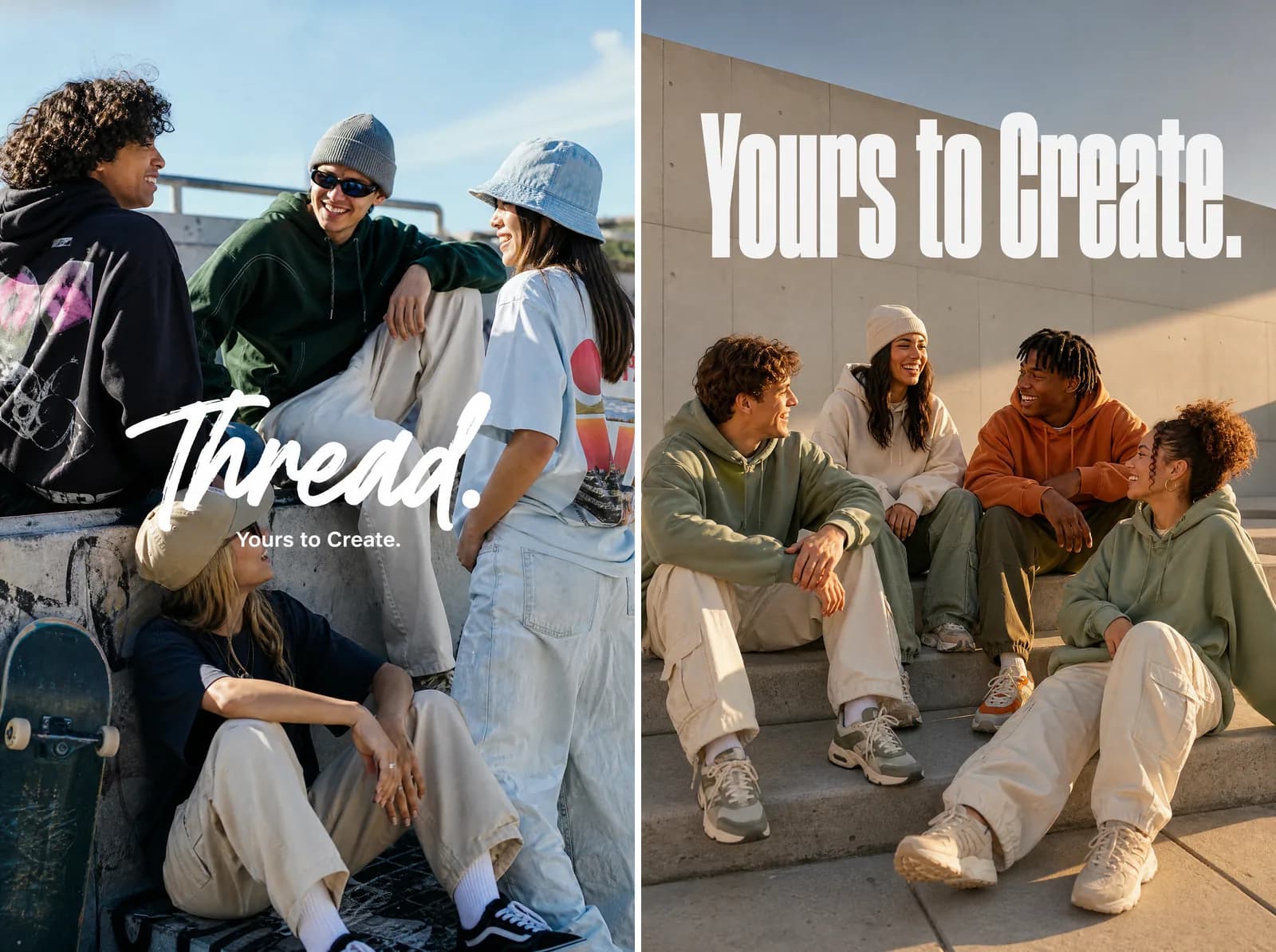 Made in Novoads with GPT Image 2 · left: OpenAI's Thread prompt, right: our rewrite · medium, 2:3, one image each · 1 credit each · rendered 2026-11-03
What came back
On the left, OpenAI's prompt put its friends at a sunny concrete skate spot.
- Four young people hang out, one sitting low with a skateboard beside her, in hoodies, a bucket hat, a beanie and a cap.
- The tagline appears once, in small white type, under a large white brush-script "Thread." wordmark across the middle of the frame.
- There's no other text, apart from the graphic prints on the clothes.
The prompt asked for the tagline once, ended "No extra text" and never asked for the brand name as text, so that wordmark is the model's own addition. You may well want a brand mark in an ad, but this one wasn't in the request.
On the right, our rewrite put its friends on the steps of a concrete plaza.
- Four friends sit laughing in oversized hoodies, cargo pants and chunky sneakers in sage, cream and burnt orange.
- The light is warm and low, against a bare concrete wall.
- The tagline appears once, large, in bold white condensed sans-serif across the top.
- There's no other text and no visible logo.
What changed between them
| Part of the brief | OpenAI's prompt | Our rewrite |
|---|---|---|
| Brand | "hip young street brand" | "young streetwear brand" |
| Audience | youth streetwear audience | an age range and a habit |
| Concept | friends hanging out | owning the city on a Saturday |
| Setting | left open | concrete plaza steps |
| Clothes and color | "strong color direction" | named clothes, named colors |
| Composition | "clean composition" | position, eye level, light, open space |
| Tagline | once, "integrated into the ad layout" | once, with type and position |
| Other text | "No extra text" | "No other text" |
We think the wording shaped this pair. OpenAI's prompt left the setting and the layout open, and the model filled them with a skate spot and a wordmark, which is the kind of "taste-driven" decision the archived guide says to leave to the model. Ours made those decisions up front, and the image came back with them. But this is one take each. A second take of either could differ, and we can't prove the wording caused it. We're also not calling either prompt the better one in general.
Our version gives something up too. It's closer to an image spec than OpenAI's is. It still has an audience and a concept, so we don't think it's the "purely technical image spec" the guide sets against a brief, but you're giving up most of what the model might have suggested on its own.
The shape of our rewrite, if you want to reuse it
This is the order we used. We've run it once, on one brand, so treat it as a starting point.
- The job and the brand. Say it's a campaign ad, name the brand and add a few words on what kind of brand it is.
- Audience. Say who it's for, with an age range or a habit you can picture.
- Concept. Give it one idea in plain words.
- Scene. Say who's there, what they're doing and what they're wearing, with colors if color matters to you.
- Composition. Say where the group sits in the frame, then give the eye level, the light and where the open space goes.
- Text. Put the exact words in quotes, then say how many times, where and in what type.
- Everything else. Rule out other text, watermarks and logos.
If your ad has to move, you'll need different words in the prompt, and our posts on camera movement prompts and prompting Seedance 2.5 deal with that. For other models' image prompts, we also went through Google's examples for Nano Banana with ads in mind, along with xAI's guide for Grok Imagine and the rules Stability publishes for Stable Diffusion.
Recipe settings that don't carry over
The recipe is from April, and parts of its code have since changed or have no matching control in the Novoads image step. These four are the ones we'd watch if you're copying from it.
The input_fidelity setting
The recipe's model table says "input_fidelity does not work for this model because output is already high fidelity by default", and four of its edit examples still pass input_fidelity = "high". OpenAI's current guide says "For gpt-image-2, omit input_fidelity; image inputs are always processed at high fidelity." So if you lift code from the recipe, leave that line out. The Novoads image step has no such setting.
Transparent backgrounds
OpenAI's changelog says transparent backgrounds went into preview for gpt-image-2 on August 20, 2026, and its current guide still says they're "available in preview". We didn't call OpenAI's API, so send one test request before you build a job around it. In Novoads the question doesn't come up. The GPT Image 2 step has no transparent-background option, so don't plan a cutout there. If you try it elsewhere, the guide has a useful warning, "A drawn checkerboard is not transparency."
Reference images
The current guide says "Assign roles to references. Identify each input by number and purpose: subject, style, clothing, or background." The Novoads image step takes up to 4 reference images, so the same habit applies there. We haven't tested how GPT Image 2 combines several of them in Novoads, so try it on your own images before you build a template around it.
Sizes and masks
OpenAI's image generation guide says gpt-image-2 "accepts any resolution in the size parameter when it satisfies the constraints below." The Novoads image step offers four fixed shapes.
- 1:1, square
- 2:3, portrait, the match for OpenAI's 1024 x 1536
- 9:16, vertical
- 16:9, wide
The Novoads step doesn't have a mask tool either. On OpenAI's side, the same guide says "Masking with GPT Image is entirely prompt-based. The model uses the mask as guidance, but may not follow its exact shape with complete precision." So even with a mask, you'd still check the edges.
Running a brief like this in Novoads
The same settings in the app
Novoads sells GPT Image 2 as well as GPT Image 2.5 Sunburst and Flare. We sent both prompts through our MCP connector. The image step in the app has the same model, shape and quality, so you can paste either prompt there and choose GPT Image 2, 2:3 and Medium.
What this pair cost
The pair cost 2 credits, 1 for each image. In dollars, that depends on your plan.
- Starter. It's $15 a month for 200 credits. At $0.075 a credit, the pair comes to 15 cents.
- Plus. It's $49 a month for 1,000 credits. At $0.049 a credit, the pair comes to about 10 cents.
Novoads is paid from the first month, and every plan is on our pricing page.
OpenAI's API charges by tokens, and on its own published numbers it comes out cheaper per image than Starter or Plus at those monthly prices, for low quality and for its portrait size. Our GPT Image 2 pricing post has OpenAI's prices and token counts, so we'll leave those numbers to that post.
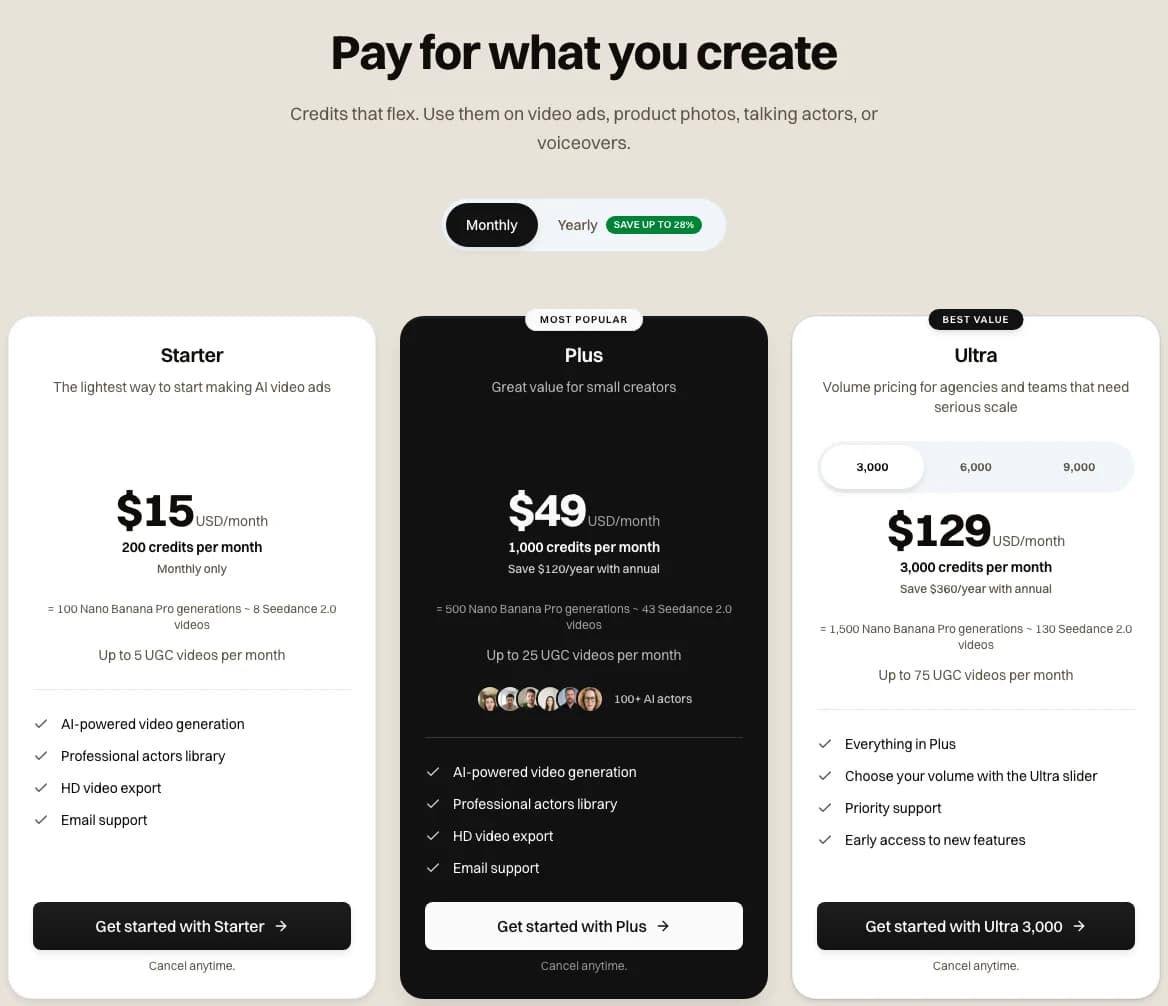 Screenshot: the Novoads pricing page with Monthly selected, taken 2026-11-03
Put your next ad brief on GPT Image 2
Paste the prompt, choose Medium and 2:3, and read what comes back. Each image at that setting takes 1 credit, and Starter is $15 a month.
See plans and creditsWhich brief to write for which job
Use the looser brief when
- You're early in a campaign and want the model to suggest scenes, which is the use the archived guide names.
- You'd welcome something you didn't ask for. In our pair, that was a skate spot and a wordmark.
- The copy is short and you're happy to choose from a few takes.
Use the tighter brief when
- The layout is settled and the tagline has to go in a specific place.
- Someone has already approved a look, and you want the scene, clothes and colors to stay close to it.
- You're making variations of an image that worked. How many of those you need is its own question, and we've written about it.
We'd start a new campaign with the looser brief, choose the take we like, then write down what's in it as a tighter brief for the variations.
Frequently Asked Questions
How do I write a GPT Image 2 prompt for an ad?
Write it like a short brief. Name the brand, the audience, the concept, the scene and the composition. Then put the exact words in quotes, say how many times they should appear and where, and ask for no other text. The idea of writing a brief comes from OpenAI's archived April 2026 guide for gpt-image-2, and the quoted-copy step comes from its current prompting guide. Neither one promises the text comes back right, so read every letter before you use the image.
Key Takeaways
- OpenAI's archived guide for gpt-image-2, dated April 21, 2026, says ad generation 'works best' when the prompt reads like a creative brief. That's advice, and the guide offers no measurement behind it.
- OpenAI's current prompting guide doesn't use the phrase. It tells you to define the result, put exact copy in quotes and say how many times it should appear, and use labeled sections for complex prompts. Its illustrated examples come from GPT Image 2.5.
- We ran OpenAI's Thread prompt and our rewrite once each in Novoads, at medium quality and 2:3. Both rendered the tagline once. OpenAI's also came back with a large wordmark nobody asked for, and ours put the tagline large across the top, as written.
- OpenAI lists text placement and clarity among the limits of GPT Image models, so no prompt here promises exact copy. Read every letter before you use the image.
- Several things in the recipe don't carry over to the Novoads image step, which has no input_fidelity setting, no transparent-background option, no mask tool and no custom sizes.
Sources
- •OpenAI Cookbook: GPT Image Generation Models Prompting Guide (archived recipe, April 21, 2026)
- •OpenAI API docs: Image prompting guide
- •OpenAI API docs: Image generation guide
- •OpenAI API docs: Changelog
- •ChatGPT Learn: Image generation
- •openai-cookbook pull request 3084: archive the GPT Image models prompting guide