Nano Banana Prompts for Ads: Google's 14 Official Examples
Google's Gemini image guide has 14 example prompts, and its product template is written for ad shots. We read each one for ad work and ran the template once.

Mauricio Valdivia
·12 min
Google's guide has a product-shot template for ads
Search for nano banana prompts and you'll mostly find galleries. The first five results we saw on Google in the US were three prompt galleries, a GitHub list of prompts and a blog post. None of them links to Google's own image generation guide.
But the most useful prompt for an ad is in that guide. Google introduces its product mockup template with the line "Perfect for creating clean, professional product shots for ecommerce, advertising, or branding." The template itself is a studio packshot written as one paragraph, with blanks for your product.
We read Google's guide and its other prompting pages on November 1, 2026, opened the five top results (all of them third-party sites) and ran the product template once on Nano Banana Pro in Novoads. We didn't test the rest of Google's examples, or any gallery prompt, for this post.
Which Nano Banana the prompts are written for
Nano Banana is a family name. Google's guide says "Nano Banana refers to the following models available in the Gemini API," and then lists five of them. We sell one.
Five models under one name
| Name on Google's list | Gemini name | How Google describes it | In Novoads |
|---|---|---|---|
| Nano Banana 2.1 | Gemini Nano Banana 2.1 | "An update to Nano Banana 2," and its main high-efficiency workhorse | No |
| Nano Banana 2 Lite | Gemini 3.1 Flash Lite Image | "The fastest and cheapest Gemini image model" | No |
| Nano Banana 2 | Gemini 3.1 Flash Image | "The previous-generation high-efficiency workhorse model" | No |
| Nano Banana Pro | Gemini 3 Pro Image | "The premium choice for the most complex visual tasks" | Yes |
| Nano Banana | Gemini 2.5 Flash Image | "The legacy pioneer of the Nano Banana series." | No |
Editing prompts need extra care on Nano Banana 2 Lite. Google describes it as "Not optimized for multiple reference inputs or multi-turn sequential editing."
If you're choosing between the two newer families, our Nano Banana 2 vs Nano Banana Pro comparison walks through that decision, and our post on what Nano Banana Pro is covers the model we sell.
The model behind Google's code samples
Every code sample under the guide's examples calls gemini-nano-banana-2.1, the model ID for Nano Banana 2.1. The prompts themselves are plain sentences that don't name a model, so you can take them to another one.
Google does point two of them at particular models. The text example says "Use Gemini 3 Pro Image for professional asset production." The comic-panel example says "For accuracy with text and storytelling ability, these prompts work best with Gemini 3 Pro and Gemini 3.1 Flash Image."
The image later in this post came from Nano Banana Pro in Novoads. We don't sell Nano Banana 2.1, Nano Banana 2, Nano Banana 2 Lite or the original Nano Banana, so we can't show you their output.
Dates that get mixed up
The original Nano Banana (Gemini 2.5 Flash Image) is the one with a shutdown date. Google's deprecations page lists it for shutdown on March 15, 2027, and names Nano Banana 2 Lite as its recommended replacement.
Nano Banana Pro has two dates on that page. Its preview model came first, on November 20, 2025. The stable model is dated May 28, 2026, with no shutdown date announced.
Nano Banana 2.1, the model in the code samples, is the newest entry on the page, dated October 6, 2026.
Google's 14 examples, read for ads
Google's prompting section has seven numbered examples for generating images and seven for editing them. It says "Each example includes a re-usable template and a sample prompt," and 13 of the 14 do. The Google Search example has a sample prompt but no template.
In both tables, the example names are Google's, and the ad uses are our reading of them.
Seven prompts for making images
| # | Google's example | What it's for in an ad |
|---|---|---|
| 1 | Photorealistic scenes | A lifestyle shot of the product in use |
| 2 | Stylized illustrations & stickers | Stickers, badges and illustrated social posts |
| 3 | Accurate text in images | A headline, an offer or a logo inside the image |
| 4 | Product mockups & commercial photography | The packshot for a store page, an ad or a brand kit |
| 5 | Minimalist & negative space design | A background with room for your copy |
| 6 | Sequential art (comic panel / storyboard) | A short comic, or a rough storyboard for a video ad |
| 7 | Grounding with Google Search | A timely graphic built on current information, with no template |
For a lifestyle shot, use the photorealistic template.
A photorealistic [type of shot] of a [subject description] in a [setting description]. [Description of the light]. Shot from a [camera angle] with a [lens type].
Google's sample prompt for it ends with "Aspect ratio 16:9." We'd end every ad prompt that way, with the ratio of the placement you're making it for.
The minimalist template is where we'd start for static ads with copy on top. Google says it's "Excellent for creating backgrounds for websites, presentations, or marketing materials where text will be overlaid," and the template asks for the empty space outright.
A minimalist composition featuring a single [subject] positioned in the [bottom-right/top-left/etc.] of the frame. The background is a vast, empty [color] canvas, creating significant negative space. Soft, subtle lighting. [Aspect ratio].
Seven prompts for editing images
| # | Google's example | What it's for in an ad |
|---|---|---|
| 1 | Adding and removing elements | Add a prop, or take out a distraction |
| 2 | Inpainting (semantic masking) | Change one thing and keep the rest of the shot |
| 3 | Style transfer | A seasonal or themed version of a photo you already have |
| 4 | Advanced composition: combining multiple images | Put your product into another picture |
| 5 | High-fidelity detail preservation | Keep a face or a logo intact through an edit |
| 6 | Bring something to life | Turn a sketch of a product or a set into a finished photo |
| 7 | Character consistency: 360 view | The same presenter seen from several angles |
Google's note on the first one is worth testing against your own shots before you rely on it. It says "The model will match the original image's style, lighting, and perspective."
The three we'd learn first
For ad work, we'd start with the product template for the packshot, inpainting for quick fixes and the multi-image example for putting a product into a scene. Between them, those three cover most of what a product ad needs from a still image.
Google's product template, filled in for a serum ad
The template, word for word
Google's product template is one paragraph, with its blanks in square brackets.
A high-resolution, studio-lit product photograph of a [product description] on a [background surface/description]. The lighting is a [lighting setup, e.g., three-point softbox setup] to [lighting purpose]. The camera angle is a [angle type] to showcase [specific feature]. Ultra-realistic, with sharp focus on [key detail]. [Aspect ratio].
Google's sample fills it in with "a minimalist ceramic coffee mug in matte black, presented on a polished concrete surface," lit by a three-point softbox, with sharp focus on the steam rising from the coffee. It ends with "Square image."
The template isn't new. Google's Developers Blog ran the same section and template in August 2025, and the line under its heading read "Create clean, professional product shots for e-commerce, advertising, or branding." It's the guide's version that calls the template perfect for the job.
Our version for a serum ad
We filled in the blanks for a skincare ad and left every other word the way Google wrote it.
A high-resolution, studio-lit product photograph of a small amber glass dropper bottle of face serum with a blank cream label on a slab of pale travertine stone. The lighting is a three-point softbox setup to give the glass a clean rim highlight and keep the shadows soft. The camera angle is a low eye-level shot to showcase the black dropper cap and the serum's golden color. Ultra-realistic, with sharp focus on the beads of water on the glass. Vertical 4:5 image.
We asked for a blank label on purpose, so this run doesn't test how Pro handles text.
What came back
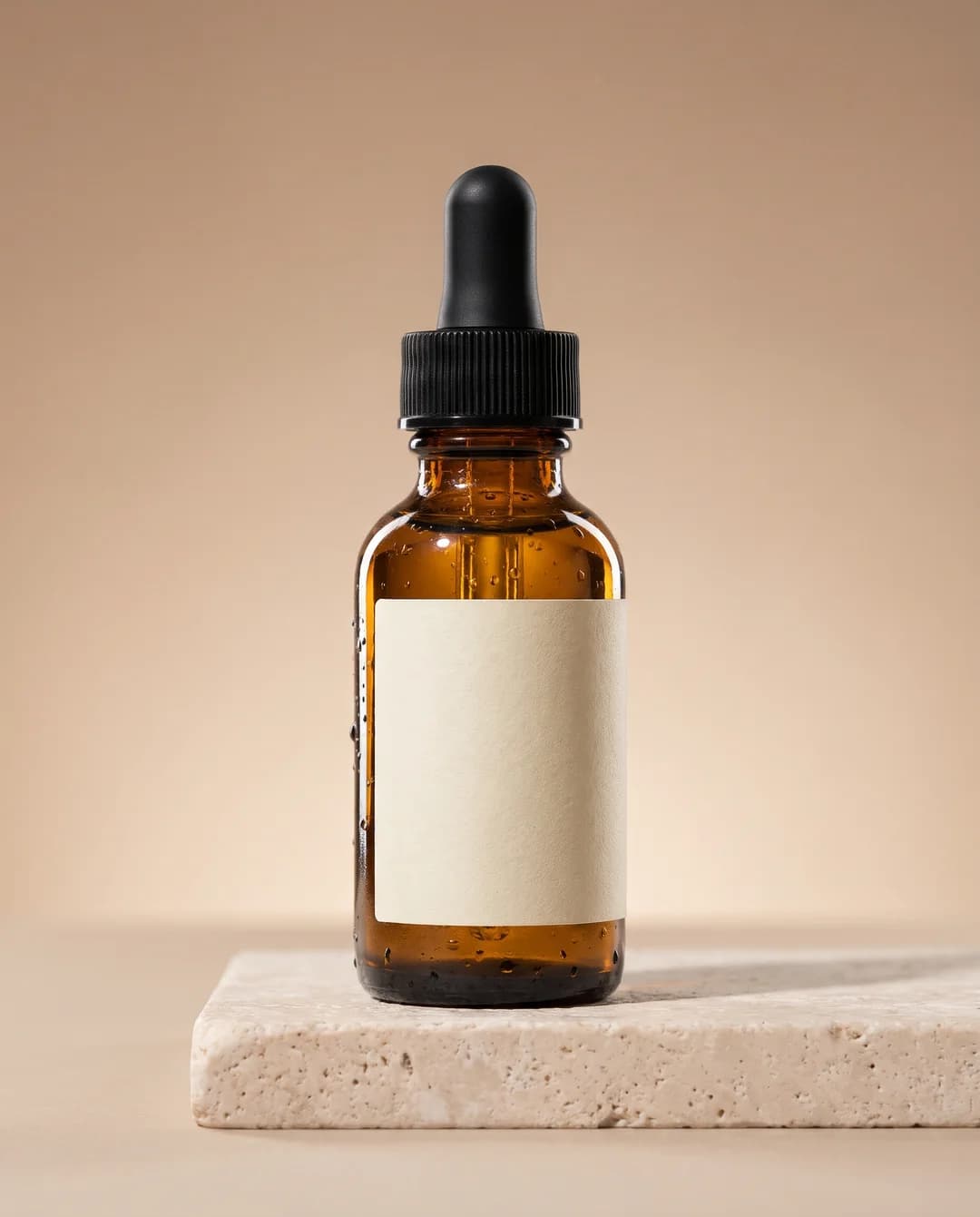
Made in Novoads with Nano Banana Pro · Google's product mockup template filled in for a serum ad · 2K, 4:5 · 2 credits · 2026-11-01
Every element we asked for is in the frame. The bottle faces the camera at about its own height, the ribbed cap is black, the label is blank, the amber glass is beaded with water and a soft shadow falls to the right across the stone.
It was one generation at 2K in a 4:5 frame. It cost 2 credits. The file came back at 1856 by 2304 pixels.
That's one run. It shows the template working on Pro once, but we haven't measured how often it lands on the first try.
Filling in the blanks for your own product
Each blank stands for a choice you'd make on a real shoot.
- For the product description, name the material and the finish. Google Cloud's guide says to specify the surface of a mockup, like a "minimalist ceramic coffee mug."
- For the background, pick one surface and one color, and leave props out unless the ad needs them.
- For the lighting, the same guide suggests a "three-point softbox setup" to evenly light a product. Then change the purpose clause to the look you want, the way we asked for a rim highlight.
- For the angle and the feature, name the one thing the angle should show off. Google's best practices say to use "photographic and cinematic language to control the composition."
- For the key detail, choose what a shopper should notice first, because that's where the sharp focus goes.
- For the aspect ratio, use the placement's ratio. DeepMind's prompt guide says to prompt for your aspect ratio and describe the format you need, such as a "vertical social post."
Prompts for text in the image and for edits
Getting the words right
The text example's template is short.
Create a [image type] for [brand/concept] with the text "[text to render]" in a [font style]. The design should be [style description], with a [color scheme].
Google's note on this example reads "Use Gemini 3 Pro Image for professional asset production." Gemini 3 Pro Image is the Gemini name for Nano Banana Pro.
Google's pages add four habits for text.
- Put the exact words in quotes. DeepMind's guide says "Enclose your desired words in quotes," and Google Cloud's guide says the same.
- Name the font or describe it. Cloud's guide puts it as "Choose a font: Describe the typography style or name of the font."
- Say how the text should look. Google's prompting tips for Nano Banana Pro say to "Clearly state what text should appear and how it should look."
- Write the words before the picture. The API guide says Gemini "works best if you first generate the text and then ask for an image with the text."
Google Cloud's guide shows this with a beauty ad. Its example puts a moisturizer jar on a warm studio background with three lines of text beside it, and the prompt names a font for each line. Our post on legible headlines and price badges on Nano Banana Pro goes deeper into text for ads.
Editing a shot you already have
Inpainting is the template to keep for quick fixes. It tells the model what to change and, just as plainly, what to leave alone.
Using the provided image, change only the [specific element] to [new element/description]. Keep everything else in the image exactly the same, preserving the original style, lighting, and composition.
To put your product into another picture, use the multi-image example. Google says it "is perfect for product mockups or creative collages," and its sample opens with "Create a professional e-commerce fashion photo." That's the page's second line about mockups, separate from the product template's.
Google Cloud's guide lays out prompts with reference images as "[Reference images] + [Relationship instruction] + [New scenario]." To keep a logo or a face intact, the API guide says to describe the details that matter "in great detail along with your edit request." For Pro, its note on limits says "gemini-3-pro-image supports 5 images with high fidelity," which leaves room for a product, a presenter and a setting.
The habits Google says make prompts land
Six best practices from the guide
The guide follows its examples with six best practices, and each one carries over to ads.
- Be hyper-specific. Google says "The more detail you provide, the more control you have." For a product, that means its material, finish, size and setting.
- Provide context and intent. In Google's example, "Create a logo for a high-end, minimalist skincare brand" beats a bare "Create a logo." Tell the model it's making an ad, and where the ad will run.
- Iterate and refine. "Don't expect a perfect image on the first try." Change one thing per follow-up, so you know which change fixed it.
- Use step-by-step instructions. Build a busy scene in steps, for example the background first, then the product, then the props.
- Use semantic negative prompts. Describe what you want, like Google's "an empty, deserted street with no signs of traffic," instead of writing "no cars."
- Control the camera. Google's examples are a wide-angle shot, a macro shot and a low-angle perspective.
What Google's other prompting pages add
- Start with a strong verb. Google Cloud's guide says to "start a prompt with a strong verb that tells the model the primary operation you want to perform."
- Write text-only prompts as a scene. Cloud's formula for them is "[Subject] + [Action] + [Location/context] + [Composition] + [Style]."
- Ask for variations side by side. DeepMind's guide suggests asking for "three distinct variations of a product mock up" to compare ideas.
- Give every reference image a job. Google's tips for Nano Banana Pro say "When using uploaded images, clearly define the role of each."
One limit to plan around
Google's limitations list says "The model won't always follow the exact number of image outputs that the user explicitly asks for." When you ask for several variations at once, count what comes back before you judge the prompt.
Where the prompt galleries fit
Who runs the top results
The galleries that rank for this search are third-party sites, and none of them is Google's.
- bananaprompts.xyz bills itself as "The prompts behind the art," shared by the people who made the images.
- bananaprompts.org says "Each prompt has been tested and optimized for Nano Banana."
- nanobanana.org runs its prompt gallery next to tools for other companies' models, such as Seedream and Kling.
- awesome-nano-banana-pro-prompts on GitHub is a list of prompts for Nano Banana Pro.
The fifth result was a guide on chasejarvis.com, last updated in January 2026, which was before Nano Banana 2.1 came out.
What we didn't find on them
On the five pages we opened, we found no link to Google's guide and no copy of its product template. We didn't open every prompt inside each library.
Google's own Cloud prompting guide came seventh in the same results, and the API guide wasn't in the top ten.
How we'd use a gallery prompt
Galleries are good for finding a look. On bananaprompts.org, the home page leads with portrait and character prompts, while nanobanana.org's gallery has an E-commerce category, which is where we'd start for product work.
When you find a look you like, rebuild it on Google's template. Keep the gallery prompt's style words, then fill in the template's blanks with your product, your surface, your light and your ratio, so the prompt describes your ad.
Running these prompts in Novoads
What an image costs on our plans
In Novoads, Nano Banana Pro costs 2 credits an image at 1K or 2K. At 4K it's 4 credits an image. Prices here are as of November 1, 2026.
| Plan | Price a month | Credits a month | Images at 1K or 2K | Per image at 1K or 2K | Images at 4K | Per image at 4K |
|---|---|---|---|---|---|---|
| Starter | $15 | 200 | 100 | $0.15 | 50 | $0.30 |
| Plus | $49 | 1,000 | 500 | about $0.10 | 250 | about $0.20 |
The per-image columns are our own arithmetic, at $0.075 a credit on Starter and $0.049 on Plus. All three plans are on our pricing page, where Ultra is the step up from Plus for more volume.
The image tab opens on Nano Banana Pro at 2K, set to three images a generation. A run at those defaults costs 6 credits, so switch to one image while you're still testing a prompt.
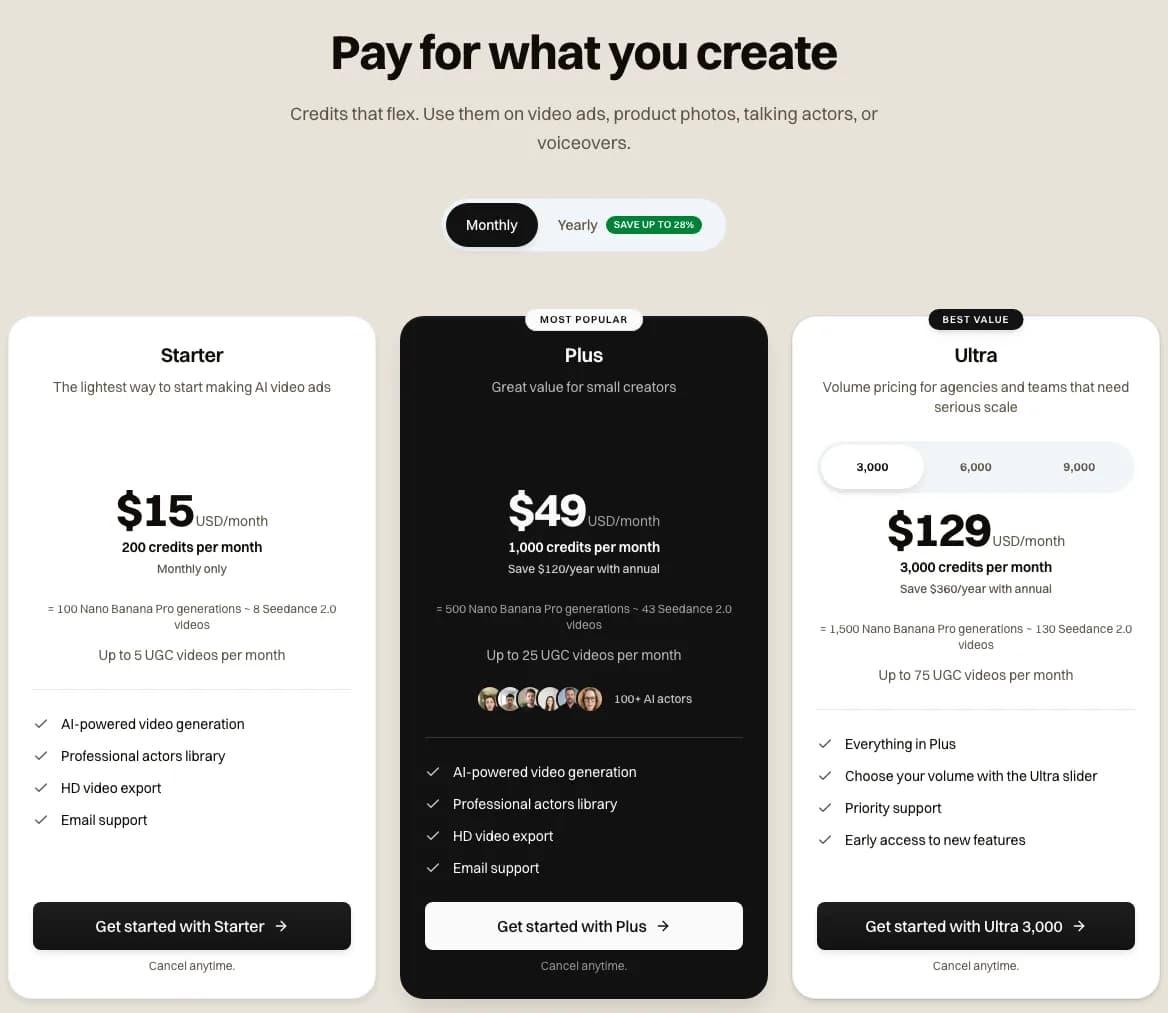
Novoads pricing page, monthly view · Starter's 200 credits are listed as 100 Nano Banana Pro generations · 2026-11-01
What Google charges on its API
If you'd rather call Google directly, its paid API tier lists Nano Banana Pro at $0.134 per 1K or 2K image. At 4K it's $0.24 an image. At those list prices, Google's API is cheaper per image than our Starter plan and more expensive than our Plus plan.
That's a developer price, and Google's table shows Pro as not available on the API's free tier. What the Gemini app costs you is a separate question, which our post on whether Nano Banana is free answers.
Watermarks Google says it adds
Google's API guide says "All generated images include a SynthID watermark." Google Cloud's guide says "All generated images include C2PA Content Credentials and a SynthID watermark." We haven't checked our own files for either mark.
From a packshot to a UGC ad
None of the Google pages we read mentions UGC, so this part is our own take. We'd use the product template for the clean product shot a UGC ad cuts to after the creator's clip, and for the still you give a video model when the product needs to move. Our UGC ad examples show where that shot goes in a creator-style ad, and our Seedance 2.0 prompt guide covers the video prompt.
Nano Banana Pro is in Novoads alongside our video models, and the same credits pay for both. As our pricing page puts it, "Credits that flex. Use them on video ads, product photos, talking actors, or voiceovers." You pay for Novoads from the first month, and Starter is the smallest plan. Our page on AI UGC video ads shows the video side.
Turn your packshot into a UGC ad
Make the product shot on Nano Banana Pro, then build a creator-style video ad around it with the same credits.
See AI UGC video adsFrequently Asked Questions
Do these Nano Banana prompts work on Nano Banana Pro?
Google writes them as plain sentences and runs its code samples on Nano Banana 2.1 (gemini-nano-banana-2.1). It points two of them at other models. The text example says to use Gemini 3 Pro Image, which is Nano Banana Pro, for professional asset production. The comic-panel example says its prompts work best with Gemini 3 Pro and Gemini 3.1 Flash Image. We ran the product mockup template once on Nano Banana Pro in Novoads and got the shot we asked for, which cost 2 credits. That's a single image, though, and we haven't measured how often the template lands.
Key Takeaways
- Google's Gemini API image guide has 14 numbered example prompts, seven for making images and seven for editing them. Of those, 13 come with a fill-in template.
- For ads, start with the product mockup template, which Google calls perfect for creating clean, professional product shots for ecommerce, advertising, or branding.
- The guide's code samples run on Nano Banana 2.1, and its text example points to Gemini 3 Pro Image, which is Nano Banana Pro, the model we sell.
- We filled in the product template for a serum ad and ran it once on Nano Banana Pro in Novoads. It returned one 2K image with every element we asked for, and the run cost 2 credits.
- The top results for this search are third-party galleries, and none of the five we opened links to Google's guide. We'd borrow a look from a gallery, then rebuild the prompt on Google's template.