Is Nano Banana Free? Free in Gemini, and What an Image Costs
Google lists Nano Banana as available for free in the Gemini app, but it doesn't say how many images you get, and downloads without a plan come out at 1K. The Gemini API has no free tier, and a standard 1K or 2K Nano Banana Pro image costs $0.134 there.

Mauricio Valdivia
·11 min
Yes in the Gemini app, but not on the API
Google's Gemini image page answers the question in three words, "Available for free," and the free part is the Gemini app. If you're signed in with a Google Account and you're 18 or over, you can make and edit Nano Banana images there without paying for a plan.
AI Mode in Google Search and Google's Flow studio also let you make images without a plan, and AI Mode is the only one of the three with a published image count (25 a day). Google doesn't give an image count for the Gemini app, and downloads without a plan come out at 1K. The paid Gemini API has no free tier for any of the five Nano Banana models.
We built this guide from Google's own help, pricing and terms pages, read on October 26, 2026. We didn't sign in to test the limits ourselves.
Five models share the Nano Banana name
Google's Gemini API docs, last updated October 9, 2026, list five models under the Nano Banana name. They're easy to mix up, because Google also gives each one a longer Gemini name.
- Nano Banana 2.1 (Gemini Nano Banana 2.1), the newest model and the main workhorse
- Nano Banana 2 Lite (Gemini 3.1 Flash Lite Image), which Google calls its fastest and cheapest image model
- Nano Banana 2 (Gemini 3.1 Flash Image), the previous-generation workhorse
- Nano Banana Pro (Gemini 3 Pro Image), the premium model for the most complex visual tasks
- Nano Banana (Gemini 2.5 Flash Image), the legacy original
Nano Banana 2.1 is the newest, and Google's pick for new work
Google released Nano Banana 2.1 on October 6, 2026, and DeepMind's model card says it's based on Gemini 3.6 Flash. The same day, Google deprecated Nano Banana 2 on the API without announcing a shutdown date. Google's docs recommend 2.1 for all new projects, so that's where we'd start if you're building on the API today.
The original's end date depends on which page you read
The original Nano Banana has two shutdown dates on Google's own site, and both pages say they were last updated on October 22, 2026.
- The pricing page warns that it shuts down on October 2, 2026, which has already passed.
- The deprecations table gives March 15, 2027 as the earliest shutdown date, with Nano Banana 2 Lite as the replacement.
We can't tell you which date Google will keep. If anything of yours still calls the original, it's time to move it.
Of the five, Nano Banana Pro is the one we sell on Novoads. We've covered how Nano Banana 2 and Pro split ad work and what Nano Banana 2 Lite is good for in separate posts.
What the Gemini app gives you without a plan
Limits measured in compute and refreshed every five hours
Google's limits page says the Gemini app runs on compute-based limits, which weigh how complex your prompt is, which models and features you use, and how long the chat gets. Your limit refreshes every five hours until you reach a weekly cap, and Google says media generation uses more of it. Google doesn't turn any of that into an image count. The image help page still mentions a "daily quota of Nano Banana 2 images," and it doesn't give a number either.
The limits page also lists three caveats.
- Limits can change without notice, including when capacity is tight.
- If capacity changes, accounts without a plan may be limited before paying ones.
- Access can be limited for testing, experimentation or availability.
So there's no count to plan a batch around, which matters if you're making ads on a deadline.
Which model makes a free image
Google's image page labels Nano Banana 2 as the free model, and its limits table puts a check mark next to "Image generation with Nano Banana 2" for accounts without a plan. Two other pages muddy that.
- Starting October 9, Gemini accounts without a plan default to Auto, which sends most prompts to the Flash-Lite model.
- Gemini's image help says image requests made on Flash-Lite use Nano Banana 2 Lite, while requests on Flash or Pro use Nano Banana 2.
Google's pages don't say which of the two makes a given free image, so we won't guess.
1K downloads, and what a plan adds
Gemini's help page says you download images at 1K without a plan and at 2K with one. The image page's free card lists "2K resolution" anyway, so we'd plan on 1K until your own downloads say otherwise.
A plan also adds Nano Banana 2.1, which Google calls its best image model, and a "Redo with Pro" option that regenerates an image with Nano Banana Pro. Google's help page lists Nano Banana Pro for paid subscribers only. These were the monthly prices on Google's US plans page on October 26, 2026.
- Free, $0 a month, standard limits
- Google AI Plus, $4.99 a month, twice the standard limits
- Google AI Pro, $19.99 a month, four times the standard limits
- Google AI Ultra, $99.99 or $199.99 a month, 5 or 20 times the Pro limits
The same page says you can buy AI credits to stretch the app's limits. Google's image page also has a banner offering college students a free year of Google AI Pro. That's a student promotion we saw on October 26, 2026, and it isn't one of the plans in the list.
The watermark on a free image
The visible mark is a setting
Gemini's help page describes a Media Watermark setting (under Settings on gemini.google.com) that turns the visible watermark on or off for the images, videos and music you make in Gemini.
- In India, South Korea and Vietnam, only AI Ultra subscribers see the setting, and everyone else there gets visible watermarks automatically.
- Outside those three countries, the page doesn't tie the setting to a plan.
- Google's image page still says Gemini adds a visible watermark to show an image is AI-made.
We haven't signed in with a free account to see the switch ourselves.
What stays in every file
Switching the visible mark off doesn't remove the invisible ones.
- Every image made or edited in Gemini carries a SynthID watermark.
- Gemini attaches Content Credentials (C2PA) metadata about where the file came from.
- Images from the Gemini API carry SynthID as well.
- In Flow, Google adds SynthID to every output, and it applies a visible watermark automatically in the same three countries to anyone who isn't on the Ultra 20x plan.
How the rule has changed since November 2025
When Google launched Nano Banana Pro on November 20, 2025, its announcement said free and Google AI Pro users would keep the visible Gemini sparkle, while Ultra subscribers and AI Studio would lose it. Today's help page describes a setting instead, and it ties that setting to a plan only in those three countries.
On a paid ad, a visible sparkle becomes part of the creative. It shows up in the frame next to your headline and tells a viewer the image is AI-made before they reach the offer, so you'd design around it or switch it off where Google lets you.
AI Mode and Flow, the other two ways in
Up to 25 images a day in AI Mode
Google's Search help says AI Mode lets you create up to 25 images in a 24-hour period without a Google AI plan. Plans raise that cap.
- Google AI Plus, up to 50 images in 24 hours
- Google AI Pro, up to 100
- Google AI Ultra, up to 1,000
Google adds that these limits can change with capacity and demand. Its plans page lists "more access to Nano Banana in Search" as a Plus benefit. The help page names Nano Banana 2.1 in AI Mode for "users over 18 in the US and Google AI Pro and Ultra subscribers," a line you can read two ways, so we wouldn't count on getting 2.1 there without a plan.
50 Flow credits a day, and help pages that disagree
Flow is Google's AI creative studio, and in February 2026 Google started moving the best of Whisk and ImageFX into it. Accounts without a subscription get 50 Flow credits a day. During peak hours (roughly 2 PM to 5 PM UTC), you may not be able to make videos without a subscription, but you can still make images.
It's harder to pin down what an image costs in those credits, because Flow's own help pages disagree.
- The model page calls Nano Banana 2 Lite "the default model available at no charge" and names Nano Banana Pro the default for Ultra subscribers.
- The images page says Nano Banana Pro is Flow's default.
- The get-started page still lists a Plus, Pro or Ultra subscription as a requirement.
- None of them gives an image's price in credits, and Google says it may rate-limit zero-credit models in Flow.
Google's February 2026 launch post put Nano Banana 2 in Flow at zero credits for all users, but today the model page's no-charge default is Nano Banana 2 Lite. That's the model we'd expect a free account to get.
Vids and Google Ads' Asset Studio
Google Vids gives personal accounts 50 credits a month at 1 credit per image action. Its help page doesn't say which model makes those images, and Google's Slides and Vids image page asks for an eligible Workspace or Google AI plan. So we wouldn't count Vids as a free Nano Banana route.
Google Ads matters more if you buy media. In November 2025, Google announced that Nano Banana Pro was rolling out to all active Google Ads users in Asset Studio. The help page names the model but doesn't give a price or an allowance. We haven't tested it, but if you already run Google Ads, it's worth a look.
Running a Nano Banana image in a paid ad
Who owns what you make
Google's Terms of Service, effective July 30, 2026, say Google won't claim ownership over content you generate with its services. Flow's help answers its own commercial-use question by pointing to that same line. The Gemini API's terms for developers add that Google may generate the same or similar content for others. We read that as a reminder that a competitor's prompt can land close to your image.
Two lines aimed at volume
Two rules matter most if you make ads in bulk.
- Google's Terms bar misleading people into thinking generative AI content was made by a human.
- Gemini's user guidelines bar using the app to create automated or repetitive commercial or promotional content, which Google calls spam.
Gemini's image help also asks you to use discretion before you publish what it generates. These are Google's product rules as its pages showed them on October 26, 2026.
What a Nano Banana image costs on Google's API
No free tier for any Nano Banana model
Google's Gemini API pricing page, last updated October 22, 2026, lists the free tier as "Not available" for all five Nano Banana models. You pay for every API image, and the price depends on the model, the resolution and the tier.
| Model and tier | 1K image | 2K image | 4K image |
|---|---|---|---|
| Nano Banana 2.1, Standard | $0.0336 | $0.0504 | $0.113 |
| Nano Banana 2, Standard | $0.067 | $0.101 | $0.151 |
| Nano Banana 2 Lite, Standard | $0.0336 | not listed | not listed |
| Nano Banana Pro, Standard | $0.134 | $0.134 | $0.24 |
| Nano Banana Pro, Batch or Flex | $0.067 | $0.067 | $0.12 |
The original Nano Banana is a flat $0.039 an image. Batch costs about half the Standard price for every model on the page. The $0.134 you'll see quoted for Nano Banana Pro is its Standard price for a 1K or 2K image.
AI Studio's "free of charge" line
Google's own pages disagree about AI Studio, its web interface for developers.
- The pricing page says "Google AI Studio usage is free of charge in all available regions."
- Google's billing FAQ says it stays that way unless you link a paid API key.
- Google's AI Studio plans page lists Nano Banana among the premium models that Google AI Pro unlocks there.
- Google's February 2026 post for developers says you need a paid API key to use Nano Banana 2 in AI Studio.
We'd plan on a paid key or a Pro or Ultra plan before counting on Nano Banana in AI Studio.
Google's API terms also say Google uses the content you send to unpaid services, AI Studio included, to improve its products. That's worth knowing before you upload a client's product photos.
How Novoads prices Nano Banana Pro
We sell one Nano Banana model, Nano Banana Pro. An image costs 2 credits at 1K or 2K and twice that at 4K. Every plan is paid from the first month.
One real run of four candle statics for 8 credits
On October 20, 2026, we asked Nano Banana Pro for four static ads in one request through the Novoads MCP connector, for our static ads guide. The prompt asked for 4:5 images at 2K showing an unlabeled amber glass candle jar on a limestone bath ledge, with the headline "Light it. Slow down." and a sub-line about soy wax, a cotton wick and hand-pouring. All four came back with the headline and sub-line spelled as written, and the run cost 8 credits.
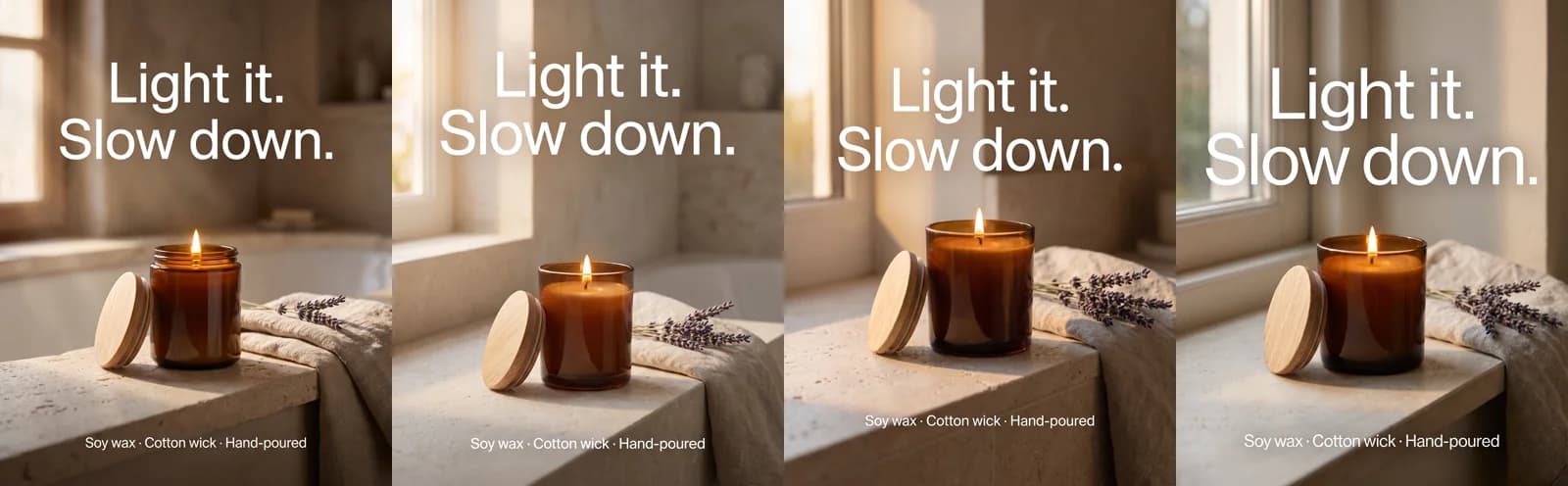 Nano Banana Pro · one prompt, four 4:5 statics at 2K of an amber candle jar on a limestone ledge, headline "Light it. Slow down." · 8 credits · rendered 2026-10-20
At Starter's rate the run came to about 60 cents, and at Plus's, about 39 cents. The same four images would cost about 54 cents on Google's Standard tier, or about 27 cents on Batch.
What an image costs on Starter and Plus
- On Starter ($15 a month for 200 credits), a 1K or 2K image works out to $0.15 and a 4K image to $0.30. The plan covers 100 images a month at 2K.
- On Plus ($49 a month for 1,000 credits), those prices drop to $0.098 and $0.196. The plan covers 500 images a month at 2K.
Google's Standard price is lower than Starter's at every resolution, and Plus comes in about 4 cents an image under Standard. Batch is cheaper than both of our plans, so if you only need Nano Banana Pro stills and can write code against Google's API, that's the cheaper way to buy them. Nano Banana 2.1 is cheaper still at $0.0504 for a 2K image, though we don't sell it.
Our credits also pay for the rest of the ad. The same balance covers video ads, talking actors and voiceovers, and nobody on your team has to write code to use them. Our pricing page counts Nano Banana Pro images per plan the same way.
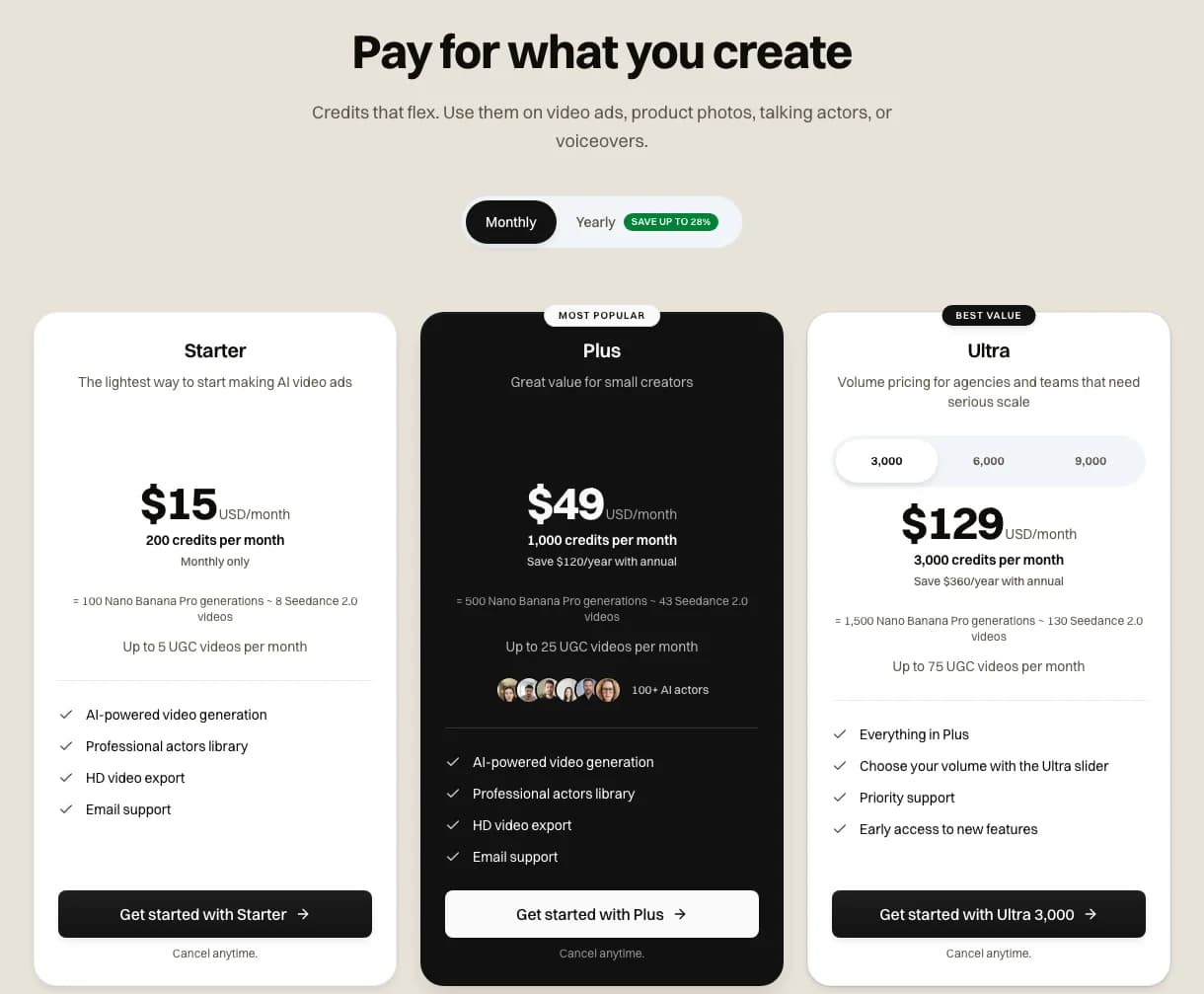 Screenshot: novoads.ai/pricing on monthly billing, showing 100 Nano Banana Pro generations on Starter, 500 on Plus and 1,500 on Ultra, taken 2026-10-26
If you're deciding between 2K and 4K for a set, we've written a separate guide on how resolution changes a Nano Banana Pro bill.
Which route fits your next ad set
Use Google's free routes when:
- you're testing a look or a prompt before you pay anyone
- a 1K download and a possible visible mark won't hurt the test
- you can live without knowing how many images you'll get
Pay per image when:
- you need a fixed number of 2K or 4K finals for an ad set
- the brief calls for Nano Banana Pro, which Google keeps behind a plan in the app
- you want to know what each image costs before you make it
If you're weighing other image models for the same job, our roundup of Nano Banana alternatives compares seven. For video tools, we've answered the same question for Higgsfield and Kling.
Make your test images in the Gemini app, then price the finals per image before you promise a client a number.
Frequently Asked Questions
How do you make a Nano Banana image in Gemini without paying?
Sign in to the Gemini app with a personal Google Account (you have to be 18 or over), pick Create images from the tools menu, and type a prompt or upload a photo to edit. Google's image page lists Nano Banana 2 as the free model. Without a plan you download at 1K, and your limit refreshes every five hours until you reach a weekly cap.
Key Takeaways
- Google's Gemini image page lists Nano Banana as available for free. The free part is the Gemini app, open to anyone who's signed in and 18 or over.
- The free app doesn't come with an image count. Google meters it by compute, refreshes your limit every five hours up to a weekly cap, and says the limits can change without notice.
- Without a plan you download at 1K, and you need a Google AI plan for Nano Banana 2.1 and Nano Banana Pro. Those plans start at $4.99 a month on Google's US page.
- AI Mode in Search lets you make up to 25 images a day without a plan, and Flow gives you 50 credits a day. The Gemini API has no free tier for any Nano Banana model.
- Google's API charges $0.134 for a standard 1K or 2K Nano Banana Pro image. Novoads charges 2 credits for the same image. That's about 15 cents on Starter and about 10 cents on Plus.