Stable Diffusion Prompts for Ads: Stability's 0-to-1 Weights
What Stability's own docs say about prompting for product ads, from its SD 3.5 guide to the 0-to-1 word weights in its Ultra and Core reference.

Mauricio Valdivia
·12 min
The prompt advice that ranks isn't Stability's
Search for Stable Diffusion prompts and most of what comes up is galleries and tutorials made for older checkpoints and community tools. Of the top results we could open on November 3, 2026, none names the SD 3.5 models Stability sells on its API today. None mentions the line in Stability's API reference that puts a word's weight between 0 and 1, either. And two of them use weights above 1. (We couldn't open one of the top five, a Reddit thread.)
So we went to Stability's own pages and took each rule from the page that states it. We read its API reference and help center the same day. The SD 3.5 prompt guide is no longer on Stability's site, so its advice here comes from a copy the Internet Archive saved on March 29, 2026. The example prompts come from the guide's images, which Stability still hosts. We didn't test Stable Diffusion for this post. The one product shot further down is our own run of a different model, Google's Nano Banana Pro, made in Novoads on November 1.
Which Stable Diffusion you're actually prompting
Stable Diffusion is a family of models, and the rules that apply depend on which model you call and where you call it. On Stability's hosted API, you choose from two groups.
The SD 3.5 models
Stability's SD 3.5 API page lets you request three models by name.
- SD 3.5 Large, at 8 billion parameters, which the page calls "the most powerful in the Stable Diffusion family".
- SD 3.5 Large Turbo, "a distilled version of Stable Diffusion 3.5 Large" that the page says works "in just 4 steps".
- SD 3.5 Medium, at 2.5 billion parameters, which the page pitches as a balance between prompt accuracy and image quality.
The same page also describes and prices a fourth model, SD 3.5 Flash, a distilled version of Medium. But Flash isn't on the list of models you can request there, and we didn't try calling it.
A prompt you've tuned on Large may need another pass on Medium. Stability's model card for Medium on Hugging Face says, "The medium model has a different training data distribution than the large model, so it may not respond to the same prompt similarly."
Ultra and Core
Stability also sells two services you call without picking a model.
- Stable Image Ultra, which its reference says is "Made from the most advanced models, including Stable Diffusion 3.5". The same page says Ultra "excels in typography, complex compositions, dynamic lighting, vibrant hues, and overall cohesion and structure of an art piece."
- Stable Image Core, which its reference says "represents the best quality achievable at high speed". The same page adds, "No prompt engineering is required! Try asking for a style, a scene, or a character, and see what you get."
So the Core page that says you don't need prompt engineering also documents the weight format we cover below. For an ad, we'd still write a full, specific prompt.
Older models in prompt galleries
Most of the prompts in the big gallery among the top results are labeled for SD 1.5. Stability's own docs list SD 1.5 among the engines that "can no longer be accessed" on its legacy API. SDXL 1.0 still has its own page in Stability's API reference, and we'll get to its rules below. For what each current model costs and what Stability's license lets you do with it, see our Stable Diffusion explainer.
What Stability's SD 3.5 guide asked for
Where the guide went
Stability published a prompt guide for its SD 3.5 models, but the guide is gone from its site now. The Internet Archive saved a copy on March 29, 2026, and that's where the quotes in this section come from. "Treat the SD3.5 models as a creative partner," it says. "By expressing your ideas clearly in natural language, you give the model the best opportunity to generate an image that aligns with your vision."
The parts of a prompt
"To structure a prompt effectively, start by identifying the key elements," the guide says, and it names them in this order.
- Style, the look you want. The guide's examples run from line art and watercolor to "product photography".
- Subject and action. "If your image has a subject, the prompt should be written to amplify its presence first and any actions the subject takes afterward."
- Composition and framing, set "by specifying close-up shots or wide-angle views".
- Lighting and color, with terms like "backlight", "hard rim light" and "dynamic shadows".
- Technical parameters, meaning camera language such as "bird's eye view," "close-up," "crane shot," and "wide-angle shot", or a "fish-eye lens" for a curved look.
- Text, for words you want printed in the image.
- Negative prompting, for what you want kept out.
For an ad, that's close to how you'd brief a photographer, with the product first and then the frame, the light and the lens.
Words on the image
"The SD3.5 models can incorporate text into images," the guide says. "To achieve the best results, enclose the text in 'double quotes' and keep the desired words or phrases short." Its own examples show why you should check the result anyway. One prompt asks for the words "Your Next Vacation Awaits!", and in the guide's image, "awaits!" comes out with a lowercase a. Read every word before an image goes into an ad.
What the guide says about negative prompts
"Negative prompting allows precise control over colors and content," it says, adding, "While the main prompt shapes the general image, negative prompts refine it by filtering out unwanted elements, textures, or hues." Its example pairs a soft morning-light portrait prompt with "Negative: smooth, neon, 3D render."
What each Stability API says about word weights
Ultra and Core put a weight between 0 and 1
Stability's Stable Image Ultra API reference says to control a word's weight with the format (word:weight), "where word is the word you'd like to control the weight of and weight is a value between 0 and 1." Its example is "The sky was a crisp (blue:0.3) and (green:0.8)", which "would convey a sky that was blue and green, but more green than blue." Core's reference has the same sentence and the same example.
So what happens if you send a larger number? The reference doesn't say the API rejects or caps it. The range is part of how the reference describes the prompt, and the prompt itself is a text field of 1 to 10,000 characters. We didn't send a weight above 1 to find out.
The sentence isn't new, either. Stability's API spec had it on Core's prompt field in March 2024 and on Ultra's by June 2024, in copies the Internet Archive saved.
SD 3.5's page describes its prompt differently
"A strong, descriptive prompt that clearly defines elements, colors, and subjects will lead to better results," the SD 3.5 API page says, and it doesn't mention weights at all. We wouldn't take that to mean SD 3.5 ignores them, or that it reads them the way Ultra does, because Stability doesn't say either way.
Where weights above 1 come from
The weights above 1 that fill prompt galleries follow other tools' rules. AUTOMATIC1111's web UI documents "(text:1.4)" and gives a word in plain parentheses a weight of 1.1. ComfyUI's docs use "(beautiful:1.2)" to raise a word, and plain parentheses get 1.1 there too. Stability's own legacy gRPC API, which is "in legacy maintenance mode", took a much wider range that included negative weights.
| Where you write the prompt | How a weight is written | The number, as documented |
|---|---|---|
| Stability API, Ultra and Core | (word:weight) | between 0 and 1 |
| Stability API, SD 3.5 | not covered on its page | not stated |
| Stability's SDXL 1.0 API | one weight per text prompt | negative numbers for negative prompts |
| Stability's legacy gRPC API | one weight per prompt | -10 to 10, with -2 to 2 recommended |
| AUTOMATIC1111 web UI | (text:1.4) | 1.1 for plain parentheses |
| ComfyUI | (beautiful:1.2) | 1.1 for plain parentheses |
If you're calling Ultra or Core on Stability's API, we'd keep weights inside the range its reference gives and save them for the one or two words that carry the ad. A gallery prompt full of (word:1.4) follows another tool's rule, and Stability's reference doesn't say how its API reads it.
Length, negative prompts, CFG, steps and seeds
Prompt length, in characters and in tokens
Prompt limits come from different places and in different units, so they don't compare directly.
- Stability's API for SD 3.5, Ultra and Core takes a prompt of 1 to 10,000 characters.
- Its SDXL 1.0 API takes up to 2,000 characters per text prompt.
- Its legacy gRPC API says "Prompts with token lengths beyond 77 will be truncated."
- The SD 3.5 Large model card gives its CLIP text encoders a context of 77 tokens. Its T5 encoder got 77 or 256 tokens "at different stages of training".
- The SD 3.5 Medium card warns that "you may observe artifacts on the edge of generations when T5 tokens go over 256."
- AUTOMATIC1111 raises its prompt limit from 75 tokens to 150 once you type past it.
The model cards are about running the weights yourself, and AUTOMATIC1111 is a community tool. None of the Stability pages we read gives a token count for its hosted API, so the 10,000-character ceiling is the only number we can point to there.
Negative prompts
SD 3.5, Ultra and Core all take a negative prompt. The SD 3.5 reference calls it "Keywords of what you do not wish to see in the output image" and "an advanced feature". Ultra's and Core's references call it "A blurb of text describing what you do not wish to see in the output image." Either way, it's a list of things to leave out, so we'd keep it to plain keywords like "text, watermark, extra bottles".
CFG scale, on SD 3.5 only
Of the three, only SD 3.5 has a CFG scale setting on the API.
- Its reference describes it as "How strictly the diffusion process adheres to the prompt text (higher values keep your image closer to your prompt)."
- It takes values from 1 to 10.
- The Large and Medium models default to 4, and Turbo and Flash default to 1.
Stability doesn't say whether a negative prompt does anything at a CFG of 1, and we didn't test it.
Steps
None of the three has a steps setting on Stability's API. Step counts show up elsewhere.
- Stability's SDXL 1.0 API takes 10 to 50 steps. Its default is 30.
- Its legacy gRPC API allows 10 to 150 steps. Its default is 30 as well.
- The SD 3.5 Large model card's sample code runs 28 steps.
- The Large Turbo card's sample code runs 4.
- The Medium card's sample code runs 40.
That sample code is for running the weights on your own hardware. Advice about step counts doesn't apply when you call SD 3.5, Ultra or Core through Stability's API.
Seeds
Each of the three also takes a seed, and the reference says that leaving it out or passing 0 gives you a random one. Stability's SD 3.5 launch post warned that "Greater variation in outputs from the same prompt with different seeds may occur", and that "prompts lacking specificity might lead to increased uncertainty in the output, and the aesthetic level may vary." When you're comparing versions of a prompt, it helps to keep one seed and make the prompt specific.
English only, and no famous names
Prompts go in English
Stability wants prompts in English. Its help center and its API reference both say so.
- Its help center says "Stability AI maintains an English-only policy for text prompts."
- The same article says "Using foreign languages in your text prompt may result in mixed outcomes and is not recommended".
- The SD 3.5 API reference lists an error with the message "English is the only supported language for this service."
So if your ad runs in Spanish or Portuguese, write the prompt in English. Stability's pages don't say how it treats non-English words you ask it to print in quotes, and we didn't test that.
Public figures and artists' styles
Stability says that asking for a famous person or an artist's style changes what you get back.
- Its help center says that when you request "an image of a public figure or in the style of an artist, you might notice that the generated visuals often default to a 'cartoon' style."
- If the system suspects a public figure, the same article says, "it will automatically transform the request into a 'stylized' or artistic representation."
- The SD 3.5 API has an error for an uploaded image that shows "the likeness of a public figure".
For a product ad, describe the look you want (the light, the lens, the colors) and leave names out. Exact brand colors are a separate problem, and our post on hex codes in AI image generators goes through what the model makers document.
Product prompts from Stability, then ours
Stability's product examples
The SD 3.5 guide printed its example prompts under its example images. These four are the closest to a product ad, copied from the images word for word.
Wide shot of street running shoes in a Blue and white color combo in the foreground, showcasing sleek design and dynamic lines. Blurred urban backdrop of buildings, graffiti, and streetlights to emphasize movement and speed. Product Photography.
Eye level shot of a rustic, hand-crafted wooden table covered with roasted coffee beans, a burlap sack spilling beans in the foreground. Hot steaming cup of espresso sits beside a sack of coffee beans, with wisps of steam curling into the air.
Three ancient alcohol bottles organized neatly on an ornate wooden shelf with intricate markings. "XL" is printed on the left bottle with blue liquid in it, "SD3" printed on the middle bottle with yellow liquid, "3.5" on the right bottle with green liquid.
A large running shoe sits on a table, its red laces dangling over its blue canvas upper and white sole. The words "Sports Are Fun" are scrawled across the image in green letters.
They share a pattern you can reuse. Each one opens on the shot or the product, puts it in a setting, then adds light, motion or a detail. Any words to print go in double quotes. The first ends on the style, "Product Photography", as a phrase of its own. Stability's product photography page writes a background prompt the same plain way, "Vintage record store with vinyl-lined walls and warm amber lighting."
Templates we wrote, untested
We built these from the guide's order of parts. We haven't run them on any Stable Diffusion model, so treat them as drafts to test, and fill in the brackets.
Product photography, close-up of a [product] in [material and color] standing on [surface], plain [color] backdrop. Soft, diffused light from the left with a hard rim light on the edges. The word "[brand word]" printed on the label.
Eye level shot of a [product] in use on a [setting], with [one or two props] nearby. Warm morning light through a window, shallow depth of field, [two or three colors].
For Ultra or Core, whose reference documents weights, a pack shot can carry two weights inside the stated range.
Product photography, a (matte black:0.9) [product] on white marble with (gold accents:0.4), soft studio light, close-up.
The serum shot we made from a written prompt
We don't sell Stable Diffusion in Novoads, so the one render in this post comes from a model we do sell. On November 1, we took the product mockup template from Google's Gemini API image guide and filled it in for a serum. We ran it once in Novoads with Nano Banana Pro at 2K. The frame was 4:5, and the run cost 2 credits. This is the prompt we sent, word for word.
A high-resolution, studio-lit product photograph of a small amber glass dropper bottle of face serum with a blank cream label on a slab of pale travertine stone. The lighting is a three-point softbox setup to give the glass a clean rim highlight and keep the shadows soft. The camera angle is a low eye-level shot to showcase the black dropper cap and the serum's golden color. Ultra-realistic, with sharp focus on the beads of water on the glass. Vertical 4:5 image.
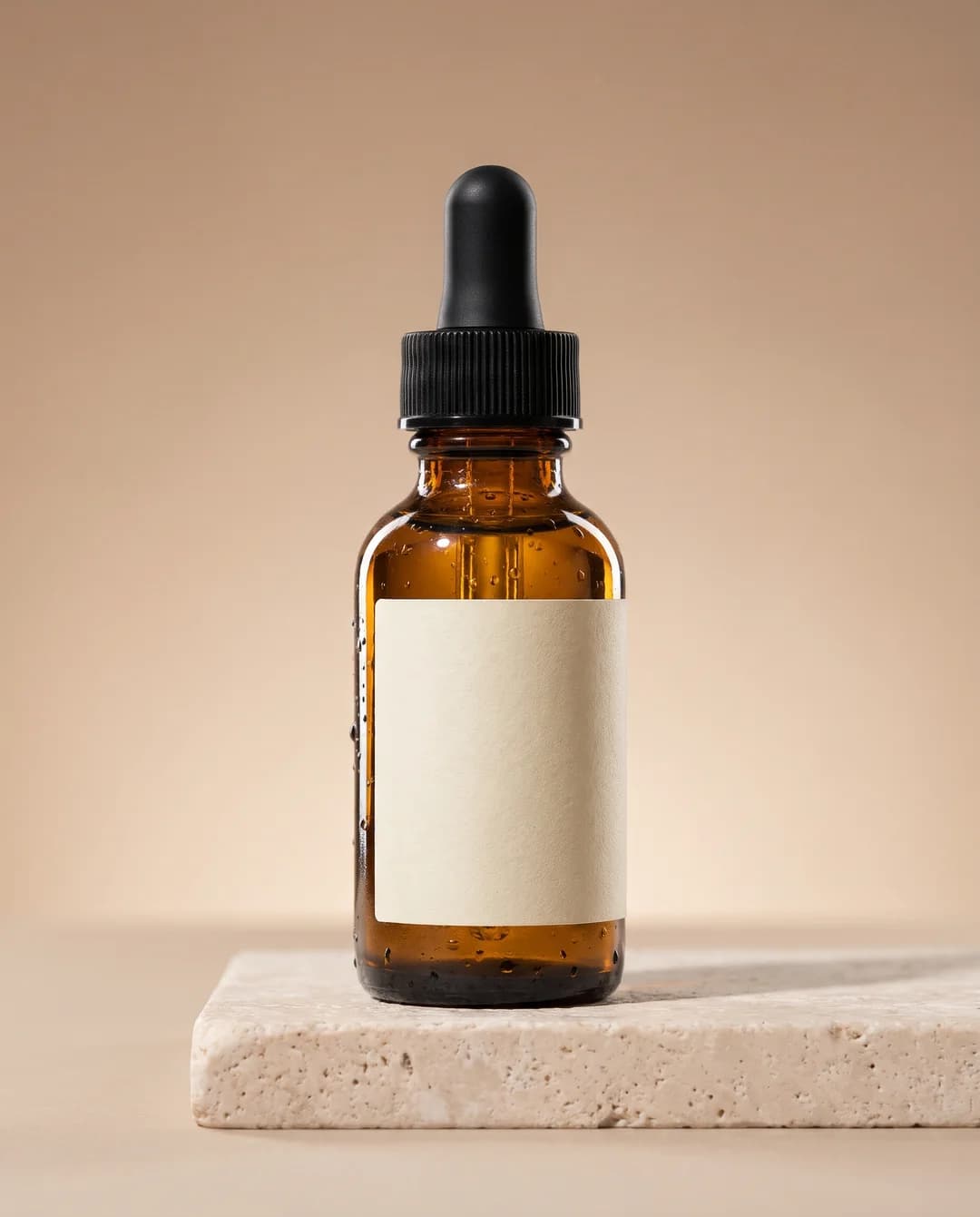
Made in Novoads with Nano Banana Pro · Google's product mockup template, filled in for a serum · 2K, 4:5 · 2 credits · 2026-11-01
What came back is a single studio shot. The amber bottle and its ribbed black cap face the camera from a low angle, the cream label is blank as the prompt asked, beads of water stand out sharp on the glass, and a soft shadow falls to the right across the stone. It's one image, so it can't tell you how often the model gets a brief like this right.
The prompt has no weights, no parentheses and no negative prompt. It's plain sentences in roughly the order Stability's SD 3.5 guide asked for, with the product first, then the light, the angle and the finish. We haven't run it on a Stable Diffusion model, so we can't say how it would come out there.
Google's template and its other examples are in our Nano Banana prompts guide, and OpenAI's advice for its own model is in our GPT Image 2 prompts post. A shot like this is the raw material for a static ad, which our static ads guide explains. Putting it into motion takes a different kind of prompt, closer to the shot list in our camera movement guide.
Commercial use and what one image costs
On Stability's API
Stability's API FAQ answers the commercial question in one line. You can use API outputs commercially "as long as the output doesn't violate anyone's copyright," and the FAQ points you to Stability's terms of service for the details. Running the models on your own hardware falls under Stability's license instead, which our Stable Diffusion explainer goes through along with each model's price.
Prices as of November 3, 2026. Stability bills its API in credits of $0.01 each, and its pricing page says prices are subject to change. An SD 3.5 Large image costs 6.5 credits, which is 6.5 cents. A Stable Image Ultra image costs 8 credits.
In Novoads
We don't sell Stable Diffusion. We sell Nano Banana Pro, the model behind the serum shot, and one balance of credits pays for product photos, video ads, talking actors and voiceovers, as our pricing page puts it. A Nano Banana Pro image costs 2 credits at 2K, the size we used. At 4K it's 4 credits.
You pay for Novoads from the first month. On the two smaller plans, one 2K image works out like this.
| Plan | Price | Credits a month | One 2K Nano Banana Pro image |
|---|---|---|---|
| Starter | $15 a month, monthly only | 200 | $0.15 (2 credits at $0.075 each) |
| Plus | $49 a month | 1,000 | about $0.10 (2 credits at $0.049 each) |
By those numbers, an image on Stability's API costs less than a Nano Banana Pro image in Novoads, on either plan. The same credits also run the video models we sell, which can start from a product image, so you can turn the shot you prompted into a video ad without leaving the app. See every plan and its credits on our pricing page, or look at how product demo videos come together in Novoads.
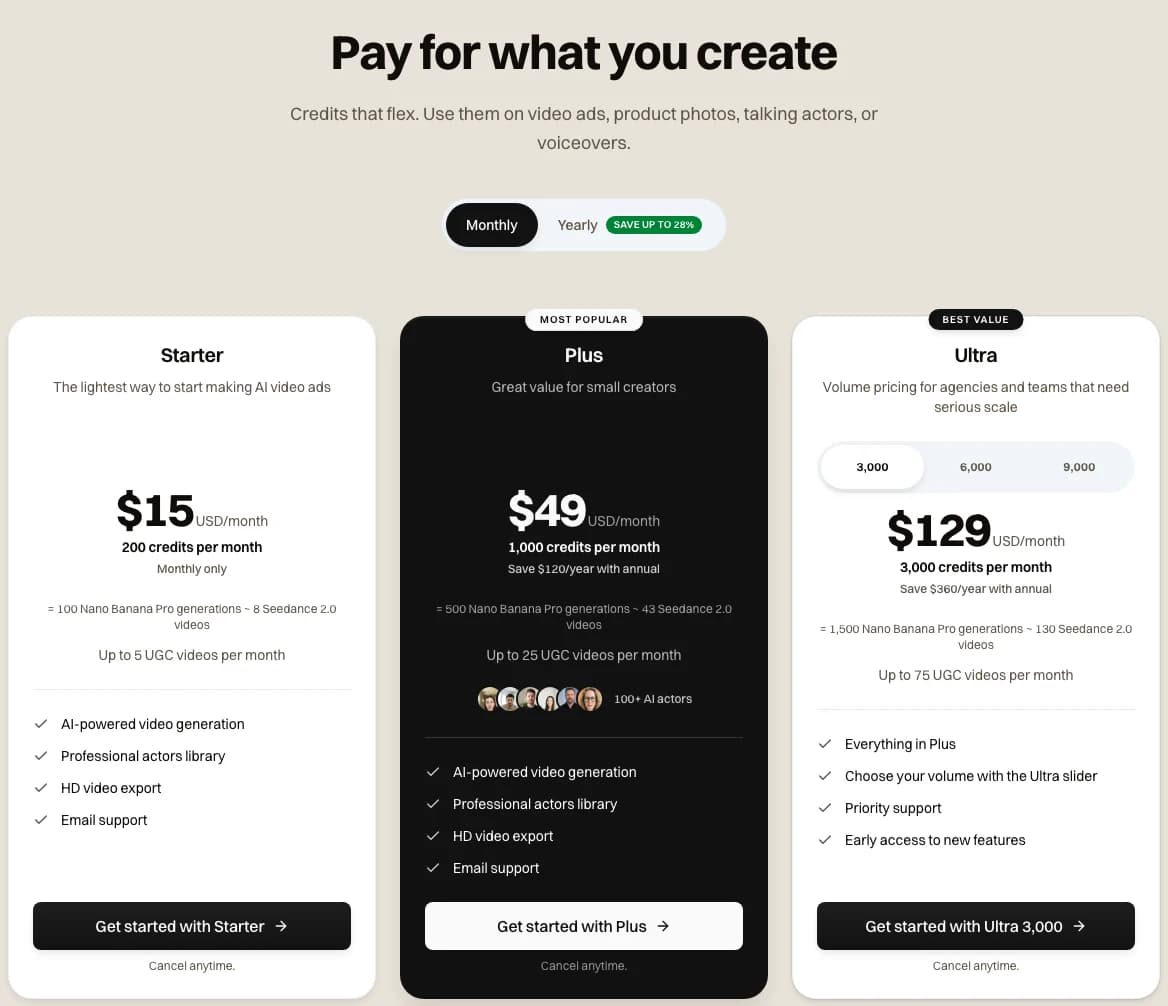
The Novoads pricing page on monthly billing, captured 2026-11-03
Turn the product shot into a video ad
Start from your product image and make demo videos with the image and video models Novoads sells, all from one balance of credits.
See product demo videosFrequently Asked Questions
How do you write a good Stable Diffusion prompt for a product ad?
Stability's SD 3.5 prompt guide, which now survives only as an Internet Archive copy, said to write in clear natural language, with the subject first and what it does after, then composition, lighting and camera terms. Any words you want printed go in double quotes. If you're using Ultra or Core on Stability's API, their reference says a word's weight goes between 0 and 1, written (word:weight). Stability's SD 3.5 page doesn't give a weight syntax. And prompts have to be in English.
Key Takeaways
- Stability's SD 3.5 prompt guide is gone from its site. The Internet Archive's copy from March 29, 2026, says to write in clear natural language, subject first, and to put any words you want printed in double quotes.
- Stability's Ultra and Core API reference says a word's weight is a value between 0 and 1, written (word:weight). Its SD 3.5 page says nothing about weights.
- Weights like 1.2 and 1.4 come from AUTOMATIC1111, ComfyUI and Stability's legacy API. Stability's current reference doesn't mention them.
- Stability's hosted API takes prompts of up to 10,000 characters, in English only. The token limits people quote come from model cards and older APIs.
- Novoads doesn't sell Stable Diffusion. Our serum shot came from Nano Banana Pro, at 2 credits for one 2K image.