LinkedIn Ads: How to Run Them, From the $10 Daily Minimum to the Creative
LinkedIn's minimum daily budget is $10, and it suggests $25 for new advertisers. We work out what a month costs at each, walk through the Campaign Manager steps and video specs, and add up what four or five ads cost to make.

Mauricio Valdivia
·13 min
LinkedIn asks for $10 a day and four or five ads
LinkedIn's budget best-practices page says the minimum daily budget to start is $10 for any ad format. Its video tips page tells you to create four or five ads in each campaign.
On November 6, 2026, we read the six articles among Google's top US results for "linkedin ads". None of them gave that minimum, and none said what those ads cost to make.
So we worked out both. Everything on LinkedIn's side comes from its own pages, which we read that day from Spain. Our side comes from an ad we made in Novoads and our own price list. We didn't run a LinkedIn campaign for this post.
At the minimum, 30 days of media come to $300. Five ads like ours take 450 credits in Novoads, which comes to about $22 at our Plus plan's price per credit.
What LinkedIn ads are, and which formats you can pick
Ads sold at auction, set up by objective
LinkedIn ads are paid placements you create in Campaign Manager, which LinkedIn describes as its platform to set up and launch ad campaigns. LinkedIn sells them through an ad auction, so you're bidding against other advertisers who want to reach the same audience.
Every campaign starts with an objective, and LinkedIn groups its objectives into the three tiers of the marketing funnel (brand awareness, consideration and conversions). What you're charged for depends on the optimization goal and bidding strategy you choose, and the auction decides what the ads cost.
The formats Campaign Manager offers
LinkedIn's help article on creating an ad set links to a how-to for each format, and the formats fall into four groups.
- Sponsored Content covers single image, video, carousel image, event, document, single job, and article and newsletter ads. You can also build one from a Company Page post or from a thought leader's post.
- Sponsored Messaging covers message ads and conversation ads.
- Dynamic ads cover spotlight, follower and job ads.
- Text ads are a group of their own.
Video, the format we price in this post, is a Sponsored Content format. A carousel takes 2 to 10 cards, but LinkedIn's carousel specs say carousel ads don't support video at this time.
Three formats with conditions attached
- With Thought Leader Ads, a person's post runs as the ad. LinkedIn's specs say the ad creative is your thought leader's post, with no call-to-action buttons. So a video you make for one has to go up first as that person's own post.
- In the EEA and Switzerland, only members who've opted in to see Sponsored Messaging ads in their inbox can receive them.
- According to LinkedIn's CTV help, Connected TV ads target the United States and Canada, in English.
What a LinkedIn campaign costs at the minimum
LinkedIn's figures in this section are as of November 6, 2026. They're in US dollars, the way its English pages showed them to us.
The $10 floor and the floors around it
The $10 a day comes from LinkedIn's budget best-practices page, which isn't dated. The same page puts the minimum lifetime budget for new, inactive campaigns at $100. Once the campaign launches, the lifetime minimum becomes the $10 daily minimum times the number of days you've scheduled.
The daily minimum isn't new. An archived copy of the page from August 2021 already gives it, and a copy from July 2026 still does.
Budget optimization comes with a higher floor. LinkedIn's help says you can use Dynamic Group Budget, which it also calls budget optimization, to optimize the budget at the campaign level instead of for each ad set. With it on, the campaign's minimum daily budget is $30, and the ad sets inside it can only use Sponsored Content formats.
LinkedIn's ads home page reads differently. It says you can start with any budget and stop your ads at any time. We'd still plan around the floors on the budget page and in the help pages.
LinkedIn's English pages give these amounts in US dollars. For other currencies, the budget page suggests the equivalent of $25, and Campaign Manager's default daily budget is available only in US dollars and euros. We didn't read the minimums for other currencies.
LinkedIn's suggested budgets, over 30 days
When you create an ad set, Campaign Manager recommends a default daily budget. LinkedIn's budget page says it suggests $25 for new advertisers who pay in US dollars. For existing advertisers, it's $50 to $100.
The 30-day column is our arithmetic, each daily figure times 30.
| Daily budget | What LinkedIn calls it | 30 days |
|---|---|---|
| $10 | The minimum to start, any ad format | $300 |
| $25 | Suggested for new advertisers | $750 |
| $30 | Campaign minimum with Dynamic Group Budget | $900 |
| $50 to $100 | Suggested for existing advertisers | $1,500 to $3,000 |
A lifetime budget ends up in the same place. Once a 30-day schedule is live, its lifetime budget can't go below $300. That's because the lifetime minimum is $10 times the number of days scheduled.
The Spanish page gives different advice
LinkedIn's budget page for Spain, which is in Spanish, doesn't give the $10 minimum. It tells you to spend your first two to four weeks testing how the platform works. Then it recommends testing with at least USD 50 a day or USD 3,000 in total, usually over a month.
At USD 50 a day, a month comes to about $1,500 by our count. That's half the USD 3,000 total the page offers as the other option. So which should you go by? We'd read the Spanish advice as a testing budget and the English $10 as the floor, since they answer different questions.
Going over the daily budget, and the lowest bid
Spend on any one day can pass your daily budget. LinkedIn's budgets help says actual daily spend might be up to 100% higher than the daily budget on a given day. An archived copy of the same help page from December 2025 said up to 50%.
The week has a ceiling, though. In LinkedIn's example, a $100 daily budget on a continuous schedule might spend up to $200 on one day. But the total for the Monday-to-Sunday week won't exceed $700. At the $10 minimum, the same rule allows up to $20 on one day. By our arithmetic, a week stays within $70.
LinkedIn's bidding help says there's no set cost per result, because the ads are auction-based rather than guaranteed inventory. The lowest bid LinkedIn accepts for manual bidding is $0.01 per result, or the equivalent in your currency. Campaign Manager suggests a bid range, and a bid below its recommendation brings up a warning that the bid won't reach your target audience. So treat $0.01 as the lowest number the bid field takes, and expect the auction to set what a click costs.
LinkedIn lists three bidding strategies (maximum delivery, cost cap and manual bidding). Maximum delivery is the automated one. With it, you're charged by impressions, and there's no bid or cost cap to set.
The new-advertiser credit is a promotion
LinkedIn's getting-started page carried a promotion when we read it, offering new advertisers at least $250 in ad credit for spending in their first 30 days.
The terms set four conditions you'll want to know before you count on it.
- LinkedIn can end the promotion at any time.
- Only one offer is allowed per company within a 90-day period.
- You have to reach the required spend within the offer's timeframe, and neither the offer nor the terms page says what that amount is.
- The credit shows up in your local currency (dollars, for us) and expires one year after it's applied.
We wouldn't plan a first month around it.
Setting up your first campaign in Campaign Manager
We follow the order in LinkedIn's help article on creating an ad set. A campaign groups related ad sets, and you pick the audience, format, budget and bid in each ad set. With Dynamic Group Budget on, you set the budget, schedule and bidding strategy on the campaign instead.
What to have ready before you start
- Campaign manager access or higher on the ad account, which LinkedIn requires before you can create ad sets.
- A LinkedIn Page tied to the ad account. Without one, text ads are the only format you can select.
- A valid form of payment on the account, which you need before you can launch.
- Your four or five ads, ready to upload before you launch.
The steps, in LinkedIn's order
- Go to your ad account in Campaign Manager, then pick an existing campaign or create a new one.
- Create a new ad set, give it a name and select its objective.
- Select an audience. You can build your own from saved audiences, matched audiences and audience attributes, or use an Auto-Targeting audience.
- Select an ad format. Where the format allows it, you can also turn LinkedIn Audience Network placement on or off.
- Select a budget, an optimization goal, a schedule and a bidding strategy.
- Add conversion tracking if you use it, then create or select the ads.
- Review the settings, click Next and then click Launch campaign.
After launch, LinkedIn reviews your ads. If they're approved, they can start getting impressions under the ad set's settings.
Audience size and language
LinkedIn's audience page sets the minimum audience at 300 members, and for single image and text ads it says to aim for 50,000 or more. You also have to pick one of LinkedIn's 35 profile languages for the audience. And in the EEA or Switzerland, LinkedIn says reach for some attributes or audiences may be limited.
The creative LinkedIn asks for
The specs and tips in this section are LinkedIn's, as of November 6, 2026.
Four or five ads, and why the creative affects cost
LinkedIn's video tips page says to create four or five ads in your campaign, to give it more exposure and more room to optimize. While you set the campaign up, you can create up to five at a time by uploading or selecting up to five videos from the media library.
The creative also affects what you pay. LinkedIn's pricing help says the more relevant your ad, the lower the price you pay.
How long the videos should run
- A video ad can run from three seconds to 30 minutes, and in-stream video ads can run up to 90 seconds.
- LinkedIn recommends 15 to 30 seconds, so a video qualifies for every placement across the LinkedIn Feed and the Audience Network.
- The tips page sorts lengths into three groups. Short videos of 5 to 15 seconds work as loops or cliffhangers. Medium ones, about 30 seconds long, make their point in the first 5 seconds, and LinkedIn names quick product overviews and talking-head interviews as strong examples. Long ones, a minute or more, tell a richer story.
- The same page credits videos of 7 to 15 seconds with up to a 300% lift in completion rates, based on LinkedIn's own 2025 data.
- Videos under 30 seconds loop until they've played for at least 30 seconds.
Ratios, sizes and the file format
LinkedIn's video specs list four ratios and mark 4:5 as the recommended one. For 4:5, the help page gives a size of 720 x 900 pixels, which falls inside the range in the table.
| Ratio | Smallest, in pixels | Largest, in pixels |
|---|---|---|
| 4:5 vertical, recommended | 360 x 450 | 1080 x 1350 |
| 9:16 vertical | 360 x 640 | 1080 x 1920 |
| 1:1 square | 360 x 360 | 1920 x 1920 |
| 16:9 horizontal | 640 x 360 | 1920 x 1080 |
LinkedIn's video specs page allows a 5% tolerance on the ratio. The file has to be an MP4 between 75 KB and 500 MB. It needs H.264 or VP8 video with AAC or MPEG4 audio, and Apple ProRes isn't supported.
LinkedIn's two pages disagree on frame rate. The help page says less than 30 frames per second, while the specs page recommends 30. We'd go with the help page, since its limit is the stricter of the two.
Sound off, captions burned in
LinkedIn video ads autoplay in the feed with the sound muted by default. The tips page tells you to think like a silent film director, because a large portion of members will watch with the sound off. It also says to show what you want people to see in the first 10 seconds and to consider burning in subtitles. LinkedIn's video ads page says captions are strongly recommended.
If you upload a caption file instead, it has to be an SRT file with plain text only. LinkedIn also says only English video captions are supported for now.
Images, text and LinkedIn's own AI tools
For a single image ad, LinkedIn's specs page recommends 1200 x 628 for a horizontal image and 1200 x 1200 for a square one. LinkedIn's ads guide gives 1200 x 627 for the horizontal size instead. The specs page also says vertical images, including 4:5, don't show on desktop.
The text has limits of its own, and two of LinkedIn's pages disagree on one of them.
- LinkedIn's video help says to keep introductory text within 150 characters so it doesn't get cut off, with a 3,000-character maximum.
- Its video specs page gives a 600-character maximum instead.
- An ad with more than four emojis, symbols or repeated characters might be rejected.
LinkedIn's advertising policy, last revised November 18, 2025, allows the phrase "find me on LinkedIn" but otherwise tells you not to use "LinkedIn" or refer to LinkedIn in your ad. So we keep LinkedIn's name and logo out of the video itself.
Campaign Manager has AI tools of its own. It offers AI-generated images, and its Draft with AI option writes the introductory text, the headline and images for a single image ad. Flexible ads take up to four images or videos that you upload, plus up to five headlines and descriptions. Campaign Manager then mixes and matches them into up to 64 versions.
What four or five LinkedIn ads cost to make in Novoads
The shapes we can make
No video model in Novoads has a 4:5 setting, so we can't make a video in LinkedIn's recommended ratio. But LinkedIn also takes 9:16, 1:1 and 16:9.
Omni Flash, the model we used for our ad, makes 9:16 and 16:9 in Novoads. Seedance 2.0, Seedance 2.0 Mini, Seedance 2.5, Kling v3 Pro and Wan 3.0 add 1:1 to those two.
For a 4:5 still image, Novoads' Image-to-Ad tool does have a 4:5 setting. Our static ads post shows how we make 4:5 static ads. LinkedIn won't show a vertical image on desktop, though.
Our ad, 28 seconds for 90 credits
On October 5, 2026, we made a vertical ad from one brief with Omni Flash in Novoads. It runs 28 seconds at 720p.
- Three storyboard pictures of Sofía, an actor from our library, cost 6 credits.
- Three Omni Flash scenes of 8, 10 and 10 seconds cost 84 credits.
- The whole ad came to 90 credits.
By our arithmetic from the plan prices, a credit costs $0.075 on Starter and $0.049 on Plus. So the ad cost about $4.41 at the Plus rate and $6.75 at the Starter rate.
The run wasn't clean. Scene 2 came back with six words burned into the picture, even though the prompt asked for no text. It needs a 30-credit retake before the ad can run. With that retake, the ad comes to 120 credits, or about $5.88 at the Plus rate. We haven't run it on LinkedIn.
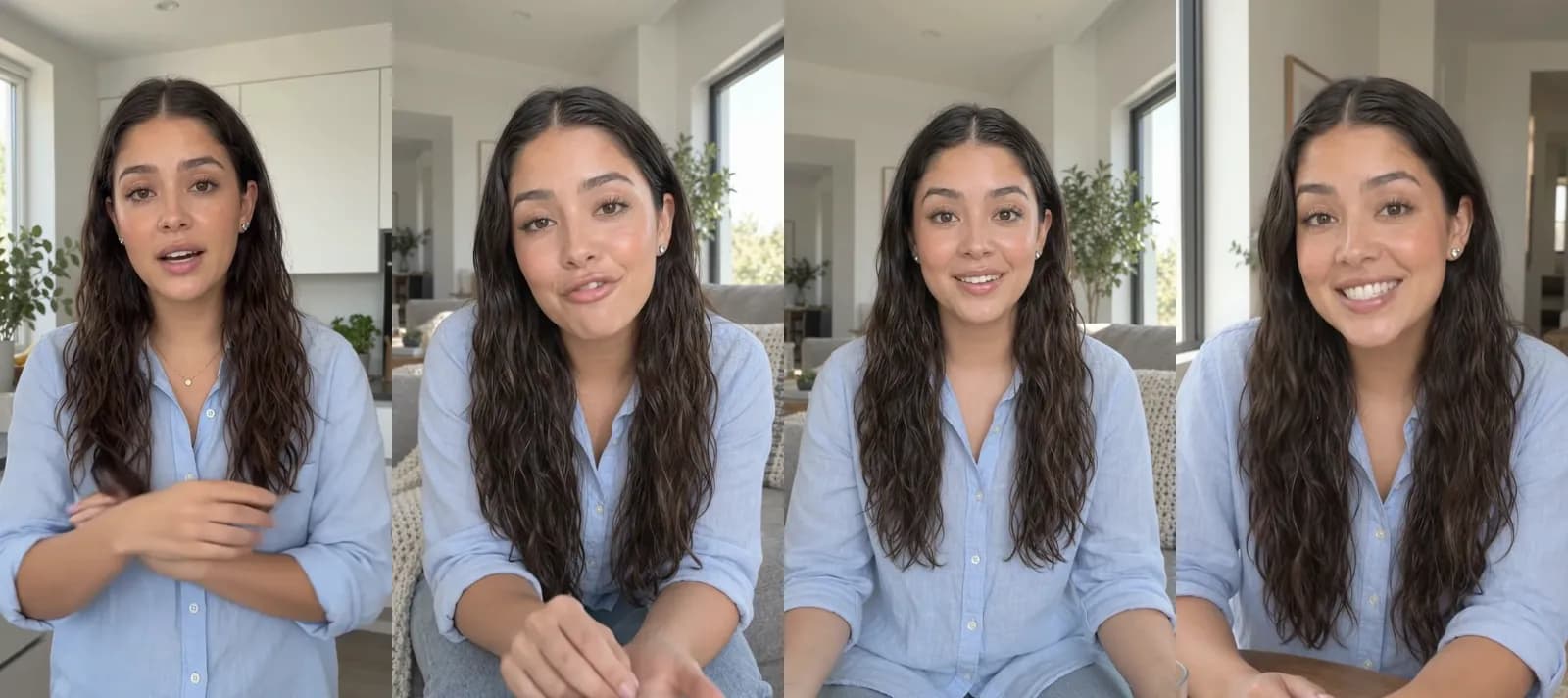
Omni Flash in Novoads, rendered 2026-10-05 for 90 credits. Four frames from the 28-second vertical ad, three scenes long, in which Sofía, an actor from our library, tells marketers they don't have to wait weeks for one ad. We haven't run it on LinkedIn.
Four or five of them next to the media budget
Four ads like ours take 360 credits, and five take 450. The dollar figures in the table are our arithmetic at the Plus rate.
| Ads like ours | Credits | At the Plus rate | If each needs one retake |
|---|---|---|---|
| 4 | 360 | $17.64 | 480 credits, $23.52 |
| 5 | 450 | $22.05 | 600 credits, $29.40 |
At LinkedIn's minimum, a month of media is $300, and five ads like ours add about 7% to that. At the $25 suggestion, the month's media is $750, and the same ads add about 3%.
You pay Novoads for a plan, and the plan's credits set how many ads fit in a month. Novoads starts at $15/month (Starter, 200 credits per month). Plus is $49 a month for 1,000 credits. For more volume, Ultra starts at $129 a month for 3,000 credits. Every plan is paid, starting with the first month.
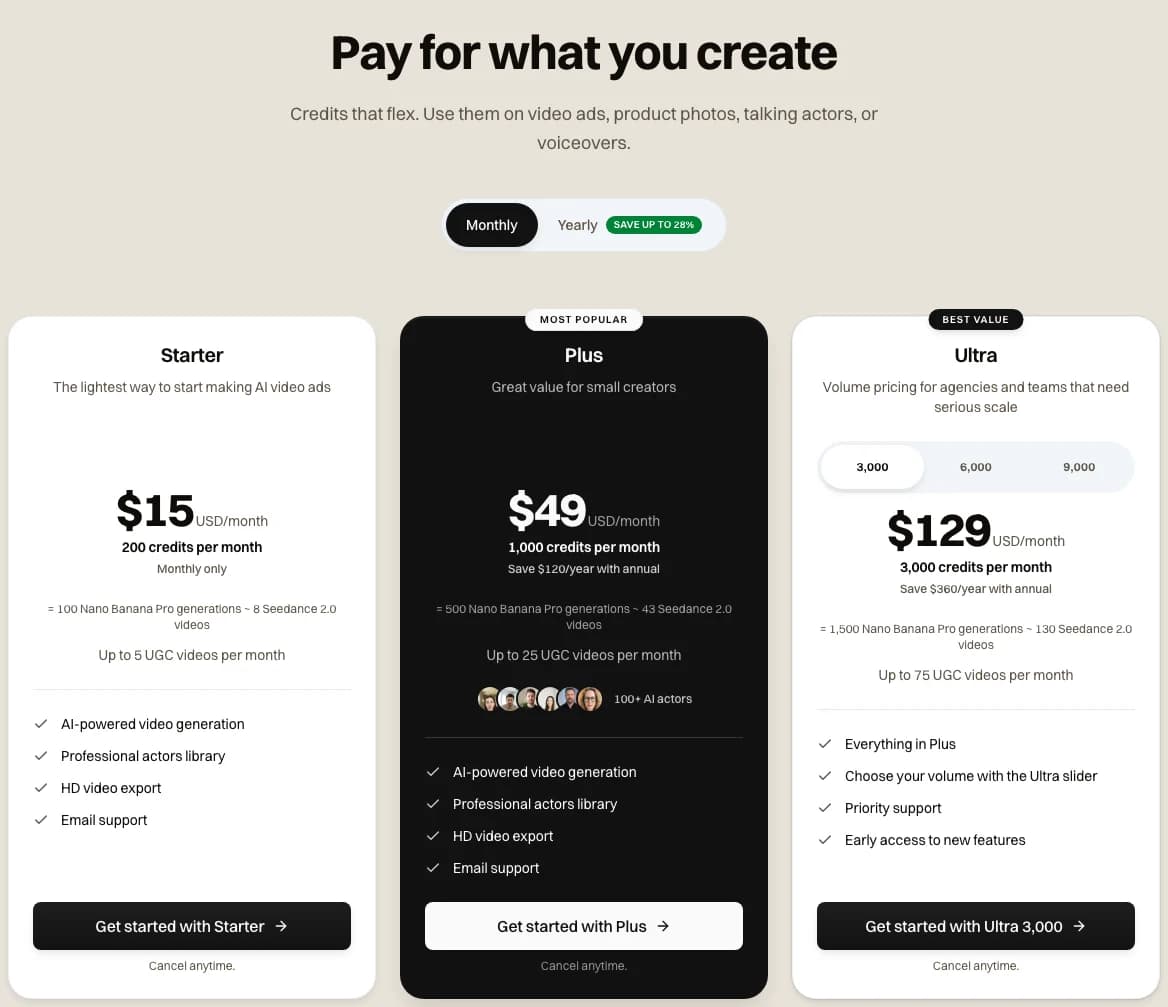
The three monthly plans on our pricing page, captured 2026-11-06, with Plus at $49 for 1,000 credits a month.
Starter's 200 credits cover two ads like ours. Plus covers all five with 550 credits left over. Our pricing page says you can also spend those credits on product photos, talking actors or voiceovers.
Our talking actor, for LinkedIn's medium-length videos
LinkedIn names talking-head interviews as a strong example of a video of about 30 seconds. Our talking actor in Novoads is billed per started minute, voice included. At 720p, a take of up to a minute costs 200 credits. At 480p, it's 100.
At 720p, five takes use a whole Plus month of credits, and at 480p the same five use half of one. Our 720p talking-actor files fall inside LinkedIn's size range for vertical video, and a square input photo gives you a square file that fits its 1:1 range.
If your product is the subject, our page on AI product demo videos covers demos where an AI actor holds and uses your product.
Getting the files into Campaign Manager
Novoads makes the video, and placing the ad is up to you. It doesn't connect to LinkedIn's Campaign Manager or publish ads anywhere, so you download each file and upload it in Campaign Manager yourself. LinkedIn takes video uploads from a desktop only, up to 25 videos in 24 hours.
Before you upload, check each file's format, codec, audio and frame rate against LinkedIn's list. We haven't checked a download from every model against it.
Captions in Novoads are burned into the picture, which suits a feed that plays muted and gets around LinkedIn's English-only caption files. Our basic caption styles cost 3 credits per started minute, and the dynamic ones cost 5. A 28-second ad counts as one started minute. So its captions add 3 or 5 credits.
Make the four or five ads before you set the budget
Novoads turns your product and a brief into vertical and square video ads. You download them and upload them in Campaign Manager yourself.
See product demo adsThe first two weeks after launch
Costs move during the learning phase
With cost cap bidding, LinkedIn's help says the cost is more likely to fluctuate during the first seven days of the learning phase. Any change to the audience, its attributes, the bidding strategy or the creatives resets that phase. LinkedIn recommends running a cost cap ad set for at least 15 days.
For a campaign on Dynamic Group Budget, LinkedIn's best practices say to let it run for at least one week before you change anything.
Launch with every ad, then change them together
That's why we'd upload all four or five ads before launch instead of adding them one by one and restarting the learning phase each time. After the first 15 days, we'd keep the ads that are working and swap out the rest in one change.
We'd also give each ad its own opening hook and scene. On Meta, ads that look alike get treated as one creative, as our creative diversity post explains. For ways to compare the ads once they're running, our post on ad creative testing tools goes through what Meta, TikTok and Google offer.
So a first month at LinkedIn's minimum comes to $300 of media plus a Plus month of credits for the ads.
Frequently Asked Questions
What are LinkedIn ads?
They're paid placements you create in Campaign Manager, which LinkedIn describes as its platform to set up and launch ad campaigns. LinkedIn sells them through an ad auction, so you're bidding against other advertisers who want the same audience. The formats include Sponsored Content (single image, video, carousel, event and document ads, among others), Sponsored Messaging, dynamic ads and text ads. Every campaign starts with an objective in one of three tiers (brand awareness, consideration or conversions).
How much does it cost to advertise on LinkedIn?
LinkedIn's budget best-practices page says the minimum daily budget to start is $10 for any ad format, and it suggests $25 for new advertisers who pay in US dollars. By our arithmetic, that's $300 or $750 of media over a month. With Dynamic Group Budget turned on, the campaign minimum is $30 a day. LinkedIn's bidding help says there's no set cost per result, because the ads are sold at auction. For an outside reference, Dreamdata's 2026 LinkedIn Ads benchmarks report, which is built on its own customers' data, puts LinkedIn's cost per click at €5.98.
What size and length should a LinkedIn video ad be?
LinkedIn's video specs mark 4:5 vertical as the recommended ratio, at 720 x 900 pixels. LinkedIn also takes vertical 9:16, square and horizontal 16:9 video. A video ad can run from three seconds to 30 minutes. LinkedIn recommends 15 to 30 seconds, which qualifies a video for every placement in the Feed and the Audience Network. The file has to be an MP4 with H.264 or VP8 video, between 75 KB and 500 MB.
Can Novoads publish my LinkedIn ads?
No. Novoads makes the videos, and you download them and upload each one in LinkedIn's Campaign Manager yourself. LinkedIn takes video uploads from a desktop only, up to 25 videos in 24 hours. No video model in Novoads has a 4:5 setting. So make your LinkedIn videos in vertical 9:16, square, or horizontal 16:9.
Key Takeaways
- LinkedIn's budget best-practices page says the minimum daily budget to start is $10 for any ad format, and the page has said so since at least August 2021. With Dynamic Group Budget turned on, the campaign minimum is $30 a day.
- Thirty days at the minimum come to $300 of media. At LinkedIn's $25 suggestion for new advertisers, it's $750 (our arithmetic). LinkedIn's Spanish budget page doesn't give the $10 minimum. It recommends testing with at least USD 50 a day or USD 3,000 in total instead.
- LinkedIn says spend can run up to 100% over the daily budget on a given day, though its example keeps a Monday-to-Sunday week within seven times the daily figure. The lowest manual bid is $0.01 per result, but that's just the lowest number the bid field takes.
- LinkedIn asks for four or five ads per campaign and recommends videos of 15 to 30 seconds. Its recommended video ratio is 4:5, and no video model in Novoads has a 4:5 setting, so our videos go up in LinkedIn's other three ratios.
- Our three-scene Omni Flash ad took 90 credits. Five like it take 450 credits, which fit inside a single Plus month and come to about $22 at the Plus rate. Novoads makes the videos, and you upload them in Campaign Manager yourself.