Choose an Audience for Each Ad Creative: One Asset per Persona
Meta announced Choose an audience for each ad creative on October 19, 2026: each image or video in one ad set can carry its own age range and gender. What it does in Meta's words, the limits Meta documents, how to plan one asset per audience, and what that set costs to make in Novoads.

Mauricio Valdivia
·12 min

Age and gender now live on the creative, not the ad set
On Monday, October 19, Meta's developer blog announced a setting with a long name and a narrow job: Choose an audience for each ad creative. Switch it on and one ad set can hold several ads, each image or video marked with the age range and gender Meta says it is "best suited for." The brief changes with it.
Advertisers could always run several ads in one ad set. What is new is the pairing. Meta's own examples are a financial-services advertiser deciding that retirement-planning videos are best suited for people aged 50 to 65 and savings-account videos for all ages, and a fashion retailer matching images of women's sweaters to women and men's sweaters to men. Each of those pairings needs a different piece of media for each audience. If two audiences should see two different ads, somebody has to make two different ads.
This post covers what the setting does in Meta's own words, where it sits in Ads Manager, the limits Meta documents, how to plan one asset per audience, and what producing that set costs in Novoads, including a two-audience version of one ad we rendered on October 9.
What Meta's setting does, in Meta's own words
Meta describes the setting from two sides. The blog post, by Graham Mahon and Mohamed Khalil, speaks to advertisers. The Marketing API reference, titled Creative audience pairing, speaks to developers and puts it in one line: the setting "lets you set age and gender on the ad creative instead of the ad set."
Announced October 19, still rolling out in Ads Manager
October 19 is the day Meta announced the setting, not the first trace of it. Three dates tell the story:
- September 4, 2026: the last update shown on Meta's API reference page for the setting, six weeks before the announcement.
- October 19: the blog post, which says "Marketing API partners will see this option available to them" from that day.
- October 20: Jon Loomer, who found the toggle in his own account, writes that Meta is still rolling it out in Ads Manager: "If you follow my instructions and still don't see it, you just don't have it yet."
If your account shows no toggle today, the likeliest reading is that the rollout has not reached it.
"Best suited for" is a direction, not a fence
The wording matters. Meta's Help Center article on the setting says that when you direct a piece of media to an age or gender, "It may also reach others who are likely to respond." The Ads Manager tooltip Loomer quotes says the same thing in one line: "Your ad will be directed towards your selected audience, but may also reach others who are likely to respond."
Read it as a steer. Meta directs each image or video toward the age and gender you picked, and may still show it to other people it expects to respond. A retirement video paired with 50-to-65-year-olds can still reach a 40-year-old. Meta's announcement gives no figure for how often that happens.
Two earlier statements frame it. Meta's April 2025 guidance said "the focus has shifted from niche targeting to creative diversification as the best lever to find the most relevant audiences." Loomer calls the new option "a sort of middle ground between full algorithmic targeting and audience restrictions, similar to value rules." Our reading of both: the creative now carries the audience hint, and the ad set stays wide.
What a persona holds
In the API, each pairing is a persona with three fields:
- Minimum age: 18 or older, and never below the ad set's own minimum.
- Maximum age: up to 65.
- Genders: 1 for male and 2 for female, at most two values.
Where the persona goes depends on the ad:
- A single-media ad carries one persona on the ad.
- A multi-media ad carries one persona per media asset. When an ad has both, Meta's multi-media reference says "only those per-asset personas apply; any ad-level persona on the same ad is not used."
Turning the setting on does nothing by itself. Meta's reference puts it plainly: "Enabling it on its own has no effect, because without a persona there is nothing to pair."
Where the toggle sits in Ads Manager
Meta documents the Ads Manager steps in a Business Help Center article, How to choose an audience for each ad creative. The switch lives in the ad set. The audiences live on each image or video.
Turn it on in the ad set
Meta's first step is to check that the setting "is turned on under Audience in your Ad set." Loomer's account adds three details:
- He found it in the ad set's Audiences section, behind the option to "further limit the reach of your ads."
- In Sales campaigns, he reports, the toggle is on by default once you have chosen to further limit the reach of your ads, and off by default for other objectives.
- He found no requirement by campaign objective, and every performance goal he tried offered the option.
That path is the trade-off. Meta's help page on audience controls describes the "further limit" route as the choice to make "If reaching a specific audience is more important than getting best performance." Whether that trade is right for your account is a targeting decision. Our guide to targeting audiences in Meta Ads walks through Advantage+ audience, controls and suggestions, and this post stays on the creative.
Give each image or video its audience
Meta's Help Center lays out the rest of the steps:
- Select Ad, then set up your ad creative and upload your media.
- Hover over a piece of media. Its audience starts at all ages and genders.
- Click Edit and choose whether to direct that media by age, gender or both.
- Duplicate the ad for each further version and set each one's audience. Meta's wording is "Make as many ads as you want."
- Publish as usual. The campaign runs after review.
In Loomer's account, the multimedia setup showed a new "Audience for This Media" setting on each image or video. The single-media setup has no per-media button, but he reports "a new Audience section under your media placement groups."

The limits Meta documents
The constraints sit in the Creative audience pairing reference and the Help Center article. Four of them decide what you can run.
No Advantage+ audience while it is on
Meta's reference names two settings the pairing cannot run with, and the Graph API answers either conflict with error code 100:
- Advantage+ audience: "You cannot combine creative audience pairing with Advantage+ audience."
- Age and gender suggestions in the ad set.
In Ads Manager terms, the Help Center says the ad set's usual Age and Gender settings are hidden while the setting is on, and that if you want to use age and gender as suggestions or controls, you turn the setting off.
The conflict Meta documents is with Advantage+ audience, the targeting setting. Advantage+ creative is a separate set of creative features, and the creative audience pairing reference does not mention it. Our explainer of Meta's AI ad features covers the creative side.
The ad set has to stay broad
While the setting is on, the reference sets three rules for the ad set's own targeting:
- Minimum age between 18 and 25.
- Maximum age of 65.
- Genders left out or set to all. A single gender is not allowed.
Break any of them and the Graph API returns error code 100. Loomer saw the same in Ads Manager: with the toggle on, only minimum age remained for restricting the audience, and gender was gone. So an ad set already narrowed to people over 30, or to one gender, cannot use the setting as it stands. The narrowing has to move from the ad set onto the personas.
Ten media per multi-media ad, each a different file
Meta's Multi-media ads reference holds the only count limit in this story, and it belongs to the ad format, not to the audience setting: "A maximum of 10 media assets (images and videos combined) can be included per ad." Each of those assets can carry its own persona, so one multi-media ad tops out at 10 audience-paired versions.
The same reference adds: "The API rejects duplicate image hashes or video IDs within the same media_sourcing_spec." In plain terms, every audience inside one multi-media ad needs its own file. The same video cannot be paired twice in that ad.
Meta's pages give no such number for the single-media setup, where you duplicate the ad and Meta's Help Center says to make as many as you want. How many ads one ad set can usefully carry is a separate question, and our breakdown of Meta's ad limits answers it.
What Meta's pages leave open
As of October 22, none of the four Meta pages on the setting (the blog post, the Help Center article and the two API references) says:
- whether a persona's top age of 65 also covers people older than 65;
- which objectives, placements or countries qualify, beyond Loomer finding no objective requirement in his own account;
- whether Ads Manager reports results by persona;
- how much of an ad's delivery goes outside its chosen audience.
Plan around those gaps, not on guesses about them. If buyers over 65 matter to your product, look at how your current results split by age before you build a 55-to-65 version on the belief that it reaches them.
Plan the creative set before you flip the toggle
The setting does not make creative. It sorts what you give it. So the work starts with a list of audiences and ends with one finished asset per audience.
Pick the audiences your product actually has
Start from who buys, not from the grid Meta allows. A persona can describe any span from 18 to 65 for men, women or both, but a product with two real buyer types needs two versions, not ten.
Two starting grids cover most products:
- Meta's own split for a product with distinct buyers: one version for women and one for men, as in its sweater example.
- A six-cell grid for a broad product: women and men in three age bands, 18 to 34, 35 to 54 and 55 to 65.
Keep every persona inside the ad set's limits. If the ad set's minimum age is 25, a persona cannot start at 18, because Meta's reference says a persona's minimum cannot be lower than the ad set's.
One distinct asset per audience
Each audience needs something made for it. In a multi-media ad the rule is mechanical, since Meta rejects a duplicate file in the same ad. In the single-media setup it is about the point of the setting: pairing one identical video with three age bands adds little that a single broad ad would not.
What makes an asset distinct for an audience is the person and the reason to buy, not the crop. If your versions differ only by the face, read why Meta can treat look-alike ads as one creative before you build ten of them.
What to change between versions, and what to hold still
Change what each audience sees and hears:
- The actor: someone that audience reads as one of them, in age and look. Our guide to how brands cast AI actors covers the casting side.
- The setting: a car, a kitchen, a home office, wherever that buyer uses the product.
- The opening line: the problem in that buyer's words. Testing ten openings on one video ad shows how to write and compare them.
- The language, if the audience speaks a different one. Language is not a persona field: a persona knows age and gender and nothing else, so if the language has to match the viewer, that split still happens at the ad set.
Hold still what the test is about: the product, the offer and the call to action. If those move too, a winning version tells you less about the audience and more about the offer. Once one version wins, a five-layer system for iterating one winning ad covers what to change next.
One protein-bites ad, written for two audiences
We ran the smallest version of this plan before writing about it. On October 9 we wrote one protein-bites ad for two audiences and rendered both as 720p talking actors in Novoads, through our MCP connector, four minutes apart.
The run
- Version 1, for a man who eats in his car: library actor Gaspar, in English, 11 seconds. The script: "I'm in and out of this car all day, and lunch used to be whatever the gas station had. Now I keep a box of these protein bites in the glovebox. Filling, not too sweet, and nothing sticky on the wheel. Link's below."
- Version 2, for a woman who works from home: library actor Bárbara, in Spanish, 12.7 seconds. The script: "Trabajo desde casa y a las cuatro de la tarde ya estaba abriendo galletas. Ahora guardo unos bocaditos de proteína en el cajón del escritorio: llenan, no son empalagosos y me aguantan hasta la cena. Te dejo el enlace abajo." (In English: by four in the afternoon she used to be opening cookies; now a drawer of protein bites holds her until dinner.)
The renders took 1 minute 18 seconds and 1 minute 29 seconds. Each cost 200 credits. When we transcribed both, each came back word for word against its script, and the Spanish one was detected as Spanish.
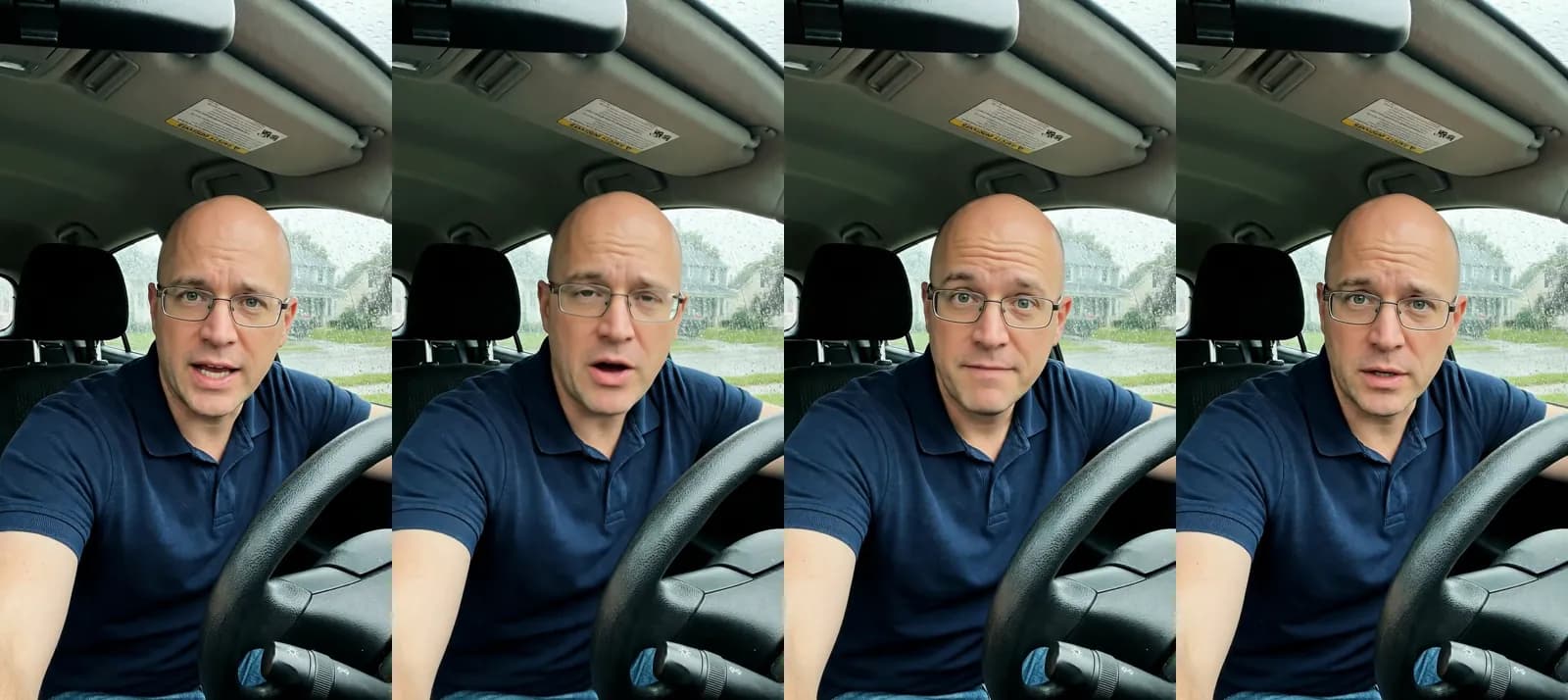 Talking actor · version 1 of one protein-bites ad, in English for a man who eats in his car: "Now I keep a box of these protein bites in the glovebox" · 200 credits at 720p · rendered 2026-10-09
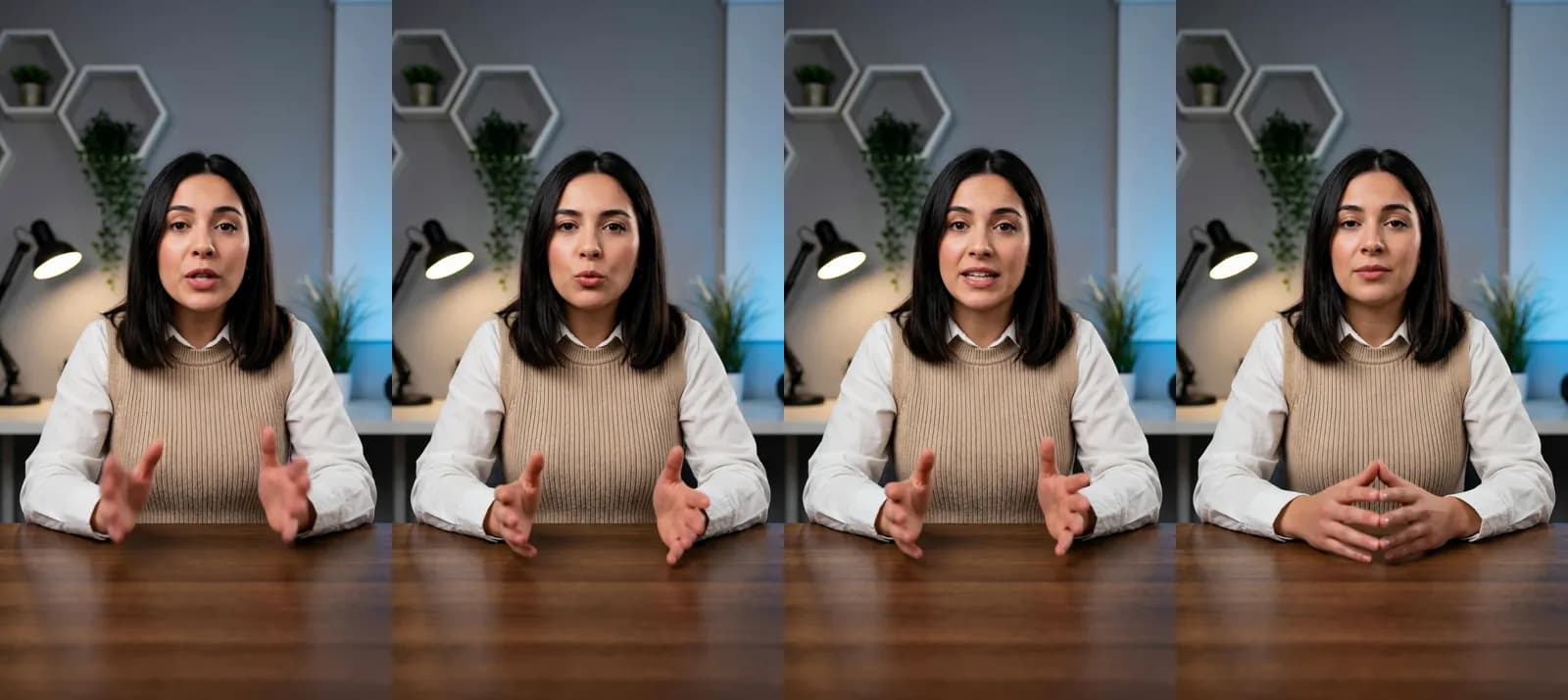 Talking actor · version 2 of the same ad, in Spanish for a woman who works from home: "Ahora guardo unos bocaditos de proteína en el cajón del escritorio" · 200 credits at 720p · rendered 2026-10-09
What the setting could and could not pair
The two versions differ in actor, setting, script and language. Meta's setting can use only some of that:
- Man versus woman: the setting carries it. Version 1 can be directed to men and version 2 to women in one ad set.
- Car versus home office, and the two scripts: these travel with each video, so they reach whichever audience the video is paired with.
- English versus Spanish: the setting cannot carry it, because a persona holds only age and gender. The Spanish version would need its own ad set aimed at Spanish speakers, or an English rewrite for the same ad set.
The second version cost exactly what the first did, 200 credits, and rendered in under a minute and a half. In a per-audience set, the hard part is deciding what each audience should hear. Producing it is the quick part.
How Novoads solves the per-audience creative set
Novoads turns one product and one script into a version per audience: pick an AI actor for each audience from more than 100, rewrite the script for that buyer, and render each version as its own downloadable file, ready to upload as a separate media in Ads Manager. Voices cover 31 languages, so a version in the audience's language is a script change, not a reshoot.
What each asset costs in credits
The setting asks for one asset per audience, so the cost question is per asset. From Novoads' credit schedules today:
| Asset per audience | Credits each | Six audiences | Ten assets |
|---|---|---|---|
| Talking actor, 720p, up to 60 s | 200 | 1,200 | 2,000 |
| Talking actor, 480p, up to 60 s | 100 | 600 | 1,000 |
| Seedance 2.0 Mini clip, 10 s, 720p | 10 | 60 | 100 |
| Nano Banana Pro static, 2K | 2 | 12 | 20 |
A talking actor bills per started minute, so a 30-second ad and a 60-second ad cost the same 200 credits at 720p, which is $9.80 at the Plus rate and all of a Starter month. The 480p option halves that. A Seedance 2.0 Mini clip costs one credit a second at 720p, and a 2K Nano Banana Pro still costs 2 credits.
A six-audience set and a ten-asset ad, in plan terms
In dollars, at the Plus rate of $0.049 a credit (Plus is $49 a month for 1,000 credits):
- Six 720p talking actors: 1,200 credits, $58.80, more than one Plus month holds.
- Six at 480p: 600 credits, $29.40, inside one Plus month.
- Six 10-second Mini clips: 60 credits, $2.94.
- Six 2K statics: 12 credits, about 59 cents.
A full ten-asset multi-media ad of 480p talking actors takes 1,000 credits, exactly one Plus month. On Starter, $15 a month for 200 credits, a month buys one 720p talking actor, two at 480p, or twenty 10-second Mini clips. Per audience, talking actors are the expensive route. When budget is tight, statics and short Mini clips can cover every audience, and talking actors can go to the two audiences that matter most. Plan prices are on the pricing page.
From the plan to the files
Our page on AI video ads for Facebook sets out the actor, model and language choices for Facebook ads, the same choices a per-audience set runs on.
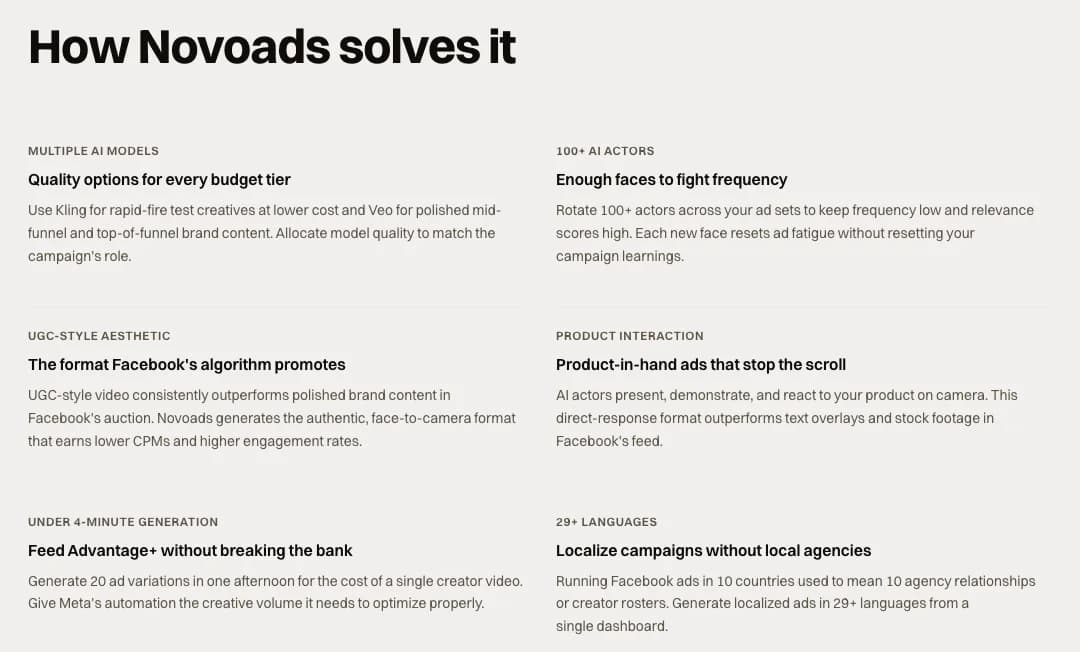 Screenshot: novoads.ai/use-cases/anuncios-video-ia-para-facebook, "How Novoads solves it": rotate 100+ actors across ad sets to keep frequency low, and 20 ad variations in an afternoon to feed Advantage+, taken 2026-10-22
The audience field is now a production brief
Meta's new setting moves a targeting decision into the edit. Every age and gender you name is a version someone has to write, cast and render, and the setting only earns its place when those versions are genuinely different. Start with two audiences you already know buy from you, make one real version for each, and let the results say whether a third is worth making.
The toggle takes a second to flip. The versions are the work.
Frequently Asked Questions
What does Choose an audience for each ad creative do in Meta Ads?
It lets one Meta ad set hold several ads and pairs each image or video with the age range and gender it is best suited for. Meta announced it on its developer blog on October 19, 2026. Meta directs each piece of media toward the audience you chose, but its Help Center says the media may also reach others who are likely to respond, so it is a direction rather than a hard limit.
Can you use it with Advantage+ audience?
No. Meta's Marketing API reference says creative audience pairing cannot be combined with Advantage+ audience or with age and gender suggestions, and the Graph API returns error code 100 when either conflict occurs. While it is on, the ad set's minimum age must be between 18 and 25, its maximum age must be 65, and it must include all genders.
How many images or videos can carry their own audience in one ad?
In a multi-media ad, up to 10. Meta's Multi-media ads reference caps one ad at 10 media assets, images and videos combined, and each can carry its own age and gender persona. Each has to be a different file, because the API rejects duplicate image hashes or video IDs in the same ad. In the single-media setup you duplicate the ad instead, and Meta's Help Center says to make as many ads as you want.
Why can't I find the toggle in Ads Manager?
Meta opened the option to Marketing API partners on October 19, 2026. In Ads Manager it was still rolling out: Jon Loomer wrote on October 20 that if you follow his steps and still don't see it, you don't have it yet. Meta's Help Center puts the toggle under Audience in the ad set, and Loomer found it behind the option to further limit the reach of your ads.
What ages can a creative's audience cover?
From 18 up to 65, per Meta's Marketing API reference. A persona's minimum age must be 18 or older and no lower than the ad set's own minimum, and its maximum age runs up to 65. Meta's pages do not say whether a maximum of 65 also covers people older than 65.
Key Takeaways
- Meta announced Choose an audience for each ad creative on October 19, 2026: one ad set can hold several ads, and each image or video is paired with the age range and gender it is best suited for.
- It is a direction, not a fence. Meta's Help Center says each piece of media may also reach others who are likely to respond.
- While it is on, the ad set stays broad (minimum age 18 to 25, maximum 65, all genders) and cannot use Advantage+ audience or age and gender suggestions.
- A multi-media ad holds at most 10 images and videos, each a different file, so the setting asks for one distinct asset per audience, not one video relabeled ten times.
- In Novoads a talking-actor version costs 200 credits at 720p or 100 at 480p, a 10-second Seedance 2.0 Mini clip 10 and a 2K Nano Banana Pro static 2. Our two-audience test cost 400 credits.
Sources
- •Meta for Developers: Choose an Audience for Each Ad Creative (October 19, 2026)
- •Meta Business Help Center: How to choose an audience for each ad creative
- •Meta Marketing API: Creative audience pairing
- •Meta Marketing API: Multi-media ads
- •Meta Business Help Center: Audience controls and audience suggestions
- •Jon Loomer: Choose an Audience for Each Ad Creative (October 20, 2026)