Snapchat Ad Sizes: Each Format's Specs, and a 1080 x 1920 Clip That Fits
Snap's Ad Formats page lists 720x1280, but its Help Center and API list 1080 x 1920. We give both sets of numbers for every format, with dates, plus the one file that fits all of them.

Mauricio Valdivia
·11 min
Snap's own pages give two sizes for the same ad
Snapchat's Ad Formats page lists its Single Image or Video ad at 720x1280. Its Business Help Center gives the same ad a full-screen canvas of 1080 x 1920. Both are 9:16, so the shape isn't in question. The pixel count is, and so are the brand-name limit and the longest video you're allowed to run.
We read the four articles from outside Snap that we could open in the top ten results for this search. None of them gives a file size, an audio spec or a safe-zone number, and none of them mentions that Snap's own pages disagree.
So we went straight to Snap. On November 9, 2026, we read its Ad Formats page, the Help Center's spec articles, its Ads API docs and its newsroom, and every number in this post comes with the page it's from and that page's date. We didn't upload anything to Ads Manager for this post, so nothing here tells you what Snap's review will accept. The Novoads section at the end uses a clip we made and measured ourselves. If you need the setup, our guide to running Snapchat ads covers it.
The one file that fits every number
Snap's own summary is that "Generally speaking, Snapchat Ads use a vertical 9x16 format." The same passage tells you to check the specs for each ad type, and that's where the numbers split. Wherever two pages disagreed, we took the tighter number, and that leaves one video file that fits every figure we found. Snap doesn't publish it as a single spec, so treat it as our own reading of where Snap's pages overlap.
- 9:16 at 1080 x 1920 pixels.
- H.264 video in an .mp4 or .mov file.
- Stereo AAC sound at 48 kHz and at least 192 kbps.
- Loudness around -16 LUFS.
- Under 1 GB, or under 32 MB if you upload through Snap's API without splitting the file into chunks.
- At least 3 seconds long and under 180.
- 5 seconds, if you want to stay within every length tip Snap gives.
- A brand name of 25 characters or fewer.
- A headline of 34 characters or fewer, and 25 to 28 on a Sponsored Snap.
- Nothing important inside the safe-zone bands, which we turn into pixels further down.
The only line this file doesn't match word for word is the Ad Formats page's "Resolution: 720x1280". A 1080 x 1920 file is the same shape, just larger. Snap's upload steps say the crop step "will be skipped automatically" when a file is already in the correct aspect ratio, though we didn't upload one to see that happen. If the same video has to run on other networks too, our post on video ad specs by platform puts Snapchat's specs side by side with theirs.
Snapchat ad sizes for each format
Snap's Help Center articles don't show a date of their own, so the table gives the day Snap last changed each one. The Ad Formats page and the API docs don't show a date either, so their numbers are as we read them on November 9, 2026.
| Format | Ad Formats page | Help Center and API | Help Center article, last changed |
|---|---|---|---|
| Single Image or Video (Snap Ads) | 9:16, 720x1280, 3 to 180 seconds | 1080 x 1920 canvas, 3 seconds to 30 minutes (API: up to 1,800 seconds) | Single Image or Video specs, March 2, 2026 |
| Story Ads | 9:16, 720x1280, 3 to 180 seconds | 1 to 10 Snaps of up to 180 seconds each, plus a 360 x 600 tile (API: 3:5) | Story Ad specs, September 2, 2026 |
| Collection Ads | 9:16, 720x1280, 3 to 180 seconds | 2, 3 or 4 square thumbnails, at least 160 x 160 each | Collection Ad specs, April 9, 2025 |
| Commercials | 9:16, 720x1280, 3 to 180 seconds | 1080 x 1920 canvas, 3 to 6 or 7 to 180 seconds, sound required | Commercial specs, October 16, 2026 |
| Dynamic Product Ads | not on this page | frame overlay 1080 x 1920 under 2 MB, hero video up to 10 seconds | Dynamic frame and Dynamic Collection articles, April 9, 2025 |
| Lenses | no size given | no size given | Lens specs, November 3, 2026 |
| Filters | 945x2048 static, 720 x 1560 moving | the same in the Help Center (API: 1080 x 2340) | AR Filter specs, April 9, 2025 |
| Sponsored Snaps | 9:16, 720x1280, 180 seconds at most | chat background 1080 x 1920, video under 180 seconds | Ads in Chat, May 20, 2026 |
Single Image or Video ads
This is the plain full-screen ad, which Snap's API docs still call a Snap Ad. The Ad Formats page lists it at 720x1280, with a length of 3 to 180 seconds. The Help Center's spec article gives it a full-screen canvas of 1080 x 1920. On length, the same article says "3 seconds to 30 minutes (if file size does not exceed 1 GB)". The API docs list the same 1080 x 1920 and cap video length at 1,800 seconds.
Under that article's rules, video goes in an .mp4 or .mov file, encoded in H.264, at 1 GB or less. A still image is a .jpg or .png of up to 5 MB, and Snap turns it into a 5-second video. A clip shorter than 3 seconds gets looped up to 3. The sound has to use two balanced channels, in PCM or AAC. Snap asks for a bit rate of 192 kbps or more, with a loudness target of -16 LUFS.
Snap's advice runs much shorter than its limits. One Help Center article recommends "3-5 seconds" for a video, and the best-practices article says "around 5-6 seconds long". As for Spotlight, Snap's pages don't treat it as a format of its own. The Ad Formats page says single image or video ads can show up in Stories and Spotlight, and Snap's API docs say an image can't run in Spotlight.
Story Ads
A Story Ad is a tile in the Discover feed that opens into a series of Snaps. Snap's Story spec allows "1-10 Single Image or Video ads", each up to 180 seconds. Each of those follows the Single Image or Video specs, so the same split between 720x1280 and 1080 x 1920 applies to every Snap in a Story Ad.
The tile has its own specs. It's a 360 x 600 image in a .png of up to 2 MB. Snap's API calls that shape 3:5. The logo on it is 993 px wide by 284 px high. The tile's headline can run up to 55 characters. Snap also says you don't need a tile at all if the ad only runs between content.
Collection Ads
A Collection Ad is a full-screen image or video with product thumbnails near the bottom of the screen. Snap's Collection spec asks for "2, 3, or 4" square thumbnails. Each one has to be at least 160 by 160 pixels and 2 MB or less, as a .jpg or .png. Snap's newer overview of the format describes the same ad with "four tappable tiles", so the two articles don't agree on the count.
The spec article gives no pixel size or file limit for the main image or video. The Ad Formats page lists it at 720x1280, as it does its other video formats. Snap's tip is to "Run short-form ads (i.e. :03-:05 in duration)". Its restrictions article asks you to keep key elements out of the top 150px and the bottom 450px.
Commercials
Commercials run inside Snap's curated content, and their opening seconds can't be skipped. Snap's Commercial spec is the strictest page we read. It asks for a 1080 x 1920 canvas and H.264 video in an .mp4 or .mov file of 1 GB or less. It requires sound, and it's the only page we read that names a sample rate (48 kHz).
A Standard Commercial runs 3 to 6 seconds and can't be skipped at all. An Extended Play Commercial runs 7 to 180 seconds, and only its first 6 seconds can't be skipped. Stills, cinemagraphs, GIFs and silent video aren't allowed. The Ad Formats page puts Commercials at 720x1280, as it does its other video formats. And the spec's list of countries doesn't match the API's.
Dynamic Product Ads
Dynamic Product Ads are built from your product catalog, so most of what you hand Snap is product pictures. Catalog images can be WebP, JPEG or PNG, and each has to be at least 200px wide and 200px high. If you add a frame over a Dynamic Single Image ad, Snap recommends 1080 x 1920 in a PNG under 2 MB.
A Dynamic Collection Ad can open on a hero video of your own, and that video "cannot be longer than 10 seconds." A Dynamic Story Ad needs at least 10 products in the product set, and Snap builds 3 to 10 Snaps from them. Snap's pages disagree on file size here. The main spec article lists Dynamic Ads at 6 MB or less, while the frame article and the API both say 2 MB.
Lenses and Filters
Lenses aren't video files. They're camera effects that people play with, built in Lens Studio or Lens Web Builder, and Snap's Lens spec gives no pixel size, file size or length for them. The spec asks for a visible brand logo or brand name, and it says Snap adds a "SPONSORED" label that shows for 2 seconds.
Filters are overlays with exact sizes, and they're taller than 9:16. A static Filter is a transparent .png at 945 x 2048, under 300kb. A moving Filter is a .gif at 720 x 1560 that loops for 1 to 3 seconds. The API lists a Filter at 1080 x 2340 instead. Novoads doesn't make Lenses or Filters.
Sponsored Snaps
Sponsored Snaps arrive in the Chat tab. Snap's Chat article says Single Image or Video ads, Story Ads and static Collection Ads can deliver there, while Commercials and Dynamic Collection Ads won't. The Ad Formats page lists Sponsored Snaps at 9:16 and 720x1280. It allows up to 180 seconds but recommends staying under 10.
The brand name comes from your Public Profile and can be up to 25 characters long. That profile also needs a profile photo. For the headline, the Ad Formats page says to aim for 25 to 28 characters, with 34 at most. The Sponsored Snaps page says 24 to 28. You can add a chat background at 1080 x 1920 and a chat message of up to 500 characters. The Chat article also asks for video in H.264, under 180 seconds.
Where Snap's pages disagree
Each row is a place where two of Snap's pages give different answers to the same question. Undated pages are as we read them on November 9, 2026, and Help Center dates are the day Snap last changed the article.
| What | One page says | Another page says |
|---|---|---|
| Single Image or Video size | "Resolution: 720x1280" (Ad Formats) | "1080 x 1920px" for the full-screen canvas (Help Center spec, March 2, 2026), "1080 x 1920 px" (API), "1080px x 1920px" for Commercials (Commercial spec, October 16, 2026) |
| Smallest file | "Minimum image size: 720x1280px" (Help Center spec, March 2, 2026) | "minimum image size of 1080x1920 pixels", and for video "the minimum required dimensions of 1080x1920" (Snap's Advanced Create blog post, updated June 6, 2025) |
| Brand name | "Brand: Up to 25 characters with spaces" (Ad Formats) | "Up to 32 characters with spaces" (Help Center spec, March 2, 2026, and Story spec, September 2, 2026), "max length: 32 characters" (API) |
| Longest Single Image or Video ad | "Length: 3-180 sec" (Ad Formats), "up to 3 minutes long" (Help Center overview, September 17, 2026) | "3 seconds to 30 minutes" (Help Center spec, March 2, 2026), "up to 30 minutes long" (best practices, April 13, 2026), "max 1800 seconds" (API) |
| Sponsored Snaps headline | "Aim for 25-28 characters (34 max)" (Ad Formats) | "Keep it short (24-28 characters)" (Sponsored Snaps page) |
| Chat ads in the EU and Norway | "Ads targeting Snapchatters in the European Union or Norway will not deliver to Chat Feed at this time", beside a line that dates launches there to June and July 2026 (Ads in Chat, May 20, 2026) | "As of 27 July 2026, the number of countries where the CHAT_FEED placement is available was extended" (API) |
| Dynamic Ads in Chat | "Dynamic Product Ads using Single Image or Video Ads or Story Ads will not deliver into Chat Feed" (Ads in Chat, May 20, 2026) | "As of 18 August 2026 Dynamic Ads are allowed in the CHAT_FEED placement." (API) |
| Countries for Commercials | 25 country codes (Commercial spec, October 16, 2026) | 22, without Belgium, Finland or India (API) |
| Static Filter size | "945px x 2048px" (AR Filter specs, April 9, 2025) | "1080 x 2340 px" (API) |
| Collection thumbnails | "2, 3, or 4 square images" (Collection spec, April 9, 2025) | "four tappable tiles" (Collection overview, August 26, 2026) |
| Dynamic Ads file size | "Dynamic Ads: 6 MB or less" (Help Center spec, March 2, 2026) | "Under 2MB" (Dynamic frame article, April 9, 2025), "2 MB max size" (API) |
The blog post that calls 1080 x 1920 a minimum was first published in 2020. It also asks for "H.254" encoding, which we read as a typo for H.264. None of the pages we read says why the numbers differ or which one wins, and we won't guess. Neither Chat line says whether the EU is open to Chat ads today, so we don't either.
We'd build every master at 1080 x 1920. It's the same 9:16 shape as 720x1280, and it's the canvas size in the Help Center spec, the API and the Commercial spec. It also meets every minimum we read. Keep the brand name to 25 characters and the video under 180 seconds, and you'll fit both sides of those rows, too.
Safe zones, in pixels
Snap's Safe Zones article (last changed October 7, 2026) asks you to keep "key content, such as text, logos, hero imagery, or legal disclaimers" away from the edges of the screen. It lists Single Image or Video, Story, Collection and Commercial ads, and it calls itself "one safe zone spec across Stories, Spotlight, and Commercials."
The article's text gives no numbers. They appear only as labels drawn on a picture of a phone screen, and the table below turns them into pixels. Those pixel figures are our own math, based on reading each label as a share of the whole canvas, which the picture doesn't spell out.
| Band | Label on Snap's picture | At 1080 x 1920 | At 720 x 1280 |
|---|---|---|---|
| Top | 10% | 192 px | 128 px |
| Bottom | 35% | 672 px | 448 px |
| Each side | 6% | about 65 px | about 43 px |
| Column at the lower right | 15% wide, 45% tall | 162 px wide, 864 px tall | 108 px wide, 576 px tall |
Snap's other written guidance gives smaller margins. The best-practices article (last changed April 13, 2026) says to keep the top 150px and the bottom 330px clear. The App Install spec (last changed July 17, 2025) gives the same pair. The Collection restrictions (June 16, 2026) use 150px at the top and 450px at the bottom. The Commercial spec (October 16, 2026) asks for 150px at both ends.
At full size, the picture's top band works out to 192 px, against 150 in the written guidance. At the bottom, it's 672 against 330. We'd design to the picture's bands, because a file that keeps clear of them also keeps clear of every number in the written guidance. Snap's article also says to "use the Safe Zone toggle in Ads Manager" to check where things fall.
A 1080 x 1920 clip from Novoads
Novoads makes the video, and you run the ad in Snap's Ads Manager yourself, so this section is only about the file. We measured files from our video models between September and November 2026, and files from four of those models came back at exactly 1080 x 1920.
| Model in Novoads | Measured file | Video codec | Credits for 10 seconds | Starter ($0.075 a credit) | Plus ($0.049 a credit) |
|---|---|---|---|---|---|
| Kling 3.0, with 9:16 chosen | 1080 x 1920 | H.264 on the clip we checked | 20 | $1.50 | about 98 cents |
| Wan 3.0 at 1080p | 1080 x 1920 on one short test file | not on record | 35 | about $2.63 | about $1.72 |
| Omni Flash at 1080p | 1080 x 1920 | H.264 | 45 | about $3.38 | about $2.21 |
| Seedance 2.5 at 1080p | 1080 x 1920 | HEVC (H.265) | 120 | $9.00 | $5.88 |
Kling 3.0 is the cheapest of the four. It has no resolution setting, and its default shape is 16:9, so choose 9:16 before you generate. The stills below are from the clip we checked.
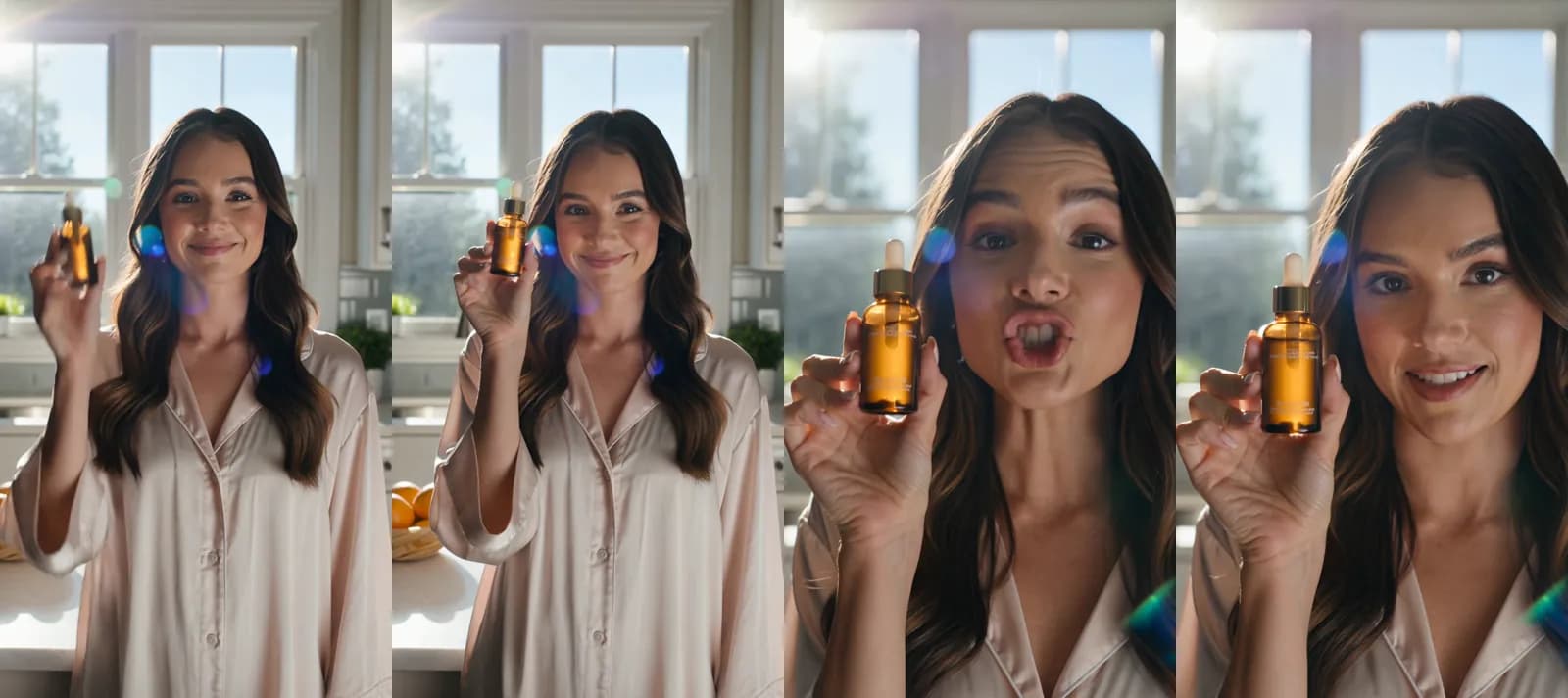
Made in Novoads with Kling 3.0 (listed as Kling v3 Pro in the app) · one line of prompt sent through our REST API, no start picture, 9:16 and 5 seconds long. A young woman in a sunlit kitchen raises a small glass serum bottle toward the lens and says "this changed my mornings". 10 credits, rendered 2026-09-30.
The clip's file measures 1080 x 1920 with H.264 video, so it matches the Help Center's canvas size and codec. It runs 5.04 seconds and weighs 7.9 MB. That's far under Snap's 1 GB limit, and 5 seconds falls within every length tip Snap gives. The clip cost 10 credits. On Starter that's 75 cents, and on Plus it's about 49 cents. It's still just one clip, though, so we can't promise that every Kling 3.0 file comes back in H.264.
The sound is the part that doesn't line up. The clip's audio is stereo AAC, which matches the codec and the two channels Snap asks for. But its sample rate is 44.1 kHz, and the Commercial spec asks for 48 kHz. Its bit rate is about 129 kbps, and Snap's audio specs ask for at least 192. We didn't measure its loudness against Snap's -16 LUFS target. So we can't tell you the clip meets Snap's audio spec straight out of Novoads. Before running it as a Commercial, we'd re-export the sound in a video editor at 48 kHz and 192 kbps or more. We haven't tested whether Snap's review actually checks those numbers.
Omni Flash at 1080p is the other model we've measured as H.264 at this size. We can switch off its settings above 720p, and when we do, the editor offers only 720p. So check that 1080p is on the list before you count on it. Wan 3.0 at 1080p came back at 1080 x 1920 on one short test file, but its codec isn't on record. Seedance 2.5 at 1080p also comes back at 1080 x 1920. But its files measure as HEVC (H.265), and Snap asks for H.264. We'd convert that file before uploading it or pick another model.
Veo 3.1 costs a flat 72 credits a clip, whatever length or setting you pick. That's $5.40 on Starter and about $3.53 on Plus. We haven't measured a Veo 3.1 file at 1080 x 1920, so it isn't in the table. If you'd rather go by the Ad Formats page's 720x1280, Wan 3.0 at 720p is the cheapest model we've measured at that size. Ten seconds of it costs 18 credits. That's $1.35 on Starter and about 88 cents on Plus.
A start picture can change the shape. Kling 3.0 once returned a nearly square file from a first frame, and Seedance 2.5's output takes the shape of whatever start picture you give it. The sizes in our table hold when you choose 9:16 and start from a 9:16 picture, or from none. All four models can make a clip of 6 seconds or less for a Standard Commercial, and all four can keep a clip to 10 seconds or less for a Dynamic Collection hero video.
Every Novoads plan is paid from the first month, and our pricing page lists what each one includes. The screenshot shows its monthly prices on November 9, 2026.
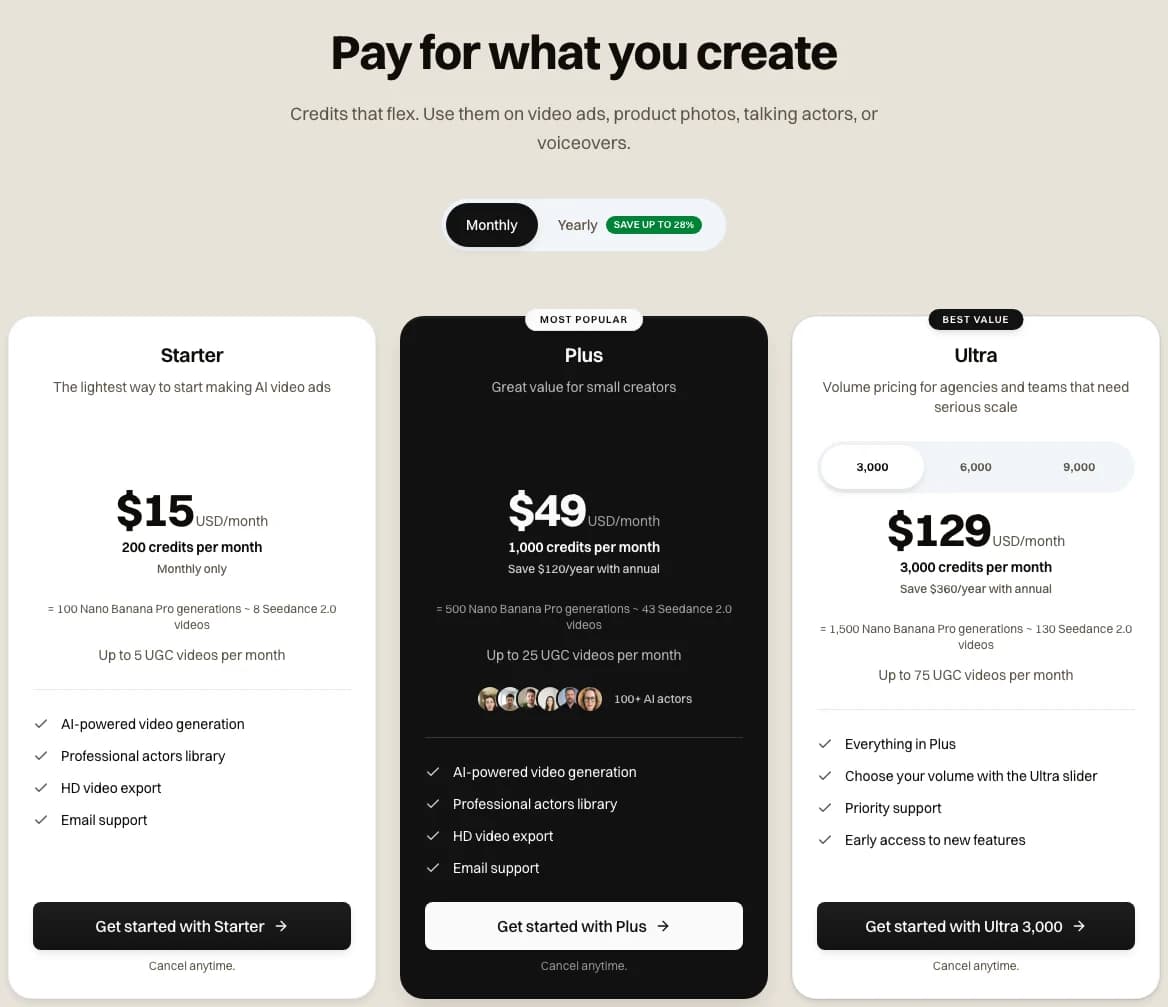
Our pricing page with Monthly selected on 2026-11-09. Starter is $15 a month for 200 credits. Plus is $49 for 1,000.
If what you need is a run of creator-style clips for Snapchat, our page on AI UGC video ads shows how Novoads builds them.
Make the 9:16 master in Novoads
Pick a model, choose 9:16 and render a creator-style clip. Then run it in Snap's Ads Manager yourself.
See AI UGC video adsWhat Snap charges to run the ad is a separate bill, and our post on what Snapchat ads cost covers it. And if you want to see what other brands run in each format, our guide to the Snapchat Ads Library shows where to look.
Frequently Asked Questions
Is Snapchat 9x16?
Generally, yes. Snap's Ad Formats page says "Generally speaking, Snapchat Ads use a vertical 9x16 format." and points you to the specs for each ad type. A few parts aren't 9:16, though. The Story Ad tile is 3:5, Collection thumbnails are square, and Filters are taller than 9:16. The only landscape size we found on Snap's pages is the App End Card. Only App Install ads use it, and it shows after the main Snap.
What are the requirements for Snapchat ads?
They depend on the format, and Snap's pages don't all agree. For a video ad, the file that fits every number we found is 9:16 at 1080 x 1920. Encode it in H.264, in an .mp4 or .mov file under 1 GB. It should run at least 3 seconds and under 180. Give it stereo AAC sound at 48 kHz and at least 192 kbps. Keep the brand name to 25 characters and the headline to 34. Snap doesn't publish that as a single spec. We worked it out from where Snap's pages overlap.
What size should a Snapchat ad be?
Snap's Ad Formats page lists 720x1280, while its Help Center and API list 1080 x 1920 for the full-screen canvas. Both sizes are 9:16. We'd build at 1080 x 1920, because it meets the larger figure and keeps the shape of the smaller one.
How long can a Snapchat ad be?
It depends on which page you read. Snap's Ad Formats page gives Single Image or Video ads 3 to 180 seconds. Its Help Center spec allows up to 30 minutes, as long as the file doesn't exceed 1 GB. Standard Commercials run 3 to 6 seconds, and Extended Play Commercials run 7 to 180. Snap's own tips call for much shorter ads. One article recommends 3 to 5 seconds, and another says 5 to 6.
Why is Snapchat cropping my ad?
Snap's spec article says that if you upload an image or video that isn't 720x1280px, "you'll have the ability to crop it to meet the specifications". Snap's upload steps also say the crop step "will be skipped automatically" when the file is already in the correct aspect ratio. We haven't uploaded a file ourselves to see that happen.
Key Takeaways
- Snapchat ads are generally 9:16, but Snap's own pages list two pixel sizes for them. The Ad Formats page says 720x1280, while the Help Center and the API say 1080 x 1920.
- Snap's pages also disagree on the brand-name limit (25 or 32 characters). Depending on the page, a Single Image or Video ad can run up to 180 seconds or up to 30 minutes.
- One file fits every number we found. It's 9:16 at 1080 x 1920, with H.264 video. Its sound is stereo AAC at 48 kHz and 192 kbps or more. Keep the brand name to 25 characters or fewer and the video under 180 seconds.
- By our math on Snap's safe-zone picture, a full-size file should keep its top 192 px and bottom 672 px clear. Snap's other written guidance asks for less.
- In Novoads, Kling 3.0 is the cheapest model we've measured at 1080 x 1920. A 10-second clip costs 20 credits. The sound on the clip we checked fell short of Snap's audio specs, so we'd re-export it.