Google Ads AI Tools: Free Gemini Omni Video, and What You Still Bring Yourself
What each Google Ads AI tool makes by format, length and price, from silent 4-second clips to Gemini Omni (which Google calls a free feature), what a campaign still asks you to bring, and what a 30-second video costs in Novoads.

Mauricio Valdivia
·12 min
None of the top results says what Google's own ad tools make
Google says you can turn a single image into a full video ad with Gemini Omni inside Google Ads, and its September page calls the feature free. It doesn't say how long that video runs. We opened seven of the top results for Google Ads AI tools on November 9, 2026. None lists what Google's own creative tools make by format, length and price, or prices a 30-second Demand Gen video alongside them. Most cover other companies' software, and the two from Google give no clip length or price.
We read Google's help and announcement pages the same day from Spain, where Google serves the US edition of its announcement pages. We didn't test Asset Studio for this post. The Novoads side is our own price list and one render.
What Google says is free inside Google Ads
The free line, and how far it reaches
Creative Drop #1, Google's page of answers on Gemini Omni in Asset Studio, says "Multimodal capabilities powered by Gemini Omni are rolling out globally as a free feature inside Google Ads." Asset Studio is the Google Ads workspace where you create and edit ad assets. With Omni, you pick one of three creative narratives, refine the storyboard scene by scene, then download the video or upload it to your YouTube channel.
"Rolling out" doesn't tell you whether your account has it today. No Google Ads page we read states a quota, which isn't the same as having none. And the sentence names multimodal capabilities, which the rest of that page ties to video.
"Globally" has limits on Google's own pages too. Google's May 20 post on Asset Studio said its new features were "rolling out globally in English this summer," and Asset Studio's help page on prompts says "Global English is currently the only supported language for prompts and model understanding." That page doesn't name Omni, so it doesn't settle whether an Omni prompt in Spanish works.
Where Google wins
On price, Google wins this one. Novoads sells Omni Flash for credits, and no Google Ads page we read puts a price on Omni. On August 26, 2026, Zeniteq took Google's wording to mean "that advertisers do not pay a separate generation fee, not that video production has no cost." That's one writer's reading, and it's ours too. You pay for the ads you run either way. If Omni is in your account and makes what your campaign needs, use it.
The dates and model names on Google's own pages
The free line is older than the September page. Google's earlier Omni announcement carries the same sentence, and Zeniteq was already asking what "free" meant in late August. On August 27, Google's blog said "We’re making Multimodal Video Creation in Asset Studio generally available." Creative Drop #2, published November 5, names "Gemini Omni 1.2" and never uses the word free.
Google's pages also name different models for the same workspace.
- Asset Studio's help page names the Nano Banana Pro image model.
- Google's multimodal asset page says "Gemini, Omni, and Nano Banana" in one place and "Gemini, Nano Banana, and Veo" in another.
- Google's Creative hub has one card for Omni and three that name Veo.
- Google's September 2025 post introducing Asset Studio named Imagen 4.
Every Google Ads AI tool by format, length and price
We read these pages on November 9, 2026. Google's help pages aren't dated, so any of them may have changed since. "Not stated" means we found nothing on the page that row cites.
| Tool | What you get | Format | Length | Price on the page |
|---|---|---|---|---|
| Gemini Omni (Asset Studio) | A video ad from an image | Vertical, horizontal, square | Not stated | "A free feature" |
| Veo (Asset Studio) | One clip per image, up to 3 | Not stated | Up to 10 s | Not stated |
| Image-to-Animation | Silent clips from your images | Not stated | 4 s | Not stated |
| Prompt in Asset Studio | 15 images, text, 3 video ideas | Images in 1:1, 1.91:1, 4:5 | Not stated | Not stated |
| Video Builder | A video from a template | Horizontal or vertical | Not stated | Not stated |
| Voice-over | A voice on your video, or an audio ad | Audio | 6 to 30 s (audio ad) | "A free, easy way" |
| Auto-generated video | Videos made from your assets | Multiple orientations | 10 s in Demand Gen | "Without effort or production cost" |
| Video enhancements | Shorter cuts, new ratios, AI voiceover | New ratios | Shorter versions | Not stated |
| Sourced videos | Your own videos, found by crawl | Not stated | Not stated | Not stated |
| Ask Advisor | Text and image suggestions | Text and images | No video stated | Not stated |
Gemini Omni and Veo in Asset Studio
Drops #1 and #2 both list vertical, horizontal and square Omni videos. Google's Omni announcement lists only two, horizontal (16:9) and vertical (9:16). No Google Ads page we read gives an Omni video's length, so check in your own account before you plan a 30-second cut around it. Drop #1 also says "Omni evaluates your brand identity, adhering to fonts, hex codes, logo rules, and visual style."
Veo is the older route, announced on March 24, 2026. You upload up to three still images, and Google says "From each uploaded image, Veo will generate a unique, high-quality video up to 10 seconds long." Then you package the clips into ads with templates.
Silent clips, and the videos Google makes for you
Google built Image-to-Animation for Performance Max. It turns your still images into what Google calls "silent, 4-second clips".
- It takes no text prompt.
- It won't take stock images or a photo with an identifiable face, though Google says its enhancement step "may generate a new image that includes an AI-generated person."
- You can save at most 5 clips to an asset group per session.
Google's help page on auto-generated video ads says that, launching first in Demand Gen, the system can turn static images into "high-quality, 10-second dynamic video clips." You can't change those videos or manage the Google-owned channel that holds them. In Demand Gen, they're on by default for new campaigns, and you can turn them off in your ad settings. In Performance Max and App campaigns, uploading your own videos turns them off.
Video Builder and voice-over
Video Builder is the template route. You pick a template, add scene text, images, music from Google's list and a voice-over, then save the video to your own channel or a storage channel YouTube creates for you.
Google calls voice-over "a free, easy way" for existing video advertisers to add text-to-speech. You get up to 5 voice-over messages of up to 150 characters each. The same page covers new audio ads made from voice-over, images and stock music, at a custom length of 6 to 30 seconds.
Images, and how many references you can add
Asset Studio's help page says "With one or two product images, Google AI can generate scenes that include backgrounds, people, and usage scenarios, while preserving product fidelity." To prompt images yourself, your account has to be active and running ads for at least 30 days, among other rules. Google says the feature may not be available to you yet even if you're eligible. People in generated images must be adults.
Google's pages don't agree on how many reference images you can add, or say how the limits fit together.
- The generated-images help page allows up to 5 style reference images per generation.
- The Asset Studio prompt page takes up to 5 product images and up to 2 briefs as PDFs.
- Google's March 2026 guide to generating creative assets says "Upload up to 14 reference images", meaning logos, style guides and product shots.
Google also says generated assets "aren't guaranteed to be approved by Ads Policy." Our post on Google's rules for AI-generated images covers what gets through.
What switches on by default
Three of these switch on without you asking.
- Video enhancements make shorter and resized versions of your video in Video and Demand Gen campaigns. Google says "Model 2 uses generative AI to extend your original video in new aspect ratios."
- Sourced videos add up to 10 of your existing videos to a Performance Max asset group. Google says they're "enabled by default for all new campaigns", and the campaign needs a daily budget above $5. The Google Ads API's page lists that video crawl as "Disabled (available starting in v25)", though the API is separate from the Google Ads interface.
- Campaigns using text customization are upgraded to AI Max "starting in September 2026", and Google's FAQ says those assets "will fully be automated."
Ask Advisor
Ask Advisor is in beta inside Google Ads, and Google's three pages on it describe it differently.
- The help page says you can "receive suggestions for new text and image creatives" and "implement the suggested changes with your approval."
- The product page says "It cannot execute account changes on your behalf."
- The May 2026 announcement says you can "directly add generated keywords and assets."
We found no video output named on any of them. It's for English-language accounts and isn't available in MCC accounts. Our post on what Ask Advisor does today goes further.
How Google labels what these tools make
Google says it embeds "non-visible SynthID digital watermarks and C2PA" markup into all images and videos generated within Google Ads tools. Its fully automated features may label assets as AI-created or edited on your behalf, and Google says "labels cannot be overwritten." We cover what viewers see in Google's AI ad labels.
Languages, tool by tool
- Asset Studio takes prompts in Global English only.
- Prompted images take English, Dutch, French, German, Italian, Japanese, Portuguese or Spanish.
- Performance Max asset generation needs the interface in one of seven of those languages, all but Japanese.
- The AI voiceover in video enhancements is only for accounts and assets in English.
- Text customization in AI Max for Search supports all languages in Google Ads.
- Campaign translation starts from English (US). Drop #2 says 15 languages, and the help page lists 10 targets.
What a campaign still asks you to bring
These come from Google's Demand Gen and Performance Max help pages and guides, read on November 9, 2026.
Three aspect ratios, and how many of each
Google's Ad Strength help for Demand Gen says a "Good" score needs "all 3 aspect ratios: horizontal, square, and vertical formats for both videos and images." It adds that "you can also attain a “Good” score by uploading a horizontal video and opting into video enhancements." An "Excellent" score needs three of each format. We go through the rest in Google Ads creative standards for 2026.
Google's own Demand Gen guide from October says "Build at least 3 videos and 3 images across horizontal, vertical and square ratios." A Demand Gen ad takes 1 to 5 videos, at these recommended sizes.
- 1920 x 1080 for horizontal
- 1080 x 1080 for square
- 1080 x 1350 for vertical 4:5
- 1080 x 1920 for vertical 9:16, which is optional and recommended for Shorts
To be eligible for Shorts in Performance Max, a vertical video has to run 10 to 60 seconds. You can add up to 15 videos, and if you add none, Google may make some for you.
Video length by placement
Demand Gen's minimum is 5 seconds, and a video under 10 seconds can't serve on YouTube in-stream. For Demand Gen, Google recommends "videos with more than 15 seconds". For non-skippable in-stream ads, Google's two pages on the format disagree on length.
- The video ad formats page says "15-60 seconds (depending on the campaign subtype)".
- The page on creating a Video campaign says "Up to 30 seconds long", and its table says "Max 15-20 seconds".
So the clip lengths Google does state for its AI tools, 4 and 10 seconds, are shorter than its own Demand Gen recommendation. That's why we price a 30-second video below. Our YouTube ad guide goes format by format.
YouTube first, with or without sound
In Demand Gen, you can't upload a video file from your computer. The help page says "Upload a video that you’ve uploaded to YouTube", and Google says you may use an unlisted one if you don't want it to serve on YouTube. In Performance Max, a House channel (a Google-managed YouTube channel) lets you upload the file during setup.
On Shorts, sound and auto-play are on by default, though Google says "You can run Demand Gen video ads without sound." Google's spec page recommends 1080p, also accepts 720p and doesn't recommend SD. Our post on video ad specs by platform puts the numbers side by side.
A person on camera
We found no Google Ads page that says Asset Studio makes a person speaking on camera. That's our reading of Google's pages, and we didn't test the product. Google's pages do mention people elsewhere. Asset Studio can generate product scenes that include people, Image-to-Animation may add an AI-generated person to a silent clip, and generated images can show adults.
Google's November 5 post on Gemini Omni 1.2 names dialogue and lip-sync for Flow, Gemini for business and Google Vids, and Google Ads isn't in that sentence. And Google's October guide for Demand Gen says "Brief creators who already have authority in your vertical to speak authentically about your product." Check your own account before you plan a spokesperson around Omni.
A 30-second Demand Gen video next to Google's tools
Prices as of November 9, 2026, from our own price list. Dollars are our arithmetic, at $0.049 a credit on Plus and $0.075 on Starter.
What 30 seconds costs in Novoads
| Route in Novoads | Credits | On Plus | At Starter's rate |
|---|---|---|---|
| Omni Flash, three 10-second clips at 720p | 90 | $4.41 | $6.75 |
| Seedance 2.5, one 30-second take at 720p | 210 | $10.29 | $15.75 |
| Talking actor, up to 60 seconds at 720p | 200 | $9.80 | $15 |
| Nano Banana Pro, four images at 1K or 2K | 8 | about 39 cents | 60 cents |
| GPT Image 2.6, four images at low or medium quality | 4 | about 20 cents | 30 cents |
Starter's 200 credits a month cover two Omni Flash sets. They don't cover a single Seedance 2.5 take, which costs 210. Plus covers 11 Omni Flash sets a month, or four Seedance 2.5 takes.
What Omni Flash covers, and what it doesn't
As of November 9, 2026, Omni Flash in Novoads is the 1.1 model, while Google Ads has named Gemini Omni 1.2 since Drop #2. We don't sell 1.2. Our Omni Flash clips run 10 seconds at most, so a 30-second cut is three clips. The 90 credits pay for the clips, and joining them into one file is a separate step we haven't priced here.
Omni Flash comes in vertical and horizontal only (9:16 and 16:9). For the square slot Google's Good score asks for, Seedance 2.5 offers 1:1, or you can take Google's own route of one horizontal video with enhancements on. Both of our models run at 720p by default, which Google's spec page accepts, though it recommends 1080p.
Google's own developer API is cheaper per second too. Google's November 5 post puts Omni 1.2 Flash there at $0.07 a second for 720p video. By our arithmetic, 30 seconds comes to about $2.10, for a newer model, though on a different surface from Google Ads. Our Gemini Omni 1.2 Flash post works through it.
A person who speaks your script
The talking actor is the row we couldn't find a Google Ads counterpart for. It speaks your script with its voice and lip-sync done, and captions come afterward in a separate step. It's priced per started minute, so a 30-second script costs the same 200 credits as a full minute. Starter's monthly credits cover one, and Plus covers five. At 480p, the price halves to 100 credits. But Google's spec page counts 480p as SD, so we'd keep it for drafts. Our post on talking-head video covers the format.
Google's own image model in Novoads
Nano Banana Pro, the image model Asset Studio's help page names, is in Novoads too, at 2 credits an image at 1K or 2K. That's 15 cents on Starter and about 10 cents on Plus.
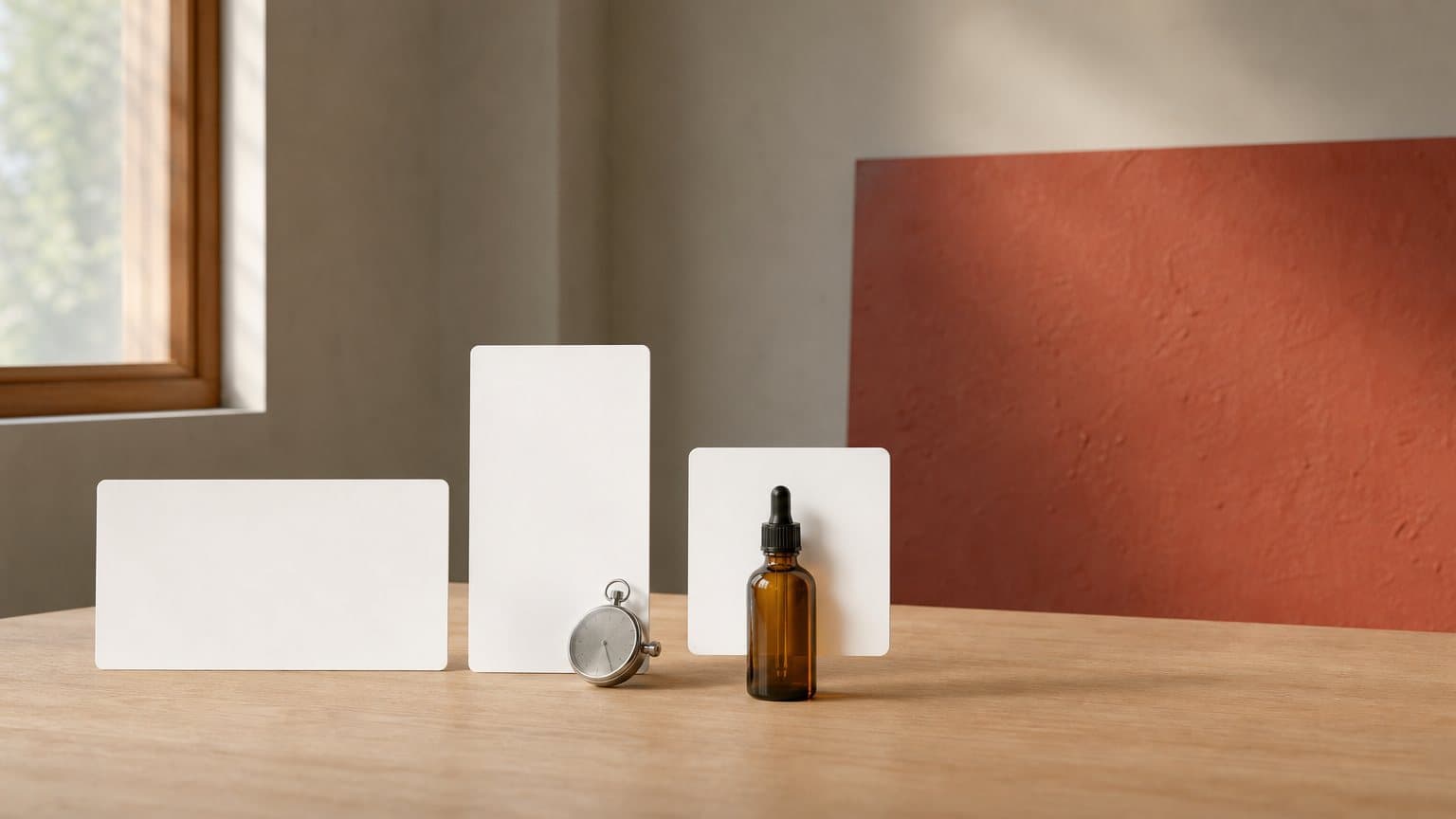
We filled in the product mockup template from Google's Gemini API image guide for a serum ad and ran it once in Novoads, at 2K in a 4:5 frame. Every element the prompt asked for came back. We asked for a blank label, so the run says nothing about text in pictures, and one image isn't a success rate. It never went through Google Ads.
 Made in Novoads with Nano Banana Pro · Google's product mockup template from its Gemini API image guide, filled in for an amber serum bottle on travertine · one image at 2K in 4:5 · 2 credits · rendered 2026-11-01
Novoads starts at $15/month (Starter, 200 credits per month). Plus is $49/month (1,000 credits). For more volume, Ultra starts at $129/month (3,000 credits). You pay from your first month, and our pricing page lists each plan with its credits.
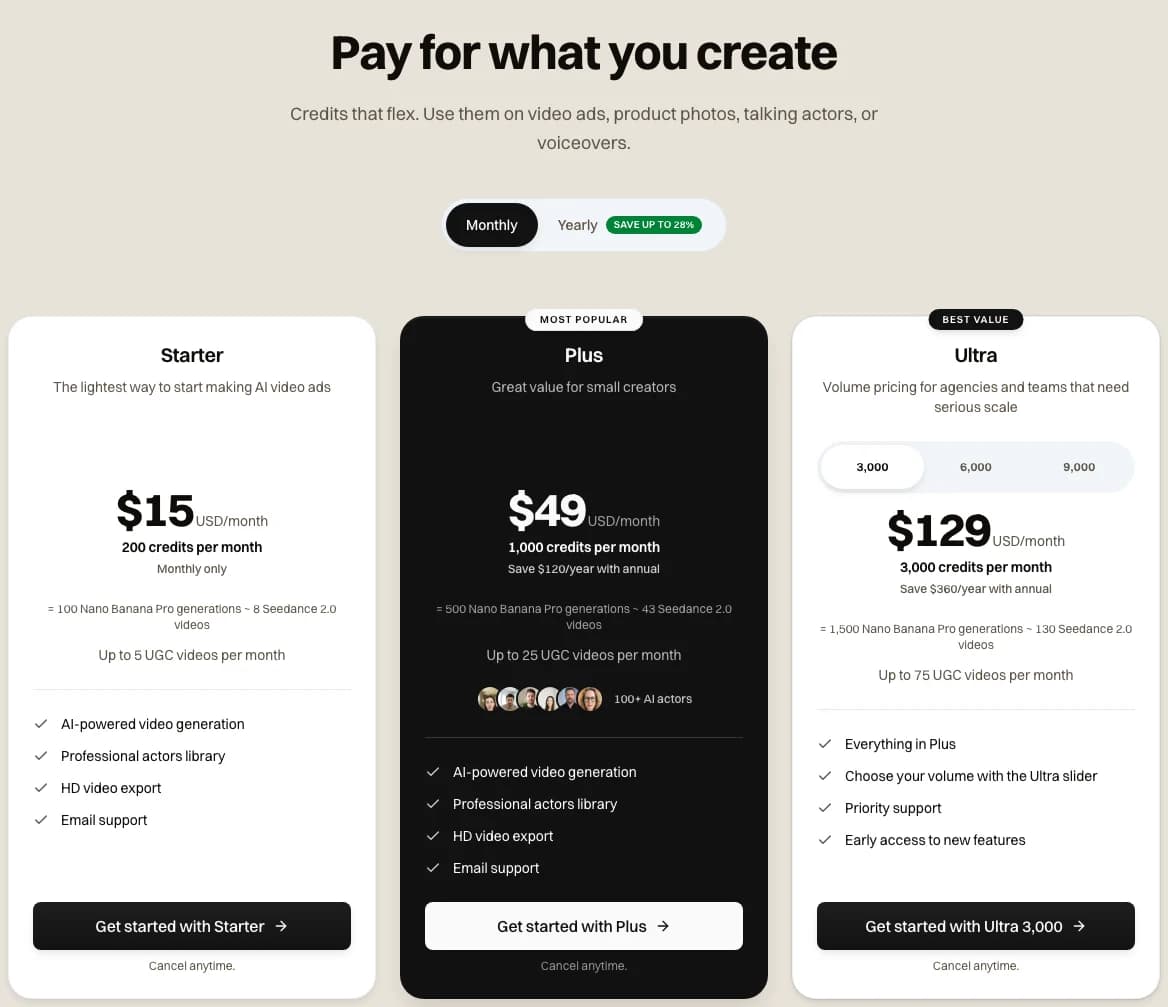 Screenshot: novoads.ai/pricing on the Monthly view, taken 2026-11-09
Price a 30-second cut before you make it
Three Omni Flash clips at 720p are 90 credits in Novoads, and a talking actor is 200 for up to a minute. Starter is $15 a month for 200 credits.
See the plansWhen Google's tools fit, and when Novoads does
Start with Google's tools when the job looks like one of these.
- Your campaign runs in Google Ads, and Omni is already in your account.
- You want vertical, horizontal and square cuts of one product image without paying for the tool.
- Short silent motion for Performance Max is enough.
- Google's templates, music list and voices suit your brand.
Novoads fits better when the job looks like one of these.
- You need a person on camera saying your script.
- Omni hasn't reached your account yet.
- You want a 30-second take in one piece, which Seedance 2.5 makes.
- You want to know a cut's length and its price in credits before you make it.
Novoads makes the video, and you run it in Google Ads like any other ad. Open Asset Studio first, then price only the slots it leaves empty, whether that's the square cut, the person on camera or the 30-second version.
Frequently Asked Questions
Are Google's AI tools in Google Ads free?
Google's own pages call several of them free. Creative Drop #1, dated September 2026, says Gemini Omni's multimodal capabilities are rolling out globally as “a free feature inside Google Ads”. The voice-over help page calls voice-over “a free, easy way” to add text-to-speech, and the help page on auto-generated video ads says they come “without effort or production cost”. But none of the Google Ads pages we read on November 9, 2026, gives a per-video price for these tools or a quota for Omni. “Rolling out” also means your account may not have Omni yet. You still pay for the ads you run, whichever tool made them.
Key Takeaways
- Google's Creative Drop #1 page, dated September 2026, says Gemini Omni's multimodal capabilities are rolling out globally as a free feature inside Google Ads. None of the Google Ads pages we read gives a quota, a video length or a per-video price for them.
- The lengths Google does state for its AI video tools are short. Image-to-Animation makes silent 4-second clips, and Veo in Asset Studio makes clips up to 10 seconds. But Google's own Demand Gen help recommends videos longer than 15 seconds.
- A Good Ad Strength score in Demand Gen needs horizontal, square and vertical videos and images, or one horizontal video with video enhancements turned on. An Excellent score needs three of each format.
- We found no Google Ads page that says Asset Studio makes a person speaking on camera. Yet Google's own Demand Gen guide tells advertisers to brief creators to speak about the product.
- In Novoads, a 30-second cut is three Omni Flash clips. They cost 90 credits, about $4.41 on Plus. A talking actor costs 200 credits for up to a minute. Starter, our entry plan, is $15 a month for 200 credits, billed from your first month.
Sources
- •Google Ads: Create on-brand video ads with Gemini Omni, Creative Drop #1 (September 2026)
- •Google Ads: Unlock creative variety with Gemini Omni (the Omni announcement)
- •Google Ads: Bring your holiday campaigns to life with Google AI, Creative Drop #2 (November 5, 2026)
- •Google Ads: Veo in Google Ads (March 24, 2026)
- •Google Ads Help: Create animated clips from your images with the Image-to-Animation tool
- •Google Ads Help: About video asset specifications for Demand Gen campaigns
- •Google Ads Help: About Ad Strength for Demand Gen campaigns
- •Google Ads Help: Add voice-over to a Video campaign
- •Google: Gemini Omni 1.2 Flash (November 5, 2026)