Lumen5 Pricing 2026: Paid Plans From $19 a Month, Billed Yearly
Lumen5's paid plans start at $19 a month, billed as a single $228 payment for the year. What an ad costs you on them depends on how much AI voice and AI footage it uses.

Mauricio Valdivia
·13 min

Lumen5's $19 plan is a single $228 payment a year
Lumen5's cheapest paid plan, Basic, costs $19 a month if you commit to a year, but you pay for the whole year up front, in a single $228 payment. Month to month, the same plan costs $29. What one ad costs you on it depends on what's in the ad. Stock scenes and library music come with the plan, while AI voice and AI-generated footage come out of small monthly allowances.
We priced a 30-second ad three ways. As we read Basic's allowances, a stock ad with an AI voiceover works out to about 73 cents if you're on monthly billing and use every voice minute that month. Thirty seconds of AI-generated footage uses half of the animation minute Basic includes each month. Once that's used up, every extra 30 seconds costs $5 in add-on minutes, and those don't roll over.
We haven't tried Lumen5 ourselves. Nobody on our team has a Lumen5 login, and we didn't make one to write this. The plan prices below are the ones Lumen5's pricing page showed us from Spain on October 30, 2026, in US dollars. The allowances and add-on prices come from Lumen5's own plan list and help center, which we read the same day. The ratings are Trustpilot's, and the Novoads side is a render of ours plus today's credit prices.
Is Lumen5 free to use?
Yes, within limits. Lumen5 has a Free plan. A help center article dated March 23, 2023, refers to it by its old name, Community Plan, and calls it "free forever". You can make real videos on it, though with the limits below it's more a place to learn the editor than a plan you'd publish from every week.
What the Free plan includes
- 5 videos a month, each up to 2 minutes long
- Exports at 720p
- 2 minutes of AI voiceover a month
- Your own uploaded photos and clips, plus the free part of Lumen5's stock library
Premium library media is marked as needing a paid plan, so on Free you'll see it but can't use it.
What Free leaves out
Free comes with no animation minutes, and Lumen5's AI video generation and animated explainers both run on those. Lumen5's July 2, 2026, update says free users can upgrade to a paid plan to get them. You can't clone a voice on Free either. And its videos stop at 720p, while on Starter and up they export at 1080p.
The Lumen5 logo, and why there's no trial
Every video made on Free ends with a Lumen5 logo. Lumen5's help article about the logo, dated May 22, 2026, places it "at the very end of the video", and any paid plan removes that branded outro. Stock media in the library can also show watermarks while you edit, but Lumen5 says rendering the video removes them.
There's no trial of Lumen5's paid plans. Its help center says "We don't offer free trials on our paid plans" and points to a 7-day money-back policy instead.
What each Lumen5 plan costs, yearly and monthly
Prices as of October 30, 2026. Lumen5 shows them in US dollars, and its billing FAQ says that's true of every rate on the site. These are list prices. We didn't go through checkout, so we can't tell you what tax gets added where you live.
| Plan | Yearly billing | Monthly billing | Export | AI voice a month | Animation a month |
|---|---|---|---|---|---|
| Free | No charge | No charge | 720p | 2 minutes | None |
| Basic | $19 a month, $228 a year | $29 a month | 720p | 20 minutes | 1 minute |
| Starter | $59 a month, $708 a year | $79 a month | 1080p | 60 minutes | 2 minutes |
| Pro | $149 a month, $1,788 a year | $199 a month | 1080p | 180 minutes | 5 minutes |
On yearly billing, Lumen5 lists the allowances as yearly totals, such as 240 AI voice minutes and 12 animation minutes a year on Basic. Above Pro there's Team, which has no public price, so you'd have to ask Lumen5 for a quote. Team's plan card lists a bespoke branded template and video translations on top of everything in Pro.
What "save 25%" means on each plan
Lumen5's pricing page opens on yearly billing, next to a label promising you'll save 25%. But compare twelve monthly payments with one yearly payment and the savings vary by plan.
- Basic costs $348 a year on monthly billing against $228 on yearly, about 34% less
- Starter costs $948 against $708, about 25% less
- Pro costs $2,388 against $1,788, about 25% less
So the label is right for Starter and Pro, and it undersells Basic. On all three, you pay the yearly price as one payment up front. Lumen5's billing FAQ, updated June 30, 2026, calls an annual subscription "a one-year commitment" and says monthly and annual plans get the same tools and features.
Unlimited videos, and where Lumen5 may flag you
Lumen5 advertises unlimited videos on every paid plan. Its billing FAQ adds that, to keep use fair, the company may flag accounts that go past 500 videos a month on Basic or 1,500 on Starter. Paid videos can run up to 10 minutes each, compared with 2 minutes on Free.
Pro adds custom watermarks and fonts, multiple workspaces and Shutterstock editorial media, and that last one matters if you make ads. Lumen5's May 25, 2026, update brought voice cloning to Basic and up. Basic and Starter include one cloned voice, and Pro includes three.
Where Lumen5's own pages don't agree
Translations are the clearest case. Lumen5's October 30, 2025, update opened video translations to every plan, Free included, with monthly limits. Today's Team card still lists video translations as one of the things Team adds over Pro, so we've left translations out of the table rather than guess.
The help center also uses older plan names in places. Its Community plan is today's Free, and its Professional plan is today's Pro.
What you can make with Lumen5
Videos built from a script, an article or a link
Lumen5's AI video generator takes a script, a blog post, a URL, a transcript or an idea and turns it into an editable video draft, building the scenes, picking visuals and matching your brand settings. A help article dated May 20, 2022, describes the same core idea, with each scene matched to background photos, videos and music. We think the thing to judge Lumen5 on is how well it turns text you already have into a finished-looking video.
If you're weighing it against other text-to-video tools, our Pictory pricing breakdown covers a close rival, our Fliki pricing breakdown covers another, and our guide to text-to-video AI explains how the generators that make footage from scratch work.
Animated explainers and AI clips
On June 15, 2026, Lumen5 announced animated explainers, which turn PDFs, slide decks, documents and text into 2D and 3D animated videos. They opened to Enterprise customers on July 1. Lumen5's July 2 update says generating animations takes animation minutes, which customers on paid plans get automatically.
You spend the same minutes on AI video generation in the AI media tab. A help article dated June 11, 2026, says animation minutes replaced Lumen5's older AI media credits, so one balance now covers both features.
The clip maker, Agent, talking heads and avatars
On September 22, 2025, Lumen5 added an AI clip maker that cuts one long video into a week of short, on-brand clips. On September 16, 2026, it added Agent, which it describes as a conversational way to create and edit videos.
For talking-head videos, a Lumen5 help article dated May 29, 2026, says you can record yourself on your webcam right inside the editor. Lumen5's own plan list also includes an AI avatar feature on Basic, Starter and Pro. Its help article on avatars dates from August 20, 2024, when the feature was in beta, and says you need a paid plan to publish an avatar video.
Formats, resolution and render time
The practical details come from Lumen5's help center, in articles dated from 2022 to 2026.
- Auto-resize turns a landscape 16:9 video into vertical 9:16, square 1:1 or portrait 4:5, though square and portrait work only with some templates
- On Starter and up, a vertical video exports at 1080x1920
- Videos download as MP4 files
- A render takes about 5 to 7 minutes on average, by Lumen5's own estimate
- You'll need a desktop browser to edit, since the video creator isn't supported in mobile browsers
What a 30-second ad costs on Lumen5 and on Novoads
Lumen5 charges by the month, and two allowances in each plan (AI voice minutes and animation minutes) decide how many ads you get out of each month. We've assumed a second of narration or AI footage uses a second of allowance, which is our reading of how the minutes count. The Lumen5 figures below use Basic, the cheapest paid plan.
A stock-footage ad with music
As we read Basic's plan, an ad built from stock scenes, on-screen text and library music doesn't touch either allowance. If you make just one in a month, it costs you that month's full price, which is $29 on monthly billing. Make them all month and the cost per ad keeps dropping. At 500 ads, where Lumen5 says it may flag a Basic account, it's about 6 cents an ad. On yearly billing, it's about 4 cents.
A stock ad with an AI voiceover
A 30-second voiceover uses half a minute of AI voice. Basic's 20 voice minutes a month cover 40 of those ads. If you make all of them, that's about 73 cents an ad on monthly billing, or about 48 cents on yearly billing. But a single voiced ad in a month still costs you the full month's price.
An ad with AI-generated footage
Thirty seconds of AI-generated video uses half an animation minute. Basic includes one minute a month, enough for two of those ads. On monthly billing, that works out to $14.50 an ad.
Past that, Lumen5 sells extra animation minutes as a monthly add-on at $10 a minute. Bought that way, each extra 30 seconds of AI footage costs $5. Lumen5's help center says animation minutes reset each billing cycle and don't roll over, so you can't bank minutes from a quiet month. Starter includes 2 animation minutes a month, and Pro includes 5.
The same 30 seconds on Novoads
Novoads charges per clip, in credits that come with a plan. Our Starter plan is $15 a month for 200 credits, and it's billed monthly only.
Plus is $49 a month for 1,000 credits. That puts a credit at about 7.5 cents on Starter and about 4.9 cents on Plus. We priced the same 30 seconds on four of our models at today's credit prices.
- One 30-second Seedance 2.5 take at 720p costs 210 credits, about $10.29 on Plus, which is more than a Starter month's credits
- A 30-second talking actor at 720p costs 200 credits, about $9.80 on Plus, or all of a Starter month's credits
- Two 15-second Seedance 2.0 Mini clips at 720p cost 30 credits, about $1.47 on Plus or $2.25 on Starter
- Two 15-second Kling v3 Pro clips at 1080p cost 60 credits, about $2.94 on Plus or $4.50 on Starter
The talking actor is billed by the minute, rounded up, so a 30-second take costs the same 200 credits as a full minute.
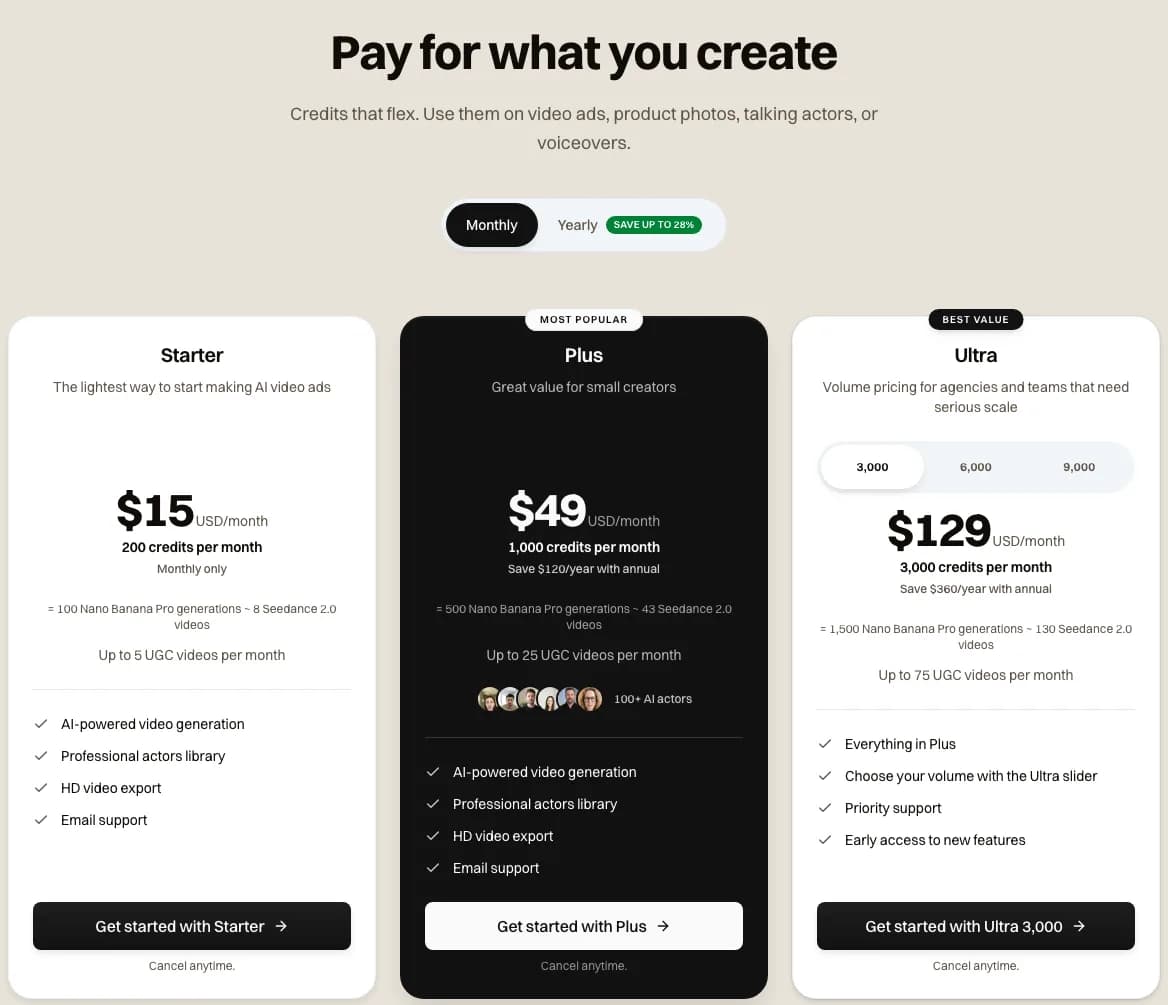 Our pricing page on monthly billing, with Starter, Plus and Ultra side by side, captured 2026-10-30
One of our renders, frame by frame
The strip below comes from a 20-second brand film we made with Seedance 2.5 on September 8, 2026. One prompt set out eight shots by timestamp, opening on a white title card with runner cutouts and a round N mark. From there the film moves through a sprint start under an overpass, orange shoes on a wet bridge and a puddle splash, then the N mark painted on a concrete wall, two runners catching their breath and a black end card. The N comes from a mock running label we based on the Novoads logo.
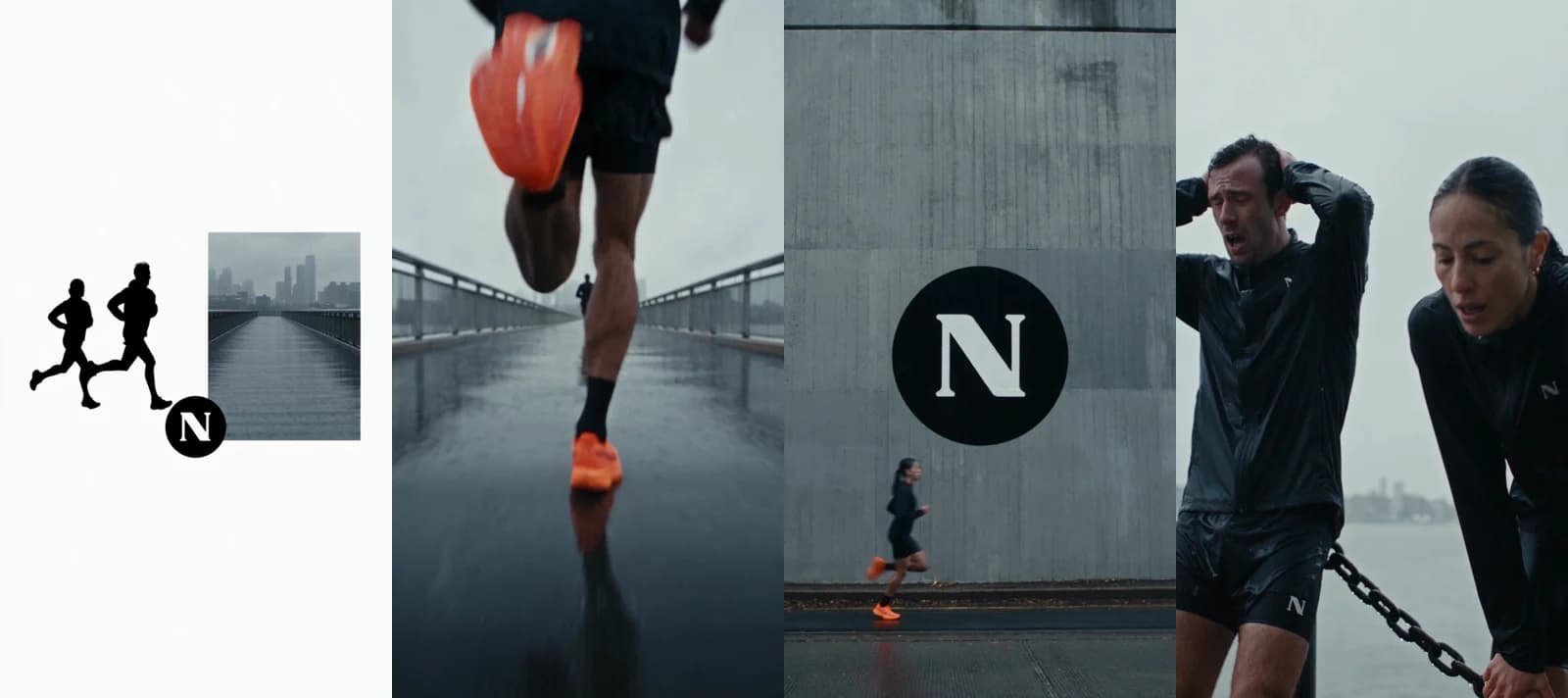 Seedance 2.5 · prompt: a 20-second athletic brand film in eight timestamped shots, title card to end card · 140 credits at today's price · rendered 2026-09-08
The film came back in 7 minutes 12 seconds. All seven cuts landed within half a second of where the prompt put them, and the runners' outfits, the orange shoes and the logo stayed consistent from shot to shot. The same render costs 140 credits today, about $6.86 on Plus. We haven't made the same film on Lumen5, so this only shows what our side produces. It says nothing about which one looks better.
Where Lumen5 costs less
For stock-footage ads, Lumen5's cost per ad drops the more you make, since a stock ad doesn't touch an allowance there. Once you're past about 20 a month on monthly Basic, each of them costs less than the cheapest 30 seconds we priced on our side. That's a pair of Mini clips at about $1.47 on Plus.
For AI footage, it depends on the model. Lumen5's add-on minutes work out to $5 for 30 seconds, which is less than Seedance 2.5 or the talking actor on Plus, and more than a pair of Mini or Kling v3 Pro clips. Lumen5's Basic plan tops out at 720p. If you need 1080p, compare against Starter, which is $59 a month on yearly billing.
The two tools also make different things. Lumen5 builds scenes from its stock library and adds AI footage on top, while Novoads generates the footage itself from a prompt or a still. For more rivals priced the same way, see our breakdowns of InVideo's plans, VEED's plans and Captions' plans.
Can you run a Lumen5 video as a paid ad?
What Lumen5 lets you do with your videos
According to a help article dated May 22, 2026, Lumen5 gives you full commercial rights to every video you create on it, and almost every file in its library is free for commercial use. Its music library is commercially licensed too. Lumen5's media library page, dated November 22, 2025, goes further and names paid ads among the safe uses for its stock.
The media an ad can't use
The exception is editorial media. In an article dated August 12, 2022, Lumen5's help center says a video made to sell a product or service (which is what an ad is) counts as commercial and can't use editorial-only media. Some Getty content in the library is licensed for editorial use only, and so is some of the Shutterstock marketplace media.
That matters most on Pro. Its plan card leads with Shutterstock editorial media, and the help center says Pro comes with 25 Shutterstock marketplace credits a month, which don't roll over and can't be topped up. By our reading of Lumen5's own rule, you can't put the editorial part of that perk in an ad.
Lumen5 marks editorial media when you hover over it in the library, tags the scenes that use it and warns you in the preview, so you can swap it out before you export.
On-screen credits in small print
Some stock needs an on-screen credit. A help article dated September 17, 2026, says Lumen5 adds those attributions itself, in very small print on the scene that needs them. If you're cutting a clean ad, check each scene's credit line before you publish.
Commercial use on Novoads
Our own pricing FAQ says "All videos generated with Novoads are fully licensed for commercial use." Novoads makes the video, and you run it wherever you advertise. If you're making a product ad from scratch, our post on AI commercials walks through four real examples and what one costs to make.
Canceling, pausing and refunds on Lumen5
Canceling and what you keep
Lumen5's billing FAQ, updated June 30, 2026, says you can turn off automatic renewal whenever you like from your account's billing page. Lumen5 bills each period in advance, and if you cancel, you keep the paid features until the current billing cycle ends. That's when the downgrade kicks in.
After that, you're on Free features. The videos you rendered while paying stay as they are, and you can still view and download them. But if you duplicate or edit one of them later, Free's limits apply to the new version, Lumen5 branding included.
Pausing instead of canceling
If you just need a break, the same FAQ says you can pause a subscription for up to 3 months. Billing restarts on its own when the pause ends.
Getting your money back
Lumen5 has a 7-day money-back policy on its paid plans. Its help article on refunds, dated March 23, 2023, says that if you're unhappy with your subscription, Lumen5 will "refund the full amount of the upgrade" when you email within 7 days. The billing FAQ from June 30, 2026, still offers the 7-day guarantee and suggests using it as a test run. Since there's no trial, that week is the only way to try a paid plan before you're committed.
Lumen5's ratings, and who it suits
What reviewers say
Lumen5 has a 4.0 from 73 reviews on Trustpilot, as of October 30, 2026. Most of those reviews sit at the extremes, with 79% at the top rating and 10% at the bottom. Trustpilot notes that Lumen5 hasn't invited customers to review recently. The newest review is from September 2026, and the one before it is from December 2023. So we read the score as mostly reflecting how Lumen5 worked a few years ago. We couldn't see Lumen5's G2 or Capterra ratings when we checked on October 30, 2026.
Who Lumen5 suits
Lumen5 suits a marketer or a small team that already has text (such as blog posts, scripts or reports) and wants a steady flow of social and explainer videos built mostly from stock. Basic on yearly billing is cheap for that if you'll use it all year, and Starter is where 1080p begins. If Pictory is also on your list, our Pictory alternatives roundup compares the tools in this group.
It's a weaker fit if your ads need generated footage every week. One animation minute a month on Basic, or five on Pro, goes quickly, and add-on minutes reset every cycle. And it won't suit you if you edit on a phone, since the editor needs a desktop browser.
Where Novoads fits
We built Novoads for ads where the footage itself is generated, such as a product shot, a talking actor or a short scene from a prompt. You pay per clip in credits, and Novoads is paid from the first month. Our cheapest plan, Starter, is $15 a month for 200 credits. It's billed month to month, so there's no year to commit to. You'll find each plan's price and credit amount on our pricing page.

We think Basic on yearly billing is fair value for stock-based video made from text you already have, as long as you're sure you'll use it for a year. Weigh the roughly 34% you'd save against paying $228 up front. Then use the 7-day refund window to test it on a real project.
Frequently Asked Questions
Is Lumen5 free to use?
Yes, on its Free plan, which Lumen5's help center calls free forever. On Free you can make up to 5 videos a month at 720p. Each one can run up to 2 minutes and ends with a Lumen5 logo. Free comes with no animation minutes, so you can't generate AI footage or animated explainers on it. Lumen5 doesn't offer a trial of its paid plans. It has a 7-day money-back policy instead.
What is Lumen5 AI used for?
Lumen5 turns a script, a blog post, a link, a transcript or an idea into an editable video draft, matching each scene with stock photos, video and music from its library. Since June 2026, it also makes animated explainers from documents and slides. Its AI video generation runs on animation minutes. On September 16, 2026, Lumen5 added Agent, a chat-based way to create and edit videos. Its media library page names public campaigns, product launches, paid ads and customer training as safe uses for its stock.
How much should a 5-minute video cost?
On Lumen5, a 5-minute video fits on any paid plan, since paid videos can run up to 10 minutes. On Free, videos stop at 2 minutes. If you build the video only from stock scenes and music, it costs nothing beyond the plan, which is $19 a month on yearly Basic or $29 month to month. With an AI voiceover all the way through, it uses 5 of Basic's 20 voice minutes. That's enough for four such videos a month. Five minutes of AI-generated footage needs 5 animation minutes, and Pro includes that many each month. On Basic, you'd need 4 add-on minutes at $10 each. That adds $40 a month to the plan. These figures assume a second of video uses a second of allowance, which is our reading of how the minutes count.
How do you create a video with Lumen5?
In a desktop browser, you paste a script, a blog post or a link into Lumen5's AI video generator, and it builds a draft, matching each scene with stock photos, video and music. You edit the scenes, the text and your brand settings, then click Download. Rendering takes about 5 to 7 minutes on average, and the finished video downloads as an MP4.
Key Takeaways
- Lumen5's Basic plan is $19 a month on yearly billing, charged as a single $228 payment. On monthly billing it's $29 a month (prices as of October 30, 2026).
- Yearly billing saves about 34% on Basic, more than the 25% Lumen5's pricing page advertises.
- Stock scenes and library music come with every paid plan, while AI voiceovers and AI-generated clips come out of monthly allowances of voice minutes and animation minutes.
- Basic includes one animation minute a month for AI-generated clips. Extra minutes are a monthly add-on at $10 a minute, and they don't roll over.
- Made in volume, stock-footage ads cost a few cents each on Lumen5, far less than the generated clips we priced on Novoads. For AI footage, it depends on which model you'd pick on our side, and we haven't compared quality side by side.