Slideshow Ads: Turn 2 to 15 Product Images Into a Meta Video Ad
Meta's Business Help Center says you can select 2 to 15 images for a slideshow ad in Ads Manager. We lay out the steps and limits next to the older counts people still quote, TikTok's carousel rules and what each still image costs to make in Novoads.

Mauricio Valdivia
·11 min

The one Meta count in the top results is from 2015
Meta's Business Help Center says you can select 2 to 15 images for a slideshow ad made in Meta Ads Manager. The same article says a slideshow can't be longer than 15 seconds, and that you can no longer create a slideshow ad from your Facebook Page.
On November 6, 2026, none of Google's top five US results for "slideshow ads" gave that count or said the Page route was gone. The one Meta count among them came from a 2015 AdExchanger story. It said three to seven photos.
We took Meta's and TikTok's rules from their own help pages, current and archived, and read them from Spain that day. The pictures are stills we'd made in Novoads earlier that week. We didn't build a slideshow in Ads Manager for this post.
What Meta means by a slideshow ad
A short video made from still images
Meta's ad formats page describes slideshow ads as "video-like ads made of motion, sound and text." You bring still images, and Meta's creative tools turn them into a short video for the ad. Meta's article on those tools says you can use that video in ads across Facebook, Messenger, Instagram and Meta Audience Network.
You don't have to film anything. Meta's slideshow tips page even says, "Instead of taking new photos, use the ones from your website or your Facebook page." You can use pictures you've made with an image model the same way, as long as they meet the size rules further down.
Why Meta pitches the format for slow connections
Meta's slideshow format page says slideshow ads use five times less data than videos. It also says you can use a slideshow version of your video ads "in markets where people have slower connections and older devices."
Facebook launched it with those markets in mind, going by AdExchanger's headline for the 2015 launch, "Facebook Unveils Slideshow To Boost Video Ads In Emerging Markets." If many of your buyers scroll on a weak signal, that lighter file is a reason to pick a slideshow over a filmed video.
How a slideshow differs from a carousel
Meta's ad formats page says carousel ads let you showcase up to ten images or videos in a single ad, each with its own link. A slideshow plays its images one after another as one video, inside one ad. So a carousel suits a set of products that each need their own page, and a slideshow suits one product or one offer told across several pictures.
We've set the slideshow beside Meta's other formats in our guide to the types of social media ads, and our Facebook ad examples group the campaigns Meta documented by format.
How Meta's help article says to build one
The steps in Ads Manager
Meta's article "Create a slideshow ad from Meta Ads Manager" starts at the ad level of a campaign you're setting up. We've kept the button names as the article worded them on November 6, 2026.
- At the ad level, scroll to the Media section and click Create video.
- When the video creation window opens, select 2 to 15 images.
- Find the Slideshow template on the right, hover over it and click Edit.
- For each scene, you can crop the image and add up to 30 characters of text.
- Choose None or Fade for the transition from one image to the next, then pick a duration.
- Add a logo, or a sticker graphic that shows on every scene, if you want one.
- Once the slideshow is in your ad, add your text, links and tracking, then click Publish.
A second route, and Creative Hub for drafts
Meta's article "Create a video ad with your images" describes another way in.
- In the Media section, hover over the media.
- Click Edit group.
- Under the templates, click Turn into video.
We didn't open Ads Manager, so we can't tell you which of the two routes your account shows today.
If you only want a draft, the slideshow article points you to Meta Creative Hub. In its words, "If you'd like to create a mockup to publish later, create a slideshow ad in Meta Creative Hub instead." The same article says you can't create a slideshow ad from your Facebook Page anymore, and that you use Meta Ads Manager to create one.
The limits every slideshow has to fit
The image count and the length cap work together, because Meta's article says the duration options change depending on how many images you use.
- You select 2 to 15 images for a slideshow.
- A slideshow can't be longer than 15 seconds. By our arithmetic, at 15 images that's about a second each.
- Images should be at least 1,080 x 1,080 pixels.
- The aspect ratio should be 16:9 or 1:1, and Meta automatically crops images of other sizes to one of those shapes.
- Each scene takes up to 30 characters of text.
Meta's page of video templates lists the Slideshow template, at 2 to 15 images, among its flexible and square templates. The same page lists it again under vertical templates, which it describes as "for vertical placements (9:16), such as Stories." The slideshow article names only 16:9 and 1:1 for the images, and we didn't open Ads Manager to see how a square image fills a vertical slideshow.
Meta's pages don't agree on music.
- The slideshow article doesn't have a music step.
- Meta's slideshow format page offers "a wide range of music."
- Meta's slideshow tips page describes a Music option at the top of the slideshow tool, where you can upload your own music or choose from the options Meta offers.
We can't tell you which of these the tool shows today.
Where the older slideshow numbers came from
Three to seven photos, from the 2015 launch
AdExchanger covered the launch on October 30, 2015. Its story said advertisers could create videos with three to seven photos or pick from stock images Facebook offered. It also said the videos could be up to 15 seconds long. That's the same cap Meta's article gives today.
That story is still in the top five results for "slideshow ads", but its count describes the tool Facebook launched that year.
Three to ten images, from a help article Meta retired
Meta's own help center later gave a different range, in an article that's no longer live. The Internet Archive has a French copy of it from November 20, 2019. That copy says you could use between three and ten images, or a single video, in a slideshow ad.
The article's old address now takes you to Meta's page "About creative tools to turn images into video ads," which doesn't give an image range at all.
What's changed since
The 2 to 15 count isn't new. An Internet Archive copy of the current article, captured June 19, 2021, already gives it, along with the 15-second cap.
What's changed is where you can make one. Today's article sends you to Meta Ads Manager and says the Page route is gone. But Meta's slideshow format page still speaks to anyone who wants to make ads "directly from your Page or phone." Neither page carries a date, and we didn't try making a slideshow from a Page, so we can't say which page is current.
Each count in the table goes with its own page and date.
| Count | Where it comes from | Date |
|---|---|---|
| 3 to 7 photos | AdExchanger's launch story | October 30, 2015 |
| 3 to 10 images, or one video | Meta's retired help article, French archive copy | November 20, 2019 |
| 2 to 15 images | Meta's current help article, archive copy | June 19, 2021 |
| 2 to 15 images | the same article, read for this post | November 6, 2026 |
TikTok's carousel ads, the closest match on TikTok
What TikTok says the format is for
TikTok's About page calls a carousel "an ad format that supports images for TikTok-in-feed ads." Its images display in order, and people swipe through them to choose content and convert. TikTok says the format is "designed to provide an alternative ad format to video if you don't have video creatives available or you want to reuse creative assets from other platforms."
So it does the job a Meta slideshow does, with one difference in how people see it. On TikTok, the viewer swipes through the images, while Meta's slideshow plays them as a video.
TikTok's spec page for carousels says it was last updated in September 2026, and its how-to page says April 2026.
The specs, and TikTok's music rule
TikTok's spec page splits carousels into a standard version and a catalog version it calls VSA.
- A standard carousel takes 2 to 35 images, in JPG or PNG.
- TikTok suggests a file size of 100 KB or less, and it lists one resolution each for horizontal, square and vertical images.
- In a standard carousel, one ad caption and one call to action cover all the images, with one URL for all of them.
- The catalog version shows 2 to 20 images, and each product image can point to its own product link.
- Music is a must in both versions, and it plays on a loop.
- A standard carousel can use music from TikTok's Commercial Music Library or a track you upload, while the catalog version only takes uploaded music.
There's one placement where the music source matters. The spec page says that if you pick library music, it'll only play on TikTok, which leaves the ads silent on the TikTok Ad Network placement. To keep the same music on TikTok and TikTok Ad Network, it says to upload your own. TikTok's About page says that when you select automatic placement, it'll filter out TikTok Ad Network and Global App Bundle traffic. Read together, the two pages don't make clear when a carousel reaches TikTok Ad Network at all, and we didn't run one to find out.
Both columns come from each company's own help pages, as we read them on November 6, 2026.
| Meta slideshow ad | TikTok standard carousel | |
|---|---|---|
| Images | 2 to 15 | 2 to 35 |
| How people see it | one video, up to 15 seconds | images they swipe through |
| Image size | at least 1,080 x 1,080 px, 16:9 or 1:1 | 1200 x 628, 640 x 640 or 720 x 1280 px |
| Text | up to 30 characters a scene | one caption for all images |
| Music | no step in the help article | a must, from TikTok's library or uploaded |
| Where you build it | Meta Ads Manager | TikTok Ads Manager |
Building one in TikTok Ads Manager
TikTok's how-to page covers the setup in TikTok Ads Manager.
- Have up to 35 images ready to upload.
- You can enhance the ad by adding music, "either from the TikTok library or by uploading your own."
- The Smart Cover Image Selection feature is on by default.
TikTok's business blog says advertisers see 19% more conversions in campaigns that combine video and images. The post is from September 13, 2024, and it cites TikTok's internal data from June 2024. That figure is about mixing video and images in one campaign, so it doesn't tell you how a carousel does on its own. The same post says you can use existing photo assets on TikTok, "if they're authentic and genuine."
We didn't upload anything to TikTok for this post. If you're reusing slides you made for Meta, resize them to one of the three sizes TikTok lists. TikTok Shop videos have rules of their own, which we cover in our guide to TikTok Shop videos. For the wider craft, see how to make TikTok ads.
What a slide needs before it goes into Meta's builder
Size and shape
Start with size, because Meta crops what doesn't fit. Its article asks for images of at least 1,080 x 1,080 pixels. By the article's rule, there's no reason for Meta to crop a still that's already 1:1 or 16:9, so make the whole set in one of those shapes.
For Stories, Meta's templates page lists a vertical Slideshow template, but the slideshow article doesn't name a 9:16 image shape. Try one slide in Ads Manager before you make a whole vertical set.
Words on the slide
You can add words in Meta's builder, up to 30 characters a scene, or put them into the picture before you upload it. Meta's slideshow tips page has advice that works either way.
- Show one benefit per image.
- Keep the text short, in a color that contrasts with the background image.
- Keep the text in the same place on each photo, so people don't have to search for where to read.
- Keep the product in the same place on each image, to cut down on movement between frames.
- Keep the images simple, with some space on each one for text.
- Give each image enough time on screen for people to read its text.
That last tip runs up against the 15-second cap. With fewer images, each one gets more time, which helps when every slide carries words.
Two stills of ours, checked against Meta's rules
These two pictures come from GPT Image 2 tests we ran in Novoads. Neither has been in a slideshow or on Meta, but each one shows something a slide needs.
The first is a square still from a prompt that asked for five exact pieces of text (a headline, a sub-line, a price badge, a button and the label). At medium, all five came out spelled right, once each, for 1 credit. The file came back at 2048 x 2048 pixels, well over Meta's floor. Generating it took 103 seconds.
 GPT Image 2 at medium in Novoads, one square still with all five requested text strings spelled right, 1 credit, made 2026-11-04
The second comes from one cold brew can prompt at 2:3, with the low take on the left and the medium take on the right, at 1 credit each. The headline came out clean in both, but the can's label was garbled in the low take and spelled right in the medium one.
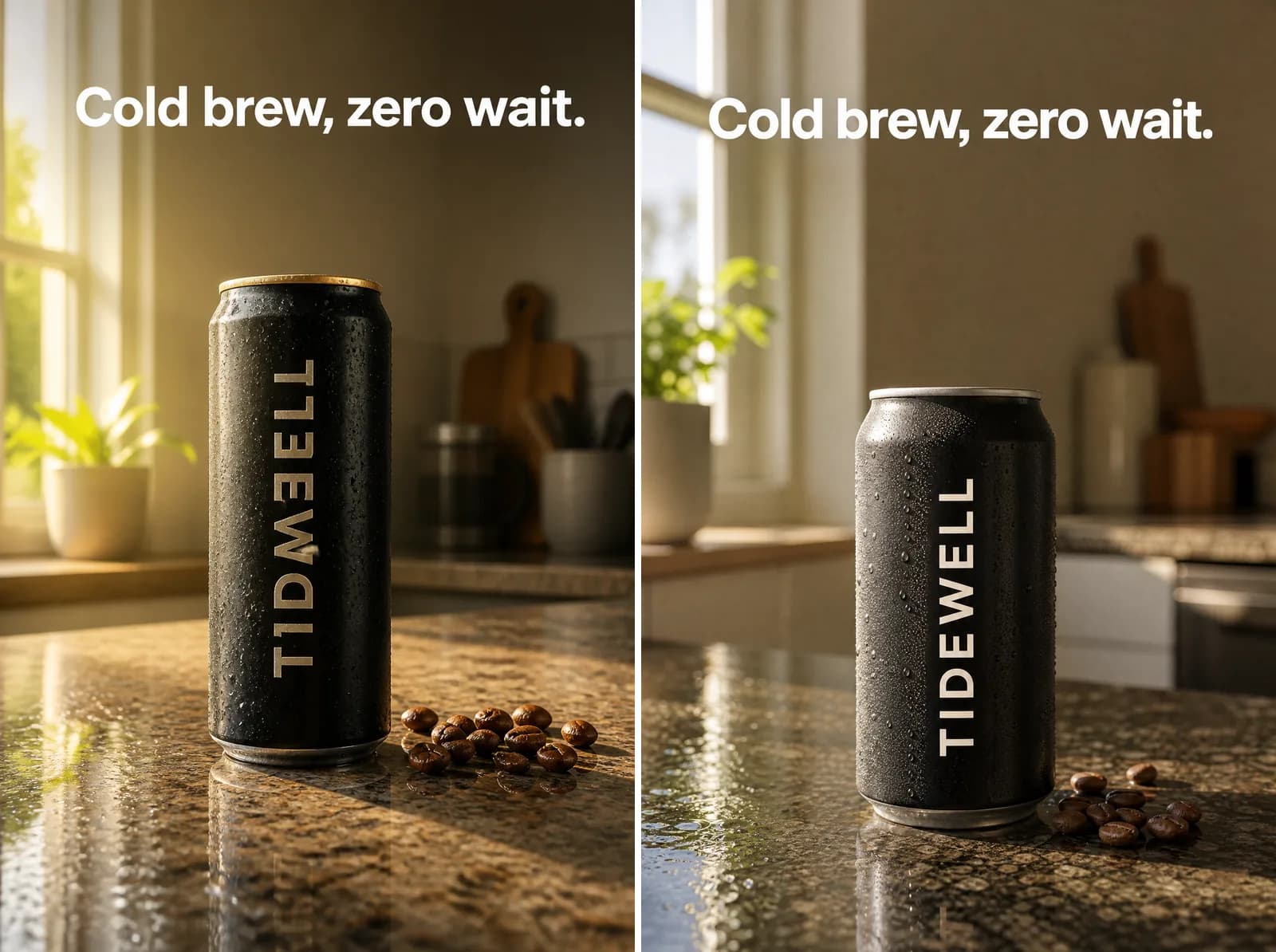 Same cold brew prompt in Novoads on GPT Image 2 at 2:3, low quality left and medium right, 1 credit apiece, made 2026-11-03
The 2:3 shape isn't one the slideshow article lists, so Meta would crop it. We also made a square take at each quality in the same test. At low, the square came back at 1024 pixels a side. That's under the 1,080 Meta asks for. At medium, it came back at 2048 pixels a side. Both cost 1 credit and got the label right, so for Meta slides we'd pick medium every time.
Making the stills in Novoads, and what ten of them cost
Credits and cents for a set of slides
In Novoads, GPT Image 2 costs 1 credit an image at low or medium, and 4 at high. Medium already clears Meta's floor at 1:1, so you don't need high for a slide set. A ten-slide set at medium comes to 10 credits.
| Stills at low or medium | Credits | On Plus | On Starter |
|---|---|---|---|
| 1 | 1 | about 5 cents | about 8 cents |
| 10 | 10 | 49 cents | 75 cents |
| 15, Meta's most | 15 | about 74 cents | about $1.13 |
The cents are our arithmetic from the plan prices, which work out to 4.9 cents a credit on Plus and 7.5 cents on Starter.
- Starter is $15 a month for 200 credits, billed monthly only.
- Plus is $49 a month for 1,000 credits.
- Ultra starts at $129 a month for 3,000 credits.
You pay for every plan from the first month, and the pricing page shows the yearly prices for Plus and Ultra.
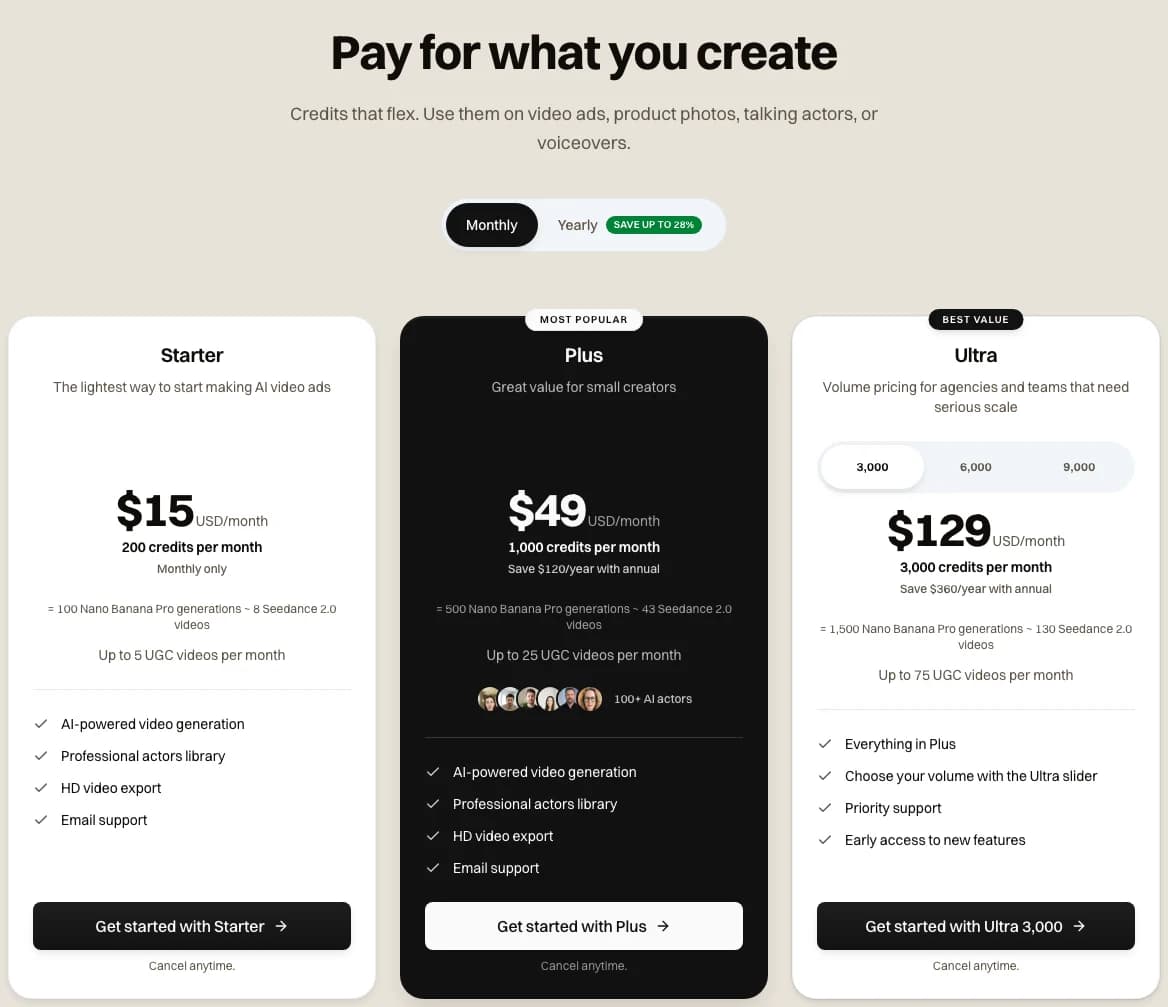 Our three plans on novoads.ai/pricing with Monthly billing picked, 2026-11-06
What Meta's slideshow builder costs
Meta's help article on how it charges for ads says you set budgets, spending limits and payment thresholds to manage your expenses and determine when you're charged for ads. We didn't find a fee for making a slideshow on any Meta page we read, so by our reading the builder costs nothing beyond what you spend on the ads. Meta's own format page calls slideshow ads "quick and affordable to create."
That makes Meta's builder the cheaper way to turn stills into motion, since every video clip you make in Novoads costs credits. For what the ad spend itself runs to, see how much Meta ads cost.
What you do in Ads Manager, and what Novoads doesn't do
You make the stills in Novoads. Then you take them into the video creation window in Ads Manager, build the slideshow there and publish it from your own ad account. Novoads doesn't upload, place or run ads on Meta, TikTok or anywhere else. If you want music on the slideshow, you'll add it in Meta's or TikTok's own tool, following what their pages say.
If you're making several slideshows to test against each other, vary more than the order of the slides. Our post on creative diversity in Meta ads explains why. If each one is aimed at a different buyer, see choosing an audience for each ad creative. And if you'd rather make a single static ad than a slideshow, our static ads guide shows how we make those.
Make the stills for your next slideshow
Each GPT Image 2 still is 1 credit in Novoads at low or medium. You build the slideshow itself in Meta Ads Manager.
See the plansWhich slideshow to build first
Start with one product and ten square stills at medium, each showing one benefit, with the words in the same spot on every slide. That's 10 credits in Novoads. Then select them in the video creation window in Ads Manager, pick the Slideshow template and check the duration options against the 15-second cap before you publish.
Frequently Asked Questions
Can you still make a slideshow ad on Facebook?
Yes, in Meta Ads Manager. Meta's Business Help Center article on slideshow ads says you can't create one from your Facebook Page anymore, and that you select 2 to 15 images in an ad's video creation window. The same article says a slideshow can't be longer than 15 seconds. We read it on November 6, 2026.
Key Takeaways
- Meta's Business Help Center says you select 2 to 15 images for a slideshow ad and build it in Meta Ads Manager.
- The same article caps a slideshow at 15 seconds and says you can't create one from your Facebook Page anymore.
- The older counts you'll still come across trace back to a 2015 launch story and a help article Meta has since retired.
- TikTok's standard carousel takes 2 to 35 images, and TikTok's spec page says music is a must.
- A GPT Image 2 still costs 1 credit in Novoads at low or medium, about 5 cents on Plus. By our reading, Meta's builder costs nothing beyond the ad spend.