What Is Adobe Firefly? The AI Studio and What 2,000 Credits Buy
Adobe Firefly is Adobe's AI studio for images, video, audio and vectors. See where you can use it, what 2,000 credits buy at 1080p and how it fits into ad work.

Mauricio Valdivia
·11 min

Why Firefly Standard's 20 video clips come to four
Adobe Firefly is Adobe's app for making and editing images, video, audio and vector graphics from text prompts, with Adobe's own models alongside partner models from Google, OpenAI and others. You can use it in a browser or in its mobile apps, then bring what it makes into Photoshop, Illustrator, Premiere or Adobe Express to keep editing.
For video, the number that matters is a rate. At 1080p, Adobe's generative credits FAQ prices the Firefly Video Model at 100 credits a second. Firefly Standard comes with 2,000 credits a month. By our arithmetic, that's 20 seconds at 1080p. Cut into five-second clips, it's four. Adobe's plan card says Standard makes "up to 20" five-second videos. By the same arithmetic, that's what the credits buy at 540p.
We haven't tested Firefly for this post. The Firefly numbers here come from Adobe's own pages as we read them from Spain on November 1, 2026, from Internet Archive copies of those pages, and from public app-store ratings. The Novoads side comes from our own run and our own pricing page.
What Adobe Firefly is and where you use it
Adobe's models and partner models in one app
Adobe announced the beta of its first Firefly model on March 21, 2023, and described it as focused on commercial use. Adobe's Firefly Video Model went into a limited public beta on October 14, 2024.
On November 1, 2026, Adobe's Firefly page described the app as "an AI-powered creative space that helps you create and edit images, videos, audio, and vector graphics from simple text prompts." The Firefly site says you can generate with 30+ AI models in one place. Adobe's own models cover images, video, audio and vectors, and the partner models come from Google, OpenAI, ElevenLabs, Luma AI, Runway and others.
On the web, on your phone and inside Photoshop
Adobe's product page and its partner-models page list where you can use Firefly.
- The Firefly web app, which you open in a browser on desktop or mobile
- The Firefly mobile app for iOS and Android
- Photoshop, Illustrator, Premiere, Lightroom and Adobe Express, where you can take what you generate and keep editing it
- Adobe Express, Illustrator and Photoshop, where Adobe's latest update added partner models
So on a desktop computer, Adobe's product page points you to the web app in your browser.
Generative Fill and Adobe's other editing tools
Generative Fill is a Photoshop tool for changing part of an image with a text prompt. Adobe's help page for Photoshop on the desktop, last updated September 15, 2026, breaks it into three steps.
- Select the area you want to edit.
- Choose an Adobe Firefly model or a partner model.
- Describe what you want, or leave the prompt blank and let Photoshop fill the selection from the pixels around it.
What it costs depends on the model you use.
- With Adobe's own models in Photoshop, Adobe's credits FAQ counts 1 credit per generation.
- Adobe's plan FAQ says every paid Firefly plan includes unlimited access to standard features like Generative Fill, even after your generative credits run out.
- With a partner model, Adobe's partner page puts Generative Fill in Photoshop at 10 to 40 credits, depending on the output size.
The Firefly app has the same kind of tools. Adobe's Firefly page lists Generative Fill, Generative Expand and Prompt to Edit for refining your work there.
What Firefly's 2,000 credits buy in video
The Firefly Video Model's per-second rate
The rates in this section come from Adobe's generative credits FAQ, last updated October 27, 2026. The FAQ prices Generate Video by the second, at 24 frames a second, and the table with those rates covers premium features "powered by the Firefly model." We read that as Adobe's own video model. Partner models in the same Generate Video tool have their own rates, listed on another page.
Adobe's FAQ also says generative credits don't roll over to the next month.
We turned the FAQ's video rates into five-second clips and set them against the credits on Firefly's smallest plans, Standard and Pro. The per-second rate is Adobe's, and every other column is our arithmetic.
| Firefly Video Model | Credits a second | Credits per 5-second clip | Firefly Standard, 2,000 credits | Firefly Pro, 4,000 credits |
|---|---|---|---|---|
| 1080p | 100 | 500 | 4 clips | 8 clips |
| 720p | 50 | 250 | 8 clips | 16 clips |
| 540p | 20 | 100 | 20 clips | 40 clips |
The table stops at Pro. Adobe's credits FAQ gives Pro Plus 10,000 credits a month and Premium 50,000, and its plan FAQ adds unlimited access to the Firefly Video Model on Premium. Once a Premium user runs out of credits, the credits FAQ says Adobe queues Text to video and Image to video generations and processes them in the background. It doesn't say how long they'll take. Adobe's current special offer can also make select models unlimited in a plan's first year on Pro, Pro Plus and Premium, and Adobe marks which models count on each plan.
How the plan card's 20 adds up
Adobe's plan card, as of November 1, 2026, counts five-second videos for each plan and doesn't name a resolution.
- Up to 20 on Firefly Standard
- Up to 40 on Firefly Pro
- Up to 100 on Firefly Pro Plus
- Unlimited access to the Firefly Video Model in Generate Video on Firefly Premium
By our arithmetic, each count is what the plan's credits buy at 540p. A five-second clip at that resolution takes 100 credits. Adobe has put a 1080p label on the same 20 before. Its release launching the Standard plan, dated February 12, 2025, called them "1080p video generations." But Adobe's FAQ already priced 1080p at 100 credits a second in its September 3, 2025 version, and it still does in the October 27, 2026 one.
Prices, and where to find them
Adobe's plan pages didn't show us a dollar price on November 1, 2026. Adobe's October 28, 2025 blog post listed Firefly Standard at US$9.99 a month. Our Adobe Firefly pricing guide goes through the plans and what they cost, and our guide to AI video credits covers how to compare credit prices across vendors.
Images, audio and avatars on the same credits
Which images use credits
Adobe's plan FAQ says all paid plans include unlimited standard image and vector generations, and that generative credits go to premium features such as video, audio and partner model outputs. But not every image counts as standard.
- Adobe's offer page lists Firefly Image 4 and Firefly Image 3 among the standard features with unlimited generations on all Firefly and credit plans.
- Adobe's credits FAQ lists Firefly Image 5 among the premium features, at 10 credits per generation.
- Firefly Image 4 Ultra costs 20 credits per generation.
- Google's Nano Banana Pro, which Adobe lists as Gemini 3 (with Nano Banana Pro), costs 40 credits per generation in Firefly, at a rate Adobe marks "for a limited time."
Video from Adobe and from partners
Adobe's help pages for Generate Video, last updated June 16, 2026, set these defaults.
- Firefly Video is the default model for Generate Video.
- If it's your first video generation, though, the default is Veo 3.1 from Google.
- Every generated video runs at 24 frames a second by default, for Adobe's models and partner models alike.
Adobe names its own model differently from page to page. The plan card says Firefly Video Model, the help pages say Firefly Video, and the credits FAQ talks about premium features "powered by the Firefly model." We treat all three as the same model.
Inside Firefly, Veo 3.1 costs 50 credits a second, with or without audio. That rate is the same at 720p and 1080p, and Adobe marks it "for a limited time." We didn't find a maximum clip length for Adobe's own video model in its help pages or its credits FAQ. The plan card counts five-second videos, and the rates are per second.
Avatars and audio
For a talking presenter, Adobe's credits FAQ lists Text to Avatar (beta) at 10 credits a second, up to 1080p. Adobe prices audio three different ways.
- Generate Sound Effects costs 10 credits per generation.
- Generate Music costs 20 credits per minute.
- Generate Speech with Firefly Speech costs 10 credits per 1,000 characters.
Our post on Firefly's audio tools explains what Adobe's commercial safety promise does and doesn't cover for them.
Adobe's October offer and who it leaves out
What Adobe's special offer covers
Adobe calls its current promotion "Firefly plan special offers as of October 13, 2026." The offer gives unlimited generations on "select models, resolutions, and features" for up to a year. Adobe's offer page names the plans that qualify.
- Individual Firefly Pro, Firefly Pro Plus and Firefly Premium plans
- The plans Adobe names by their credits, from 4,000 to 50,000
Adobe says Teams and Enterprise plans aren't included. Firefly Standard, the 2,000-credit plan, isn't on the list either. So by our reading, the full Firefly Video Model rate in our table applies to it. Adobe's offer table marks which models count, plan by plan.
What happens after the first year
Adobe's offer page puts limits on that year.
- The year begins on the date you start your eligible plan and runs for 12 consecutive months.
- After that, in Adobe's words, "all users return to consuming credits."
- The unlimited generations work only on firefly.adobe.com and in the Firefly mobile app. Adobe says you can't use them in other Adobe products or desktop applications.
- The list of models and resolutions in the offer is subject to change.
Some partner rates are temporary, too. Adobe's partner-models page marks several of them "for a limited time," Nano Banana Pro's and Veo 3.1's among them.
Adobe's MAX conference runs from November 10 to 12, 2026, after a preconference on November 8 and 9. At MAX 2025, Adobe introduced Firefly Image Model 5 in public beta, in a release dated October 28, 2025. If you're choosing a plan around this year's MAX, check the rates again.
Daily generations without a plan
On November 1, 2026, Adobe's plans page said, "You don't need a plan to get free daily generations across image, video, and audio." The page added that the limits refresh every day. Adobe's plan FAQ calls this a free plan with limited daily generations.
Is Adobe Firefly good for ads?
What the app stores say
We read the Firefly app's store ratings on November 1, 2026.
- 4.5 stars from 32.4K reviews on Google Play
- 4.7 from 11K ratings on Apple's US App Store
Those ratings are for the app as a whole, so they don't tell you much about how its output does in an ad.
Where it's strong for ad work, in our reading
We think Firefly is at its best when your ad work already runs through Adobe's apps.
- On a paid plan, standard image generations (Firefly Image 4 among them) don't use credits, so you can draft and redraft statics on Adobe's standard models without draining your allowance.
- Adobe's help page says Generative Fill edits an image non-destructively in Photoshop, so you can fix one part of a product shot and leave the rest alone.
- Adobe says outputs from its own Firefly models are safe for commercial use, which matters for paid ads.
Where the credits run thin
On video, the smaller plans run out of credits fast. By our arithmetic, a 20-second cut at 1080p from the Firefly Video Model uses up Standard's whole month of credits. Pro's monthly credits cover 40 seconds. If you're testing several versions of an ad, read our post on how many ad creatives you need and our creative testing guide before you pick a plan size.
What the same kind of static ad costs on Novoads
We made these four static ads in Novoads with Nano Banana Pro on September 1, 2026. They're all for one product, our tan Novoads cap, and none of them came from Firefly. Each is a 4:5 image at 2K from a single generation. The four formats are a studio hero shot, a street portrait, a desk flat-lay and a street billboard at dusk, and the headlines are in Spanish.
 Made in Novoads with Nano Banana Pro · four 4:5 statics at 2K for our merch cap, one generation each · 8 credits for the four at today's price · rendered 2026-09-01
On Novoads, Nano Banana Pro costs 2 credits an image up to 2K. So the four ads came to 8 credits at today's price. At the Starter rate of $0.075 a credit, that's 15 cents an image, by our arithmetic. At Plus's $0.049 a credit, it's about 10 cents.
In Firefly, Google's Nano Banana Pro costs 40 credits per generation at Adobe's limited-time rate. By our arithmetic, Standard's 2,000 credits cover 50 of those a month. Adobe's row doesn't give a resolution, so the same model name may not mean the same settings. We also don't have a current dollar price for Adobe's credits to compare with ours.
On standard images, Firefly costs less than we do. Adobe's offer page lists Firefly Image 4 among the standard features that every Firefly and credit plan can use without limits, while each Nano Banana Pro image on Novoads uses 2 credits. If Firefly Image 4 is good enough for your ad, it's the cheaper way to make statics. For another route, our Stable Diffusion explainer works out what one picture costs on Stability's API. Our static ads guide covers ad sizes and how we made four 4:5 variants from one prompt, and our Nano Banana Pro post for ad creative goes into headlines and price badges on that model.
Can you use Firefly output in a paid ad?
Adobe's own models
Adobe's plan FAQ says, "Outputs from Adobe Firefly AI models are safe for commercial use." It says Adobe trains those models on licensed content and on public domain content where copyright has expired, and that Adobe automatically attaches Content Credentials for transparency. Adobe's product page adds that Adobe doesn't train on users' personal or generated content.
Partner models and beta features
Partner models and beta features each get their own lines in Adobe's FAQs.
- Adobe's plan FAQ says you're responsible for deciding whether content generated by partner models is appropriate for your project.
- Adobe's credits FAQ says you can use outputs from features without the beta label in commercial projects, and outputs from beta features too, "unless explicitly stated otherwise in the product."
- The same credits FAQ says beta outputs aren't indemnified for eligible teams and enterprise customers.
- Adobe's plan FAQ says eligible enterprise customers can also get IP indemnification for select Firefly outputs.
In our reading, Adobe's own non-beta features are the simpler choice for a paid ad, and a partner model's output is yours to check. Text to Avatar is in beta, so the beta rule applies to it.
How Novoads prices the same static ad
Our plans as of November 1, 2026
Every Novoads plan is paid from the first month. You pick a model we sell, and each image or clip uses credits from your plan.
- Starter is $15 a month for 200 credits, billed monthly only.
- Plus has 1,000 credits a month.
- Ultra has 3,000 credits a month.
Our pricing page lists every plan's price.
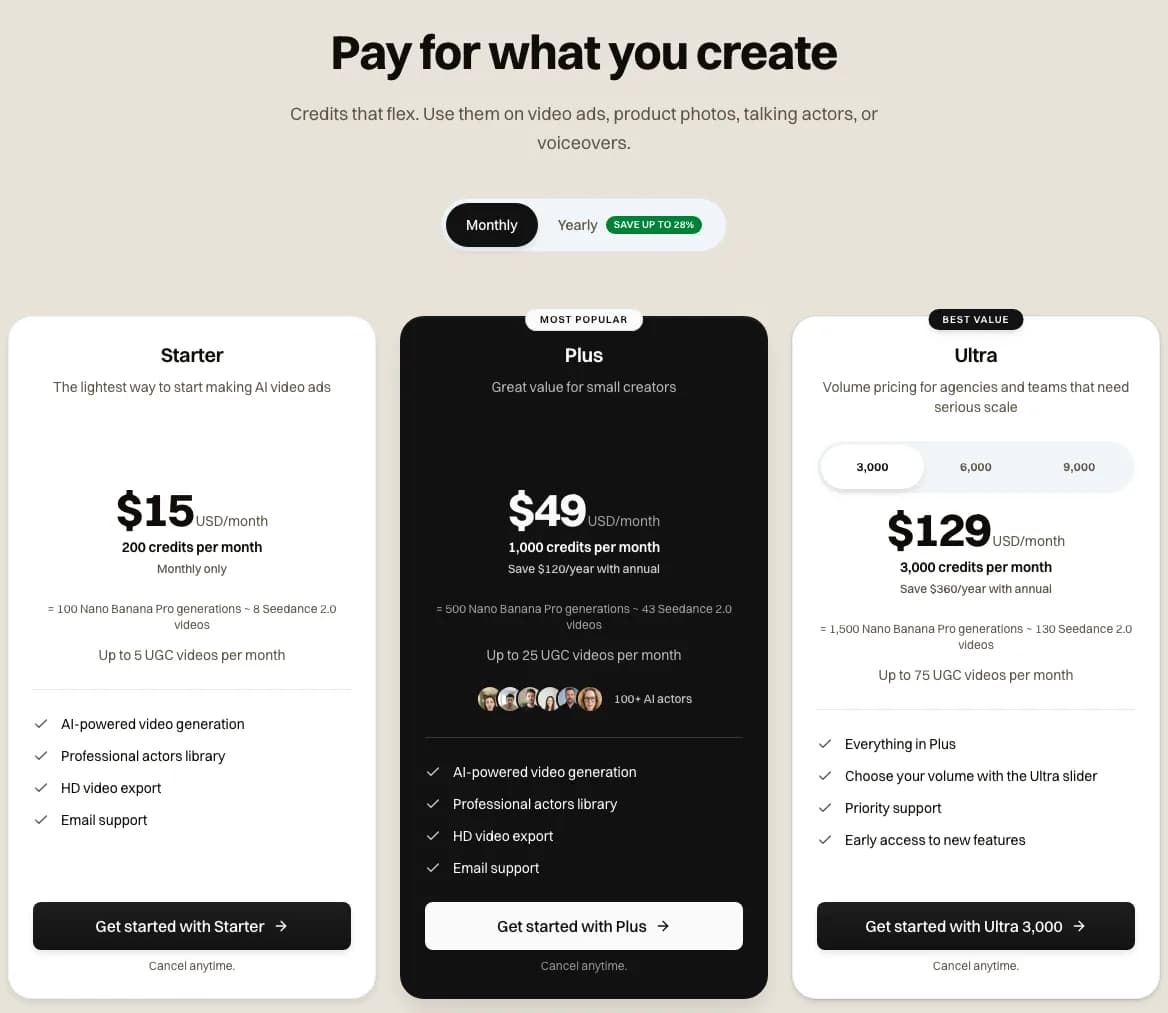 Our pricing page with monthly billing selected, 2026-11-01. Each plan card shows its monthly credits and what they make in Nano Banana Pro images.
Starter's 200 credits cover 100 Nano Banana Pro images. Plus's 1,000 credits cover 500, as its plan card says.
Where Novoads fits beside Firefly
Adobe built Firefly around its own apps, and Firefly's best deal is the unlimited standard image work on a paid plan. We built Novoads for making ads with the models we sell, Nano Banana Pro among them, and our pricing page shows what each plan's credits make. So you can work out what a batch of statics will cost before you start.
If your team edits in Photoshop and Express every day, Firefly's unlimited standard images are hard to match. If you'd rather pay a known credit price for each image and clip, that's how Novoads works.
Price your next batch of statics
Starter is $15 a month for 200 credits. That covers 100 Nano Banana Pro images at up to 2K, and every plan's credits are on the pricing page.
Compare Novoads plansCount your seconds before you pick a Firefly plan
If you're weighing Firefly for ad work, start with how many seconds of video you need each month and the resolution you'll export at. At 1080p, the Firefly Video Model uses 100 credits a second. By our arithmetic, that puts Firefly Standard's monthly allowance at 20 seconds of video. If most of your ads are statics, compare Firefly's unlimited standard images with the per-image price on our pricing page.
Frequently Asked Questions
Is Adobe Firefly a desktop app?
Adobe describes Firefly as a web app you can open on a desktop or a phone, plus mobile apps for iOS and Android. On a desktop, you can also bring Firefly's output into Photoshop, Illustrator, Premiere, Lightroom or Adobe Express, and Photoshop's Generative Fill can use Firefly models directly. Adobe's current unlimited offer doesn't apply in its desktop applications, though.
What is generative fill AI?
Generative Fill is a Photoshop tool for changing a selected part of an image with a text prompt. You select the area, pick an Adobe Firefly model or a partner model and describe what you want. Or you can leave the prompt blank and let Photoshop fill the selection from the surrounding pixels. With Adobe's own models, Adobe's credits FAQ counts it at 1 credit per generation, and Adobe says every paid Firefly plan includes it without limits.
What does Adobe Illustrator do with Firefly?
Adobe's partner-models page lists Text to Vector Graphic, Prompt to Edit and Concept to Vector in Illustrator among the features where you can use partner models. Adobe's Firefly page also says you can bring generated content into Illustrator to keep editing it, and Firefly itself makes vector graphics from text prompts.
Is Adobe Firefly actually good?
For ad work inside Adobe's apps, we think it's strong on images, but its credits don't go far on 1080p video. Paid plans include unlimited standard image generations, while the Firefly Video Model uses 100 credits a second at 1080p. By our arithmetic, Standard's monthly credits buy four five-second clips at that rate. On November 1, 2026, the Firefly app had 4.5 stars from 32.4K reviews on Google Play. On Apple's US App Store, it had 4.7 from 11K ratings.
Key Takeaways
- Adobe Firefly is Adobe's app for generating and editing images, video, audio and vector graphics, with Adobe's own models alongside partner models from Google, OpenAI and others. You can use it in a browser or in its mobile apps, and you can bring what it makes into Photoshop, Illustrator, Premiere or Adobe Express.
- According to Adobe's generative credits FAQ, last updated October 27, 2026, the Firefly Video Model costs 100 credits a second at 1080p. By our arithmetic, Firefly Standard's 2,000 monthly credits cover 20 seconds of it. That's four five-second clips.
- The 20 videos on Standard's plan card are what its credits buy at 540p. Firefly Premium gets unlimited access to the Firefly Video Model on top of its credits.
- Every paid Firefly plan includes unlimited standard image generations, Firefly Image 4 among them, while video, audio and partner models use credits. Adobe's special offers as of October 13, 2026 make select models unlimited for a year on Pro, Pro Plus, Premium and four credit plans. Firefly Standard isn't on that list.
- Adobe says outputs from its own Firefly models are safe for commercial use, and it leaves partner-model output to you. We haven't tested Firefly. Our four Nano Banana Pro static ads cost 8 credits in Novoads at today's price.
Sources
- •Adobe: Generative credits FAQ (Internet Archive copy, October 29, 2026)
- •Adobe: Firefly unlimited generations special offer (Internet Archive copy, October 22, 2026)
- •Adobe: Partner models in Adobe products (Internet Archive copy, October 21, 2026)
- •Adobe newsroom: the Firefly app and Firefly Standard launch (February 12, 2025)
- •Adobe Firefly on Google Play
- •Adobe Firefly on the App Store