How to Make Miniature World Videos With AI: The Tilt-Shift Look in Two Prompts
Generate a macro still of tiny figures around one oversized object, then use it as the first frame of an image-to-video model and prompt one slow camera move. Here are both prompts, the scale words that make a scene read as miniature, and how to put your product in the tiny world.

Mauricio Valdivia
·12 min
The miniature look is written, not shot
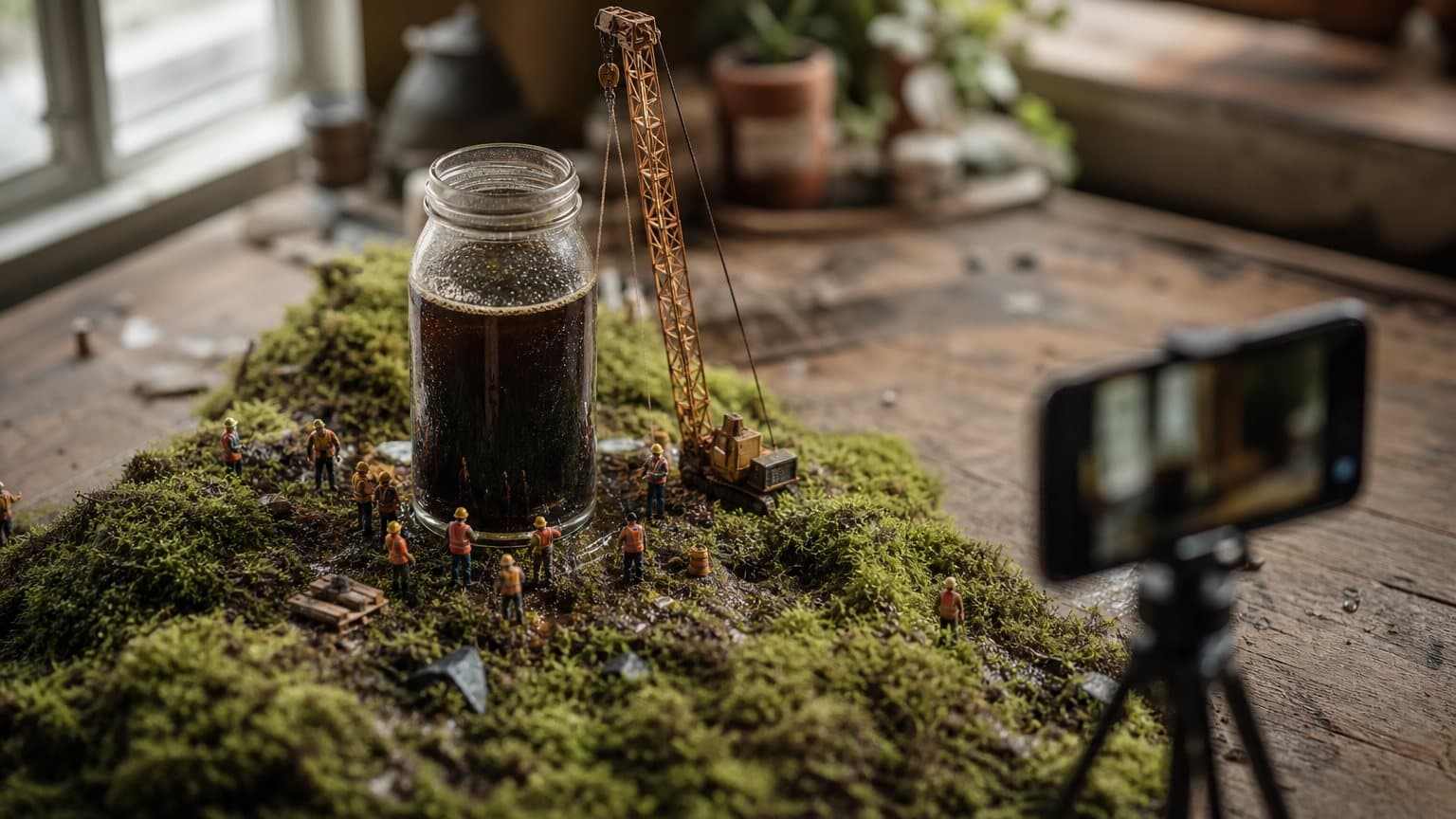
A jar of cold brew stands in a meadow like a water tower. Thirty construction workers the size of rice grains swarm its base, a crane lifts a single coffee bean toward the lid, and the camera drifts down over the whole scene. It looks like a model someone spent a month gluing together. It took two prompts.
That is how you make a miniature video with AI. First, generate a still image of the tiny scene with an image model, written as a macro photograph: small figures, one oversized everyday object, shallow focus, a camera looking down. Then set that still as the first frame of an image-to-video model and prompt a single slow camera move across it. Google's own Veo documentation pairs the two steps the same way, with a still of tiny surfers in a bathroom sink animated by a slow pan.
Both halves of that example run in Novoads: Nano Banana Pro for the still and Google Veo 3.1 for the motion, with Kling v3 Pro as a second animator when you want a longer take. This guide gives you both prompts, the handful of words that make a scene read as small, why "tilt-shift" is the wrong word to type, and how to turn the trend into an ad by making your product the biggest thing in a tiny world.
What makes a scene read as miniature
Nobody measures a diorama. The eye decides something is small from a few habits it learned looking at real models and real macro photographs, and those habits are what you are writing into the prompt. Three of them carry almost the whole illusion.
A thin band of sharp focus
A lens pointed at something tiny can only hold a sliver of it sharp. Everything in front of that sliver and behind it dissolves. Google's video prompt guide defines shallow depth of field as "an optical effect where only a narrow plane of the image is in sharp focus, while the foreground or the background is blurred". Put that blur above and below a busy scene and the brain files it under "small".
This is the effect photographers call the tilt-shift look, after the lens they use to fake it on real city streets. You do not need the lens. You need the result: one sharp band across the middle of the frame and soft blur at the top and bottom.
A camera that looks down
We see models from standing height, looking down at a table. Google's guide says a high-angle shot "places the camera above the subject, looking down, which can make the subject seem small, vulnerable, or part of a larger pattern". Its bird's-eye view goes further, "a shot taken directly from above, offering a map-like perspective of the scene".
Map-like suits a whole village. For a product scene, a high angle that still shows the side of the object keeps faces, props and the label readable.
One familiar object at the wrong size
The strongest cue is contrast. A sink is a sink, so surfers inside one are tiny. A watermelon is a watermelon, so the excavators beside it are toys. The familiar object tells the viewer the true size of everything around it, and it is the one element your audience will look at first.
The words that carry these three cues, in the order we reach for them:
- tiny, miniature, hand-painted figures for the people
- hyperrealistic macro photo for the medium
- shallow focus, or "only the middle of the frame is sharp"
- high-angle shot, looking down for the camera
- one everyday object at giant scale for the anchor
- bright, soft natural light, the way a real tabletop is lit by a window
Step 1 to make a miniature video: generate the macro still
Everything that makes the clip read as miniature is decided in the still. The video model inherits the scale, the focus and the light from it, so this is the step to spend your attempts on.
Write it as a photograph of something small
Here is the input-image prompt Google uses in its Veo 3.1 documentation, under "Prompting with reference images", labelled "Input image (Generated by Nano Banana)":
"A hyperrealistic macro photo of tiny, miniature surfers riding ocean waves inside a rustic stone bathroom sink. A vintage brass faucet is running, creating the perpetual surf. Surreal, whimsical, bright natural lighting."
Read it as five parts and you have a template:
- The medium: "hyperrealistic macro photo". It tells the model to render a photograph of something small, not an illustration of something big, and the photographic half of that instruction runs on the same camera, light and focus fields that make any AI clip read as real.
- The figures: "tiny, miniature surfers". Both words, on purpose.
- The container: "a rustic stone bathroom sink". The familiar object that sets the scale.
- The mechanism: "a vintage brass faucet is running, creating the perpetual surf". A reason for motion that the video step can animate later.
- The mood and light: "surreal, whimsical, bright natural lighting".
A still prompt you can copy
Swap the bracketed parts and keep the skeleton:
A hyperrealistic macro photo of tiny, miniature [figures] [doing one action] around a giant [everyday object] standing in [a small setting]. [One mechanism that could move, such as steam, water or a crane]. High-angle shot looking down at the scene, shallow focus with only the [object] and the nearest figures sharp, the foreground and background softly blurred. Bright, soft natural light. Surreal, whimsical.
The mechanism line matters more than it looks. A still with nothing that could plausibly move gives the video model two bad options: animate the figures, which is where miniature scenes break, or move only the camera over a dead set.
Settings in Novoads
In a Novoads project, open the Image section and paste the prompt. Nano Banana Pro is the default image model there, set to 9:16 vertical at 2K with three images per run. Each 2K image costs 0.5 credits, so a run of three is 1.5 credits. Google's example credits its still to Nano Banana; its image docs describe Nano Banana Pro as "The premium choice for the most complex visual tasks", which is why it is the model we reach for when fine detail decides whether a scene reads as real.
Our own measured median wait for a Nano Banana Pro still was 45 seconds (21 renders, in the sixty days ending August 10, 2026), so iterating on the still is cheap in time as well as credits. The full table is in our post on how long AI video generation takes. When one of the options holds the scale, the focus band and the light, click "Use as start frame". If you are building statics too, Nano Banana Pro for ad creative covers the resolution trade-offs.
Step 2: animate the still with one slow camera move
The video step has one job: move the camera through the world you already built, without breaking it.
The still becomes frame one
Google's documentation is plain about what happens to your image: "Veo uses the input image as the initial frame." It also tells you to "Select an image closest to what you envision as the first scene of your video". The video model does not redesign the scene. It continues it. A weak still cannot be rescued by a clever video prompt, and a strong one mostly needs to be left alone.
Google's matching video prompt
Here is the prompt Google pairs with the surfer still, labelled "Output Video (Generated by Veo 3.1)":
"A surreal, cinematic macro video. Tiny surfers ride perpetual, rolling waves inside a stone bathroom sink. A running vintage brass faucet generates the endless surf. The camera slowly pans across the whimsical, sunlit scene as the miniature figures expertly carve the turquoise water."
Three habits are worth copying:
- It restates the scene in one sentence, so the model is never unsure what it is looking at.
- It names one motion inside the world, the surf, which the still already set up with the running faucet.
- It names exactly one camera move, with a speed: "the camera slowly pans".
Choosing the move
Pick one move per clip. Google's prompt guide defines the useful ones, and each suits a different miniature scene:
- Slow pan. "The camera rotates horizontally left or right from a fixed position." Best for a wide diorama where the whole world is the point.
- Slow dolly in. "The camera physically moves closer to the subject or further away." Best when the clip should end on the product.
- Crane down. Google notes a crane shot is "often used for dramatic reveals or high-angle perspectives". Start high over the town, finish at the jar.
- Static camera, moving world. Water runs, steam rises, the crane turns. The safest option when your figures are delicate.
If you want more direction words and how often models miss them, our guide to camera movement prompts for ads goes deeper.
Length, format and cost in Novoads
In Novoads, open Settings in the video panel and choose Google Veo 3.1. What you get there:
- Length: 4, 6 or 8 seconds, defaulting to 8.
- Format: 9:16 or 16:9, defaulting to vertical at 1080p.
- Sound: always on. Veo renders the audio with the clip, so one line of ambient sound in the prompt is worth writing.
- Price: a flat 10 credits per clip at any length.
Google's API documentation lists the same three lengths and requires 8 seconds "when using extension, reference images or with 1080p and 4k resolutions". With a flat price, take the 8 seconds. Our measured median wait for a Veo 3.1 render was 122 seconds (34 renders, same sixty-day window).
When to animate with Kling v3 Pro instead
Kling v3 Pro is the other animator Novoads offers for this workflow, and it is the better pick when you want a longer, lazier drift than Veo's eight seconds allow. It renders 3 to 15 seconds and is priced by length: 5.8 credits for 12 seconds, 7 credits for 15. Our comparison of Kling vs Veo for video ads walks through where each one wins.

Why "tilt-shift" is the wrong word to type
"Tilt-shift" is the word most people reach for first, because it is what photographers call the look. It is the right word for a photographer and a gamble for a video model.
What Google's prompt pages actually list
Google's Veo prompt guide in the Gemini API docs has a "Focus and lens effects" line that tells you to "Use terms like shallow focus, deep focus, soft focus, macro lens, and wide-angle lens to achieve specific visual effects." The longer Cloud prompt guide, which Google writes for both Gemini Omni Flash and Veo ("Gemini Omni Flash and Veo offer endless customization through textual prompts"), lists wide-angle, telephoto, shallow and deep depth of field, lens flare, rack focus, fisheye and the dolly zoom. Neither page uses the word tilt-shift. We checked both on September 18, 2026.
What Google warns about advanced lenses
The Cloud guide's lens section carries an explicit caveat: "Some advanced camera lenses are not officially supported." The same section adds that results and reliability may vary depending on the overall prompt. A lens name the model was never documented to understand is exactly the kind of instruction that sometimes lands and sometimes gets ignored.
Describe the effect, not the lens
Our advice, not Google's: spend your words on what the lens would have done. The model does not need to know how the photo was taken. It needs to know what the photo looks like.
Write this:
- "macro photo, shallow focus, only a thin band across the middle is sharp"
- "high-angle shot looking down at tiny, hand-painted figures"
- "a giant coffee jar towering over miniature workers"
Instead of this:
- "tilt-shift lens"
- "miniature effect"
- "make it look small"
The same rule holds on Omni Flash, which Novoads also offers: the guide's documented vocabulary is the safer bet.
Putting your product in the miniature world
The trend is fun on its own. It becomes an ad the moment the oversized object is the thing you sell. In a miniature scene the viewer's eye goes to the one element at the wrong size, and it stays there while the tiny figures do something around it. Your product gets to be the landmark without anyone saying its name.
Three ways to stage the product
- The landmark. The product stands in a landscape like a monument and a crew works around it: a cold-brew jar as a water tower, a sneaker as a hangar, a perfume bottle as a lighthouse. Works for anything with a strong silhouette.
- The set. The product, or what it holds, becomes the terrain: skiers carving down a swirl of face cream, surfers in a mug of foam, climbers on a granola cluster. This is Google's sink pattern, and it suits products whose texture is the selling point.
- The machine. Tiny technicians operate or maintain the product: polishing a watch crystal, inspecting a headphone hinge, refilling a serum dropper. It turns a feature into an action you can watch.
Keep it your product, not a lookalike
Nano Banana Pro accepts reference images, so attach your real product photo in the Image section and tell the prompt to keep its shape and label as in the reference. Keep the label large and facing the camera. In our experience small print is the first thing to drift, so zoom in on the still and check the wording before you spend credits animating it.
Give the figures a job that sells
The tiny crew is your copywriter. Workers hauling beans say "freshly roasted" without text on screen. Engineers measuring a hinge say "built to last". Pick one action that points at your one benefit, and keep it simple enough to survive the camera move. For the wider playbook on turning a product photo into a clip, see how to make product videos with AI, and for a stylized cousin of this format, 3D animated product ads.
A miniature world is also a genuinely different visual concept, not one more hook cut onto the same talking-head shot. Our post on creative diversity in Meta ads covers why a new concept counts for more than a new opening line.
A worked example: a cold-brew jar as a water tower
Here is the scene from the top of this guide, written out as you would build it in Novoads with your own product photo attached as the reference. The prompts are complete; the budget assumes one retry on the still, which is where a miniature scene usually needs it.
The still prompt
A hyperrealistic macro photo of the glass cold-brew coffee jar from the reference image standing in a dewy meadow like a water tower, towering over dozens of tiny, miniature construction workers in orange vests and yellow helmets. A miniature crane lifts a single coffee bean toward the lid while tiny trucks haul beans along a dirt track at its base. High-angle shot looking down at the scene, shallow focus with only the jar and the nearest workers sharp, the foreground grass and the far meadow softly blurred. Bright, soft morning light. Surreal, whimsical. Keep the jar's shape and label exactly as in the reference image.
Read the first run of three before you touch the prompt. The usual miss is a camera that sits too low, so the meadow fills the frame like a real field and the illusion collapses. The fix for the second run is to strengthen "looking down" and move "shallow focus" earlier in the sentence, not to add more figures.
The video prompt
A surreal, cinematic macro video. Tiny construction workers in orange vests swarm the base of a giant glass cold-brew jar standing in a dewy meadow, and a miniature crane slowly lifts a coffee bean toward the lid. The camera slowly cranes down from a high angle toward the jar's label as morning light spreads across the grass. Shallow focus throughout. Soft ambient sound of wind and tiny engines.
What it cost and how to tell it came out right
The cost of one finished clip: two still runs plus one video render.
| Step | Model in Novoads | Setting | Credits |
|---|---|---|---|
| Still, run 1 | Nano Banana Pro | 3 images, 2K | 1.5 |
| Still, run 2 | Nano Banana Pro | 3 images, 2K | 1.5 |
| Clip | Google Veo 3.1 | 8 s, 9:16 | 10 |
| Total | 13 |
A second camera move from the same still, say a slow pan instead of the crane, adds 10 credits, so two cuts of the scene cost 23. Novoads starts at $49/month (Starter, 50 credits per month). At 13 credits a finished clip, one month of Starter credits covers three of these scenes with room left for extra still runs.
How to tell it came out right:
- Pause on frame one. It should match your chosen still exactly.
- The sharp band stays in place as the camera moves, with blur holding at the top and bottom.
- The workers keep their number and their shape. Nobody melts into the grass.
- The label is readable in the final second, which is where the viewer's eye lands.
Common mistakes and how to fix them
Every miniature clip that fails, fails in one of a few recognisable ways. Here is what each one looks like, why it happens, and the fix.
The scene reads life-size
- What you see: the jar looks like a real tower in a real field.
- Why: an eye-level camera and deep focus are how we see full-size things.
- Fix: add "high-angle shot looking down", put "shallow focus" early in the still prompt, and make sure one familiar object gives away the true scale.
Tiny figures melt or multiply once the camera moves
- What you see: workers merge into each other or new ones appear mid-shot.
- Why: many small moving bodies plus a fast camera give the model the most to invent.
- Fix: slow the move ("slowly"), give the motion to the environment (water, steam, a crane) and let only a few figures act.
You typed "tilt-shift" and got an ordinary shot
- What you see: a normal-looking scene with no focus band at all.
- Why: it is a lens name, not one of the documented prompt terms, as covered above.
- Fix: replace it with the description of the effect: a thin sharp band, blur above and below, a high camera.
The clip drifts away from your still
- What you see: by second four the scene has a different layout or light.
- Why: the video prompt described a scene the still does not show.
- Fix: open the video prompt by restating what is in the still, the way Google's surfer prompt restates the sink and the faucet, then add the one motion and the one camera move.
Wrong model, length or format
- What you see: a horizontal clip, a short take, or a different model's look.
- Why: the video panel remembers the settings you used last, and they may belong to a different job.
- Fix: before you click Generate, check Settings for Google Veo 3.1, 8 seconds and 9:16, or Kling v3 Pro at the length you want and 9:16.

How Novoads solves the miniature-world ad
Novoads runs both halves of the miniature workflow in one project: Nano Banana Pro builds the macro still from your prompt and your product photo, and "Use as start frame" hands it straight to Google Veo 3.1 or Kling v3 Pro for the camera move. There is no export and re-upload between tools, and the settings panel shows the credit cost before you generate. Novoads starts at $49/month (Starter, 50 credits per month). All plans are published on /pricing. If you want to try the two prompts above on your own product, you can start in Novoads.
The miniature trend is usually filed under fun, shareable content. It is better understood as a staging trick: shrink the world and the product becomes the biggest thing on screen without a single line of copy asking anyone to look at it.
Frequently Asked Questions
How do you make a miniature world video with AI?
In two steps. First generate a still image of the tiny scene with an image model, written as a macro photograph: small figures, one oversized everyday object, shallow focus and a camera looking down. Then use that still as the first frame of an image-to-video model and prompt one slow camera move across it. Google's own Veo documentation shows the same pairing, a Nano Banana still of tiny surfers in a bathroom sink animated by Veo 3.1 with a slow pan.
What prompt words make a scene look miniature?
Three cues do most of the work. A thin band of focus (macro photo, shallow focus, only the middle of the frame sharp), a camera above the scene (a high-angle shot looking down), and one familiar object at an impossible size next to tiny, hand-painted figures. Bright, soft daylight helps, because that is how a real tabletop model is lit.
Should I write tilt-shift in my AI video prompt?
We would not rely on it. Tilt-shift appears on neither of Google's Veo prompt pages, which list terms such as shallow focus, macro lens and wide-angle lens instead, and Google's Cloud prompt guide warns that some advanced camera lenses are not officially supported. Describe the effect the lens produces (a thin sharp band, blur above and below, a high camera) rather than naming the lens. That is our prompting advice, not a Google rule.
Which AI models can make miniature world videos?
Any image model that can render a convincing macro still plus any image-to-video model that accepts a start frame. Google's example uses Nano Banana for the still and Veo 3.1 for the motion. Novoads offers Nano Banana Pro for the still and both Google Veo 3.1 and Kling v3 Pro for the motion, so the whole chain runs in one project.
How much does one miniature world video cost in Novoads?
A 2K Nano Banana Pro still costs 0.5 credits, so the default run of three options costs 1.5 credits. A Google Veo 3.1 clip is a flat 10 credits at any length, and a 12-second Kling v3 Pro take costs 5.8 credits. The worked example in this guide came to 13 credits for one finished Veo clip. Novoads starts at $49/month (Starter, 50 credits per month).
How long should a miniature world clip be?
Eight seconds is the natural length on Veo 3.1. Google's API documentation offers 4, 6 or 8 seconds and requires 8 when using extension, reference images or 1080p and 4k resolutions. In Novoads the Veo price is the same at every length, so 8 seconds at 9:16 is the sensible default. Kling v3 Pro goes up to 15 seconds when you want a longer drifting pan.
Key Takeaways
- A miniature world video is two generations: a macro still that fixes the tiny scene, then that still used as the first frame of an image-to-video model with one slow camera move. Google's Veo documentation pairs a Nano Banana still with a Veo 3.1 pan in exactly this way.
- Three cues make a scene read as small: a thin band of sharp focus, a camera looking down from above, and one familiar object at an impossible size beside tiny figures. Write all three into the still prompt.
- Do not type tilt-shift and hope. Google's Veo pages never use the word and warn that some advanced lenses are not officially supported, so describe the effect instead. That is our advice, labelled as such.
- For an ad, the oversized object is your product: a landmark the tiny crew works around, a set the figures play in, or a machine they maintain. Upload the product photo as a reference in the still step so the shape stays yours.
- In Novoads the worked example cost 13 credits: two runs of three Nano Banana Pro stills (3 credits) and one 8-second Google Veo 3.1 clip (10 credits). Kling v3 Pro is the cheaper animator for a 12-second take, at 5.8 credits.