Adobe MCP: Four Apps Your AI Agent Will Edit, and What an Ad Costs
Which Adobe MCP is which, what Adobe's agent preview will change in Photoshop, Illustrator, Premiere and After Effects files, and what one ad clip costs in Adobe credits and in ours.

Mauricio Valdivia
·12 min

Adobe showed its MCP at MAX, and you can't install it yet
At MAX on November 10, 2026, Adobe previewed local MCP integrations that will let creative professionals "direct their preferred third-party agent to make changes locally" to their Photoshop, Illustrator, Premiere and After Effects project files. You can't use them yet. Adobe's detail release says the integrations "will be available in private beta in early 2027," and for now its blog offers a sign-up for updates.
Adobe also has tools AI assistants can use today (its connectors inside the big chat apps and a few MCP servers for developers), and the three are easy to mix up. The connectors' pages describe edits to pictures and footage you already have. An ad can't skip the clip itself, though, so we priced that too, on Adobe's side and on ours.
We read Adobe's three MAX pages, its connector and credits pages, Apple's US App Store listing for the Firefly app and Creative Cloud's plans page as shown to a US visitor, all on November 11, 2026. Nobody outside Adobe can run the MCP yet, and we didn't run Adobe's connectors or Firefly either. The only run in this post is our own, an ad our connector put together from a Claude Code session the day before.
Which "Adobe MCP" is which
Three different things answer to that name, and only one of them is the MAX preview.
| What it is | Status on November 11, 2026 | What it works on | Where you use it |
|---|---|---|---|
| Local MCP integrations | Preview, private beta in early 2027 | Photoshop, Illustrator, Premiere and After Effects project files | On your computer, through an agent you choose |
| Adobe connectors | Live | Photos, designs, PDFs and video you upload | Inside Claude, ChatGPT, Gemini and Slack |
| Adobe's developer MCP servers | Live | Analytics reports, Express add-on code, Experience Manager content | In a coding tool or a chat app |
The local integrations Adobe previewed at MAX
Adobe's detail release describes an agent "making changes directly in native project files on the user's computer." It adds that "Layers, vectors, bins and sequences remain editable," so you can step in and finish the work by hand.
Adobe doesn't say which agents it supports. Its overview release says "their preferred third-party agent," and its MAX blog says "the third-party agent you already use." TechCrunch's report says the MCP lets "other chatbots like ChatGPT, Claude, or Gemini use Adobe features." That list of chatbots is TechCrunch's, and Adobe's own pages don't give it.
Adobe vice president Deepa Subramaniam told TechCrunch, "We are still figuring out where and when and how to draw the line." On the pages we read, Adobe hasn't published a price for the MCP, the plan it needs, a country list or install steps. The one demo on the MAX blog is captioned "MCP integration in Photoshop," so for Illustrator, Premiere and After Effects, we only have Adobe's description to go on.
The connectors that already work
Adobe's connectors are an older product, and they're live now. The connectors page says they're "currently available for Google Gemini, ChatGPT, Claude, and Slack," and that "ChatGPT and Claude allow you to use Adobe capabilities without an account." They rolled out between December 2025 and September 2026.
- Adobe put Photoshop, Adobe Express and Acrobat into ChatGPT on December 10, 2025.
- The Adobe for creativity connector came to Claude on April 28, 2026, with "50+ pro-grade tools."
- On August 6, 2026, a single Adobe plugin in ChatGPT brought "more than 70 pro-grade tools," and Adobe says it "replaced the previous Photoshop plugin."
- On September 24, 2026, Adobe brought its tools to Gemini and added Acrobat to its Claude plugin, which Adobe says now gives you "more than 80 pro-grade tools" in Claude.
You use the connectors inside a chat app, while Adobe describes the MAX preview as working in project files on your own computer.
What you need to use the connectors
You don't always need an Adobe account. The connectors page says signing in or creating a free Adobe account gets you more tools, Creative Cloud storage and work saved across sessions. It also says "Google Gemini requires an Adobe login." Adobe's ChatGPT page adds that "Some tools require an eligible paid Adobe plan."
Adobe's help page for Claude says Adobe for Claude "isn't optimized for enterprise use and does not support EDU accounts." The same page says it's available worldwide, except where Adobe's trade compliance rules restrict it.
Adobe's developer MCP servers
Adobe also runs MCP servers for developers and marketing teams. In our reading of their pages, none of them edits an ad.
- The Analytics server lets you "Run Adobe Analytics reporting queries through MCP."
- Adobe said in March 2026 that its Express Developer MCP Server was "officially out of beta." It brings "Adobe Express add-on knowledge" into coding tools such as Cursor, Claude Desktop and VS Code.
- The AEM MCP Server "brings AEM into your preferred AI-powered IDE or chat-based application," and Adobe's docs say the AEM Claude Connector and AEM ChatGPT Plugin use it.
If you want MCP servers that make video, our comparison of AI video MCP servers covers the ones we found.
What an agent can do to an ad through Adobe
Photo edits for a static ad
Adobe's help page for Claude says Adobe for Claude "can help adjust color, lighting, and tone, apply Lightroom presets, remove or blur backgrounds, crop, resize, and expand images, and import and render Photoshop files." For a static ad, that's enough to retouch a product shot, take out its background and resize it for each placement.
Cuts, highlight reels and resizes for video
On the video side, you start from footage you upload. The Claude help page says you can "Upload video clips and ask Adobe to create quick cuts or resize them for different platforms." Adobe's ChatGPT page adds turning "key moments into a highlight reel," and its connector overview says you can "combine clips into a single sequence."
The ChatGPT page also lists "create and resize videos" among the things the plugin can do, and one of its templates offers to animate a design for social media. But none of the connector pages we read names a video model, and none describes making a clip from a prompt.
What the MCP will change in project files from 2027
Adobe's MCP examples are about work you already have. The MAX blog suggests removing a logo from one campaign asset, then asking your agent to "cascade it across the rest of the campaign." The detail release describes an agent "pulling in a brief from Google Docs," working on the project with Adobe's tools and sharing the result in Slack.
Premiere is where new footage could come in. Adobe's MAX blog says its Generative Media tool brings "Generate Video, Generate Sound Effects, Generate Soundscape and Generate Music directly into your timeline in Premiere," with Adobe Firefly and partner models from Google, Kling, Runway and Luma. Adobe hasn't said whether the MCP will reach that tool. What Subramaniam described to TechCrunch is "a number of endpoints and capabilities across Illustrator, Photoshop, After Effects, and Premiere."
Where the clip itself comes from
Neither Adobe's MCP description nor the connector pages we read name a video model. In our reading, that means the clip an ad is built on still comes from a video model. You'd get it from Firefly or a partner model inside Adobe, billed in credits a second, or from a connector like ours that makes one from Claude. Our Firefly explainer covers which models Adobe offers there.
What one clip and one ad cost on each side
Prices as of November 11, 2026.
Adobe hasn't published a price for the MCP on any page we read, so on Adobe's side an ad costs you the plan that includes the apps, plus the credits its clip uses.
What an Adobe credit costs
A credit's dollar value depends on how you buy it, so we divided each price by the credits it comes with.
| Where you buy Adobe credits | Price | Credits | About a credit |
|---|---|---|---|
| Firefly app, Apple's US App Store | $4.99 | 500 | 1 cent |
| Creative Cloud Pro, US, annual plan billed monthly | $69.99 a month | 4,000 a month | 1.75 cents |
| Creative Cloud Pro, first 3 months for new subscribers (a promotion) | US$34.99 a month | 4,000 a month | 0.87 cents |
The App Store lists 500 credits at $4.99 among the Firefly app's in-app purchases, but the listing doesn't say whether that's a month of credits or a one-time pack. The US$34.99 price is a promotion. Adobe's plans page showed it to new subscribers only, with US$69.99 a month after the first 3 months and no end date for the offer.
Adobe's credits FAQ, last updated on November 10, 2026, gives Creative Cloud Pro 4,000 credits a month for premium generations. Creative Cloud Standard costs $54.99 a month in the US on the same kind of annual plan, and the FAQ gives it 25 credits a month. Single-app plans bought on or after June 17, 2025, such as Photoshop or Premiere on its own, also come with 25.
For Firefly's own plans and what each one buys, see our breakdown of Adobe Firefly pricing.
One Kling 3.0 clip on both sides
On Adobe's partner-model page, Kling 3.0 with sound costs 25 credits a second at 720p. At 1080p with sound, it's 35 a second. On Novoads, a 5-second Kling 3.0 clip costs 10 credits, and our price depends only on its length.
| One 5-second Kling 3.0 clip | Credits | About |
|---|---|---|
| Adobe, 720p with sound, App Store rate | 125 | $1.25 |
| Adobe, 720p with sound, Creative Cloud Pro list price | 125 | $2.19 |
| Adobe, 720p with sound, Creative Cloud Pro promotion | 125 | $1.09 |
| Adobe, 1080p with sound, App Store rate | 175 | $1.75 |
| Adobe, 1080p with sound, Creative Cloud Pro list price | 175 | $3.06 |
| Adobe, 1080p with sound, Creative Cloud Pro promotion | 175 | $1.53 |
| Novoads on Starter | 10 | 75 cents |
| Novoads on Plus | 10 | 49 cents |
Every dollar figure in that table is our own math. For Adobe's credits we used the per-credit costs above, and for ours we used $0.075 a credit on Starter or $0.049 on Plus.
At 720p, a month of Creative Cloud Pro's credits covers 32 of Adobe's clips. Starter's 200 credits cover 20 of ours. Plus's 1,000 credits cover 100.
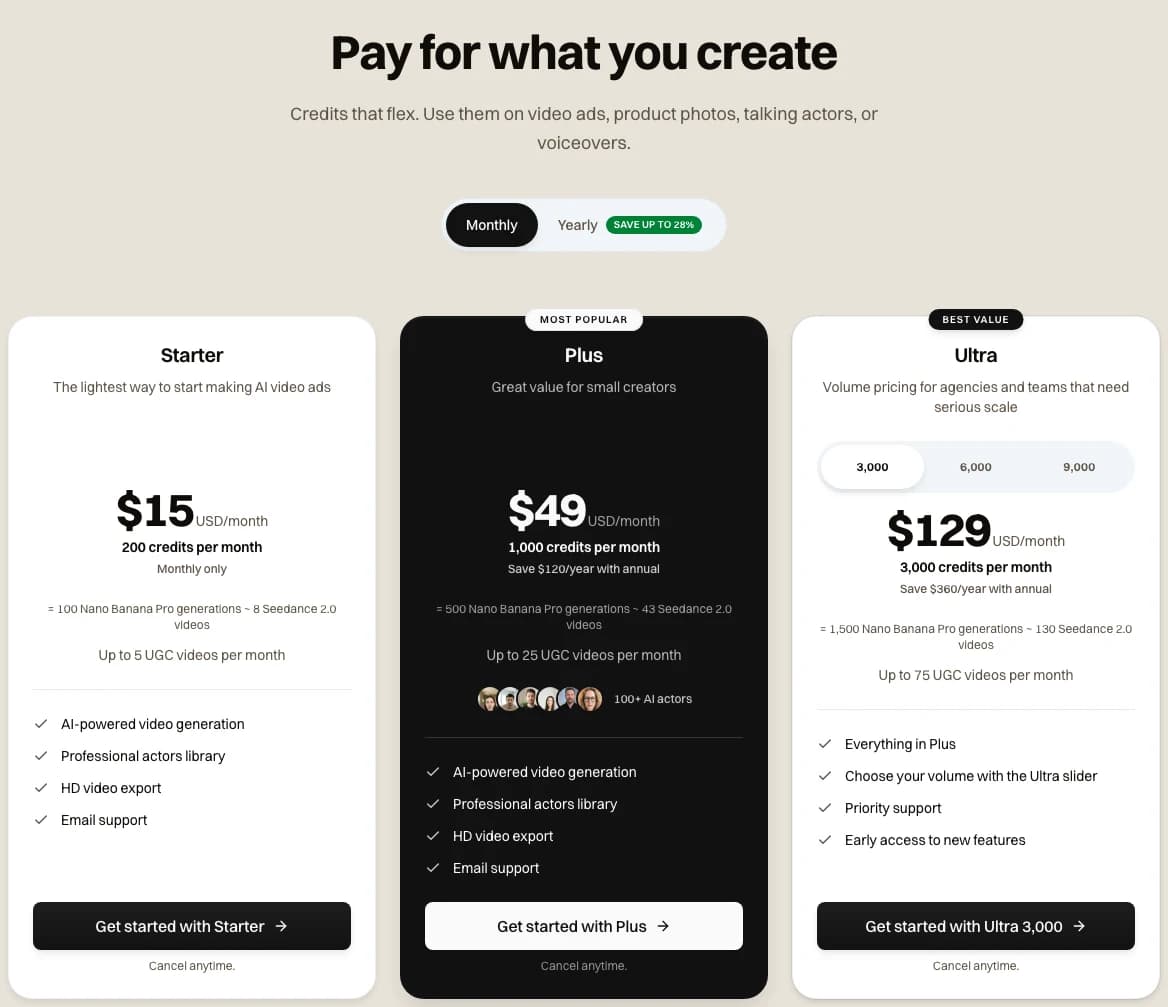
Our pricing page on monthly billing, the plans behind every Novoads dollar figure in this post · 2026-11-10
Starter is $15 a month for 200 credits. Plus is $49 a month for 1,000 credits, and our pricing page lists the rest. Every plan is paid from the first month.
A finished ad, and where Adobe comes out cheaper
At its simplest, a finished ad on our side has three parts.
- a 5-second Seedance 2.0 Mini clip at 720p, 5 credits
- putting the ad together, 10 credits
- basic captions, 3 credits
That comes to 18 credits. On Starter that's $1.35, and on Plus it's about 88 cents. We can't give a matching figure for Adobe, since the Adobe pages we read don't price the MCP or name the plan it needs.
Veo 3.1 is where Adobe can come out cheaper. Adobe's partner-model page lists Google Veo 3.1 at 50 credits a second, "For a limited time." That rate is the same at 720p and 1080p. On Adobe, an 8-second clip comes to 400 credits. We charge a flat 72 credits for a Veo 3.1 clip.
| One 8-second Veo 3.1 clip | Credits | About |
|---|---|---|
| Adobe, App Store rate | 400 | $3.99 |
| Adobe, Creative Cloud Pro list price | 400 | $7.00 |
| Adobe, Creative Cloud Pro promotion | 400 | $3.50 |
| Novoads on Starter | 72 | $5.40 |
| Novoads on Plus | 72 | $3.53 |
At the App Store rate, Adobe's clip costs $1.41 less than ours on Starter. On Plus, ours comes in about 46 cents under that App Store figure. With the Creative Cloud Pro promotion, Adobe's clip also beats our Plus price, by about 3 cents. Our Veo 3.1 price doesn't drop for a shorter clip, so Adobe's lead grows as the clip gets shorter.
Adobe's limits worth knowing
- Adobe also sells Kling 4.0, at 35 credits a second at 720p with sound, and we don't.
- Adobe's Seedance help page says "Seedance models aren't currently available for Adobe Firefly users in the United States," so we've left Adobe's Seedance prices out.
- Adobe's unlimited generations are a special offer, and Adobe says they "can only be used on firefly.adobe.com and the Firefly mobile app, and cannot be used in any other Adobe products or desktop applications." In our reading, that leaves out the desktop apps the MCP will work in.
- Adobe's partner-model rates are "only available on the most up-to-date version of the app," and the same page says "Usage rates may vary."
How Novoads put one ad together from Claude Code
Novoads is our own ad tool, and our connector lets Claude make the clip and finish the ad in the same chat. Before Claude spends anything, it can ask the connector what a call will cost in credits.
The clip we started from
We didn't make a new clip for this post. The ad starts from a clip our workspace made with Seedance 2.0 Mini from a prompt on October 20, 2026. It's a 6-second vertical clip, and it cost 6 credits.

Made in Novoads with Seedance 2.0 Mini · four frames of the starting clip, a woman in a gray sweatshirt talking to the camera with a sage-green insulated bottle in her kitchen · 6 credits · 2026-10-20
Four paid calls from Claude Code
On November 10, 2026, a Claude Code session connected to our connector turned that clip into a finished ad with four paid calls.
- a transcript of what she says, 1 credit
- a voice-over for the closing frame, 1 credit
- a music bed, 2 credits
- putting the ad together with Casper captions, 13 credits
That's 17 credits. The ad came back 9 seconds long and vertical, with its captions burned in.

Made in Novoads with Seedance 2.0 Mini · the finished 9-second ad our connector put together from that clip for a Claude Code session, captions burned in and a closing line asking viewers to tap the link · 17 credits · 2026-11-10
What our ad came to in dollars
With the clip's 6 credits, the whole run, from prompt to finished ad, cost 23 credits. That's about $1.73 on Starter or $1.13 on Plus.
That's more than the 18-credit ad in the cost section, because this run had a 6-second clip and added a voice-over and music. Our post on Claude video editing walks through the same run call by call. If you haven't connected Novoads to Claude yet, our Claude ads skill post shows how.
Price an ad on our plans
Every plan is paid from the first month, and Claude can ask our connector what a step will cost in credits before it spends any.
See plansWhich one fits which job
Picking a tool for the ad in front of you
- Use Adobe's connectors when you already have the photos or footage and want retouching, background removal, resizes or quick cuts from inside Claude, ChatGPT or Gemini.
- Wait for the MCP when your ads are layered Photoshop files or Premiere sequences you'd like an agent to change in place. Adobe's blog has a sign-up for updates.
- Use Firefly or a partner model in Adobe when you want a Veo 3.1 clip and buy Adobe credits at the App Store rate, which comes in under our Starter price.
- Use Novoads when you need the clip itself and the finished ad from the same chat, with captions, a voice-over and music added by our connector.
What to ask Adobe once the beta opens
We'd want four answers before moving ad work into the MCP, and the Adobe pages we read don't give any of them.
- Which agents it accepts, since Adobe's MAX pages don't name one.
- Whether an agent can reach Premiere's Generative Media tool, or only edit what's already in the project.
- Which plan it needs, and whether an agent's calls spend generative credits.
- Whether Illustrator, Premiere and After Effects work the way the Photoshop demo does.
Running the finished ad
Once the ad is made, you run it yourself. Our post on Meta's ads MCP server covers getting a 9:16 video into a Meta campaign from Claude.
Our connector also has a Weekly ads recipe, live as of November 11, 2026. With it, Claude writes a week of ads using the connector's other recipes and waits for a single yes before anything is spent. So far we've only run it from Claude Code. Our post on Claude marketing skills sets our recipes beside the ad skills other makers publish for Claude.
Frequently Asked Questions
Can you use Adobe's MCP today?
Not yet. Adobe previewed its local MCP integrations at MAX on November 10, 2026, and its detail release says they "will be available in private beta in early 2027." For now, Adobe's blog offers a sign-up for updates. What you can use today are Adobe's connectors inside Claude, ChatGPT, Gemini and Slack, which edit photos and cut or resize video you upload.
Key Takeaways
- Adobe previewed local MCP integrations at MAX on November 10, 2026. They'll let an agent you choose change Photoshop, Illustrator, Premiere and After Effects project files on your computer, and Adobe says a private beta starts in early 2027.
- Adobe's MAX pages don't name an agent. The ChatGPT, Claude and Gemini names come from TechCrunch's report, and the Adobe pages we read didn't give a price, a plan or install steps.
- Adobe's live connectors are a separate product inside Claude, ChatGPT, Gemini and Slack. Their pages describe photo edits, plus cuts, resizes and sequences made from video you upload, and none of the pages we read names a video model.
- Apple's US App Store lists 500 Firefly credits at $4.99. At that rate, a 5-second Kling 3.0 clip with sound costs from about $1.25 in Adobe credits. Ours is 10 credits, or 75 cents on Starter.
- For Veo 3.1, Adobe's App Store rate beats our Starter price. An 8-second clip comes to about $3.99 in Adobe credits. Ours is a flat 72 credits, or $5.40 on Starter.