Best Pika Alternatives for Ad Creative: 6 Tools Compared on Cost per Usable Ad
Pika now runs Seedance 2.5, Veo 3.1 and its own Pika 2.5, and on October 23, 2026 its $10-a-month Starter plan carried monthly credits and a commercial license. Here are six Pika alternatives mapped to real ad creation, compared on native audio, workflow, and the kind of ad each one actually finishes.

Mauricio Valdivia
·Updated ·14 min

Pika prices the clip, and the license starts at Starter.
The best Pika alternatives for ad creative are the tools that finish the part of the job you would otherwise do by hand. Pika calls itself "the AI creative platform you've been waiting for," and it has the catalogue to back that up: Seedance 2.5, Google Veo 3.1 and its own Pika 2.5 behind one credit balance, plus a Product Ad app. What an advertiser still has to price is a campaign: a script, an actor, a product held to camera, and the same format repeated twenty times until the data picks a winner.
You can see how it charges on Pika's own price list. It meters per generation and publishes what a plan's credits make. A 720p five-second Seedance 2.5 video is 122 credits. A 720p five-second Wan 3.0 clip is 33. None of that is a flaw. It is a platform that knows exactly what it is, and an advertiser arriving from it is not leaving because the output looks bad. They are leaving because an ad is a workflow, the render is only one beat of it, and the right to run the result is a plan decision.
The 6 best Pika alternatives, at a glance
Pika sits at the broad, many-engines end of AI video. The six tools below win, where they win, by being closer to a finished ad on a meter you choose: a spoken creator, a product import step, a published language list, or a format that comes out ready for paid social. Pick the one that matches the ad you need, then argue about price.
- Higgsfield is best for turning a product link into a social-first ad without leaving an effects-rich workspace.
- Google Veo is best for a premium hero cut with native audio at 1080p and 4K.
- Kling is best for a cinematic spoken scene with native multilingual sound.
- Seedance is best for a multi-shot product story with synchronized audio.
- Creatify is best for batching many ad variations out of a product page.
- Novoads is best for a finished UGC ad where a custom actor, made from a photo of someone holding your product, presents it.
The first question is not price. It is which layer of the ad you want to stop building by hand. If the answer is the voice, start with a native-audio model. If it is the actor and the script, start with an ad-first tool. Our companion roundup of Veo alternatives for ad creative works the same problem from the premium end, and the Runway alternatives guide covers the high-craft cinematic end.
| Tool | Best at | Audio in the same pass | Best-fit ad job |
|---|---|---|---|
| Pika | Many engines, one credit meter | Native on Seedance 2.5 | Engine tests; ads from Starter up |
| Higgsfield | Product link to ad | Via its ad workspace | Social-first product ads |
| Google Veo | Premium 1080p and 4K | Native | Polished hero brand cuts |
| Kling | Cinematic multi-shot | Native, multilingual | Talking product scenes |
| Seedance | Multi-shot storytelling | Native, with lip-sync | Story-driven product spots |
| Creatify | Variation volume | Via its ad workflow | Batch tests from a product page |
| Novoads | Finished UGC ads | Voice, lip-sync, captions | Ecommerce UGC, product in hand via a custom actor |
What Pika is genuinely good at
It is worth being precise about what you would be replacing, because Pika is not a weaker version of an ad tool. It is a broad creative platform with a coherent shape.
A model catalogue with a published price per generation
Pika's homepage promises "Every model you need to make anything you want," and the strip under it names Seedance 2.5, Pika 2.5, GPT Image 2.5 and MiniMax H3, with Wan 3.0, Gemini Omni 1.1 Flash and Pikaframes in its video model menu and Google Veo 3.1 on its apps page. The pricing page then does something most of the category avoids. Under "What your monthly credits make," it publishes the credit cost of a reference generation for each model and how many of them each plan buys. A 720p five-second Seedance 2.5 video is 122 credits, which Pika counts as 7 on Starter, 25 on Creator and 70 on Fancy. A 720p five-second Wan 3.0 clip is 33 credits, or 27 on Starter.
That transparency is unusual and useful. Most video tools hide the per-generation cost behind one undifferentiated credit balance; Pika tells you before you click what a specific engine will draw down, and shows you where a cheaper one stretches the month. If your work is trying engines against each other, that is a better price list than most of the category publishes.
Apps for the whole creative job, with the effects moved to Experiments
The second thing Pika does well is breadth. Its Video Studio promises to "Generate anything from a short clip to a 30-second multi-shot masterpiece," its Character Studio lets you "Customize a character who can be repeatedly used in your creations," and Pika Speech reads a script in one of 76 voice presets. The effects it built its name on are still there, on its Experiments page: the Pika video app will "Turn any photo into a reality-bending video with just one tap," and AI Trendmaker invites you to "Hop on any video trend, or create your own, with just a selfie and a sound." Pika describes those experiments as part of a "quest to make creation accessible to all."
Read the homepage as a positioning statement, because that is what it is. Pika now names ad creatives and marketers among the professionals it serves, and it keeps the one-tap effects for the person who wants to be in the video, on the trend, today. That range is real, and it is not one a single-purpose ad tool can fake. A brand whose team jumps between trend posts, product shots and engine tests will get more out of one Pika balance than out of a formal ad tool.
What the four plans actually buy
Pika's pricing page lists four self-serve plans, Free, Starter, Creator and Fancy, plus an Enterprise tier with custom credits, and a toggle that saves 20% on yearly billing. As read on October 23, 2026:
| Plan | Monthly | Billed annually | Monthly credits | Commercial license |
|---|---|---|---|---|
| Free | $0 | $0 | 0 (credit packs only) | No |
| Starter | $10/mo | $8/mo | 900 | Yes |
| Creator | $35/mo | $28/mo | 3,150 | Yes |
| Fancy | $95 to $880/mo | $76 to $704/mo | 8,550 and up | Yes |
Three details on that grid matter more than the numbers:
- The license. Pika's comparison table marks "Commercial license" as No on Free and Yes on Starter, Creator and Fancy, and its terms of service limit use to "personal, noncommercial use" except where your plan expressly permits commercial use.
- The watermark is not the license. Every plan, Free included, lists no watermark, so a clean export is not the same thing as the right to run it.
- Credits expire. "Plan credits refresh each billing period and do not roll over," and top-ups, sold at 60 credits per $1, carry over but expire 365 days after purchase (read October 22, 2026).
Free is the plan capped on rights: a credit pack buys clips on it, but not the right to run them as ads.

Where an ad brief runs out of road
None of what follows is a knock on output quality. The reasons advertisers move on are about the shape of the job, and they show up in three specific places.
An ad is a script, an actor, and a product
A performing UGC ad is a stack: a hook that lands in three seconds, a person your audience believes, a product visible and used on camera, a claim delivered in a voice that matches the market, captions burned in for sound-off feeds, and a 9:16 cut sized for TikTok, Reels, and Meta. Pika hands you strong layers of that stack, several engines deep. Its Product Ad app "takes any image of your product, combines that with your brief, and turns it into a stunning, market-ready video."
Sound is not the gap either. Pika's page for Seedance 2.5 says audio "is generated in the same pass as the pixels," and Pika Speech covers a separate read. What an ad brief needs on top is a place to put the script, choose who says it, and get the same person back tomorrow for variation eleven. Pika's Character Studio is built for that last part, so the difference is less a missing feature than how many apps one ad passes through before it runs. Our guide to creating ads with AI walks through those layers in order.
The credit math at testing volume
Now do the arithmetic on the published numbers, because this is where the difference becomes concrete rather than philosophical.
Pika's own table prices a 720p five-second Seedance 2.5 video at 122 credits and does the division for you. Here is what each plan buys at that rate:
- Free, 0 monthly credits: nothing without a pack, and the $25 pack's 1,500 credits make twelve clips by Pika's count, with no commercial license.
- Starter, 900 credits: seven clips, and the first plan with a commercial license.
- Creator, 3,150 credits: twenty-five.
- Fancy, 8,550 credits: seventy.
Then remember that a single ad is rarely a single clip. If your ad is a hook beat, a demo beat, and a payoff beat, that is three generations and 366 credits before you have opened an editor, more than a third of Starter's month. Dropping to Wan 3.0 at 33 credits a clip stretches Starter to 27 clips, with a different look. The number that matters in ad work is not credits per generation. It is credits per finished, testable ad, and every extra beat multiplies it. For the broader picture of what a produced AI ad costs across tools, the best free AI video generators roundup maps where the cheapest tiers stop being useful, and the UGC creator explainer covers the format this is all trying to imitate.
Sound, length, and resolution
The third constraint is shape, and on Pika it is looser than you might expect. Its Seedance 2.5 page promises "Up to 30 seconds in one continuous pass" with sound, and Video Studio stretches to a 30-second multi-shot piece. What remains is resolution and budget: the credit table's reference cells are priced at 720p, the same Seedance 2.5 page answers "Does 2.5 render 4K? No." and says the model tops out at 1080p, and longer takes draw on the same monthly credits.
The alternatives below differ from Pika in different directions: a different meter for the same engine, a published language list, higher resolution, or a workflow that assembles the beats for you. Which one you need depends on the ad, which is why the list is not ranked.
The 6 alternatives, mapped to ad creation
Here is where each tool fits, why you would pick it for ad work, and the ad job it is best at. Two of these engines, Seedance and Veo, are also on Pika's own model list, so for them an alternative changes the meter, the license and the workflow rather than the model. Three of them, Seedance, Kling, and Veo, are also available inside Novoads, so reaching them does not mean managing three subscriptions.
1. Higgsfield, best for turning a product link into a social-first ad
Higgsfield is the closest thing here to Pika's shape: a broad creative suite with an advertising mode built around a product link. It describes itself as an "AI-native creative suite," and its Marketing Studio "is Higgsfield's AI ad generator for marketing teams. Paste a product URL, pick a format, and generate publish-ready video ads in seconds," marketing a path of "From product link to video ad in 2 minutes." The product import will "automatically extract the product name, description, and images," or you can upload up to five images by hand.
For ads specifically it offers "40+ ready-to-use avatars or generate your own from a text prompt via Soul 2.0," covers UGC formats including "talking heads, product reviews, tutorials, unboxings, and virtual try-ons," and exports 9:16, 16:9, and 1:1. Notably, its ad videos are "powered by Seedance 2.0," the same engine several tools in this list rent. Our Higgsfield alternatives roundup goes deeper on where that workspace fits.
- Why pick it for ads: a product-URL import and 40+ ready-to-use avatars.
- Trade-off: its plan figures are not rendered in the page source, so check current pricing in the app.
- Best-fit ad job: a social-first product ad built from a live product page.
2. Google Veo, best for a premium hero cut with native audio
Google's Veo 3.1 generates video "with natively generated audio" and supports "1080p and 4K" output. Its native clip durations are 4, 6, or 8 seconds, and the docs note that duration "Must be '8' when using extension, reference images or with 1080p and 4k resolutions." Those same Gemini API docs, read October 23, 2026, say the Veo 3.1 Preview models in the Gemini API were shut down on October 22, 2026, and point developers to Gemini Omni Flash or to the generally available (GA) models on Google's Gemini Enterprise Agent Platform.
Pika lists Google Veo 3.1 among its own video models, so against Pika the question is not the model but the meter and the controls around it. A Veo clip can arrive with its audio already attached at a resolution a brand campaign will accept, which removes an entire production stage from a sound-on placement. The trade is length: eight seconds is a hero shot, not a story. Novoads runs it as Google Veo 3.1.
- Why pick it for ads: native audio, with 1080p and 4K documented by Google.
- Trade-off: short fixed durations, so it is a shot rather than a sequence.
- Best-fit ad job: a premium, sound-on hero shot at the top of a funnel.
3. Kling, best for a cinematic spoken scene
Kling's own VIDEO 3.0 guide leads with a "Native Audio Upgrade, Enhanced Element Consistency, and Support for Multi-Shot Narratives." It supports "longer video generation (up to 15 seconds)" with "native audio-visual output, with highly flexible storyboard control," and its feature grid lists "Multilingual Support (Chinese, English, Japanese, Korean, Spanish)" alongside "Dialects and Accents." The same guide explains that "VIDEO 3.0 will automatically plan scene transitions, shot framing, and camera angle changes based on the prompts."
That fifteen-second ceiling plus native sound and a published language list is the practical case for a talking product scene: Kling can arrive with the scene and the sound together, in any of five published languages. Kling's own prompt guidance is worth reading before you spend on it, since it warns that asking for too many camera movements at once "can create unstable results." Novoads runs it as Kling v3 Pro, and our Seedance versus Kling comparison digs into which of the two wins on specific jobs.
- Why pick it for ads: native multilingual audio and 15-second takes.
- Trade-off: prompt discipline matters, and camera requests can fight each other.
- Best-fit ad job: a cinematic, spoken product scene.
4. Seedance, best for a multi-shot product story
Seedance 2.0 is the most interesting of the three engines for product work, because of how it takes input. Its reference-to-video mode accepts "up to 9 images, 3 video clips, 3 audio clips, plus natural language instructions," and you address them directly in the prompt: ByteDance's own launch post shows the pattern as "The character is from @Image 2, the scene is from @Image 3, and the props are from @Image 4." It "supports 15-second high-quality multi-shot audio-video output," can "reference composition, motion, camera movement, visual effects, audio and other elements from input assets," and its audio option covers "sound effects, ambient sounds, and lip-synced speech."
For an ad, that means your actual product can be one of the referenced images rather than something the model invents. ByteDance is also candid about the limits, noting "there is still room for optimization regarding multi-subject consistency," which is the honest caveat to keep in mind when a scene has two people and a product in it. Seedance 2.5 is also the reference engine on Pika's own credit table, so for this engine the choice is mostly the meter. Novoads runs Seedance 2.0, Seedance 2.0 Mini for high-volume testing (5 credits for a five-second 720p clip, against 23 on Seedance 2.0), and Seedance 2.5.
- Why pick it for ads: reference images pin your real product into the scene.
- Trade-off: multi-subject consistency is still improving, per its maker.
- Best-fit ad job: a short product story with a turn.
5. Creatify, best for batching variations from a product page
Creatify approaches the problem from the marketing side rather than the model side. Its signature workflow is "URL to Video," and its features page makes the volume play: Batch Mode "enables you to generate multiple ad variations at once." Its published plans start at $15 a month for Standard with "55 credits / mo" and $55 a month for Pro with "280 credits / mo," on monthly billing as read on October 21, 2026. The plan also sets the pace: Standard runs one generation at a time and Pro up to five in parallel (read October 22, 2026). Below both sits an entry plan with 10 monthly credits, enough to "Create up to 2 video ads or 20 image ads," with "access 300 AI actors."
The comparison with Pika is almost a category difference rather than a feature difference. Pika sells you a creative platform with an ad app inside it; Creatify sells you a pipeline from a product page to a set of testable ads. Our Creatify alternatives roundup covers that field in more detail.
- Why pick it for ads: a URL-in, many-ads-out batch workflow.
- Trade-off: less creative range outside ad formats.
- Best-fit ad job: many variations of the same product claim.
6. Novoads, best for a finished UGC ad with a custom actor holding your product
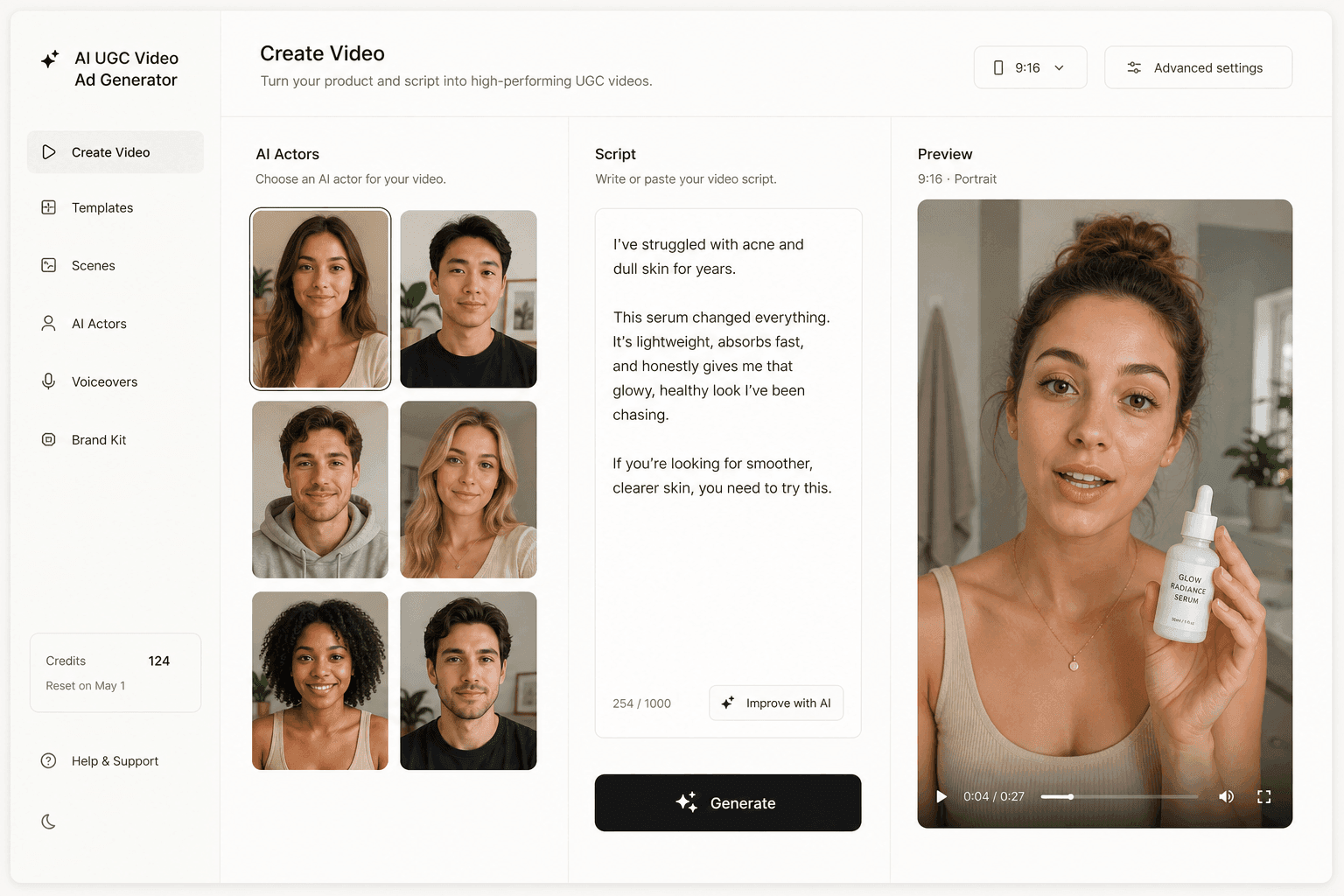
Novoads is built around the whole ad rather than the render: you write or auto-generate a script, pick an AI actor, and get a vertical UGC ad with voice and captions included. A stock actor from the library has empty hands, so to show your actual product in hand you create a custom actor from a photo of someone holding it (Create Actor, then Upload: "Transform a picture into a talking actor"). It also runs Seedance 2.0, Seedance 2.0 Mini, Seedance 2.5, Kling v3 Pro, and Google Veo 3.1 under one roof, so three of the alternatives above are reachable from the same account and the same script.
- Why pick it for ads: the script, actor, voice, and format are the product.
- Trade-off: it is not the place to go for a trend effect or a meme transformation, and product in hand takes that custom actor step.
- Best-fit ad job: ecommerce UGC where the demo is the ad.
A worked example: one cold brew concentrate ad
Say you sell a cold brew coffee concentrate and want a 15-second vertical ad: a groggy 7am hook, a pour over ice, and a short line to camera holding the bottle. Here is that brief on Pika and on an ad-first tool.
The brief
- Hook: someone half-awake, staring at an empty kettle.
- Turn: the concentrate goes over ice and the glass fills.
- Payoff: a believable line to camera, bottle in frame.
- Delivery: 9:16, captions, a warm natural voice, sized for Meta.
The winner among five hooks like this is unpredictable, which is the whole reason to make several cheaply rather than perfect one.
Running it on Pika
On Pika you would pick an engine and lean on what the platform is good at, which is range. Seedance 2.5 in Video Studio can carry the pour with sound in one pass, or the Product Ad app can start from the bottle photo and a brief. Then the ad work starts.
- Generate three beats. At 720p and five seconds, Pika's table prices a Seedance 2.5 clip at 122 credits, so one assembled ad is 366 credits before revisions.
- Write the script and get the spoken line, either in the clip's own audio or as a Pika Speech read laid in separately.
- Cut the beats together, caption them, and export at 9:16.
- Repeat all of it four more times to have five variants worth testing: fifteen clips is 1,830 credits, past Starter's 900, the first plan with a commercial license, and more than half of Creator's 3,150.
You end with strong footage and a real production task on top of it. For a one-off brand clip, that trade is fine. For variant eleven of a product claim, it compounds badly.
Running it on an ad-first tool
On Novoads the same brief collapses. Upload a photo of someone who matches your buyer holding the bottle to create a custom actor (Create Actor, then Upload), paste or auto-generate the script, pick a voice with the right accent, and generate. You get a finished 9:16 ad with that actor holding the bottle, synced voice, lip-sync, and captions, in about four minutes. Testing five hooks means editing five lines of script, not building five timelines. The custom actor renders on the talking-actor route; Seedance 2.0, Seedance 2.5, Kling v3 Pro, and Google Veo 3.1 are a separate route for generated video clips, so you can also try the same angle there and keep whichever lands.
How Novoads turns a product photo into a finished ad
Novoads is built for the job that makes advertisers leave a pure video tool: shipping many finished UGC ads, in the language the audience actually speaks, without a production stage behind every clip.
From product photo to a finished UGC ad
You write or auto-generate a script, pick an AI actor, and get a vertical ad. Each clip arrives finished:
- Voice, lip-sync, and burned-in captions, ready for sound-off feeds.
- 9:16, 1:1, and 16:9 output in HD, downloadable for any ad platform.
- 31 languages with real regional accents, rather than translated captions over an English read.
A stock actor from the 100+ library has empty hands, so putting your real product on camera takes one of two routes. Create a custom actor from a photo of someone holding the product (Create Actor, then Upload), or start from one of Discover's product templates: you upload the product image, it is swapped into the template creator's hand, and the result is animated as a short video.
The realism itself is not the argument. Every serious tool in this category rents the same frontier engines, so on raw output quality this is a tie, honestly stated. The argument is what it costs to reach an ad you can actually run.
Every frontier engine in one place
The models this article compares are not subscriptions you have to choose between one at a time:
- Seedance 2.0 and the lower-cost Seedance 2.0 Mini for high-volume testing (5 credits for a five-second 720p clip), plus Seedance 2.5 for takes up to 30 seconds.
- Kling v3 Pro for cinematic clips, plus Kling Motion Control to drive a specific performance.
- Google Veo 3.1 for premium, sound-on cuts.
- GPT Image 2 for product-to-ad stills from 1 credit per image (4 at high quality).
That is the practical answer to model churn. You keep the script and swap the engine. Novoads starts at $15/month (Starter, 200 credits per month). Plus is $49/month (1,000 credits), and Ultra starts at $129/month (3,000 credits) for more volume. All plans are published on novoads.ai/pricing, and you can cancel anytime.
The last mile is the product
The best Pika alternative is not the tool with the longest model list. It is the tool that closes whichever part of the ad you are currently closing by hand. Pika is a broad creative platform, it publishes what its credits buy more transparently than most of the category, and for testing engines it is a cheap way in at $10 a month, or $8 billed annually. For anything you plan to run as an ad, that same Starter plan is where the commercial license starts (read October 23, 2026). For a repeatable, on-brand product ad, the expensive part was never the render. It was the script, the actor, the voice, the captions, and the eleven variants nobody wants to cut by hand, and that is the part worth paying a tool to finish.
Frequently Asked Questions
What is the best Pika alternative for ad creative?
It depends on which part of the ad you want handed to you. If you need a talking creator with synced voice and captions holding your product, Novoads is the closest fit, through a custom actor made from a photo of someone holding it, and it also runs Seedance 2.0, Seedance 2.5, Kling v3 Pro, and Google Veo 3.1. If you want a many-engine workspace like Pika's with an ad mode that starts from a product URL, Higgsfield's Marketing Studio. For a premium hero cut with native audio, Google Veo. For a cinematic spoken scene, Kling. For a multi-shot product story, Seedance. For batching many variations from a product page, Creatify.
How much does Pika cost?
As of September 2026, Pika's pricing page lists four self-serve plans. Free is $0 with no monthly credits (credit packs only). Starter is $10 a month, or $8 a month billed annually, with 900 credits. Creator is $35 a month, or $28 billed annually, with 3,150 credits and the 'Best Value' badge. Fancy runs from $95 to $880 a month, or $76 to $704 billed annually, starting at 8,550 credits. Plan credits refresh each billing period and do not roll over, one-time top-ups are sold at 60 credits per $1, and an Enterprise tier with custom credits goes through sales.
Can you use Pika videos in commercial ads?
Only on the right plan. On October 23, 2026, Pika's plan comparison marked a commercial license on Starter, Creator and Fancy, and not on Free, and its terms of service limit use to 'personal, noncommercial use' except where your subscription plan expressly permits commercial use. Every plan lists no watermark, so a clean export is not the same thing as the right to run it. Anything you intend to run as a paid ad belongs on Starter ($10 a month, or $8 billed annually) or above. Read the current plan card before building a campaign on it, because plan contents change.
Does Pika generate voice for a talking ad?
Yes, in two ways. Its Video Studio runs Seedance 2.5, and Pika's page for it says audio 'is generated in the same pass as the pixels.' Video Studio itself promises anything from a short clip to a 30-second multi-shot piece, sound included. Separately, Pika Speech turns a script into a spoken read in one of 76 voice presets. What an ad brief still has to settle is the assembly around the voice: who says the line, whether the same presenter comes back for variation eleven, and where the captions and the 9:16 cut happen.
Is Pika good for product ads?
It has a direct route to one. Pika's Product Ad app 'takes any image of your product, combines that with your brief, and turns it into a stunning, market-ready video,' and its homepage names ad creatives and marketers among the professionals it serves. The one-tap effects it was known for, Pikaffects and AI Trendmaker, now sit on its Experiments page. The questions for a product advertiser are the license, which starts at Starter as of October 23, 2026, and the credit meter at testing volume, where a 720p five-second Seedance 2.5 clip is 122 credits.
Which Pika alternatives generate audio with the video?
Three of the models in this comparison do. Seedance 2.0 exposes a synchronized-audio option covering sound effects, ambient sound, and lip-synced speech. Kling ships native audio with multilingual output in Chinese, English, Japanese, Korean, and Spanish. Google Veo 3.1 generates all audio natively and supports 1080p and 4K. Pika hosts Seedance 2.5 and Veo 3.1 itself, so going elsewhere for those two changes the meter rather than the model. Novoads runs all three engines, so you can render the same script on each and keep the one that performs.
Key Takeaways
- As of September 2026, Pika lists four self-serve plans: Free at $0 with no monthly credits (credit packs only), Starter at $10 a month ($8 billed annually) with 900 credits, Creator at $35 ($28 billed annually) with 3,150, and Fancy from $95 ($76 billed annually) with 8,550 and up. Plan credits do not roll over.
- Pika prices the generation, not the ad. Its own table puts a 720p five-second Seedance 2.5 clip at 122 credits and counts seven of them in Starter's month, so a three-beat ad is three charges plus your editing time.
- For advertisers the line that matters is the license. Pika's plan comparison, read October 23, 2026, marks a commercial license on Starter, Creator and Fancy and not on Free, and its terms limit use to personal, noncommercial use unless your plan permits commercial use.
- For spoken product ads, start from a model that makes the sound. Seedance generates synchronized audio including lip-synced speech, Kling VIDEO 3.0 ships a native audio upgrade with multilingual support up to 15 seconds, and Google Veo generates video with native audio at 1080p and 4K. Pika hosts Seedance 2.5 and Veo 3.1 too, so for those two an alternative changes the meter, not the model.
- Novoads is the ad-first pick: you write or auto-generate a script, pick an AI actor, and get a UGC ad with voice, lip-sync, and captions, with your product in hand through a custom actor made from a photo of someone holding it. It runs Seedance 2.0, Seedance 2.5, Kling v3 Pro, and Google Veo 3.1 in one place and starts at $15/month (Starter, 200 credits per month).