Furniture Ads: Room Scenes From One Product Photo, and Google's Lifestyle Image Slot
How a furniture store can make room scenes, clean shots on white, sale ads and carousels from its own product photos in Novoads and a presenter video from a script, what each one costs in credits, and what Google Merchant Center's lifestyle image slot asks of a room scene.

Mauricio Valdivia
·11 min
Room scenes without building a room set
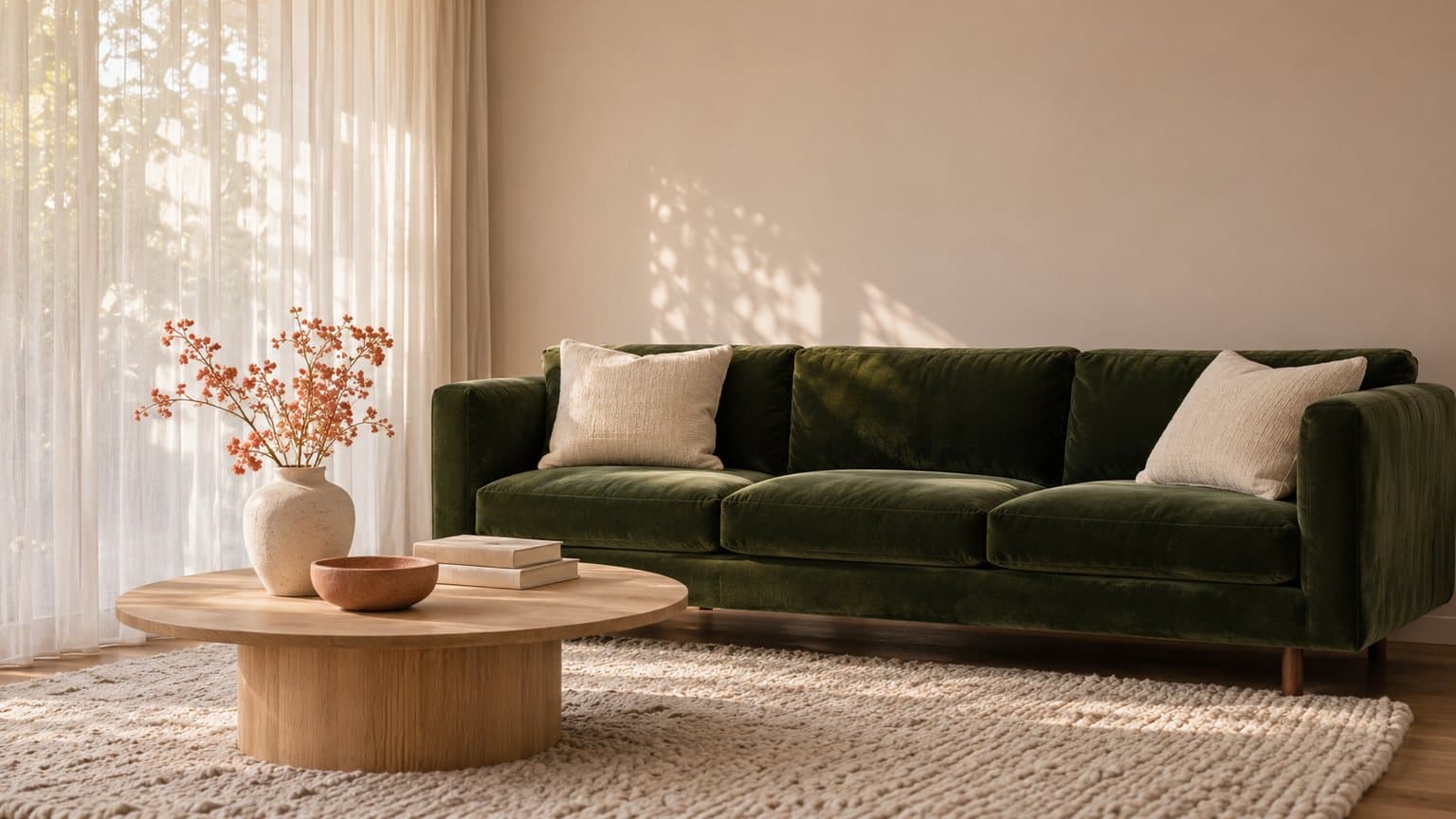
The green velvet sofa in our test picture sits on a cream wool rug in a sunny living room, beside a round oak coffee table with two books and a vase of small white flowers. We made that room in Novoads with GPT Image 2.6 Sunburst from a written prompt, then turned the picture into a five-second clip in which the camera drifts toward the sofa. Neither the sofa nor the room exists. There's no real store behind this post, so the picture stands in for a photo of your own piece.
If you sell furniture, that's the picture you're short of most weeks. A new sofa line lands before anyone has time to dress a room set. The floor model has to go before the next delivery. And the customer on the phone wants to know how the sectional would look against a dark floor in a north-facing room. A shot on white can't show any of that, but a staged room can.
None of the four pages we opened for "furniture ads" shows how to make one with AI, and none mentions that Google Merchant Center has an image slot whose own examples include furniture staged within a room. We read the results page on November 15, 2026, and opened VividWorks' guide and NationwidePrimeMedia's gallery of TV spots from it. We added guides by Cropink and Viewst from our own search, and that same day we read Google's Merchant Center help pages and our own code and prices. We made one picture and one clip for this post. We didn't upload anything to Merchant Center, and we didn't run either one as an ad.
The ads furniture stores and makers run
Much of the first page of results for "furniture ads" goes to Pinterest, Behance, iSpot and Instagram rather than to guides. Still, several kinds of ad turn up in more than one of the guides we opened, and each does a different job for a shop. For product video ads beyond furniture, our ecommerce video ad examples cover the formats any online store can use.
Room scenes that let a shopper see the piece at home
VividWorks' guide calls this lifestyle advertising, and Cropink's list frames it as helping buyers picture the piece in their own home. It's the ad that answers the customer on the phone (what will it look like in a room like mine?). From one photo of your piece, an image model can set the scene in a sunlit room, a loft with a dark floor or a family den, and you can turn the best of those into a slow push-in.
Keep these out of every room scene.
- a fabric, a finish or a size the piece doesn't come in
- a room so small that a loveseat reads as a three-seater
- a showroom that isn't yours, presented as your store
The clean shot on white, with call-outs for social
This is the plain picture of the piece, often with labels pointing at the joinery, the legs or the fabric choices. VividWorks lists it as a clean product ad on white, and Google's own example of a main product image is "only the couch on a white background". We'd keep your real photo here. AI can clear a cluttered background behind it, but every seam and hinge a buyer sees should be one they'll get.
Call-out labels and swatch bars belong on the social version, and the one you send Google stays clean. On either version, no edit should add these.
- a detail the piece doesn't have, such as stitching, legs or hardware
- a swatch you don't stock
Sale ads for the holidays and the floor model that has to go
Furniture sales follow the calendar (Black Friday, the long holiday weekends, the year-end clearance), and VividWorks, Cropink and NationwidePrimeMedia each give seasonal ads a place of their own. The ad's job is to say what's off, on which pieces, and until when. AI is good at the parts around the offer, such as an AI presenter reading it, captions carrying the discount and a clip of the piece moving behind the words.
Every part of the offer has to be real, so none of these goes in unless it is.
- a discount
- a "was" price
- a code
- an end date
Social proof without a pretend customer
This ad lets people who already bought the piece do the talking. VividWorks' Facebook ad example is a UGC-style video from genuine buyers or influencers, and Cropink's list has a tip on showing that others already trust you and another on customer content. AI can build the frame around real proof. An AI presenter can walk through the piece, your delivery promise and the offer, with your real star rating or a real review on screen as text.
A social proof ad must never include any of these.
- an AI actor passed off as a buyer
- a review or a star rating you didn't get
- an AI person relaxing on the sofa as if filmed in a customer's home
A stock talking actor from our library has empty hands, so show the piece itself in its own stills and clips.
Carousels that walk through one room
A carousel takes a shopper card by card through a room (the sofa, then the side table, the rug, the lamp), so one ad can sell the set. VividWorks' guide gives cross-selling ads a section of their own. The cards look like one home when each one starts from your own photo of that piece and uses the same room description.
And don't let the carousel promise more than you sell.
- pieces you don't sell as a set
- a delivery window or a saving you don't offer
Where Google accepts room scenes, and what it asks of them
Merchant Center is where a store sends Google its product data, and one optional attribute in it, the lifestyle image link, suits room scenes. We read Google's help page for it as it stood on November 15, 2026. The page itself isn't dated.
What the slot takes
- Google's page marks the attribute "Optional for each product".
- It says to include up to 5 lifestyle images.
- It says lifestyle images "can be shown to potential customers in free listings".
- Its examples are clothing worn by a model, furniture staged within a room, a complete set, vivid background colors and playful situations.
So a staged room is one of five examples, and it's the one that names your trade.
The page doesn't say these pictures appear in Shopping ads or Performance Max campaigns, so we wouldn't plan on that. For a room scene meant for your ads, we'd look at the additional image slot instead. It takes up to 10 more pictures per product, which Google says "can appear to potential customers". Google's own example there is "the couch with two pillows and a living room setting".
What has to stay off the picture
Google says not to use "an image that contains promotional elements or other text". It gives these as examples of promotional elements.
- calls to action, such as "buy"
- service information, such as an extended warranty
- free shipping
- price information
- promotional words, such as "best" or "cheap"
- condition or compatibility words, such as "new" or "2-piece"
- any overlay, such as watermarks, brand names or logos
- barcodes
- the retailer name and the retailer logo
It also rules out borders and padding. The rules apply to the pictures a store sends in this attribute. For a furniture shop, we read them as taking the delivery badge, the sale flag, a "2-piece" tag and your store's logo off the version you send Google. The list covers overlays and your own name and logo as the retailer. But it says nothing about a maker's mark that's part of the piece itself.
AI-made room scenes and their metadata
Every room scene in this post is AI-made, so one more line on the page matters. Google says "All images created using generative AI must contain meta data indicating that the image was AI-generated", and gives the IPTC DigitalSourceType tag TrainedAlgorithmicMedia as its example. It also asks you not to remove such tags, and its list of source types to keep includes CompositeSynthetic, for an image that's a composite with synthetic elements. Before a room scene goes into your feed, check that the file carries one of those tags, add one if it doesn't, and keep it through every crop and export.
Two versions of every room scene
We'd make each room scene in two versions.
- The clean one goes in your feed, with no price, badge, logo, store name or border, and with its AI tag in place.
- The other carries the offer and the call-outs and runs on Facebook, Instagram or wherever else you advertise.
The sale ad, the presenter video and the carousel cards are social ads, so none of them belongs in the lifestyle slot.
Making each furniture ad in Novoads
You start every ad above in the Image tab, the Video tab or the Talking Actors tab.
A room scene from your own product photo
- Open the Image tab and click Reference to add your photo of the piece. It takes up to 4 reference photos, so you can add a second angle too.
- Open Settings and pick GPT Image 2.6 Sunburst under Model and Medium under Quality. Under Aspect ratio, choose 9:16 for stories and reels or 1:1 for a square post. For Google's slot, check the size and shape rules on its help page first.
- In the box that reads "Describe your image...", describe the room around the piece (the floor, the walls, the light, what stands nearby) and ask for no people, no text and no logos.
- Send it with the round arrow button.
You get back one still, for 1 credit at medium quality. Check it against the piece on your floor (the fabric, the legs, the size next to the table), and make it again if anything's off. Each new take is another credit.
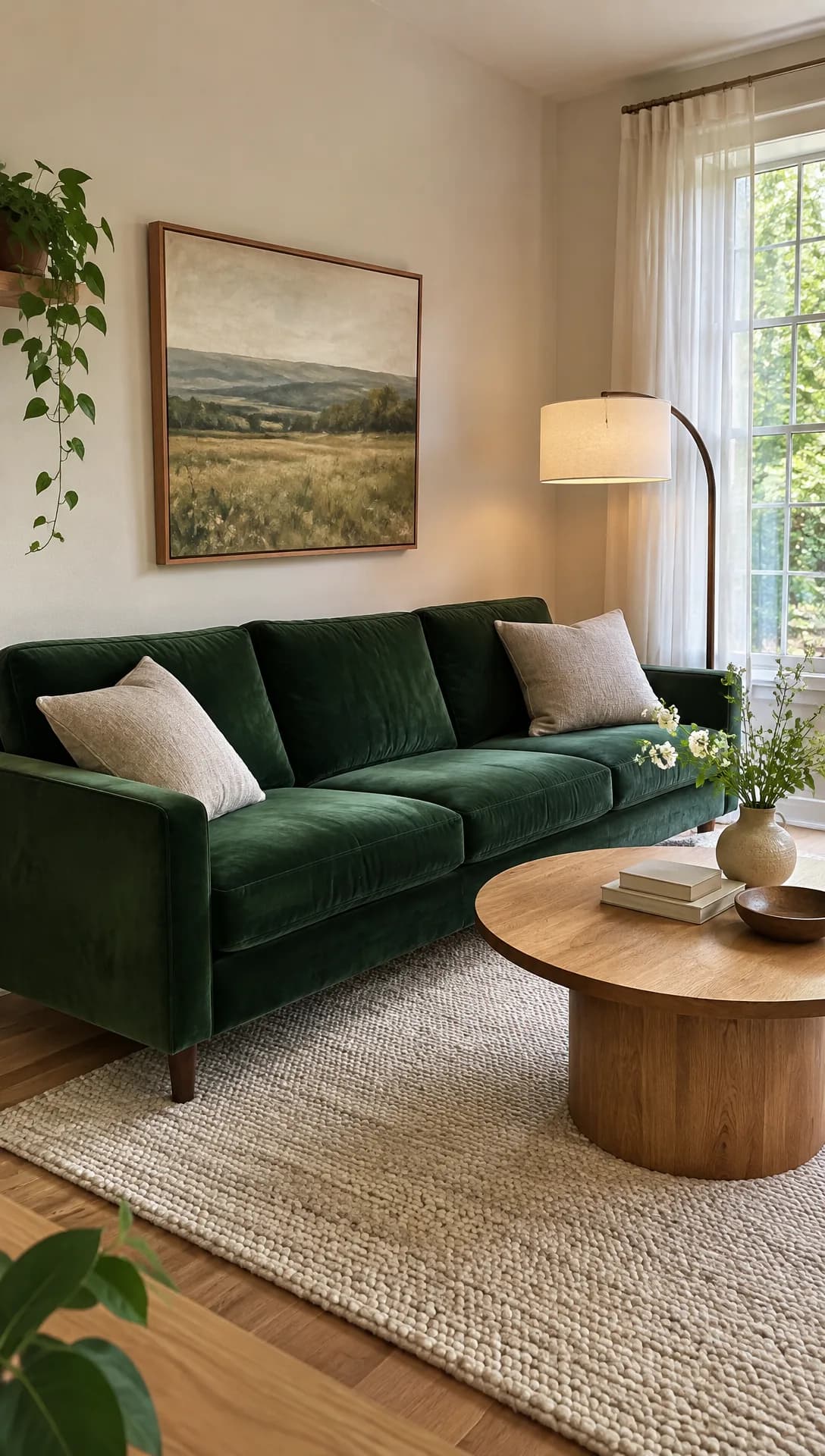 Made in Novoads with GPT Image 2.6 Sunburst · a green velvet sofa in a staged living room, made from a written prompt to stand in for your own photo · 1 credit · 2026-11-15
We made ours from a written prompt because this post has no shop behind it. It stands in for your own photo. With your photo in Reference, the picture tool starts from your piece instead, and that's the picture to check, detail by detail, against the real thing.
A five-second clip from the room scene
We made our clip with our own connector for Claude, which can start a Seedance 2.0 Mini clip from a start picture. It cost 5 credits at 720p. In the editor you'd use another model. On Seedance, the editor takes a photo only as a reference (@Image1 in the prompt), which means the clip doesn't start on it.
- Open the Video tab, pick Kling 3.0 and drop the room scene where it says "Drop a start frame or click to upload".
- On Wan 3.0 or Omni Flash, pick "Start / End Frames" instead of "Reference" and add the still there.
- Once the still is set, the editor shows "The video starts on this picture." Describe one camera move in the prompt, such as a slow push toward the sofa with the light moving across the rug.
- Send it with the round arrow button.
A five-second Kling 3.0 clip costs 10 credits, and the cost table further down prices Wan 3.0 and Omni Flash too. Our walkthrough from one product photo to a finished clip covers how to choose a model for the motion.
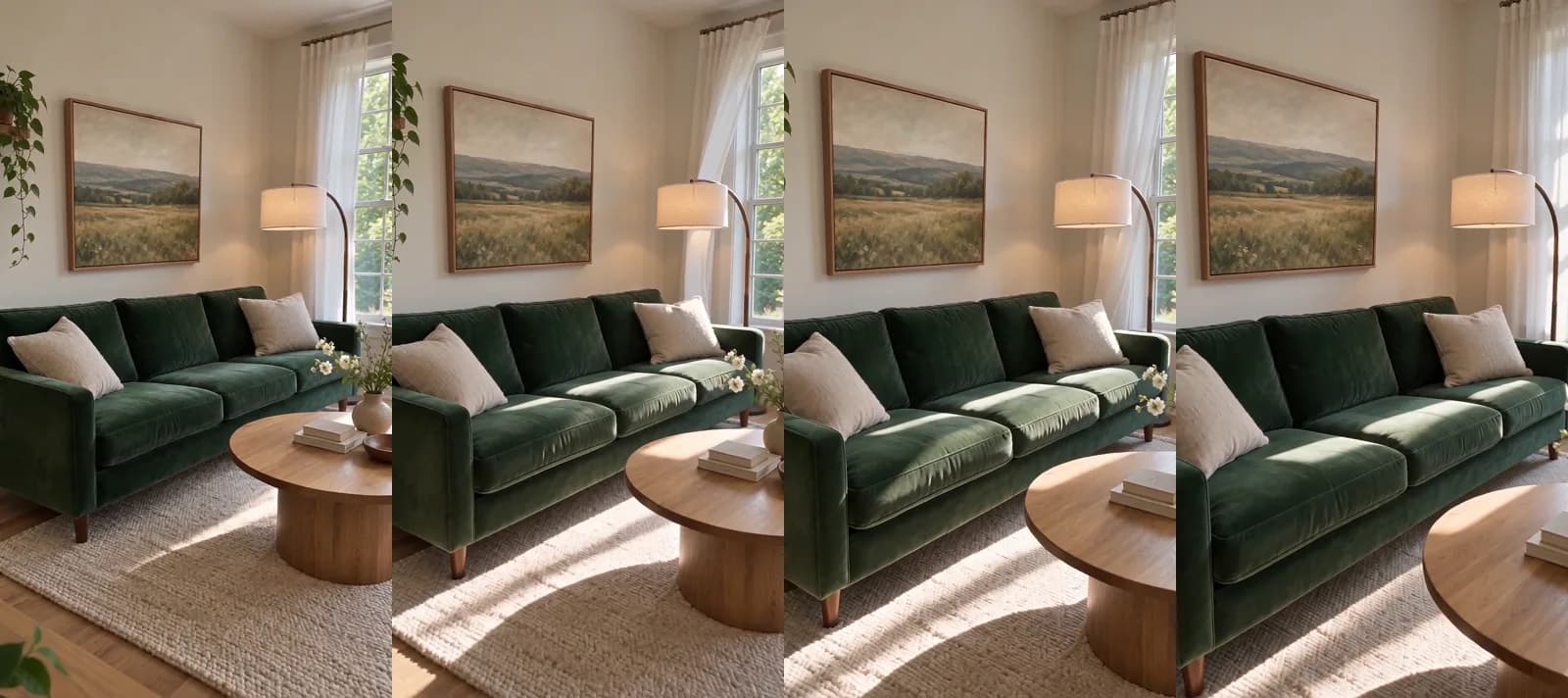 Made in Novoads with Seedance 2.0 Mini · the sofa still animated as a slow camera move, sound off, started from the still through our connector · 5 credits · 2026-11-15
Across the strip, the camera moves in toward the sofa and along it, the stripes of sunlight on the rug shift, and the curtains move a little.
A sale ad or walkthrough with an AI presenter
For the floor-model clearance or the holiday weekend, an AI presenter can read the offer.
- Open the Talking Actors tab, click Add actors and pick one.
- Type the script in the box that reads "Write what the actor will say...". A line like "Every floor model in the showroom is marked down this weekend, delivery included" gives the presenter one clear job.
- Choose 720p or 480p on the price line.
- Send it with the round arrow button.
You get back a video of the actor saying your script, with voice and lip-sync. At 720p it's 200 credits for anything up to a minute. At 480p it's 100. Captions are one more step, in the Captions tab, where the Karaoke style costs 0 credits in the app. The presenter is an AI actor, so never pass them off as you, someone on your staff or a buyer. If AI ads are new to you, our guide to making video and image ads with AI covers the basics.
Carousel cards and the clean version for your feed
For a carousel, make one still per piece from your own photo of that piece, and use the same room description for each so the cards read as one home. For Google's slot, make the clean version first, with no text, no logo and no badge in the prompt, and check it for the AI tag before it goes into your feed. The social version is the same picture with your offer added on top, in the tool you build your social ads in. Each still costs 1 credit at medium quality.
What a furniture ad costs in credits
Prices as of November 15, 2026. We divided each plan's monthly price by its credits to get the rate behind the dollar figures.
- Starter, $15 a month for 200 credits, or $0.075 a credit
- Plus, $49 a month for 1,000 credits, or $0.049 a credit
- Ultra 3,000, $129 a month for 3,000 credits, or $0.043 a credit
| Piece | Model | Credits | Starter | Plus | Ultra 3,000 |
|---|---|---|---|---|---|
| Room scene, medium | GPT Image 2.6 Sunburst | 1 | about 8 cents | about 5 cents | about 4 cents |
| 5 s clip, our connector | Seedance 2.0 Mini, 720p | 5 | about 38 cents | about 25 cents | about 22 cents |
| 5 s clip, start frame | Kling 3.0 | 10 | 75 cents | 49 cents | 43 cents |
| 5 s clip, start frame | Wan 3.0, 720p | 9 | about 68 cents | about 44 cents | about 39 cents |
| 4 s clip, start frame | Omni Flash, 720p | 12 | 90 cents | about 59 cents | about 52 cents |
| AI presenter, up to 60 s | Talking actor, 720p | 200 | $15.00 | $9.80 | $8.60 |
| AI presenter, up to 60 s | Talking actor, 480p | 100 | $7.50 | $4.90 | $4.30 |
A first set for one new sofa
For one new sofa, we'd start with three room scenes and one clip from the best of them. With the clip on Kling 3.0 in the editor, that's 13 credits. It comes to about 64 cents on Plus and about 98 cents on Starter. Through our connector, with the clip on Seedance 2.0 Mini, the same set costs 8 credits. Starter's 200 credits a month cover 15 of the Kling sets.
The table leaves out these costs.
- the takes you throw away, each billed again
- the ad spend
- the time it takes you to check every render against the real piece
A presenter video costs the most in this table, so we'd add it once a room scene has shown which piece people respond to. For a longer spot, our post on what an AI commercial costs to make prices one out in full.
What a product photographer charges
Shopify published a guide to product photography pricing on January 27, 2026. It says product photographers charge anywhere from $500 to $3,000 per day, and that the final number can be much higher once support staff and equipment are counted. That's a vendor's figure, and it covers products in general rather than furniture alone. A day of a photographer's work also isn't the same thing as a room scene made from your own photo, so we'd use it only for a rough sense of scale.
Which furniture ad to make first
We'd start with the room scene. It's the picture a furniture shopper can't get from a shot on white, and each take costs a credit. Its clean version also has a place in Google's feed, in a slot whose examples name furniture staged within a room. The sale ad and the presenter video come next, once you know which room your customers stop for.
In Novoads, you make the room scenes and clips from your own product photos, and the presenter videos from a script, all in one workspace. You run the finished ads wherever you sell. You pay from the first month, and the plans start with Starter at $15 a month for 200 credits. Our pages on AI product demo videos and AI video ads for ecommerce go further on the video side.
Stage your first piece in a room
Add your own product photo in the Image tab, describe the room around it, then move the camera through the best still in a five-second clip.
See product demo videosStart with your best-selling piece. Photograph it on the shop floor this week, stage it in three rooms, and keep one clean version, AI tag included, for your Google feed.
Frequently Asked Questions
Can an AI-made room scene go into Google Merchant Center?
Google's page for the lifestyle image link speaks to AI pictures directly. It says every image created with generative AI must contain metadata indicating it was AI-generated, gives the IPTC DigitalSourceType tag TrainedAlgorithmicMedia as its example, and asks you not to remove such tags. The picture also can't carry promotional elements or text, so leave the price, the badge, the logo and your store's name off it. Read the rule on Google's own page before you upload.
Will the AI change my sofa's fabric, color or size?
It can, so check every render against the real piece before it runs. Look at the fabric, the color in daylight, the legs and the size next to the table, and make it again if anything's off. Every new take is billed again, at its own price in credits.
What does a furniture ad cost to make with AI in Novoads?
A room scene from your own product photo costs 1 credit with GPT Image 2.6 Sunburst at medium quality. A five-second clip from that picture costs 10 credits on Kling 3.0 in the editor. An AI presenter reading your sale costs 200 credits at 720p for anything up to a minute. Starter is $15 a month for 200 credits, and you'll find every plan on our pricing page.
Where do furniture room photos show up on Google?
Google's lifestyle image page says those pictures can be shown to potential customers in free listings. It doesn't say they appear in Shopping ads or Performance Max. Google's additional image slot takes up to 10 more pictures per product, and the example Google gives there is a couch with two pillows in a living room setting.
Key Takeaways
- The furniture ad guides we opened keep coming back to room scenes, clean shots on white, holiday and clearance sale ads, social proof and room-by-room carousels.
- Google Merchant Center's lifestyle image link is optional and takes up to 5 lifestyle images per product. Google's examples for it include furniture staged within a room.
- Google says lifestyle images can be shown in free listings, and that they can't carry promotional elements or text, such as a price, a delivery badge, an overlay logo or your store's name.
- Google asks that every AI-made picture carry metadata saying it was AI-generated, so check each room scene for that tag before it goes into your feed.
- In Novoads, a room scene from your own product photo costs 1 credit with GPT Image 2.6 Sunburst at medium quality. A five-second Kling 3.0 clip made from it costs 10 credits.