Google Flow Prompts for Video Ads, and What Each Clip Costs in Flow Credits
What Google's Flow help asks of a prompt in each tool, what each Veo 3.1 clip costs in Flow credits before the December 5 retirements, and what that comes to on each Google AI plan.

Mauricio Valdivia
·11 min

A 100-credit clip with four weeks left in Flow
The top five results for "google flow prompts" are three YouTube tutorials, a community post with a prompt cheat sheet and a video maker's list of prompt examples. None of them says what a clip costs in Flow at Google's current rates. The one page that does name a price quotes a Veo 3 plan and a credit cost per clip that don't match any Google page we read.
So we went to Google's own pages for both the prompt advice and the costs. Everything about Flow here comes from Google's help, plan and Flow pages, which we read from Spain on November 7, 2026. The Novoads side is two Veo 3.1 clips we made and our own price list. We didn't run a prompt in Google Flow for this post.
The 100-credit clip is Veo 3.1 Quality. Flow's credits page lists an 8-second Quality video at 100 credits per generation, the same on every plan, in its table of retiring models. Quality retires on December 5, 2026, four weeks after we read the page.
What a prompt does in each Flow tool
Google's help calls Flow "our AI filmmaking tool". It's a different product from Google Flow Music, which Google named alongside it in a post on May 19, 2026. In Flow's prompt box, you pick the aspect ratio, the number of outputs and the model, then the length. The prompt's job changes with the tool, and as of November 7, 2026, Flow's help pages spell it out for each one.
Describing the whole scene in Text to Video
Flow's help asks for the scene "in detail" and says to be specific about "the subject, action, environment, lighting, and style." For an ad, we'd read the subject as the product and the action as what a hand or a person does with it. Then the environment, lighting and style decide whether the clip looks like a phone video or a studio shot.
Describing the middle in Frames to Video
You give Flow a first frame, or a first and a last one, and the prompt should "describe the action or transition that should happen between the frames." Flow's models page lists Veo 3.1 Quality as taking text, a first frame, or a first and last frame, at 4, 6 or 8 seconds. As we read it, that lets a product ad open and close on pictures you already have, like a packshot and a lifestyle photo.
Ingredients, characters and voices
Ingredients are reference images, and the prompt should "describe how your ingredients should be used as references within the clip." Flow's tips for them suit product work.
- Use references on "a plain or segmented background".
- Keep extra subjects out of a location or style reference, unless you want them in the clip.
- Write the prompt to "complement, not contradict" what the images show.
Veo 3.1 Quality can't take ingredients. Flow's models page lists them as unsupported for Quality, along with video-to-video editing and extending. Fast and Lite take them only for 8-second videos.
You call a character in with @ and its name, as in Flow's example "@CaptainZoro walking through a futuristic city." And @me adds your avatar. A voice reference, which you add from the Omni Flash model in the prompt box, works only in generations that use ingredients ("For all other kinds of generations, you'll get an error."). Flow's regions page says Avatars aren't available in the European Economic Area, Switzerland or the UK, and you can't edit uploaded videos there either.
Extending, editing and Scenebuilder
Extending a clip now runs on Omni Flash 1.2 for Plus, Pro and Ultra subscribers. The prompt describes "how the action should continue", and you can add up to 3 image references to keep the character and setting consistent. Edits are prompts too, like Google's example "Change the lighting to a cinematic sunset". You get up to 3 turns, and an edit costs the same credits per second as a new generation. Then, in Scenebuilder, you arrange the clips in a sequence, trim and reorder them, and download the scene. Queries to Flow's Agent cost no credits (each plan has a daily limit), but the media it makes uses your credits.
Ad prompt tips from Google's own pages
Google's Flow advice comes from two eras. The help pages above are current, while Google's "5 tips for getting started with Flow" post is dated June 25, 2025. That's before Google introduced Veo 3.1 in Flow, in a post dated October 15, 2025.
Write the scene in English, one part at a time
Flow's regions page says, "For best results with our tools, we recommend using English prompts." The 2025 tips add two lines that still fit a product shot. For the setting, "Don't just name a place; paint a picture." For the camera, they suggest terms such as "wide shot" or "close-up" and moves like a "tracking shot".
Our Veo 3.1 prompt guide covers what we've learned about writing speech, sound and camera moves for Veo 3.1. For other model makers' advice side by side, see what six models' own guides say, and for fixes to light and skin, see how to make AI video look real.
Dialogue and the 8-second limit
Google's 2025 tips present sound as a Veo 3 feature and say to prompt "ambient noise, specific sound effects, or even generate dialogue". They warn that speech is less likely "if the requested dialogue doesn't fit in the 8-second clip, or if it involves minors."
Our Veo 3.1 clip below sticks to one short sentence. In a kitchen, a woman lifts a small amber jar toward the lens and tells the camera she keeps it by the sink. We wrote her words straight after a colon, without quote marks, and put the kitchen's sound and a single sound effect in separate sentences. She said every word as written and no text appeared on screen, but the jar's plain label turned into a gold mark with lines too faint to read.
 Made in Novoads with Google Veo 3.1 · one line to the camera, 8 seconds at 1080p, one take · 72 credits · rendered 2026-11-06
Prompts for a series of clips
For the next take, Flow's help suggests sending Gemini "your prompt, an image, or even a video" and asking it for new prompts. The 2025 tips add that for consistent clips, you'll need to "explicitly tell Gemini to repeat all essential details from prior prompts." Our post on Kalshi's AI ads covers how one spot's prompts were written. Flow TV's channels show "the prompt behind the clip", which is what the top video result for this search is about. One line in the 2025 post is out of date, though. It still says "Jump To and Extend only work with Veo 2", but Flow now extends clips with Omni Flash 1.2.
What each Veo 3.1 clip costs in Flow credits
Flow's credits help page prices each clip per generation, in Flow credits, and the table has the page's rows as of November 7, 2026.
| Model in Flow | Clip lengths | Credits per generation |
|---|---|---|
| Veo 3.1 Quality | 8 seconds | 100 on every plan |
| Veo 3.1 Fast | 4, 6 or 8 seconds | 20, or 10 on Ultra |
| Veo 3.1 Lite, 720p | 4, 6 or 8 seconds | 10, or 5 on Ultra |
| Veo 3.1 Lite, Lower Priority | 4, 6 or 8 seconds | 0 on Ultra 20x only |
| Omni Flash 1.2 | Up to 10 seconds | 1 a second at 360p, 3 at 720p |
On the page, the Quality and Fast rows are under the heading "Retiring Google Flow model credit costs". Lite's Lower Priority mode is only for Ultra 20x subscribers and family plan managers. Flow's models page lists Quality at 4, 6 or 8 seconds, but the credits table prices only the 8-second video. Our Veo 3.1 Lite explainer covers Lite as a model, and Omni 1.2 Flash gets its own post.
Per generation, so one request can cost 200
The page says costs are "per generation, not per request", and that "you can make a single request that may generate 2 videos." So as we read it, a request that returns two Quality videos costs 200 credits. If a generation fails or hits a safety filter, Flow's FAQ says you get the credits back within one hour.
What "All users" covers
Fast and Lite have one price for Ultra and another for everyone else. Quality has a single cell, "All users: 100", so it's one price on every plan. That doesn't mean an account with no plan can make one. Without a subscription, you get only 50 credits a day and unused ones don't roll over. By our reading, that never gets you to 100. Flow's own pricing table lists Veo 3.1 Lite, not Quality, for its tier with no subscription. Flow's help adds that without a subscription, you may not be able to generate videos during peak hours, roughly 2 PM to 5 PM UTC.
December 5, and what's already gone
Flow's credits and models pages carry the same notice, "On December 5, 2026, Veo 3.1 Fast, Veo 3.1 Quality, and Omni Flash 1.1 will be retired." Until then, those models run "at standard credit rates", and the models page recommends Omni Flash 1.2 or Veo 3.1 Lite "for future projects". Veo Extend is already gone, retired on November 5, 2026.
The 100-credit cost itself isn't new. An archived copy of the same help page from February 25, 2026 already lists Veo 3.1 Quality at 100 credits. So does the copy from October 21, 2026. Flow's help says limits "are subject to change at any time" and sends you to Settings, at the top right of the prompt box, for the latest costs.
What a Flow clip comes to in dollars
Google doesn't publish a price per clip, and its own pages don't agree on what the plans cost. The table has each page's monthly price as we saw it from Spain on November 7, 2026, along with each plan's monthly credits from Flow's help.
| Plan | Flow's pricing table | Google One, US page | Google One, Spain page | Flow credits a month |
|---|---|---|---|---|
| Google AI Plus | $7.99/mo | $4.99/mo | 4,99 € | 200 |
| Google AI Pro | $19.99/mo | $19.99/mo | 21,99 € | 1,000 |
| Ultra 5x | $99.99/mo | $99.99/mo | 99,99 € | 10,000 |
| Ultra 20x | $199.99/mo | $199.99/mo | 219,99 € | 25,000 |
Flow's table is in US dollars, with the note "Prices may vary by market", and it calls both Ultra plans Google AI Ultra (Flow's help names them by price). Google One's US page says Ultra is billed monthly only, and every account also gets 50 Flow credits a day.
The pages disagree in two places. Plus is $7.99 on Flow's table and $4.99 on Google One's US page, so we've run our split at both prices. And Flow's credits page says Plus, Pro and Ultra subscribers can buy AI credits in supported regions (except Japan), while Google One's help says AI credits are "only available for Google AI Pro and Google AI Ultra plans." We couldn't see a price for a credit pack, so we've left top-ups out of the math.
Our split, plan by plan
We spread each plan's monthly price evenly across its monthly Flow credits to get a cost per clip. That's our arithmetic, and Google doesn't publish it.
- Google AI Pro is $19.99 for 1,000 credits, or about 2 cents a credit. A Quality clip comes to about $2.00 of the plan, and the month's credits cover 10. A Fast clip is about 40 cents and a Lite clip about 20 cents.
- Pro at Google One's Spain price of 21,99 € puts a Quality clip at about 2,20 €.
- Google AI Plus has enough credits for 2 Quality clips a month. Each comes to about $2.50 at Google One's US price of $4.99. At the $7.99 on Flow's table, it's about $4.00.
- Ultra 5x at $99.99 puts a Quality clip at about $1.00, and the month's credits cover 100. There, a Fast clip's 10 credits come to about 10 cents, and a Lite clip's 5 come to about 5 cents.
- Ultra 20x is $199.99 for 25,000 credits, which puts a Quality clip at about 80 cents.
What the split leaves out
- It assumes you buy the plan only for Flow and spend every credit, but Flow's own plan cards list the Gemini app, storage and other extras under each paid plan.
- Unused monthly credits "do not roll over to the next month", so in a month where you spend only half your credits, each clip costs more.
- It leaves out the 50 daily credits, which subscribers get on top and lose at the end of each day.
Watermarks and terms on a Flow clip
If a Flow clip is going into an ad, Google's pages had this to say on November 7, 2026.
- Flow's FAQ asks, "Can I use outputs of these tools for commercial purposes?" and answers that "The Terms of Service govern how these tools may be used, and must be consulted and followed in their entirety."
- Google's Terms of Service say that for what its services generate, "Google won't claim ownership over that content."
- Flow's FAQ points to Google's Generative AI Prohibited Use Policy, which lists "Misrepresenting the provenance of generated content by claiming it was created solely by a human, in order to deceive."
- Every Flow output made with Veo, Omni or Nano Banana carries an invisible SynthID watermark, which Flow's help says "should not be tampered with or removed".
- Users in India, South Korea and Vietnam who aren't on the Ultra 20x plan also get a visible watermark, applied automatically.
For a clip made in Novoads, our pricing FAQ says, "All videos generated with Novoads are fully licensed for commercial use."
The same Veo 3.1 clip in Novoads
We don't sell Google Flow, Veo 3.1 Lite or Omni Flash 1.2. We run Google's standard Veo 3.1 model, neither Fast nor Lite, at a flat 72 credits a clip. That price holds at 4, 6 or 8 seconds and at 720p or 1080p, with sound. Our prices are as of November 7, 2026.
Two clips at 72 credits each
The kitchen clip above ran 8 seconds at 1080p. It came back within 4 minutes 34 seconds. We made the product shot below from one line, "A glass skincare bottle on a marble counter, slow push-in, soft morning light", as a 4-second vertical clip at 720p with no reference image. It came back in 77 seconds, with no made-up lettering on the label. It cost the same 72 credits as the 8-second clip, so going shorter saves you nothing here.
 Made in Novoads with Google Veo 3.1 · a one-line prompt for a glass skincare bottle on marble, 4 seconds at 720p · 72 credits · rendered 2026-09-28
Our price next to Flow's Quality row
Flow doesn't name model IDs, so putting our Veo 3.1 next to its Quality row is our own reading. It's the closest match we see.
- Starter is $15 a month for 200 credits, or $0.075 a credit. A Veo 3.1 clip costs $5.40, and the month's credits cover 2.
- Plus is $49 a month for 1,000 credits, or $0.049 a credit. A clip costs about $3.53, and the month's credits cover 13.
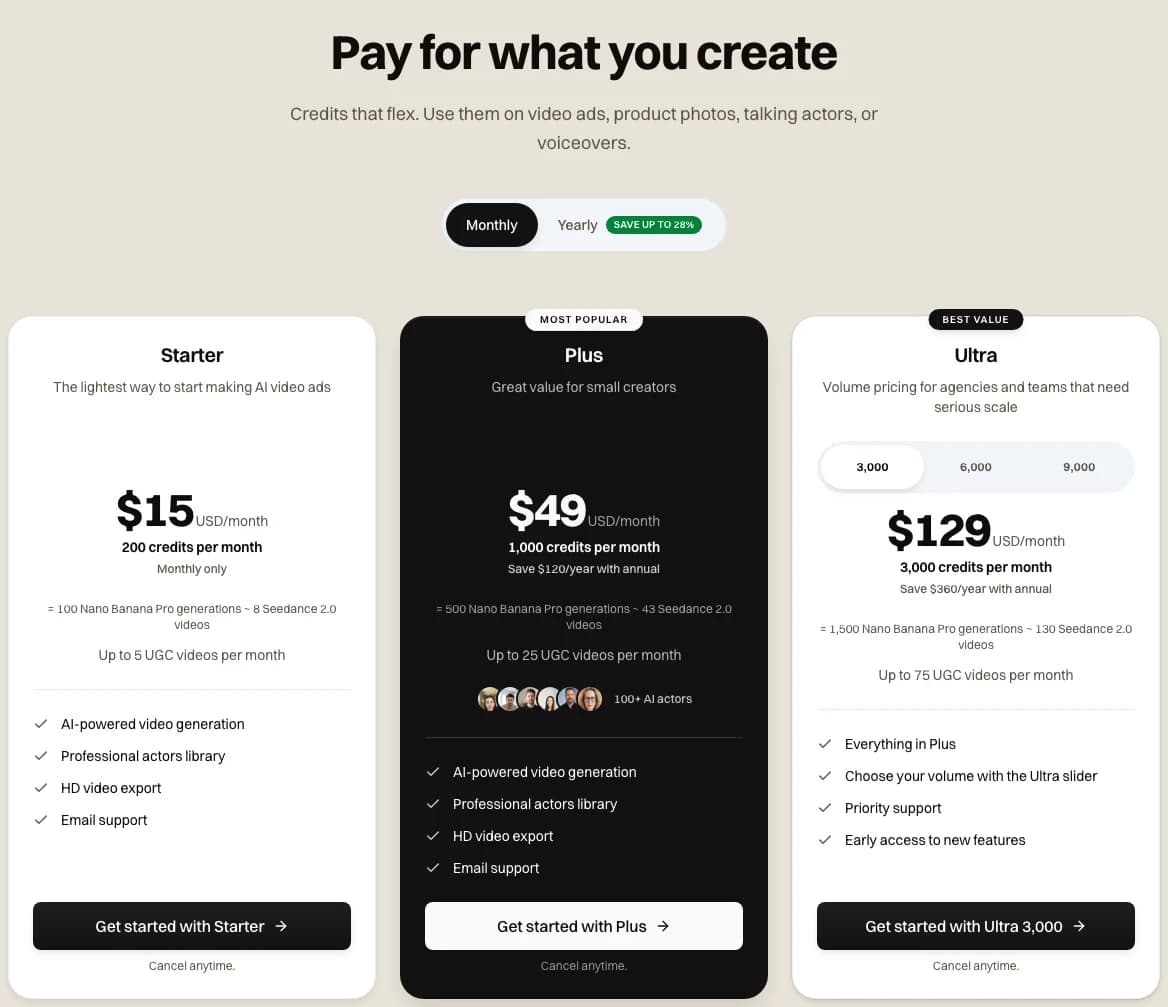 Screenshot: the Novoads pricing page, monthly plans, taken 2026-11-07
On these numbers, Flow is cheaper per clip. By our split, a Quality clip comes to about $2.00 of Google AI Pro and about $1.00 of Ultra 5x. Ours costs $3.53 on Plus, and Flow's Fast and Lite clips cost far less. If Veo clips are all you need and you'll spend every credit, a Google AI plan is the cheaper way to buy them.
Beyond price, three things differ.
- Our 72 credits cover 4, 6 or 8 seconds, while Flow's credits page prices Quality only at 8 seconds.
- Our Veo 3.1 starts from a prompt or one reference image and has no slot for an end frame, while Flow's Quality takes a first and last frame.
- Flow lists 1080p upscaling of a retiring model's clip at 0 credits for subscribers, while our 72 credits already include a 1080p render.
You'll find all our plans on the pricing page. If you're choosing a model rather than a tool, we've pitted Kling against Veo and Seedance 2.0 against Veo 3.1 for ads.
Veo 3.1 at one price for every length
A Google Veo 3.1 clip in Novoads is 72 credits at 4, 6 or 8 seconds, at 720p or 1080p. Starter is $15 a month for 200 credits.
See the plansWhich Veo prompt to write before December 5
Until December 5, a Veo 3.1 prompt in Flow can go to Quality, Fast or Lite. After that, Flow's help points to Lite and Omni Flash 1.2.
When Flow is the better buy
- You already pay for Google AI Pro or Ultra and you'll spend the month's credits.
- A Fast or Lite clip is good enough for the ad.
- You want ingredients, a first and last frame, or Scenebuilder.
When Novoads is the better fit
- You want one Veo 3.1 price at every length we offer, 720p or 1080p included.
- You'd rather spend one pool of credits on the clip, the product photos, the talking actors and the voiceovers for the same ad.
Whichever you pick, write the prompt for the tool it's going to. If that's Flow, check its credits page again after December 5.
Frequently Asked Questions
How many credits does a Veo 3.1 video cost in Google Flow?
Google's Flow credits help page lists an 8-second Veo 3.1 Quality video at 100 credits per generation, the same on every plan. Veo 3.1 Fast costs 20 credits, or 10 on Ultra. Veo 3.1 Lite costs 10, or 5 on Ultra. Those were the rates on November 7, 2026, and Quality and Fast retire in Flow on December 5, 2026. If a request comes back with two videos, you're charged for both.
Key Takeaways
- Flow's help gives the prompt a different job in each tool. In Text to Video it describes the whole scene, in Frames to Video the action between two frames, and in Ingredients to Video how each reference is used.
- Flow's credits page lists an 8-second Veo 3.1 Quality video at 100 credits per generation on every plan. An archived copy of the page from February 25, 2026 already listed it at 100.
- Veo 3.1 Fast, Veo 3.1 Quality and Omni Flash 1.1 retire in Flow on December 5, 2026, and Veo Extend was already retired on November 5, 2026.
- Google doesn't publish a price per clip. If we split Google AI Pro's monthly price across its credits, a Quality clip comes to about $2.00 of the plan and a Lite clip to about 20 cents.
- In Novoads, a Google Veo 3.1 clip costs 72 credits whatever its length or resolution. That's about $3.53 on Plus, so a Google AI plan works out cheaper per clip if you spend all of its credits.