Veo 3.1 Prompts for Video Ads: Dialogue, Sound and Camera Lines for 8-Second Clips
Google's own Veo pages disagree on how to write a spoken line. We lined up each page's rule, ran the colon form once on Veo 3.1 and priced the clip.

Mauricio Valdivia
·13 min
The top Veo 3.1 prompt pages don't show the clip
We searched for Veo 3.1 prompts on November 6, 2026, and opened four of the top five results (three blog posts from Skywork and a prompt builder on editingtools.io). None of them shows a Veo 3.1 ad clip next to the exact prompt that made it, or says what the clip cost. The fifth result, a Reddit thread, wouldn't open for us.
For an ad, the clip you get back is what matters, and Google's own best-practices page warns that a spoken line can turn up as text in the video. So we've put two Veo 3.1 clips here, each beside the exact prompt we sent and what it cost, along with what Google's pages say about dialogue, sound and camera lines.
We read Google's pages from Spain that day and ran one of the two clips for this post. The other one is a product shot from September, and the prices come from our own price list.
The parts of a Veo prompt in Google's own guides
Google spreads its Veo prompt advice across at least five pages (a Google Cloud blog guide, two Google Cloud documentation pages, the Gemini API's Veo guide and a Google DeepMind guide), and they don't disagree much on what goes into a prompt. For other video models, see our guide to AI video prompts.
Google Cloud's five-part formula
Google Cloud's blog published its "Ultimate prompting guide for Veo 3.1" on October 16, 2025. "Consider this five-part formula for optimal control," it says, and it lists the parts in this order.
- Cinematography, the camera work and how the shot is framed, which the blog calls "the most powerful tool for conveying tone and emotion."
- Subject, the main character or focal point. In an ad, that's your presenter or your product.
- Action, what the subject does.
- Context, the setting and what's behind it.
- Style and ambiance, which covers the look, the mood and the light.
What the Gemini API guide requires, and what's optional
The Veo guide in Google's Gemini API docs asks for three things in a prompt (a subject, an action and a style). Then it lists optional lines. The first is the camera, and the guide tells you to "Control the camera's location and movement using terms like" aerial view, eye-level, top-down shot or dolly shot. Composition, focus and lens effects, and ambiance are optional too.
Google Cloud's prompt guide also says, "You don't need to use all elements in every prompt." So we'd start an ad prompt with the shot, the subject, the action and the setting, and add the optional lines when the clip needs them.
Write in English, with enough detail to remove guesswork
Google's Agent Platform model page for Veo 3.1 lists English as the prompt language, so we'd write the whole prompt in English. DeepMind's guide, written for Veo 3, says "The more detail you add, the more control you'll have over the final output." And the best-practices page asks for "Clear and direct prompts that eliminate ambiguity."
Detail means things a camera can see and a microphone can hear. "A bright kitchen in the morning, window light from the left" gives the model a place and a light, while "a cozy vibe" leaves both to chance.
Where Google's pages disagree on dialogue
The spoken line is where these pages contradict each other, and it's the one that matters most when a person talks to camera.
The colon rule on Google Cloud's best-practices page
Google Cloud's best-practices page covers "Gemini Omni and Veo videos" and doesn't name a Veo version. As we read it on November 6, 2026, it says "To prevent the model from rendering text in the video, use a colon" after the speaker's action "to denote speech and avoid using quotation marks." Its recommended example is "A woman says: My name is Clara."
The page gives a reason for the rule, but there's no test behind it. And the rule isn't new. An archived copy from the page's earlier address, captured on November 22, 2025, when it was titled "Best practices for Veo on Vertex AI," has the same sentence.
Google Cloud's prompt guide, part of the same documentation, writes its spoken lines the same way, as in "The seasoned detective says: Your story has holes." Both pages come from the same publisher, though, so we'd count them as one voice.
The quotation-mark rule on three other Google pages
The Veo guide in the Gemini API docs says the opposite. Its dialogue line reads "Use quotes for specific speech." Google Cloud's blog guide for Veo 3.1 sides with it ("Dialogue: Use quotation marks for specific speech"), and DeepMind's Veo 3 guide writes its spoken lines in quotation marks too.
| Google page | The spoken line | Its example |
|---|---|---|
| Google Cloud best-practices page (Gemini Omni and Veo) | After a colon, no quotation marks | A woman says: My name is Clara. |
| Google Cloud prompt guide | After a colon, in its examples | The seasoned detective says: Your story has holes. |
| Gemini API Veo guide | In quotation marks | "This must be the key," he murmured. |
| Google Cloud blog guide for Veo 3.1 | In quotation marks | A woman says, "We have to leave now." |
| Google DeepMind prompt guide (Veo 3) | In quotation marks, in its examples | Camper: "I'm one with nature now!" |
The Gemini API guide also opens with a notice that its Veo 3.1 preview "was shut down on October 22, 2026," and it points readers to the generally available models on Google's Agent Platform. The best-practices page is part of that platform's documentation. The Gemini API guide's advice may still be right, but we'd weigh it knowing it was written for a preview that's gone.
What our one take showed
We wrote one ad line the best-practices way and ran it on Google Veo 3.1 in Novoads the same day, as a selfie-style shot of a woman holding a jar of hand cream.
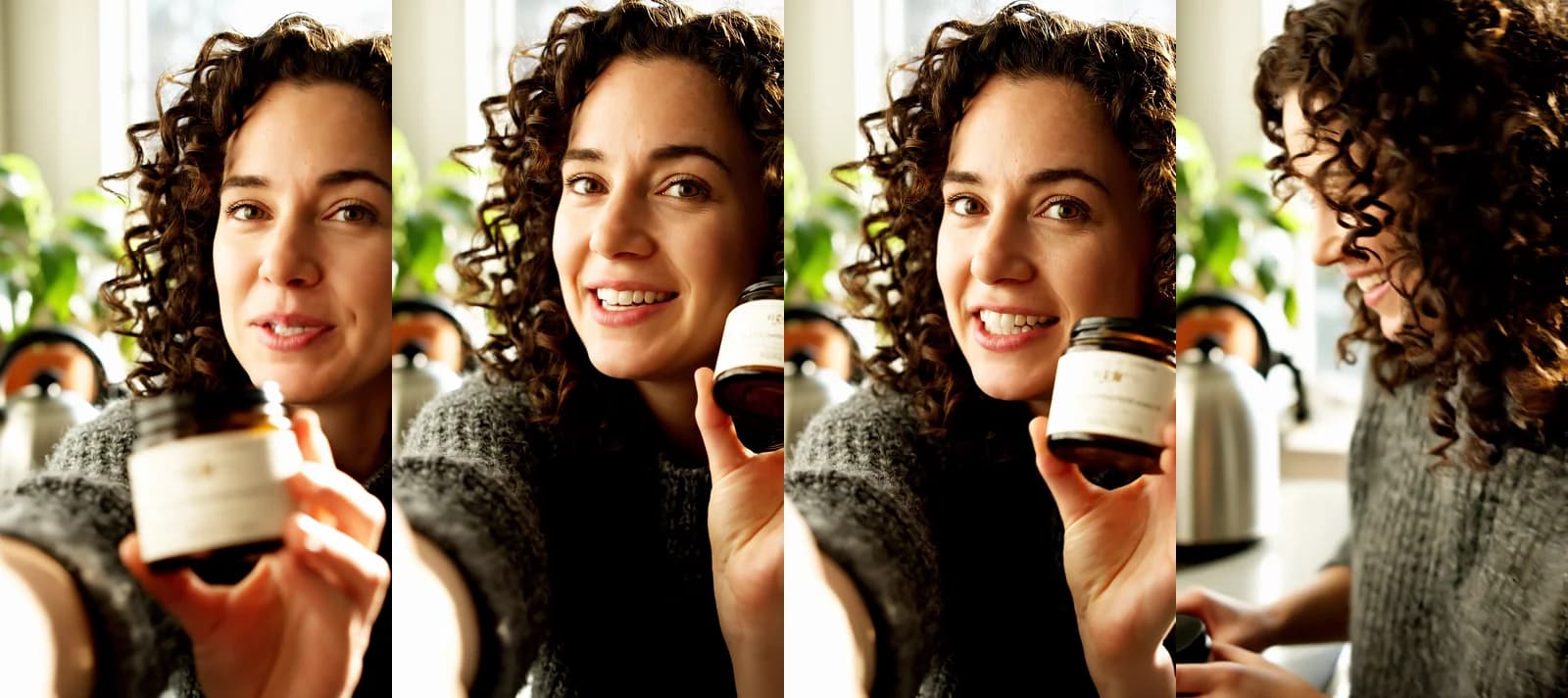 Google Veo 3.1 in Novoads, one take, rendered 2026-11-06. It's an 8-second vertical clip with sound at 1080p. It cost 72 credits.
We sent Veo this exact prompt.
Close-up selfie-style shot at eye level, handheld, with a slow push-in toward her face. Maya, a woman in her early thirties with curly dark hair and a grey knit sweater, holds up a small amber glass jar of hand cream with a plain cream label. She tilts the jar toward the lens and says, in a warm, relaxed voice: I keep this by the sink, and my hands finally stopped cracking. A bright kitchen in the morning, window light from the left, a kettle and a green plant out of focus behind her. Natural, candid phone-video look, soft daylight, gentle grain. Ambient noise: a quiet kitchen, birds faintly outside the window. SFX: the soft tap of the jar's lid on the counter. No music, no subtitles, no on-screen text. Vertical 9:16.
The line came back word for word. We checked frames twice a second and saw no subtitles or other words on screen, and there's no cut anywhere in the clip. In the last second and a half she turns away to set the jar down, so you'd probably trim the end. We'd asked for a plain label, and it came back with a small gold mark and faint lines too small to read.
That's a single take, so it shows the colon form can work but can't tell you how often it does. The prompt also asked for no subtitles and no on-screen text, so the colon can't take all the credit. And we haven't run the same line in quotation marks to compare. Until someone runs both side by side, we'd write an ad's spoken line after a colon, because the page that asks for it gives a reason.
How to write sound effects and background noise
It's easy to leave sound out of a Veo prompt, and Google's pages are fairly specific about it.
Two kinds of sound, each in its own sentence
Google Cloud's prompt guide says "We recommend that you use separate sentences in your prompt to describe the audio." Then it names the kinds of sound those sentences cover.
- Sound effects, "individual, distinct sounds that occur within the scene."
- Ambient noise, "the general background noise that makes a location feel real."
- Dialogue, which the guide's own examples write after a colon.
The Gemini API guide describes the same two lines more briefly. For sound effects it says "Explicitly describe sounds," and for ambient noise, "Describe the environment's soundscape." The Cloud blog writes them as labeled lines, such as "SFX: thunder cracks in the distance" and "Ambient noise: the quiet hum of a starship bridge."
What our sound lines asked for, and what we checked
Our line-to-camera prompt used those labels, one sentence each, with a quiet kitchen and birds for the background and the tap of the jar's lid for the effect. We checked the spoken line and what showed on screen. We didn't check the birds or the tap, so we can't tell you how closely Veo 3.1 followed those two lines.
We'd tie each sound to something in the shot, like a lid, a pump or a zip. For more on how sound makes an AI ad read as real, see our guide to making AI video look real.
One moment and one camera move per clip
Veo 3.1 clips are only a few seconds long, and Google's pages don't agree on how much to fit into one.
One focused moment for a short clip
The best-practices page says "For short videos, dedicate each prompt to a single, focused moment." Chaining several events in one short prompt "often leads to muddled or incomplete videos," it warns, and its fix is to "Generate each part as a separate clip."
The Cloud blog's Veo 3.1 guide goes the other way, with what it calls timestamp prompting. In its words, "By assigning actions to timed segments, you can efficiently create a full scene with multiple distinct shots," and its example packs four timed shots into eight seconds.
For an ad, we'd keep one moment per clip and join clips in the edit, because a two-second shot gives a viewer little time to take in a product.
One camera move, said plainly
In its image-to-video advice, the best-practices page names three kinds of movement. Camera motion is the one where "The camera moves, but the scene is static," and the page calls it "the simplest and most reliable way to add dynamism." Its example is "Slow dolly in on the subject."
Both of our clips use a slow push-in, which is the same move in plainer words, and neither prompt asks for a second one. For more direction words and how often they land, see our post on camera movement prompts for ads.
Leaving things out
Google Cloud's prompt guide describes a separate negative prompt for what you don't want in the clip, and it advises against "instructive language" there, such as the words "no" and "don't." Instead, it says, "Describe what you don't want to see," as in "wall, frame." The Cloud blog's own example of leaving things out still uses "a desolate landscape with no buildings or roads."
Our line-to-camera prompt put "No music, no subtitles, no on-screen text" in the main prompt, and the clip came back with no words on screen. One take can't tell you whether that line did the work, so we'd keep it in and check what comes back.
Two ad patterns we've run, with their clips
A line to camera
A line to camera is the pattern in our first clip, and it suits a testimonial-style video where one person holds the product and says one line. We wrote its parts in this order.
- One sentence for the camera, with the framing, the height and one move.
- The person, with a name and a look, and the product in their hand.
- What they do and how they sound, then the spoken line after a colon.
- The setting, and where the light comes from.
- The look of the footage.
- One ambient sentence and one sound-effect sentence.
- What to leave out, and the shape of the frame.
The best-practices page asks you to "give your character a name and a specific voice style," and that's why the prompt names Maya and gives her a warm, relaxed voice. For a series of ads with the same presenter, it says to "Copy and paste the entire, unchanged character description into your prompt for every new scene or action." So you'd keep Maya's sentence word for word and change only the action and the line.
The same page calls 9:16 "essential for mobile-first platforms like TikTok, Instagram Reels, and YouTube Shorts." We ran this clip vertical, at 8 seconds and 1080p.
A product shot
The second clip doesn't have a person or a spoken line. It's a product shot from a run on September 28, 2026.
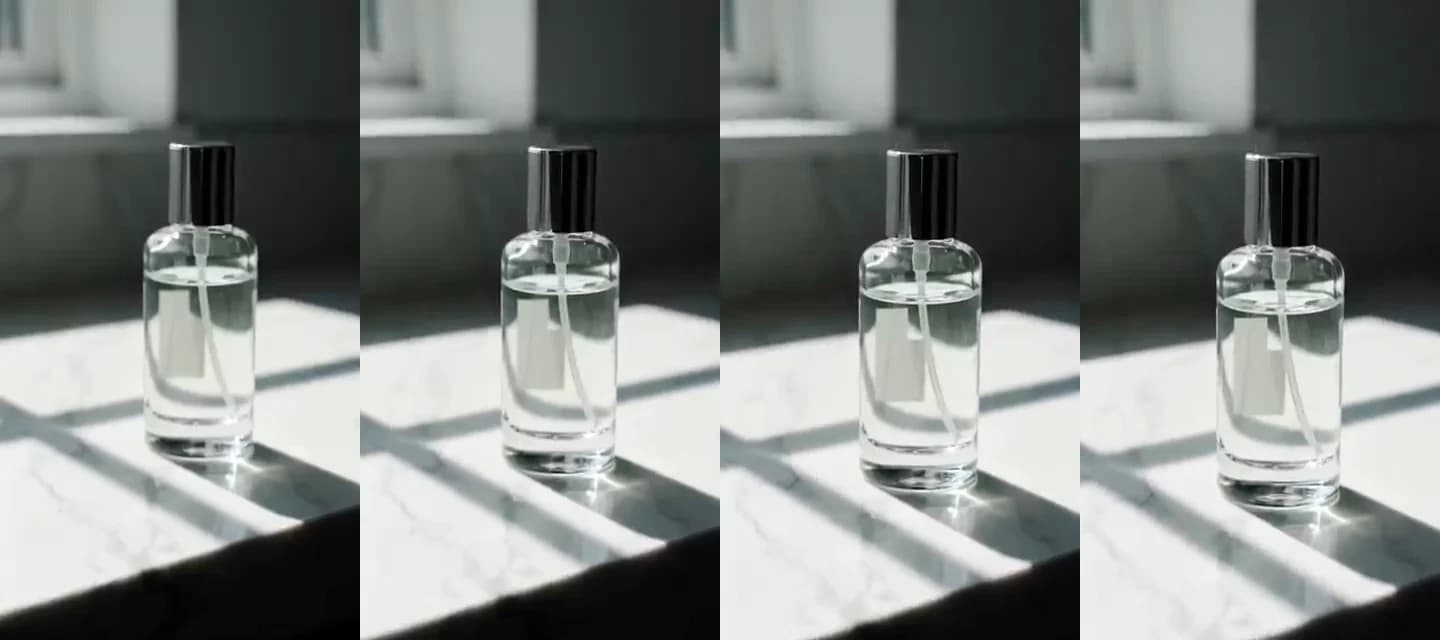 Google Veo 3.1 in Novoads, rendered 2026-09-28 from a one-line prompt. A 4-second vertical clip at 720p with no reference image. It cost 72 credits.
We sent this prompt.
A glass skincare bottle on a marble counter, slow push-in, soft morning light
It ran from text alone and came back in 77 seconds. That day we ran it on four models, and Veo 3.1's bottle was the only one with no invented text on its label. In Novoads, a 4-second clip costs the same 72 credits as a longer one. So if a product shot might be useful at full length, we'd ask for 8 seconds.
If you start from a photo of your own product instead, the best-practices page says the image "already provides the subject, scene, and style," so "Focus your prompt on the motion you want to see." It adds that "A sharp, clear, and well-composed photograph yields a more coherent and higher-quality video."
Two more ad patterns we haven't run yet
We wrote these two following Google's advice for an 8-second vertical clip at 1080p. We haven't made clips from them, so the first take is yours to judge.
A product demo
A demo shows the product doing its job in one moment, and that's the heart of most product demo videos. This one keeps the camera on the hands and puts the voice off screen.
Close-up at counter height with a slow push-in on two hands over a white bathroom sink. A woman presses the pump of a frosted glass bottle of hand wash twice, then works the foam between her fingers under running water. Soft daylight from a small window, white tiles out of focus behind. Natural, candid phone-video look. A voiceover in a calm, friendly tone says: Two pumps, and the foam does the rest. Ambient noise: a quiet bathroom, the faint hum of a fan. SFX: the click of the pump, water running into the sink. No music, no subtitles, no on-screen text. Vertical 9:16.
There's one press and one lather, so it stays a single moment. The voiceover uses the colon form, and each of the two sound sentences matches something on screen.
A before and after
A before and after is two moments, and by the best-practices page's advice, that means two clips. Google Cloud's prompt guide shows another way, with a jump cut inside one clip. Its example is "A person sitting in the same position but wearing different outfits, with sharp jump cuts between each outfit change," and it adds that "The lighting and framing should remain consistent to emphasize the sudden changes."
Locked-off close-up at bench height on a white canvas sneaker resting on a wooden bench, its toe streaked with dried mud. A hand wipes the toe once with a damp white cloth, then a sharp jump cut shows the same sneaker in the same position, clean and bright. The lighting and framing stay the same across the cut. Soft window light from the left, a plain grey wall behind. Natural phone-video look. SFX: the soft scrub of the cloth, then a light tap as the hand sets the cloth down. Ambient noise: a quiet hallway. No music, no subtitles, no on-screen text. Vertical 9:16.
The two routes don't cost the same in Novoads. One 8-second clip with the jump cut is 72 credits. Two shorter clips, one for each state, come to 144, because we charge the same for every Veo 3.1 clip.
What Google charges, and dates on other Veo 3.1 pages
If you'd rather run Veo 3.1 somewhere else, Google's own price and a few end dates are worth knowing first.
Google Cloud's list price
As we read it on November 6, 2026, Google Cloud's price list puts Veo 3.1 video with audio at 40 cents per count, in US dollars. That price covers both 720p and 1080p.
We couldn't find where the page says what a count is. On September 8, 2025, Google's Developers Blog priced Veo 3 at 40 cents a second. Its Veo 3.1 launch post said "Veo 3.1 is the same price as Veo 3." So we read a count as one second of video, and that's our reading rather than Google's.
On that reading, an 8-second clip with sound is $3.20 on Google's list. That's less than a Veo 3.1 clip costs on our Plus or Starter plan.
Dates on other pages that serve Veo 3.1
Four pages give dates that matter if you're choosing where to run your prompts. We give each date as the page states it.
- The Gemini API docs say the Veo 3.1 preview there was shut down on October 22, 2026.
- fal's Veo 3.1 model page says "This model will be removed on November 17, 2026."
- Google Flow's help page on credits says "On December 5, 2026, Veo 3.1 Fast, Veo 3.1 Quality, and Omni Flash 1.1 will be retired."
- Google's Agent Platform model page lists Veo 3.1 as generally available, with a release date of November 17, 2025, and a retirement date of "May 4, 2027 or later."
For the lighter model, our post on Veo 3.1 Lite covers its price and limits.
How Novoads prices and runs a Veo 3.1 clip
As of November 6, 2026, Google Veo 3.1 costs 72 credits a clip in Novoads at every length and resolution we offer.
A flat 72 credits a clip
You can pick from these settings.
| Setting | What you can pick |
|---|---|
| Length | 4, 6 or 8 seconds |
| Resolution | 720p or 1080p, with sound |
| Frame | 9:16 or 16:9 |
| Start from | A text prompt or an image |
| Price | 72 credits at every setting above |
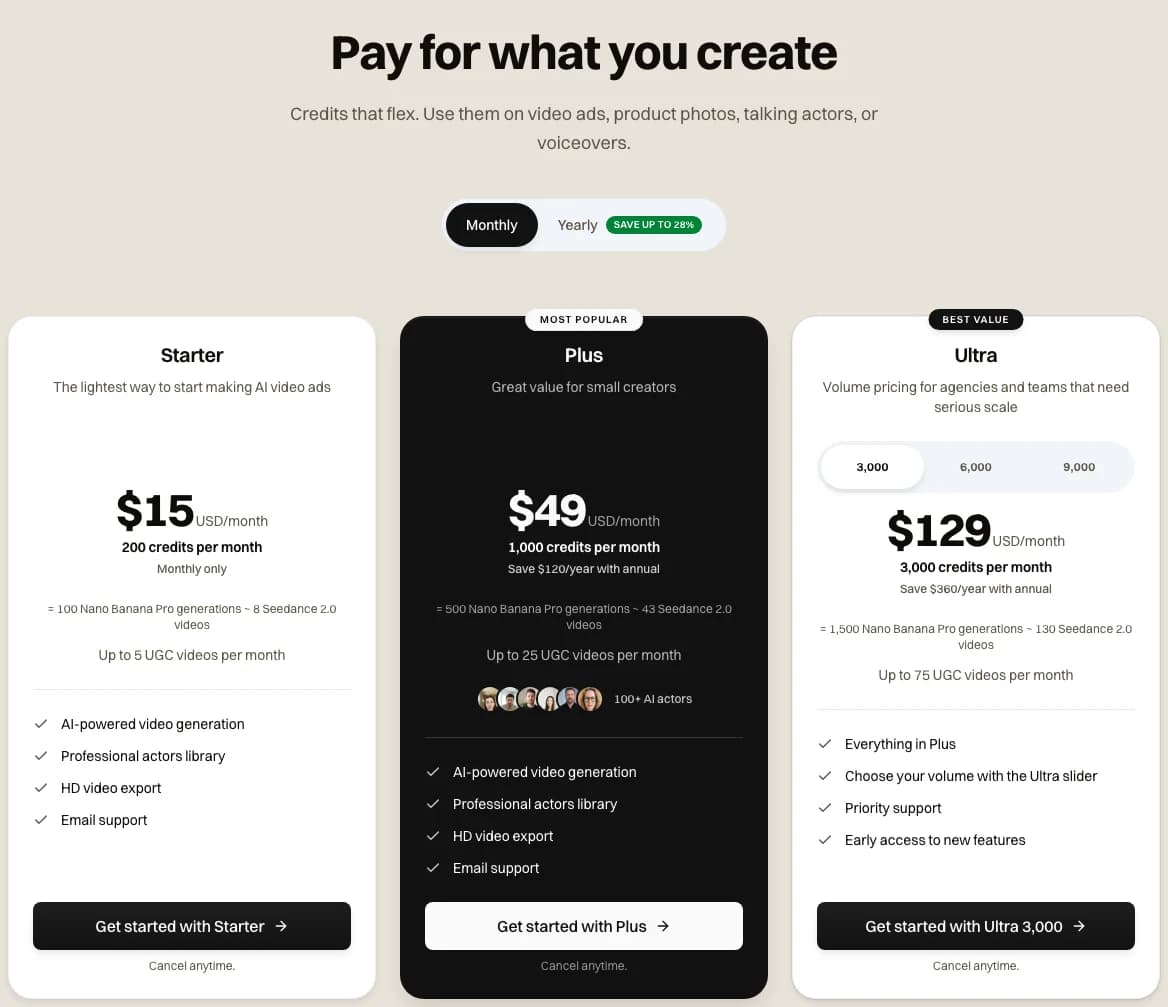 The Novoads pricing page on Monthly, as it read on 2026-11-06. A Google Veo 3.1 clip is 72 credits on every plan.
| Plan | Price | Credits a month | Veo 3.1 clips a month | One clip, our arithmetic |
|---|---|---|---|---|
| Starter | $15 a month, monthly only | 200 | 2 | 72 credits at 7.5 cents = $5.40 |
| Plus | $49 a month | 1,000 | 13 | 72 credits at 4.9 cents = about $3.53 |
Since every length costs the same, 8 seconds gets you the most video for the credits. Every plan is on our pricing page. If 72 credits a clip is more than your test budget allows, our comparisons of Kling and Veo and Seedance 2.0 and Veo 3.1, and our list of Veo alternatives for ad creators, set Veo against other models.
Running the prompts on this page
Each prompt here is plain text, and it's well under the 4,000 characters Novoads accepts for a Veo 3.1 prompt, so you can paste it in as written. We made the first clip from Claude through the Novoads Claude connector and the second in the Novoads app, and each cost the same 72 credits.
Turn a Veo 3.1 line into a UGC ad
Start from the hand cream prompt, run it on Google Veo 3.1 for 72 credits a clip, and build the rest of the ad in Novoads.
Explore AI UGC adsIf you're going to run one prompt from this page, make it the line to camera. Then check the first take to see whether the words came back as written and whether any of them turned up on screen.
Frequently Asked Questions
How do you write dialogue in a Veo 3.1 prompt?
Google's pages give two answers. Google Cloud's best-practices page for Gemini Omni and Veo says to write the line after a colon with no quotation marks, so the model doesn't render the words as text. The Gemini API's Veo guide and Google Cloud's blog guide for Veo 3.1 say to use quotation marks. We ran the colon form once on Google Veo 3.1 in Novoads on November 6, 2026, and the line came back word for word, with no words on screen. That's a single take, so it can't tell you how often the colon form works.
Key Takeaways
- Google's pages disagree on the spoken line. Google Cloud's best-practices page for Gemini Omni and Veo says to put it after a colon with no quotation marks, so the model doesn't render the words as text. The Gemini API's Veo guide says to use quotes instead.
- We ran the colon form once on Google Veo 3.1 in Novoads, and the line came back exactly as written, with no words on screen. It's one take, and that same prompt also asked for no subtitles.
- Google Cloud's prompt guide asks for the audio in separate sentences, so sound effects and ambient noise each get their own.
- For short videos, the best-practices page asks for a single, focused moment per prompt. For image-to-video, it calls camera motion the simplest and most reliable way to add dynamism.
- A Veo 3.1 clip is a flat 72 credits in Novoads at every length. That's about $3.53 on Plus and $5.40 on Starter by our arithmetic. Google's own list price is lower, at $3.20 for an 8-second clip if a count is one second of video.