GPT Image 2.6 for Ads: Low Quality Costs 4.2x GPT Image 2.5, High Unchanged
OpenAI's calculator puts a low-quality GPT Image 2.6 square at an estimated $0.02469 of image output, against $0.00588 on 2.5, and high quality at the same cost on both.

Mauricio Valdivia
·Updated ·12 min
The setting you draft on is where 2.6 costs more
OpenAI's API changelog says the company released GPT Image 2.6 Sunburst and Flare on November 4, 2026, for image generation and editing through the Image API. By OpenAI's own calculator, a low-quality 1024 x 1024 image comes to an estimated $0.02469 of image output on 2.6. The same image comes to $0.00588 on GPT Image 2.5, so you'd pay 4.2 times as much. At high quality, the two versions come out level at $0.05268.
None of the five pages that rank highest in the US for "gpt image 2.6" puts a price on a single image. On the morning of November 5, 2026, the top one was OpenAI's launch post for 2.5. Three of the others still called 2.6 unreleased. By that afternoon, two of those three had caught up and listed OpenAI's token rates, though neither gave a cost for an image. The third is dated November 1, three days before the release.
We read OpenAI's changelog, pricing page, model pages and image guides the same day. The 2.6 launch post wouldn't load for us, so we quote it from an Internet Archive copy made early that day. The Novoads image further down is one we made with GPT Image 2.5. We didn't call the 2.6 API for this post, so we can't tell you how its images look or whether your account can use it.
What one image costs on 2.6 and on 2.5
Prices as of November 5, 2026, in US dollars. Each figure is calculator arithmetic for one 1024 x 1024 image, and it's an estimate of image output only. The calculator prices Sunburst and Flare as a single option on each version, so the table applies to both.
| Quality | GPT Image 2.6 | GPT Image 2.5 | 2.6 against 2.5 |
|---|---|---|---|
| Low | $0.02469 | $0.00588 | 4.2 times |
| Medium | $0.04347 | $0.01317 | 3.3 times |
| High | $0.05268 | $0.05268 | The same |
The two settings above high, xhigh and max, come out level too, at $0.09366 and $0.21072.
The gap is at the cheap end. On 2.5, low quality costs about a ninth of high. On 2.6, it costs a little under half. And 2.6 at low costs more than 2.5 at medium. In its notes on the 2.5 models, OpenAI's guide says to use low "for quick drafts". If that's how your team works, drafts are the part of your bill the new version changes.
A thousand low-quality drafts come to an estimated $24.69 on 2.6 and $5.88 on 2.5. That $18.81 difference won't move many budgets on its own, but you pay it again with every round of variations you run. For GPT Image 2's own prices, see our pricing post.
The same ratios hold for vertical ads
A 1080 x 1920 image doesn't meet OpenAI's size rule, because width and height must be multiples of 16. So we priced 1088 x 1920, the next size up that does.
| Quality | GPT Image 2.6 | GPT Image 2.5 | 2.6 against 2.5 |
|---|---|---|---|
| Low | $0.01866 | $0.00444 | 4.2 times |
| Medium | $0.03405 | $0.01032 | 3.3 times |
| High | $0.03975 | $0.03975 | The same |
Each cell comes in below the square's, even though the image has about twice the pixels. Why would a bigger image come out at fewer tokens? We can't tell you, but that's what the calculator gives.
Where these numbers come from
OpenAI's image generation guide has a calculator that tells you to "Select a model, quality, and size to estimate output tokens and image output cost." It opens on 2.6 at low quality and 1024 x 1024. There, it shows 823 tokens and $0.02469. We worked out every other cell from the token counts and the rate the calculator uses. Those cells are our arithmetic on OpenAI's numbers, and no OpenAI sentence states them.
Both versions share one rate, $30 per million image output tokens, so the whole gap comes from the token counts the calculator uses for each setting.
| Quality | Tokens on GPT Image 2.6 | Tokens on GPT Image 2.5 |
|---|---|---|
| Low | 823 | 196 |
| Medium | 1,449 | 439 |
| High | 1,756 | 1,756 |
OpenAI never spells out that 2.6 uses more tokens. The closest it comes is the guide's line "The models can use different token counts for the same quality setting and share the same price per image output token." So we'd treat 4.2 and 3.3 as the calculator's numbers until your own responses confirm them. A member of OpenAI's developer forum posted a test with 344 output tokens on 2.5 and 1,136 on 2.6, both at medium, which is about the same ratio. It's one unverified test, and it doesn't name a variant.
Both GPT Image 2.5 model pages still say "The GPT Image 2 calculator does not estimate GPT Image 2.5 token consumption." The guide's calculator now lists 2.5 as an option, though, and that's the one we used.
What the estimate leaves out
The calculator's own note says it "Excludes text and image input tokens and streaming partial images." OpenAI's pricing page and guide list what comes on top, and the token rates are the same on both versions.
- Text input at $5.00 per million tokens
- Image input at $8.00 per million tokens, which you'll pay when you edit an image
- 100 extra image output tokens for each streamed partial image
- A 10% uplift on regional processing (data residency) endpoints, for models released on or after March 5, 2026
The estimate also needs an explicit quality and size, because OpenAI says "auto depends on the generated image." And the guide tells you to measure token use from the response for your own prompts, sizes and quality settings, with the warning "Equal token rates don't mean equal cost per image: token consumption can differ by model and quality setting."
Batch and the Responses API's image tool, on 2.5 only
OpenAI's pricing page lists GPT Image 2.5 at $15.00 per million image output tokens through Batch, half the standard rate. The page has no Batch row for 2.6, and both 2.6 model pages mark Batch "Not supported".
So "high unchanged" only holds at standard rates. Through Batch, a high-quality 2.5 square comes to an estimated $0.02634, half of 2.6's $0.05268. A low-quality 2.5 square through Batch comes to an estimated $0.00294, and 2.6 at low costs about 8.4 times that. If your drafts can run as a batch job, that's the gap we'd weigh.
The 2.5 Flare page says you can select that model "in the Image API or as the model of the Responses API image generation tool." The 2.6 pages say no such thing. They mark Responses "Not supported", and the November 4 changelog entry names only the image generation and image edit endpoints. (The 2.5 pages mark the plain Responses endpoint the same way, so the difference is the tool.) If you generate images through the tool inside a Responses conversation, we wouldn't count on 2.6 today.
What OpenAI says the release adds
OpenAI's changelog entry for November 4 reads "Released GPT-Image-2.6 Sunburst and GPT-Image-2.6 Flare for image generation and editing, with adjustable complexity, SVG generation, and animated GIF generation." It doesn't name a price, and its tags list the two image endpoints. OpenAI's prompting guide calls Flare "the smaller model for workflows where speed matters most" and Sunburst "the base model for workflows that need more detail or precise edits."
OpenAI's wording on availability varies. The changelog says "Released", the launch post says the models "are available in the API", and the forum announcement says "coming to the API". We didn't make an API call, so test your own key before you plan a campaign around it. The launch post also puts Images 2.6 in ChatGPT and Codex, but every price in this post is for the API.
Complexity, a new setting for how much planning the model does
The launch post says the setting "lets developers adjust how much planning the model does to meet a request, with lower settings suited to quick edits." The guide offers low, medium and high, and both models use high if you leave it out. It also says "Adjusting complexity has no separate fee." The calculator doesn't ask for a complexity setting, though, so its figures can't show you whether complexity moves your token count.
The guide says "Lower complexity can suit focused edits, such as changing a background or a sign." It also warns "Higher complexity can increase latency and introduce unwanted changes, so compare results for your task." The launch post adds "For most editing tasks, we recommend low complexity for faster edits, paired with the image quality your workflow requires."
To us, the guide's line about focused edits describes the ad variation job, where the product stays and the background changes. We'd try low complexity there and keep high for a frame with a lot of text on it, since the guide says "Higher complexity can help with dense text, complex layouts, and relationships between objects."
SVG for generation only, GIF on both endpoints
The guide says "The image edit endpoint does not support SVG output, and an SVG is not a supported raster input for image edits." So an edit can't return an SVG, and you can't send one in as the image to edit. The guide lists GIF output on both endpoints, and it says "To guide the animation with still reference images, send them to the image edit endpoint."
OpenAI says SVG suits "graphics that need editable paths, shapes, and colors, such as icons and illustrations." We'd use it for a badge or an icon in an ad, but we wouldn't use it for the product shot. On cost, the guide says "For SVG output, you pay the image model's rate for the reference image and the authoring model's rate for the tokens it uses to produce the SVG. The total depends on how many tokens each model uses." It doesn't give a figure for a single SVG.
The launch post names our readers outright, saying "Marketers and creators can animate a brand mascot for a campaign, create reactions and memes for social media, or use animated storyboards to explore character movement before video production." The guide gives these request fields for GIF output.
| Field | Values | Default |
|---|---|---|
frame_count | 2 to 16 frames | 9 |
frame_duration_ms | 20 to 2000 milliseconds a frame, rounded to 10 ms | 200 |
size | auto, or WIDTHxHEIGHT with a width and height that are multiples of 16 | auto |
OpenAI's own example uses the default frame count and duration and lasts 1.8 seconds. The guide also says "The frame count, frame dimensions, and number of animations must fit the model's size limits and the total request pixel budget." Earlier on November 5 the guide showed a higher frame cap and said an edit couldn't return a GIF. Both have changed since, so check the guide again before you plan around it. We didn't find a GIF price in the guide or on the pricing page, and the calculator has no GIF option, so we can't tell you what one costs.
Markup-guided editing, on both versions
The changelog says "Added markup-guided editing for supported GPT Image 2.5 and 2.6 models." So it isn't a 2.6-only feature. You send a transparent layer with circles or sketches on it to show where the change goes, and you describe the change in your prompt. OpenAI says "Markup-guided edits use the same token rates as other edits, with no extra fee." The first image and the annotation layer can each hold up to 16,777,216 pixels, and the annotation file has a 50 MB limit. We'd reach for it when one thing in an approved frame has to change.
Speed and layout, in OpenAI's words
The launch post says "Images 2.6 generates images 50% faster than before." It doesn't say faster than what. It also says "When quality is set to low, Flare can generate images in as little as six seconds." That six seconds is for Flare at low, which is also the setting with the 4.2-times gap. So the fastest case OpenAI quotes is the one where 2.6 costs the most against 2.5. The 2.6 Flare page lists its speed as "Not specified", and we didn't find a seconds figure for Sunburst.
The same post says "Flare also improves layout quality for posters, product imagery, and other professional visuals." It says Sunburst "brings higher-quality image generation and even greater image consistency across edits when quality is set to medium or high." Both would matter for ads if they hold. We didn't run 2.6, so we can't back them up or knock them down.
No dated snapshot, and fewer stated size rules
OpenAI says "Snapshots let you lock in a specific version of the model so that performance and behavior remain consistent." Both 2.5 model pages list a dated snapshot from September 8, 2026, while the 2.6 pages list only the plain model name. We see that as a small risk for a team with an approved look, because what you get under that name could change and there's no dated version to pin it to.
OpenAI's prompting guide tells you to use multiples of 16 for a custom size on 2.6, with an aspect ratio from 1:3 to 3:1. Two more limits appear only where OpenAI writes about 2.5 and older models. We didn't find a sentence that applies them to 2.6, though the calculator won't give an estimate for 2.6 outside them either.
- No edge over 3840 pixels
- A total between 655,360 and 8,294,400 pixels
OpenAI's notes on 2.5 also call anything above 2560 x 1440 experimental. The 2.5 pair has its own post, and our explainer on GPT Image 2 covers the line as a whole.
Should your ad team move to 2.6?
OpenAI's pages give two answers
OpenAI's image prompting guide leads with 2.6 and says "For a new workflow, start with GPT Image 2.6 Flare if response time matters most. Start with GPT Image 2.6 Sunburst if the image must meet demanding requirements for detail, layout, or edit accuracy." Its migration steps add "For a 2.5 Flare workflow, try 2.6 Flare first."
Other OpenAI pages point the other way.
| OpenAI page | Its words |
|---|---|
| Image generation guide, section on earlier models | "For new integrations, use one of the GPT Image 2.5 models described above." |
| Image generation guide, 2.6 section | "The existing examples below use GPT Image 2.5." |
| GPT Image 2.5 Sunburst model page | "Our most capable model for image generation and editing" |
| GPT Image 2.5 Flare model page | "GPT Image 2.5 Flare is our fastest model for high-quality, everyday image generation." |
Those lines may just predate the release. We can't tell from the pages, so we're giving you both.
How we'd decide for high-volume ad work
When 2.5's low or medium does the job, we think the price gap is the argument for staying. The case for 2.6 is what the release adds, so we'd move a workflow when it needs one of those additions. We wouldn't move a working low-quality draft flow only because 2.6 is newer.
OpenAI's migration steps say "Track response time, failures, retries, and cost per accepted image before you expand." Cost per accepted image is the number we'd watch. At low, a 2.6 draft has to pass your review about 4.2 times as often as a 2.5 draft to cost the same per accepted image. If one draft in five passes on 2.5, a little over four in five would need to pass on 2.6.
We'd stay on GPT Image 2.5 when any of these is true.
- Your low or medium drafts already pass review often enough.
- You run large jobs through Batch at half the rate.
- You generate images through the Responses API's image tool.
- You want a dated snapshot you can pin.
We'd test GPT Image 2.6 when any of these is true.
- You need an animated GIF, or an SVG for an icon or illustration.
- You already work at high quality and don't use Batch, so the calculator shows no gap.
- You want the complexity setting on edits.
- Your 2.5 drafts fail review often enough that a better pass rate could pay for the gap.
When you test, write the brief the same way for both versions, and our GPT Image 2 prompts post covers how we write one. How many drafts a round needs is a separate question, and we've worked through it separately. If still images are new to your team, our static ads guide starts with the format itself.
What you can run in Novoads today
You can use GPT Image 2.6 Sunburst and Flare in Novoads, along with GPT Image 2.5 Sunburst, GPT Image 2.5 Flare and GPT Image 2, each at low, medium or high quality. Here 2.6 costs the same credits as 2.5 at every quality, so the gap in OpenAI's prices doesn't apply. Novoads makes still images with 2.6: its GIF and SVG output and its complexity setting aren't offered.
| Model in Novoads | Low or medium | High |
|---|---|---|
| GPT Image 2.6 Sunburst or Flare | 1 credit | 2 credits |
| GPT Image 2.5 Sunburst or Flare | 1 credit | 2 credits |
| GPT Image 2 | 1 credit | 4 credits |
You pick from four shapes (square, portrait, vertical and widescreen), and the credit price doesn't change with the shape. To put a GPT Image 2.6 or 2.5 image in dollars, we divide each monthly plan's price by its credits.
| Plan, billed monthly | Price | Credits | Per credit | Low or medium image | High image |
|---|---|---|---|---|---|
| Starter | $15 a month | 200 | $0.075 | 7.5 cents | 15 cents |
| Plus | $49 a month | 1,000 | $0.049 | About 5 cents | About 10 cents |
Set against the 1024 x 1024 figures above, OpenAI's API costs less per image than Novoads on either plan, before you add input tokens.
Those figures don't hold for every file, though. On November 5, 2026, we ran one serum ad on GPT Image 2.5 Flare at high quality. The prompt asked for five exact bits of text (a headline, a sub-line, a $29 badge, a Shop now button and the label). It cost 2 credits, and all five came out spelled right, once each. The file came back at 2880 x 2880.

Made in Novoads with GPT Image 2.5 Flare · a square serum ad with five exact text strings · high quality, 1:1 · 2 credits · file 2880 x 2880 · rendered 2026-11-05
That's one take, the first we got, so it doesn't give you a rate. It also tells you nothing about how 2.6 would draw the same ad. At 2880 x 2880 and high quality, calculator arithmetic gives $0.1779 of image output on either version. That's more than 2 credits cost on either plan, so at that size Novoads costs less. We measured that size on this one high-quality file, and we haven't measured what size low or medium returns on 2.5. The same prompt cost 4 credits on GPT Image 2 at high, also at 2880 x 2880. That run, from November 4, is in our comparison with Nano Banana Pro.
Novoads is an ad maker, and you pay for it from the first month. In the app you pick the model and the quality and pay in credits, so there's no token count to estimate, and the same credits cover our video models too. See what each plan includes before you decide.
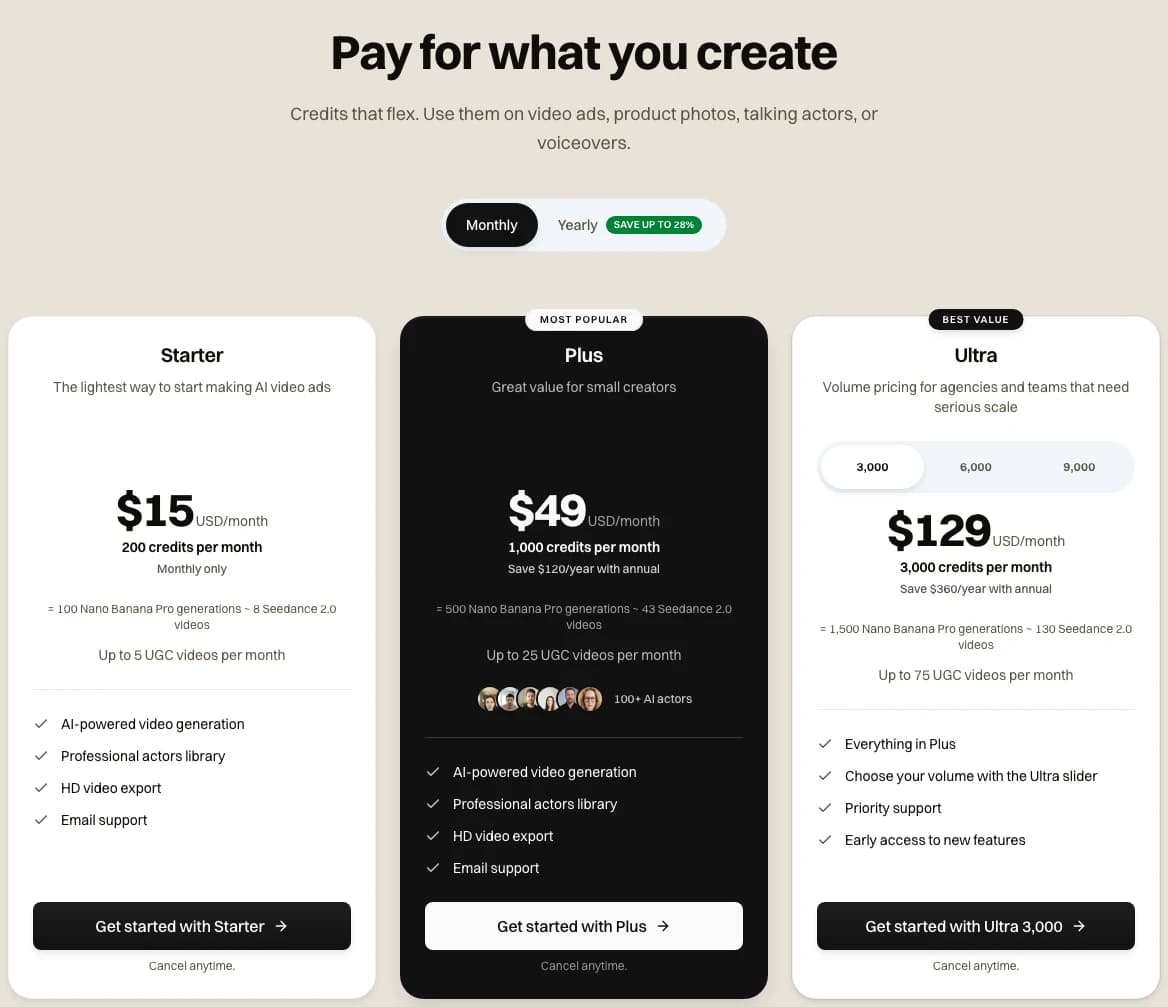
The Novoads pricing page with Monthly selected, captured 2026-11-05
Price your next ad image in credits
GPT Image 2.6 and 2.5, Sunburst or Flare, cost 1 credit at low or medium and 2 at high, at any shape we offer.
See the plansThe comparison we'd run with your own API key
OpenAI's migration steps suit ad work well, so if you call the API yourself, we'd follow them and add a token check.
- Collect the prompts you already use, hard ones included. OpenAI's list is "difficult edits, exact text, product geometry, and transparent assets where relevant", and ads lean on the first three.
- Run them on your current model and on 2.6 at the same size, quality and output format. OpenAI says "Leave complexity at the model default" for this first pass.
- Read the token count each response reports, and compare it with the tables above.
- Count the drafts you'd approve on each version, then divide what you spent by that count.
- After that, change quality or complexity one at a time, and move a small share of your volume first.
Once you have your own token counts, use them in place of every estimate in this post.
Frequently Asked Questions
Is GPT Image 2.6 out yet?
Yes, according to OpenAI's API changelog. Its entry for November 4, 2026, says OpenAI released GPT Image 2.6 Sunburst and GPT Image 2.6 Flare for image generation and editing, and its tags list the image generation and image edit endpoints. The 2.6 model pages mark Batch and the Responses API as not supported. We didn't call the API for this post, so test it with your own key before you plan around it. In Novoads, you can pick 2.6 Sunburst or Flare for still images, at the same credits as GPT Image 2.5.
Key Takeaways
- OpenAI's changelog says it released GPT Image 2.6 Sunburst and Flare on November 4, 2026, for image generation and editing through the Image API. We didn't call the API for this post, so test it with your own key before you plan around it.
- At low quality and 1024 x 1024, OpenAI's calculator puts one image at an estimated $0.02469 of image output on 2.6. On GPT Image 2.5, it comes to $0.00588, so 2.6 costs 4.2 times as much.
- Medium costs 3.3 times as much on 2.6, and high comes to $0.05268 on both. All of these figures are calculator arithmetic for image output only, so you pay for input tokens on top.
- GPT Image 2.5 can run through Batch at half the output rate, works as the Responses API's image tool and has dated snapshots. We found none of those three on the 2.6 model pages.
- OpenAI's prompting guide says to start new work on 2.6, while its image generation guide tells new integrations to use 2.5. On OpenAI's API, when 2.5's low or medium does the job, we'd stay on it.
- In Novoads, GPT Image 2.6 Sunburst and Flare cost the same credits as GPT Image 2.5: 1 for low or medium and 2 for high.
Sources
- •OpenAI API docs, Changelog
- •OpenAI API docs, Image generation guide
- •OpenAI API docs, Image prompting guide
- •OpenAI API docs, Pricing
- •OpenAI API docs, GPT-Image-2.6 Flare
- •OpenAI API docs, GPT-Image-2.6 Sunburst
- •OpenAI API docs, GPT-Image-2.5 Flare
- •OpenAI API docs, GPT-Image-2.5 Sunburst
- •OpenAI, Introducing Images 2.6 (Internet Archive copy, November 5, 2026)
- •OpenAI Developer Community, Images, upgraded: introducing ChatGPT Images 2.6