Personal Injury Lawyer Ads: Video Ideas, What Each Costs With AI, and Alabama's Rule on Actors
The video ads personal injury firms run, how AI can turn the firm's own photos into B-roll for each, what five clips cost on each Novoads plan, and what Alabama's rule on actors means for who appears on camera.

Mauricio Valdivia
·12 min

We Made a Law Office Clip With Nobody in It
We made a five-second clip of a law office conference room for this post. The camera slides along a walnut table toward a window with half-open blinds, a legal pad drops out of frame as a glass carafe comes forward, and the late sun shifts across the wood. Nobody walks in. The still we started from and the Seedance 2.0 Mini clip cost 6 credits together. Near the end, the model added a small object to the table that the still never had.
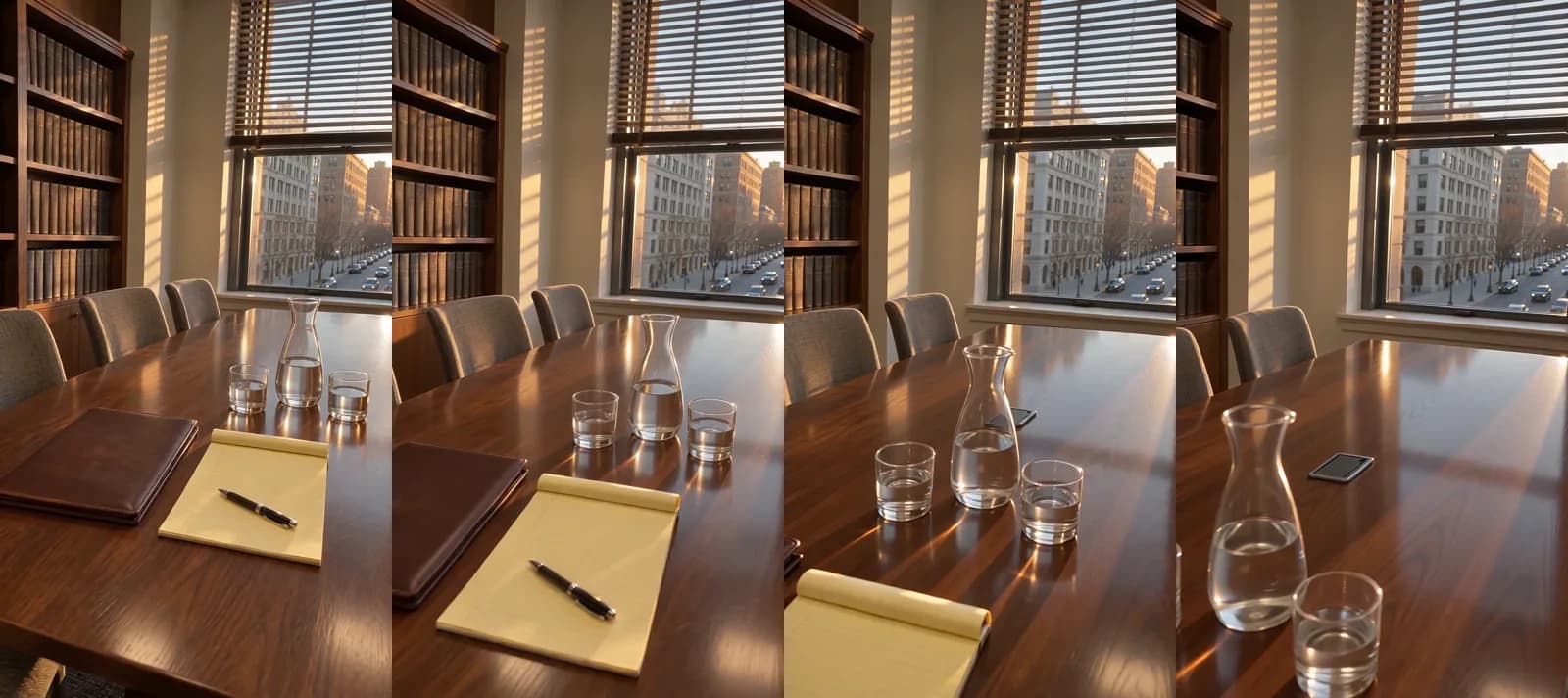 Made in Novoads with Seedance 2.0 Mini · a slow move down an empty conference table to a sunlit window, no sound, started from a still that stands in for your own photo · 5 credits · rendered 2026-11-16
That empty room is most of what AI should shoot for a personal injury firm. Your week is already full. The intake line rings after a wreck on the interstate, the billboard comes up for renewal, and somebody wants the TV spot cut down for Instagram before the weekend. The part people trust is your lawyer talking to them, and that part stays yours. A model can make everything around it cheaply, from the lobby to the street your office is on.
There's also a rule that none of the guides we opened from the search results mentions. Alabama's lawyer-advertising rules, in force since January 1, 2026, keep an actor from playing the lawyer in an ad. The Alabama State Bar's own summary says lawyers "can no longer use actors to impersonate themselves or satisfied clients in advertisements." So in Alabama, the lawyer in your ad has to be the real one. We'd treat an AI presenter playing your lawyer the same way. That's our reading, since the rule itself never mentions AI.
On November 16, 2026, we read the results page for "personal injury lawyer ads" and the guides on it, went through the Alabama State Bar's own pages and checked our prices. We made the clip above in our own workspace, starting from a picture we generated to stand in for a firm's photo. We haven't made an ad for a law firm, and nothing here is legal advice.
The Video Ads Personal Injury Firms Run
The guides that rank for this search sort a firm's video ads into a few kinds. FirmPilot, which sells what it calls an AI-powered legal marketing platform, says in its guide that "Top campaigns combine attorney-to-camera, client testimonials, community branding, and high-production narrative spots." Craft Creative, which pitches its own video production to law firms, adds a story built around a crash. Each kind has a job AI does well and a line it shouldn't cross.
The Attorney-to-Camera Spot
FirmPilot calls this format "the workhorse of personal injury advertising." The lawyer looks into the lens, says what kind of cases the firm takes and gives one next step. It's the ad for the person sitting in a body shop waiting room on a Tuesday, wondering whether anyone will call them back.
AI's job here is the cutaways between the lawyer's lines. That means the front door, the conference room and the street the office is on, each made from a photo the firm took, so the edit has somewhere to go while the lawyer catches a breath. What it shouldn't make is the lawyer. The one shot we never suggest in this post is an AI presenter in a suit reading your script, and the Alabama section below explains why.
The Client Testimonial
A former client telling the camera how the firm handled the claim is proof a lawyer can't give about their own firm. In Alabama, the bar's article says "Testimonials can only come from real clients with firsthand experience." Craft Creative's guide, written from the production side, says "Let clients describe their experience in their own words."
No part of that person should come from AI. What AI can supply is the setting around them, like the waiting area, the hallway to the conference room or an empty chair across the desk, cut in while the client talks. Film the client yourself, with their consent, and keep people out of every AI frame.
The Story Spot After a Wreck
Craft Creative's guide suggests a commercial that could "show someone dealing with the aftermath of a serious car accident," then "introduce the law firm as a resource that can help." It's the format closest to a short film, and it's where AI is most tempting. A model can make a rain-wet road at dusk, a tow lot under floodlights or a kitchen table with an unopened envelope on it, and those scenes carry the mood.
But the model shouldn't make the crash, the injury or the person who was hurt, and it should never put a settlement figure on screen as one of the firm's results. Let your lawyer tell the story over those scenes, in their own voice. The same guide says a dramatization "should never mislead viewers into believing an actor is an actual client." Alabama's rule draws its own line for an actor who plays a client, which we set out in the Alabama section below.
The Community Spot
FirmPilot describes community branding spots as a long-term way to build name recognition, tying the firm to "local institutions and causes." For an injury firm, that's the youth league it sponsors, the school supply drive at the office or the charity run it puts its name on.
AI works here when you start from the firm's own photos of those events and pick frames with no faces in them, such as the empty field before kickoff or the folding table of donated backpacks. It shouldn't invent an event the firm wasn't part of, or fill a scene with a crowd that was never there.
The Character Spot
Some injury ads are jokes. Craft Creative's own list of its top five personal injury commercials includes one titled "Funny Super Bowl Commercial," and a made-up character can carry a gag that a lawyer reading a script can't.
Our own connector for Claude has two recipes for animated ads, the 3D animated storyboard ad and the Claymation storyboard ad. Each one shows what its paid steps will cost and waits for your yes before it spends anything. For an injury firm, we'd keep the animated scenes short and cut them in around the lawyer's own lines, the same way the rest of the B-roll goes in. Don't let the character stand in for your lawyer or one of your clients, and keep it away from verdicts and settlement amounts.
How to Make the B-Roll in Novoads From Your Own Photos
Most of the ideas above rely on short clips made from photos the firm already owns and cut in around the lawyer's own footage. You film the lawyer. Novoads makes the clips from the photos, and you or your editor put the cut together.
Photos Worth Taking This Week
Walk the office with a phone before the lawyer's next shoot and take these shots.
- The entrance and the door clients walk through.
- The lobby and the intake desk, with nobody at them.
- The conference room, with the chairs pushed in.
- The street outside and the roads your clients drive every day.
- Photos from events the firm sponsored, but only the frames with no faces in them.
We didn't have a firm's photo, so we made a stand-in with GPT Image 2.6 Sunburst for 1 credit and asked for it to look like an owner's own phone shot. You'd use yours. A made-up office in your firm's ad shows a room that isn't yours, and a viewer would take it for your office.
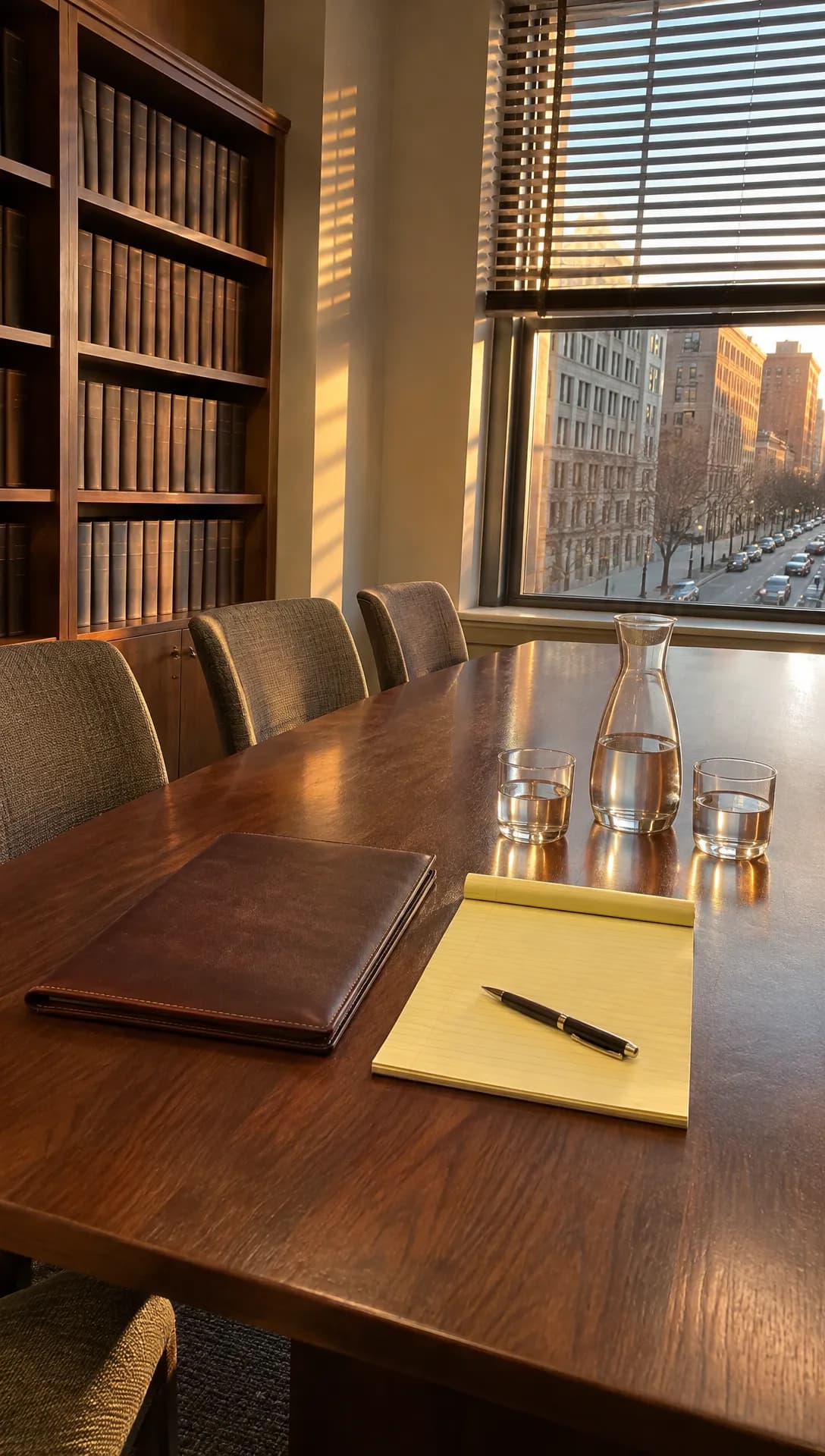 Made in Novoads with GPT Image 2.6 Sunburst · an empty law office conference room in late sun, made as a vertical phone photo to stand in for your own · 1 credit · made 2026-11-16
Kling 3.0, When the Clip Has to Open on Your Photo
In the editor's Video tab, Kling 3.0 is the simplest way to get a clip that opens exactly on your photo.
- Pick Kling 3.0 in the model menu.
- Drop your photo where the box reads "Drop a start frame or click to upload." The editor then shows "The video starts on this picture."
- Write one camera move and what has to stay out of the shot, for example "the camera pushes slowly toward the window, no people, no text."
- Choose 5 seconds and press the round button with the up arrow.
You get a five-second clip that opens on your photo, and it costs 10 credits. Omni Flash and Wan 3.0 can start on a photo too, once you switch from "Reference" to "Start / End Frames." Our guide to product videos with AI takes one product photo all the way to a finished clip.
Seedance 2.0 Mini, the Way We Made Ours
We made our clip through our own connector for Claude, which can start a Seedance 2.0 Mini clip from a start picture. It runs five seconds at 720p and has no sound. It cost 5 credits. In the editor, Seedance takes your photo as a reference instead. You name it @Image1 in the prompt, and the clip doesn't open on it.
So when a shot has to begin on your exact photo, use Kling 3.0 in the editor. When you only need the room's look and light, Seedance 2.0 Mini is the cheapest clip in the cost table below.
Shoot Vertical Photos for Social and Wide Ones for TV
The cut for Reels and TikTok is vertical, and a wide frame cropped to vertical loses most of its width. So shoot the photos for social clips vertical and the ones for TV clips wide, and each photo will already have the shape of the edit it's going into. Our TikTok ads guide covers what makes an ad work once it's on TikTok.
Check Every Clip Against the Real Room
Watch the last second before anything goes out. Near the end of ours, there's a small dark object on the table, shaped like a phone, that the still never had. The model added it. We think viewers assume a firm's B-roll shows its actual office, so a clip that adds a diploma, a plaque or a stack of case files you don't have is showing something that isn't yours. Re-roll it, which costs the clip's credits again, or trim the clip before the extra object shows up.
What Five Clips Cost on Each Plan
Prices as of November 16, 2026. We paid 1 credit for the stand-in still only because this post has no firm behind it, and a firm starting from its own photos skips that cost. The plans put three different prices on a credit.
- Starter costs $15 a month for 200 credits. That's $0.075 a credit.
- Plus is $49 a month for 1,000 credits. That's $0.049 a credit.
- Ultra 3,000 is $129 a month. That's $0.043 a credit.
| Clip | Credits | Starter | Plus | Ultra 3,000 |
|---|---|---|---|---|
| Kling 3.0, 5 s, from your photo | 10 | 75 cents | about 49 cents | about 43 cents |
| Seedance 2.0 Mini, 5 s, 720p | 5 | about 38 cents | about 25 cents | about 22 cents |
| Omni Flash, 4 s, 720p | 12 | 90 cents | about 59 cents | about 52 cents |
| Wan 3.0, 5 s, 720p | 9 | about 68 cents | about 44 cents | about 39 cents |
| Three Kling 3.0, two Seedance 2.0 Mini | 40 | $3.00 | about $1.96 | about $1.72 |
A Starter month covers the five-clip set five times over. A Plus month covers it 25 times, and an Ultra 3,000 month covers it 75 times. Our pricing page lists every plan's current price and credit count.
Filming your lawyer costs no credits, because you do it yourself. Each re-roll costs its clip's credits again. Editing, music, captions and the airtime or ad spend aren't in these sums, since Novoads makes the clips and your firm runs the ads.
How That Compares With a Produced Commercial
FirmPilot published its guide to injury commercials on March 30, 2026. It cites industry estimates that "place professionally produced commercials between $10,000 and $50,000 for basic production." It adds that high-end campaigns can reach "$500,000 or more depending on creative complexity and distribution."
Those numbers are for a different job. FirmPilot's range covers a whole commercial made the usual way. Our 40 credits buy five clips of B-roll, and you still have to film your lawyer. We work out what a whole commercial made with AI costs in our guide to AI commercials.
Alabama's Rule on Actors, Which the Ranking Guides Skip
What the Bar Says and When It Took Effect
The Supreme Court of Alabama adopted amendments to the lawyer-advertising rules in an order on May 13, 2025, and the changes took effect January 1, 2026. In an article published September 18, 2025, the Alabama State Bar summed up the part about actors.
"Lawyers can no longer use actors to impersonate themselves or satisfied clients in advertisements. However, actors may be used in the background if not in speaking roles and not done in a way that is misleading."
None of the three guides we opened from the results page names this rule or any state's rule on actors. In FirmPilot's guide, narrative spots lean on "cinematic storytelling, professional actors," and the compliance section says attorney advertising rules "vary by state" without getting to actors.
Who It Binds
The rule binds Alabama's lawyers. The bar's guide adds that "lawyers who are not licensed in Alabama will still be held to the same standards as Alabama lawyers if they are soliciting clients in this state." Rules vary by state, as FirmPilot's guide notes, so a firm advertising elsewhere should check with that state's bar too.
What the Court's Own Text Adds
The rule itself, Rule 7.2(p) in the court's order, is more precise than the bar's summary.
- A lawyer may not use an actor to portray the lawyer whose services the ad promotes, and there's no background exception for that part.
- An actor, or a model in a posed photo, may portray a client only in a nonspeaking, merely background part, and that covers any client, whether or not the ad calls them satisfied.
- The comment to the rule counts the firm itself as the lawyer.
What We Take From It for AI Clips
The rule names actors and models and never mentions AI. Treating an AI presenter as an actor is our reading, not the bar's, and we built this post on it. Read that way, any lawyer in an Alabama ad has to be your own lawyer, any client who speaks has to be a real client, and AI sticks to B-roll of places and things. That's why none of the ad ideas above puts an AI presenter in front of the camera, and why our clip has no one in it.
This isn't legal advice. The bar's guide says lawyers "can seek guidance from the Office of General Counsel," and that's the place to ask before an ad runs in Alabama.
Where Your Firm Can Start This Week
With Novoads, you can turn the photos already on your phone, from the conference room to the roads your clients drive, into short clips for the ads your firm runs, while your lawyer stays the one on camera. Novoads is paid from the first month, and Starter is the smallest plan. Our AI ads guide walks through making an ad with AI step by step.
Turn your office photos into B-roll
Short clips from your own photos, priced per clip in credits. Starter is the smallest plan, paid from the first month.
See the plansBefore the lawyer's next shoot, take five photos of the office and the streets you serve, make one clip from each, and check every frame against the real room.
Frequently Asked Questions
How do personal injury law firms advertise?
A lot of it is video. FirmPilot's guide, one of the top results for this search, says top campaigns combine attorney-to-camera spots, client testimonials, community branding and high-production narrative spots. AI fits around those formats as B-roll made from the firm's own photos, while the lawyer stays the one on camera.
Can a personal injury firm use an actor or an AI presenter in its ads?
It depends on the state. As FirmPilot's guide notes, attorney advertising rules vary by state. In Alabama, since January 1, 2026, an actor may not play the lawyer an ad promotes, and an actor or model may play a client only in a nonspeaking, merely background part. The rule never mentions AI, so treating an AI presenter as an actor is our reading. This isn't legal advice, and the Alabama State Bar's own pages are the place to check.
How much does a personal injury commercial cost?
FirmPilot's guide cites industry estimates that put a professionally produced commercial between $10,000 and $50,000 for basic production. AI B-roll is a much smaller line item. The five clips we price in this post come to 40 credits. That's $3.00 on Starter or about $1.96 on Plus. Both prices are as of November 16, 2026. Filming the lawyer, editing and airtime are extra.
What should a law firm photograph for AI B-roll?
Places and things the firm actually has, such as the entrance, the lobby, the conference room with nobody in it, the street outside and the roads its clients drive. Shoot vertical for Reels and TikTok and wide for TV and YouTube, keep people out of any photo you plan to animate, and check every clip against the real room, because a model can add objects that were never there.
Key Takeaways
- Personal injury firms run attorney-to-camera spots, client testimonials, story spots, community spots and the odd character ad, and the firm's own lawyer carries most of them.
- AI earns its place in those ads as B-roll, meaning short clips of the firm's own office, conference room and streets, made from photos the firm took, with no people in them.
- Three Kling 3.0 clips and two Seedance 2.0 Mini clips, five seconds each, come to 40 credits. That's $3.00 on Starter or about $1.96 on Plus. Both prices are as of November 16, 2026.
- FirmPilot's guide cites industry estimates of $10,000 to $50,000 for basic production on a professionally made commercial. Our 40 credits buy only the B-roll, and you still have to film the lawyer.
- Alabama's rules, in force since January 1, 2026, bar an actor from playing the lawyer an ad promotes and let an actor or model play a client only in a nonspeaking, merely background part. Treating an AI presenter the same way is our own reading, so every AI clip in this post shows places and things.
Sources
- •Alabama State Bar: Alabama Moves to Modernize Lawyer Advertising Rules, A Look at the Changes
- •Alabama State Bar: guide to Alabama's lawyer advertising rules (June 23, 2025)
- •FirmPilot: Why most personal injury lawyer commercials don't pay for themselves
- •Craft Creative: Personal Injury Lawyer TV Commercial, How to Connect With Your Audience