Topaz Video AI Pricing: $299 a Year, and What a 4K Ad Upscale Costs
Topaz Video AI is discontinued, and Adobe now owns Topaz Labs. We price Topaz Video's plans and work out, in dollars, what a 15-second 4K upscale costs on each route.

Mauricio Valdivia
·13 min
Topaz Video AI is gone, and Adobe now owns its maker
Topaz Video AI was discontinued in September 2025, so the prices you're looking for now apply to its subscription successor, Topaz Video. The company has changed hands too. Adobe completed its purchase of Topaz Labs on September 23, 2026, and we found no announcement of a pricing change.
Topaz lists Topaz Video's Personal plan at $299 a year, in US dollars and before VAT. That price isn't new, and it predates the Adobe deal. A Topaz help table effective September 16, 2025, already shows it.
We opened five of the top results for this search, and none of them turns Topaz's credit tables into dollars for one clip. So we did the math for a 15-second ad clip at 4K. By our scaling, it takes 30 credits on Topaz for Web. On its $29 monthly Video plan, those credits are worth $4.35. On your own machine with Topaz Video, the same upscale costs nothing beyond the plan.
We didn't test Topaz for this post. Every Topaz figure comes from its own pages, archived copies of those pages or public ratings, read on November 5, 2026, from a connection in Spain. The one clip you'll see further down is ours, made in Novoads, and we'll tell you where Topaz is the better buy.
What happened to Topaz Video AI
Video AI was a buy-once product, and Topaz phased it out in three steps.
- On August 15, 2025, a copy of Topaz's pricing page shows it at $299, with a year of upgrades included and the version yours for life.
- On September 17, 2025, Topaz's CEO announced the end of perpetual licenses.
- On October 2, 2025, Topaz released the last version, 7.1.5. Its docs say the app won't be optimized or updated for newer systems.
Topaz replaced it with a subscription app, Topaz Video, and says your access ends once the subscription is canceled or expires. So the $299 that bought Video AI outright in August 2025 is now Topaz Video's list price for one year.
If you already own Video AI, the license stays yours, and you can go back to the version it covers. It doesn't activate Topaz Video, though, and new buyers can't get a perpetual license anymore.
Some of what ranks for this search predates all of this, including a 2023 forum thread and Topaz's own Video AI Pro page, so go by the plan cards in the next section.
What Topaz Video costs, by billing option
Prices as of November 5, 2026, in US dollars and before VAT. Topaz offers up to three billing options per plan, and a price only makes sense next to its option, so each one gets its own column.
| Plan | Paid once a year | Billed monthly on a 12-month commitment | Month to month | Cloud credits a month |
|---|---|---|---|---|
| Topaz Video Personal | $299 | $39 a month | $59 a month | 25 |
| Topaz Video Pro | $699 | $74 a month | Not listed | 100 |
| Topaz Studio | $399 | $45 a month | $69 a month | 300 |
| Topaz Studio Pro | $799 | Not quoted | Not quoted | 600 |
Topaz's pages show more than one monthly figure for Studio Pro, and they don't agree, so we're only quoting its $799 a year.
Why you might see $59 before you see $299
The Topaz Video page doesn't always open on the same billing option. Sometimes it opened on Monthly for us, with Personal at $59, and sometimes on Annual, with Personal at $299. It's one plan, and the price follows the option on screen. In August 2026, a Topaz team member told a customer on the Topaz forum to compare Annual with Annual and Monthly with Monthly. They added that an account can show a different price if its owner locked in a sale or has founder pricing.
The three ways to pay for Personal
The $25 a month on the Annual card isn't a monthly bill. It's the $299 you pay once, upfront, divided by 12. The $39 option is billed every month for a year, which comes to $468 by our arithmetic. Month to month costs the most over a year, but at $59 it's the cheapest way to cover a single month of work.
Pro and Studio
Pro costs $699 a year, or $74 a month if you commit for a year, and Topaz doesn't list a month-to-month price for it. It adds full commercial use with no revenue threshold, which matters for ads, plus local access to Starlight Sharp, HQ and Fast, except on Macs and AMD GPUs.
Topaz Studio is the bundle, and its card names five apps (Video, Photo, Gigapixel, Topaz for Web and Topaz for Mobile). Paid yearly, it costs $100 more than Personal. It comes with 300 monthly cloud credits, where Personal has 25. If you expect to render in the cloud at all, we think it's the plan to price first.
Topaz for Web is a separate browser plan
Topaz for Web is the browser app, sold separately from Topaz Video. Prices as of 23:22 UTC on November 5, 2026.
| Topaz for Web plan | Monthly | Yearly | Cloud credits a month |
|---|---|---|---|
| Video | $29 | $299 | 200 |
| Pro | $59 | $599 | 400 |
Earlier that day, the Video plan showed $19 a month against a struck-through $29. That $19 offer was already up on September 19, 2026. By 23:22 UTC, the pages no longer showed it, and neither plan had a struck price.
The Video plan's $299 a year matches Topaz Video Personal's, but that one is the desktop app, with unlimited local rendering. You also need a subscription to use Topaz for Web at all, since credit packs only top one up.
VAT and currency
Every Topaz price in this post is a list price, and what you actually pay can differ.
- If your billing address is in the EU or the UK, Topaz adds VAT at checkout and on each renewal.
- The charge stays in US dollars, with VAT worked out on the dollar amount.
- A business with a validated EU VAT number gets the reverse charge, which shows as 0% on the invoice.
- If you see another currency, Topaz says your device or browser may be converting the price.
What's changed since the Adobe deal closed
Adobe announced the deal on June 25, 2026, and said Topaz's products would stay on sale as standalone offerings on the company's website. Adobe's post on the close, which we read in German, says the Topaz Labs brand stays too. We found no pricing announcement in either post or in the coverage we read.
Copies of the page from September 22 and October 25, 2026, show Personal at the same $299 as today. Other things have changed. On October 23, Studio had a 50% first-year offer at $199.50, and that's gone now. Topaz's FAQ also said the Astra interface would stop being accessible on September 30, with most of its video models moving to Topaz for Web, so don't shop for Astra as its own app.
What a 15-second 4K upscale costs on each route
Rates as of November 5, 2026, before VAT. Topaz prices its examples by the 10-second or one-minute clip, so the scaling to 15 seconds in this table is ours.
| Route | What you pay Topaz | Credits for the clip | What the clip costs |
|---|---|---|---|
| Topaz for Web, Video plan | $29 a month, or $299 a year | 30 | $4.35 of the $29 month |
| Topaz for Web with Speed Boost | The same plan | 60 | $8.70 of the $29 month |
| Topaz Studio, spent on Topaz for Web | $399 a year, $45 a month committed, or $69 for one month | 30 | $2.80, at Topaz's own $28 value for 300 credits |
| Topaz Video, local render | $299 a year, $39 a month committed, or $59 for one month | 0 | Nothing beyond the plan |
| Topaz Video, desktop cloud render | The same Topaz Video plans, with 25 credits a month included | About 5.5 to 17.5 on Proteus or Starlight Mini and HQ | Nothing inside your 25 credits. Bought separately, 17.5 credits run $1.75 to $4.38 |
Topaz runs two price lists for credits, one for Topaz for Web and one for Topaz Video's desktop cloud, and a rate from one doesn't carry over to the other. The smallest pack on each list holds the same number of credits, but it costs $3.00 on the web and $5 on desktop.
What 30 credits are worth on Topaz for Web
Topaz's docs give Starlight Precise 2.6 and Starlight Fast 2 the same web rate, 20 credits for 4K output on a 10-second clip at 30 FPS. Scaled to 15 seconds, that's 30 credits.
The Video plan includes 200 credits a month. At $29 a month, a credit works out to 14.5 cents. Paid yearly at $299, the clip comes to about $3.74, but only if you use every credit, since they expire monthly.
A month's credits cover six of these clips, with 20 left over. Topaz's docs describe the same 200 credits as "around 16 renders", a count with no length or size attached, so we wouldn't plan a month of ads around it.
Monthly credits expire at the end of the month. One-time packs never expire, but they need an active subscription. A credit costs 15 cents in the smallest pack and 6 cents in the largest. If you run out mid-month, two small packs cost $6.00 and cover this clip.
Extras cost more. Topaz's docs say a combined render costs the sum of its models. Topaz also says you'll always see the credit cost before you hit Render.
- Speed Boost on Starlight Precise 2.6 takes twice the credits, so this clip costs 60.
- HDR conversion adds 40 credits for every 10 seconds at 4K. On this clip, that's 90 credits in all, or $13.05 on the monthly plan.
- Raising the frame rate is a separate step with its own credit cost.
Topaz's rate is for 30 FPS, and its docs note that AI-generated video is often 24 FPS. The web docs give no rate for 24 FPS footage, so go by the number on screen.
Studio subscribers can spend their 300 credits in Topaz for Web, and Topaz's Studio page values those credits at $28 a month. At that value, the clip comes to $2.80, and a month's credits cover ten. That $28 is Topaz's own comparison figure and not a charge.
Rendering on your own machine with Topaz Video
A local render uses no credits. Topaz's pricing FAQ says desktop rendering with Topaz Video is always unlimited on your own hardware, so the clip costs nothing beyond the plan you already pay for. It's the cheapest route in this post, and nothing we sell competes with it.
You do need the machine, and Topaz sets a floor for it.
- On a Mac, the minimum is an M-series chip with 16 GB of RAM, and Intel Macs aren't supported.
- On Windows, the minimum is a graphics card with 6 GB of VRAM.
- For Starlight models, Topaz's Starlight Mini page asks for at least 32 GB of system RAM, and its requirements table lists 36 GB for a Mac.
Topaz's pages also disagree about Starlight on Personal. The plan card lists Starlight Precise and Starlight Mini as local models, and a note on version 1.7.0 says Starlight Mini no longer requires a Pro account to render locally. Its cloud rendering doc says cloud rendering is required for Starlight models on a Personal license. If Starlight is the reason you're buying Personal, ask Topaz first.
Speed matters less at this length. Topaz's own test upscaled an hour of 1080p footage to 4K, with these times.
- 2 hours 34 minutes on an RTX 4090
- 3 hours 21 minutes on an M4 Max
- 22 minutes in its cloud
At that rate, a 15-second clip takes under a minute on either machine. So we don't think the cloud's speed buys an ad maker much, unless the batch is big.
Rendering in the cloud from the desktop app
Desktop cloud renders use the other price list. Personal includes 25 credits and Pro includes 100, and they reset every month. Topaz says there's no fixed cost per video, and its cloud page warns that the table may not match in-app pricing, so treat these as estimates.
Topaz's examples are for a one-minute clip at 30 FPS upscaled to 4K, from two starting points.
| Starting footage | Tier 2 models, such as Proteus | Starlight models |
|---|---|---|
| SD, 480p or 576p | About 22 to 26 credits | About 31 credits |
| 1080p | About 34 credits | About 70 on Mini or HQ, about 121 on Fast 2 |
A 15-second clip costs a quarter of those. Topaz has no row for 720p footage, so for a 720p clip we'd expect a figure between its SD row and its 1080p row, which gives these ranges.
| Model | A 15-second 720p clip, by our scaling |
|---|---|
| Proteus | About 5.5 to 8.5 credits |
| Starlight Mini or HQ | About 7.75 to 17.5 credits |
| Starlight Fast 2 | Up to about 30.25 credits |
One Proteus or Starlight Mini clip fits inside Personal's 25 credits, but a Starlight Fast 2 clip may not. Starlight Sharp won't help, because Topaz limits it to 1080p output. HDR conversion and stabilization aren't available in the desktop cloud either, so those steps stay on your machine.
If you buy credits, the rate depends on how you buy them, so we've priced 17.5 credits, the top of the Starlight Mini range, three ways.
| How you buy | Price | A credit | 17.5 credits |
|---|---|---|---|
| One-time pack of 20 | $5 | $0.250 | $4.38 |
| Monthly plan of 80 | $9.99 | $0.125 | $2.19 |
| Monthly plan of 400 | $39.99 | $0.100 | $1.75 |
You need an app subscription to buy any of these. Credits on a monthly credit plan roll over, up to five times the monthly amount, and one-time packs don't expire. Topaz says it only bills completed renders.
Other ways to use Topaz's models
Topaz also sells an API, from $50 a month for 500 credits, and we haven't priced a clip on it. Its models turn up inside other tools too. Adobe's partner-model table, as it read on October 21, 2026, listed Topaz Astra video upscaling, and we cover it in our Adobe Firefly post. Runway's Pro and Max cards listed Topaz AI Upscale when we wrote our Runway review on November 4. We haven't priced this clip on either.
Can you run an upscaled clip as an ad?
Yes, within a revenue limit. Topaz's license, in its February 2026 version, names advertising as commercial use. The Personal plans and the Topaz for Web Video plan cover commercial use only for individuals and organizations under $1M a year in revenue.
If your organization makes more than $1M a year
The license says employees of organizations above that line can't use a Personal license commercially and have to buy a Professional one. On Topaz's price lists, that means Topaz Video Pro, Topaz for Web Pro or Studio Pro.
- If a bigger organization hires you part-time for six months or less, the license lets you use Personal for that work.
- For web apps, it says the answer depends on the plan you bought. The Video plan's card says limited commercial use, and Pro's says full commercial use.
- A Personal license covers one computer, and every Topaz subscription comes with one seat.
The wording isn't identical from page to page. The license's Personal section opens with "personal purposes" and Studio's card says "For personal use", while the plan cards and the pricing FAQ say personal plans include commercial use under $1M. If you're near the line, read the license itself.
Refunds and canceling
Topaz's refund policy gives you 2 days from purchase to ask. Its docs say Topaz Video has no trial mode, but that you can test the app for those 2 days and ask for a refund if it doesn't meet your needs.
Canceling is where Topaz's pages part ways. The pricing FAQ answers "Can I cancel anytime?" with a yes for annual and monthly plans, and says you keep access through the end of your billing period. The refund policy says annual-commitment subscriptions can't be canceled or refunded during the 12-month term without paying an additional fee. We'd budget the $39 option as a $468 commitment unless Topaz tells you otherwise.
What reviewers say about Topaz's prices
On Trustpilot, Topaz Labs had a 3.6 from 56,717 reviews on November 5, 2026, and that score covers every Topaz product. The Topaz Video annual plan has its own rating, 3.7, from just 19 reviews. We couldn't see G2's or Capterra's pages that day.
Price comes up on both sides in the recent reviews we read.
- One reviewer wrote "Predatory pricing." on October 27, 2026.
- Another wrote the same day that "the credits and cost of credits is ridiculous".
- A third, also that day, called it a "Decent price for such a good job."
- A five-star Topaz Video reviewer wrote on October 3 "excellent result but cloud rendering is expensive so I do local processing", which is the comment closest to our math.
They're a handful of reviews out of tens of thousands, so they show what people complain about but can't tell you how many feel that way.
Upscaling a clip versus making one
Topaz and Novoads do different jobs. Topaz's own comparison says its upscaler takes existing footage and doesn't generate video from scratch. Novoads makes new clips from a prompt and doesn't upscale video (our 7-credit upscale is for images only). If you already have the footage, that's Topaz's job, and we can't do it.
The two meet when you've made a clip with AI and want it in 4K. Topaz published a guide to this pairing for Seedance 2.0 clips on April 25, 2026. We haven't run the chain ourselves, so our numbers are just arithmetic and say nothing about how the result looks.
The math for one 15-second clip
Our side uses Seedance 2.5, priced as of November 5, 2026. A credit costs $0.075 on Starter and $0.049 on Plus. The clip takes 105 credits at 720p and 180 at 1080p. Topaz's side uses the $29 monthly plan from earlier.
| Step | Credits | On Plus | On Starter | Output |
|---|---|---|---|---|
| Seedance 2.5 at 720p in Novoads | 105 of ours | $5.15 | $7.88 | 720p |
| Upscale on Topaz for Web | 30 of Topaz's | $4.35 | $4.35 | 4K |
| Both steps | 105 of ours plus 30 of Topaz's | $5.15 + $4.35 = $9.50 | $7.88 + $4.35 = $12.23 | 4K |
| Seedance 2.5 at 1080p in Novoads, no upscale | 180 of ours | $8.82 | $13.50 | 1080p |
By these numbers, the two-step route costs more per clip than making the clip at 1080p with us on Plus, and less on Starter. Topaz is also the only way to get 4K in that chain.
But you'd be paying for two subscriptions, and the math only works if you use the credits. Starter's 200 credits cover one 15-second clip a month at either resolution. Plus's 1,000 credits cover nine at 720p. At 1080p, they cover five. The 4K version also starts as a 720p render, which we can't compare with a clip made at 1080p without testing it. Whether 4K is worth the extra step depends on where the ad runs, and we've written separately about where 4K pays off in social ads.
If you want 4K without the extra step, Omni Flash, a different model in Novoads, makes it directly in our dashboard at 9 credits a second. Its longest clip is 10 seconds, or 90 credits. That's $4.41 on Plus and $6.75 on Starter. So a 15-second ad takes two clips. By our arithmetic, the cheapest pair comes to 144 credits. That's $7.06 on Plus and $10.80 on Starter. On either plan, that's less than the two-step route, and it's one subscription instead of two.
What 1080p from us looks like
We made the clip in this strip in Novoads on September 21, 2026, from a one-line prompt. It's 5 seconds of vertical Seedance 2.5 at 1080p, the top resolution we offer on that model. It took 8 minutes 38 seconds to render and cost 60 credits, and it never went through Topaz.
 Made in Novoads with Seedance 2.5 · from a one-line prompt about a smiling woman lifting a dropper bottle to the camera at home · vertical 1080p, 5 s · 60 credits · rendered 2026-09-21
If you're still comparing tools for making the clip, we've priced six of them per second in our Runway alternatives post, and we've worked out what a 30-second AI commercial costs too.
What Novoads costs if you're making the clips
Novoads is paid from the first month, and plan credits reset each month with no rollover. Prices as of November 5, 2026.
- Starter is $15 a month for 200 credits, monthly only.
- Plus is $49 a month for 1,000 credits. Billed annually, it's $39 a month.
- Ultra is $129 a month for 3,000 credits. Billed annually, it's $99 a month.
Our pricing FAQ says all videos generated with Novoads are fully licensed for commercial use. What you're paying for is the clip itself, made from a prompt on models like Seedance 2.5. We don't upscale footage you already have, so if that's your whole job, Topaz is the better buy. If you need the clips, you can compare our plans.
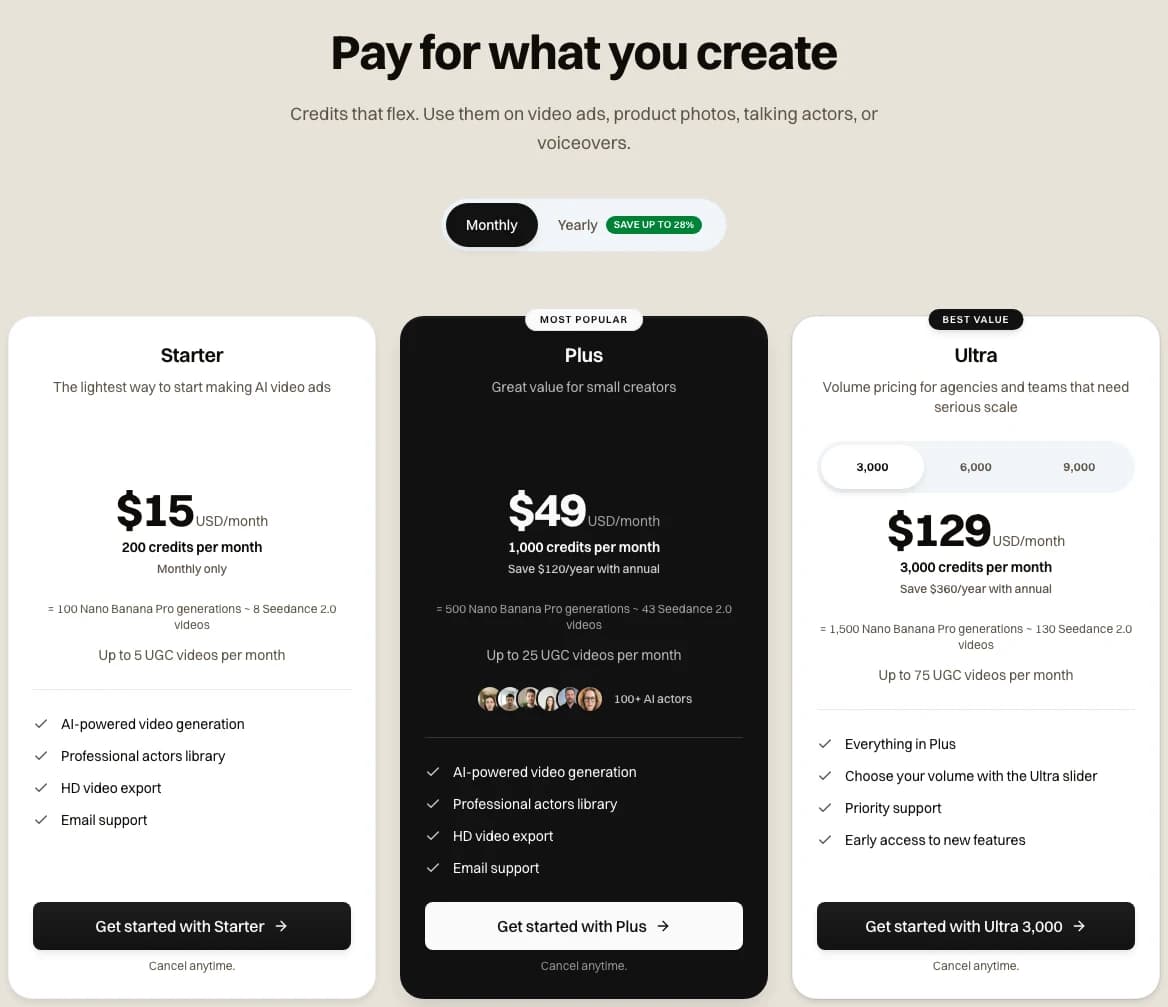 Screenshot: novoads.ai/pricing with Monthly selected, taken 2026-11-05
Want 4K clips without an upscaler?
Novoads makes new ad clips from a prompt, up to 4K on Omni Flash, and every plan is paid from the first month.
See Novoads plansWhich route fits which job
Your starting point decides most of this.
| If you | Start with |
|---|---|
| Have footage and a capable machine | Topaz Video's local render, the cheapest route here, on Personal if you're under the $1M line |
| Have a few short clips and no such machine | Topaz for Web's Video plan, the smallest outlay for a single month |
| Work for an organization over $1M a year | The Pro plans, because Personal and the web Video plan won't cover your ads |
| Would render in the cloud often and pay yearly | Studio, priced against Personal before you buy |
| Don't have the clip yet | Novoads, with Omni Flash for 4K in one step, or Seedance 2.5 plus an upscaler |
If you take the Seedance 2.5 route in the last row, plan on two subscriptions, ours for the clip and an upscaler's for the 4K step.
Frequently Asked Questions
Is Topaz Video AI discontinued?
Yes. Topaz's docs say Video AI was discontinued in September 2025, and its last version, 7.1.5, came out on October 2, 2025. If you own a license, it's still yours, but it doesn't activate Topaz Video. New buyers get Topaz Video, which is sold by subscription. On November 5, 2026, Topaz listed its Personal plan at $299 a year before VAT.
Is Topaz Sharpen free?
It depends on which Sharpen you mean. Sharpen AI, the old desktop app, was discontinued in late 2023, and Topaz calls it a legacy app. Topaz says Sharpen AI's sharpening is available in its currently supported apps, and Topaz Photo has a Sharpen tool. Topaz's docs describe Topaz Photo as subscription-only. On November 5, 2026, Topaz listed it at $199 a year. Topaz's browser page for sharpening images says you can upload one "to get started for free", while its docs say a subscription is required to use Topaz for Web. We'd expect a paid step, but we didn't test it.
Is Topaz Video worth the money?
It can be, if you already have footage and a machine that can run it, because a local render costs nothing beyond the plan. For a few short clips without that machine, there's Topaz for Web's Video plan at $29 a month. By our math, a month's credits cover six 15-second clips at 4K. It won't make a clip for you, though. We didn't test it. On Trustpilot, the score for all Topaz products read 3.6 from 56,717 reviews on November 5, 2026.
What does it cost to make an AI video?
It depends on the model, the length and the resolution. In Novoads, a 15-second Seedance 2.5 clip costs 105 credits at 720p and 180 at 1080p. On Plus, that's $5.15 and $8.82. On Starter, it's $7.88 and $13.50, by our arithmetic on November 5, 2026. Topaz doesn't make clips, so its credits only come into it when you upscale footage you already have.
Key Takeaways
- Topaz Video AI was discontinued in September 2025, so the prices you'll find today are for its subscription successor, Topaz Video. Adobe completed its purchase of Topaz Labs on September 23, 2026, and we found no announcement of a pricing change.
- Topaz lists the Personal plan at $299 a year, in US dollars and before VAT. The same plan is also $39 a month on a yearly commitment, or $59 month to month. Pro is $699 a year.
- By our scaling, a 15-second clip upscaled to 4K takes 30 credits on Topaz for Web. On its $29 monthly Video plan, those credits are worth $4.35. A local render with Topaz Video costs nothing beyond the plan.
- Topaz's license counts advertising as commercial use. Personal and the web Video plan cover it only under $1M a year in revenue, and larger organizations need a Professional license.
- Novoads makes new clips from a prompt and doesn't upscale video. A 720p Seedance 2.5 clip from us plus Topaz's upscale comes to about $9.50 on Plus. The same clip made at 1080p with us costs $8.82. For 4K without the extra step, Omni Flash makes the clip directly in our dashboard, at 9 credits a second.
Sources
- •Topaz Labs: Topaz Video plans
- •Topaz Labs: Pricing
- •Topaz Labs: Topaz for Web video plans
- •Topaz docs: Video AI vs Topaz Video
- •Topaz docs: Cloud rendering
- •Topaz docs: Topaz for Web plans and pricing
- •Topaz docs: Topaz for Web video
- •Topaz docs: Cancellation and refund policy
- •Topaz docs: VAT FAQ
- •Adobe newsroom: Adobe to acquire Topaz Labs
- •Adobe blog (German): Adobe completes its acquisition of Topaz Labs