X Lead Gen Ads Open to Self-Serve, X Says: 17 Form Fields
X says its Lead Gen ads are open to all advertisers, self-serve accounts included. We cover the 17 form fields in X's Ads API docs, the creative specs and what X hasn't published.

Mauricio Valdivia
·12 min

When the form opens inside X, the ad has to make the pitch
On October 30, X said that "Lead Gen ads are now generally available to all advertisers globally, including small and medium-sized businesses and self-serve advertisers, with the product live in X Ads Manager." Of X's posts about the format that we could read, it's the first to name small businesses and self-serve accounts.
The way the form works puts the weight on the ad. X sums up the flow in one sentence. "A user taps the ad, fills in a short form that stays on X, and submits it without being sent to an external page." There's no landing page after the tap, so the image or video, plus the few lines on the card, has to state the offer, back it up and give people a reason to leave their details today. X also says that once someone has completed a form, "future ones can be pre-filled", which makes responding nearly effortless. We think that makes the creative the filter as well as the pitch, because nothing after the tap slows anyone down.
We didn't test Lead Gen ads inside X Ads Manager for this post. X's side comes from its October 30 Article and its Ads API documentation, both read on November 1, 2026, and we couldn't open X's business and help sites. The creative example further down is a vertical ad we made in Novoads.
What X said in July, August and October
A teaser, then sales-rep access, then a launch Article
X's business account teased the format on July 21, 2026, with a post that read "Coming soon to X Ads". On August 25, it introduced Lead Gen Ads and told advertisers, "Reach out to your X Sales Rep for exclusive access today."
The next day, X published its launch Article. It opens with "X today launched Lead Gen Ads enabling advertisers to collect high-quality customer leads directly on the platform" and ends on "Lead Gen Ads are now available to advertisers globally." That last line carries an asterisk, and there's no footnote for it anywhere on the page.
On September 15, X's developer changelog documented the Lead Generation API with the line "You can now create and manage native lead forms". The form details in this post come from those docs.
What the October 30 Article added
The October Article keeps "globally" and adds two groups by name, small and medium-sized businesses and self-serve advertisers. "Globally" is X's word in both Articles, and neither one lists countries. PPC Land covered the change on October 31 and noted, "Any excluded markets or restricted categories go unmentioned."
So the October post tells you X now counts self-serve accounts in. It doesn't say when self-serve access started, and PPC Land points out that it "does not say whether those accounts were excluded before, whether the August availability ran only through managed sales, or which markets, if any, were held back."
What nobody has shown yet
We haven't found a published test of a self-serve account running Lead Gen ads, a screenshot of the Leads objective in one, or a comment from an X spokesperson beyond the Article. Until one of those turns up, treat self-serve access as X's claim and check what your own Ads Manager account offers.
What X's Ads API docs say a lead form can ask for
Neither launch Article lists a single form field, and PPC Land made the same point about the October one, writing, "There is no list of available fields". X's Ads API documentation does list them, because developers build forms through it. Ads Manager may offer options the API docs leave out, and we don't cover Ads Manager's own screens here.
The 17 fields in X's docs
X's docs list 17 fields in two groups, contact details and information about the person.
| Group | The fields, in X's order |
|---|---|
| Contact (7) | Email, phone number, street address, city, state, country, ZIP code |
| User information (10) | Full name, first name, last name, date of birth, company name, job title, work email, work phone number, gender, handle |
Every field you add is required unless you mark it optional, and at least one field on a form has to stay required. X says later forms can be pre-filled for people who've completed one, but PPC Land notes there's "no description of which data is pre-filled", so don't count on any particular field arriving filled in.
Pick the fields based on the call you'll make afterward. A software demo offer usually needs a work email, a company name and a job title. A quote request for a local business usually needs a first name, a phone number and a ZIP code. Each extra field means more typing on a phone before the submit button, so ask for just what the first conversation needs.
What else goes on a form
Beyond the fields, every form needs a name, a purpose and a privacy policy, and X's docs list two more parts as optional.
| Part | Required? | What X's docs say |
|---|---|---|
| Name | Yes | Internal name for the form, 1 to 255 characters |
| Purpose | Yes | What the leads are used for, 1 to 1,000 characters |
| Privacy policy | Yes | An https link plus your company name, which takes 1 to 255 characters |
| Introduction card | No | Shown before the fields, with a headline of 1 to 190 characters and a description of up to 1,000 |
| Thank-you page | No | Shown after a successful submission, with an optional button whose label takes 1 to 100 characters |
Archived forms stop accepting submissions and can't be updated, so archive a form only when you're done with its offer.
The thank-you page can send people on. Its optional button "links the lead onward (for example, to the advertiser's site)", so you can point people to a booking page or a product page once they've submitted. If your offer is a call, a booking link there turns a lead into a meeting without waiting for anyone on your side to reply.
Who sees the leads, and where they go
X's docs say the Leads API "requires the Campaign user permission on the ads account", and that "Lead exports are further restricted to account administrators, because exported files contain personal information." That's about roles inside an ads account, and it's a separate question from which advertisers can run the format.
Through the API, you can download a form's submissions over a time window as JSON, CSV or XLSX. For Ads Manager, X's Article describes "a Leads Center where submissions can be exported or passed to a CRM." X doesn't name a CRM, and PPC Land adds that X "does not say how long the Leads Center keeps submissions". So before launch, decide who's an administrator, who downloads new leads and how fast someone calls them.
X describes the Leads objective for Ads Manager only. Its Article gives advertisers "a dedicated Leads objective in Ads Manager", but the Ads API reference we read lists eight campaign objectives, and none of them is for leads.
The image and video rules for the ad above the form
The formats that can carry a form
X's October Article says the format "works across image, video, carousel and Timeline Takeover creatives." In the Ads API, a form attaches to a card. A card holds one image or video, or a swipeable set of 2 to 6, and it has either a title block or a button. Either one can open the form.
We couldn't open X's own pages on Timeline Takeover specs, so those specs aren't in this post.
Size and file rules in X's creative docs
X's Ads API creative docs set these rules for images and videos used in cards:
- Images must be 3 MB or less and at least 800 px wide.
- Images can be BMP, JPEG or PNG files.
- Website card images take 1:1 and 1.91:1.
- Website card videos take 16:9 and 1:1.
- Promoted video can run up to 10 minutes, with a file of 500 MB or less.
- Video files should be MP4 or MOV.
The ratio lines are written for Website cards, the kind that send people to a site, and we didn't find a ratio rule for lead cards in anything X published that we could read. So treat the Website card lines as the closest published rule.
X's developer guide to media uploads, which also covers video for ads, recommends 1280 x 720 for landscape video and 720 x 1280 for portrait. For square video, it recommends 720 x 720. If you want other networks' spec sheets next to these, our roundup of video ad specs by platform has them, and if you edit video in X's own app, our post on X's video editor covers what it means for advertisers.
X Marketing Japan's ratio list
On February 27, 2026, X Marketing Japan, an account affiliated with X, posted that image and video ad creatives in these ratios can be uploaded in X Ads Manager as is:
- 2:3 at 1080 x 1620 pixels (new in that post)
- 4:5 at 1440 x 1800 pixels (new in that post)
- 1:1 at 1080 x 1080 pixels
- 1.91:1 at 2064 x 1080 pixels
- 16:9 at 1920 x 1080 pixels
- 9:16 at 1080 x 1920 pixels
The same post said ad accounts handled by X's sales team got the new ratios automatically, and it sent other accounts to a contact form. That note is eight months old. It may mean 4:5 and 2:3 aren't open to every self-serve account, so check what your own uploads accept.
Put the three lists side by side and square is the only ratio in all of them. Vertical 9:16 is in X Marketing Japan's list but not in the Website card video line. That's our own reading of the three lists, because X hasn't published a ratio rule for lead cards.
The results X shows, and what it leaves out
micro1's numbers, as X reports them
The results section of X's October Article covers one advertiser, micro1, which X calls "a company hyperscaling in the data management space". X reports these results for it:
- "5x average ROAS in Q3 2026"
- "75% lower cost-per-lead after switching to the Lead Generation objective"
- "acquisitions delivered within the first two weeks"
- "4.5x increased investment", which X credits to the lower cost per lead
In the same Article, micro1's CMO, Daniel Warner, gives a different figure, saying, "We recently cut our cost-per-lead for our acquisition program by 33%". X ties its 75% to the switch to the Lead Generation objective, while Warner's 33% covers micro1's acquisition program, so the two numbers describe different scopes. PPC Land read it the same way and concluded that X "has published one case study, picked by X, from one advertiser, with figures that do not agree with each other and no absolute numbers."
What X's head of global advertising said
Monique Pintarelli, X's head of global advertising, said in the October Article that "making them available to everyone means more businesses, including smaller ones, can turn real-time attention into results across the full funnel." That's X's reason for opening the format to everyone, and micro1's numbers are the only results the Article offers to back it up.
What isn't public yet
X hasn't published a cost per lead or explained how leads are charged. PPC Land lists, in its own words, the gaps an advertiser would run into before spending:
- X "discloses no spend, no lead volume, no absolute cost per lead and no comparison period".
- The post "does not say what it optimises for, whether bids can be set on a cost-per-lead basis or how leads are charged."
- X's post "says nothing about invalid lead detection, spam controls on forms or credits for fraudulent submissions."
AdTechRadar, as PPC Land quotes it, wrote that X "will need to keep proving its value."
Without a public cost per lead, the benchmark has to come from your own account. Run the same creative once to a lead form and once to your landing page, then compare what a qualified lead costs after your team has called the people who filled in the form. Testing several hook variations on one video is a cheap way to find the opening that brings in leads worth calling.
How Novoads makes the video or image above the form
With the form inside X, the creative has to carry the offer, the proof and the call to action, and that's the part Novoads makes. You write or paste a script, pick an actor or a product photo, and download the finished file. Novoads doesn't place, buy or run ads on X, so you upload the file in X Ads Manager yourself.
A 23-second talking-actor ad we made
On October 5, 2026, we made a 23-second vertical talking-actor ad with one call through the Novoads MCP connector. Bárbara, one of the AI actors in our library, sits at a wooden desk in a beige knit vest and talks about a tool that builds her weekly reports in about a minute. She closes on a spoken call to action, "The link is right below."
It came back in 2 minutes 31 seconds and cost 200 credits. The file is a vertical 720p video, 736 x 1312 pixels, and a local transcription matched the script word for word. We didn't run it on X.
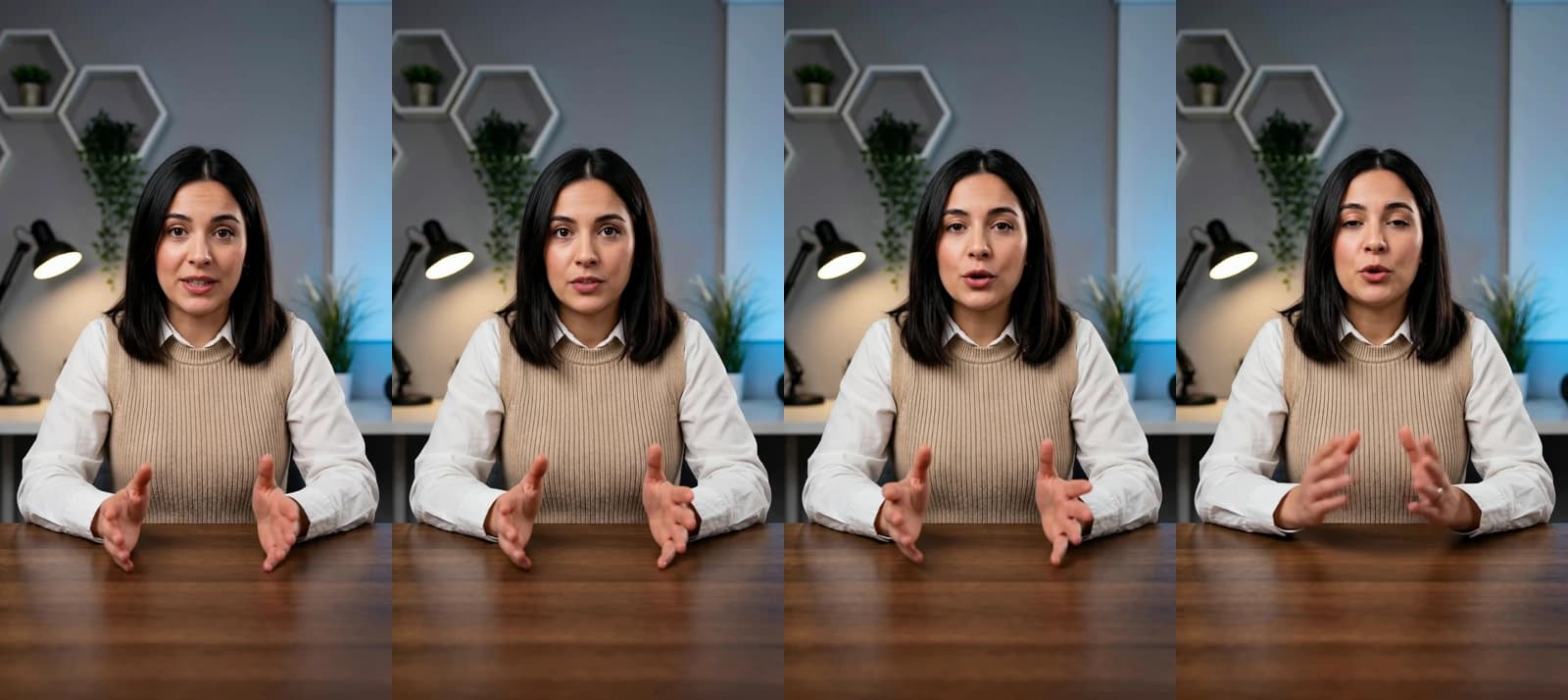
Talking actor in Novoads, rendered 2026-10-05 for 200 credits at 720p. Library actor Bárbara reads a 23-second script about weekly reports and ends on "The link is right below." Four frames from the finished vertical file, which we didn't run on X.
A talking-actor ad is a UGC-style ad made without filming anyone, and for a lead form, the closing line is the one to rewrite. "The link is right below" fits an ad that sends people to a page. Above a form, the actor should say what people get for filling it in and what happens next, something like "Tap the button, leave your work email, and we'll send you the report template today." Our guide to ad hooks covers the opening, but on X the close matters just as much, because it's the last thing people hear before the tap.
Our ad is vertical 9:16, which X Marketing Japan's list includes and the Website card video line doesn't. Since X hasn't published which ratios a lead card takes, it's worth having a square or 16:9 file as well, and the table below shows which of our tools make one.
Which Novoads outputs fit X's lists
Ratios as of November 1, 2026, matched against the X lists above.
| Novoads output | Ratios we make | In X's Website card lines | In X Marketing Japan's list |
|---|---|---|---|
| Talking actor | 9:16 in our run | No | 9:16 |
| Image ads (GPT Image 2) | 4:5, 9:16, 1:1, 16:9, 2:3, 21:9 | 1:1 | 4:5, 9:16, 1:1, 16:9, 2:3 |
| Seedance 2.0 and Seedance 2.5 | 16:9, 9:16, 1:1, 4:3, 3:4, 21:9 | 16:9, 1:1 | 16:9, 9:16, 1:1 |
| Kling v3 Pro | 16:9, 9:16, 1:1 | 16:9, 1:1 | 16:9, 9:16, 1:1 |
| Wan 3.0 | 9:16, 16:9, 1:1, 4:3, 3:4 | 16:9, 1:1 | 9:16, 16:9, 1:1 |
| Google Veo 3.1 | 9:16, 16:9 | 16:9 | 9:16, 16:9 |
None of our video models makes 4:5 or 2:3. Nothing we make comes in 1.91:1, the wide ratio on X's Website card image line.
Every size our image ads come in is at least 1,024 pixels wide, which clears X's 800 px minimum. With GPT Image 2, our 16:9 image comes out at 1920 x 1088 pixels. That's 8 pixels taller than the 1920 x 1080 in X Marketing Japan's list. We haven't measured our files against X's 3 MB image limit, so check the file size before you upload, especially for a 4K Nano Banana Pro image in Novoads. For flat image creative, our post on static ads covers sizes and text limits.
What it costs in Novoads
Prices as of November 1, 2026, on monthly billing, with the annual price beside each plan.
| Plan | A month | Credits a month | Billed annually |
|---|---|---|---|
| Starter | $15 | 200 | Monthly only |
| Plus | $49 | 1,000 | $39 a month |
| Ultra | $129 | 3,000 | $99 a month |
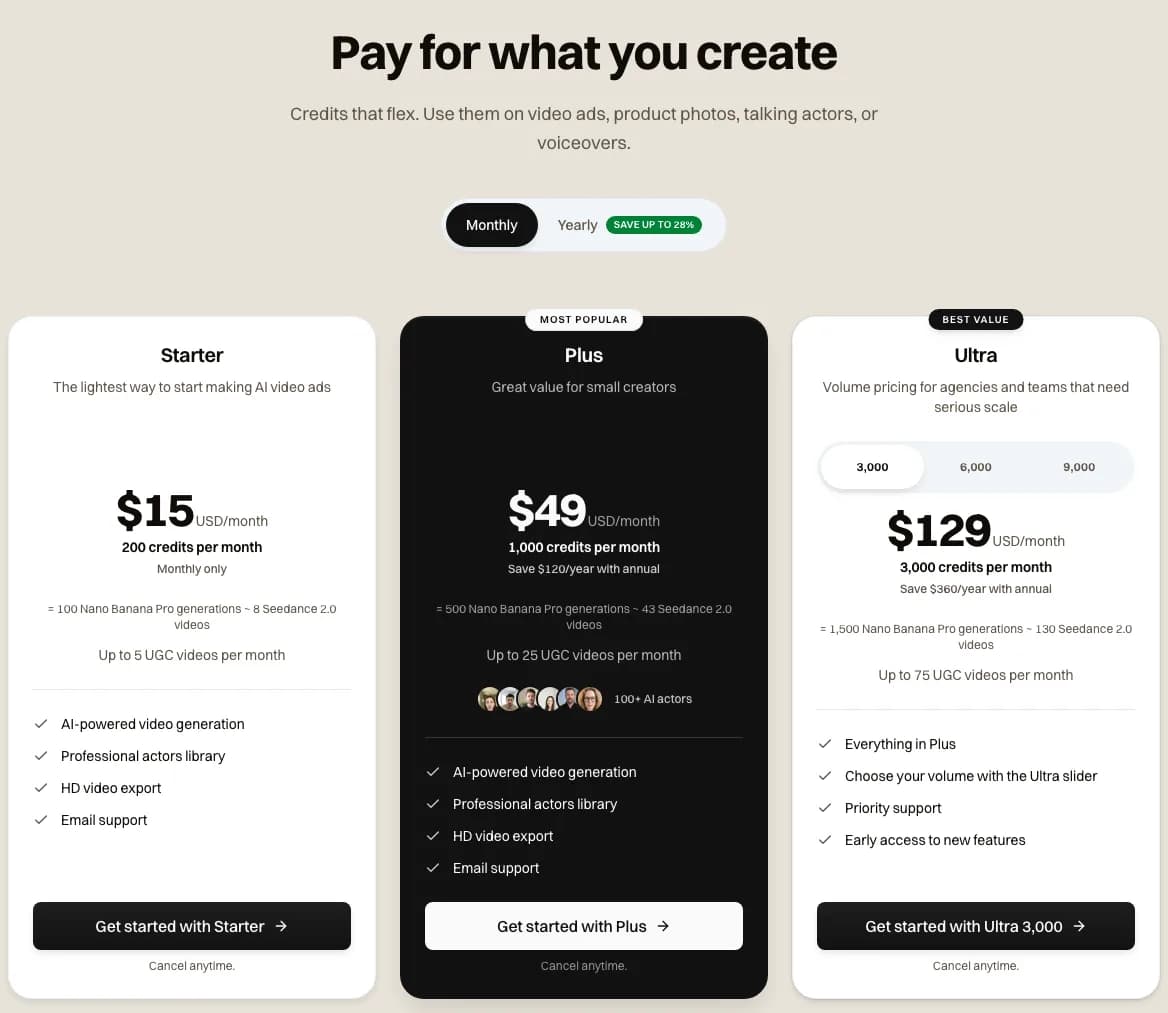
Novoads pricing with monthly billing selected, captured 2026-11-01. Starter shows $15 a month for 200 credits.
Talking-actor ads are billed per started minute, with the voice included. For an X lead ad, what matters in Novoads is what a talking-actor minute and an image cost in credits.
- A talking-actor minute costs 200 credits at 720p.
- At 480p, the same minute costs 100 credits.
- An image with GPT Image 2 at medium quality costs 1 credit.
- A Nano Banana Pro image costs 2 credits up to 2K, or 4 credits at 4K.
So the 23-second ad above cost what a 60-second one would, which is a whole month of Starter credits. On Plus, where a credit works out to $0.049, that ad comes to about $9.80. Every plan is paid from the first month, and the full price list is on our pricing page, along with what each plan's credits make.
Make the ad your X lead form sits under
Write the offer into a talking-actor video or an image ad in Novoads, download the file, and upload it in X Ads Manager yourself. Every plan is paid from the first month.
See plans and creditsBefore you launch your first X lead form
- Check that your Ads Manager account offers the Leads objective. X says self-serve advertisers are included, but your own account is where you'll see it.
- Put the offer in the first few seconds of the video or at the top of the image, with what people get and when they get it.
- End the video with a spoken line that points to the button and says what happens after the tap.
- Ask only for the fields your team will use on the first call.
- Write the form's purpose, and have an https privacy policy link and your company name ready, since X's docs require both.
- Decide who's an account administrator, because only administrators can export leads.
- Make a square version of every video and image, plus a 16:9 cut of each video, since those are the ratios X's Website card lines list.
- Keep images at 3 MB or less and at least 800 px wide.
- Use the thank-you page's optional button to send people to a booking page or your site after they submit.
- Compare what a qualified lead costs through the form with what it costs when the same creative sends people to your landing page.
Frequently Asked Questions
Who can run X Lead Gen ads now?
On October 30, 2026, X said Lead Gen ads are generally available to all advertisers globally, including small and medium-sized businesses and self-serve advertisers, with the product live in X Ads Manager. Its August 25 post had told advertisers to reach out to their X sales rep for access. X hasn't published a country list, and we haven't found a public test of a self-serve account running the format, so your own Ads Manager account is the place to confirm it.
Key Takeaways
- On October 30, 2026, X said Lead Gen ads are generally available in X Ads Manager to all advertisers globally, small and medium-sized businesses and self-serve advertisers included. We haven't found a published test of a self-serve account running them.
- The form opens inside X and people submit it there, with no landing page after the tap, so the image or video above it has to state the offer, back it up and say what happens next.
- X's Ads API docs list 17 fields a form can ask for, split into two groups. Every form also needs a name, a purpose and a privacy policy link, and only account administrators can export leads.
- X's creative docs cap card images at 3 MB and set a minimum width of 800 px. X hasn't published which ratios a lead card takes, and square is the one ratio in every list we found.
- The results in X's Article come from one advertiser, micro1. X credits it with a 75% lower cost per lead, while micro1's CMO cites a 33% cut over a different scope. X hasn't published a cost per lead or explained how leads are charged.
- Novoads makes the ad above the form. A talking-actor video with a spoken call to action, for example, costs 200 credits per started minute at 720p. You upload it in X Ads Manager yourself.