Adobe Firefly Prompts for Product Ads: Examples, Credit Costs and Adobe's Three-Word Tip
Adobe's own advice for writing Firefly prompts, eight product ad prompts written to it, what each one costs in Firefly credits and dollars, and where Nano Banana Pro costs less.

Mauricio Valdivia
·11 min
The Firefly prompt guides skip what an image costs
The pages that rank for "adobe firefly prompts" are lists of example prompts and writing tips, and none of the ones we could read mentions generative credits or a price. For a product ad, that's the missing half, because what a prompt costs depends on the model you run it on. Adobe's credit tables put a Firefly Image 5 generation at 10 credits and a Nano Banana Pro generation at 40. Firefly Image 4 costs no credits on a paid plan.
We read Adobe's help, credit and plan pages, and archived copies of its help pages, from Spain on November 6, 2026. We didn't test Firefly for this post. The eight prompts below are ours, written to Adobe's advice and never run in Firefly, and the product shot further down is a Nano Banana Pro image we made in Novoads.
What Adobe's help pages tell you to write
Adobe's help article on writing text prompts, last updated June 16, 2026, covers image prompts on the Firefly website, and most of its advice carries straight over to product shots.
Three words, and the reason Adobe gives
Under "Be specific", the article says "Use at least three words in your prompts, and avoid using words like generate or create." Adobe's page on generating images from text descriptions repeats the advice as "stick to simple and direct language and use at least three words." It's written as a tip, and we didn't test whether the app turns down a shorter prompt.
Adobe gives the reason on a troubleshooting page about language warnings, which says "Sometimes, short English prompts are misinterpreted as being from an unsupported language. To resolve this issue, rewrite your prompt using three or more words." So the three words are about language detection. We'd write far more than three for an ad, because the detail is what gets you the shot you pictured.
The tip isn't new. An Internet Archive copy of the article at its old address, saved on September 21, 2023, carries the same sentence and is stamped "Last updated on Sep 13, 2023".
Leave out "generate" and "create"
The second half of the tip asks you to drop verbs like generate and create, and to start with what you want to see. The 27 prompts on Adobe's own Australian examples page don't follow it. All of them open with "Create a", as in "Create a product render of a luxurious crocodile leather purse". We'd go with the help article, since it's Adobe's guide to writing prompts, and open with the product.
Subject first, then detail, feeling and light
The article asks for "simple, direct language with a subject, descriptors, and keywords." It says "the more detailed your description, the more likely you are to get images that match your vision," and asks you to bring in "feeling, style, and lighting elements." Its studio example already reads like a product brief.
Studio shot of futuristic high heels, warm red blue gel lighting, shallow depth of field, mechanical materials as props
For mood, Adobe suggests words like love, gentle and playful for a heartwarming image, and powerful, strong and uplifting for an inspiring one. Under "Be empathetic", it says images "tailored to what the audience cares about" become "more engaging, memorable, and relevant." That's the line we'd keep in mind for ads, so in a prompt we'd name the feeling the buyer wants first and then the light that brings it out.
When the first result misses, Adobe's article says "You can modify text prompts and experiment with the settings until you achieve the image you want."
Effects, quoted text and prompt enhancement
Firefly's effects come in three groups (Color and tone, Lighting, and Camera angle), and as you apply them, Adobe says, "they will be displayed in the Prompt field." The effect names are worth borrowing when you type the whole prompt yourself.
- Color and tone includes Warm tone, Cool tone, Pastel color and Muted color.
- Lighting includes Studio light, Golden hour, Backlighting and Dramatic light.
- Camera angle includes Closeup, Knolling, Shot from above and Shallow depth of field.
For words inside the picture, Adobe's Fast mode page says "If you want to specify text in an image, use quotation marks."
Adobe also offers prompt enhancement, which it says "refines your prompt in the background by making it more detailed and descriptive," but it works with Firefly Image 4 and Image 4 Ultra, and it's "available only for prompts written in English." Adobe's product page says Firefly accepts prompts "in over 100 languages", so a prompt in another language goes in without that enhancement.
What Adobe says about video prompt length
The three-word tip is for images. Adobe's help page for video prompts says "There aren't hard limits on how long or short a prompt should be, but Firefly has a maximum word limit of 1800 words." The prompt box on Adobe's Firefly product page has a cap of its own, with the message "Prompt exceeds the max length of 750 characters."
Eight product ad prompts written to Adobe's advice
We wrote these prompts to the advice above and haven't run them in Firefly. Each opens with the product, adds the setting, the light and a feeling, and leaves out "generate" and "create". Under each one, we list the settings we'd pick, using Adobe's own names.
Adobe's content type setting offers Art or Photo, or an automatic choice based on the prompt, and every prompt here uses Photo. For sizes, Adobe's aspect ratio page names four standard options (Landscape, Portrait, Square and Widescreen) and adds Vertical, with a note that "Vertical (9:16) is available for Firefly Image 4 and Firefly Image 4 Ultra models." Adobe's page on Gemini models lists more sizes for Gemini, Standard (4:5) among them.
A serum bottle on travertine
Studio product photo of a small amber glass dropper bottle of face serum with a blank cream label on a pale travertine slab, black dropper cap, water beads on the glass, soft three-point studio lighting, low eye-level angle, warm beige background, calm and clean mood
It follows Adobe's high-heels example, with the product first, then the props and the light, and the mood last.
- We'd set Portrait (3:4), with Warm tone, Studio light and Closeup.
We haven't run this wording anywhere. The image below came from Google's product mockup template, filled in for the same serum scene and run once in Novoads with Nano Banana Pro. So it shows the scene rather than this exact prompt, and it isn't Firefly output. That one run came back with every element the prompt asked for. We asked for a blank label, so this run didn't test text in the image.
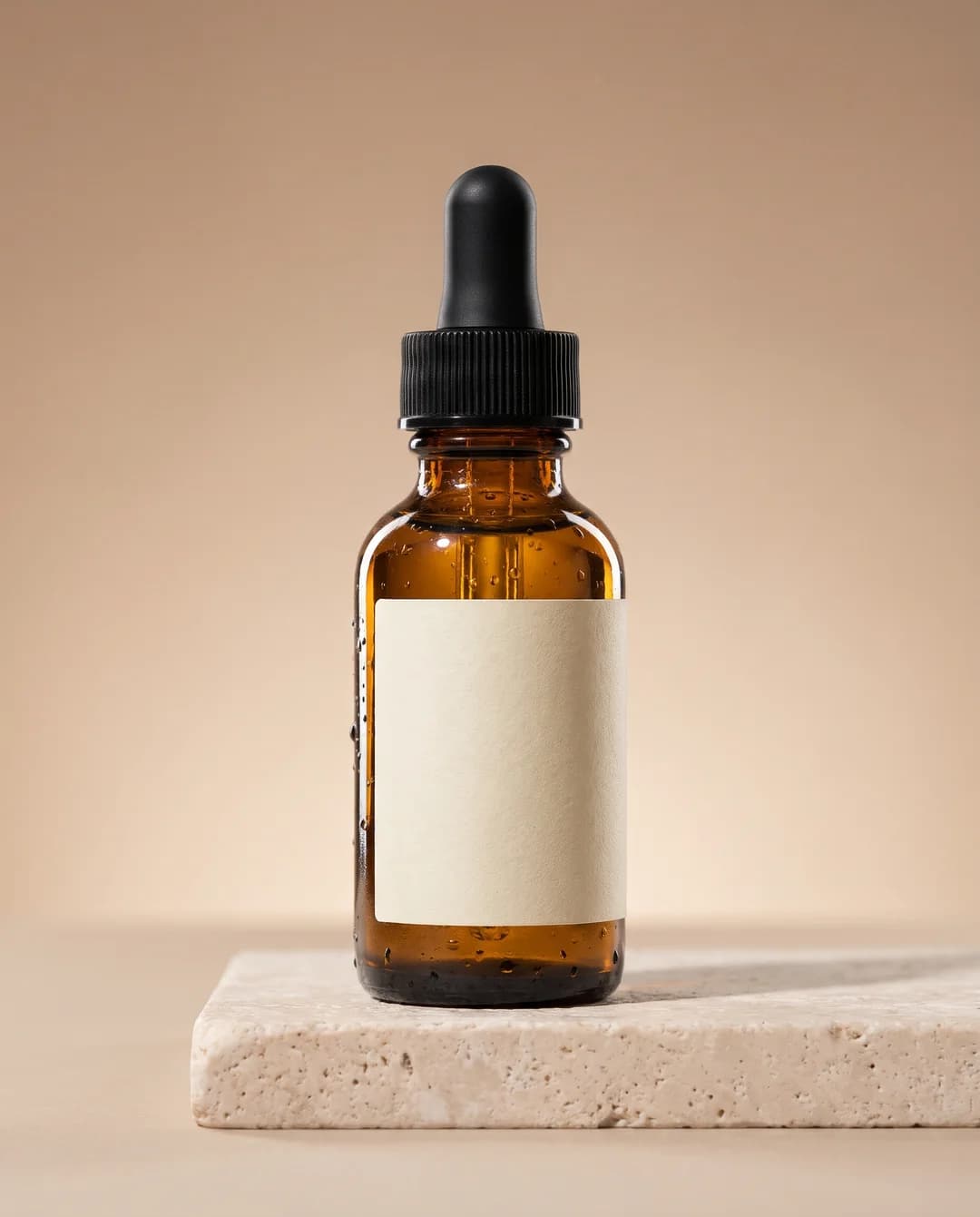 Made in Novoads with Nano Banana Pro · Google's product mockup template filled in for a serum, one image at 2K and 4:5 · 2 credits · rendered 2026-11-01
Google's template and how we filled it in are in our guide to Nano Banana prompts, and our Nano Banana Pro explainer covers the model itself.
Headphones with a line of copy
Matte black over-ear wireless headphones above a concrete plinth, deep shadows, minimal studio set, bold white headline text "QUIET ANYWHERE" above the headphones, powerful and modern mood
The headline is in quotation marks, as Adobe's Fast mode page asks, and "powerful" is one of Adobe's mood words. Check the headline's spelling in every result, because we haven't tested text in Firefly.
- We'd set Square (1:1), with Monochromatic and Studio light.
Face cream on a bathroom shelf
White ceramic jar of face cream on a bathroom shelf beside a eucalyptus sprig and a folded linen towel, soft morning sunlight, fresh and gentle mood
"Gentle" comes from Adobe's words for a heartwarming image.
- We'd run it on Image 5, which returns a single image per generation.
- We'd set Portrait (3:4), with Pastel color, Backlighting and Photographed through window.
A candle on a windowsill
Hand-poured soy candle in an amber glass jar on a wooden windowsill, soft garden bokeh behind, warm glow, cozy and gentle mood
It names the product, the place, the light and the feeling.
- We'd set Portrait (3:4), with Warm tone, Golden hour and Shallow depth of field.
A water bottle by a mountain lake
Matte green stainless steel water bottle on a granite rock beside a mountain lake, early morning light, crisp air, adventurous and uplifting mood
"Uplifting" is one of Adobe's words for an inspiring image, and the wide frame suits a banner.
- We'd set Widescreen (16:9), with Vibrant colors, Golden hour and Wide angle.
A coffee kit laid flat
Pour-over coffee kit laid out neatly on a light oak table, glass carafe, ceramic dripper, paper filters, whole coffee beans and a small kitchen scale, soft daylight, tidy and calm mood
Naming every item in the frame is how we'd apply Adobe's advice on detail. Knolling is one of Adobe's camera angle effects, and it suits a kit laid out on a table.
- We'd set Square (1:1), with Muted color, Studio light and Knolling.
A running shoe for a vertical story
White running sneaker on wet asphalt at night, cool blue rim lighting, puddle reflections, shallow depth of field, bold and energetic mood
Adobe's aspect ratio page lists Vertical (9:16) for Image 4 and Image 4 Ultra, so we'd run a story ad on one of those two models.
- We'd set Vertical (9:16), with Cool tone, Dramatic light and Shot from below.
A granola box in a brand's look
Box of almond honey granola on a breakfast table with a bowl of yogurt and fresh berries, bright morning light, playful pastel colors, clean product photo
"Playful" is another of Adobe's mood words. For a brand with a set look, Adobe says style references "guide the design of logos, advertisements, and branding materials," and that a composition reference is matched on its "outline and depth."
- We'd set Square (1:1), with Pastel color and Shot from above.
What each prompt costs in Firefly credits
Prices as of November 6, 2026.
Adobe sells Firefly plans by the month with a set number of generative credits, and each model has its own rate per generation. The rates come from Adobe's credits FAQ, last updated October 27, 2026. Nano Banana Pro's rate is on Adobe's partner models page, last updated October 23, 2026. The FAQ says paid plans get "unlimited access to standard generations," and Adobe's offer page counts Firefly Image 4 and Image 3 among those standard features, so they cost no credits.
| Model in Firefly | Credits per generation | One generation returns | On Standard, our sum |
|---|---|---|---|
| Firefly Image 4 | none on a paid plan | four variations | nothing extra |
| Firefly Image 5 | 10 | one image | about 5 cents |
| Firefly Image 4 Ultra | 20 | one image | about 10 cents |
| Nano Banana Pro, a partner model | 40, for a limited time | not stated | about 20 cents |
The last column uses Firefly Standard's rate of US$9.99 for 2,000 credits. That's about half a cent a credit. The Adobe pages we read don't say how many images one Nano Banana Pro generation returns, so we've counted it as one. Adobe attaches conditions to these rates and credits.
- Partner rates are "only available on the most up-to-date version of the app," and Adobe adds "Usage rates may vary. Plans are subject to change."
- "Availability of partner models may vary by country or region."
- Adobe's FAQ says "generative credits do not roll over to the next month."
- After a failed generation, Adobe says "credits are typically refunded to your credit balance within minutes."
What Firefly's four plans cost
Adobe's US plans page lists four plans, billed monthly.
- Firefly Standard, US$9.99 a month for 2,000 credits
- Firefly Pro, US$19.99 a month for 4,000 credits
- Firefly Pro Plus, US$49.99 a month for 10,000 credits
- Firefly Premium, US$199.99 a month for 50,000 credits
By our arithmetic, a credit costs about half a cent on Standard, Pro and Pro Plus, and about 0.4 cents on Premium. Standard's 2,000 credits cover 200 Image 5 generations a month. Spent on Nano Banana Pro, they cover 50.
Adobe's page for Spain lists Firefly Standard at 11,17 € a month with VAT included, for the same 2,000 credits.
What a round of drafts costs
Adobe's Australian examples page suggests you "Start with three to five variations of a prompt to explore different approaches," and go to "10-15 variations" on complex projects. We priced a round of five, the top of the first range, on Firefly Standard.
- Five on Image 4 cost no credits and return 20 variations.
- Five on Image 5 cost 50 credits, about 25 cents.
- Five on Image 4 Ultra cost 100 credits, about 50 cents.
- Five on Nano Banana Pro cost 200 credits, about $1.
Adobe's first-year offer of unlimited generations
Adobe's special offer of unlimited generations is a promotion with dates. We read its offer page on November 6, and the plan tables on it are headed "as of October 13, 2026". The offer covers "Individual plans for Firefly Pro, Firefly Pro Plus, Firefly Premium" and four credit plans, and "Teams and Enterprise plans are not included." Standard isn't on the list, and Adobe limits the offer in time, in place and in the models it covers.
- "The year begins on the date you start your eligible plan and runs for 12 consecutive months."
- It's "available exclusively on firefly.adobe.com and on the Firefly mobile app."
- "After the first year, all users return to consuming credits."
- Unlimited generations "apply to select models and resolutions that vary by plan," and the tables include Firefly Image Model 5 and Nano Banana Pro at 1K and 2K.
- "The list of models and resolutions covered by the unlimited generation special offer is subject to change."
So the credit sums above hold on Standard, for any model your plan's column leaves out, and for everyone once the year ends. Our Adobe Firefly explainer has more on the offer, and our Adobe Firefly pricing guide covers the plans and video costs in full.
Nano Banana Pro in Novoads, and where Firefly costs less
The same model for 2 credits an image
Nano Banana Pro isn't only in Firefly. We sell it in Novoads for 2 credits an image up to 2K. A 4K image is 4 credits. We priced one image at 2K or less against the Firefly rates above.
- On Novoads Starter, 2 credits at $0.075 each come to 15 cents.
- On Novoads Plus, 2 credits at $0.049 each come to about 10 cents.
- On Firefly Standard, 40 credits come to about 20 cents.
- On Firefly Premium, 40 credits come to about 16 cents.
Outside Adobe's offer, Nano Banana Pro costs less in Novoads than on any of Firefly's four monthly plans. On Starter it's 5 cents under Firefly Standard, and on Plus it's about 10 cents under. Our pricing page shows Starter's 200 credits as 100 Nano Banana Pro generations.
Where Firefly is the cheaper choice
Firefly costs less in three cases.
- Image 4 costs no credits on a paid plan and returns four variations a generation, so drafting on it adds nothing to the plan's price.
- Image 5 is about 5 cents a picture on Standard, a third of our Starter price for Nano Banana Pro and about half our Plus price, though it's a different model.
- During Adobe's first-year offer, a model your plan's column covers costs no credits until the year ends.
Commercial use differs by model too. Adobe's plans FAQ says "Outputs from Adobe Firefly AI models are safe for commercial use," and for partner models, "You're responsible for determining whether content generated by partner models is appropriate for your project." Our Firefly vs Midjourney comparison covers what that means for a paid ad, and our post on Firefly's audio tools goes through Adobe's commercial-safety line feature by feature.
When we'd pick each
We'd stay in Firefly in three cases.
- You already pay for a plan and want plenty of drafts on Image 4 at no extra cost.
- Adobe's offer covers the model you want on your plan.
- You want an Adobe model's commercial-use line for the picture.
We'd use Novoads in two.
- You want Nano Banana Pro images without paying Firefly's 40-credit partner rate.
- You want the same credits to cover video ads, talking actors and voiceovers, which our pricing page lists beside product photos, so a static ad and its video version come from one plan.
Novoads is paid from the first month. Starter is $15 a month for 200 credits. Plus is $49 a month for 1,000 credits. Every plan is on our pricing page.
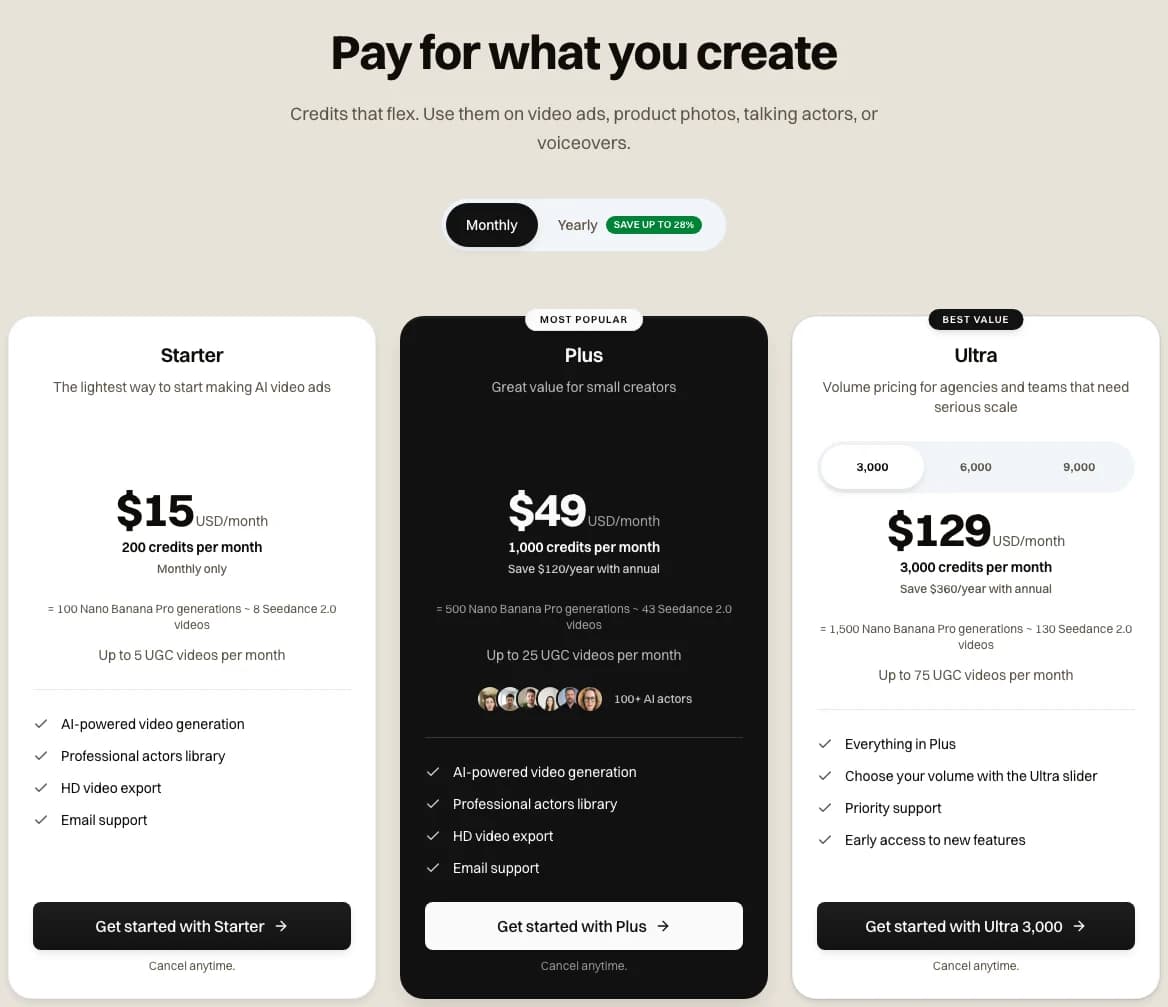 The Novoads pricing page with Monthly selected, each plan's credits also shown as Nano Banana Pro generations, taken 2026-11-06
Price a round of product shots before you prompt
Nano Banana Pro is 2 credits an image in Novoads, and every plan is on one page.
See the plansIf you already pay for Firefly, we'd draft on Image 4 and spend credits only on the finals you'd put in an ad.
Frequently Asked Questions
How do you write a good prompt in Adobe Firefly?
Adobe's help article on writing text prompts says to use at least three words, leave out words like generate or create, and stick to simple, direct language with a subject, descriptors and keywords. It also suggests adding feeling, style and lighting, then changing the prompt or the settings until the image matches what you pictured. For a product ad, that means naming the product first, then the setting, the light and the mood. That's from Adobe's help page Writing effective text prompts, last updated June 16, 2026.
Key Takeaways
- Adobe's help article asks for at least three words and no verbs like generate or create, a tip that's been on its pages since at least September 2023.
- The three-word tip is Adobe's fix for a language warning on short English prompts, and its help page for video prompts says there aren't hard limits on length.
- On Adobe's credit tables, a Firefly Image 5 generation costs 10 credits and a Nano Banana Pro one costs 40, while Image 4 costs no credits on a paid plan.
- At Firefly Standard's rate, that's about 5 cents for an Image 5 picture and about 20 cents for a Nano Banana Pro one. In Novoads, a Nano Banana Pro image is 2 credits, about 10 cents on Plus.
- Firefly costs less when you stay on Image 4 or Image 5, or when Adobe's first-year offer covers the model on your plan.
Sources
- •Adobe Help: Writing effective text prompts (Internet Archive copy of October 26, 2026)
- •Adobe Help: Prompt triggers a language warning (Internet Archive copy of September 23, 2026)
- •Adobe Help: Generative credits FAQ (Internet Archive copy of October 29, 2026)
- •Adobe Help: Partner models in Adobe products (Internet Archive copy of November 4, 2026)
- •Adobe Help: Firefly unlimited generations special offer (Internet Archive copy of October 22, 2026)