How to Make Animated GIF Ads With AI: in the App, by API or From Claude
To make a GIF ad with AI, write a prompt where the first frame shows your product and each frame after it changes one thing, then make it with GPT Image 2.6 in Novoads' picture tool, through its API or from Claude.

Mauricio Valdivia
·11 min
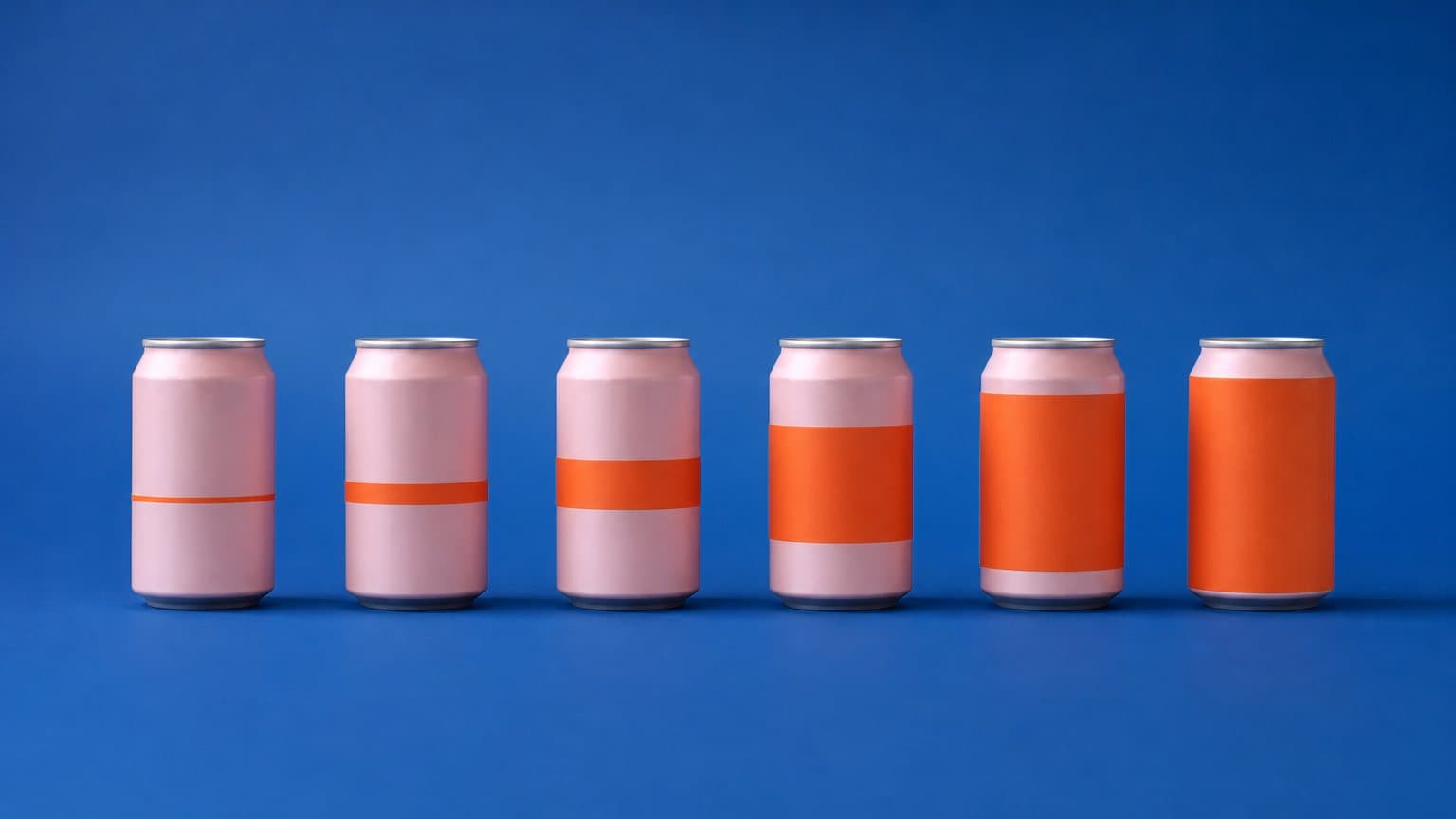
A soda can whose logo grows for 12 frames
For this post, we made one GIF ad and kept it exactly as it came out. It shows FENNOW, a grapefruit soda can we made up, standing alone on a flat blue backdrop. Over 12 frames, the orange logo on the pink can gets bigger, fills the can, spills off it and runs across the picture. Our prompt asked for a last frame where the logo covers the whole picture from edge to edge, but the GIF stopped short of that. The can still shows through the middle, and there's still blue at the sides. The small print on the can also came out as made-up letters.
A looping GIF ad is a handful of still frames that play in order, over and over, with no sound. OpenAI added animated GIF output to GPT Image 2.6 Sunburst and Flare on November 4, 2026. Since November 10, every Novoads customer has been able to make GIFs with both, in our picture tool, through our API and from Claude. A GIF in Novoads has 4 to 16 frames. Depending on how many you use and the speed you pick, the whole loop lasts 0.4 to 4.8 seconds.
On November 12, 2026, we read OpenAI's changelog and image guide, our API document, our connector's tool descriptions and our code. We made the GIF the same day in a Claude Code session through our connector, from one reference picture of the can. We didn't call OpenAI's API, and for this post we didn't make a GIF in the picture tool or through our API, so the steps for those two come from our API document and the app's own screens.
Why a loop instead of a still
What a few frames can show
A still ad shows one moment, and our guide to static ads covers what a single image can do on its own. In a loop, you get a few frames to show something changing, and since a GIF starts over by itself, the change plays again every time someone looks back at it. Our can is a simple example. Frame 1 is the can as you'd show it in a still ad, and by frame 8 the logo runs the full height of the can. Nothing else in the picture moves, so the only thing to watch is the logo getting bigger.
When a video fits better
A GIF has no sound, so the change has to make its point without a voice to explain it. Every GIF you make in Novoads is also square, and with 16 frames at most, we'd give each one a single idea. When the ad needs a person talking, a product in use or an offer read out loud, make a video instead. Our guide to product videos takes you from one product photo to a finished 15-second ad.
Write frame 1, then change one thing per frame
The pattern in two parts
Frame 1 is your starting picture, built the way you'd build a still ad, with the product, the backdrop and the light. Each frame after it changes one thing a little more than the frame before, and nothing else moves. OpenAI's image guide gives the same advice in one line, "Describe the subject, motion, and desired loop in your prompt." Say what has to stay still, too. Our prompt does that twice. It asks for only the can, with no hands, people or other objects, and it says the camera and the can never move. In the GIF that came back, the can and the camera stayed put in all 12 frames.
Frame 1 is a product picture like any other, so what you know about prompting a still ad applies to it. Our guide to GPT Image 2 prompts shows how to write one like a creative brief. If your brand colors have to match, our post on hex codes in AI image generators goes through what five makers document about exact colors.
The FENNOW prompt, word for word
We sent this prompt with one reference picture of the can. It's 743 characters long, well under the 4,000 a GIF prompt can hold.
An animated GIF ad, square, flat and clean like a studio product shot. The pink FENNOW sparkling grapefruit can from the reference picture stands alone, upright and centered on a plain flat blue backdrop, soft even studio light, a soft shadow under it. Only the can: no hands, no people, no other objects, no words except what is printed on the can. Frame 1 shows the can with its FENNOW logo at its normal size. In every following frame the FENNOW logo on the can is bigger than in the frame before: first it fills the can, then it spills off the can across the blue backdrop, until in the last frame one giant orange FENNOW logo covers the whole picture from edge to edge. The camera never moves and the can never moves; only the logo grows.
What came out, frame by frame
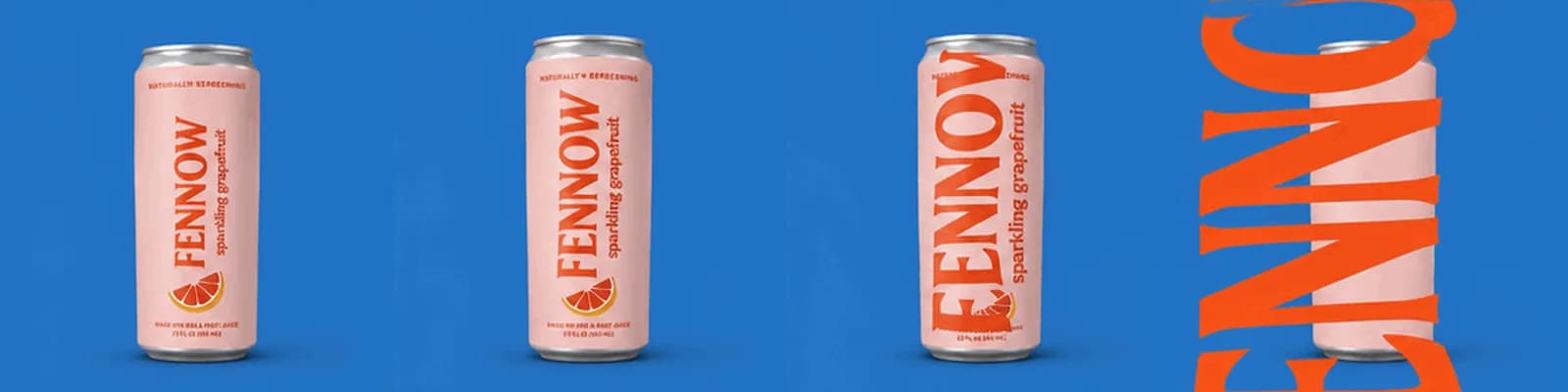
Made in Novoads with GPT Image 2.6 Sunburst · four of the 12 frames of a looping GIF of a made-up grapefruit soda can whose logo grows each frame, from one reference picture · 3 credits · 2026-11-12
The strip shows four of the 12 frames, from the first to the last.
- In frames 1 to 6, the logo grows slowly on the can.
- In frames 7 and 8, it fills the full height of the can.
- In frame 9, the letters spill past the can's edge onto the blue backdrop.
- In frames 10 and 11, they run across the backdrop and off the top and bottom of the picture.
- In frame 12, giant orange letters cross the picture, but the can still shows through the middle and there's still blue at the sides.
The lettering was hit-or-miss. FENNOW and "sparkling grapefruit" are spelled right wherever they're whole, but the small print (the line at the top of the can and the two lines at the bottom) came out as made-up letters. So we'd call this run mixed. The growing logo works as a loop, the last frame stops short of what we asked for, and small print needs a frame-by-frame look before you put the GIF in an ad.
The growing logo is the only idea of this kind we've turned into a GIF. We had four more for the same pattern (a price that drops, a product that fills up, a color swap, and a before and after), but we haven't made any of them, so we can't tell you how they'd turn out.
How long the loop runs at each setting
Frames times speed
As of November 12, 2026, two settings decide how long a Novoads GIF runs. Frames is how many pictures the loop has, and Speed is how long each one stays on screen. Multiply the two and you get the length of the loop. Our FENNOW GIF uses the defaults, 12 frames at Normal speed, where each frame stays on screen for 150 milliseconds. That's a 1.8-second loop, and the finished file runs exactly that long.
| Frames | Slow (300 ms a frame) | Normal (150 ms) | Fast (100 ms) |
|---|---|---|---|
| 4 | 1.2 seconds | 0.6 seconds | 0.4 seconds |
| 8 | 2.4 seconds | 1.2 seconds | 0.8 seconds |
| 12, the default | 3.6 seconds | 1.8 seconds | 1.2 seconds |
| 16 | 4.8 seconds | 2.4 seconds | 1.6 seconds |
We did the math for every cell, multiplying the frame count by the time per frame. The bold cell is the setting we ran.
Which length to start with
We'd start where we did, at 12 frames on Normal. If the change goes by too fast to follow, switch to Slow before you add frames. The same 12 frames then run 3.6 seconds, and speed doesn't change the price. Going to 16 frames gives the change more steps, for one more credit. At the short end, 4 frames on Fast make a 0.4-second loop, which we'd save for a quick swap between looks.
The limits on every Novoads GIF
The same limits apply whichever way you make one.
- A GIF is square. We ask the model for frames 288 pixels on a side and scale them up 2.5 times. The file you get is 720 x 720 pixels.
- One request makes one GIF.
- A GIF can use at most 2 reference photos.
- The prompt can run up to 4,000 characters.
- A GIF is always a new picture drawn from its prompt and photos. It can't be an edit of a picture you already have.
- Only GPT Image 2.6 makes GIFs, in both its versions, Sunburst and Flare.
- You can't use a finished GIF as a reference picture. For a second GIF in the same look, send the still photo again.
OpenAI's own API accepts a wider range. Its guide lists 2 to 16 frames and sizes other than square. Each frame can stay on screen for 20 to 2,000 milliseconds. Those are OpenAI's ranges for its own API, and the list above is what you get in Novoads.
Making a GIF in the Novoads picture tool
Open the picture tool set to GIF
The quickest way in is a link that opens the picture tool with GPT Image 2.6 Sunburst and GIF already picked. Open the GIF maker and you can go straight to the prompt. You'll need a Novoads plan to use it, and every plan is paid from the first month.
The settings, one at a time
Without the link, open any project and follow these steps.
- Click Image above the prompt box.
- Click Settings at the bottom of the prompt box to open the Image Settings panel.
- Under Model, pick GPT Image 2.6 Sunburst or GPT Image 2.6 Flare. The menu describes Sunburst as "Slower, keeps fine detail" and Flare as "Fast, for most images."
- Under Format, pick GIF. Its hint reads "Animated, loops. Square, one at a time." With GIF picked, the panel shows the shape as 1:1, at 720 x 720.
- Under Frames, pick how many frames the loop has. The default is 12.
- Under Speed, pick Slow, Normal or Fast. The default is Normal.
- You can leave Quality as it is, since it doesn't change a GIF's price.
- Check Estimated cost at the bottom of the panel.
- Click Reference to add one or two product photos, or skip them and make the GIF from the prompt alone.
- Write your prompt in the box and click the round arrow button.
If you add a third photo or go past 4,000 characters, a message asks you to remove the extra photos or shorten your text before we make the GIF.
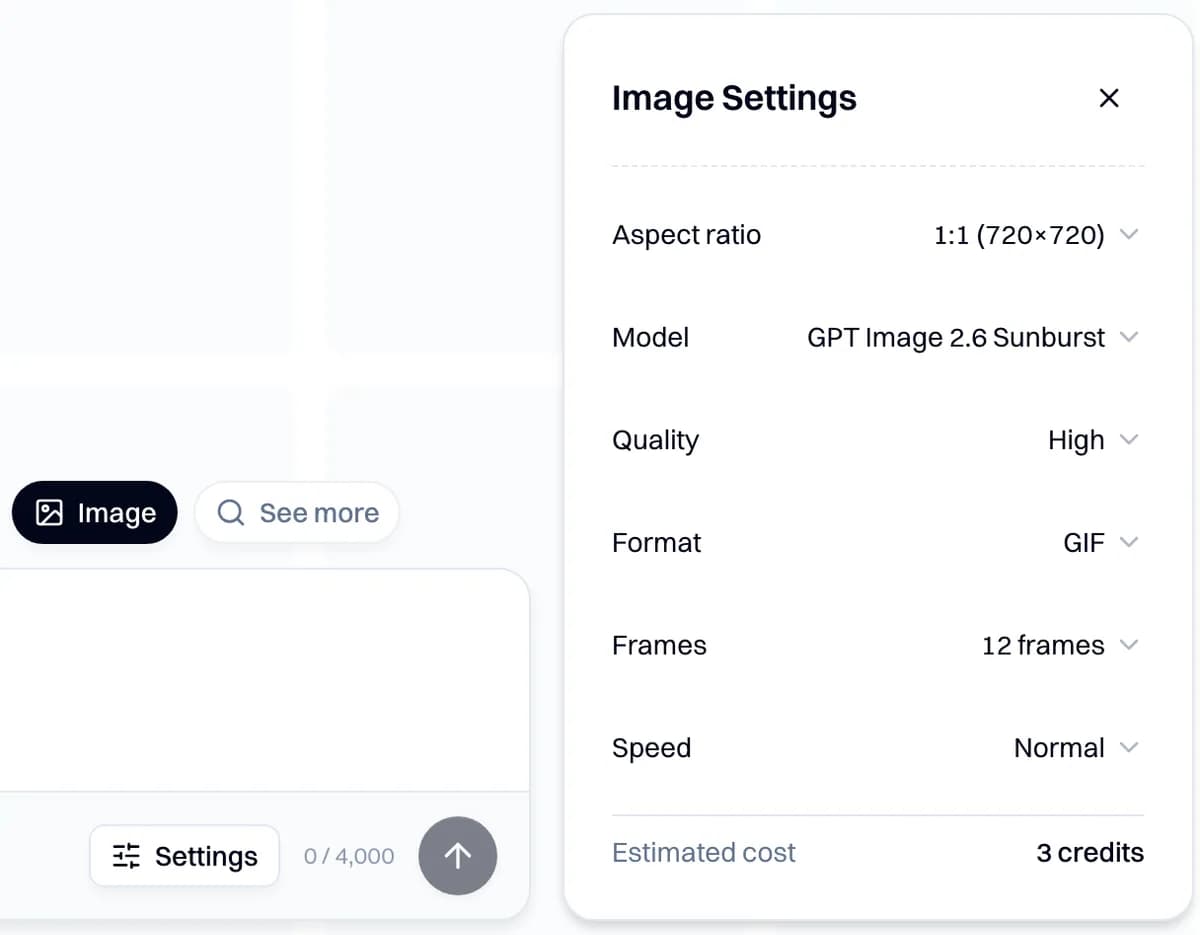
Screenshot of the Image Settings panel with GIF picked, 12 frames on Normal and an estimated 3 credits, captured 2026-11-08, two days before GIFs opened to every customer
Making a GIF from Claude or through our API
From Claude, the way we made ours
Our connector links Claude to your Novoads account. You sign in with that account and approve two permissions. There's no API key to paste, and the GIFs you make through it come out of your plan's credits.
You can add it in two ways.
- In claude.ai, the Add Novoads to Claude button in your Novoads dashboard opens Claude's add window with our name and address already filled in. Check them, add the connector and sign in.
- In Claude Code, run the command below, then run /mcp, finish signing in and restart Claude Code.
claude mcp add --transport http novoads https://novoads.ai/api/mcp
A session loads its tools when it starts, so if you connected Claude before GIFs opened on November 10, reconnect to see the GIF settings.
We made the FENNOW GIF in a Claude Code session through the connector, in three steps.
- We uploaded the can picture with the connector's upload tool, which returned an ID for it.
- We asked for the price first, and the estimate came back at 3 credits.
- We asked for one square GIF with GPT Image 2.6 Sunburst, at 12 frames on Normal, with the can picture as the reference and the prompt above word for word.
The job took 34 seconds and cost 3 credits. In Claude Code, you send a photo by uploading it through the connector, as in step 1. We haven't tried attaching a photo in claude.ai or Claude Desktop, and a GIF made from the prompt alone doesn't need one. Name the settings in your request, as this one does, so Claude doesn't have to guess them.
Make one looping GIF ad in Novoads with GPT Image 2.6 Sunburst, GIF format, 12 frames, Normal speed, square. Use <path to your product photo> as the reference picture. Tell me the price first and wait for my go before you make it. Use this prompt word for word: <your prompt>
If you're choosing among image tools for Claude, our comparison of image generation MCP servers covers setup, keys and cost for each.
Through our API
The third way is our own REST API. It works on any paid plan, and a GIF made through it costs the same number of credits as one made in the app. Only the owner or an admin of your Novoads organization can create a key, which they do under Settings, then Developer.
A GIF is an ordinary image request with outputFormat set to "gif", plus frameCount for the number of frames and frameDurationMs for how long each frame shows, in milliseconds.
curl -sS --max-time 120 https://api.novoads.ai/v1/images \
  -H "Authorization: Bearer $NOVOADS_API_KEY" \
  -H "Content-Type: application/json" \
  -d '{
    "model": "gpt-image-2.6-sunburst",
    "outputFormat": "gif",
    "frameCount": 12,
    "frameDurationMs": 150,
    "referenceAssetIds": ["<assetId from POST /v1/uploads>"],
    "prompt": "<your prompt, up to 4,000 characters>"
  }'
- Leave out
aspectRatioandnumImages, since a GIF is always square and each request makes just one. - To use a photo, upload it first through
POST /v1/uploadsand pass theassetIdyou get back. - To price the GIF first, send the same body to
POST /v1/estimateswith"kind": "image"added. Getting a quote doesn't spend any credits.
The image call waits for the render and usually comes back with the GIF already in it. If the render takes longer than the call waits, the response says running and includes a jobId, and you check GET /v1/generations/{jobId} until the job is done. We don't send a webhook when it finishes. Our API document asks for a client timeout of at least 120 seconds. It also says a timeout doesn't mean the job failed, since the work may still have run and been charged.
What one GIF costs on each plan
A GIF's price depends on its frame count and nothing else. Up to 12 frames, it costs 3 credits. At 16 frames, it costs 4. Quality and speed don't change it, and a GIF costs the same in the picture tool, through our API and from Claude.
Prices as of November 12, 2026. For each plan, we divided the monthly price by the plan's credits, then multiplied by the GIF's credits.
| Plan | Monthly price | Credits a month | Each credit | A GIF of up to 12 frames | A 16-frame GIF | GIFs a month at 3 credits |
|---|---|---|---|---|---|---|
| Starter | $15 | 200 | $0.075 | 22.5 cents | 30 cents | 66 |
| Plus | $49 | 1,000 | $0.049 | About 15 cents | About 20 cents | 333 |
| Ultra 3,000 | $129 | 3,000 | $0.043 | About 13 cents | About 17 cents | 1,000 |
These are monthly prices. Plus and Ultra cost less per month when you pay for a year, and Starter is only billed monthly. Our pricing page lists every plan.
We didn't find a GIF price on OpenAI's pages, so there's no OpenAI figure to put next to these. For what a still image costs with GPT Image 2.6, in Novoads and on OpenAI's API, see our GPT Image 2.6 post.
Once a GIF shows you which look works, you can take the same product photo into a product demo video in Novoads, where an AI actor holds the product up and shows it on camera.
Put the same product photo in a demo video
Upload your product photo, choose an AI presenter and get a demo where they hold the product up and show it on camera.
See product demosWhat to run first on your own product
Pick one product photo and write a prompt where only the logo changes from frame to frame, and spell out that the camera and the product stay still. Run it at 12 frames on Normal for 3 credits. Look at the last frame first, since that's where ours fell short, and then check any small print on the product. Move to Slow or to 16 frames only if the change needs more time to read.
Frequently Asked Questions
How long should a GIF ad loop?
We haven't measured how long people watch a GIF ad, so we don't have a tested answer. In Novoads, the loop lasts the frame count times the speed. The shortest setting, 4 frames on Fast, runs 0.4 seconds. The longest, 16 frames on Slow, runs 4.8 seconds. We'd start at the default, 12 frames on Normal, which loops every 1.8 seconds. If the change goes by too fast to follow, switching to Slow stretches the same frames to 3.6 seconds.
Key Takeaways
- Build a GIF ad around one change. Frame 1 shows the product the way you'd show it in a still ad, and each frame after it changes one thing a little more while the rest of the picture stays put.
- In Novoads, a GIF's loop lasts its frame count times its speed. The default, 12 frames on Normal, runs 1.8 seconds. The shortest setting runs 0.4 seconds, and the longest runs 4.8.
- A GIF of up to 12 frames costs 3 credits, whatever the quality or speed. At 16 frames it costs 4. On Plus, a 3-credit GIF comes to about 15 cents.
- In our 3-credit test GIF of a made-up soda can, the logo grew frame by frame as the prompt asked. But the last frame stopped short of covering the whole picture, and the can's small print came out as made-up letters.
- You can make one in Novoads' picture tool, through our API or from Claude through our connector. Each request makes one square GIF from at most 2 reference photos.