Real Estate Ads: Live Examples, What One Costs With AI, and Meta's 15-Mile Rule
Ten real estate ads running on Meta, what it costs to make a listing tour or an agent introduction with AI, what AI can't honestly show about a home, and Meta's 15-mile rule for housing ads.

Mauricio Valdivia
·15 min
What the top real estate ad guides leave out
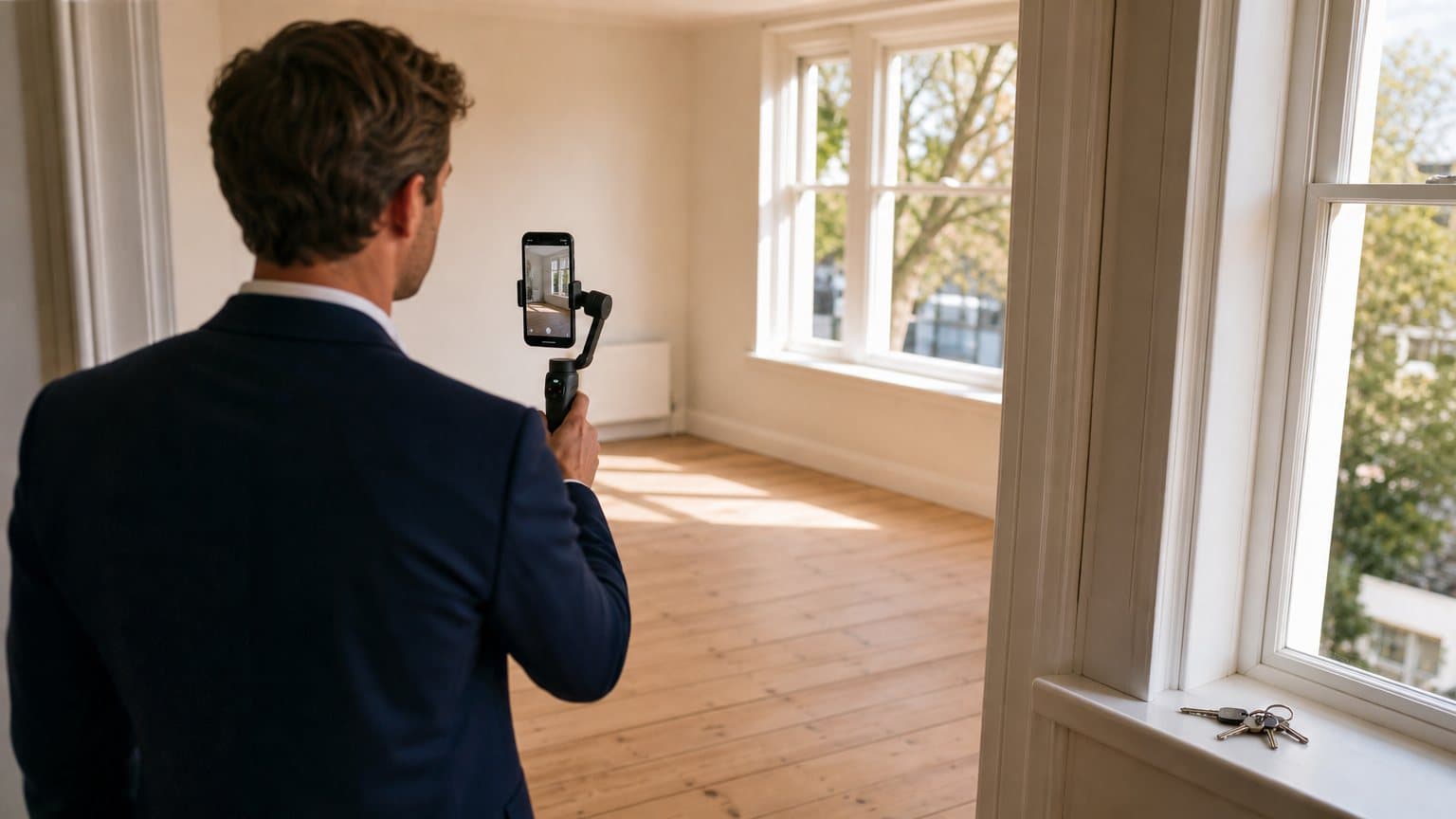
Right now, real estate ads on Meta include filmed walk-throughs, tours built from listing photos, open house and just-sold posts, and agents introducing themselves to the camera. Every one of them is public in Meta's Ad Library. The guides that rank for real estate ads don't tell you what one of those costs to make with AI, or what AI can't honestly show about a home. Of the five top-ranked pages we could open on November 9, 2026, none prices a single ad, and none says where AI has to stop.
So we pulled ten of those ads, each with a link to its library page, and priced out a listing tour and an agent introduction in credits and dollars. None of those five pages spells out Meta's radius rule, either. Meta requires the location targeting on a US housing campaign to cover at least a 15-mile radius around any city, address or dropped pin you select, and it doesn't allow ZIP code targeting for these ads.
We went through Meta's Ad Library on November 9, 2026, from Spain and without signing in, and read Meta's rules on its developer and Help Center pages the same day. Every Novoads price is our own credit cost. For this post, we rendered the made-up room further down, but we didn't run a Meta campaign, so the targeting limits below come from Meta's written rules.
Ten real estate ads running on Meta right now
We found these on November 9, 2026, in the Ad Library's housing category, filtered to active US video ads. For a visitor from Spain who isn't signed in, each ad's page shows who ran it, the day it started, its copy and its video, but not its spend or reach. So nothing here tells you which ad works. The order isn't a ranking, and any of these ads could stop at any time.
Our notes on each ad's first seconds are our own reading of the library's small preview, watched with the sound off. And we only say an ad used AI or staging when its copy says so.
Listing tours, filmed or built from photos
- Deb Dorsey Team, Real Estate (library page). A filmed walk-through in a vertical frame. It opens on an agent on the front step talking straight into a handheld camera, and the copy notes that the home in the video is staged.
- Real Estate Motion Walkthrough (library page). A tour built from listing photos, in a portrait frame a little taller than square. It opens on a still of the exterior with the line "See Price and Details Now!", then cuts to a furnished living room with a red tag at the edge of the frame, cropped after the letters VIRT. The copy says "Some photos Virtually Staged".
- Cori Radley & Co. (library page). A horizontal tour that puts "Virtual Staging with Ai" on screen over an empty room, then rolls out a rug and drops in a sofa. Its copy ends with "Virtually staged furnishings are AI-generated and are for illustrative purposes only."
Just listed and open house
- Noble Heron Group (library page). A just-listed ad in a portrait frame. Its first seconds show a couple in an empty room under "Just Listed" in script, then the house from outside at twilight. The copy says "One or more photo(s) has been virtually staged, AI generated or rendered."
- Amanda Miller Realty Group (library page). A vertical open house ad that starts on the outside of the house, with the day and hours animated over it. Its copy leads with "OPEN HOUSE THIS FRIDAY!", but that Friday had already passed when we read the page, and the ad was still listed as active.
- SweeneySells (library page). A vertical open house ad that starts on a twilight exterior with a gold OPEN HOUSE tag, then moves along the side of the house. The copy closes with "Equal Housing Opportunity. Some rooms shown with virtual staging." It doesn't say how the moving exterior was made, so we don't either.
Just sold
- LAER Realty Partners (library page). A square ad that shows the sold house under a gold band asking what it sold for. Next comes a card with the agent's headshot. The copy asks you to tap for the details.
- bailey_pate (library page). A vertical just-sold ad in which the agent walks toward the camera in front of the house, taking off her sunglasses. It's the only one of the ten whose copy states a result. It says how quickly the house sold, that it drew multiple offers and how far over asking it closed.
Agent introductions and neighborhood guides
- Don Shaffer & The Shaffer Team, Howard Hanna Real Estate Services (library page). A vertical agent introduction in which he sits and talks to the camera, with captions and a name bar. The library notes that the ad runs in more than one version.
- Zachary Belil Luxury Real Estate Expert, Miami (library page). A vertical neighborhood guide that opens on an aerial shot over waterfront homes, with the neighborhood's name as its title. Its copy begins with "This isn’t a typical Miami neighborhood tour, this is the neighborhood I call home."
Five of the ten mention staging in their copy, and two of those name AI. Taken together, the ten split by the job they do. The tours and the just-listed ad sell one home, the open house and just-sold ads sell a day or a result, and the last two sell the agent.
What AI can do for each kind of real estate ad
A listing tour from your own photos
This is where AI helps most, because the home is already there in your photos. A video model can take a photo as its first frame and move a camera into it, so four photos become four short clips you join into one tour. But the model has to make up whatever the photo doesn't show, like the far side of a doorway or the view out a window. Runway's real estate guide, dated September 11, 2026, says to reject or regenerate a clip if walls bend or pulse, if windows appear, disappear or move, if rooms gain depth the source never showed, or if the surroundings outside are invented.
Virtual staging and other altered shots
Virtual staging puts furniture into a photo of an empty room, and the ads in our list that use it say so in their copy. California's law requires more than a line, and so does at least one MLS. Staging shouldn't touch the room itself. Runway's guide says not to publish "an image that invents a room or amenity, conceals a permanent defect, creates a false window view, changes room dimensions or depicts a different layout," and adds that a disclosure "does not correct an image that materially misrepresents the property."
The agent introduction
An introduction sells the agent, so the face in it should be the agent's. In Novoads, you can turn the agent's own photo into a talking actor that reads your script. A stock actor reading your name isn't you, and we wouldn't run one as if it were. HeyGen's real estate ads guide, last updated November 2, 2026, says "Disclose the AI, because realism exists so viewers recognize you, not so they are fooled." For the script, InVideo suggests covering your name, the area you work in, what you offer, testimonials if you have them and your contact details.
Open house and just-sold ads
These two carry facts a buyer acts on (a day and an hour, or a sale). AI can add motion to the real photo of the house, and that's all we'd let it do. Put the date, the time or the result on screen as text you type yourself, and check that it's true.
Neighborhood guides
This is the weakest fit for AI. A neighborhood guide promises real streets, and a model can only invent streets that look right. Runway's guide says aerial-style motion made from a ground-level photo "is simulated and should not be treated as documentation of a real flight or an unseen view," and we'd say the same of a street a model fills in. If you want aerial shots of a real neighborhood, film them.
What AI can't honestly show about a home, and the rules that say so
AI can move a camera through a photo of a real room. It can't honestly add a room, a view, a feature, more space or a better state of repair, and it can't stand in for a flight or a walk-through that never happened. Creatify draws the same line. Its buyer's guide, dated September 10, 2026, says a product that "pans and zooms across your real photos sits in a different position from one that invents a room."
For a video made from photos, HousingWire columnist Paul Parker suggests saying so in plain words, with a line like "AI-generated video created from property photographs. No drone or walkthrough footage was captured." We'd put a line like that in the caption or on screen, and we'd hold on to the photos the video was made from.
California's AB 723
California's rule on altered listing photos is AB 723, which became law in 2025. HousingWire reports that it took effect on January 1, 2026. According to the bill's text on CalMatters' Digital Democracy, if a broker or salesperson (or anyone acting for them) puts a digitally altered image in an ad for the sale of a property, they have to include a statement that the image has been altered, along with a link, URL or QR code to a public page that shows the original.
"Digitally altered" in the law means changed with photo editing software or AI "to add, remove, or change elements in the image." An image changed only by common edits doesn't count, as long as those edits don't change how the property is represented. Common edits include lighting, sharpening, white balance, color correction, angle, straightening, cropping and exposure. In its summary of the law, the state's Department of Real Estate adds that the statement has to be reasonably conspicuous, sit on or next to the image, and say that the unaltered images can be seen at the link.
One MLS's rule, in San Diego
An MLS can add its own rules on top of the law, and we read one. San Diego's MLS (SDMLS) asks the listing broker to label an altered photo "Digitally Altered" in the MLS rather than watermarking the photo or embedding the disclosure on it. Altered images on SDMLS can't carry text, watermarks, contact information or promotional material. An ad that uses one has to show the photo's label and the link to the original, in line with California law. That's one MLS, so check yours before you post.
Wisconsin and New York
HousingWire's Paul Parker wrote on June 30, 2026, that Wisconsin goes further than California. He reports that the state's Act 69, effective in 2027, "requires disclosure when advertising is altered using technology, including AI, in a way that creates a false or misleading impression." We couldn't reach Wisconsin's legislature site, so we're relying on his account. In New York, he describes a pending bill, S9584, that would define digital representations to include images, video and immersive media, and would require disclosure when they contain material alterations or generated elements. As a pending bill, it isn't law.
Meta, Google and TikTok each have their own AI-label rules, and we go through them in our posts on labeling AI-generated ads and the three platforms' AI disclosure rulebooks.
Meta's 15-mile rule for housing ads
Meta's developer page on special ad categories was last updated on May 21, 2026, and its Help Center pages aren't dated. We read both on November 9, 2026.
What the rule says
In the US and Canada, any city, address or dropped pin in a housing campaign's targeting has to come with a radius of at least 15 miles (25 kilometers). Meta's developer page says so in its rules, and again in the error it documents for a smaller radius. For a city, the Help Center measures the radius from the center. Its own example is a campaign aimed at people who live in Seattle, which also reaches people within 15 miles of Seattle's city center.
Meta's developer page says that once a campaign is declared as housing, all of its audience limits are enforced with a hard error. We read that as a block rather than a warning, though we didn't build a campaign to see it. The same page says businesses in the US, or reaching people there, have had to declare housing, employment and credit campaigns since December 4, 2019, or their ads aren't allowed to run. So May 2026 is only when the page was last updated, and the declaration rule on it is years older.
Who it covers
The rule depends on who the ads reach as well as where the advertiser is based. Meta applies these limits to advertisers "based in the United States or running ads reaching the United States, Canada, or Europe," and Canada has the same 15-mile floor as the US. Employment ads and ads for financial products and services have the same audience limits as housing ads.
Meta's developer page on real estate ads says advertisers must declare the housing category "for ad campaigns that market housing," and Meta says a campaign declared in the wrong category can have its ads paused until it's corrected. We couldn't open the part of Meta's Help Center that spells out what counts as a housing ad, so the clearest definitions we can give you are TikTok's and Google's. TikTok's definition covers "rental or sale listings, realtor services," and Google's examples include housing listing sites and real estate services.
What you can still target
You can still target by country, region, state, province or city, with the radius applied to cities. Meta's Help Center says you can target people by geographic location "but not by ZIP code or postal code." Your other audience options narrow too. Meta's developer page says ages are generally fixed at 18 through 65+, you can't choose a specific gender, lookalike audiences aren't available and location exclusion isn't supported. Its Help Center adds saved audiences, audience exclusion targeting and some interests to what's limited or unavailable for advertisers in the places it lists.
Meta's two pages give different radius figures for Europe, so we've left Europe out. Everything here is about campaigns that reach the US. We cover the rest of Meta's audience setup in our guide to targeting audiences in Meta Ads.
Google's and TikTok's versions
| Who it covers | Smallest location | Also off | |
|---|---|---|---|
| Meta | Advertisers based in the US, or reaching the US, Canada or Europe | A 15-mile (25-km) radius around a city, address or dropped pin, in the US and Canada | ZIP and postal codes, a chosen gender, lookalike audiences and location exclusion. Ages generally fixed at 18 to 65+ |
| Housing ads in the US and Canada | A radius of at least 1 km. City and country targeting allowed | Gender, age, parental status, marital status and ZIP codes | |
| TikTok | Advertisers based in the US, or targeting the US or Canada | No ZIP code targeting | Gender, lookalike audiences, interest keywords, automatic targeting and targeting expansion. Age 18+ only |
TikTok's two policy pages on this were last updated in April 2026, and Google's page isn't dated. On TikTok, you declare these ads with its Special Ad Category toggle.
Put the local details in the ad itself
With a 15-mile floor, a listing ad reaches far beyond the neighborhood it's selling, so the ad itself has to tell the right viewers it's for them. As HeyGen's guide puts it, "let the creative do the local qualifying instead." Put the neighborhood's name, the school district and the commute on screen as text in the first few seconds. HeyGen also says to keep the script factual (schools, transit, parks, recent sale data) and not to describe who lives there or who a home would suit. That's how we'd write it too.
Starting from your own listing photo in Novoads
There are three ways to make a clip in Novoads (the editor in our web app, our API and our connector for Claude), and the one you use decides what happens to your photo.
Which models open on your photo, and where
- Omni Flash opens on your photo as a true first frame in 9:16 or 16:9, whether you use the editor (through its Frames switch), the API or the Claude connector.
- Seedance 2.5 and Seedance 2.0 open on your photo through the API and the Claude connector, in vertical, horizontal or square, among other shapes. In the editor, the photo goes in as a reference you call @Image1 in your prompt. In our reading, that gives the model more leeway to change the room than a first frame does, though we haven't rendered the two side by side.
- Kling v3 Pro and Wan 3.0 take a start frame in the editor, the API and the Claude connector alike.
In the editor, it takes three things to keep your photo as Omni Flash's first frame. Omni's composer defaults to references, so press Start / End Frames before you add the photo. After you send a clip, the editor clears the photo and the prompt, so add both again for the next one, even if it's a second take of the same room. And skip a picture's own "Use as start frame" button. It switches the editor to Google Veo 3.1, and if you switch back to Omni Flash, that picture isn't sent.
A clip costs the same number of credits whichever way you make it. For the sizes each platform wants, see our video ad specs by platform.
When the photo's shape doesn't match the ad
If you ask Seedance 2.5 for a 9:16 clip from a horizontal photo, Novoads fills the space above and below it with a heavily blurred, enlarged copy of the same photo, so the clip opens with blurred bands. Seedance 2.0 and Omni Flash compose the frame themselves, which can crop or reframe what the photo shows. We didn't render either case for this post. Crop each photo to the ad's shape first, and the framing stays your call.
Our own clip of a made-up room
We can't show you someone's real home, so we made up a room for this post. In Novoads, we asked Nano Banana Pro for a vertical phone photo of a small living room seen from a doorway. At 2K, it cost 2 credits. Then, through our Claude connector, we gave that still to Omni Flash as the first frame of a 6-second clip at 720p.
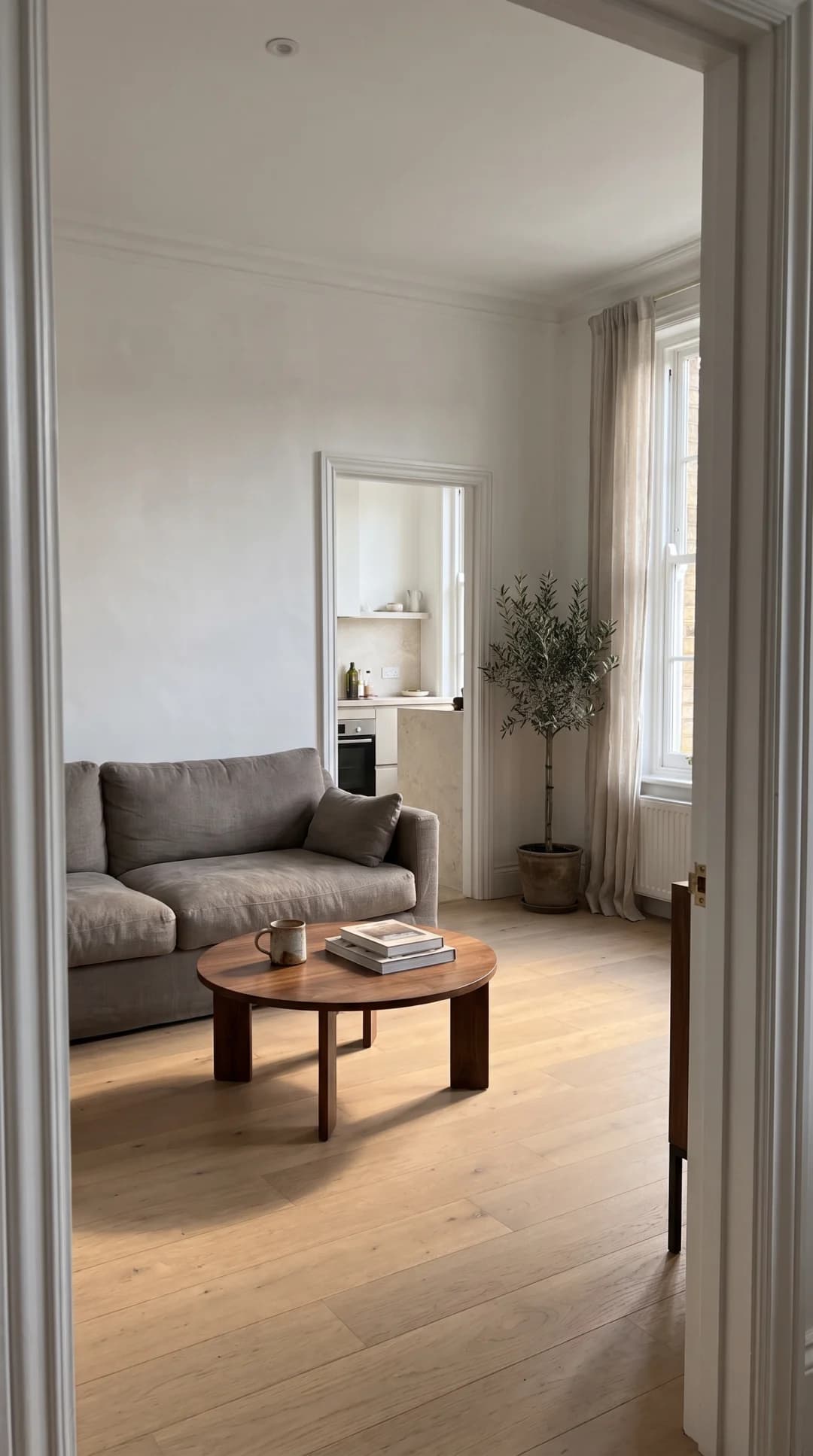 Made in Novoads with Nano Banana Pro · one made-up living room, never a listing, rendered at 2K in 9:16 for 2 credits · 2026-11-09
That still stands in for the listing photo you'd start from.
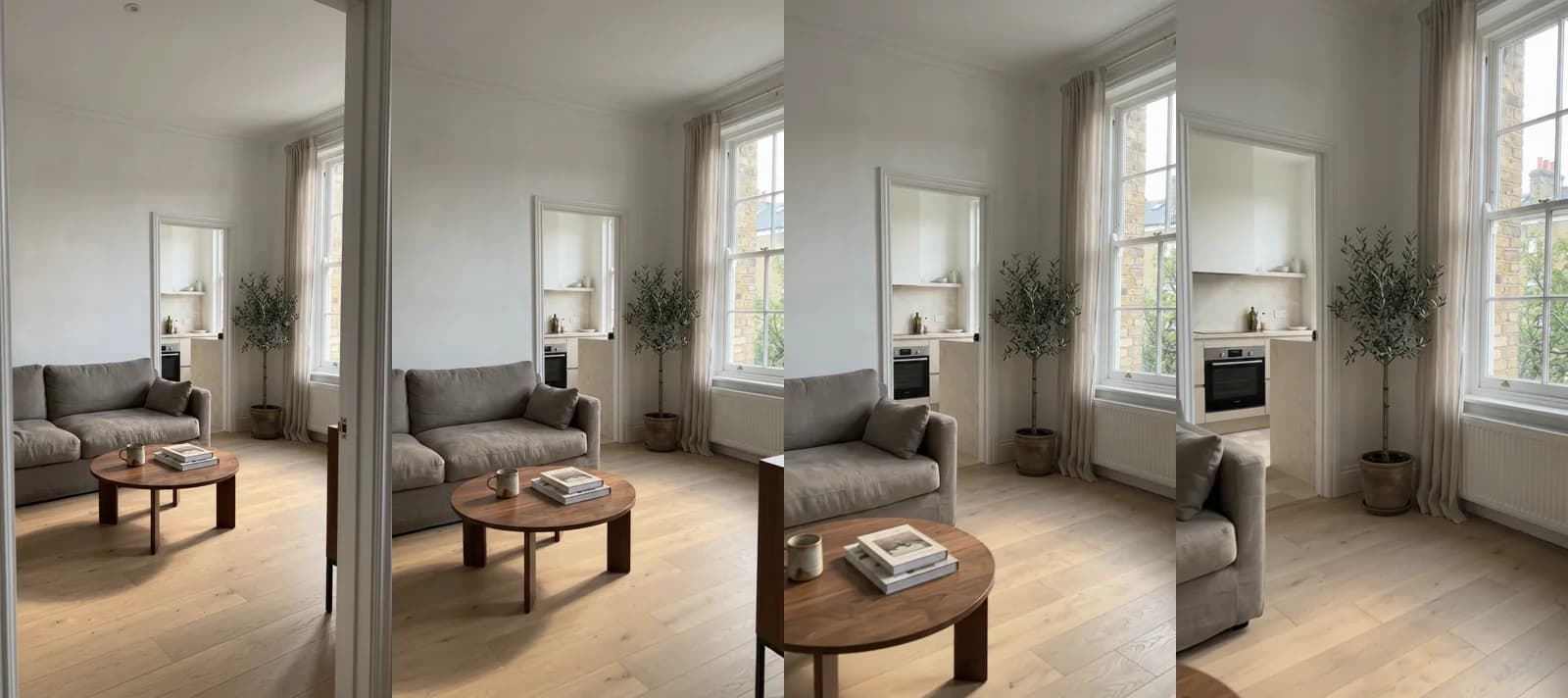 Made in Novoads with Omni Flash · a 6-second 9:16 clip at 720p that opens on the made-up room's still as its first frame, 18 credits · 2026-11-09
The still shows a slice of brick through the window and the front of a kitchen through the back doorway. As the camera moves in, the clip invents what the still doesn't show. Brick houses, chimney pots and a tree appear outside the window, the radiator under it comes fully into view, and the kitchen opens up to a whole oven and more of the room beyond. The sofa and the table stay as they were, though the sofa slides out of frame by the end.
In a made-up room, that's harmless. On a real listing, each of those additions is a feature a buyer could go looking for and not find, which is exactly what AI can't honestly show. The clip cost 18 credits, which is $1.35 at Starter's rate. At Plus's rate, it's about 88 cents. The Omni Flash tour priced below (four clips from four photos) comes to 60 credits.
The agent's own photo as the presenter
For an introduction, Create Actor in our web app has an Upload option that turns a picture into a talking actor, so you can build the presenter from the agent's own photo. The actor comes back speaking, with lip-sync, and captions are a separate step on the finished video. We didn't make one for this post.
What one real estate ad costs to make with AI
Prices as of November 9, 2026. We bill in credits, and the dollar figures below are our own math at two plan rates.
| Plan, billed monthly | Price | Credits a month | A credit costs |
|---|---|---|---|
| Starter | $15 a month | 200 | $0.075 |
| Plus | $49 a month | 1,000 | $0.049 |
Ultra starts at $129 a month for 3,000 credits. Every clip below is at 720p, the default for these models.
A listing tour from four photos
Here, a tour is four photos, each turned into its own clip, for 20 seconds in total.
| Model in Novoads | Clips | Credits | At Plus's rate | At Starter's rate | Tours in a Starter month |
|---|---|---|---|---|---|
| Seedance 2.5 | four 5-second clips | 140 | about $6.86 | $10.50 | 1, with 60 credits left |
| Seedance 2.0 | four 5-second clips | 92 | about $4.51 | $6.90 | 2, with 16 left |
| Omni Flash | two 4-second and two 6-second clips | 60 | about $2.94 | $4.50 | 3, with 20 left |
Omni Flash doesn't make 5-second clips. So its tour is two 4-second clips and two 6-second ones. That's the same 20 seconds in total.
A 30-second agent introduction
A talking actor is billed per minute, and any part of a minute counts as a full one, so a 30-second introduction costs the same as a 60-second one.
| Talking actor, up to a minute | Credits | At Plus's rate | At Starter's rate | In a Starter month |
|---|---|---|---|---|
| 720p, the default | 200 | about $9.80 | $15.00 | 1 |
| 480p | 100 | about $4.90 | $7.50 | 2 |
One tour and one introduction in a Starter month
You can fit a tour and an introduction into one Starter month in two ways, both with a 480p introduction.
| Tour, with a 480p introduction | Credits | Left of Starter's 200 |
|---|---|---|
| Omni Flash | 160 | 40 |
| Seedance 2.0 | 192 | 8 |
The tour figures above don't include joining the clips. Joining the four clips into one file in our editor is one export, which costs 10 credits however many clips it holds. That's about 49 cents at Plus's rate or 75 cents at Starter's.
| Tour joined into one file | Credits | Tours in a Starter month |
|---|---|---|
| Seedance 2.5 | 150 | 1 |
| Seedance 2.0 | 102 | 1 |
| Omni Flash | 70 | 2 |
What these figures leave out
- Re-rolls. Each new try is billed as its own clip, and a clip that bends a wall or invents a window needs one.
- Joining the clips, at 10 credits an export, as above.
- Captions, a separate step on the finished video. The default Karaoke style costs 0 credits. Classic costs 3 credits for each minute or part of a minute, and Animated costs 5.
- The ad spend, which you pay to Meta, and the time it takes you to check each clip against its photo.
Compared with a videographer's price
The closest outside price we found is in a guide for videographers by Fotober, a real estate media company. The guide, dated March 4, 2026, puts entry-level real estate video "from $200", which it describes as a simple handheld walk-through with basic editing and no drone footage. The professional tier is "from $500". Fotober's entry price is about 19 times what our Seedance 2.5 tour costs at Starter's rate, and about 44 times our Omni Flash tour.
It isn't the same job, though. A videographer films the rooms as they are. Our tour animates four photos you already have, and it can't show a room nobody photographed.
Creatify's buyer's guide, dated September 10, 2026, prices property listing video ads made with its own tool. It puts them at "under 4 dollars per unique video and under 2 dollars for variations". That's Creatify's own figure, and we haven't checked it.
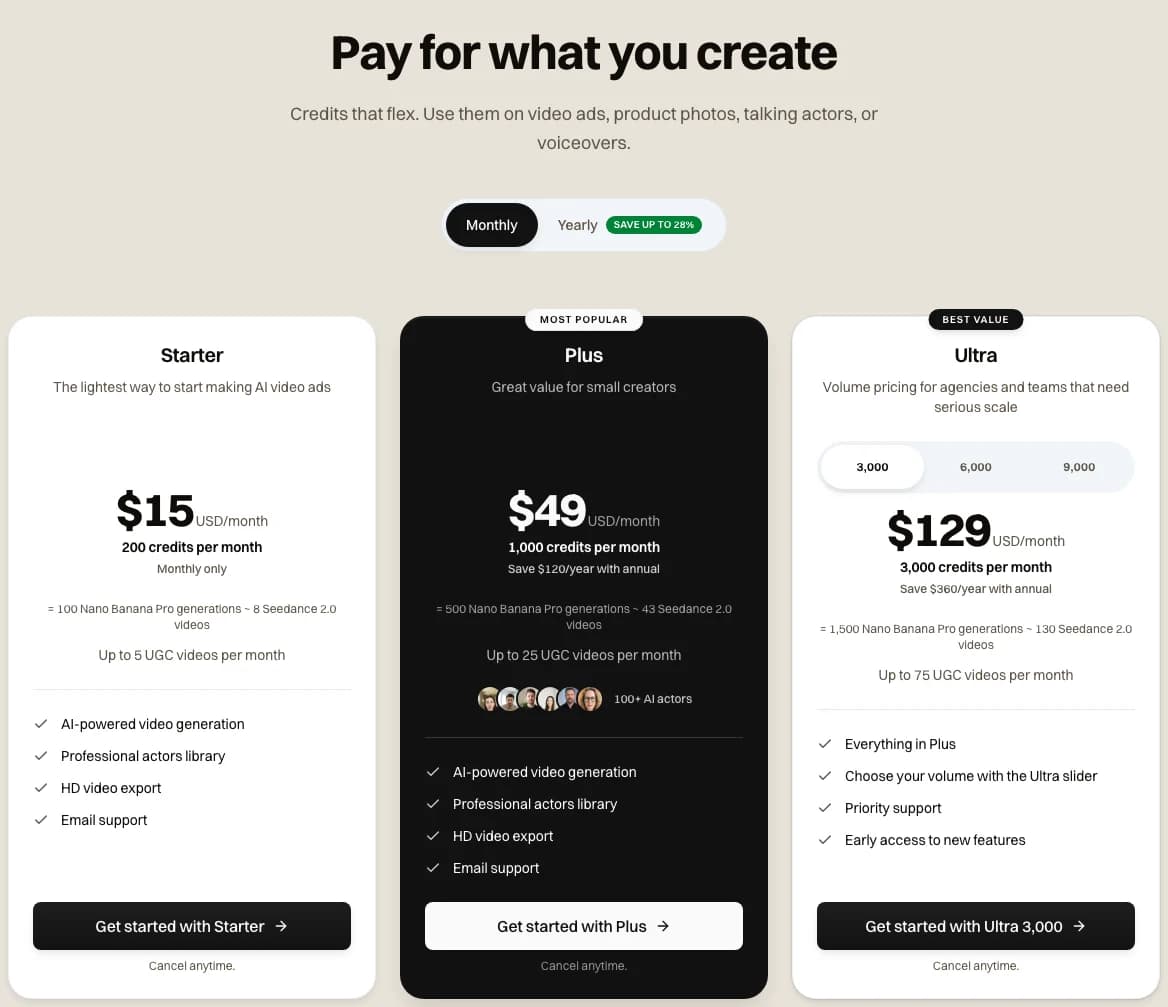 Our pricing page with Monthly selected, as it stood on 2026-11-09
Our pricing page lists every plan and what its credits buy.
Price your next listing tour
A four-photo tour on Omni Flash is 60 credits, and Starter is $15 a month for 200 credits.
See the plansWhat we'd make first for one listing
With one listing and a Starter month, we'd make the Omni Flash tour from four photos and check each clip against its photo, frame by frame. We'd put the neighborhood and the open house day on screen as text, and add whatever staging or altered-image line your state and your MLS require. Then we'd spend the rest on a 480p introduction made from the agent's own photo, which still leaves 40 credits for a re-roll or two. Our guide to AI ads covers the general steps for any AI ad, and our post on AI commercials covers broadcast-style spots.
Frequently Asked Questions
How much does a real estate video ad cost to make with AI?
These are Novoads prices as of November 9, 2026. A listing tour built from four photos costs 60 credits on Omni Flash. On Seedance 2.5, it's 140. At Starter's rate, those come to $4.50 and $10.50. An agent introduction with a talking actor is billed per minute, and any part of a minute counts as a full one. A minute or less costs 100 credits at 480p. At 720p, it's 200. Re-rolls, joining the clips into one file, captions and the ad spend are extra.
Key Takeaways
- On November 9, 2026, the real estate ads in Meta's Ad Library included filmed walk-throughs and tours built from listing photos. There were also just-listed, open house and just-sold ads, agent introductions and a neighborhood guide.
- In Novoads, a listing tour built from four photos costs between 60 and 140 credits, depending on the model. At Starter's rate, that's $4.50 to $10.50, not counting re-rolls, captions or joining the clips into one file.
- AI can move a camera through a real photo, but it also invents whatever the photo doesn't show. Our own clip of a made-up room added houses outside the window and a whole oven. On a real listing, those would be features the home might not have.
- Meta requires the location targeting on a US housing campaign to cover at least a 15-mile radius around any city, address or dropped pin you select, and it doesn't allow ZIP code targeting for these ads.
- California's AB 723 requires brokers and salespeople who put a digitally altered photo in an ad to say so and to link to the original.
- According to RESPA News, NAR's 2025 Profile of Home Buyers and Sellers found that 52 percent of buyers used an online video site in their search. We couldn't read the Profile itself, so that figure is secondhand.
Sources
- •Meta for Developers: Special Ad Categories (last updated May 21, 2026)
- •Meta Business Help Center: About audiences for housing, employment or financial products and services campaigns
- •CalMatters Digital Democracy: AB 723, Real estate, digitally altered images, disclosure
- •Google Advertising Policies Help: Housing in personalized advertising
- •TikTok Advertising Policies: Housing, employment and credit (HEC) ad policy
- •HousingWire: AI listing videos and the disclosure test agents need now (June 30, 2026)