Amazon Ads Pricing Policy: No Typed Prices on Amazon's Store, and What a Passing Ad Shows
Amazon Ads' Pricing and Promotions page, updated November 15, 2026, allows a numerical price or saving in ads on Amazon's retail placements only when Amazon renders it. We go through what your own Black Friday videos and pictures can still show and say, and how to make a no-price version in Novoads.

Mauricio Valdivia
·11 min
On Amazon's store, the price in your ad has to come from Amazon
By this week you've probably started the Black Friday versions of your Amazon ads, the same product video and pictures with the price or the saving typed into the frame. On Amazon's retail placements, that typed number is the part Amazon Ads' policy doesn't allow. Its Pricing and Promotions page, updated November 15, 2026, says that for all ad products on Amazon retail supply, "Numerical prices or savings are only permitted when rendered dynamically in the ad by Amazon." The same list also says "Pricing, savings, and promotional claims must match what the customer sees on the landing page for the full duration of the campaign."
Black Friday falls on November 27 this year. On November 19, 2026, eight days before it, we read Amazon Ads' help pages, its Black Friday and Cyber Monday guide for advertisers and the top search results for this policy. The two product pictures further down are our own renders from an earlier guide, and for this post we didn't run an ad on Amazon or put one through Amazon's review.
You can still run a Black Friday ad on those placements. In our reading, the number moves out of your frame, and what's left to show is the product and a claim your product page backs. You leave the deal itself to Amazon's own badge, where Amazon draws one. The pricing page doesn't say which formats show a badge, so we wouldn't build an ad that needs one.
What Amazon's pricing page says for each kind of placement
The page sorts its rules by where an ad runs. Amazon's retail placements get the longest list, its other placements get a shorter one, and ads on other sites get a single line.
Amazon.com and the other retail placements
The first group is headed "All ad products on Amazon retail supply (for example, Amazon.com retail placements and Whole Foods Market digital placements)." Its first two rules are the ones quoted at the top of this post, and neither comes with an exception. Because the group names all ad products, the rules aren't tied to one ad type. In our reading, a Sponsored Brands video, a Sponsored Display picture or any other ad you make falls under them whenever it runs on those placements.
The page doesn't say what "rendered dynamically" covers, or which ad formats can show a price that way. We take it to mean a price or saving that Amazon itself puts into the ad, so a number you type into a frame, a caption or an overlay wouldn't count.
The next rule is for ads that point at several products at once. "When permitted to link to multi-ASIN landing pages or Brand Store, at least 10% of products, or the required percentage per locale regulations, on the landing page must attract the maximum-claimed savings." So if an ad that's allowed to link to a page of several products, or to a Brand Store, claims a top saving, at least one product in ten on that page (or whatever share local rules require) has to carry that saving.
Deal teasing, urgency and price superlatives
Three more rules cover the copy around a deal. The page says "Deal teasing is prohibited." It doesn't define the term, so we read it as any line that hints at a deal shoppers can't buy yet. It also rules out "language that forces an urgent decision such as 'buy now or regret later.'" In our reading, a countdown clock in the frame does the same job as that line, so we'd leave it out too.
And ads "with pricing, savings, or promotional content must not contain superlatives relating to pricing and savings," or pricing claims that are competitive, misleading or can't be proven. The page gives eight examples.
- "Best/Top price"
- "Unbeatable price"
- "Competitive price"
- "Best possible price"
- "Introductory price"
- "Wholesale price"
- "Never before seen price"
- "Price advantage"
IMDb, Fire TV and Streaming TV
The rest of Amazon's own placements get a different rule. For "Non-retail Amazon supply (for example, IMDb, Fire TV, and Streaming TV placements)," claims "must be available for the full duration of the campaign and must clearly disclose any material conditions, limitations, or restrictions that apply (such as exclusions, delivery costs, subscriptions, or bundles)." The dynamic-price rule isn't in that group, but the ban on price superlatives is, with the same eight examples.
Ads on other websites and apps
For "Open Internet supply (third-party publisher sites and apps)," the page has one line. "Advertisers are responsible for ensuring pricing and promotional messaging is accurate, not misleading, and compliant with applicable laws and publisher requirements." So off Amazon, it's your job to get the pricing right under the law and under each publisher's own rules.
Two more Amazon pages that point the same way
Amazon Ads keeps separate pages for Brand Stores and for event days, and Black Friday is one of the event days. Neither is the pricing page, but both say similar things in more detail for their own cases.
The Brand Store page covers the words inside your pictures
Amazon's page on Brand Store content for peak events was updated November 13, 2026. It says "These rules apply to every Store, for every event," and "The rules cover text, images, page names, navigation tabs, and text inside images." The wording it doesn't allow includes urgency lines ("Today only" or "Hurry") and specific prices or savings such as "Save 50% on Product" or "$20 off Product". It also says "Promotional messaging is only allowed with the Featured Deals widget." For Black Friday and Cyber Monday, it allows "Black Friday sales," "Black Friday deals" and the short form "BFCM" in page names, images and text.
That page's rules are for Stores, and they don't bind ads. We bring it up because it spells out that a number written into a picture still counts as text, which the ad pages leave unsaid. We'd hold your ad pictures to the same standard.
The Event days page, which covers Black Friday
Amazon's Event days page, updated October 8, 2026, covers "all ads running during Amazon event days (such as Prime Day, Prime Big Deal Days, and Black Friday/ Cyber Monday), including the lead-up period and ads purchased through Amazon Ads." Its pricing lines are short.
- A deal "Must be live when the ad is served."
- A numerical price that links to a product page "must use dynamic or responsive ad formats."
- Generic claims with no number in them, like "low price," are permitted.
- Comparative claims like "better price" are prohibited.
On wording, the page says "Black Friday Sales", or similar, "can be used to describe any offer running throughout November." It permits event mentions "in endemic ads within certain date parameters," and says "All deals must be live for the duration the ad is live." In our reading, your Black Friday ad on Amazon's store answers to this page and to the pricing page at once.
What the dates on these pages tell you
The pricing page gives no effective date, and November 15 is only its latest update. Amazon's Ad policy change log doesn't say what changed that day either. Its latest rows are from April 2026, and a row dated March 2026 reads "This change updates the policy guidance that governs pricing and promotions claims in ads." So the page has been around since at least March. Another Amazon Ads policy page, Claims and substantiation, was updated on November 15 too. We read that as a wider revision of the policy pages ahead of Black Friday, though Amazon doesn't say so.
Asking the ad to match the landing page goes back further. Amazon's Black Friday and Cyber Monday guide for advertisers was first published in November 2024. Its current version lists a "Price deal mismatch" among "the 5 most common blockers for BFCM creative" and says "All prices or savings must be in the same format on the ad creative and landing page."
What your own Black Friday ad can still show and say
This section is our reading of the pages above, for ads on Amazon's retail placements. Amazon doesn't publish a list like this one.
What comes out of the frame
- A price or saving typed into the frame, a caption or an overlay, whether in dollars or percent, and any struck-through old price.
- The eight price phrases above, and close cousins such as "lowest price", which isn't on Amazon's list but is still a superlative about price.
- Urgency lines and countdown clocks.
- Any hint of a deal before shoppers can buy it.
- A price said out loud. The page refers to numerical prices and savings in the ad without saying where they appear, so we'd treat a voiceover that names a price like a price on screen.
What stays in
- The product, shown as your product page shows it. The Black Friday guide's list of blockers has a "Product deal mismatch" too, where "The product type, version, or image on your ad creative must match what is shown on the landing page."
- The product in use, in clips that start on your own product photo. Any hand or person an AI clip shows is AI-made, so it shouldn't pass as you, a customer or a reviewer.
- A claim your landing page backs for the whole campaign.
- On event days, a generic claim with no number, such as "low price", and "Black Friday Sales" wording for an offer that runs throughout November, with the deal live while the ad runs.
 Made in Novoads with GPT Image 2.6 Sunburst · a blender bottle beside a pink smoothie and fruit on a sunny counter, standing in for your own product photo · 1 credit · 2026-11-16, for our TikTok Shop ads guide
Where the number goes
In its list of places where Prime Day mentions are barred, Amazon's Event days page carves out "dynamically pulled PDP ASIN information, such as deal badging" in Sponsored Ads. We read that as a deal badge Amazon draws into the ad from your product page, and as the place your number belongs. Set the deal on the listing and let Amazon show it in the formats that support it. Since the pricing page doesn't list which formats render a price or a badge, build the ad so it works without one.
How to make a no-price version in Novoads
In Novoads you make the clips and pictures from your own product photo, then upload them to Amazon and run them yourself. At every step below you keep numbers out of the frame, so the deal stays Amazon's to show.
Start a Kling 3.0 clip on your product photo
- Open the video editor and pick Kling 3.0 in the model menu.
- Drop your product photo where it says "Drop a start frame or click to upload." The editor then shows "The video starts on this picture."
- In the prompt, describe how the product moves or gets used, and leave out every price, percent, badge and on-screen word.
- Set the length under Duration. A 5-second clip costs 10 credits, and Kling 3.0 makes widescreen, vertical and square clips.
- Its Generate Audio switch is on by default. If you keep the sound, make sure nothing in it says a price.
- Press the round button with an up arrow on it to make the clip.
Kling 3.0 is the model we priced. In the editor, Kling 4.0 and Google Veo 3.1 also start a clip on your photo, and Omni Flash and Wan 3.0 do too once you pick "Start / End Frames." Amazon's specs for listing and Sponsored Brands video are in our Amazon product video guide, and our guide to turning one product photo into a finished ad picks up where the clips leave off.
Make the picture ads from the same photo
- Open the Image tool, click Reference and upload the same photo.
- In the prompt, describe the picture you want, with the product in use and no number, price or badge in it. If you ask for a line of copy, keep it to words your product page backs.
- Under Settings, switch the Model to GPT Image 2 (the tool opens on Nano Banana Pro) and pick the shape under Aspect ratio.
- Set Quality to Medium. It starts on High, which costs 4 credits a picture on GPT Image 2, while Medium costs 1.
A run makes three pictures unless you change the Images setting, so one run at Medium costs 3 credits. The Reference photo doesn't add to that.
Our own runs, with nothing written in the frame
The still further up and the strip below come from our own runs, made on November 16, 2026, for our TikTok Shop ads guide. The still is a GPT Image 2.6 Sunburst picture standing in for a seller's own product photo, and it cost 1 credit. We turned that still into a Seedance 2.0 Mini clip through our Claude connector, and it cost 5 credits. It runs 5 seconds at 720p with the sound off. The camera drifts a little around the blender, and no frame shows a price, a saving, a badge or a word. The blender is made up, and neither picture has been through Amazon's review or run on Amazon.
In the editor, Seedance takes a photo only as a reference you name in the prompt. So to make a clip in the editor that opens on your photo, use Kling 3.0 or one of the other models above.
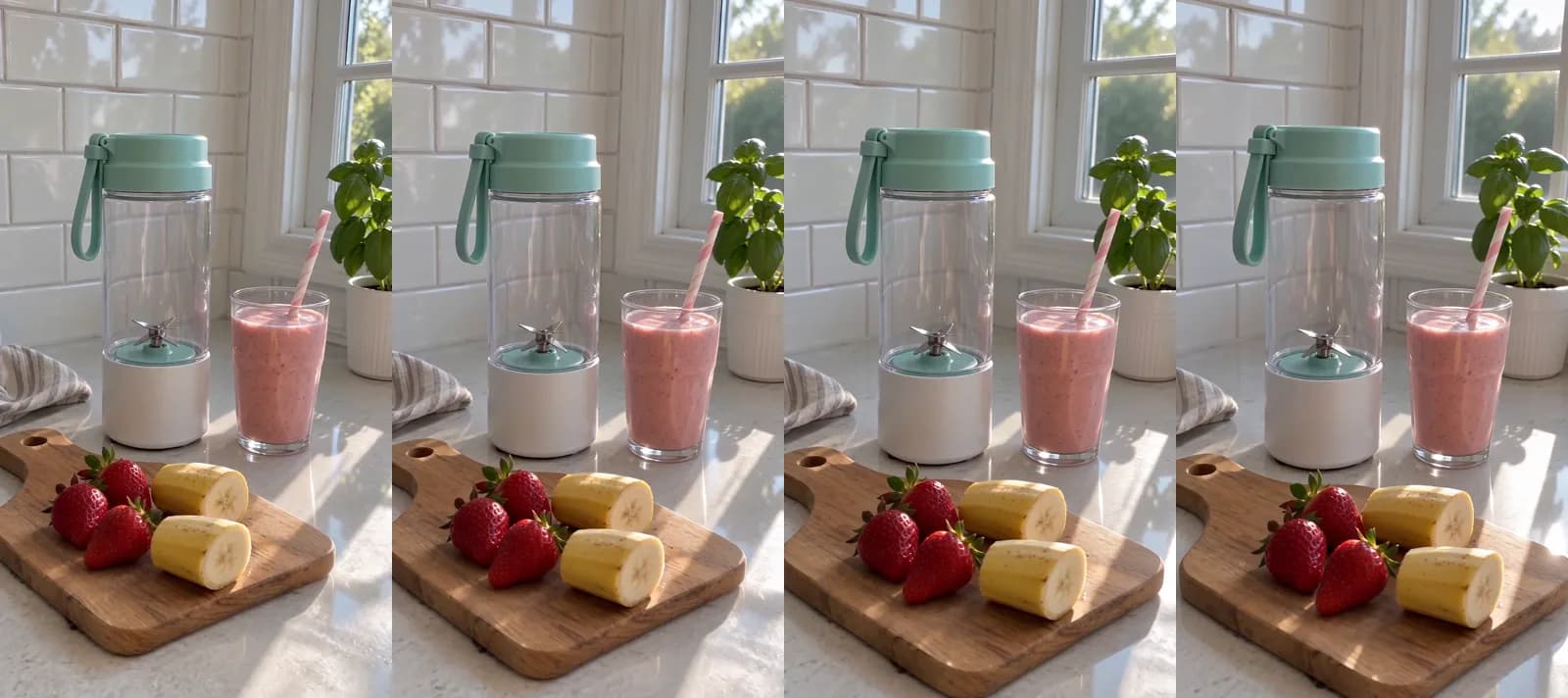 Made in Novoads with Seedance 2.0 Mini · a slow camera move around the blender and the smoothie, sound off, started on the still above through our Claude connector · 5 credits · 2026-11-16, for our TikTok Shop ads guide
Check every frame before you upload
Scrub through each clip and zoom into each picture before they go to Amazon. Look for any number, tag or lettering you didn't ask for, and redo that take instead of covering it up. Then hold the ad next to the product page and check that the product, its version and its color match.
What a no-price set costs in credits
Credits and plan prices as of November 19, 2026. The set we priced covers the Black Friday versions of one product's ads, all made from one photo.
| What you make | Credits each | Credits |
|---|---|---|
| Three Kling 3.0 clips of 5 seconds, each started on your photo | 10 | 30 |
| One run of three GPT Image 2 pictures at Medium, your photo as the Reference | 1 | 3 |
| The set | 33 |
The dollar figures in the next table are our own arithmetic. We multiplied the set's 33 credits by each plan's price per credit.
| Plan | Price and credits a month | Per credit | The set | Whole sets a month |
|---|---|---|---|---|
| Starter | $15 for 200 credits | $0.075 | about $2.48 | 6, with 2 credits left |
| Plus | $49 for 1,000 credits | $0.049 | about $1.62 | 30, with 10 credits left |
| Ultra 3,000 | $129 for 3,000 credits | $0.043 | about $1.42 | 90, with 30 credits left |
What the table leaves out
The sum covers one take of each piece. A clip or picture you redo costs its credits again, and captions and music are separate steps with their own credits, so they aren't in it. It also leaves out your ad spend on Amazon, and no credit count tells you whether Amazon's review will pass a given ad. Novoads is paid from the first month, and every plan's price and monthly credits are on our pricing page.
Make the version of your ad that has no price in it
Start a clip on your own product photo, keep every number off the frame and leave the deal to Amazon. Plans and their monthly credits are on our pricing page.
See plans and creditsBefore the Black Friday versions go live
Amazon's pricing page leaves the number to Amazon on its retail placements. The page could change again before the season's over, so read it once more on the day you upload. Check that the deal on your product page will hold for the whole campaign, and that nothing in your frames, captions or voiceover says a price. If you'd like more formats to try from the same photo, our AI ads guide and our ecommerce video ad examples go further, and our AI commercials guide prices a longer spot.
Frequently Asked Questions
Can I put a price in a Sponsored Brands video on Amazon?
Not one you type in, if the ad runs on Amazon's retail placements. Amazon Ads' Pricing and Promotions page says numerical prices or savings are only permitted when rendered dynamically in the ad by Amazon. That rule covers all ad products on Amazon retail supply, which in our reading takes in Sponsored Brands. The page doesn't say which formats can show a price that way, so we'd make the video without one and leave the number to Amazon.
Is Amazon's pricing and promotions policy new?
No. The page was updated November 15, 2026, but Amazon's Ad policy change log dates an update to its pricing and promotions guidance to March 2026, so the page has been around since at least then. Neither the page nor the change log says what changed on November 15, and the page gives no effective date.
Can an Amazon ad say "best price" or "lowest price"?
Not on Amazon's own placements. The pricing page bans superlatives relating to pricing and savings on its retail placements, and again on IMDb, Fire TV and Streaming TV. Its examples include "Best/Top price" and "Unbeatable price." "Lowest price" isn't on its list of eight, but it's a superlative about price, so we'd leave it out. Amazon's Event days page does allow generic, non-numerical claims like "low price" on event days such as Black Friday.
Does the rule apply to IMDb, Fire TV or ads on other websites?
The dynamic-price rule doesn't. For IMDb, Fire TV and Streaming TV placements, the page asks that pricing, savings and promotional claims be available for the full duration of the campaign and clearly disclose any material conditions, such as exclusions, delivery costs, subscriptions or bundles. It bans price superlatives there too. For third-party publisher sites and apps, it makes advertisers responsible for keeping their pricing messages accurate, not misleading and compliant with applicable laws and publisher requirements.
Key Takeaways
- On Amazon's retail placements, Amazon Ads' Pricing and Promotions page (updated November 15, 2026) permits a numerical price or saving in an ad only when Amazon renders it, and the rule covers all ad products there.
- On those placements, any pricing, savings or promotional claim has to match the landing page for the whole campaign. Amazon's Event days page, which covers Black Friday, asks that a deal be live when the ad is served.
- On retail placements the pricing page also bans deal teasing, urgency lines such as "buy now or regret later" and price superlatives such as "Best/Top price." IMDb, Fire TV and Streaming TV get a disclosure rule and the same ban on price superlatives, and on other websites the advertiser is responsible for its own pricing messages.
- The page isn't new. Amazon's Ad policy change log dates an update to its pricing and promotions guidance to March 2026, and no page we read says what changed on November 15.
- In our reading, a passing Black Friday ad shows the product and leaves the number to Amazon. In Novoads, the clips and pictures we priced for one product's Black Friday versions come to 33 credits, about $1.62 on Plus.