Auto Detailing Ads: Ideas That Book Cars, What Each Costs With AI, and the FTC on Lifetime Warranties
How auto detailers, mobile detailers and ceramic coating shops can use AI to turn photos of cars they've finished into ads, what a month of those ads costs in Novoads credits and on each plan, and what the FTC's warranty guides say about calling a coating warranty lifetime.

Mauricio Valdivia
·12 min
Our test clip ended on a sticker the photo never had
For this guide, we made one picture of a freshly detailed car, the kind of shot you'd take on your phone before you hand back the keys. The driver's door is open, the fabric seats and black mats are clean, and a gray microfiber towel sits folded on the sill. Then we asked for four seconds of motion. The camera glides in from the door, past the steering wheel toward the windshield, and in the last frames the sun visor comes into view with a sticker that wasn't in the photo.
That sticker is the risk of using AI in a detailing ad, and it's small enough to miss. Your ads sell work a customer can check. Someone who books a paint correction because your ad showed a hood with no swirl marks expects that hood to be one you corrected. Someone who pays for a coating package expects the warranty in the ad to match the paperwork. So we'd give AI three narrow jobs. It animates the photos you've already taken of cars you finished, has an AI presenter read your booking offer, and puts your prices on a picture. None of the three should add anything you didn't do.
On November 18, 2026, we went through the search results for "auto detailing ads", the FTC's warranty guides and our own credit prices. We made the interior picture and the four-second clip further down through our own Claude connector, for 3 credits in all. We haven't shown any of these ads to a car owner, so nothing here ranks them by bookings.
Five detailing ads, from swirled paint to coating packages
A lot of what ranks for "auto detailing ads" is videos about running Facebook ads, and the articles in between give marketing tips or collect ads other shops have run. Pull the ad ideas out of those pages, and they come down to five kinds. Each one has a job, a part AI does well, and a line AI shouldn't cross.
Before and after, on one car you worked on
A before-and-after shows your skill in two photos. The stained seat, then the seat you shampooed. The hood full of swirls under a shop light, then the same hood after two rounds of polishing. Both of the tips articles we looked at suggest building ads around before-and-after results.
AI is good at turning each of your two photos into a short clip that starts on it, and at putting captions over the cut. What it must never show is a car, a result or a finish your shop didn't produce, and that includes an after shot the model made up. A single clip that turns the dirty seat into the clean one fills every frame between your two photos with the model's guess at your work. We'd rather make one clip from each photo and cut them together. If the cut is headed for TikTok, the platform has its own rule on before-and-after ads, and our guide to TikTok's misleading-content rules covers it.
The mobile detail that comes to the driveway
Mobile detailers sell the visit as much as the wash. There's no line at the car wash and no ride back from the shop, just the van in the driveway while the customer works from home. The ad's job is to make booking feel as easy as the visit. Window cleaning ads and house cleaning ads sell the same kind of visit.
AI does two things well here. An AI presenter reads out what you're offering and how to book, and a picture ad can start from a shot you took of your van or of a job you finished. Don't pass the AI presenter off as you or as the tech who shows up, and don't show a van or a crew that isn't yours. If your ad says who's coming, it should name the person who actually drives over.
Ceramic coating and paint protection packages
Coatings and paint protection film are the big-ticket jobs, so their ads carry the most terms. There's a package name, a price or a starting price, sometimes a tint bundle, and a warranty when the package comes with one.
A picture ad built on your shot of a coated car, with the offer and the warranty terms set as text, is a good use of AI here, and so are captions on a short clip of your own work. Don't let AI show water beading, gloss or a self-healing effect and pass it off as what the product does on a real car, or put a warranty length on screen that neither you nor the coating's maker offers. If the ad says "lifetime," read the FTC section further down before you run it.
Reviews in the customer's own words
We think a review from someone who got their car back spotless says more than any line you could write yourself. Both of the tips articles we looked at recommend testimonials, too.
The AI part is small. You put the customer's written review on screen, word for word, as captions over your own photos of that car. Don't use an AI actor to play the customer and read the review as if it were theirs.
A price on the picture
Seasonal deals and starting prices make the plainest ad there is, a photo of a finished car with a number in big type. Spring cleanups, a winter salt package and a pre-sale interior detail all fit the format.
AI can build the still from your own photo with the price on it, or have an AI presenter read the deal in a short clip. Don't let it show a shop, a bay or a car that isn't yours.
How to make each ad in Novoads
Three tools in Novoads cover all five. In the Video tab you make clips that start on your photo, in Talking Actors you put an AI presenter in front of your script, and in the Image tab you make pictures from your photo. Every step below costs credits, and the next section adds them up. If you've never made an ad this way, our guide to AI ads walks through the basics first.
A clip that opens on a car you finished
- In a project, pick Video, then choose a model with the sliders button. Kling 3.0, Kling 4.0 and Google Veo 3.1 open the clip on the picture you drop in. Omni Flash and Wan 3.0 do too once you switch from "Reference" to "Start / End Frames".
- Drop your photo where it says "Drop a start frame or click to upload". The editor then shows "The video starts on this picture."
- Ask for camera movement only, for example a slow push along the hood toward the windshield, with nothing added and no text.
- Press the round button with the up arrow to send. A 5-second Kling 3.0 clip costs 10 credits. Kling 4.0 takes the same photo with sound always on, and its 5-second clip at 720p costs 18 credits.
- Watch the clip to its last frame before you use it.
It's the same single-photo process as turning a product photo into a video, except your product is the car you just handed back.
We made our example a little differently, since we don't have a shop of our own. The picture below stands in for the shot you'd take yourself.
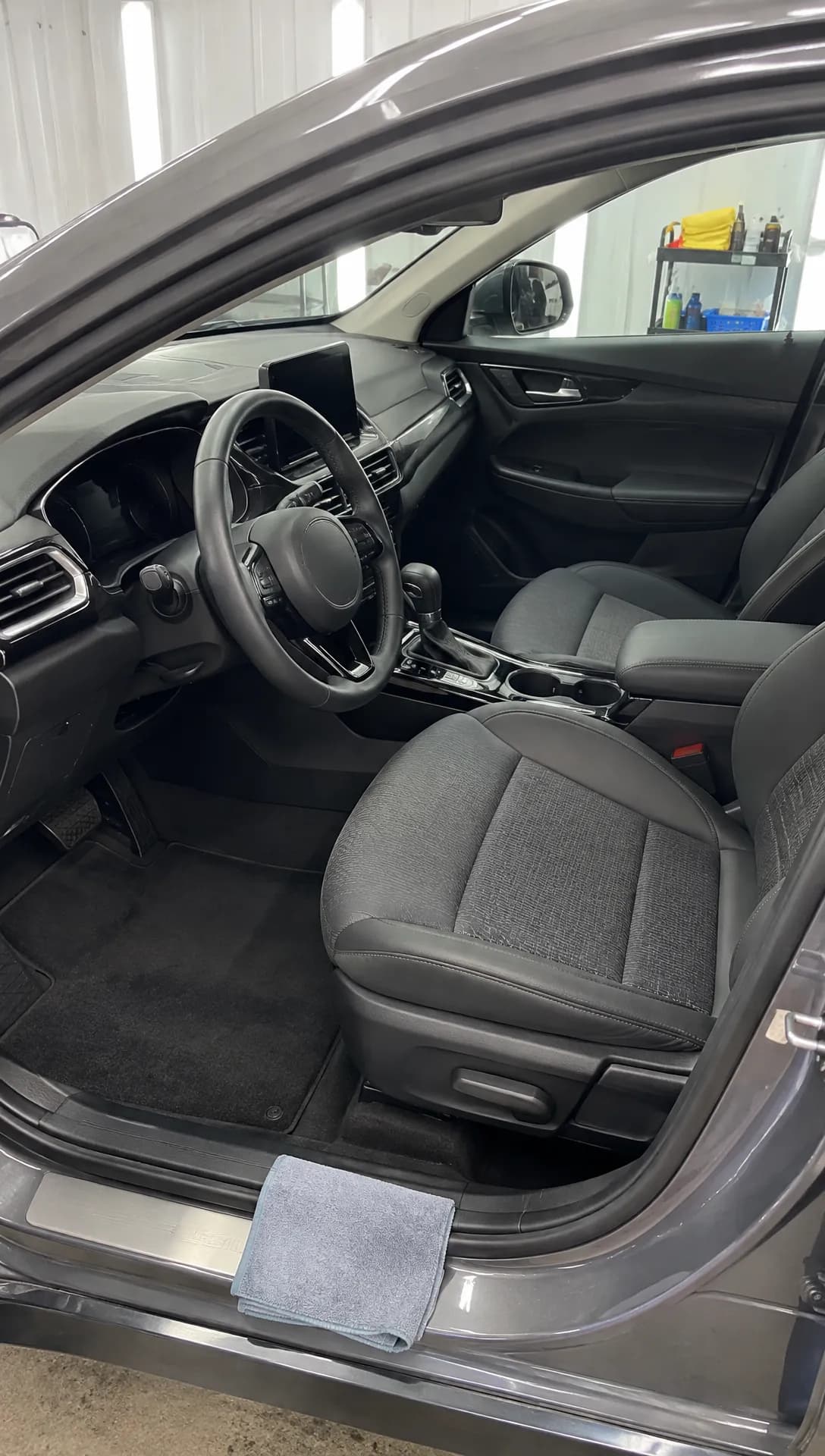 Made in Novoads with GPT Image 2.6 Sunburst · a freshly detailed interior through the open driver's door as a vertical phone photo, standing in for your own photo · 1 credit · 2026-11-18
Our Claude connector can start a Seedance 2.0 Mini clip on a picture, so that's how we animated the still above, four seconds long at 480p with the sound off. In the editor, Seedance uses a picture only as an @Image1 reference that your prompt mentions, and the clip doesn't start on it. That's why the steps above use Kling or the start-frame switch. Four seconds at 480p is a cheap way to test the motion. An ad you post would go out at 720p. At that resolution, a 5-second Seedance 2.0 Mini clip through the connector costs 5 credits.
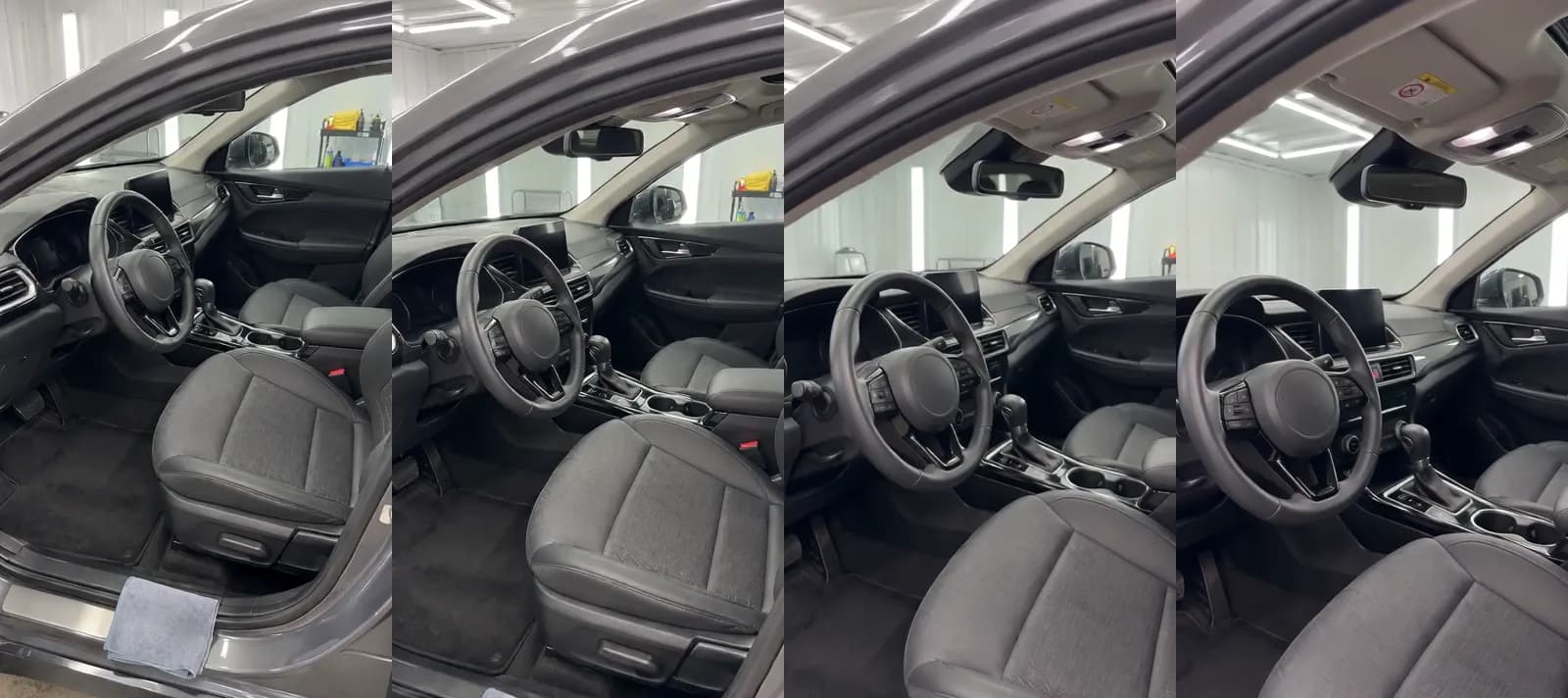 Made in Novoads with Seedance 2.0 Mini · the still above, animated with a slow glide from the door toward the dashboard through our Claude connector, 4 seconds at 480p, sound off · 2 credits · 2026-11-18
Look at the last two frames. The visor comes into view with a sticker on it, white with a red symbol and a yellow strip of lettering too small and blurry to read. The photo never had one. On a car you're showing as your own work, a detail like that is something the model made up. Watch every clip to the end, and make it again if the model adds anything your car didn't have. Our car dealership guide opens on the same kind of slip.
An AI presenter reading your mobile-detail offer
- Pick Talking Actors, then "Write or pick a script". Write the offer the way you'd say it on the phone, covering what you do, the towns you drive to and how to book.
- Under "Choose an actor", use "Add actors" to pick one.
- The price line beside the send arrow reads 200 credits per started minute at 720p, the default. Open it and pick 480p to bring that down to 100.
- Press the arrow, and the presenter comes back speaking your lines, voiced and lip-synced. Any take up to 60 seconds counts as one started minute.
- Add captions afterward, on the finished take. The captions tool opens on "TikTok, no box", one of six looks at 3 credits a started minute.
The presenter is an AI actor. Present it in your ad as someone reading your offer, never as you, one of your detailers or a customer, and make sure nothing on screen suggests it works in your bay. Our voice list covers 32 languages, so the same offer can go out in Spanish to customers who'd rather book in Spanish.
A price picture from your own photo
- Pick Image, click "Reference" and upload your photo of a finished car (a JPG, PNG or WebP).
- In the prompt, describe the ad you want, for example the service and its price in large type over the photo.
- Under "Settings", pick GPT Image 2 and switch the quality from High to Medium, which costs 1 credit a picture instead of 4. The tool opens on Nano Banana Pro, so check the model too.
- GPT Image 2 makes square, vertical and wide pictures. For a 4:5 picture, you'd switch to Nano Banana Pro, at 2 credits.
- Each run makes 3 pictures unless you change "Images". At Medium, those three come to 3 credits.
- Check the car in every picture. The model makes a new picture from yours, so look for anything it changed (shine, wheels, reflections) and run only the ones that still show your car.
What a month of detailing ads costs
Credit prices as of November 18, 2026. The set below is a starting point for one month of a shop's ads. It includes a before clip and an after clip made from your photos on Kling 3.0, your mobile offer read by an AI presenter at 480p, and a run of three GPT Image 2 price pictures at Medium. We did the dollar math ourselves, using each plan's price per credit (shown in the column headings).
| Ad | Model and setting | Credits | Starter ($0.075) | Plus ($0.049) | Ultra 3,000 ($0.043) |
|---|---|---|---|---|---|
| Before clip, your photo | Kling 3.0, 5 seconds | 10 | 75 cents | about 49 cents | about 43 cents |
| After clip, your photo | Kling 3.0, 5 seconds | 10 | 75 cents | about 49 cents | about 43 cents |
| Mobile offer, AI presenter | Talking actor, 480p, up to 60 s | 100 | $7.50 | $4.90 | $4.30 |
| Three price pictures | GPT Image 2, Medium | 3 | about 23 cents | about 15 cents | about 13 cents |
| The set | 123 | about $9.23 | about $6.03 | about $5.29 |
How many sets each plan covers
- Starter is $15 a month for 200 credits. One set fits, leaving 77 credits for a retake.
- Plus is $49 a month for 1,000 credits. That covers eight sets.
- Ultra 3,000 is $129 a month, enough for 24 sets.
The presenter is most of the bill. At 720p, it would cost 200 credits on its own. Picking 480p is what keeps the set inside a Starter month. We bill each plan from its first month, and our pricing page lists every plan with its monthly credits.
Price a month of detailing ads
Each plan lists its monthly credits, and a 5-second Kling 3.0 clip from your photo of a finished car is 10 of them.
See the plansWhat the 123 credits leave out
- A retake costs that row's credits again.
- Joining the before and after clips into a single ad, or adding a voice-over, has no listed price, so neither is in the total.
- Captions on the presenter's clip add 3 credits a started minute with the tool's default look.
- The ad spend on Meta or Google is yours to set.
- We haven't counted the time you'll spend comparing every clip with the car in your bay.
What the FTC says about a "lifetime" warranty in an ad
None of the articles we looked at for this guide mentions a rule on warranty claims, yet a coating package is where a warranty is most likely to end up in your ad. The FTC has guides on exactly that, and one section is about the word "lifetime".
Section 239.4, word for word
The FTC's Guides for the Advertising of Warranties and Guarantees are Part 239 of Title 16 of the Code of Federal Regulations, its guidance on warranty ads in the US. Section 239.4 is one sentence. "If an advertisement uses 'lifetime,' 'life,' or similar representations to describe the duration of a warranty or guarantee, then the advertisement should disclose, with such clarity and prominence as will be noticed and understood by prospective purchasers, the life to which the representation refers."
Both of the section's examples involve car parts. In Example A, a muffler's guarantee runs for the life of the car it's installed in, and the ad reads, "Our lifetime guarantee on the Whisper Muffler protects you for as long as your car runs," then goes on, "even if you sell it, trade it, or give it away." In Example B, a battery is covered "for as long as the original purchaser owns the car in which it was installed," and the ad reads, "Our battery is backed by our lifetime guarantee. Good for as long as you own the car!"
So "lifetime" means two different things in the guide's own examples. The muffler's guarantee continues after the car is sold, and the battery's ends when the original purchaser no longer owns the car. The guide says, "These examples are for both print and broadcast advertising. These examples are illustrative, not exhaustive."
Who it covers and how binding it is
Section 239.1 says, "The other sections of the Guides apply to the advertising of any warranty or guarantee." Section 239.4 is one of those other sections. It uses the word "should". And the FTC's notice of July 20, 2015, which ended a review by keeping the Guides "without change", says, "The Guides are advisory in nature."
The section's text dates from May 1, 1985. We quote the edition dated January 1, 2026, which the US government publishes on govinfo.gov.
What it means for a coating or detailing ad, in our reading
Neither example is a coating or a detail, and the guide doesn't mention either. In our reading, a "lifetime" warranty sold with a ceramic coating or a detailing package is the kind of guarantee section 239.1 covers, and an ad for that package is the kind of ad section 239.4 describes. So wherever "lifetime" appears, we'd say right beside it which life it means (the car's, the time the original purchaser owns it, or whatever the warranty's own terms say), in words a prospective purchaser will notice and understand.
In the five ads above, the word could show up in three places.
- The headline of a coating price picture.
- The script your AI presenter reads.
- The captions over a before-and-after clip of a coated car.
The guide's examples are print and broadcast ads, so applying section 239.4 to a short video or a presenter's script is our reading too. If the warranty comes from the coating's maker, its length and its terms are the maker's, so the ad should repeat them as written. That's how we read the FTC's guide, and it isn't legal advice. Before you write the line, read the guide itself on govinfo.gov.
Where to start with the next car you finish
Start with the before-and-after, because it needs nothing you don't already have. Two Kling 3.0 clips from your own photos come to 20 credits, and they show the work you actually did.
- This week, pick one car you'll finish and plan to shoot both photos from the same spot, in the same light.
- Once the clips look right, add the presenter's offer if you run a mobile service.
- Save the coating picture for when the warranty line says which life it means.
Take the before photo before the first towel touches the car.
Frequently Asked Questions
How do I market my car detailing business with ads?
Start with the cars you finish. The five ads we'd build first are a before-and-after of one car, an offer for your mobile service, a coating package with its terms, a customer's written review and a seasonal price. You can make each one from your own photos. AI can animate those photos and have an AI presenter read your offer, but every car, finish and result in the ad should be one your shop produced.
Can an AI presenter play the detailer in my ad?
No. An AI presenter is an AI actor, so present it in your ad as someone reading your offer, never as you, one of your detailers or a customer. If the ad says who'll pull into the driveway, name the person who actually will.
What should an ad with a lifetime coating warranty say?
The FTC's warranty guides (16 CFR 239.4) say an ad that uses "lifetime" or "life" for how long a warranty or guarantee lasts "should disclose, with such clarity and prominence as will be noticed and understood by prospective purchasers, the life to which the representation refers." The guide's own examples are a muffler covered for as long as the car runs and a battery covered for as long as the original purchaser owns the car. Applying it to a coating warranty is our reading and isn't legal advice. The guide's text is on govinfo.gov.
How much does a month of detailing ads cost in Novoads?
The set in this guide comes to 123 credits at credit prices as of November 18, 2026. Most of that goes to the AI presenter, which costs 100 credits at 480p. That price covers any take up to a minute long. Its two 5-second Kling 3.0 clips, the before and the after from your photos, cost 10 credits each. A run of price pictures at Medium adds 3 more. On Plus, that's about $6.03, and one set fits in a Starter month.
Key Takeaways
- Detailing ads sell work a customer can check, so build them from photos of cars your shop finished. Let AI animate those photos, but never let it make the after shot.
- In the Novoads editor, Kling 3.0, Kling 4.0 and Google Veo 3.1 start the clip on the car you photographed, and so do Omni Flash and Wan 3.0 once they're set to Start / End Frames. Seedance works differently there and treats a picture as a reference your prompt points to.
- In our 4-second test clip, the model added a sticker the photo never had, so watch every clip to its last frame before you run it.
- The month's set of ads we priced comes to 123 credits, about $6.03 on Plus. Credit prices are as of November 18, 2026.
- The FTC's warranty guides say an ad that calls a warranty lifetime should disclose which life it means. Applying that to a coating warranty is our reading. The guide's own text is on govinfo.gov.