Car Dealership Ads: Video Ideas From Your Own Lot, and Google's Actual-Car Photo Rule
The five ads a car dealership runs, how to make them in Novoads from a script or a photo of the actual car, what each costs in credits, and Google's vehicle ads rule on photos that aren't the actual car.

Mauricio Valdivia
·12 min
The model drew badges on cars it had never seen
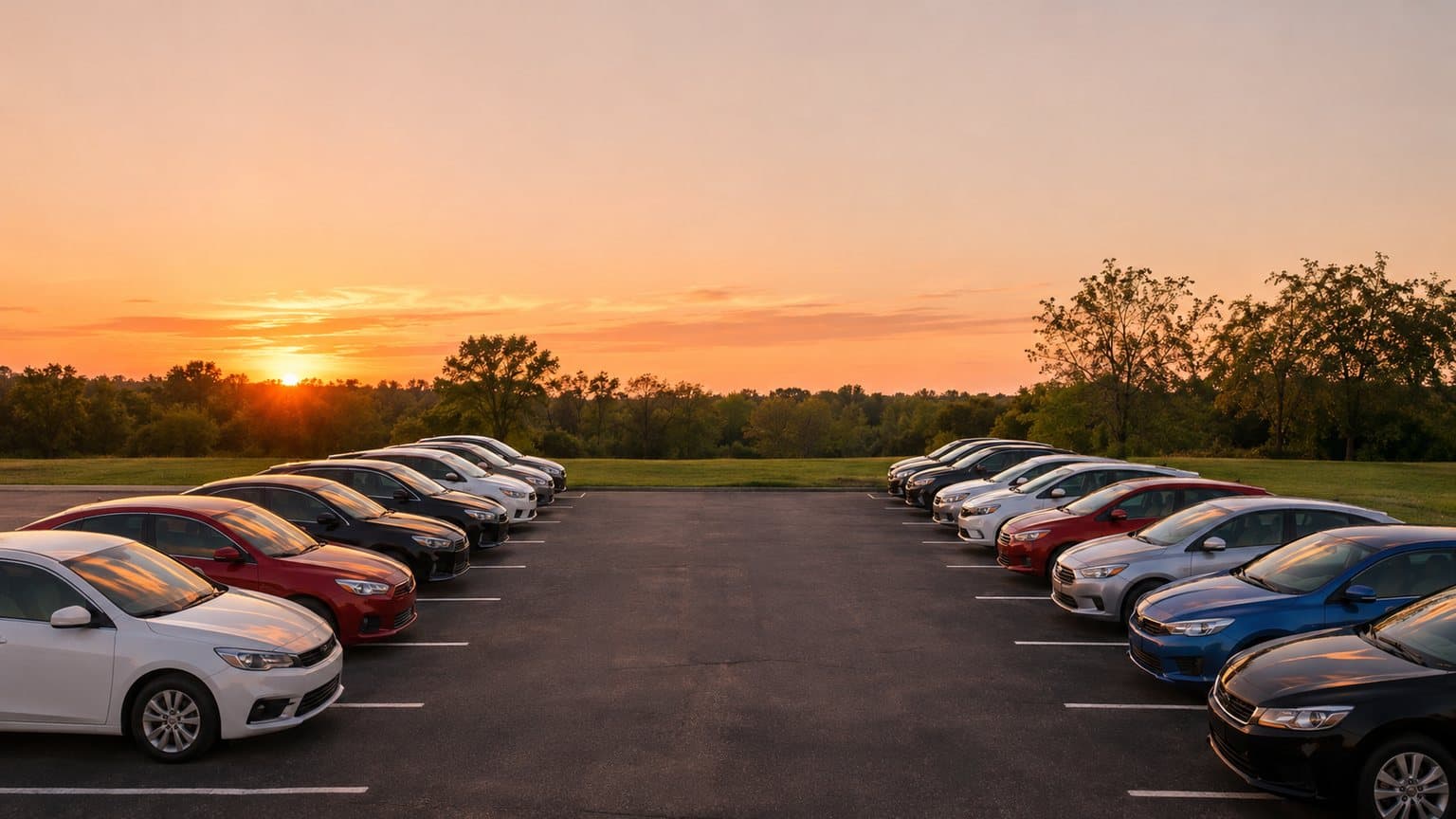
We asked an image model for a row of clean, unbadged sedans and SUVs at sunset, seen at eye level, and it put oval badges on the grilles anyway. At full size, two of them looked like a real carmaker's logo. We made the still with GPT Image 2.6 Sunburst in Novoads, to stand in for a dealer's own photo. The two clips we made from it kept the badges too, one moving along the row and one with the camera held still.
So we set all three aside and asked for the lot again, seen from a second-floor window where a grille is too small to read. That's the pair in this post. All in, the stills and clips cost 17 credits, and 11 of them went to the tries we didn't use.
You have the same problem, with more riding on it. Every unit on your lot is one car, with its own stock number, color, trim and miles, and a model that's never seen it will draw you a different one. A shopper who drives across town for the white SUV in your ad expects to find that SUV on the front line.
That's why every ad here starts from a photo of the actual car. It's also what Google's vehicle ads ask your inventory feed for, and none of the three ranking pages we could open mentions that rule.
We read Google's own help pages on vehicle ads on November 13, 2026, along with three of the pages that rank for "car dealership ads". The Novoads prices come from our own price list that day. We made the still and the clip in Novoads through our own connector for AI assistants. We didn't upload an inventory feed or run a campaign, so we can only report Google's written rule as we read it.
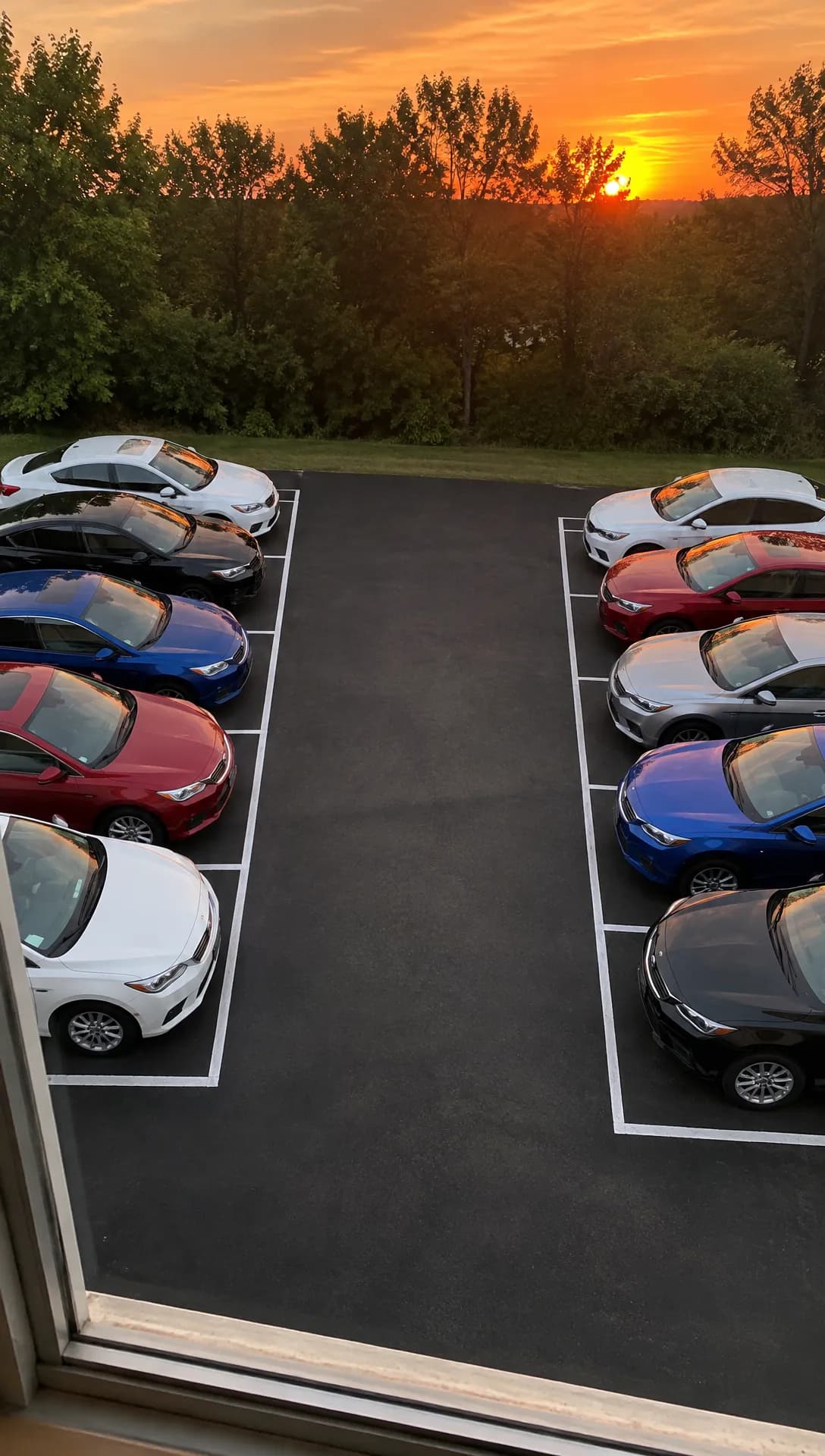 Made in Novoads with GPT Image 2.6 Sunburst · prompt: a small used-car lot from a second-floor window at sunset, as a vertical phone photo with the grilles too small to read · 1 credit · rendered 2026-11-13. The lot is made up and takes the place of a photo of your own lot, for the video steps only. A listing in Google's vehicle ads needs the actual car's photo.
The five ads a dealership runs, and where AI has to stop
Two of the pages we opened are galleries from Dealer Creative, an agency that makes video commercials for car dealers. Their titles read like a year of the sales calendar, with "Presidents Day Event", "Price Match Guarantee" and "Employee Discounts For All" among them. The third is a list of 25 ad ideas dated September 21, 2026, from Claivra, which sells an ad-creative tool. It sorts the ideas by goal into inventory, trade-ins, service, events and trust.
We've kept those five jobs. What AI does well in each, and what it shouldn't show, is our reading.
One car, just in or just marked down
This ad moves one unit. It's the trade-in that just came out of recon, or the SUV that's been sitting on the front line since summer and just got a new price on the windshield.
AI helps here when it starts from your photo of that exact car. A video model can take the photo and add a few seconds of slow camera movement, turning the listing photo into a clip for the places that play video.
AI must never show a car it made up, or a stock car, as if it were a unit on your lot, since the color, the wheels, the trim and the miles belong to one vehicle. Our first still shows what goes wrong. We asked for no badges and the model drew them anyway. Our read is that it was filling in cars it had never been shown.
The sales event spot
This is the ad for the model-year sell-down, the holiday weekend, or the Saturday you keep the doors open late. An event ad sells dates and an offer more than it sells one car, so we'd let a person talking to the camera carry it.
An AI presenter can read the offer and the dates, and a photo of your own lot or showroom can become the clip that opens the spot. The ad shouldn't show a showroom, a lot or a crowd that isn't yours. And it shouldn't state a price or a saving the desk won't honor when the buyer shows up.
The trade-in ask
When the used side is short on trucks, the ad's job flips and you're the one buying. A presenter says which vehicles you want this week and how the appraisal works.
The wanted list changes from week to week, and you remake the ad by writing a new script, with nothing to reshoot. The ad must not show a made-up seller, or present a made-up offer amount as a real customer's deal.
The service lane special
This one sells oil changes, tires, or a battery check before winter. You can run it all year, to people who already own a car and aren't shopping for another.
A photo of your own service drive can become the opening clip, with a presenter reading the special and how to book. Don't show technicians or a bay that aren't yours as if they were.
Meet the team, and the real review
We'd film this one on a phone and keep AI out of the picture. The whole point of the ad is that the people are real (your sales manager, the advisor at the service desk, the buyer who left the review).
An AI presenter must never be passed off as someone who works at your store, or as a customer. Claivra's list makes the same point about reviews, telling dealers to quote a genuine one "word for word, with the reviewer's permission. Never write one." What a tool can do for this ad is add captions to the finished video.
Making the ads in Novoads from a photo of the car or a script
Novoads is the tool we build. It turns a photo or a script into a short video, and you run that video wherever you already buy ads for the store. You pay from the first month.
Two routes cover the ads above. One is a clip made from your photo of the car, the lot or the service drive. The other is an AI presenter reading your script, the kind of ad our page on AI UGC video ads describes. We also keep a page on video ads for car dealerships, and our guide to turning one product photo into a finished ad goes deeper on prompts than we will here.
A clip from your photo of the actual car
- Take the photo you'd use for the listing, the whole car from the front and a little to the side.
- Open Video, press the sliders button and choose Kling 3.0 under Model. Then drop the photo where the box reads "Drop a start frame or click to upload".
- Write a prompt that moves the camera and leaves the car alone. Ours asked for the cars to "stay parked and keep their shapes".
- Set the clip's length under Duration and its shape under Aspect ratio. Kling 3.0 has no resolution setting, and the panel shows the Estimated cost before you press the arrow.
- Watch the clip beside the photo before it goes anywhere, and check the badge, the wheels, the color, the trim and the plate.
A photo in another shape gets fitted to the clip, with its edges extended by AI or a plain border, and the car stays as you shot it.
Wan 3.0 can start from your photo too, at 4 to 15 seconds. Its frames are behind a switch, so move it from Reference to Start / End Frames before you drop the photo in. Seedance 2.0 Mini handles the photo differently in the editor. It has no start frame there, so the photo goes in as a reference image and your prompt calls it @Image1.
Even so, our own clip is a Seedance 2.0 Mini clip. We made it through our connector, which does take a start picture on that model. We used the stand-in still as that start picture, and the clip came back 5 seconds long at 720p, with the sound off.
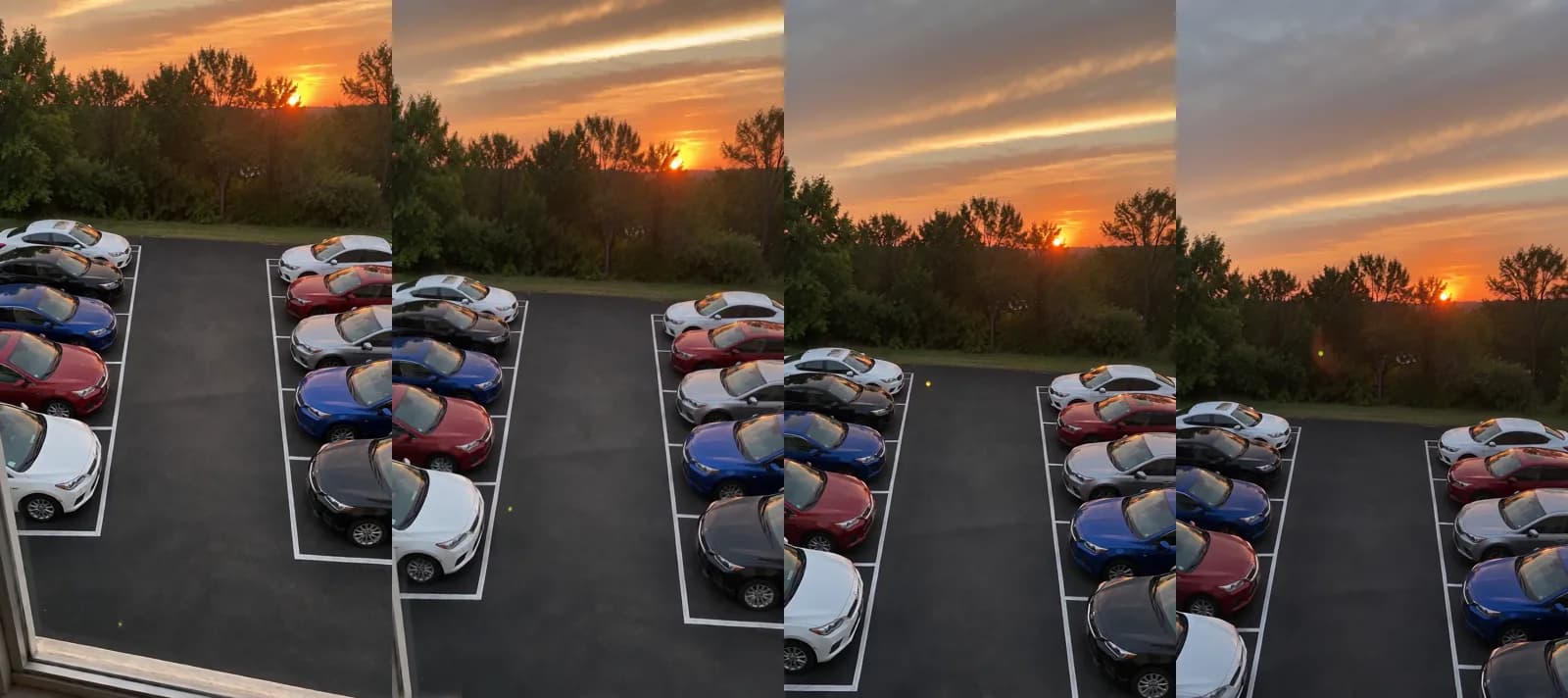 Made in Novoads with Seedance 2.0 Mini · prompt: from the same window, a slow tilt up from the two rows of parked cars to the sunset over the trees, sound off · 5 credits · rendered 2026-11-13. The lot is made up and its cars have no make or model. It shows the video steps only, because a listing in Google's vehicle ads needs the actual car's photo.
Across the four frames, the camera tilts up from the two rows of cars to the sunset. The cars hold their spaces and colors, streaks of cloud fill the sky by the end, and a small lens flare drifts across. No frame shows a person, badge, plate or text.
We think the tilt held up because the only new things the model had to draw were sky and cloud. The clip we set aside moved along the row at eye level, so new cars kept coming into view and the model had to invent them, badges included. For a real car, we'd pick a move that stays on the metal you photographed, like a slow push-in or a small tilt, and skip any move that swings around to a side of the car the photo never showed.
An AI presenter for the event, the trade-in ask and the service special
- Open Talking Actors and write the script the way your floor talks. Give the event's dates, the offer exactly as the desk will honor it, and how to book a test drive.
- Choose an actor. It's an AI presenter, so don't give it a staff name or a line about its years on your sales floor. Our post on how brands cast AI actors goes further into picking one.
- Press the arrow, and the video comes back with voice and lip-sync. Anything from 1 to 60 seconds is billed as a full minute.
- Add captions to the finished video as one more step, in the Captions tool. In the app, the default style, Karaoke, costs 0 credits.
If part of your market shops in another language, the voice list covers 32 languages. Across the event spot, the trade-in ask and the service special, only the script has to change.
What these ads cost in credits
Prices as of November 13, 2026. Each column heading gives that plan's price for one credit, and every dollar figure is our own arithmetic from that rate.
| What you make | Credits | Starter ($0.075 a credit) | Plus ($0.049) | Ultra 3,000 ($0.043) |
|---|---|---|---|---|
| One car, Kling 3.0, 5 s | 10 | 75 cents | 49 cents | 43 cents |
| One car, Wan 3.0, 8 s at 720p | 14 | $1.05 | about 69 cents | about 60 cents |
| Three cars on Wan 3.0, one clip each | 42 | $3.15 | about $2.06 | about $1.81 |
| Seedance 2.0 Mini, 5 s at 720p (our proof clip) | 5 | about 38 cents | about 25 cents | about 22 cents |
| AI presenter, up to 60 s at 720p | 200 | $15.00 | $9.80 | $8.60 |
| AI presenter, up to 60 s at 480p | 100 | $7.50 | $4.90 | $4.30 |
What a month of each plan holds
- Starter, $15 a month for 200 credits and monthly only, holds 14 of the table's 8-second Wan 3.0 clips, or one presenter video at 720p.
- Plus, $49 a month for 1,000 credits, holds 71 of those clips, or five presenter videos.
- Ultra 3,000, $129 a month for 3,000 credits, holds 214 clips, or 15 presenter videos.
All three are on the pricing page. On Starter, you'd be choosing between one presenter spot and a run of car clips.
The table leaves things out. A retake costs the same again, the way our own unused tries did. Caption styles beyond the default, music, and joining clips into one ad are extra steps. Your ad spend isn't in there, and neither is the time it takes to check each clip against the real car.
One outside price, for scale
C&I Studios, a production company with its own studio in Los Angeles, says its pricing guide was originally published March 1, 2026. One of its sample budgets is a "$22,000 regional TV commercial", described as "A regional auto dealer or healthcare provider producing a 30-second spot." The same guide says commercial video production "runs between $3,000 and $500,000 in 2026."
That's one studio's figure for its own work, and it isn't the market's price. It also buys something different. The budget's line items are creative planning, a studio day with a professional crew, on-camera talent, post-production with color and sound, and broadcast delivery. A clip made from a photo doesn't replace any of them. Our post on what an AI commercial costs to make covers the longer format.
Google's actual-car photo rule for vehicle ads
Vehicle ads are the listings Google builds from the inventory feed you upload to Merchant Center. Google's overview says, "Customers see an image of the car with details like the make, model, price, mileage, and dealer name." None of the three ranking pages we opened mentions vehicle ads or Merchant Center.
What the rule says and who it binds
Google's vehicle ads image guidelines list the image problems that can get a listing turned down, under a lead-in that reads "Offers may be disapproved if the images violate any of the following policies". Two items on that list matter when AI makes the pictures.
- The item "No placeholder images" says a placeholder, a "generic or stock image which is not the actual car, or using just the brand or dealer logo will be disapproved." Its only exception is for new cars. "Stock images are allowed for new cars as long as they show the same make, model, and color as the car listed."
- The item "No superimposed logos or text" is about what's laid over the photo. As we read it, a sale banner across the feed photo falls under it, so we'd keep the photo clean and let the listing's own price line carry the number.
The first item is firmer than the lead-in, with "will be" where the lead-in says "may be". The guidelines give no stock exception for a used car, and the feed's own spec asks for the same car in its main image field, a "Single image of the specific vehicle".
The page has no date, so that's the rule as we read it on November 13, 2026. We can't tell you when Google wrote it, and nothing on the page calls it new.
The rule binds whoever submits a feed for vehicle ads. Google says the program takes "new and used vehicle inventory from dealer, retailer stock, aggregators, or original equipment manufacturers (OEMs)", and that ads from private sellers, individuals or auto brokers aren't permitted. Its overview lists vehicle ads as available in Australia, Canada, Japan and the United States, with an open beta in six European countries.
What the rule doesn't cover
It's about the photos in the feed.
- The guidelines say nothing about video ads, and none of the Google pages we read says a video ad has to show the actual car.
- The rule doesn't cover your other Google ads either, or any other platform.
- We didn't read Meta's rules for this post, so nothing here tells you what Facebook or Instagram require. For the formats Meta itself has documented, start with our post on Facebook ad examples by format.
The overview's only line on video comes under the heading "Upload your own video assets". It reads, "To prevent Performance Max from automatically creating videos, it's highly recommended to upload your own video assets to your asset group." That's a recommendation, and Google doesn't word it as a requirement.
What we'd do with it
This part is our advice.
- Use the same photo of the actual car twice, once in the feed and once as the start frame of that car's video. A shopper who taps a vehicle ad lands on that vehicle's page on your site, and a video you ran for the car should show the one they'll find there. Our badge problem is the other reason, since a model that isn't given the car will make one up.
- Keep AI-made cars out of the feed altogether. In our reading, a made-up still like our stand-in lot is the generic image that item describes, because it isn't the actual car. Our post on Google Ads rules for AI-generated images covers the wider picture. For jewelers, the FTC's note on enlarged stones in pictures is in our jewelry ads guide.
- Before you upload an AI-made clip, read the note that opens the same guidelines page. It's headed "Label assets that are AI edited or created". It says AI regulations in the European Union, India, New York, California, South Korea and Vietnam "require that ads with certain AI-generated or edited assets include disclosures and/or labels", and that such labels "will not be in violation of Google policies prohibiting text overlays and watermarks". We read Google's note but not those laws, so read Google's vehicle ads image guidelines for yourself.
Start with three cars and the photos you already have
Pick the three units you most need to move, the aged ones first. Photograph each one whole, from the front and a little to the side, which is the angle Google's guidelines recommend. Give the feed that photo, and give the video model the same photo to start from.
Put your lot on video this week
Start a clip from your own photo of the car, or hand your event script to an AI presenter. You see the credit cost before you generate.
See how it worksAt 8 seconds each on Wan 3.0, that's 42 credits before retakes. Watch every clip beside its photo, and don't post one where the badge, the wheels or the color have changed. When the next sales event comes up, write the offer the way the desk will honor it and let a presenter read it.
Frequently Asked Questions
What are some examples of car dealership ads?
Claivra's list of 25 ideas, one of the pages ranking for that search, sorts them by goal into inventory, trade-ins, service, events and trust. On a lot, that means a spotlight on a unit that just arrived or just got a new price, the sales event spot, the trade-in ask, the service special, and an ad that introduces your team or quotes a real review. One agency's gallery of dealer commercials has titles like "Presidents Day Event" and "Price Match Guarantee". We haven't measured which of them sells more cars.
Can I use a stock photo of a car in Google's vehicle ads?
Only for a new car, and only when the stock image shows the same make, model and color as the car listed. Google's vehicle ads image guidelines, which we read on November 13, 2026, say a placeholder, a "generic or stock image which is not the actual car", or just the brand or dealer logo "will be disapproved". They give no stock exception for a used car.
Does Google require a video ad to show the actual car?
None of the Google pages we read says so. The actual-car rule is in the vehicle ads image guidelines, and it's about the photos in your inventory feed. Google's vehicle ads overview only recommends uploading your own video assets so Performance Max doesn't create videos for you. Building each video from the actual car's photo is our advice.
What does it cost to make a car dealership video ad with AI?
As of November 13, 2026, an 8-second Wan 3.0 clip made from your photo of the car costs 14 credits in Novoads. That's about 69 cents at the Plus rate. An AI presenter video at 720p costs 200 credits for anything up to a minute. At the same rate, that comes to $9.80. Neither figure covers retakes, music, your ad spend or the time it takes to check each clip against the real car.
Can an AI presenter play one of my salespeople?
No. An AI presenter is an AI actor, and the ad should treat it as one. It can read the dates of your sales event or the price of an oil change, but it shouldn't carry a staff name, claim years at your store, or give a customer review. For an ad about your team, film your team.
Key Takeaways
- In Google's vehicle ads, a feed photo that's a placeholder, a generic or stock image that isn't the actual car, or just a brand or dealer logo "will be disapproved". The only exception is a stock image of a new car in the same make, model and color.
- That rule is about the photos in your inventory feed. The only line about video in Google's vehicle ads overview recommends uploading your own video assets so Performance Max doesn't make videos for you.
- Building each car's video from the same photo of the actual car is our own advice. An image model that isn't given the car makes one up, and the one we used put badges on cars we'd asked it to leave plain.
- As of November 13, 2026, an 8-second Wan 3.0 clip in Novoads costs 14 credits at its default resolution. One clip for each of three cars comes to 42 credits, about $2.06 at the Plus rate.
- An AI presenter can read your event offer, your trade-in ask or your service special. It should never be passed off as a salesperson, a technician or a customer.
Sources
- •Google Merchant Center Help: Vehicle ads image guidelines
- •Google Ads Help: Vehicle ads overview
- •Google Merchant Center Help: Vehicle ads data source specification
- •C&I Studios: How Much Does Commercial Video Production Cost in 2026? (originally published March 1, 2026)
- •Claivra: Car dealership ads, 25 ideas with example headlines (September 21, 2026)
- •Dealer Creative: Buick-GMC dealer commercials and videos
- •Dealer Creative: Chevrolet dealer commercials and videos