Coffee Shop Advertising: Ad Ideas for a Cafe, What Each Costs With AI, and TikTok's Local Feed
The ads cafes run, from a new cold brew to an opening special, and how to make each one from your own photos in Novoads. We also price a week of them on every plan and look at where TikTok's Local Feed fits in.

Mauricio Valdivia
·11 min
The pour you'd film if the morning rush ever let up
Nobody filmed the cold brew pour in the strip further down this page. We started with one still of a tall glass of ice beside a small carafe on a light oak counter, the sort of photo you'd take on your own bar in a slow hour, and asked Kling 4.0 for five seconds of video that open on it. A hand reaches in, lifts the carafe and pours over the ice, and by the strip's last frame the glass is about half full under a pale layer of foam. We made the pair on November 17 for our guide to Kling 4.0. It's here because it's the shot a cafe owner means to get every time the menu changes.
Getting that shot is the hard part. The menu turns with the seasons, a new cold brew goes up on the board, and each change deserves a post on TikTok or Instagram, maybe with a Facebook ad behind it. But the light you'd want comes during the rush, and after lunch nobody feels like clearing the bar to prop a phone against the grinder.
For this post, we read two cafe guides from the search results for "coffee shop advertising", TikTok's announcement of its Local Feed, a restaurant software company's guide to creator rates and our own price list, all on November 18, 2026. Both images are ours, made through our own connector for Claude. We haven't put any of these ads in front of customers, and we can't tell you what one will sell.
The ads cafes run, from the new drink to the stamp card
Those two cafe guides keep coming back to the same handful of ideas. There's the new drink, the barista at work, the room, the opening special or stamp card, and the story of how the place started.
A seasonal drink or a new cold brew
This is the ad with the plainest job. It tells your regulars and the street what's on the menu this week, and maybe how long it'll stay. AI is good at the motion around a drink you already make, like steam off a cup, a slow push-in or a pour like ours. And a picture can put the drink's name and price beside it.
The ad shouldn't show anything you don't serve, so no latte art your bar doesn't pour, no cup you don't use, no pastry outside your case and no price that isn't on your board. Leave out the AI customer taking a first sip and lighting up, too, if the ad would pass it off as a real reaction.
The bar and the brew at work
Some of the best cafe content is the work itself, like the grinder, the shot pulling and the milk going into the cup. AI does well with your own photos of your own bar, adding a little steam or a slow pan along the counter.
People are where you draw the line. An AI person shown as your barista, or as you, isn't someone who works there, and the ad shouldn't suggest otherwise. A hand on a carafe, like the one in our clip, reads as a pour, while a face behind the bar would read as staff. The machine and the bar should be yours too.
The room on a quiet morning
The room is the part a photo of a cup can't show. It's the window seat, the light across the tables before ten and the shelf of beans by the register. AI can give your own interior photo gentle motion, like light drifting across a table or a slow pan from the door.
It shouldn't add to the room. Keep out seating you don't have, a view or a terrace that isn't there, a full house on a Tuesday when your Tuesdays are quiet, and AI people at the tables standing in for customers.
An opening special or a stamp card
This is the ad with a deadline in it, whether it's a grand opening week, a cold brew deal through the end of the month or a stamp card that pays out on the tenth drink. An AI presenter can read the offer and its end date from your script, or a picture ad can set the offer beside your real drink.
Be upfront that the presenter is AI. It isn't you, a barista or a regular, and the script shouldn't hand it your history. Keep the offer honest too, with no review you didn't get and no discount you aren't running.
The cafe's own story
Why you opened, the first beans you roasted (if you roast), what the corner was before you got there. Owners tell these best in their own words. AI can animate your own old photos into a short sequence with captions over it. What it shouldn't do is tell the story for you, so no AI presenter speaking as the founder, no customer moment that didn't happen and no history the shop doesn't have.
Making each ad in Novoads from your own photos
In Novoads, three routes fit a cafe. You can open a clip on your photo, build a picture ad with your photo as the reference, or have an AI presenter read your script. If AI ads are new to you, our guide to AI ads starts from the beginning.
A clip that opens on your drink
- Photograph a drink you actually serve, on your own counter and in your own light. We'd keep it to one drink with some empty counter around it.
- In the Video tab, open Settings and choose Kling 4.0 under Model.
- Drop the photo where it reads "Drop a start frame or click to upload". The editor then says "The video starts on this picture."
- In the "Describe your video" box, write only the motion, like steam off the cup, a slow push-in or a pour over ice.
- Back in Settings, set 5 seconds and pick 720p under Resolution, then press the round up-arrow button to send.
Kling 4.0 defaults to 1080p when you pick it, and at that resolution the same clip costs 27 credits. At 720p it's 18. You get back a 5-second clip that opens on your photo, with sound, since Kling 4.0 always generates audio. Kling 3.0 and Google Veo 3.1 take a start frame the same way. A 5-second Kling 3.0 clip is 10 credits. Our product video guide goes further into getting a product right on camera.
Our pair shows the route. The still stands in for your counter photo. We opened the clip on it through our connector for Claude, which starts a Kling 4.0 clip on a picture the same way the editor's start-frame box does.
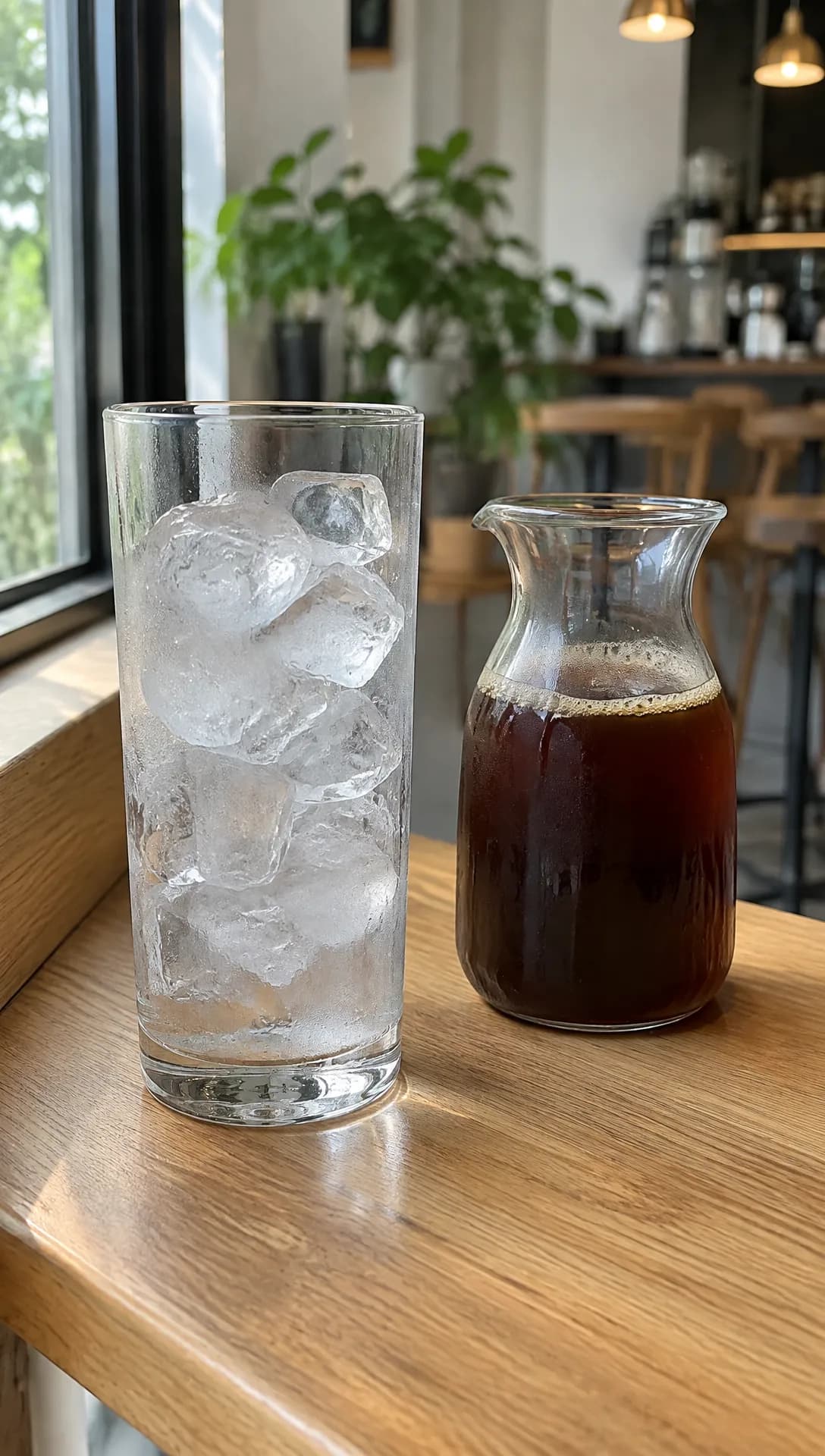 Made in Novoads with GPT Image 2.6 Sunburst · ice and a carafe of cold brew on an oak counter, standing in for your own photo · 1 credit · made 2026-11-17 for our Kling 4.0 guide
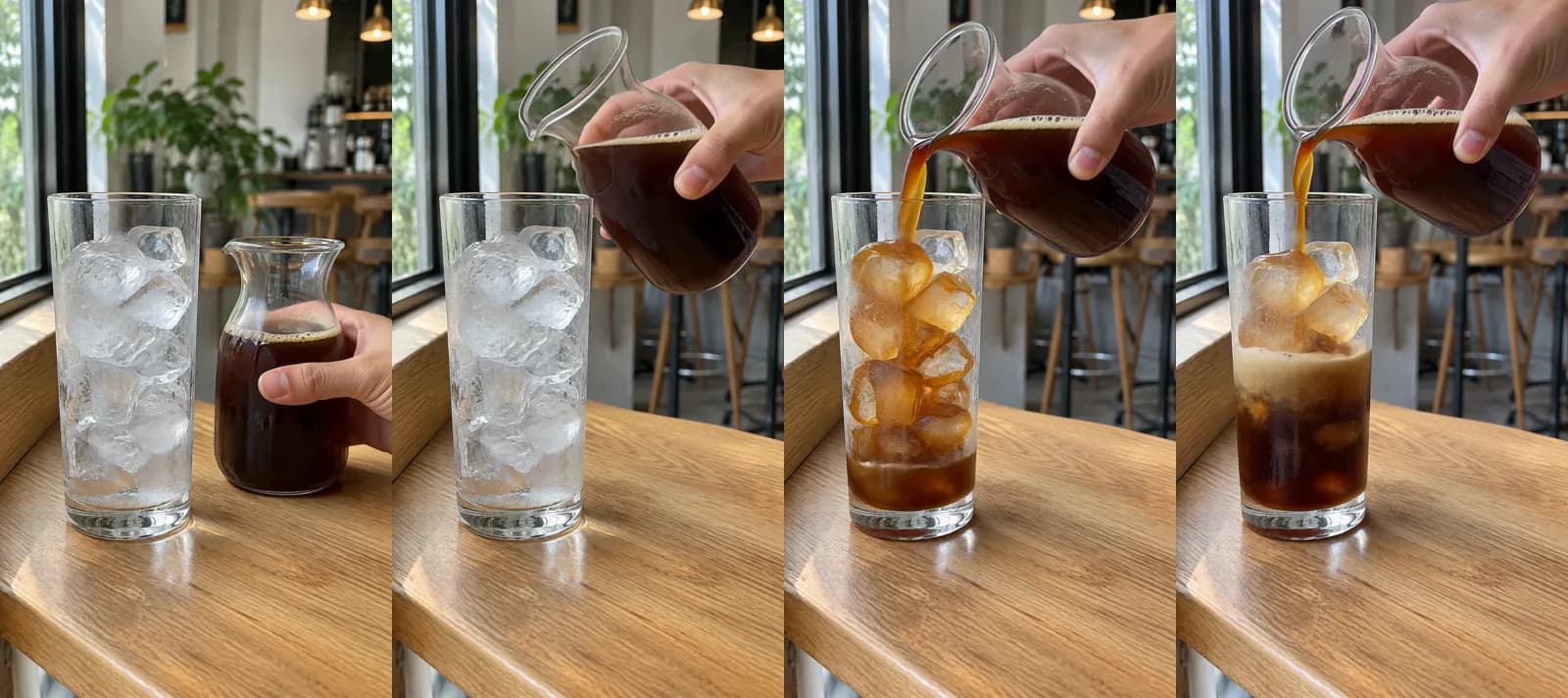 Made in Novoads with Kling 4.0 · opens on the still above, a hand pours the cold brew over the ice, 5 seconds at 720p · 18 credits · made 2026-11-17 for our Kling 4.0 guide
The hand is the model's and belongs to nobody. No face appears, and the framing holds across all four frames. In your version, the drink and the counter come from your photo, so the clip shows what a customer will actually get.
Seedance works differently in the editor. With Seedance, your photo can only go in as a reference, named @Image1 in the prompt, so the clip won't open on it.
The room, with Start / End Frames
- In the Video tab, choose Wan 3.0 under Model in Settings.
- Switch the photo box from "Reference" to "Start / End Frames" and drop your photo of the room in as the start frame. A second photo of the same room from another spot can go in as the end frame.
- Describe slow, quiet motion, like light moving across the tables or a pan from the door toward the counter.
- Set 5 seconds at 720p and send it. That clip costs 9 credits.
Wan 3.0 makes clips of 4 to 15 seconds. Sound is on by default, and a silent clip costs the same. Omni Flash can also open a clip on your photo with "Start / End Frames".
Menu pictures from the Image tab
- Open the Image tab, click Reference and upload your drink photo as a JPG, PNG or WebP.
- In the "Describe your image..." box, describe what goes around the real drink, and type its name and price exactly as your board has them.
- In Settings, choose GPT Image 2 under Model and move the quality from High to Medium, which takes each picture from 4 credits to 1.
- Leave Images at 3, so a run costs 3 credits.
The Image tab opens on Nano Banana Pro, so check the model before you send. GPT Image 2 can't make a 4:5 picture there, but Nano Banana Pro can, at 2 credits a picture. Read every word and number before anything goes out, since the price in the ad has to match the register.
The opening special, read by an AI presenter
- Open the Talking Actors tab and click "Add actors" to choose a presenter from the library.
- In the box that reads "Write what the actor will say...", type the special, what it includes and the day it ends, in words you'd put your name to.
- Send it with the same round arrow button.
The voice and the lip-sync come back already done. Captions are a separate step you add to the finished clip afterward. The voices cover 32 languages, which helps if your counter takes orders in two. A presenter from the library has empty hands, so it won't be holding one of your cups.
Your story, from your own photos
Use the routes above to make three or four short clips from your own photos, from opening day to the bar as it looks now, then add captions in the Captions tool. The tool opens on the "TikTok, no box" look, one of six looks that cost 3 credits for each minute or part of a minute. If you want the story told out loud, keep it in words you wrote, and never hand it to an AI presenter speaking as you.
What a week of cafe ads costs on each plan
Prices as of November 18, 2026. We priced a set made from your own photos, with two clips of the new drink, a clip of the room and a run of three menu pictures. It comes to 48 credits.
Starter is $15 a month for 200 credits. Plus is $49 a month for 1,000 credits. Ultra 3,000 is $129 a month. For the dollar columns, we divided each plan's price by its credits. You'll find every plan on our pricing page.
| Piece of the set | Model and setting | Credits | Starter | Plus | Ultra 3,000 |
|---|---|---|---|---|---|
| New drink, first clip | Kling 4.0, 5 s, 720p | 18 | $1.35 | about 88 cents | about 77 cents |
| New drink, second clip | Kling 4.0, 5 s, 720p | 18 | $1.35 | about 88 cents | about 77 cents |
| The room | Wan 3.0, 5 s, 720p | 9 | about 68 cents | about 44 cents | about 39 cents |
| Three menu pictures | GPT Image 2, Medium | 3 | about 23 cents | about 15 cents | about 13 cents |
| One set | 48 | $3.60 | about $2.35 | about $2.06 | |
| Sets in a month | 4 | 20 | 62 |
The set leaves some costs out.
- Retakes. A take you redo costs its full price again, so trying the pour a second time is another 18 credits.
- A narrator's voice and the edit that joins the clips into one ad. Neither has a fixed price on our price list, so we left both out of the total.
- Captions, which cost 3 credits for each minute or part of a minute in any of the Captions tool's six looks.
- The ad spend. Novoads makes the ad, and you post it or run it on TikTok, Instagram or Facebook yourself.
- Your own time, spent holding every clip up against the drink you pour and the room you have.
The AI presenter for an opening special isn't in the set either. It's billed by the minute, and any part of a minute counts as a full one. At 720p, the default, a clip that runs a minute or less costs 200 credits, which is a full month of Starter credits. At 480p it's 100.
Sauce, a restaurant ordering and delivery software company, gives a sense of what the other route costs. It published a guide to influencer rates for restaurants on March 8, 2026. Under typical TikTok pricing, the guide lists nano influencers at $100 to $400 per video. It counts a nano influencer as a creator with 1,000 to 10,000 followers. It's one company's range, and that money buys something our set doesn't include, a person who makes the video for you.
TikTok's Local Feed and a cafe's public posts
Neither of the two cafe guides we read mentions TikTok's Local Feed, and it's the one platform fact here that bears on where a cafe's own posts can show up.
TikTok announced it on February 11, 2026, in a newsroom post credited to TikTok USDS Joint Venture LLC under the heading "Helping Americans discover, connect, and thrive". So this is TikTok's feed for the US. The post says "The Local Feed is a new tab on the TikTok home screen" and describes what's in it.
"It features local content related to travel, events, restaurants and shopping, as well as posts from small businesses and local creators. Posts in the Local Feed are shown to people based on location, the topic of the content, and when the content was posted"
The same post also says what the feed leaves out: "TikTok content won't appear in the Local Feed from accounts under 18 years old, if someone has a private account, or sets their post privacy to Friends or Only You." That's TikTok's own rule about which accounts and posts can appear in the tab, as TikTok stated it in February. We couldn't read TikTok's help center, which the post links to for more on location, so we can't say whether that wording has changed since.
To help power the feed, TikTok said it would let people share their precise location through their device's GPS settings. TikTok said that option would roll out gradually across the U.S., and it would be off by default, optional and only for accounts 18 and over. Nothing in the post promises a radius around your door, and we wouldn't count on everyone nearby seeing a post.
What we take from it for a cafe
TikTok's post never mentions cafes or coffee, so these four points are our own reading of it.
- Public posts are the way in. Your clips can go up as ordinary public posts from the cafe's public account. TikTok names posts from small businesses as part of the feed, and its stated exclusions don't cover a public business post.
- Ads are a separate question. TikTok's post says nothing about ads in the Local Feed, so we wouldn't assume a paid ad shows up there. Running a clip as a paid TikTok ad is a different route, and our guide to making TikTok ads covers it.
- When it went up counts. TikTok lists the posting time beside location and topic, so by our reading the new drink belongs online the week it goes on the menu.
- Private settings keep a post out. A post set to Friends or Only You, or one from a private account, stays out under TikTok's rule.
TikTok also has its own rules on misleading AI-made ads, and our guide to what TikTok counts as misleading in AI ads walks through them. If your cafe pours wine or beer at night, TikTok's rules on alcohol offers are a separate matter, and our restaurant ads guide covers them.
Three photos to take before you open tomorrow
Tomorrow, before you unlock the door, use the morning light to take three photos, one of the new drink on your counter, one of the bar with the machine on and one of the room from the doorway. Those three cover the set in the table.
In Novoads you can turn photos like those into clips and menu pictures, then post them or run them as ads yourself. Every plan is paid from your first month, and the smallest, Starter, is $15 for 200 credits.
Turn this week's drink photo into an ad
Start from your own counter photo. Starter's 200 credits a month cover four sets like the one in this guide.
See the plansIf you only make one thing this week, make the drink clip from a photo of a drink you actually pour.
Frequently Asked Questions
How do I advertise my coffee shop when there's no time to film?
Instead of filming, use a quiet hour to photograph the new drink on your counter, the bar and the room. In Novoads you can open a short clip on one of those photos with Kling 4.0, or with Wan 3.0 after you pick Start / End Frames, and build menu pictures around the same photo in the Image tab. The set we price in this guide has two drink clips, a room clip and a run of menu pictures. It comes to 48 credits, or $3.60 on Starter.
What can a cafe show in an ad, and what should AI leave out?
Show the drink that's new this week, the bar while you're working it, the room, an offer with its end date and the story of how you started. AI can add motion to your own photos of all of those. Don't let it add a drink or pastry you don't serve, a cup you don't use, a price you don't charge, seats or a crowd you don't have, or an AI person passed off as your barista or one of your customers.
Can my cafe's TikTok posts show up in the Local Feed?
TikTok said on February 11, 2026, that its US Local Feed carries posts from small businesses and local creators, chosen by location, topic and when they were posted. It also said the feed keeps out accounts under 18, private accounts and posts set to Friends or Only You. The announcement doesn't mention ads in the feed, and nothing in it promises how many people nearby will see a post.
Can an AI presenter announce my cafe's opening special?
Yes. It can read the offer and its end date from a script you write, and we'd present it plainly as an AI presenter, never as you, a barista or a regular. In Novoads you pick one in the Talking Actors tab and type the script. Anything up to a minute costs 200 credits at 720p. At 480p it's 100.
Key Takeaways
- A cafe's ads come down to the new drink, the bar at work, the room, an offer with an end date and the shop's own story. AI should only animate what you actually serve and actually have.
- In the Novoads editor you can open a clip on your own photo with Kling 3.0, Kling 4.0 or Google Veo 3.1, and with Omni Flash or Wan 3.0 once you pick Start / End Frames.
- The set we priced (drink clips on Kling 4.0, a room clip on Wan 3.0 and menu pictures from GPT Image 2) comes to 48 credits, or $3.60 on Starter.
- TikTok announced its US Local Feed on February 11, 2026. It said the feed shows posts based on location, topic and when they went up, and leaves out private accounts, accounts under 18 and posts set to Friends or Only You.
- TikTok's announcement says nothing about ads in the Local Feed, so plan on your public posts appearing there, and don't assume a paid ad will.