What Is Kling 4? Kling 4.0's 30-Second Clips, What Changed From 3.0, and What a Clip Costs in Novoads
Kling's own pages say Kling 4.0 makes one clip of up to 30 seconds in a single generation, where Kling 3.0 stopped at 15. What else Kling changed, which ads Kling 4.0 suits and what each length costs in Novoads.

Mauricio Valdivia
·11 min
We gave Kling 4.0 one photo and five seconds
Our clip opens on a still we made for this post, a tall glass packed with ice on a light oak cafe counter with a small glass carafe of cold brew beside it. Over five seconds, a hand lifts the carafe and pours, and the coffee runs down through the ice until the glass is about two-thirds full under a pale layer of foam. The camera holds still the whole time. We made the clip with Kling 4.0 at 720p through our connector for Claude. It cost 18 credits, about 88 cents on the Plus plan.
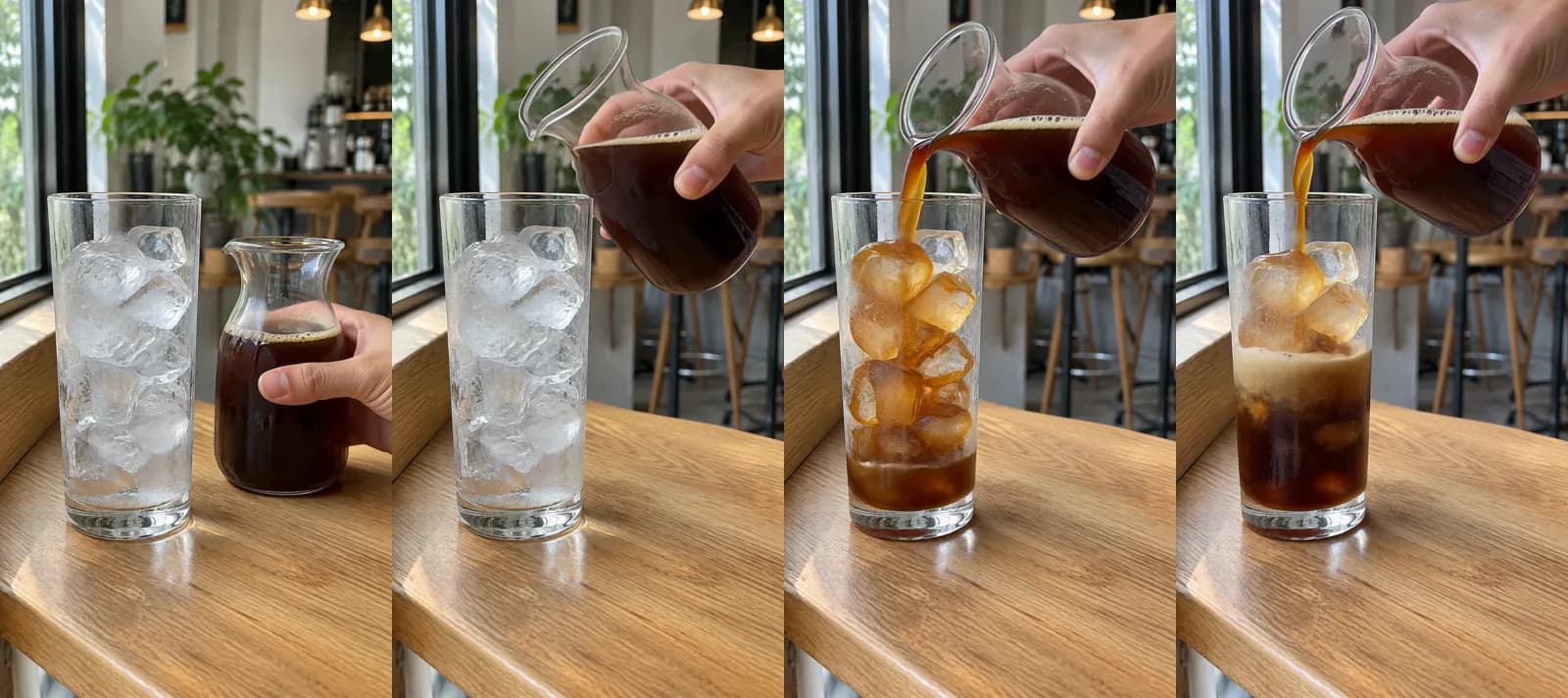 Made in Novoads with Kling 4.0 · a hand pours cold brew over ice, started on a still that stands in for your own photo · 5 seconds at 720p · 18 credits · 2026-11-17
If you searched "kling 4", you probably want to know what the model is, what changed from Kling 3.0 and what one clip costs. Kling 4.0 is the video model Kling AI rolled out to all its users in October. Kling's own user guide says it makes one clip of up to 30 seconds in a single generation, and Kling's comparison page gives Kling 3.0 half that. In Novoads, the price of a Kling 4.0 clip depends on its length and size, and the editor shows you the credits before you send it.
For what Kling 4.0 does in Kling's app, we read Kling's own pages (its user guide, its comparison with Kling 3.0, its feature page and its blog) on November 17, 2026. We also read the top Google results for "kling 4". The Novoads side comes from our own prices that same day and our own render. For the clip above, we made a GPT Image 2.6 Sunburst still (1 credit) to stand in for your product photo, then started a five-second Kling 4.0 clip on it. We didn't make a 30-second take, a 1080p clip, a clip with an end frame or one with speech, so we don't judge those here.
What Kling's own pages say Kling 4.0 does
Everything in this section is Kling's own description of its app, taken from three of its pages.
- The long user guide for the model, dated November 4, 2026
- The page comparing it with Kling 3.0, dated September 30, 2026
- A blog post on how teams use it, dated October 27, 2026
One clip of up to 30 seconds
The guide says "Kling 4.0 supports single-generation videos ranging from 3 to 30 seconds." In Kling's app you set the length in 1-second steps, and the guide gives "default: 10 seconds" for its Omni Reference mode.
That 30-second figure wasn't new on November 4. Kling's comparison page already listed the full 30 seconds for Kling 4.0 on September 30. The model reached everyone about two weeks later. Kling's blog post from October 27 says "Since Kling 4.0 rolled out to all users on October 15, creative teams across film, advertising, and animation have been putting these capabilities to work." So the guide, the model's manual, came out about three weeks after the rollout, and the length was public well before that.
Kling 4.0 Flash stops at 20 seconds
The 30 seconds belong to the full model. Kling's guide also describes Kling 4.0 Flash, a faster variant it calls "ideal for rapid creative iteration and short-form video creation." It says Flash "supports videos up to 20 seconds at a maximum resolution of 720p", and that Flash doesn't currently take start and last frames or multiple keyframes. Flash is Kling's own variant. The Kling 4.0 you pick in Novoads goes up to 30 seconds and 1080p.
Multi-shot is on by default in Kling's app
Right after the 30-second line, the guide says "Multi-shot is enabled by default, allowing the model to automatically split shots and organize pacing based on the content." It pitches the long clips at "Short films and finished ads with a complete storyline and multi-shot narrative." So in Kling's own app, the model may cut a long clip into several shots by itself unless you switch that off. If you want one continuous take there, that's the setting to check first.
The guide's own fine print
The guide opens by saying "this manual is based on the capabilities of the Kling 4.0 model and the platform's launch specifications", and adds that "Features and parameters are subject to the actual product interface". So every limit it lists is what Kling's app offered at launch, and the app can change while the page stays the same. Check Kling's app itself before you plan around a number from the guide.
What changed from Kling 3.0
Kling's comparison page, "Kling 4.0 vs 3.0: Key Differences Explained", went up two weeks before the rollout, so a few of its lines talk about the launch in the future tense. Its side-by-side table is still Kling's own account of the two models.
| In Kling's comparison table | Kling 3.0 | Kling 4.0 |
|---|---|---|
| One clip | 3 to 15 seconds | 3 to 30 seconds |
| Frames you can set | a start and an end frame | a start and an end frame, or up to 10 keyframes |
| Reference pictures or subjects, no video | up to 7 | up to 10 images and 7 subjects |
| Reference videos | 1, up to 15 seconds | up to 5, 30 seconds combined |
| Sound | single-channel | two-channel stereo |
| Spoken languages | Chinese, English, Japanese, Korean and Spanish | adds Portuguese, German, French, Hindi and more |
The length goes from 15 seconds to 30
"A 15-second video is often enough for one main action, a short dialogue moment, or a compact product sequence," the comparison page says. At 30 seconds, it goes on, there's room to set up a scene, develop the action and bring it to a more deliberate ending.
Keyframes and more references
Kling 3.0 took a start frame and an end frame. "Kling 4.0 adds Multiple Keyframes, supporting up to 10 keyframe images," the page says, so in Kling's app you can set images at several points along the clip's timeline instead of only at the start and the end. The page also says Kling 4.0 "supports up to 15 combined reference assets, including images, videos, subjects, and voice references".
Creative Recreation and longer prompts
"Another new area in Kling 4.0 is Creative Recreation," the page says. You borrow an existing video's pacing, shot structure and presentation style, then swap in your own characters or products. Kling's example is a brand rebuilding a trending product video around its own product. And the page says Kling 4.0 "expands prompt input to as much as 8,000 tokens," so a long shot list fits in a single prompt in Kling's app.
Stereo sound and better lip-sync
Sound made with the picture isn't new. The page says "Kling 3.0 already supports Native Audio, including dialogue, ambience, sound effects, multilingual speech, and lip-sync." What Kling 4.0 adds, according to the same page, is "two-channel stereo audio and improved lip-sync accuracy," plus the four new spoken languages in the table.
Kling's own pages disagree on 4K
Kling's guide lists sizes up to 4K in its spec table. Its summary marks the 10-bit HDR output as coming soon. Kling's feature page for the model has no date, and when we opened it on November 17, 2026, it said "Kling 4.0 supports 21:9 ultrawide framing, with native 4K and 1080p output coming soon." Since Kling's own pages disagree, we'd plan a Kling 4.0 ad at 1080p for now, wherever you make it.
What a Kling 4.0 clip takes and costs in Novoads
You'll find Kling 4.0 in the Novoads editor's model menu, right under Kling 3.0, and in our API and our connector for Claude. Every Novoads customer has had it since November 16, 2026.
What you give it
You give Kling 4.0 a prompt, or a start frame with an optional end frame. Its sound is always on, and you set three things.
- The length, from 3 to 30 seconds, one second at a time
- The size, 720p or 1080p, with 1080p as the default
- The shape, in the editor's Aspect ratio setting
We don't offer Kling 4.0 with reference images, video inputs or multi-shot, and we don't offer it above 1080p or past 30 seconds. An end frame only works alongside a start frame.
What each length costs
Prices as of November 17, 2026. The credits are Novoads' own, and each dollar figure is our arithmetic at that plan's price per credit, rounded to the cent.
| Kling 4.0 clip | Credits | On Starter ($15 for 200 credits) | On Plus ($49 for 1,000 credits) | On Ultra 3,000 ($129 for 3,000 credits) |
|---|---|---|---|---|
| 3 s at 720p | 11 | 83 cents | 54 cents | 47 cents |
| 5 s at 720p | 18 | $1.35 | 88 cents | 77 cents |
| 5 s at 1080p | 27 | $2.03 | $1.32 | $1.16 |
| 10 s at 1080p | 53 | $3.98 | $2.60 | $2.28 |
| 15 s at 1080p | 80 | $6.00 | $3.92 | $3.44 |
| 30 s at 720p | 106 | $7.95 | $5.19 | $4.56 |
| 30 s at 1080p | 159 | $11.93 | $7.79 | $6.84 |
The editor's "Estimated cost" line shows the same credits for the length and size you pick, before you send the clip. Kling 4.0 won't be on our pricing page until December 1, so the editor and this table are where you'll see its credits. At the default 1080p, a month of credits buys this many whole clips on each plan.
- On Starter (200 credits a month), seven five-second clips or one 30-second take
- On Plus (1,000 credits a month), 37 five-second clips or six 30-second takes
- On Ultra 3,000, 111 five-second clips or 18 thirty-second takes
A long take costs what the same seconds cost in short clips
The price climbs with the length, so a long take saves you almost nothing per second.
| The same 30 seconds | At 720p | At 1080p |
|---|---|---|
| One Kling 4.0 take | 106 credits | 159 credits |
| Six five-second Kling 4.0 clips | 108 credits | 162 credits |
So what you're paying for with one long take is continuity. It's one shot in one light, with a product that looks the same from start to finish and sound that runs under all of it.
The case against it is what a redo costs. A 30-second take with one warped label near the end costs another 159 credits to make again. Replacing one bad five-second clip costs 27.
Kling's own plans, for comparison
Kling sells its own app on monthly plans. Its credit guide, written for Kling 3.0 and dated July 28, 2026, gives three numbers for the Pro plan.
- $25.99 for the first month, as a first-subscription discount
- $32.56 a month after that
- 3,000 Kling credits a month
The same guide warns that "Credits, prices, plan benefits, and access rules can change as Kling AI products are updated."
Credits on the two services aren't the same unit. The Kling pages we read for this post don't say how many credits a Kling 4.0 clip takes in Kling's app, so the plan prices are what we can compare. We cover Kling's lowest plans and what they allow in a separate post.
Our plans page lists every Novoads plan, with what each one costs a month.
Which ads Kling 4.0 suits
Kling's announcement post for the model, dated September 30, 2026, has a table of typical content, and three of its rows are ads.
- "Product ads, brand films, campaign videos"
- "Product demos, social ads"
- "Reviews, unboxings, creator ads"
For a small brand, those ads split into the ones where a long take earns its credits and the ones where it doesn't.
A product story in one take
The new kind of ad Kling 4.0 adds over Kling 3.0 is a product story told in one continuous clip of 15 to 30 seconds, with its sound made in the same pass. Kling's announcement post suggests you "Break the 30 seconds into story beats", where "a product video might move from an opening scene and product close-up to product use, dialogue, and a final hero shot." Use your own product photo as the first frame, so the clip opens on your real label. Then watch every second for a label that changes, and keep out any size, claim or feature your product doesn't have. If you've never built one, our walkthrough from one product photo to a finished ad covers the prompt side.
Pours, splashes and push-ins
Close-ups are where the shortest Kling 4.0 clips pay off. In a post written for Kling's blog, dated November 9, 2026, a creator who tested the model on "a fictional energy drink ad" names three product close-ups as the most expensive shots in a drink commercial.
- A can coming out of ice
- Its pull tab opening
- An ice cube dropping into a drink
"Filming them for real would require a high-speed camera and specialized rigging," the creator writes, adding that they're also among the hardest shots to generate, since the tab can deform or the liquid can look like it's melting.
Our cold brew pour is that kind of shot, and the five-second clip covered the whole move, from the lift to a glass about two-thirds full. Make the drink look like what your buyer gets, with no fuller glass, darker coffee or richer foam than the real thing.
A start photo and an end photo
Kling's guide keeps the familiar first-frame and first-and-last-frame workflow under its Keyframes mode, and in Novoads, Kling 4.0 takes a start frame with an optional end frame. Give it two photos of your own and the model fills in the move between them. Pairs like these are a good fit.
- An empty counter, then the same counter set for a tasting
- A gift box closed, then the same box open
- A bare shelf, then the same shelf stocked
Stick to moves that really happen. A before-and-after of a result that didn't happen (a cleaner room, clearer skin, a fixed screen) has no place in your ad.
Talking clips, and when an AI presenter fits better
Kling's list includes reviews and unboxings, and its guide names nine languages for speech, English and Spanish among them. The person in a clip like that is generated, so never present them as a customer or have them voice a review nobody gave. For an offer read word for word (a price, a date, opening hours), an AI presenter is the better fit in Novoads. Our talking actor reads your script. It costs 200 credits a minute at 720p, and a started minute counts as a full one. Our ecommerce video ad examples show where each kind of clip fits in a store's ads.
When short clips do the job for fewer credits
One long Kling 4.0 take is worth its credits in three cases.
- The ad is one continuous moment, like a pour that ends in a toast or an unboxing that runs into first use.
- The sound has to run under the whole ad.
- The product has to look the same from the first second to the last.
Short clips do the job for fewer credits in three others.
- You're testing hooks, and a three-second clip at 720p costs 11 credits.
- The ad is a run of close-ups you'll cut together anyway.
- The shot fits in 15 seconds, and Kling 3.0 costs 10 credits for five seconds.
Before you commit to one long take, it's worth looking at real AI commercials and what one costs to make. If Kling isn't the right model for the job, our Kling alternatives list compares other models by price per second.
How to make a Kling 4.0 clip in Novoads
We made our clip through our connector for Claude, starting it on the still below. In the editor, the same clip takes six steps.
- In the video editor, pick Kling 4.0 in the model menu, right under Kling 3.0.
- Add your product photo to the upload area marked "Drop a start frame or click to upload". Once it's in place, you'll see "The video starts on this picture."
- If the clip should end on a specific picture, add a second photo to the one marked "Drop an end frame or click to upload".
- Pick a Duration from 3 to 30 seconds, a Resolution and an Aspect ratio.
- In the prompt, describe what the camera sees, including the move, the hands and the light. Kling's guide says the only negative instructions you really need are "no subtitles and no background music", because "The model may add these by default", so put that line in your prompt unless you want them.
- Check the "Estimated cost" line, then click the round button with the up arrow to send it.
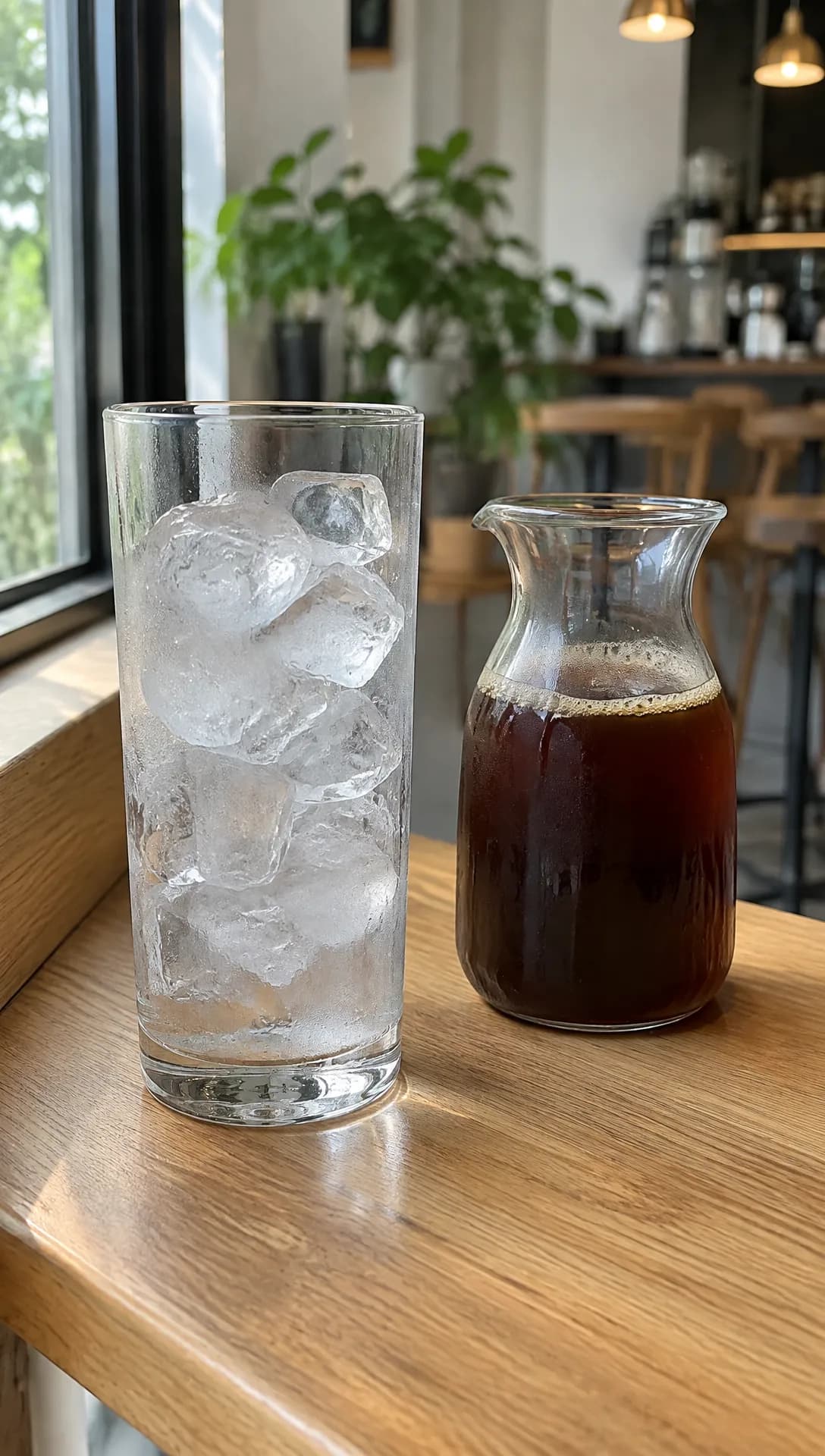 Made in Novoads with GPT Image 2.6 Sunburst · a glass of ice beside a carafe of cold brew on a cafe counter, standing in for your own photo · 1 credit · 2026-11-17
You get back one clip, with sound, at the length and size you set. Play it with the sound up before you use it, and check the label in every frame against your real one. Our five-step guide to AI ads takes you from one clip to a finished ad.
Start with a short Kling 4.0 clip
One credit balance pays for every video model in Novoads (Seedance 2.5, Seedance 2.0, Seedance 2.0 Mini, Kling 3.0, Kling 4.0, Google Veo 3.1, Omni Flash and Wan 3.0). So a hook test on a cheaper model and a long Kling 4.0 take come out of the same month's credits. We charge from your first month, and Starter is $15 a month for 200 credits.
Start a Kling 4.0 clip on your own product photo
Pick Kling 4.0 in the editor, drop your photo as the start frame and see the credits before you send it. Plans start at $15 a month.
See the plansMake your first Kling 4.0 clip a five-second one at 720p. Move up to a 30-second take once the short clip shows your product the way it really looks.
Frequently Asked Questions
How long can a Kling 4.0 video be?
Kling's own user guide says Kling 4.0 makes one clip of 3 to 30 seconds in a single generation. Kling's comparison page puts Kling 3.0's limit at 15 seconds. The user guide also says Kling 4.0 Flash, Kling's faster variant, goes up to 20 seconds at 720p. In Novoads, a Kling 4.0 clip runs from 3 to 30 seconds. The longest take, at the default size, costs 159 credits.
Key Takeaways
- Kling's own user guide says Kling 4.0 makes one clip of 3 to 30 seconds in a single generation. Kling's comparison page puts Kling 3.0's limit at 15 seconds.
- Kling's blog says the model rolled out to all its users on October 15. The 30-second length was already on Kling's pages in September.
- For Kling's own app, its guide lists multi-shot, on by default, plus ten keyframes and fifteen reference assets. In Novoads, Kling 4.0 takes a prompt, or a start frame with an optional end frame.
- In Novoads, a five-second Kling 4.0 clip at 720p costs 18 credits. The longest take, at the default size, costs 159.
- A long take costs about what the same seconds cost in short clips, so test hooks on short clips and save the 30-second take for an ad that needs one continuous shot.