Etsy Ads: How They Work, What a Listing Video Costs With AI, and Why It Plays Silent
An Etsy listing video plays without sound and runs 15 seconds at most, so it has to sell the piece with motion and light. Etsy Ads and Offsite Ads promote the listing it's on, and you can make that listing's photos and clips with AI in Novoads from the pictures you've already taken.

Mauricio Valdivia
·11 min

Etsy removes the sound from a listing video
Our clip of a hand-knit beanie, a pair of mustard mittens and a skein of rust yarn runs five seconds with no sound at all. On an Etsy listing, a soundtrack wouldn't have survived anyway, because Etsy's help center says a listing video "will not contain any audio once uploaded to your listing." So the video beside your photos has to sell the piece with movement and window light, in 15 seconds or less.
If you sell handmade goods, vintage or prints on Etsy, this will sound familiar. The piece is finished, you've taken the photos by the window, the tags are in, and the listing still has room for a video. Or your shop gets views but few sales, and you're wondering whether Etsy Ads would help or just spend your budget faster.
For this post, we read Etsy's own help pages and five of the top results for "etsy ads" that we could open, all on November 16, 2026. We priced every clip from our own credit tables, and that morning we made one still and one clip in Novoads. None of those five results mentions that a listing video plays silent, and nothing in this post measures what an Etsy Ads campaign earns.
The ads an Etsy shop can run, starting with the listing
Everything an Etsy shop advertises leads back to a listing. Etsy promotes the listing itself, and your own posts send people to it, so the work starts with what's on the listing page.
The listing video, up to two per listing
You can add up to 2 videos to an Etsy listing, next to its photos. Etsy's help center says, "Listing videos give shoppers a better idea of your products, and can also help improve how your listings appear in Etsy search." For a maker, it's the slot that shows what a still can't, like the weight of a chunky knit or the way a glaze catches the light.
AI is good at the movement. From one photo of the real piece, it can make the camera drift closer, slide along a row of stitches or let the light change, which is most of what a silent clip needs.
The clip must never show anything the piece doesn't have. That means no yarn color, finish, stitch pattern or engraving that isn't on the item, and no scale that makes a beanie look bigger. With vintage, the wear counts too. If your photo shows a chip in the glaze or a faded corner on a print, the clip has to keep it, because the buyer is paying for that exact piece. If you sell jewelry, our post on jewelry ads goes further into stones and metal.
Etsy Ads on Etsy's search and category pages
Etsy Ads are the ads you buy inside Etsy. Etsy's campaign page says they can show up in Etsy search, on category pages and on Market pages, both on the site and in the app. The same page spells out the rules.
- You set a daily budget, the most you'll spend in a day. The minimum is $1, and you can change it at any time.
- Every seller starts with a maximum daily budget of $25, which Etsy recalculates weekly.
- The bid on an ad sets what each click costs, and each day's clicks are added to your Payment account the next day.
- All your current listings are advertised by default, and only to buyers in countries you ship to.
- A new shop has to wait 15 days after opening before it can start a campaign.
Etsy also says, "Etsy Ads work best when your listings are already getting interest from buyers." There's no separate ad to design, since Etsy promotes the listing you have. What's on that listing is the part you control, and that's where AI helps, with a sharper photo, a lifestyle scene or a listing video.
Props are the risk. Our still has needles and a skein of yarn next to the hat and mittens, and on a listing for the hat alone, a shopper could think they're part of the set. Either sell it all as a kit or leave the props out.
Offsite Ads, run by Etsy on other sites
Offsite Ads are the ads Etsy runs for you outside Etsy. Etsy's Offsite Ads page says they may appear on sites such as Google, Facebook, Instagram, Pinterest and Bing, and that these partners may change over time. You don't upload anything. Etsy shares your listing data with the ad platforms, including your titles, images and descriptions, and you can't choose which listings run.
The fee comes out of the orders these ads bring in, and how much you pay depends on your shop's sales.
- If your shop has always made less than $10,000 in any consecutive 365-day period, you're enrolled automatically, but you can opt out. An attributed order carries a 15% fee.
- If your shop has made $10,000 or more in any consecutive 365-day period, you have to take part for the lifetime of the shop. The fee is discounted to 12%.
- The fee on a single order never goes above $100.
- An order counts when a buyer clicks one of these ads and buys from your shop within 30 days.
When you see an Etsy listing in a Facebook or Instagram ad, it could be one of these, or an ad the shop bought itself, the kind we cover next. Since Etsy sends your images to those platforms, the listing photo is your lever. Etsy's page says, "To increase the chance of your listings being advertised, improve the quality of your listings." So keep every listing image true to the item, because it travels off Etsy.
Your own posts on Instagram, Facebook and Pinterest
These are the posts you make and the ads you pay for yourself, each linking to a listing. Unlike on the listing page, sound can play here, so a voice, music or an AI presenter can earn its place. A vertical clip from your product photo fits a reel or a story, and a presenter with captions can announce a restock date or a sale. Our post on ecommerce video ads walks through more formats for a feed, and our TikTok ads guide covers TikTok. If the same pieces also sell in a TikTok Shop, our breakdown of TikTok Shop ads explains how GMV Max turns the clips you post into ads there.
Never use a presenter to pose as a real buyer with a review, and never show a customer who doesn't exist or a result nobody had. An AI presenter is an AI actor. It isn't you, the friend who dyes your yarn or someone who bought from you, and nothing in the post should suggest it is.
Holiday pictures and sale clips
For the holiday rush, you might want a seasonal version of your best seller's photo, like a gift setting or a winter table, and a short sale clip for your own accounts. AI is quick at this. It can set the same piece on a holiday table or under early winter light, then turn that picture into a clip.
Neither the picture nor the clip should show gift wrap you don't offer, extras that aren't in the box or a delivery date you can't keep. Our still has a kraft paper parcel tied with twine in the corner. If your shop doesn't wrap orders, that parcel reads as a promise, so crop it out or leave it out of the prompt.
Making each Etsy ad in Novoads from your own photos
Each of these starts from a photo you've taken of the real piece. If AI ads are new to you, our guide to AI ads covers the basics first.
A listing video from a photo you've already taken
In the editor, Kling 3.0 is the simplest model for this, because it starts the clip on your photo.
- Open a project and pick Video in the row at the top.
- Open Settings, then choose Kling 3.0 under Model and 5 seconds under Duration.
- Drop your listing photo where the editor says "Drop a start frame or click to upload". The editor then shows "The video starts on this picture."
- In "Describe your video...", ask for one slow camera move and the light you want, such as a slow push toward the pompom in soft window light, and say that nothing else moves.
- Check the Estimated cost and send it with the round arrow button, which has no text on it.
You get back a 5-second clip that opens on your photo, for 10 credits. Omni Flash and Wan 3.0 can also start on your photo once you pick "Start / End Frames" instead of "Reference". Omni Flash's shortest clip is 4 seconds, which is under the listing guide's minimum, so pick 6. Wan 3.0 offers 1080p, the size Etsy's video article calls ideal. In the editor, Seedance takes your photo only as an @Image1 reference, so its clip doesn't start on it.
We made this post's clip through our own connector instead. That's the set of Novoads tools an AI assistant like Claude can call, and it can start a Seedance 2.0 Mini clip from a start picture for 5 credits. Our start picture was a still we made in GPT Image 2.6 Sunburst to stand in for a maker's photo.

Made in Novoads with GPT Image 2.6 Sunburst · hand-knit pieces on linen by a window, asked for as a maker's phone photo · it stands in for your own photo · 1 credit · 2026-11-16
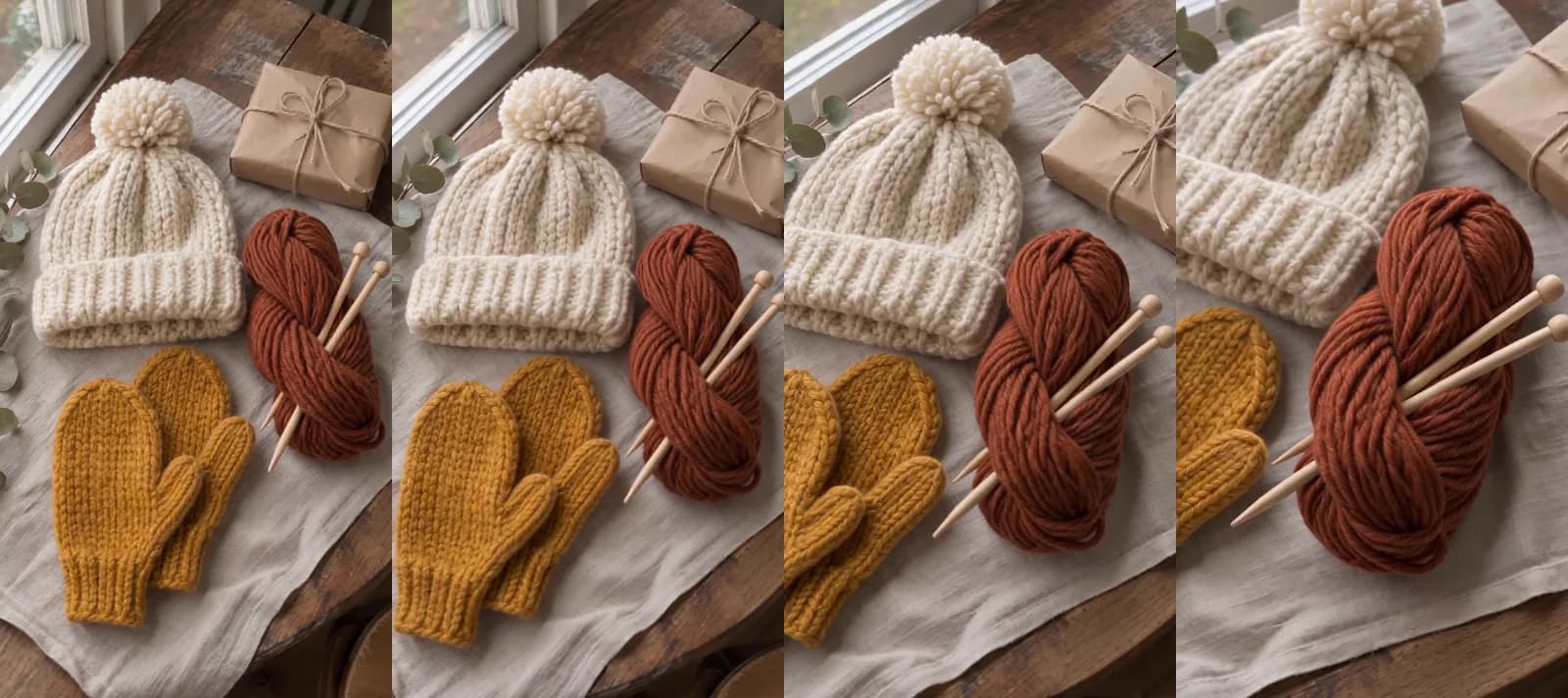
Made in Novoads with Seedance 2.0 Mini · four frames of a 5-second clip started from the still above, the camera gliding toward the yarn, sound off · 5 credits · 2026-11-16
Both came back usable on the first try, so the pair cost 6 credits. Before you put a clip like this on a listing, hold it next to the real piece.
- Check the colors. Ours held from the first frame to the last, but a model can warm or cool a yarn.
- Watch what leaves the frame. Our mittens slide out at the left, which works for a yarn listing but not for one selling the mittens.
- Look for anything your photo doesn't have, like a label or a logo, and make the clip again if you find one.
A sharper photo or a holiday scene for the listing
Etsy's listing guide recommends images at least 2000 pixels wide. If yours is smaller, the form shows a warning that the guide calls "only a suggestion", and you should still be able to publish.
- Pick Image in the row at the top.
- Click the + button, whose tooltip reads "Add reference", and attach your own photo of the piece.
- In "Describe your image...", say where the piece sits, such as a winter table or a gift setting, and what has to stay exactly as it is, like the color, the stitch and the size.
- Open Settings, then choose GPT Image 2.6 Sunburst under Model (its hint reads "Newest. Slower, keeps fine detail"), Medium under Quality, and an Aspect ratio.
- Check the Estimated cost and send it.
At Medium, a picture costs 1 credit. A square comes back 1,024 pixels wide, about half of Etsy's recommended width, and that's fine for your own posts. For a listing photo at Etsy's width, choose Nano Banana Pro under Model, 2K under Resolution and a square Aspect ratio. The settings label that size 2048px, and each picture costs 2 credits.
A clip with sound for your own posts
For Instagram, Facebook or Pinterest, make the clip on Wan 3.0 in 9:16 and keep the sound. The model generates sound with the clip unless you switch Generate Audio off, and it costs the same number of credits either way. If you want a longer cut built from one product photo, our guide to product videos with AI walks through it.
An AI presenter for a restock or a sale
- Pick Talking Actors in the row at the top.
- Choose an AI presenter with "Add actors".
- Type the lines into "Write what the actor will say...", such as the day your winter colors restock.
- Leave the price line at 720p or switch it to 480p, then send it.
It comes back with a voice and lip-sync, and you add captions afterward, on the finished video. In the app, the Karaoke style costs 0 credits, but the captions tool doesn't open with it selected, so pick it yourself. Any length up to a minute costs a full minute for each actor. Keep it for your own posts, since on a listing it would lose its voice. A longer branded spot is a bigger job, and our post on AI commercials prices one.
What each Etsy ad costs to make with AI
Prices as of November 16, 2026. The credit counts come from our credit tables, and the dollar columns are our own math at each plan's price per credit.
| What you make | Model and setting | Credits | Starter, $0.075 a credit | Plus, $0.049 a credit | Ultra 3,000, $0.043 a credit |
|---|---|---|---|---|---|
| Listing video from your photo, 5 s (our connector) | Seedance 2.0 Mini, 720p | 5 | about 38 cents | about 25 cents | about 22 cents |
| Listing video from your photo, 5 s (editor) | Kling 3.0 | 10 | 75 cents | 49 cents | 43 cents |
| Listing video from your photo, 5 s (editor) | Wan 3.0, 720p | 9 | about 68 cents | about 44 cents | about 39 cents |
| Listing video from your photo, 5 s (editor) | Wan 3.0, 1080p | 18 | $1.35 | about 88 cents | about 77 cents |
| Listing video from your photo, 6 s (editor) | Omni Flash, 720p | 18 | $1.35 | about 88 cents | about 77 cents |
| Listing or holiday picture | GPT Image 2.6 Sunburst, Medium | 1 | about 8 cents | about 5 cents | about 4 cents |
| Square listing photo at 2K | Nano Banana Pro, 2K | 2 | 15 cents | about 10 cents | about 9 cents |
| AI presenter, one actor, up to 60 s | Talking actor, 720p | 200 | $15.00 | $9.80 | $8.60 |
| AI presenter, one actor, up to 60 s | Talking actor, 480p | 100 | $7.50 | $4.90 | $4.30 |
Three new holiday listings, each with one Kling 3.0 clip made from its own photo, use 30 credits in all.
- On Starter, that's $2.25. Its 200 monthly credits cover 20 clips like these.
- On Plus, it's $1.47, out of 1,000 credits a month.
- On Ultra 3,000, it's $1.29.
- Through our connector, the same clips on Seedance 2.0 Mini use 15 credits, about $1.13 on Starter.
These numbers leave out a few things. If a clip changes a color or a stitch, you make it again, and the remake costs as much as the first one. Putting clips together into one ad and adding a voice-over don't have a fixed price we can print, so neither is in the table. Etsy's fees, your ad budget and the time you spend checking each clip aren't in it either.
For comparison, soona, a studio that shoots photos and video for brands, lists "$93 per video clip" on its pricing page, which isn't dated. Its studio pass adds a "$149 studio fee" per booking, so one clip from a single booking comes to $242 by our math, before models or styling. A studio films the real piece, which matters when a listing needs real movement, like a sweater being worn. For a slow look at a still life you've already photographed, we think a 10-credit clip is enough.
What Etsy's help center says about a listing video's sound and length
Etsy states the rule on two help pages. Neither is dated, so we're quoting both as they read on November 16, 2026. The first is the article on adding listing videos.
Your video may be 3-15 seconds long and will not contain any audio once uploaded to your listing.
The second is the guide to creating a listing.
You can add up to 20 photos and 2 videos that are 5-15 seconds in length to each listing.
The rule covers every video you add to a listing. The two pages agree on the maximum length but not the minimum, so a clip of at least 5 seconds fits both, and every listing clip we priced does. The video article also gives a file limit of 100 MB. It names 500px as the minimum resolution and at least 1080px as the ideal.
We read the rule as a brief for the clip. With no voice to explain the piece and no music to set a mood, a few seconds of slow movement have to show its texture and its true color in daylight. The size, the fiber and any care notes go in the title and description. That advice is ours. Etsy's pages only state the rule.
So the answer on sound depends on the kind of ad. On the listing, skip the voice-over and the music. Etsy Ads and Offsite Ads promote the listing as it is, so the rule doesn't change anything you make for them. Your own posts aren't covered by it, and that's where a voice, music or an AI presenter belongs.
Start with the listing that gets views but no sales
One line on Etsy's Offsite Ads page fits a shop whose views don't turn into sales. "Identify listings that get traffic but not sales and test new photos, pricing, or promotions." That's where we'd start. Pick the listing with the most views and the fewest sales, make one new photo and one 5-second clip from the picture you have, and check both against the piece before they go up.
You pay for Novoads from the first month. Starter is $15 a month for 200 credits. That covers 20 Kling 3.0 clips from your photos, or 40 Seedance 2.0 Mini clips through our connector. Plus is $49 a month for 1,000 credits. Ultra 3,000 is $129 a month. Every plan and its yearly price are on our pricing page, and if you also sell on your own site, our page on AI video ads for e-commerce covers that side.
Give your next listing its video
Turn the photo you already took into a short listing video, a holiday picture and a clip with sound for your own posts.
See plans and creditsFrequently Asked Questions
How do I turn on Etsy Ads?
In Shop Manager, choose Marketing, then Etsy Ads, and select Get started. Set a daily budget, which can be as low as $1 and which you can change at any time, then select Start advertising. In the Etsy Seller app, the same path starts from More. A new shop has to wait 15 days after opening before it can run its first campaign, and once a campaign starts, all your current listings are advertised by default.
Are Etsy Ads worth it for a small shop?
Etsy's own campaign page says Etsy Ads work best when your listings are already getting interest from buyers, and it tells sellers to optimize their listings first. So we'd judge the listing before the ads. If a listing gets views but few sales, fix its photos, video, price or description first. Etsy also recommends running a strategy for at least 30 days before you change it. We haven't measured what Etsy Ads return, so we won't put a number on it.
How long does it take for Etsy Ads to start working?
Etsy's help pages mention three waiting periods. A new shop can't start a campaign until 15 days after it opens. A newly published listing may take up to 48 hours to appear in Etsy search results and categories. And Etsy recommends running a strategy for at least 30 days so you can judge how it performs before you adjust it. Etsy bills clicks by the day, adding each day's costs to your Payment account the next day.
Do Etsy listing videos have sound?
No. Etsy's article on listing videos says a video won't contain any audio once it's uploaded to your listing. The same article gives the length as 3 to 15 seconds. Etsy's listing guide says 5 to 15. So the clip has to show the piece with movement, texture and light, and any voice-over or music belongs in the clips you post on your own accounts.
Key Takeaways
- Etsy removes the audio from a listing video once it's uploaded, so the clip beside your photos has to sell the piece with movement, texture and light.
- A listing video can run 15 seconds at most. Etsy's two help pages disagree on the minimum, so a clip of at least 5 seconds fits both.
- Etsy Ads promote your listings inside Etsy on a daily budget you set. Offsite Ads put them on sites such as Google, Facebook, Instagram and Pinterest, for a fee on the orders they bring in. Either way, the listing is what you improve.
- In Novoads, a 5-second Kling 3.0 clip that starts on your own photo costs 10 credits. On Plus, that's 49 cents.
- An AI presenter belongs in your own posts, where sound can play, and you should show it as an AI presenter rather than as yourself or a buyer.