Handyman Ads: Ideas for Small Jobs, What Each Costs With AI, and California's Unlicensed Line
Five handyman ads you can make from your own job photos or with an AI presenter, what each piece costs in Novoads credits and dollars, and where California's contractors board draws the line on ads by unlicensed handymen.

Mauricio Valdivia
·12 min
A finished job, a phone photo, and no ad yet
Your week is a run of small jobs. There's a TV to mount on Monday, a flat-pack bookcase on Tuesday, a doorknob hole in the drywall by Thursday and, before the weekend, a side gate that won't latch. Each one ends with something you'd be glad to show a neighbor, and often the only record of it is a photo on your phone, if you remembered to take one. That photo is most of an ad. What's missing is an afternoon to turn it into one, and a videographer isn't in the budget for a gate repair.
The pictures further down show the idea with one stand-in photo. It's a phone-style shot of an open sink cabinet, with a new white drain trap under a steel sink and, on the tile in front, a folded gray towel and a toolbox. It became five seconds of video that starts on that photo and moves in on the trap. We made the pair on November 15 for our plumbing guide, using our own Claude connector for the clip. Here the photo only stands in for one of your own, and we aren't holding it up as an example of work to take on.
We'd build five ads from photos like that one, each made with AI in Novoads, either from your own pictures or with an AI presenter reading your words.
In California there's one more piece, and none of the top pages we could read for this search brings it up. Under California law, as the state's contractors board publishes it, a person without a contractor license may advertise construction work only for jobs that come to less than $1,000, and only if the ad states that the person isn't licensed. The board's exemption for that work also applies only when the job doesn't require a building permit and uses no employee labor.
We read the results page for "handyman ads" on November 18, 2026, along with the contractors board's own pages, its 2026 Law Book and our own price tables. We didn't make a new render for this post, and we didn't run any of these ads.
Five ads from a week of TV mounts, patches and gate repairs
On the first page of results for this search, business owners asking where to advertise show up beside homeowners looking for help, and one of the owners' questions is about California. Nextdoor's own guide for handymen, updated February 2, 2022, suggests a business page where you "showcase your work with before and after photos, promote local deals, gather recommendations."
A list of the small jobs you take
This ad tells a neighbor at a glance that you're the one to call for the TV mount, the flat-pack, the drywall patch and the sticky door, and how far you'll drive to do them. An AI presenter can read the list, your service area and how to book while captions put the same words on screen. Or you can turn each of your own job photos into a short clip, one job per clip.
It shouldn't show a finished job, a room or a client that isn't real, and it shouldn't pass the AI presenter off as you. If you work in California without a license, keep the list within the board's exemption, which we lay out in the California section below.
One repair, before and after
A before photo and an after photo of the same wall or the same gate are the plainest proof you'll find that you do the work. AI can turn each photo into a short clip, with the before holding nearly still and the after moving slowly in on the fix. Or you can make a picture ad from the after photo in the Image tool.
Don't show an AI-made before or after scene, or someone else's job passed off as yours. If you never took the before photo, run the after on its own.
A seasonal fix-up offer
A short list of fall or spring fixes at one price gives a neighbor a reason to book this month. Nextdoor's guide also suggests a package deal with another local business. For example, it says to "team up with a hardware store to offer discounted painting services with their paint." An AI presenter can read the offer, its price and what it covers, with captions, and you can make a separate take for each neighborhood you serve.
It shouldn't show a price or a partner deal that isn't real. If you work in California without a license, it also shouldn't bundle one home's jobs into a package that reaches the board's limit, since that limit counts the combined value of one or more contracts on a project.
A customer's review on a picture of the job it describes
Nextdoor's guide says "reviews work as advertisements for your business," and we think a review reads better next to the job it's about. AI can put the review, word for word, onto a picture made from your photo of that job.
It must never show an AI actor speaking as the customer, or a review nobody wrote. Copy the words exactly as the customer posted them.
An intro to the streets you cover
A neighbor who has never heard of you needs to know who the business is, which streets it covers and what it takes on. Nextdoor's guide suggests talking to "prospective clients in neighborhoods you want to target" through Nextdoor Ads. An AI presenter can introduce the business by name, with captions that keep any statement the ad needs on screen.
It must not pass the presenter off as you, or show a neighbor, a van or a crew that isn't yours. You make the video files in Novoads and post them wherever you run ads, from Nextdoor to Facebook, Instagram or TikTok. If TikTok is where your neighbors scroll, our guide to making TikTok ads goes through the format.
How to build each handyman ad in Novoads
Three tools in Novoads cover all five ads. One makes a clip that starts on your own photo, one hands your script to an AI presenter, and one turns your photo into a picture ad. If you're new to making ads this way, our overview of AI ads walks through one in five steps.
A clip that opens on your job photo
- Open the Video tab and pick Kling 3.0 as the model.
- Drop your photo where it says "Drop a start frame or click to upload." The editor then shows "The video starts on this picture."
- Describe the motion in the prompt, such as a slow push-in on the patched wall or the gate swinging shut.
- Send it with the round arrow button.
A 5-second Kling 3.0 clip costs 10 credits. Other models handle your photo differently.
- Kling 4.0 also opens on your photo and makes its clips with sound, at a higher price you'll find in the table below.
- Omni Flash and Wan 3.0 open on your photo once you switch them from "Reference" to "Start / End Frames."
- In the editor, the Seedance models don't use your photo as the first frame. They take it only as a reference, which you call @Image1 in the prompt.
We made our pair through our Claude connector rather than in the editor, because a Seedance 2.0 Mini clip made through the connector can start on a picture.
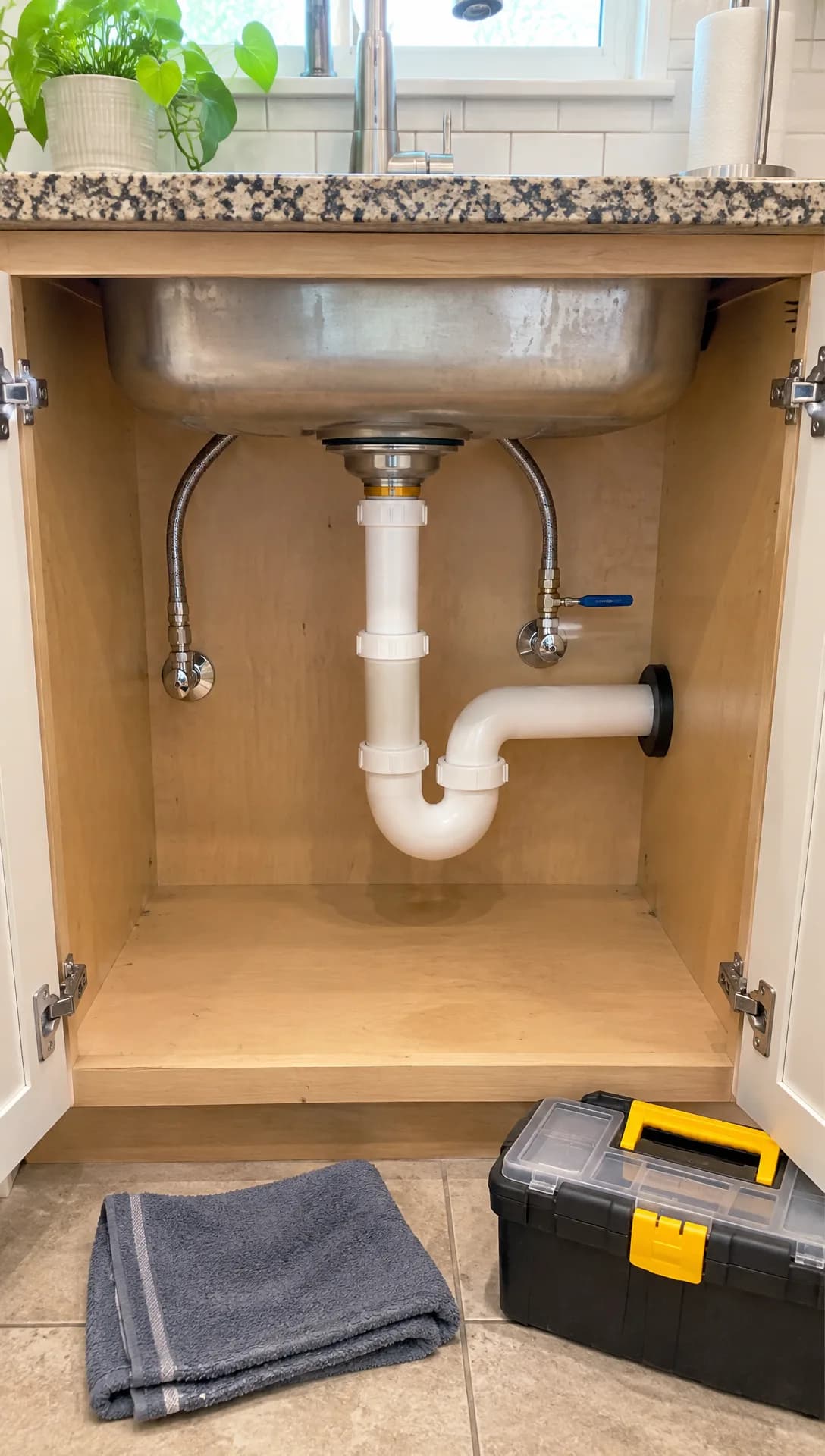 Made in Novoads with GPT Image 2.6 Sunburst · an under-sink cabinet shot like a phone photo of finished work, reused from our plumbing guide as a stand-in for your own photo · 1 credit · 2026-11-15
From that still, Seedance 2.0 Mini made five silent seconds at 720p.
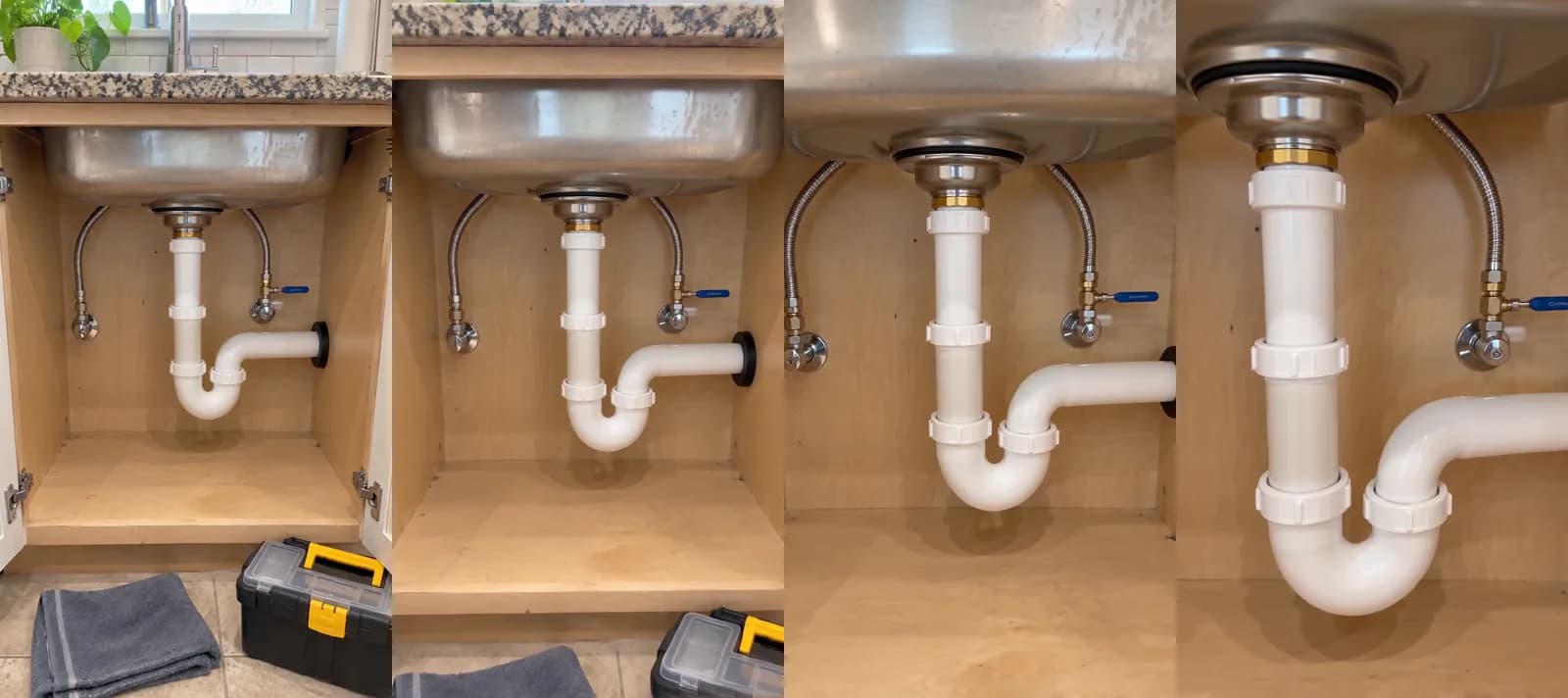 Made in Novoads with Seedance 2.0 Mini through our Claude connector · four frames of the five-second clip that starts on the still above and moves in on the drain trap, sound off, reused from our plumbing guide · 5 credits · 2026-11-15
The camera moves in across the four frames. By the third frame the towel and the toolbox are out of the shot, and the last one is close on the trap, with the blue-handled valve at its edge. Before you post a clip of your own, watch it all the way through for anything that wasn't in your photo, such as a hand, a label or a logo. For more on choosing a model for the motion you want, see how to make product videos with AI.
An AI presenter reading your script
- Open Talking Actors and write the script where it says "Write what the actor will say..."
- Click Add actors and choose an actor.
- Open the price line beside the send arrow, which reads "200 credits per started minute · per actor · 720p". Then pick 480p to bring it down to 100.
- Press the arrow to generate.
A take is billed by the started minute, so a 40-second script costs as much as a full minute. It comes back with voice and lip-sync, and adding captions is one more step. The Captions tool opens on the "TikTok, no box" look, at 3 credits a started minute.
The presenter is an AI actor, so write the script as the business talking ("[Your business] mounts TVs, assembles furniture and patches drywall in [your area]"). Never write it in the first person, as if the presenter were you. Our explainer on AI actors covers how brands cast one. If some of your neighbors would rather hear Spanish, you can pick a voice in any of 32 languages.
A picture ad made from your photo
- Open the Image tool, click Reference and upload your photo (JPG, PNG or WebP).
- Describe the ad in the prompt. Ask for the job to stay as it is, and name the words you want on the picture.
- Open Settings, pick GPT Image 2 and switch Quality from High to Medium, which cuts the price from 4 credits a picture to 1.
- Press the arrow to generate.
The tool opens on Nano Banana Pro and makes three pictures a run unless you change the Images setting. So a run of GPT Image 2 at Medium costs 3 credits. GPT Image 2 makes square, tall and wide pictures. For a 4:5 feed picture, switch to Nano Banana Pro. It costs 2 credits a picture at 2K, its default size.
The picture that comes back is a new image made from yours, so check it against the real job before you use it anywhere. For the review ad, put the review's exact words in the prompt and compare them letter by letter when the picture arrives.
Which tool for which ad
- The small-jobs list can be an AI presenter take with captions, or a clip from each of three job photos.
- The before and after needs a clip from each photo, or a picture ad made from the after photo.
- The seasonal offer reads best as an AI presenter take with the price and the terms in its script.
- The review goes on a picture ad made from your photo of that job, with the review's exact words on it.
- The intro starts with an AI presenter take and ends on a clip from a photo of your own work.
What a week of handyman ads costs
Prices as of November 18, 2026. The dollar columns are our own arithmetic. A credit works out to 7.5 cents on Starter and 4.9 cents on Plus. On Ultra 3,000 it's 4.3 cents.
| Piece | Credits | On Starter | On Plus | On Ultra 3,000 |
|---|---|---|---|---|
| Kling 3.0 clip, 5 seconds | 10 | 75 cents | 49 cents | 43 cents |
| Kling 4.0 clip, 5 seconds, 720p | 18 | $1.35 | about 88 cents | about 77 cents |
| Kling 4.0 clip, 5 seconds, 1080p (its default) | 27 | about $2.03 | about $1.32 | about $1.16 |
| AI presenter take, per started minute, 480p | 100 | $7.50 | $4.90 | $4.30 |
| AI presenter take, per started minute, 720p | 200 | $15.00 | $9.80 | $8.60 |
| Captions, per started minute | 3 | about 23 cents | about 15 cents | about 13 cents |
| GPT Image 2 picture at Medium | 1 | about 8 cents | about 5 cents | about 4 cents |
We priced one week's set for a handyman who works alone.
- Three 5-second Kling 3.0 clips, each opening on a photo of a job you finished, for 30 credits.
- One AI presenter take at 480p, under a minute, reading your small-jobs list and, if California's rule applies to you, your not-licensed line, for 100 credits.
That's 130 credits a week.
- On Starter it's $9.75, and a Starter month covers the set once, with 70 credits left over.
- On Plus it's $6.37, and a month covers seven sets, with 90 credits left over.
- On Ultra 3,000 it's $5.59, and a month covers 23 sets, with 10 credits left over.
The total leaves out retakes, which cost the same again, and captions at 3 credits a started minute. Joining the clips into one ad and adding a separate voice-over aren't in it either, and neither is what you spend to run the ads or the time it takes to check each clip against your photo. You'll find every plan, and what its credits buy, on our pricing page.
Billo, which sells short videos made by creators, says on its pricing page that "Videos start at $99, which covers a 15-second video from a regular creator with basic editing." The same page says the price goes up for a longer video, a Premium creator or extras such as captions. That's Billo's starting price on the day we read the page, for one video made by a person. So it isn't a like-for-like match with clips made from your own photos or with an AI presenter.
California's under-$1,000 line for handymen without a license
The only article on the first page of results that we could open was doBid's page for Houston homeowners, which prices handyman jobs and doesn't say what an ad has to carry. We also read Nextdoor's handyman guide, which isn't on the first page. It tells you to start by "researching your home state's handyman license requirements," and it doesn't get to what an ad has to say either.
What the board says, and what the statute adds
California's Contractors State License Board answers the question in its guide for building officials. Asked whether it's against the law for an unlicensed individual to advertise construction services, the board says "No, as long as the advertisement includes a statement that the individual does not hold a state contractor license," citing Business and Professions Code section 7027.2.
That answer is the board's shorthand for a longer rule. The section itself, as it appears in the board's 2026 Law Book, says a person without a license "may advertise for construction work or a work of improvement covered by this chapter only if the aggregate contract price for labor, material, and all other items on a project or undertaking is less than one thousand dollars ($1,000) and the person states in the advertisement that the person is not licensed under this chapter." So the statement is only one of two conditions. The job's total has to be under the limit too, and the statement alone never covers a bigger job.
That rule binds people without a contractor license who advertise construction work in California. Licensed contractors get a different answer in the same guide, which says "Any time licensed contractors advertise their services, whether on paper, over the air waves or on the Internet, a license number must appear."
The rest of the exemption
The board's page for people applying for a license sets out the exemption itself. It covers work "for which a building permit is not required, no employee labor is used and the combined value of labor, materials, and all other costs on one or more contracts is less than $1,000." The same page says work on a larger project "may not be broken down to smaller amounts of less than $1,000 in an attempt to meet the $1,000 exemption."
Section 7048, the minor-work exemption in the same Law Book, takes the exemption away in two more cases.
- It doesn't apply to a person who "Employs another person to perform, or assist in performing, the work or operation."
- It doesn't apply to a person whose advertising "might indicate to the public that the person is a contractor."
The board's page for applicants puts that second case more plainly. A license isn't necessary, it says, "as long as you don't advertise yourself as a licensed contractor" and the project meets the permit, labor and dollar conditions.
How long this has been the rule
None of it is new. The not-licensed statement dates from 1978, when the section was added under another number. The $1,000 limit and its permit and employee conditions came with Assembly Bill 2622. They took effect January 1, 2025.
When we read the board's guide on November 18, 2026, its minor-work answer still put the limit at "less than $500." The page for applicants and the Law Book both give $1,000, so go by those two.
What it means for the ads above
This is our reading, not legal advice, so check your jobs against the board's own pages. If you're in California without a license, we'd shape the five ads like this.
- Put the statement in every ad. As we read it, the section doesn't set the words, so "Not a licensed contractor" is only one example of how it could read. We'd have the AI presenter say it and keep it on screen in the captions.
- Keep the small-jobs list to jobs that fit, meaning work that doesn't require a building permit, done without employees, for less than $1,000 all in.
- Price a seasonal package so one home's total stays under the limit. The board counts the combined value of one or more contracts on a project, and a larger job can't be split to fit.
- Leave helpers out of the clips. The exemption only covers work done without employee labor, so an ad that shows a crew describes work it doesn't cover.
- Keep the presenter's words modest. A line like "fully licensed," or a presenter calling the business a contractor, reads to us like the kind of advertising that section 7048 takes the exemption away for.
If you do hold a California contractor license, the license-number answer above is the one that applies to your ads. And if your jobs include paint or drywall work in older homes, our contractor ads guide covers the EPA's pre-1978 rule.
Three finished jobs and one script to start this week
Scroll back through this month's photos and pick three finished jobs you'd be glad for a neighbor to see. Turn each into a 5-second Kling 3.0 clip, then write a script under a minute long for an AI presenter, naming the jobs you take, the streets you cover and how to book. If California's rule applies to you, the not-licensed line goes in that script too. If you want to see how a longer, polished spot compares, our breakdown of AI commercials prices a 30-second one.
Novoads plans are paid from the first month. Starter is $15 a month for 200 credits, enough to make the set above once. Plus is $49 a month for 1,000 credits. Ultra starts at $129 a month for 3,000 credits.
Price your first week of handyman ads
See what each plan's monthly credits cover before you make your first clip from a job photo.
See plans and creditsOn your next job, take the after photo from where a neighbor would stand, before you pack up the drill.
Frequently Asked Questions
How do I grow my handyman business with ads?
Start with the work you've already finished. We'd run a short list of the small jobs you take, read by an AI presenter, alongside clips that open on your own photos of finished jobs. Then add one repair shown before and after, and a real customer's review on a picture of the job it describes. Nextdoor's guide for handymen says reviews work as advertisements for your business, so ask for one as you close out each job.
Can I advertise handyman work in California without a contractor license?
California's Contractors State License Board says it isn't against the law as long as the ad includes a statement that you don't hold a state contractor license. Section 7027.2, as it appears in the board's Law Book, allows that advertising only when the whole job comes to less than $1,000. The board's exemption also applies only to work that doesn't require a building permit and uses no employee labor. That rule binds people without a license in California. This answer isn't legal advice, so check your own jobs against the board's pages.
What does a handyman video ad cost to make with AI?
In Novoads, a 5-second Kling 3.0 clip that opens on your photo costs 10 credits. An AI presenter take of a minute or less costs 100 credits at 480p. At 720p it's 200. Three clips and one 480p take come to 130 credits. As of November 18, 2026, that's $6.37 on Plus and $9.75 on Starter.
Can an AI presenter play me in my handyman ad?
We wouldn't. An AI presenter is an AI actor, so write the script as the business talking, with its name, the jobs it takes and the streets it covers. Never pass the presenter off as you, a helper or a customer. If you want to appear in the ad, film yourself or use your own photos.
Key Takeaways
- We'd build a handyman's ads from finished jobs. The five we'd make are a list of the small jobs you take, one repair shown before and after, a seasonal fix-up offer, a real review on a picture of the job it describes, and an intro to the streets you cover.
- In Novoads, a 5-second Kling 3.0 clip that opens on your job photo costs 10 credits. An AI presenter take of a minute or less costs 100 credits at 480p.
- Three clips and a presenter take come to 130 credits, or $6.37 on Plus. Billo's pricing page, which we read on November 18, 2026, says its creator videos start at $99.
- California's contractors board says an unlicensed individual may advertise construction services if the ad states they don't hold a state contractor license. Section 7027.2 allows that only for jobs under $1,000 all in.
- The board's exemption also applies only to work that doesn't require a building permit and uses no employee labor. As we read it, that keeps crews, big packages and jobs that need a permit out of an unlicensed California handyman's ads.