Contractor Ads: Project Video Ideas, What Each Costs With AI, and the EPA's Pre-1978 Rule
The five ads general contractors and remodelers run, how to make each one from your own job photos or with an AI presenter, what each costs in credits, and the EPA's rule on advertising work in homes built before 1978.

Mauricio Valdivia
·12 min
Your next ad is the kitchen you're halfway through
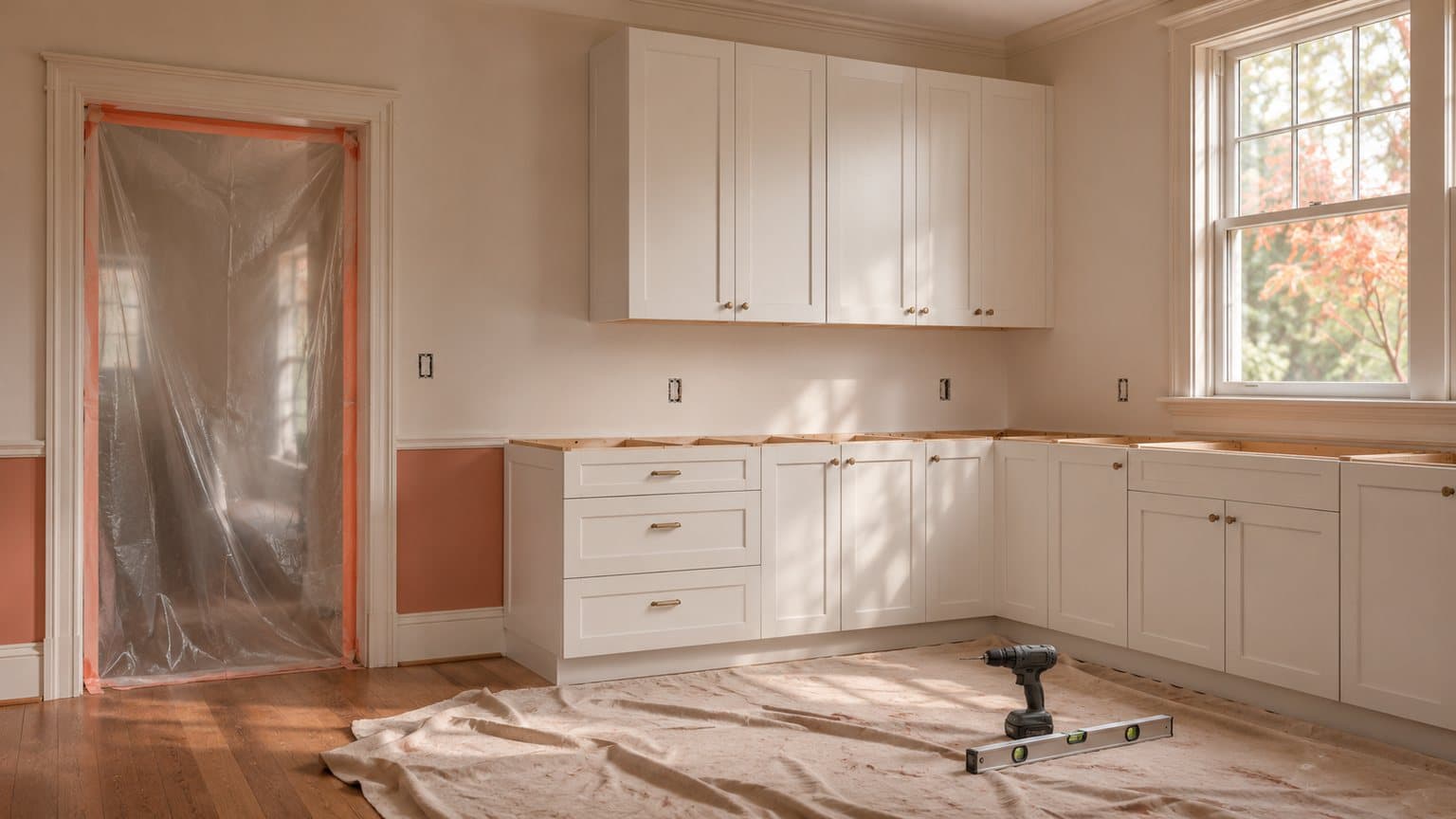
The kitchen in the picture below is halfway through a remodel. The new white shaker cabinets are hung, there's no countertop yet, plastic sheeting is taped over a doorway, and a drill and a level are lying on a drop cloth. You've probably got a photo like it from every job you've run. Those photos are the best material contractor ads can have, because a homeowner deciding who to call wants to see work you've actually done.
That kitchen isn't a client's. We made the picture with AI for this post, as a stand-in for your own progress photo, and it took two tries. Then we turned it into a 5-second clip that pans slowly along the new cabinets toward the window. You'll see both further down, along with what each one cost.
There's no shortage of ad ideas in the guides that rank for "contractor ads" and "contractor facebook ads". But in the seven we opened, we didn't find what any of those ads costs to make, or a word about the EPA rule on advertising renovation work in homes built before 1978.
On November 15, 2026, we read those search results, the EPA's own pages on its lead-safe rule, the regulation itself and our own price list. We made the picture and the clip in Novoads through our own connector. We didn't run either one as an ad, so nothing in this post says how an ad will perform.
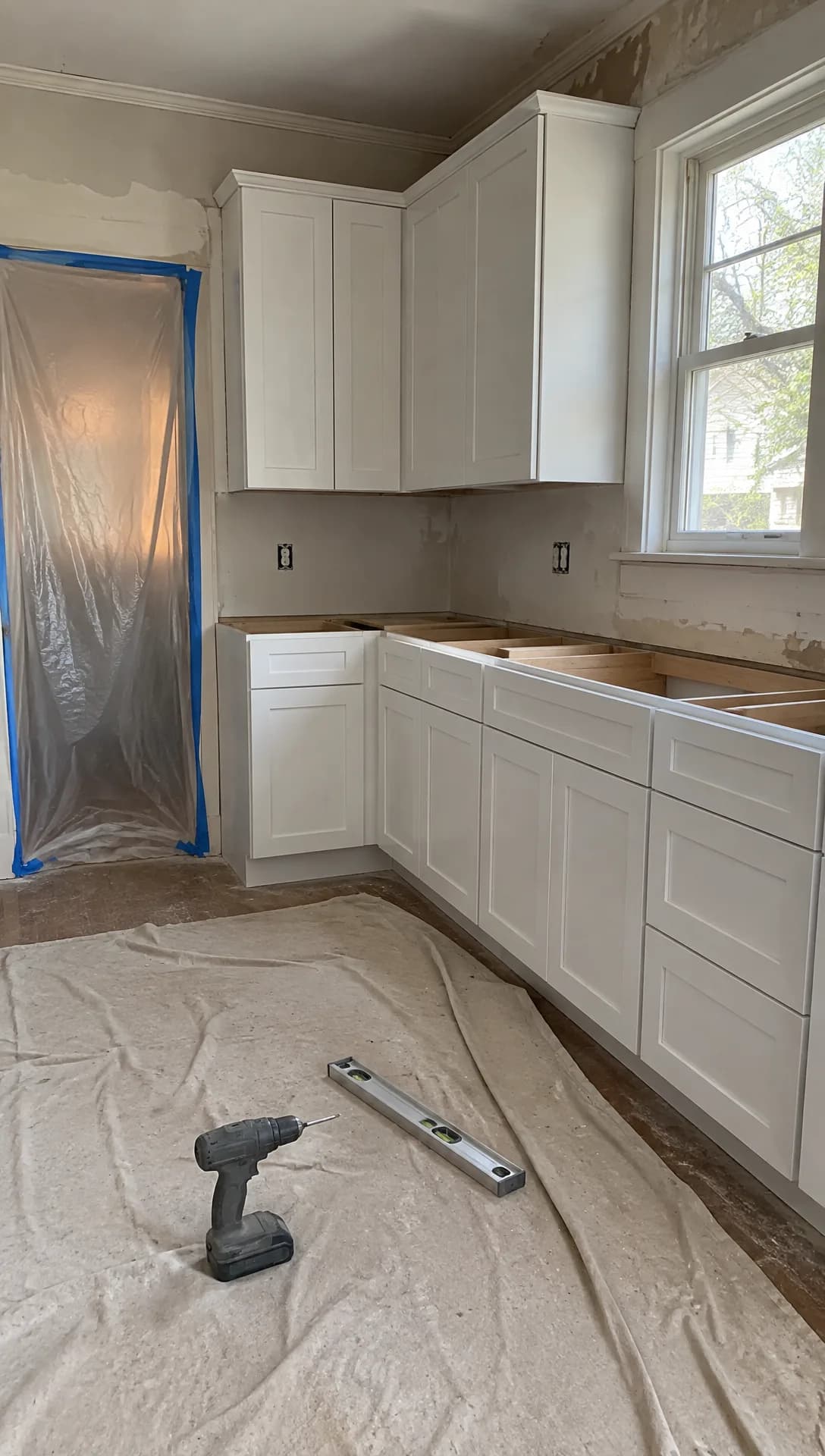 Made in Novoads with GPT Image 2.6 Sunburst · a kitchen with new cabinets and no countertop yet, tools on a drop cloth, made to stand in for your own progress photo · 1 credit · 2026-11-15
The five ads general contractors and remodelers run
Put the guides that rank for these searches side by side, and the same five ads keep turning up. ServiceTitan's guide to contractor Facebook ads suggests building credibility "through project walkthroughs and before-and-after transformations". Chase's marketing tips for construction businesses suggest posting "before-and-after photos, customer testimonials and time-lapse project videos". What AI does well changes from one ad to the next, and so does what it must never show.
The finished-job walkthrough
This is the ad version of the project gallery on your website. It shows one finished kitchen, addition or basement a room at a time, with the town and the scope of the job in the captions. In its list of contractor advertising ideas, Market Veep suggests turning it into a "Project of the Month" video series. We think that's a good habit in bid season, when you're one of several firms a homeowner is weighing.
- AI is good at the part that used to need a videographer. It can turn the photos you took at the final walkthrough into short moving clips you can cut together, such as a slow pan across the new island or a push toward the back door.
- It must never show a room you didn't build, or a finished look on a job that's still under way, such as a countertop the model added to a kitchen that doesn't have one yet.
Before and after, from the same spot
The change is what sells a remodel, so this ad puts the dated kitchen next to the new one, or the rotted deck next to the rebuilt one. The pair works best when both photos come from the same spot at the same height, so take the before from exactly where you'll stand for the after. A roof gives you that pair too, and our roofing post draws its ad ideas from jobs you've finished.
- AI can turn the two photos into one clip that starts on the before and ends on the after, so both ends are your own photos.
- The model draws the frames in between, so they aren't a record of the work. Don't pass them off as a time-lapse.
- AI must never make either photo, because a generated before or a generated after turns a real job into an invented one.
One offer, said out loud
The offer might be a spring addition, a fall window job or a design consultation booked before the holidays. This ad states one offer, the towns you work in and one next step. It's the one an AI presenter fits best, because the presenter says it on camera without you filming anything. And a second version worded differently is cheap to make. Chase's tips list "Offer free consultations" among their ideas.
- The ad must never show a discount, a price or financing you don't actually offer. When the job includes a heat pump, our HVAC post on the federal credit that ended says what to offer instead.
- If the offer is for work on an older house, such as new windows or a kitchen gut in a home built before 1978, read the EPA section below before the ad runs, because the EPA's wording names advertising as well as the work itself.
A homeowner's review, read as a review
A testimonial lets a past client vouch for you. Chase's tips put it as "Feature real customers sharing their experiences". The real thing is the homeowner on camera in the finished room. If they'd rather not be filmed, an AI presenter can read a review they actually wrote, introduced as a review of that job, over your photos of it.
- AI must never play the homeowner. The presenter speaks for your business, so the script never says "my new kitchen" about a kitchen the presenter never owned.
- A review nobody wrote never goes in at all.
License, years in business and certifications
This ad answers "are you licensed and insured?" before anyone asks. It names your license number, your years in business, your insurance and the certifications you hold. Chase's tips call it "Showcase certifications and awards".
- An AI presenter can say those facts in your company's voice, and your real logo files go on the end card as they are.
- The ad must never show a license, a badge or a certification you don't hold, or an AI-drawn copy of a real certification mark. If a badge of yours came from Google's Local Services Ads, our plumbing post explains what replaced Google Guaranteed.
- If one of your certifications is the EPA's lead-safe firm certification, its logo comes with rules of its own, and the FAQ at the end covers them.
How to make each ad in Novoads
You make the ad in Novoads and run it wherever you advertise. There are two ways in. You can turn your own job photos into short moving clips, and you can have an AI presenter say the words you'd otherwise have to film. If you're new to making ads with AI, start with the walkthrough, since it needs only one photo.
A walkthrough clip from one job photo
- Open the Video tab and pick a model with the sliders button. For a single photo, we'd start with Kling 3.0. It costs 10 credits for 5 seconds.
- Drop the photo where the editor says "Drop a start frame or click to upload". Once it's set, the editor tells you "The video starts on this picture."
- Describe the camera move in plain words, such as a slow pan from the sink to the window. Stick to what's in the photo, so nobody walks in and no furniture appears.
- Pick the length and press the round up-arrow button to send it.
You get back a clip that opens on your photo, ready to download and cut into the ad. Google Veo 3.1 takes a start frame the same way, at 72 credits a clip whatever the length. Omni Flash and Wan 3.0 take one too, once you pick "Start / End Frames" instead of "Reference".
The Seedance models work differently in the editor. They take a photo only as a reference you name in the prompt as @Image1, so the clip doesn't start on it. Our guide to making product videos with AI also starts from one photo, but of a product instead of a job site.
Before and after in one clip
- Pick Wan 3.0, then select "Start / End Frames" instead of "Reference".
- Drop the before photo as the start frame and the after photo where it says "Drop an end frame or click to upload".
- Describe the change between them, such as a slow push-in as the old kitchen becomes the new one.
- Choose 5 seconds at 720p and send it. That clip costs 9 credits.
We didn't make a before-and-after for this post, so we can't show you what Wan 3.0 draws between the two photos. Watch those middle frames before the clip goes into an ad, since the model drew them.
An AI presenter for the offer, the review and the proof ad
Open the Talking Actors tab. The app gives you three steps of its own ("Write or pick a script", "Choose an actor" and "Press the arrow to generate"). Write the script in your company's voice ("we build additions across the north side"), because the presenter is an AI actor and never you, your crew or a client.
The editor shows the price per started minute, per actor. At 480p, a started minute costs 100 credits. At 720p, it's 200. So a 15-second offer costs the same as a 60-second one.
You get back the presenter saying your script, with voice and lip-sync. Captions are one more step. You add them to the finished video in the Captions tool, where the Karaoke style costs 0 credits in the app. Our voice list covers 32 languages, which helps if you also work for Spanish-speaking homeowners.
What we made in our own test
We made the clip below through Novoads' own connector for Claude, which can start a Seedance 2.0 Mini clip from a picture. We gave it the kitchen still and asked for a slow pan along the new cabinets toward the window, with the sound off. It came back clean on the first take and cost 5 credits. The clip runs 5 seconds at 720p.
In the clip, the camera moves along the cabinets toward the window, the plastic over the doorway slides out of frame and the sun flares through the glass at the end. The still it started from cost 1 credit a try. It took two tries, and we set the first one aside. In the editor, you'd make the same move from your own photo with Kling 3.0, or with Omni Flash or Wan 3.0 on "Start / End Frames".
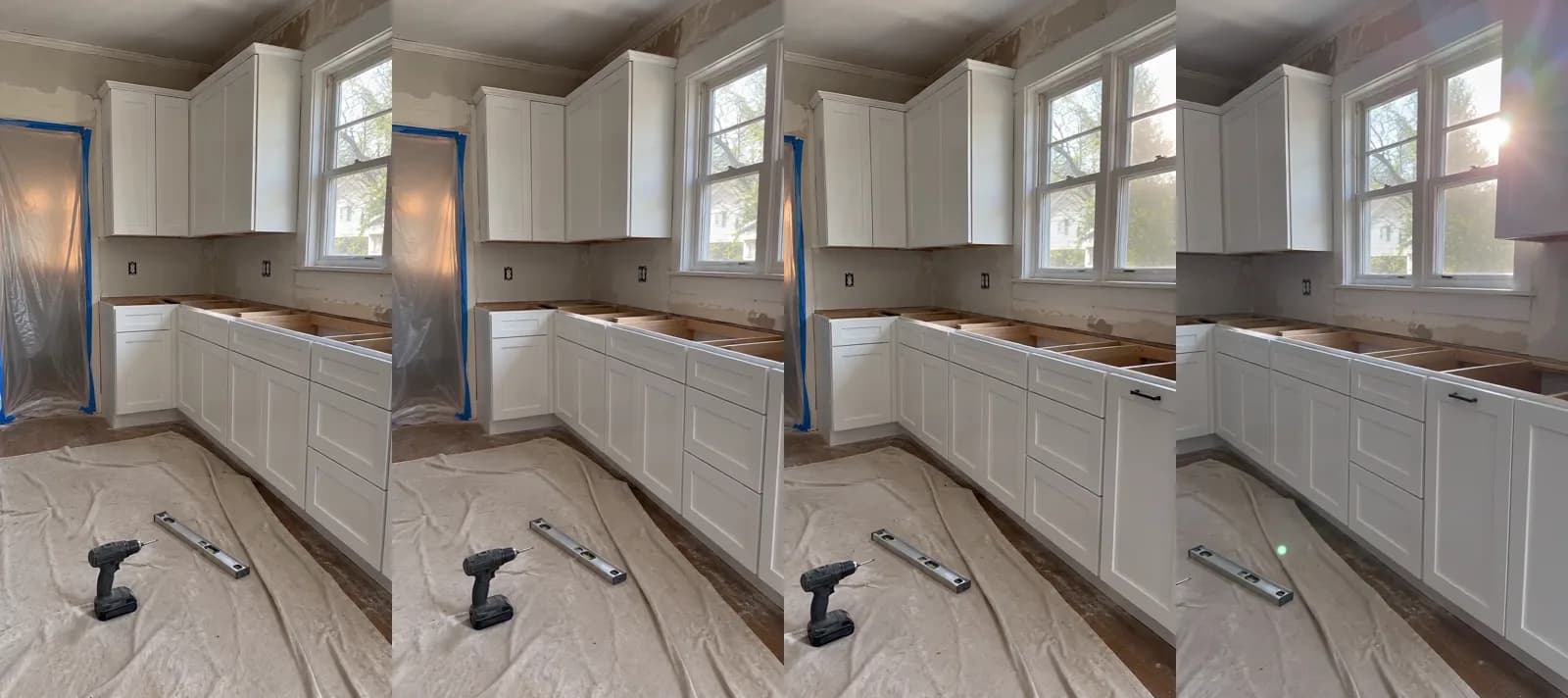 Made in Novoads with Seedance 2.0 Mini · the kitchen still as the start picture, a slow pan along the new cabinets toward the window, sound off, 5 seconds at 720p · 5 credits · 2026-11-15
What each contractor ad costs
Prices as of November 15, 2026. You pay for Novoads from the first month, on one of these plans.
- Starter, $15 a month for 200 credits
- Plus, $49 a month for 1,000 credits
- Ultra 3,000, $129 a month for 3,000 credits
Divide each price by its credits, and a credit comes to $0.075 on Starter and $0.049 on Plus. On Ultra 3,000, it's $0.043. The larger Ultra plans and the annual prices are on our pricing page. The table applies those three rates to the model settings the five ads use.
| What you make | Model and setting | Credits | Starter | Plus | Ultra 3,000 |
|---|---|---|---|---|---|
| Walkthrough clip, 5 s | Kling 3.0, start frame | 10 | 75 cents | 49 cents | 43 cents |
| Walkthrough clip, 10 s | Kling 3.0, start frame | 20 | $1.50 | 98 cents | 86 cents |
| Slow pan, 8 s | Omni Flash at 720p | 24 | $1.80 | about $1.18 | about $1.03 |
| Before and after, 5 s | Wan 3.0 at 720p, two frames | 9 | about 68 cents | about 44 cents | about 39 cents |
| Our test clip, 5 s | Seedance 2.0 Mini, our connector | 5 | about 38 cents | about 25 cents | about 22 cents |
| Presenter, up to 60 s | Talking actor at 480p | 100 | $7.50 | $4.90 | $4.30 |
| Presenter, up to 60 s | Talking actor at 720p | 200 | $15.00 | $9.80 | $8.60 |
On Starter, a presenter at 720p uses up all 200 of the month's credits at once. At 480p, it leaves half the month's credits for clips.
One kitchen's set of ads, priced on each plan
We priced one set of ads for a finished kitchen. It starts with three before-and-after clips on Wan 3.0, each from a different corner you photographed. Together they come to 27 credits. Add a presenter reading the consultation offer at 480p, and the set comes to 127 credits. That's about $6.22 on Plus and about $9.53 on Starter. On Ultra 3,000, it's about $5.46.
A Starter month covers one set and leaves 73 credits for walkthrough clips. A Plus month covers seven sets. An Ultra 3,000 month covers 23.
Those figures leave out re-rolls (each one costs the same credits again), music, your ad spend and the time it takes you to check each clip against the real job.
What a videographer charges for one video
For an outside price to compare against, take Vourly, a Seattle-based video crew. Its construction video pricing guide, dated April 10, 2026, says "A one-off construction video is a Video Project from $1,500." That's one company's starting price in one city, so don't read it as a survey. For that money, you get a crew filming real footage on your site, cut into a finished film.
In Novoads, you're turning photos you've already taken into clips, so the two aren't like for like. We'd make the photo clips every week and save a videographer for the job that deserves a film. When a job does deserve one, our post on what an AI commercial costs to make prices a longer piece.
Price a month of job-site ads
Compare Starter, Plus and Ultra and the credits each one includes every month.
See the plansThe EPA's pre-1978 rule the top results leave out
What the EPA's page says
The EPA's Lead Renovation, Repair and Painting Rule (the RRP Rule) sets requirements for firms and individuals who do renovations. In the EPA's words, it affects "contractors, property managers and others who disturb painted surfaces". The agency's page for contractors, last updated November 12, 2026, says firms can't "advertise or perform renovation activities covered by the RRP Rule in homes or child-occupied facilities built before 1978 without firm certification."
The regulation behind that sentence is in the 2025 edition of the Code of Federal Regulations. It says "On or after April 22, 2010, no firm may perform, offer, or claim to perform renovations without certification from EPA" in the housing and child-occupied facilities the rule covers, unless the renovation qualifies for one of its exceptions. The page's word is "advertise", while the regulation says offer or claim to perform.
Who it covers
In general, the EPA says, "anyone who is paid to perform work that disturbs paint in housing and child-occupied facilities built before 1978 must be certified". It adds that this "includes all firms, even sole proprietorships". The page names general contractors among the firms covered. Its list of covered work includes remodeling and repair, carpentry, plumbing, electrical work, painting preparation and window replacement. Child-occupied facilities are places such as schools and child care centers.
What it leaves out
The same page lists what the rule doesn't cover.
- Housing built in 1978 or later.
- Minor repair and maintenance that disturbs six square feet or less of paint per room inside, or 20 square feet or less on the exterior. Window replacement and demolition of painted surfaces are covered whatever the size.
- Housing just for elderly or disabled people, and zero-bedroom homes such as studios and dormitories, unless children under six live there or are expected to.
- Homes or parts of them that a certified inspector or risk assessor has declared lead-free.
Fifteen states and one Tribe run their own programs "in lieu of the federal program", in the EPA's words. The states are Alabama, Delaware, Georgia, Iowa, Kansas, Massachusetts, Mississippi, North Carolina, Oklahoma, Oregon, Rhode Island, Utah, Vermont, Washington and Wisconsin. The Tribe is listed as the Minnesota Chippewa Tribe, Bois Forte. That's why this post points you to the EPA or your state's program. The EPA adds that "if you work in more than one state, you may need both EPA and state certification".
Where the EPA runs the program, it charges a renovation firm $300 to certify or recertify, and the certification is good for five years. Its firm certification page says "Application processing takes a week or two."
What it means for the five ads
We read the EPA's sentence as covering the ad as well as the job, since its word is "advertise". That's our reading of the page, and it isn't legal advice. To check what applies to your firm, go to the page itself or your state's program. Each of the five ads runs into the rule in its own way.
- The offer ad runs into it most directly. An ad for replacement windows in homes built before 1978 offers work that the EPA's page calls covered regardless of square footage.
- We'd treat a walkthrough or a before-and-after from an older home the same way, since it promotes the work it shows.
- A homeowner's review of a job in an older home promotes that job too.
- The proof ad is where a certified firm says it's certified, with the logo the EPA sends. The FAQ below covers that logo's rules.
- Homes built in 1978 or later fall outside the rule, according to the same page.
What to shoot before your next demo day
Most of these ads start with a photo you can only take once, the before shot on demo day. Take it from the spot where you'll stand for the after, and take a few more of the room halfway through, like the kitchen in this post.
If you also sell cabinets or fixtures from a showroom, those products call for the kind of ad in our ecommerce video ads guide. Then pick the last job you finished, check what year the house was built, and make its walkthrough from the photos you already have.
Frequently Asked Questions
Can a contractor put the EPA's Lead-Safe logo in an AI video ad?
Only an RRP-certified firm can, using the personalized logo the EPA emails when it approves the firm. The EPA's logo guidelines say a certified firm may use the logo in advertisements, that it must include the firm's certification number, and that it must not be altered or distorted in any way. Firms that aren't RRP-certified may not use it. In a video ad, we'd read that as putting the real file on the end card as it is and never asking an image or video model to draw, restyle or animate it.
Key Takeaways
- The marketing guides for contractors keep coming back to the same five ads. They're the finished-job walkthrough, the before and after, the offer ad, a homeowner's review read aloud and the proof ad with your license and certifications.
- In Novoads, your own job photos become short clips (Kling 3.0 from a start frame, or Wan 3.0 on Start / End Frames for a before and after). An AI presenter reads the offer without ever posing as you, your crew or a homeowner.
- A before-and-after set for one kitchen, with a presenter reading the offer, comes to 127 credits. At prices as of November 15, 2026, that's about $6.22 on Plus.
- In its pricing guide of April 10, 2026, Vourly, a Seattle-based video crew, says its one-off construction videos, filmed on the job site, start at $1,500.
- The EPA says firms can't advertise or perform renovation activities covered by the RRP Rule in homes or child-occupied facilities built before 1978 without firm certification. In general, the rule covers anyone who's paid for work that disturbs paint in those buildings. Small repairs aren't covered, and 15 states and one Tribe run their own programs instead.