Plumbing Ads: Google Retired 'Google Guaranteed', So Here's What to Put in Yours
The emergency, flat-price, tip, crew and Local Services ads plumbers run, how to make each one in Novoads by animating the photos you take on the job or using an AI presenter, what each one costs on every plan, and what Google's switch from 'Google Guaranteed' to Google Verified means for your van, flyers and video ads.

Mauricio Valdivia
·11 min
Who gets the call when a supply line lets go
A braided supply line under a kitchen sink lets go in the middle of the night. The homeowner finds the shutoff, or doesn't, and stands in the water with a towel in one hand and a phone in the other, searching for a plumber. The ad they see in that minute has to say you'll pick up, and it has to look like a business they'd let into the house with water still on the floor.
Making that ad is the part your week squeezes out. The water heater quits on a Sunday, a drain call turns into a repipe quote, and the good photos of finished work stay on your phone. Most of the ads in this post start from exactly those photos, or from an AI presenter reading the offer you'd give on the phone anyway.
For this post, we made the photo ourselves. A GPT Image 2.6 Sunburst picture of a sink cabinet right after a repair (white drain trap, braided supply lines, a shutoff valve with a blue handle, a toolbox on the tile) stands in for the one you'd take, and a 5-second Seedance 2.0 Mini clip made from it pushes in on the trap. The pair cost 6 credits, and both came back clean on the first take.
We read the top results for "plumbing ads" on November 13, 2026, and Google's own Local Services pages and blog on November 15, which is also the day we took every price in this post from our credit tables. We didn't run any of these ads, buy any media or put a business through Google's screening. None of the top pages we read mentions the badge change at the center of this post, so it gets a section of its own.
The five plumbing ads, and where AI fits in each
Every page we read sorts plumbing ads its own way. We put them in five groups, from the emergency that can't wait until morning to the Local Services listing in Google's search results.
Emergency ads for burst pipes and no hot water
This ad exists for the call that can't wait. Google's own help pages put plumbing in an urgent category "because consumers often call plumbers for time-sensitive, urgent needs, such as a hot water outage," and the ad should sound like it knows that. Its script needs three things.
- The problem the way the homeowner says it (water under the sink, no hot water, a toilet that won't stop running).
- When you answer.
- The number to call.
AI helps most here as a presenter reading a short script to camera, or by setting your own photo of the van or a finished job in motion for a few seconds. It should never show a made-up technician passed off as your employee, an arrival time you can't keep, or a license number or badge you don't hold. If you work in older houses, our contractor post has the EPA's rule on advertising that work.
Flat-price offers and seasonal specials
An offer gives a homeowner who isn't in trouble yet a reason to book, like a drain cleaning at one flat price, a water heater flush before winter, or a camera inspection of the sewer line before they close on a house. The price and the end date have to be real. Shops that also fix furnaces should read what to advertise now the heat pump tax credit is gone.
AI makes versions cheap, so you can test several takes on the same offer, each one opening on a different problem. Have the presenter say the price out loud so it shows up in the captions too. Our guide to AI ads covers how to test openings before you pay for a long take. AI should never supply a price, a guarantee or an end date the offer doesn't have, and a generated before-and-after of a drain never passes as your job.
Tip videos that teach before anything breaks
A tip ad answers a question before it turns into a call, like what never to pour down a kitchen drain, where the main shutoff is, or why the water heater pops as it heats. It's the easiest of the five to make with AI, since an AI presenter can read a few tips from your script and you don't need any job footage. Keep the advice to what you'd tell a customer standing in their own kitchen, and don't let generated repair footage pass as your work.
Your crew and your customers, shown for real
This one sells trust, with your team on a job or a customer saying what you fixed, so everything in it has to be real. AI plays a small part here. A finished-job photo can move for a few seconds, captions keep a clip readable on mute, and an AI presenter can introduce the company in a clip of its own. An AI actor should never pose as a customer or read an invented review, and a generated crew, truck or finished job never goes out as yours. Our roofing post takes the same line, with ad ideas built from a crew's finished jobs.
The Local Services listing and its badge
Local Services Ads are Google's own listings for local service businesses. Google says its Local Services unit shows prominently in search results when people look for the services you offer in the areas you've chosen. Its getting-started page sums up the deal as "Pay only for leads related to your business and the services you offer." Those leads come in as phone calls and messages through the ad.
There's nothing for AI to make in this one. As we read Google's pages, the listing runs on your Local Services profile, and Google puts the badge "next to the name of your business or featured professionals" on that profile page. AI's job is the video ads you run beside it on other platforms. What doesn't belong anywhere near it is the phrase "Google Guaranteed," a refund promised in Google's name, a Google Verified badge your profile doesn't carry, or reviews nobody wrote.
Making each one in Novoads from your photos or an AI presenter
Between them, a short clip made from your own photo and an AI presenter reading a script cover every ad above except the listing, which needs neither.
Your own job photo, moving for a few seconds
Shoot the photo the way you already do after a job, with the cabinet open, the new parts in frame and nothing of the homeowner's (mail, family photos) in the shot. Then take it into the editor's Video tab.
- Pick Kling 3.0 under Model.
- Drop the photo on the box that reads "Drop a start frame or click to upload." The editor confirms it with "The video starts on this picture."
- Describe one camera move and nothing else, such as a slow push in toward the new trap and valve, with no people and no text.
- Set Duration to 5 seconds, then press the round up-arrow button to send it.
A 5-second Kling 3.0 clip costs 10 credits and opens on your photo. Omni Flash and Wan 3.0 can start on your photo too, once you pick "Start / End Frames" instead of "Reference". In the editor, a photo you give a Seedance model is a reference you name @Image1 in your prompt, and the clip doesn't start on it. So when the first frame has to be your own picture, stick with Kling 3.0 or one of those two. Our guide to making product videos with AI goes deeper on choosing the motion and the model.
We made our own pair a different way, through the connector we built for Claude, which can start a Seedance 2.0 Mini clip from a picture. The still came first.
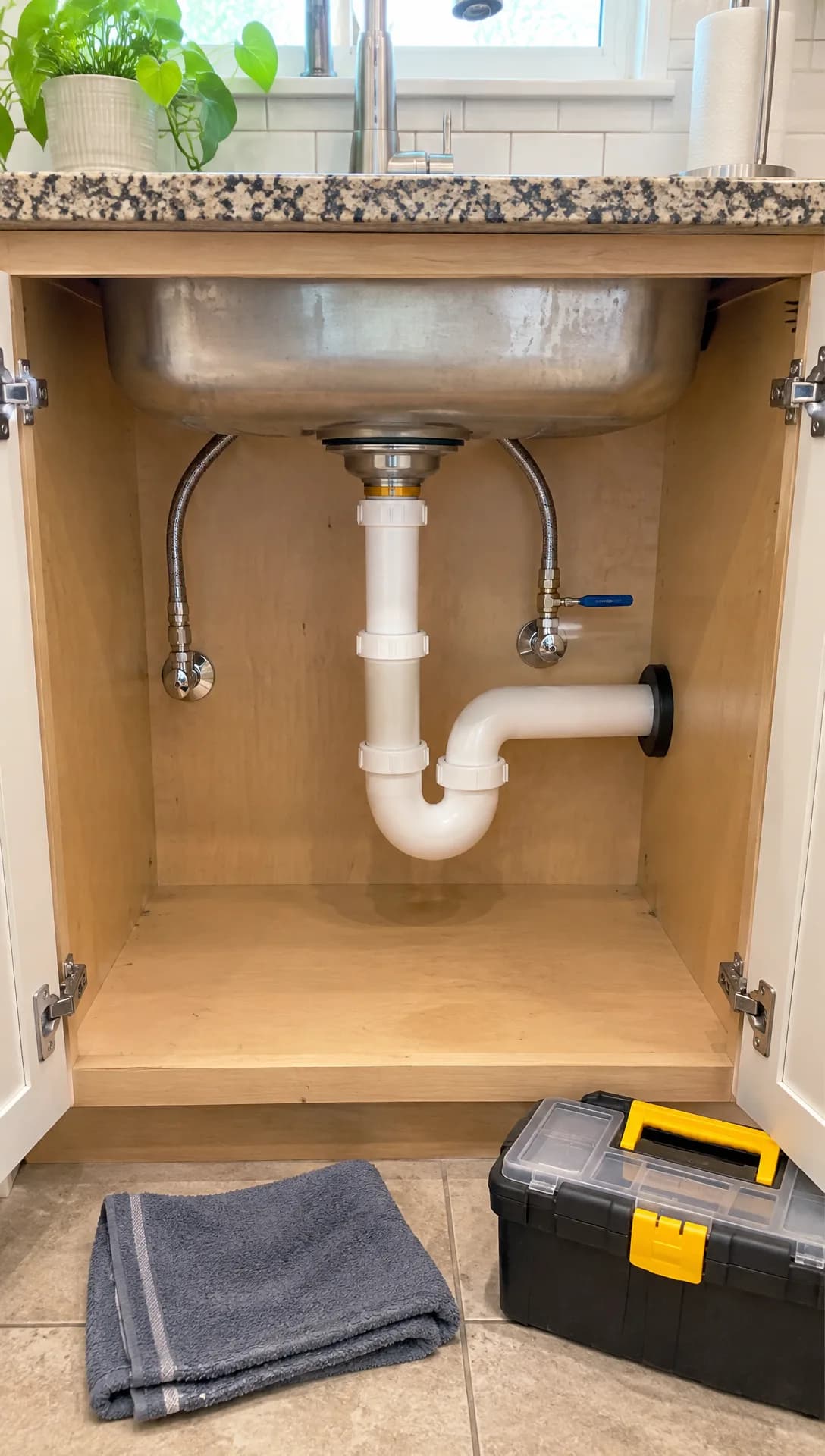 Made in Novoads with GPT Image 2.6 Sunburst · a sink cabinet just after a repair, framed like a phone photo, standing in for your own job photo · 1 credit · 2026-11-15
A photo like that is what you'd hand the editor. Our clip started on it and ran for five seconds with no sound.
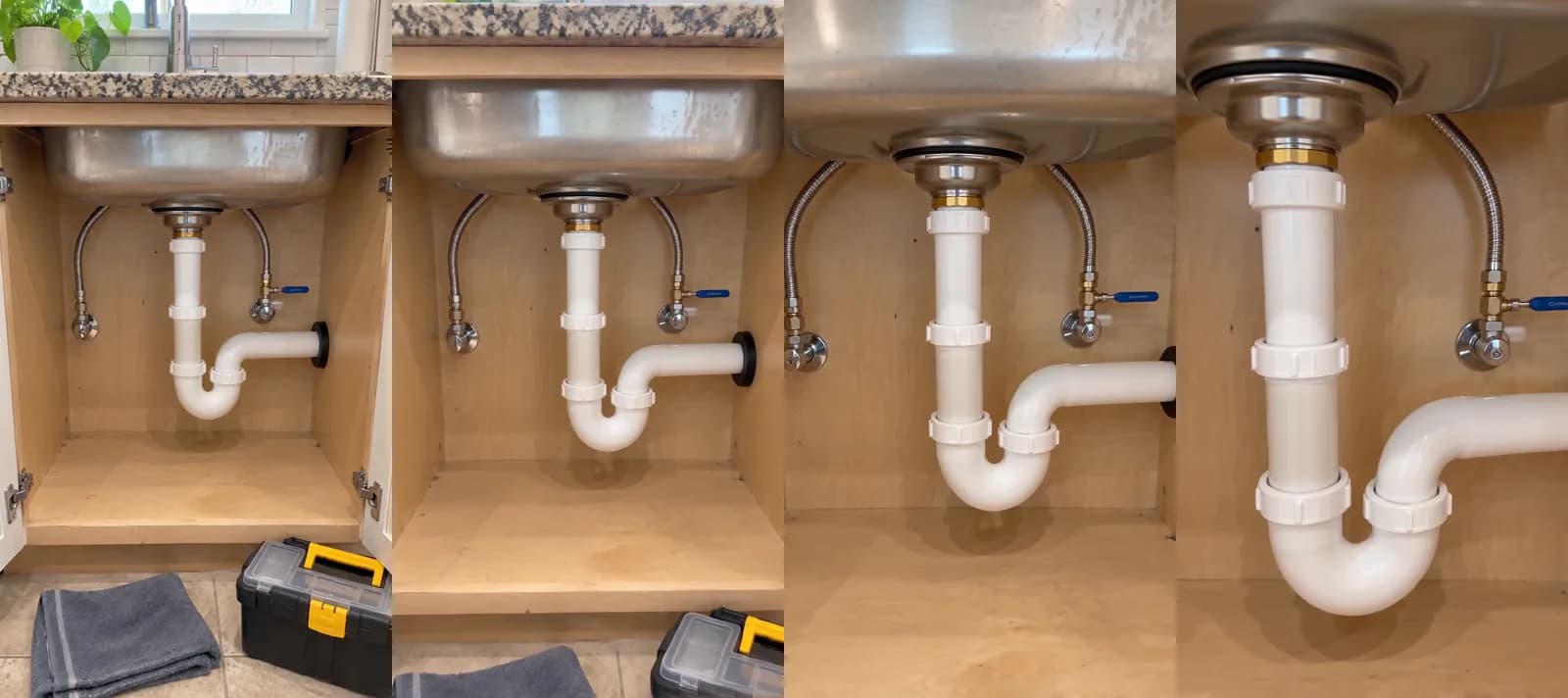 Made in Novoads with Seedance 2.0 Mini through our Claude connector · the still above, standing in for your own photo, as the start picture, with a slow push in on the drain trap and valve, sound off · 5 credits · 2026-11-15
Across the clip, the camera pushes in until the white trap fills the frame, the towel and the toolbox are out of the shot by the halfway point, and the light holds steady. No person or readable text showed up in either one, and that's the check to run on your own clips before they go out.
An AI presenter reading your offer or your tips
- Open Talking Actors, press "Add actors" and choose one in the "Select actors" window. Go with someone who reads as a presenter in everyday clothes, never one in work overalls or a tool belt, so nobody takes them for your plumber.
- Type the script in the words you'd use on the phone. An emergency script needs the problem, when you answer and your number. An offer script needs the job, the price and the day it ends.
- On the price line, keep 720p or switch to 480p for half the credits.
- Press the same round up-arrow button.
You get back a video of the AI presenter saying your script, voiced and lip-synced. Captions come afterward. You add them to the finished clip in the Captions tab, where the Karaoke style costs 0 credits. Our voice list covers 32 languages, so a Spanish version of the same offer is a second script and a second video.
The presenter is an AI actor, never your plumber and never a customer, so keep the script in the company's voice ("we", "our crew") and away from anything a person would say about a job they did.
Which ad gets which piece
- The emergency ad is the AI presenter reading your after-hours line, and a second version can be a clip of your own van.
- The flat-price offer is the presenter again, saying the price out loud, in a few openings you test against each other.
- Tips use the presenter too, one tip per video.
- Crew and customer ads are your real photos moving, with no presenter standing in for anyone.
- The Local Services listing doesn't need anything made, just a current profile.
What each piece costs, plan by plan
Prices as of November 15, 2026. A credit costs a different amount on each plan, so the dollar columns below are our own math at each plan's rate.
| Plan | A month | Credits | One credit |
|---|---|---|---|
| Starter | $15 | 200 | $0.075 |
| Plus | $49 | 1,000 | $0.049 |
| Ultra 3,000 | $129 | 3,000 | $0.043 |
The credits each piece uses
| What you make | Model and setting | Credits | Starter | Plus | Ultra 3,000 |
|---|---|---|---|---|---|
| Your photo, moving | Kling 3.0, 5 s | 10 | 75 cents | 49 cents | 43 cents |
| Your photo, moving | Wan 3.0, 5 s, 720p | 9 | about 68 cents | about 44 cents | about 39 cents |
| Your photo, moving | Omni Flash, 6 s, 720p | 18 | $1.35 | about 88 cents | about 77 cents |
| Our stand-in still | GPT Image 2.6 Sunburst | 1 | about 8 cents | about 5 cents | about 4 cents |
| Our clip, via our connector | Seedance 2.0 Mini, 5 s, 720p | 5 | about 38 cents | about 25 cents | about 22 cents |
| AI presenter, up to 60 s | Talking actor, 480p | 100 | $7.50 | $4.90 | $4.30 |
| AI presenter, up to 60 s | Talking actor, 720p | 200 | $15.00 | $9.80 | $8.60 |
Presenter videos are charged by the started minute, so a short script costs as much as one that runs close to a full minute.
What the emergency ad comes to
We didn't render one for this post, but going by these tables, the emergency ad as a 480p presenter video is 100 credits. That's $7.50 on Starter and about $4.90 on Plus. A Starter month's 200 credits cover two of them. A Plus month covers ten. A 5-second Kling 3.0 clip of your van adds 10 credits to whichever version you make.
These figures cover making the video and nothing else. They leave out five things.
- A take you don't like, since each retake costs the same credits again.
- Joining clips or adding music.
- Caption styles other than Karaoke, which are priced per started minute.
- The time you spend checking each clip against your real photo.
- The ad spend, a separate bill from Google, Meta or wherever you run the ad.
Compared with one production company's range
MoonB, which makes commercials and other videos for companies, updated its pricing guide on October 19, 2026. The guide says "A simple local spot can be made for $1,500 to $10,000." It adds that "none of that includes airtime, which is a separate bill entirely."
That's one production company's range for producing a commercial, so comparing it with a presenter video or a few seconds of your own photo moving isn't apples to apples. We think it shows why a plumbing shop that would never book a shoot can still afford to test an emergency ad against an offer. If you're weighing a full commercial, our breakdown of what an AI commercial costs to make puts a price on one.
What happened to "Google Guaranteed" on Local Services Ads
What Google's own pages say
Google announced the change on its blog on August 20, 2025. "Starting in October, we'll be unifying all Local Services Ads (LSA) badges," the post says, and "Google Verified will replace other LSA badges and programs, like Google Guaranteed, Google Screened, License Verified by Google and the Money Back Guarantee."
Google's help page on the badge covers the money. It says Google "will be discontinuing the Money Back Guarantee associated with the Google Guarantee badge," and its next lines read, "Eligible consumers can submit the request for reimbursement for services booked through Local Services Ads before December 7, 2025. Requests must be submitted within 30 days of the initial service completion date."
Both pages talk about the change as something still to come, and the help page doesn't give it a date. Google's own help center, read on November 15, 2026, shows that it went through.
- The help page's "Understand the Google Guarantee" link opens the Google Verified page itself.
- Its "Submit a Google Guarantee Reimbursement Request" link opens Google's general page for reporting content or provider concerns.
In our reading, December 7, 2025, is the cutoff for which bookings the old guarantee covered, and Google discontinued the guarantee itself.
Who it covers
This is Google's rule for its own Local Services Ads, whose list of categories includes Plumbers. Google offers the badge in "select verticals only" and says it "is currently unavailable for verticals in the auto, beauty, and dining categories."
The checks behind the badge didn't go away. New advertisers get it by completing Local Services screening and verification, and plumbing gets "an additional level of screening, including service professional background checks." Businesses aren't charged for the background check, and Google puts the screening and verification at three to four weeks on average once your documents are in. For a plumber already advertising there, Google's page says "For existing advertisers, no action is required," and eligible advertisers who've completed verification earn the Google Verified badge automatically. The same page says "Local Services Ads ranking won't be affected by this change."
What it means for the five ads
In our reading, which isn't legal advice, the change touches each kind of ad differently.
- In the emergency ad and the offer, leave out "Google Guaranteed" and any refund promised in Google's name, in both the script and the captions. If you back your work with a warranty of your own, say so in your company's name, with its real terms.
- Tip videos and crew videos don't need to mention a badge at all.
- On the Local Services listing, Google shows the badge with the checks you passed beside it ("Provider profiles display the Google Verified badge along with the specific verification checks they have completed"), so there's nothing to add.
- Van wraps, yard signs, flyers and old video ads that still say "Google Guaranteed" name a badge and a refund Google has retired, so they go on your list of things to change.
If you'd like to mention Google Verified anywhere, check that your profile carries the badge and read Google's own page on the badge first.
The first plumbing ad to make this week
Start with what's already out in the world. Find every place "Google Guaranteed" still shows up (the van, the website footer, the flyer stack, last year's video ads) and change it before you make anything new. Then make the emergency ad, because it's the one a homeowner sees with water on the floor, and make a tip video next, because it keeps your name in front of people between emergencies.
With Novoads, you make the videos on that list, starting from the photos you take on jobs or from an AI presenter reading your script, and then you run the finished files wherever you already advertise. You pay for Novoads from your first month, and the smallest plan is Starter. Our page on AI UGC ads shows the kind of presenter video the emergency ad is built on.
Make the after-hours ad first
An AI presenter reading your emergency line is 100 credits at 480p. A 5-second clip of your own job photo on Kling 3.0 is 10 more.
See how presenter ads workMake the presenter version and the van version of the emergency ad, run them side by side, and keep whichever one makes the phone ring more.
Frequently Asked Questions
How do you market a plumbing business?
Be in front of people the moment something breaks, and give them a reason to trust you before they call. On Google, Local Services Ads charge per lead, and plumbers go through extra screening there, background checks included, to get the Google Verified badge. Short video ads cover the rest of the week, from an emergency ad and a flat-price offer to tips and real footage of your crew. Keep every claim in them true to your real prices, hours and badges.
Can a plumbing ad still say 'Google Guaranteed'?
On August 20, 2025, Google announced that Google Verified would replace Google Guaranteed, Google Screened and License Verified by Google. It also discontinued the Money Back Guarantee that came with Google Guaranteed, and its old Guarantee help article opens the Google Verified page instead. In our reading, an ad that still says 'Google Guaranteed' names a badge and a refund Google has retired, so we'd take it out. This isn't legal advice. For the rule itself, read Google's own page on the Google Verified badge.
What does a plumbing video ad cost to make with AI?
In Novoads, an AI presenter reading your script costs 100 credits at 480p, for a video of up to a minute. As of November 15, 2026, that's about $4.90 on Plus and $7.50 on Starter. The same video at 720p is 200 credits. A 5-second Kling 3.0 clip made from your own job photo is 10 credits. The ad spend on Google or Meta is a separate bill.
Does Google charge plumbers for the Local Services background checks?
No. Google's screening page says businesses aren't charged for the background check. Plumbing does get an extra level of screening, including background checks on the service professionals, because Google counts it as an urgent category. Google puts screening and verification at three to four weeks on average after you send in your documents.
Key Takeaways
- The five ads plumbers lean on are the emergency call, the flat-price offer, the tip video, real footage of the crew and customers, and the Local Services listing in Google's results.
- On August 20, 2025, Google announced that Google Verified would replace Google Guaranteed, Google Screened and License Verified by Google on Local Services Ads. It also discontinued the Money Back Guarantee that came with Google Guaranteed.
- Google's help page says reimbursement requests only cover services booked through Local Services Ads before December 7, 2025, and must be sent within 30 days of the job's completion. In our reading, a van, flyer or video that still says 'Google Guaranteed' points to a badge and a refund Google has retired.
- As of November 15, 2026, a 480p video of an AI presenter reading your emergency line costs about $4.90 on Plus. A 5-second clip of your own job photo on Kling 3.0 adds 10 credits.
- An AI presenter never plays your plumber or a customer, and generated pipes, crews or trucks never pass as your own work.
Sources
- •Google: Google Verified makes it easier to find trusted local businesses advertising on Google (August 20, 2025)
- •Google Local Services Help: About Google Verified badge
- •Google Local Services Help: Getting started with Local Services Ads (United States)
- •Google Local Services Help: Business screening and verification requirements (United States)
- •Google Local Services Help: Understand the screening and verification process
- •MoonB: How Much Does a 30-Second Commercial Cost? (2026 Guide)