SaaS Facebook Ads: Video Ideas That Book Demos, and Meta's Higher Intent Lead Form
Five Facebook video ads for software, how to make each one in Novoads from your own screenshots or with an AI presenter, what each one costs, and what Meta's developer guide says about the higher intent lead form.

Mauricio Valdivia
·Updated ·11 min

From one desk picture to a five-second dashboard shot
The picture we started from shows a laptop on a wooden desk by a window, with four plain charts on its screen, a mug of coffee on a cork coaster and a closed navy notebook beside it. We made it with GPT Image 2.6 Sunburst for 1 credit, as a stand-in for the screenshot or phone photo you'd take of your own product. Then we used our connector for Claude to hand it to Seedance 2.0 Mini as the clip's start picture. The clip is five seconds long and cost 5 credits. The camera moves in until the screen and keyboard fill most of the frame, and the charts stay as they were.
That's close to the shot a small software company needs most from a Facebook ad. The demo calendar has gaps on Thursday afternoons, the launch at the end of the month still needs an explainer nobody has had time to script, and the signup page converts well for the few visitors it gets. All three come down to the same raw material, your real product on screen and someone saying in one sentence what it fixes.
On November 15, 2026, we read the pages that rank for "saas facebook ads" and Meta's developer guide to lead forms, and we took every price below from our own plan and credit tables the same day. We didn't run these ads on Facebook or count a single lead. What we say about how Meta's lead forms work comes from that developer guide.
Five video ads that move a software buyer toward a demo
The guides that rank for this search, from agency playbooks to long lists of example ads, keep coming back to five kinds of video. Each does a different job somewhere between a stranger's first scroll and a booked demo, and each has one thing an AI tool must never fake.
The screen demo with a voice over it
This is the ad that answers "what does it actually do?" with your product on screen. A screen recording or a few screenshots carry the middle, and a voice tells the viewer what they're looking at, whether that's a report that builds itself or an inbox that sorts itself. AI is good at the parts around your screens. An AI presenter can name the problem in the first few seconds and read the offer at the end, and an AI voice with captions can narrate the recording in between.
It must never show a screen, a feature or a number your product doesn't have. The screens come from your own product, recorded or photographed. Never pass off a generated interface as yours.
The talking-head explainer
Someone talks to the camera about the problem your software fixes, in the loose phone-video style people already scroll through in their own feed. It's the format a UGC creator gets paid to make. It's also the core of what we make at Novoads, an AI presenter reading your script, with voices in 32 languages to choose from.
The line it can't cross is identity. An AI presenter isn't your customer, your founder or anyone on your team. So the script talks about the product and the problem, and never says "I built this" or "I use it every day." A testimonial needs a real customer in their own words.
The demo or trial offer
Most software ads end on an ask, like booking a demo, starting a trial or seeing pricing. The offer ad leads with that ask. A presenter reads it in a few sentences, and the captions repeat the one line that matters, whether that's the length of the trial or what happens on the call.
The risk is a promise the company can't keep. Only put in a trial length, a price or a result like a fuller pipeline if it holds for every buyer who clicks.
The lead magnet behind a form
Plenty of software buyers aren't ready to talk to sales. But they'll trade an email address for something useful, like a benchmark report, a template or a seat at a webinar. The ad's job is to make that thing sound worth the form. In a few lines, a presenter can say what's inside and who it's for, over a shot of the real cover or its first page.
Don't show a page, a chart or a finding that isn't in the real report or template. This is also the ad where the form behind it does the most work, and Meta's developer guide describes a form setting that fits it.
The feature launch
When you ship something, the first people worth telling are the ones who signed up last quarter and the ones who nearly did. A short presenter clip names the feature, and your own screen capture shows it working. AI makes it quick to cut a few versions with different openings.
The hard rule here is timing. Never show a feature you haven't shipped as if it works today, and if it's on the roadmap, say so in the ad.
Making each ad in Novoads from your own screens
You make the AI parts of all five ads with two tools in Novoads, then finish them with a third.
- Talking Actors makes the presenter who names the problem and reads the offer.
- Video turns your own screenshots into short clips.
- Captions puts the words on screen once you've cut the video.
Making the presenter in Talking Actors
- Open Talking Actors and write or pick a script. You pay by the started minute, so anything up to 60 seconds costs one full minute, and trimming a script that's already under a minute won't save you anything.
- Choose an actor. It's an AI presenter, so write the script for someone who explains your product and never claims to have built or used it.
- Pick 480p or 720p on the price line, then press the arrow.
You get back a video of the presenter saying your script, with the voice and lip-sync already done. Captions come later, in Captions, where the Karaoke style costs 0 credits.
Turning your screenshot into a clip in the Video tab
- Take a screenshot of the real screen you want in the ad, or a phone photo of it on your laptop.
- Open Video, pick Kling 3.0 in the Model menu and drop the screenshot where it says "Drop a start frame or click to upload." Once it's in, you'll see "The video starts on this picture."
- Describe the camera move in the prompt (a slow push toward the screen, with nothing on it changing), keep Duration at 5 seconds and press the round arrow button.
Whether the clip starts on your screenshot depends on the model you pick.
- Kling 3.0, Kling 4.0 and Google Veo 3.1 start on it as soon as you drop it in.
- Omni Flash and Wan 3.0 start on it once you pick "Start / End Frames" instead of "Reference."
- The Seedance models don't use it as the clip's first frame. They take it only as a reference, which you name as @Image1 in the prompt.
We took a different route for this post's clip. We made the desk picture first, then asked our connector for Claude to start a Seedance 2.0 Mini clip from it.
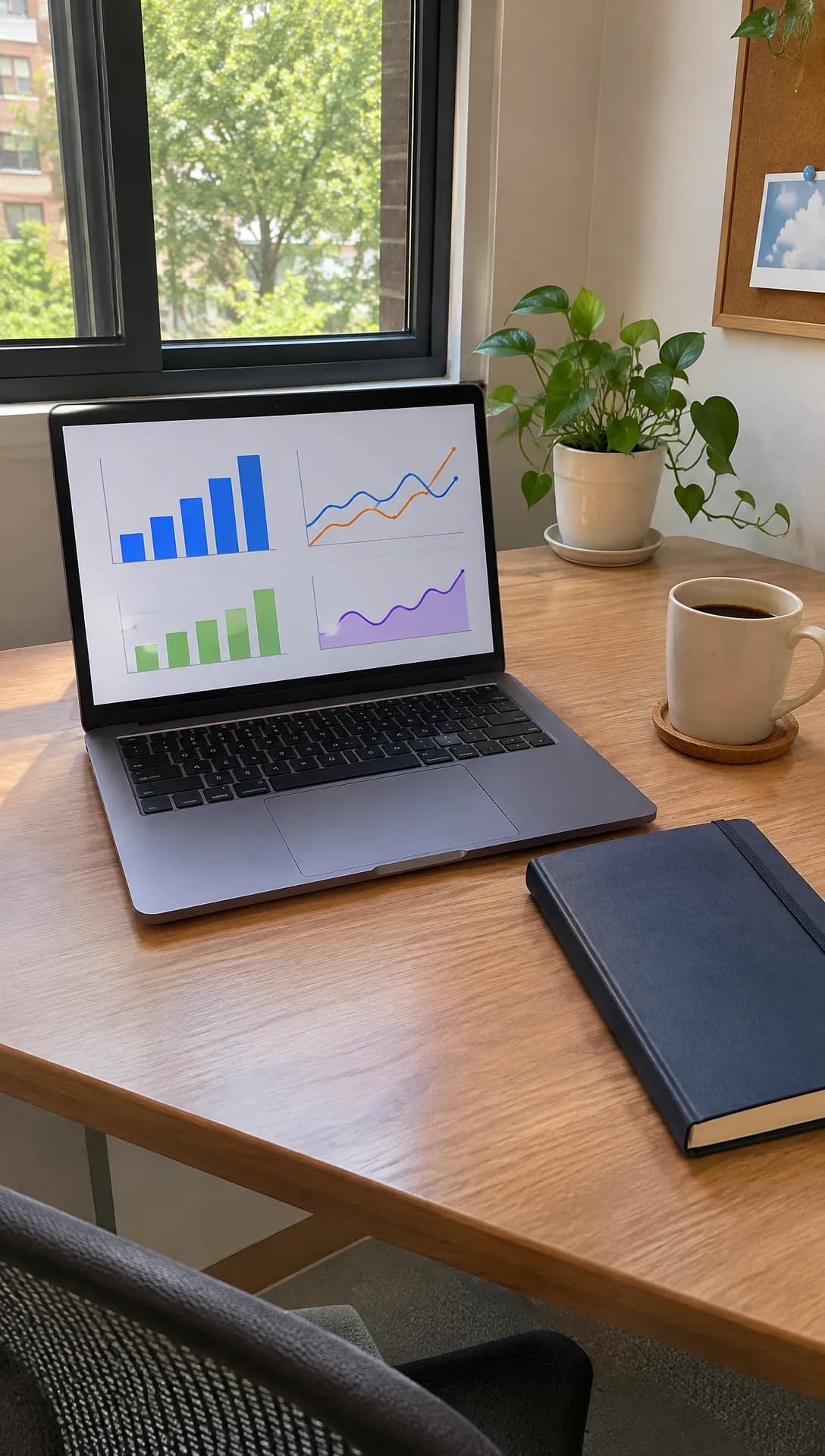
Made in Novoads with GPT Image 2.6 Sunburst · a laptop showing simple charts on a small-office desk, shot like a phone photo · stands in for your own photo · 1 credit · 2026-11-15
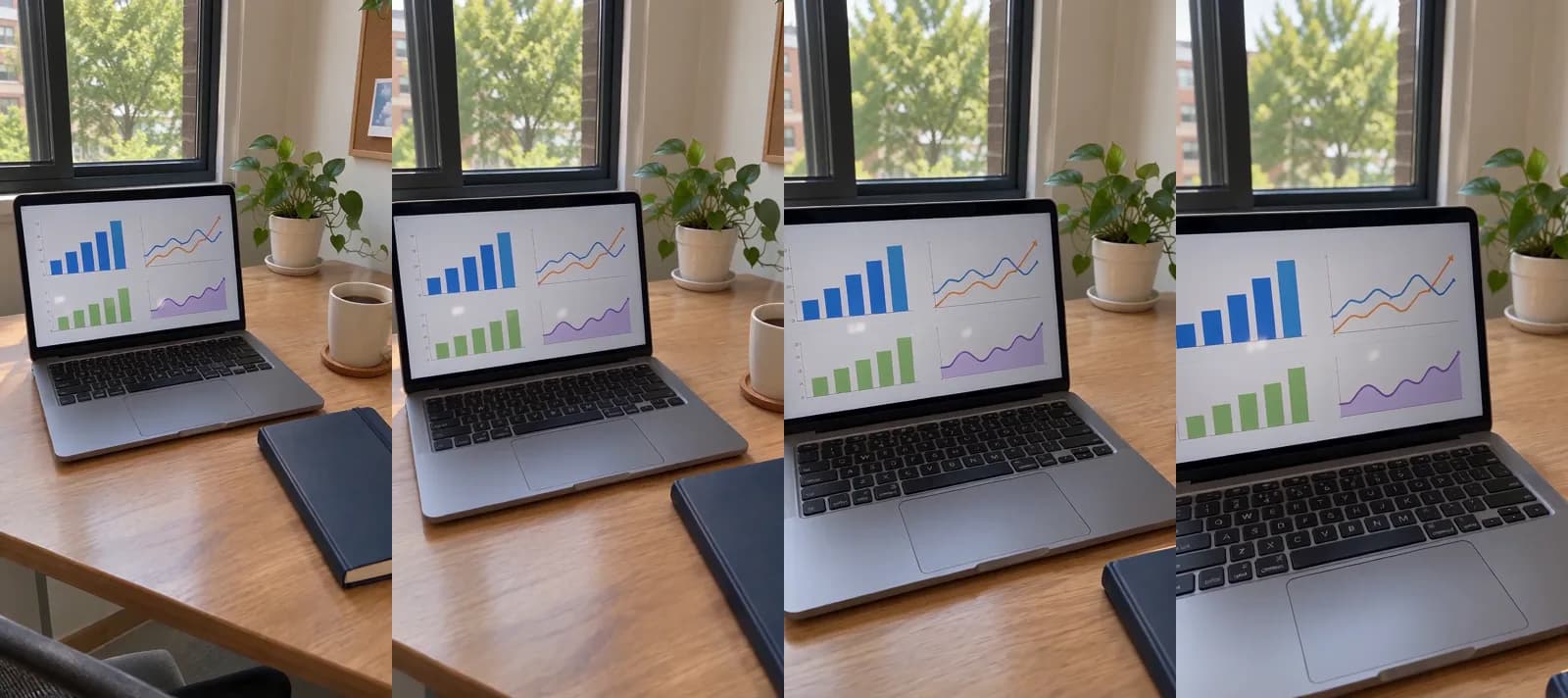
Made in Novoads with Seedance 2.0 Mini · the desk picture as its start picture, a slow push in on the laptop, sound off, through our connector for Claude · 5 credits · 2026-11-15
In our clip the camera moved and the charts didn't, which is what you want from a product shot. In a real ad, that picture would be your own screenshot, so the screen people see is the product they'd be signing up for. The same photo-to-clip idea works for physical products, and our guide to product videos with AI walks through it.
What a demo ad costs in credits and dollars
Credits for each piece
Prices as of November 15, 2026. Every Novoads plan is paid from the first month. The table uses the three plans below, and all of them are on our pricing page.
- Starter is $15 a month for 200 credits.
- Plus is $49 a month for 1,000 credits.
- Ultra 3,000, named for its monthly credits, is $129 a month.
We got each dollar figure in the table by multiplying the credits by that plan's price per credit, which you'll find in the column headers.
| Piece of the ad | Credits | Starter ($0.075 a credit) | Plus ($0.049) | Ultra 3,000 ($0.043) |
|---|---|---|---|---|
| AI presenter, 480p | 100 | $7.50 | $4.90 | $4.30 |
| AI presenter, 720p | 200 | $15.00 | $9.80 | $8.60 |
| Kling 3.0, 5 s, editor | 10 | 75 cents | 49 cents | 43 cents |
| Seedance 2.0 Mini, 5 s, connector | 5 | about 38 cents | about 25 cents | about 22 cents |
| Presenter at 480p plus two Kling clips | 120 | $9.00 | $5.88 | $5.16 |
At either size, a presenter covers anything up to a minute of speech, and 720p is the default. The demo ad in this post is a presenter and two screen clips.
- Made in the editor with the presenter at 480p, that set comes to 120 credits. That's $5.88 on Plus.
- A month of Plus covers eight of those sets, with 40 credits left over.
- Starter covers one set, with 80 credits to spare.
- Through our connector for Claude, Seedance 2.0 Mini starts a clip from your picture for 5 credits.
- Swap both Kling clips for those and the set comes to 110 credits, or $5.39 on Plus.
These sums leave out five things you'll still pay for, in money or in time.
- Re-rolls, since we charge each one again at its price in the table.
- Joining the clips into one ad.
- Music.
- Your ad spend on Facebook.
- The time it takes to check each clip against your real screen.
How it compares with a studio's explainer
Shootsta, which sells video production by subscription, lays out what explainers cost in a pricing guide last updated November 8, 2026. It puts a one-minute, custom-illustrated explainer for a SaaS product at roughly $8,000 to $12,000 as a one-off project. That price covers a written script, custom illustration, one voiceover and two rounds of revisions. The same guide says that with a subscription producing a few videos a month, each one costs a fraction of that.
It's not the same thing as our demo set, though. Shootsta's is a custom-illustrated piece with the script and revisions included, while ours puts your own screenshots in motion behind an AI presenter and leaves the script to you. If you'd rather have a polished commercial than a demo, our post on what an AI commercial costs to make runs the numbers for that format.
Meta's higher intent setting for lead forms
What Meta's developer guide says
Meta's developer guide to lead forms is for teams that build lead ads through its Marketing API. It says, "By default, lead ads are optimized for the volume of leads, however, you can create forms that result in higher intent leads." The setting it describes "adds a step to the form submission flow where a person reviews and confirms their answers before the person submits the form."
It's a setting on the form, and you pick it when you create the form. The guide lists it as one of four settings under a line that reads, "Get higher quality leads by adding one or more of the following form settings."
- Form performance tracking, to track the source of your leads.
- Higher intent forms, which add the review and confirm step.
- Organic leads filtering, to filter out organic leads.
- Gated content, which gives people a file download after they send the form.
The ad set's optimization goal is a separate choice, made in its own step of the same guide. We didn't read Meta's Business Help pages for this post, so we won't guess at what Ads Manager calls the setting. Teams whose software deals with people's health should also read our chiropractor post on Meta's flags for health-condition audiences.
Meta's example, and how we read it for software demos
The guide's one example of who these leads might be is people interested in a specific product or service, "such as booking a test drive at a dealership." That example comes from car sales, and using the setting for software demos is our own reading.
A demo works a lot like a test drive. It takes up a slot on a salesperson's calendar, and that slot is wasted when the email bounces or the company name has a typo in it. A review step gives people one more look at what they typed before it reaches you. We'd pick the form based on what a lead costs your team.
- The demo offer gets the higher intent form, because every lead takes up someone's time.
- The lead magnet keeps the default, because the file is the point and more downloads are welcome.
The ranking guides give a different answer. TripleDart's guide to Facebook ads for SaaS, updated October 27, 2026, tells software teams to use instant forms for gated content and webinar sign-ups rather than for demo requests, and to "pair them with strong lead scoring." None of the pages we opened from that results page mentions the higher intent setting.
We haven't measured what the review step does to your lead count, so treat it as a test. Send the same ad to both versions of the form and compare the demos each one books.
The file download for a lead magnet
The same guide describes a form setting that fits the lead magnet ad. In its words, "Reward consumers with a file download after submitting their lead." The download shows up as a button on the form's thank-you page, so people get your guide or template right after they send the form. That leaves the ad itself with one job, saying what's inside the file and who it's for.
Start with the ad only you can make
We'd start with the screen demo, because nobody else can make it for you. It's your real product in motion, with a presenter saying in one breath what it fixes.
- Make it with two openings, one that names the problem and one that names the job your product does.
- Run both on Facebook and let the results decide between them.
- Make the other four ads once one opening is clearly ahead.
Our guide to AI ads walks through the habit of testing openings cheaply before you pay for longer cuts, and our ecommerce video ads guide makes the same case for physical products.
In Novoads, you can make the pieces for that ad from what you already have, with an AI presenter from Talking Actors, your own screenshots turned into clips in the Video tab and captions on the finished cut. Our page on video ads for software companies has more on making them for SaaS.
Make your demo ad from your own screens
An AI presenter names the problem and the offer, and your real screenshots move behind it.
See it for software teamsMake the screen demo this week, run it beside the ad you already have, and keep the one that books more demos.
Frequently Asked Questions
Is $10 a day enough to test Facebook ads for a SaaS product?
It's a slow way to learn. PPC Hero's guide to Meta ads for software companies, published in July 2024, sets the first weeks aside for testing. It says to spend at least $50 a day across several ad creatives during those weeks. At $10 a day, we'd test fewer ads at once, such as a presenter cut against a screen demo, and give each one more days before judging it.
What does Meta's higher intent lead form setting do?
Meta's developer guide says lead ads are optimized for the volume of leads by default, and that you can set a form up for higher intent leads instead. That setting adds a step where people review and confirm their answers before they submit the form. You choose it on the form when you create it, and the ad set's optimization goal is a separate choice.
What does a Facebook video ad for a SaaS product cost to make with AI?
Prices as of November 15, 2026. In Novoads, an AI presenter costs 100 credits at 480p. That covers anything up to a minute of speech. A five-second Kling 3.0 clip made from your own screenshot costs 10 credits. The presenter plus two of those clips comes to 120 credits, or $5.88 on Plus, before re-rolls, music and your ad spend.
Can an AI presenter play our founder or a customer in the ad?
We wouldn't write the ad that way. An AI presenter is an AI actor. It can explain your product and read your offer, but it hasn't built or used the software, so the script shouldn't say it has. For a testimonial, film a real customer in their own words.
Key Takeaways
- The five video ads the ranking guides keep coming back to are the screen demo, the talking-head explainer, the demo or trial offer, the lead magnet and the feature launch.
- In Novoads, the presenter comes from Talking Actors, and your own screenshot becomes the first frame of a Kling 3.0 clip in the Video tab.
- Our demo set, an AI presenter at 480p plus a pair of Kling 3.0 clips made from your screenshots, comes to 120 credits. That's $5.88 on Plus, at prices as of November 15, 2026.
- Meta's developer guide says lead ads are optimized for the volume of leads by default, and that you can set a form up for higher intent leads, which adds a step where people review and confirm their answers.
- Meta's own example of a higher intent lead is a test drive at a dealership. Using the setting for software demos is our own reading, so test it against the default form.