Self Storage Ads: Facility Video Ideas, What Each Costs With AI, and Google's Unit-Size Pilot, First Shown in 2024
Five self storage ads you can make from your facility's own photos or with an AI presenter, what each costs on every Novoads plan, and Google's photo-reading Search ad for unit sizes, which its help page still calls a pilot.

Mauricio Valdivia
·11 min
One gate photo, four seconds of golden-hour motion
Our test picture shows a storage entrance at golden hour. There's a keypad post, a yellow bollard and a black gate shut across the drive, with drive-up units behind the fence. It isn't a real facility. We made it with GPT Image 2.6 Sunburst to stand in for an owner's own phone photo, then animated it with Seedance 2.0 Mini through our Claude connector. Over 4 seconds, the camera pushes in on the gate, the keypad slides out of frame and the sun breaks through between the units.
You've probably got pictures like that on your phone already. What's missing is the time to turn them into ads for the jobs that come around every month. There's the move-in special that has to go out before the first, the row of 10x10s still empty after moving season, and the caller who wants to know what fits in a 5x10 before driving over.
On November 17, 2026, we read six of the top results for "self storage ads", along with Google's own help pages and our credit tables. We made the test picture and its clip in our own workspace. We didn't run any of the ads below, buy media for them or try Google's pilot ourselves.
Tours, move-in specials, size guides, features and reviews
The marketing guides in those results suggest a tour of the facility, offers for new renters, your unit sizes and features, and testimonials from customers. We group those into five ads, and each one needs different footage. AI can help with four of them. With the fifth, it can add footage but never a face.
Facility tours and unit walkthroughs
A tour is for the renter who's comparing a few facilities on their phone and wants to see the gate, a hallway and a clean unit before getting in the car. It's the closest thing to a visit.
AI helps here only when the clip starts from your pictures. A photo of the gate, one of a hallway and one of an open, swept unit can each become a few seconds of slow camera movement. Never use a clip that shows a facility, a unit, a gate or a hallway that isn't yours. A prompt on its own gives you a model's idea of a storage hallway, so every clip in the steps below starts on a photo.
Move-in specials and price ads
This is the ad for the units you have too many of. It's built around a first-month offer, a lower rate on the size that's sitting empty, or an end-of-month deadline.
An AI presenter can read out the offer, the city and how to reserve. Put the offer on its own line at the end of the script, so next month you change that one line and make the ad again. Never show a price, a promotion or an open unit you won't have on the day the ad runs.
Unit size guides that show what fits in a 5x10
A size guide answers the phone call before it happens. It tells a renter what a 5x10 holds or which size a two-bedroom move needs, and it can also say which units are drive-up. If your front desk explains this every day, the script's already written.
AI helps when the script comes from your own size chart. An AI presenter can walk through each size you rent, and clips made from photos of your real units show the space. Don't show a size you don't rent, or a unit packed with more boxes and furniture than would really fit.
Google's help page describes a Search ad that comes at the same question from the renter's side, using their own photos. The page still calls that ad a pilot.
Feature ads for climate control, access, drive-up and security
A feature ad sells one reason to pick you. That might be climate-controlled units for furniture or paperwork, the hours the gate opens, drive-up access for a heavy load, or the keypad and the cameras.
Make one short clip per feature from a photo of that feature, and keep the on-screen text to the feature's name. A night clip of the gate should start from a photo taken at night, or the lighting in it will be made up. And a clip must never show cameras, gates, climate equipment or lighting your facility doesn't have. It's an easy mistake to make when a model fills in the parts of a scene your photo doesn't show.
Reviews and meet-the-manager clips
Both depend on real people, so they're the two where AI shouldn't put a face on screen. A review ad quotes a real review word for word and says where it came from. A meet-the-manager clip is your actual manager, filmed on a phone in the office.
An AI presenter never stands in for the tenant who wrote the review, or for your manager. AI can still make the footage around them, like a gate or hallway clip made from your photo.
Making a storage ad from your photos or a script
Every ad above starts one of two ways. Either a photo you took becomes a short clip that opens on your real place, or an AI presenter reads your script on camera.
- Tours and feature ads start from your photos.
- Size guides and move-in specials start from a script, with clips of your real units if you have photos of them.
- Reviews and the manager's clip use real footage, with photo clips around it.
If you're new to making ads with AI, our AI ads guide covers the basics in five steps.
A clip that opens on your own gate photo
In the editor, only some models can use your photo as a clip's first frame. We priced Wan 3.0 for this post.
- Pick Video as the content type, then pick Wan 3.0 as the model.
- Switch from "Reference" to "Start / End Frames", then drop your photo where it says "Drop a start frame or click to upload". The editor confirms with "The video starts on this picture."
- Describe only the movement and the light, such as a slow push toward the gate in evening sun, with no people and no text.
- Set 5 seconds at 720p, then send it with the round up-arrow button.
Wan 3.0 adds sound by default, and a silent clip costs the same. It isn't the only model in the editor that can open a clip on your photo.
- Kling 3.0, Kling 4.0 and Google Veo 3.1 start a clip on a photo you drop in their start-frame box.
- Omni Flash does it once you pick "Start / End Frames", the same switch as on Wan 3.0.
- In the editor, Seedance only takes a photo as a reference that the prompt calls @Image1, so its clip doesn't open on your picture.
Before any clip runs, compare it with the real place and check that the gate, the doors and the lights match. Our guide to product videos from one photo walks through the same idea with a product.
We don't have a facility, so for this post we made a stand-in photo and animated it. The still cost 1 credit. We made the clip with our Claude connector instead of the editor, because a Seedance clip sent through the connector does start on the picture you give it. It's a 4-second test at 480p. It cost 2 credits, but an ad you'll actually run should be made at 720p.
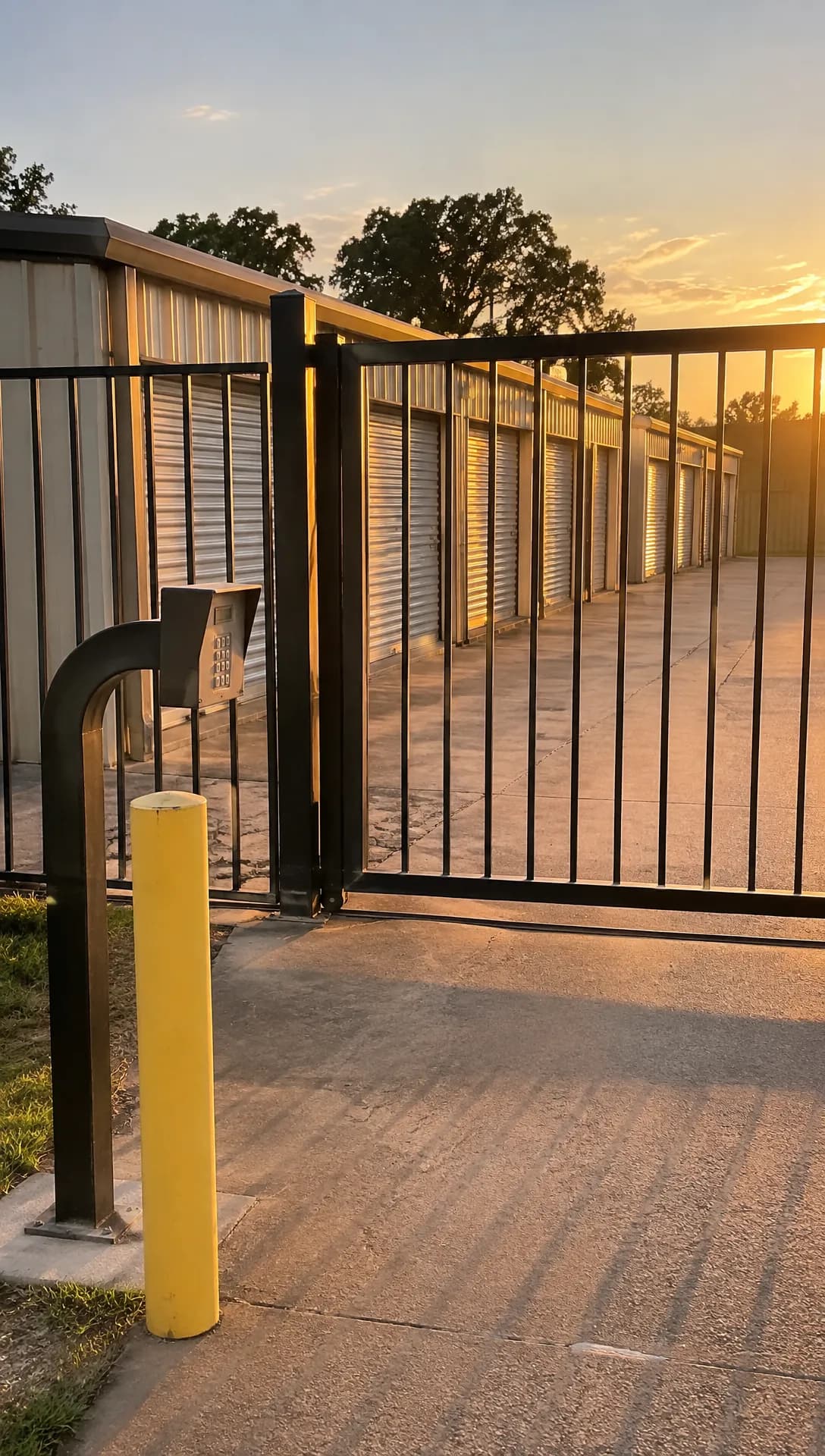 Made in Novoads with GPT Image 2.6 Sunburst · a storage gate and drive-up units at golden hour · it stands in for your own photo · 1 credit · 2026-11-17
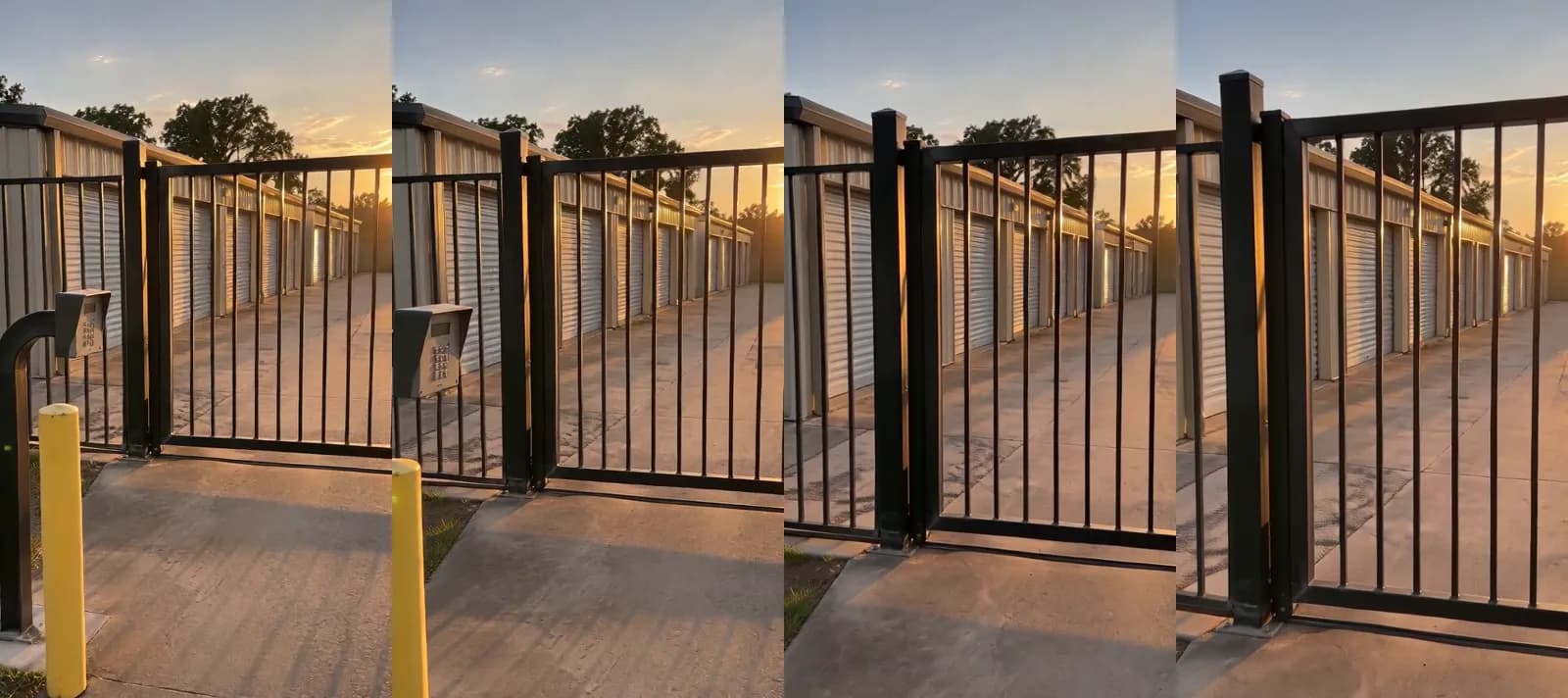 Made in Novoads with Seedance 2.0 Mini, through our Claude connector · a slow push toward the gate while the low sun flares, no sound · 4 seconds at 480p · 2 credits · 2026-11-17
An AI presenter for sizes and specials
- Pick Talking Actors as the content type.
- In the "Script / Prompt" box, paste what your front desk says about each size, plus this month's offer if there is one.
- Under "Select Actors", pick an AI actor.
- On the price line, keep the default 720p or switch to 480p.
- Send it.
You get back a video of the AI presenter saying your script on camera. Captions are a separate step, done on the finished video. The captions tool opens on the "TikTok, no box" look, one of six looks that cost 3 credits a started minute. The Karaoke look costs 0 credits.
Novoads has voices in 32 languages, so a facility in a bilingual town can run the same size guide in a second language.
The presenter is an AI actor. It speaks for the facility, and it never plays your manager, a renter or someone who left a review.
A size guide script built from your own chart
Every line of the script comes from your rate sheet and what your staff already tells callers, so nothing in it is a guess.
- Open with the facility's name, the city and the renter's question, which is what size they need.
- Give each size you rent its own line, from the smallest up, with what your staff says fits in it.
- Say which sizes are drive-up or climate-controlled, if any are.
- Add this month's offer only if it's real on the day the ad runs.
- Close with how to reserve, whether that's by phone, online or at the office.
Keep it under 60 seconds when it's read aloud. Presenter videos are charged per started minute, so a script that runs 61 seconds is charged for two minutes.
What a storage ad costs on each plan
Prices as of November 17, 2026. You pay for Novoads from the first month, and a credit costs a different amount on each plan.
- Starter, $15 a month for 200 credits
- Plus, $49 a month for 1,000 credits
- Ultra, from $129 a month for 3,000 credits
| What you make | Credits | Starter | Plus | Ultra (3,000 credits) |
|---|---|---|---|---|
| One credit | 1 | 7.5 cents | 4.9 cents | 4.3 cents |
| Wan 3.0 clip, 5 s at 720p | 9 | about 68 cents | about 44 cents | about 39 cents |
| Three of those clips | 27 | about $2.03 | about $1.32 | about $1.16 |
| Kling 3.0 clip, 5 s | 10 | 75 cents | 49 cents | 43 cents |
| AI presenter, up to 60 s at 480p | 100 | $7.50 | $4.90 | $4.30 |
| AI presenter, up to 60 s at 720p | 200 | $15.00 | $9.80 | $8.60 |
| Captions in a look, per started minute | 3 | about 23 cents | about 15 cents | about 13 cents |
| Three clips and a 480p presenter | 127 | about $9.53 | about $6.22 | about $5.46 |
The set we'd start with
That's the bold row in the table. It's three Wan 3.0 clips of the gate, a hallway and an open unit, plus a presenter at 480p walking through your sizes. A Starter month covers that set once, with 73 credits left over. A Plus month covers it seven times.
What the total leaves out
The 127 credits cover the clips and the presenter, but four things aren't in that total.
- Re-rolls, since each new try is charged again.
- A voice-over and joining the pieces into one ad, neither of which this table prices.
- Your time checking each clip against the real place.
- What you spend to run the ads, which our look at Google Ads costs gets into.
You'll find every plan and what it includes on our pricing page.
What a produced promo costs, for scale
Vidico, which calls itself a B2B explainer video company, dated its promo video pricing guide May 21, 2026. The guide says a professional promo video costs "between $1,000 and $15,000 for most businesses". That range is for a produced promo, which is a different job from animating your own photos, so treat it as a sense of scale. If you're weighing a full commercial instead, our guide to AI commercials walks through what one takes.
Google's unit-size Search ad, still a pilot on its help page
None of the six results we read mentions this ad. Google's help page "About Search ads with AI-powered recommendations" describes it in the company's own words.
- It's a Search ad that "analyzes photos using Google AI, to guide customers through their purchase, like an expert would".
- Its photo specifications are written for "customers when uploading photos with items to store".
- The page says "Google AI models have been trained to focus on large movable items, which will help determine the storage unit size you need".
The note at the top of the page reads "The product is currently in the pilot phase, available only to select advertisers for the storage use case." So the pilot covers only storage so far, and as we read it, a facility can't switch it on for itself.
The help page isn't dated. We read it on November 17, 2026, and that's the version we quote. Google first showed Search ads that provide AI-powered recommendations on May 21, 2024, in its roundup of announcements from Google Marketing Live. The roundup said "This experience will be tested with select advertisers in the U.S. over the coming weeks."
The page has a few more details that matter to an owner.
- Google bases its recommendations only on the first 5 photos a renter uploads.
- The page says Google doesn't show recommendations for vehicle storage, such as cars, RVs and boats. That line covers only the recommendations.
- Google says it doesn't share the photos "with anyone else including the advertiser".
- A renter who isn't sure their items are allowed in self storage is told to "contact the Extra Space Storage team".
And the FAQ on the same page says "The product is in the pilot phase and will soon expand to additional use cases and advertisers."
Since the page isn't dated, we can't tell from it whether the pilot is still running or has ended, so this post doesn't say either way. Our reading is that the pilot starts from the renter's side, with the things they own and which unit those things need. A size guide built from your own chart and your real units answers that same question in any ad you run.
The storage ad we'd make first
If you only make one ad this month, we'd make it the size guide. It answers the same question Google's storage pilot is built around, which unit size a renter needs. With Novoads, you can make every piece of it, from clips that open on your own photos to an AI presenter reading your chart, with captions on the finished video. Starter is $15 a month for 200 credits, which covers the set above with credits to spare.
Price your storage ads before you make them
Three photo clips and an AI presenter come to 127 credits. See what each plan includes.
See the plansIf you plan to run it on TikTok, our guide to TikTok ads goes into what works there. Start with the three photos you probably already have (the gate, a hallway and one clean unit), and hold every clip up against the real place before it runs.
Frequently Asked Questions
Can my storage facility turn on Google's photo-reading unit-size ad?
As we read it, a facility can't just switch it on. Google's help page says the product is currently in the pilot phase, available only to select advertisers for the storage use case, and that it will soon expand to additional use cases and advertisers. The page isn't dated. We read it on November 17, 2026, and that's the version we quote. Google first showed Search ads that provide AI-powered recommendations on May 21, 2024. Any facility can still answer the renter's size question in its own ads, with a size guide made from its real unit sizes and photos.
Key Takeaways
- The guides in the top results for this search suggest facility tours, offers for new renters, unit sizes, features and customer testimonials. We group those into five storage ads, and AI can help with four of them.
- If a clip has to show your real gate or hallway, it should open on your own photo. In the editor, Wan 3.0 does that once you switch to Start / End Frames.
- The set we'd start with is three Wan 3.0 clips made from your photos, plus an AI presenter at 480p. As of November 17, 2026, that comes to 127 credits, or about $6.22 on Plus.
- Vidico's pricing guide puts a professional promo video between $1,000 and $15,000 for most businesses. That range is for a produced promo, which is a different job from animating your own photos.
- Google's help page describes a Search ad that reads a renter's photos to suggest a unit size, and says it's in a pilot open only to select advertisers for storage. Google first showed the format on May 21, 2024, and the page itself isn't dated.