Tree Service Advertising: Ad Ideas, What Each Costs With AI, and Maryland's License Line
Tree service advertising ideas from big removals to winter pruning offers, how to make each ad with AI from job photos your crew already has, what each one costs in credits and dollars, and the license number or 20-foot statement a tree service ad in Maryland has to include.

Mauricio Valdivia
·12 min
A pruned oak, a chipper and four seconds of motion
Our test photo shows an oak with pale, fresh cuts where its limbs came off. A white box truck sits at the curb beside it with a yellow wood chipper hitched behind, and the cut branches lie stacked on the lawn. No tree company gave us that picture. We generated it in Novoads to stand in for the shot a crew grabs once a job wraps up. Then we sent it through our connector to Seedance 2.0 Mini, which animated it into 4 seconds of video. The camera glides down the curb toward the oak, the chipper slips out of frame, and the truck drifts to the left edge.
Most tree companies already have photos like that one. Removals, crown reductions and storm cleanups usually end with somebody on the crew snapping a few pictures that then sit on a phone. But the ads you'd like to run need motion, an offer and a reason to call this week. Filming pulls a crew off a paying job, and hiring a production company takes a budget most small outfits don't have.
AI closes part of that gap, and only part. It can turn your real photo into a short clip, put an AI presenter in front of your winter offer and lay out a before-and-after picture. It shouldn't invent the job itself. And if you advertise in Maryland, your ad also needs a line that none of the marketing guides we read on page one of the search results mentions.
On November 18, 2026, we read agency guides from the first page of search results for "tree service advertising", Maryland's statute on the General Assembly's own site, and our own price tables. The still and the clip cost 3 credits in our workspace. We haven't run these ads for a real tree company, so you won't find a lead count of ours anywhere in this post.
Five kinds of tree service ad, and where AI belongs in each
The agency guides on that first page overlap more than they differ. Ads Astra Labs, a tree-service marketing agency whose guide was updated November 6, 2026, says "Real beats polished on every tree account we run." We agree, and it's the test we used to decide what AI should touch in each ad below. (Roofers face the same problem with their own job photos, and our roofing ads guide covers their version.)
The owner on the job, filmed on a phone
Here the person behind the saw is the selling point. Ads Astra says that across the tree service ads it studied, an owner selfie on a job site "brought in 62 leads for one company". That figure comes from its own study, and we can't check it. Nothing in this ad should be generated, so don't hand it to an AI presenter dressed up as you. Film it yourself at the end of a job, in the yard, with the work behind you, and name the town in your first sentence.
The big removal, with the crane, lift or chipper at work
A big removal is the ad people stop scrolling for. Ads Astra describes "A short video of a big removal with a curious hook" that "was a top ad on two different tree accounts". It also says that at one tree company it names, ads showing the spider lift or chipper at work were the best style. DataCram, a San Antonio marketing firm that runs Google Ads for tree companies, dated its tree service advertising guide November 5, 2026. It writes that a short video of a crane lifting a dead pine clear of a roof, or a before and after of a crown reduction, "says more than any headline."
AI is good at the motion. Give it your own photo of a real removal and it can turn the frame into a few seconds of camera movement. But it must not show a crane, a lift, a roof or a machine that wasn't on that job, or a tree coming down that never came down. Our still below is the kind of photo this ad starts from, with the truck and the chipper, the tree with its fresh cuts, and nobody posing.
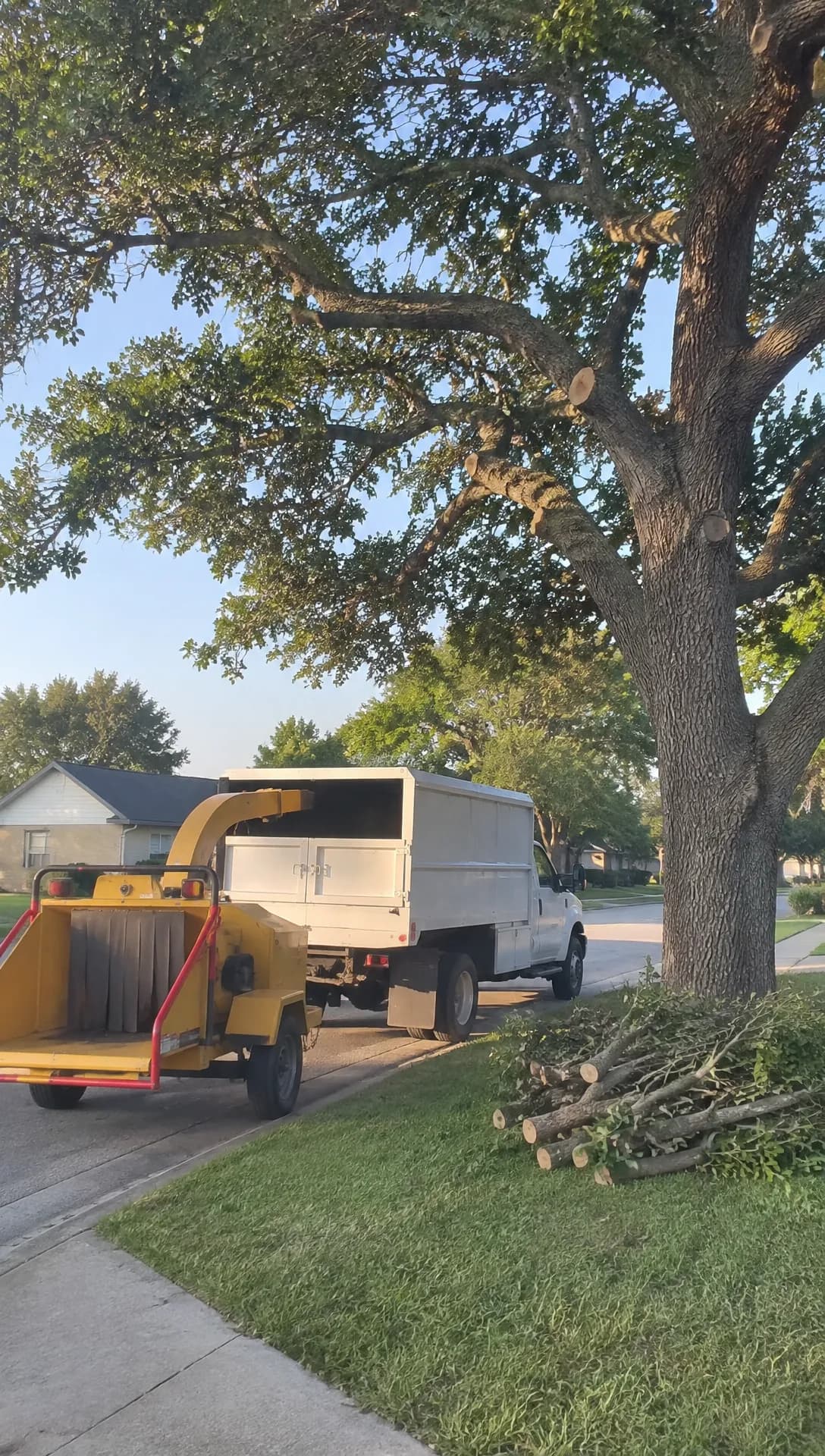 Made in Novoads with GPT Image 2.6 Sunburst · prompt: a tree crew's work truck and wood chipper beside a freshly pruned oak, as a vertical phone photo · 1 credit · 2026-11-18 · nobody's real job, it stands in for the photo your crew would take
A before-and-after of a pruning job or crown reduction
Pruning is sold on the difference between the before and the after, so both photos have to be real. For the after shot, stand where you stood for the first one, hold the phone where you held it, and wait for similar light. AI can set the two photos side by side as a picture ad, add your town and number in a clean band and give you three versions to pick from. But never let it make the after shot. A generated one, or a fuller canopy or tidier lawn than the job left, would show a result your crew didn't deliver.
The winter pruning offer
Ads Astra lists "A dormant-season pruning offer for the winter, when crews have room" among its ideas. It also says that one winter, a "$100 off" version of the same ad brought in more than twice the leads of a "$75 off" one. An offer ad is where an AI presenter fits best. It can read your offer, the towns you cover and your phone number, in two versions if you want to test the offer. In Maryland, it reads your license line too. It's never presented as you, a crew member, an arborist, the licensed tree expert or a happy customer, and it never voices a review nobody gave you.
The storm ad, built before the storm
Storm work is the other side of the business. Ads Astra suggests "An emergency Google Ads campaign built in advance and switched on only when a storm is forecast". DataCram's advice is to build the storm campaign ahead of time, leave it paused and have it run "only when a crew can actually respond." Make the creative in a quiet week, from your own photo of a real storm cleanup, with your town and your number. Never show storm damage, a tree on a house or a crew arriving that isn't yours, and never promise a response time you can't keep on the worst night of the season. And if the cleanup ends with your crew hauling the debris off, junk removal ads made from before-and-after photos sell that part of the job.
Making the ads in Novoads from job photos and a script
You make the ad in Novoads and post it wherever you already advertise. Each piece below starts from one of your job photos or a script you write, and none of it needs a camera crew. For the basics of AI ads, start with our general guide to AI ads.
Turning a finished-job photo into a clip
- Open the Video tab. It starts on Omni Flash, the model we price in our worked example.
- Switch the photo box from "Reference" to "Start / End Frames", then drop your photo in as the start frame. The editor confirms it with "The video starts on this picture."
- In the prompt, describe only the camera move (a slow push along the curb toward the tree, for instance) and list what must not appear, such as people, new vehicles or lettering.
- Pick 8 seconds, keep 720p and press the round up-arrow button to send.
You get back an 8-second clip at 720p whose first frame is your photo. Wan 3.0 works the same way once you pick "Start / End Frames". Kling 3.0, Kling 4.0 and Google Veo 3.1 start on a photo too, from the box that reads "Drop a start frame or click to upload". The Seedance models treat an uploaded photo differently in the editor. There it's a reference, called @Image1 in your prompt, and never the start frame. The start-frame trick works for any photo you sell from, and our walkthrough for turning one photo into a product video shows it on a product.
We made the test clip through our connector instead. It's a Seedance 2.0 Mini clip started from the still above, with the sound off, and it ran 4 seconds at 480p. That made it a small, cheap check of the motion, and it cost 2 credits. For an ad you'd actually run, you can make the clip at 720p. At that size, Seedance 2.0 Mini charges 5 credits for 5 seconds.
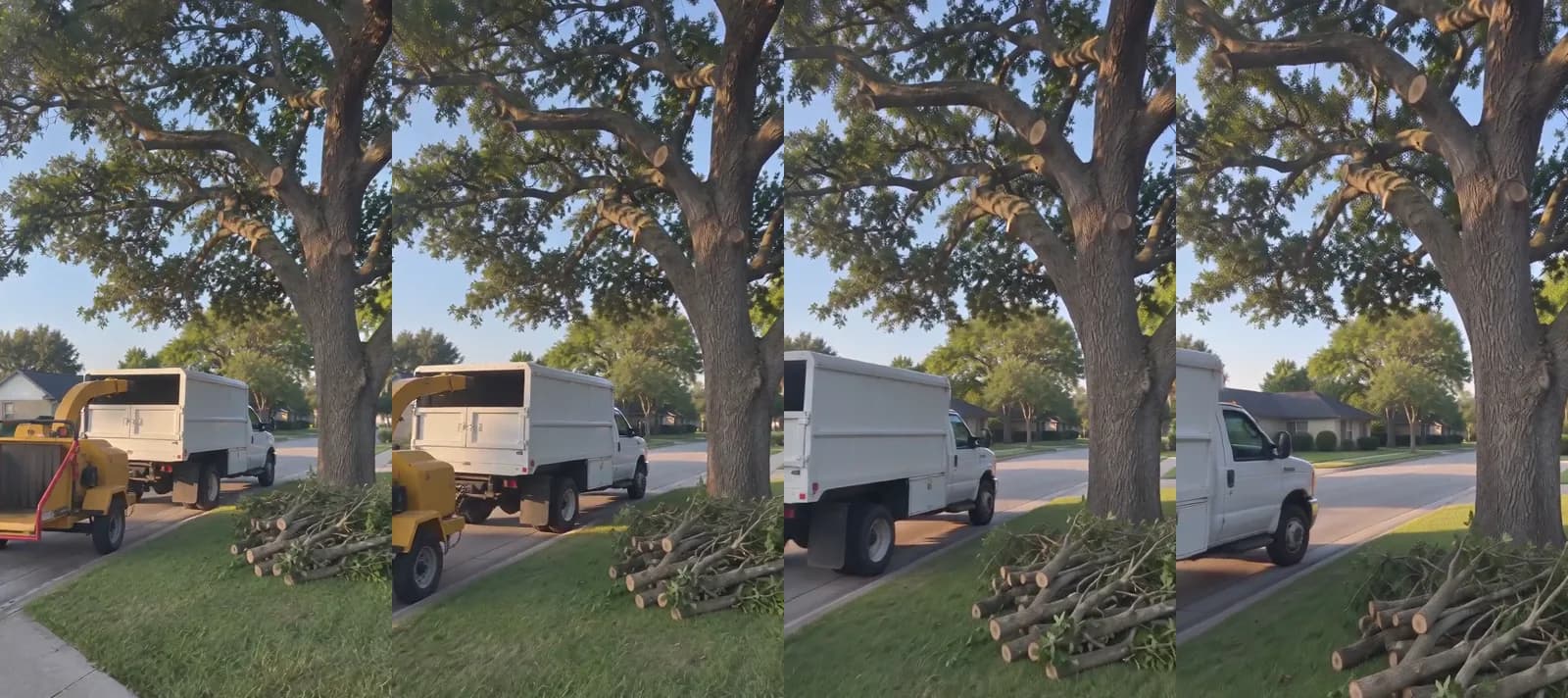 Made in Novoads with Seedance 2.0 Mini · prompt: the pruned oak and the parked truck, animated with a slow move toward the tree, sound off · a 4-second test at 480p, started from the still above through our own connector · 2 credits · 2026-11-18
We'd asked for the truck to roll out of the frame. It stopped at the left edge instead, side-on with an empty cab, while the stacked branches stayed on the grass. That's the kind of small miss to look for in every take, so check each clip against your own photo before you use it.
- The tree keeps the cuts your crew actually made.
- Nothing shows up that wasn't in the yard.
- No lettering appears on a truck.
If a take fails any of those, re-roll it. Each re-roll is billed again.
Putting an AI presenter in front of the winter offer
- Open the Talking Actors tab and write the script where it says "Write what the actor will say...". Keep it to your offer, your service area and your phone number, plus the license line in Maryland.
- Choose an actor. It's an AI actor, and it speaks for your company, never as you or as anyone on your crew.
- On the price line, which also sets the size, pick 480p (the size we price in our worked example) or keep 720p.
- Send it with the arrow button.
You get back a video of the presenter speaking your words, with a voice and lip-sync. You add captions afterward as a separate step, in the Captions tool, on the video the presenter made. The tool opens on the "TikTok, no box" look, and each of its six looks costs 3 credits for every started minute. A script we'd start from reads "Winter pruning is booking now in [your towns]. [Your offer, in one line.] Call [your number]." In Maryland, end it on your license line, and say it as your company's line, never as the presenter's own license.
A before-and-after picture with both photos as references
- Open the Image tool, click "Reference" and upload the before photo and the after photo (JPG, PNG or WebP).
- In the prompt, describe the picture you want from them. For example, ask for the two photos side by side with the before on the left, and a plain band at the bottom with your town, your phone number and, in Maryland, the license line. Tell it not to change the trees.
- Under "Settings", pick GPT Image 2 and move its quality from High, where it starts, to Medium, which makes it 1 credit a picture.
- Send it. A run makes three pictures, so it costs 3 credits.
The tool redraws your photos rather than pasting them in, so check every version against the originals before you use one.
- Throw out any version where the canopy looks fuller or the lawn tidier than it was.
- Throw out any with a wrong character in the license number or the phone number.
- Keep the one that matches both of your photos.
GPT Image 2 has no 4:5 shape. For a feed picture in that shape, pick Nano Banana Pro instead, which costs 2 credits a picture at 2K.
What the clips, the presenter and the pictures cost
Prices as of November 18, 2026. The dollar columns are our own arithmetic (each plan's monthly price divided by its credits). That works out to $0.075 a credit on Starter and $0.049 on Plus. On Ultra 3,000 it's $0.043.
The price of each piece
| Piece of the ad | Model and setting | Credits | Starter | Plus | Ultra 3,000 |
|---|---|---|---|---|---|
| Clip from your photo | Omni Flash, 8 s, 720p | 24 | $1.80 | about $1.18 | about $1.03 |
| Clip from your photo | Kling 3.0, 5 s | 10 | 75 cents | 49 cents | 43 cents |
| Clip from your photo | Kling 4.0, 5 s, 720p | 18 | $1.35 | about 88 cents | about 77 cents |
| Clip from your photo | Wan 3.0, 5 s, 720p | 9 | about 68 cents | about 44 cents | about 39 cents |
| AI presenter, up to 60 s | Talking actor, 480p | 100 | $7.50 | $4.90 | $4.30 |
| AI presenter, up to 60 s | Talking actor, 720p | 200 | $15.00 | $9.80 | $8.60 |
| Captions, up to a minute | Any of the six looks | 3 | about 23 cents | about 15 cents | about 13 cents |
| Three before-and-after pictures | GPT Image 2, Medium | 3 | about 23 cents | about 15 cents | about 13 cents |
The presenter is billed per started minute, so anything from a few seconds to a full minute costs the same.
One full set of two clips and a presenter
Our worked example is the set a winter pruning push needs. It's two Omni Flash clips that open on your crew's photos of finished jobs, plus one AI presenter reading the offer. Each clip runs 8 seconds at 720p. The two clips come to 48 credits. The presenter at 480p adds 100 more. That's 148 credits for the set.
- On Starter the set costs $11.10, with 52 of the month's credits left over.
- On Plus it's about $7.25, and a month covers six sets.
- On Ultra 3,000 it's about $6.36 a set. A month of it covers twenty.
The sum leaves out re-rolls (each try is billed again), captions, and joining the clips and the presenter into one ad (we don't have a credit figure to print for that step). It also leaves out the money you spend placing the ad and the minutes you spend comparing every clip with the photo it came from. Our pricing page has every plan, including the annual prices.
Compared with a filmed video
ORB Tree Service Marketing is an agency that sells video production to tree companies, and its video production page answers what a professional 2-minute video costs. Across the whole industry, it says, those videos "usually cost between $2,000 and $10,000." ORB last updated that page on May 11, 2026. That's a vendor quoting an industry range rather than a survey or ORB's own price list. And the comparison isn't like for like, because a filmed video is a different product from short pieces made from photos you already have. We still think the gap matters for a small crew, since the photo route lets you make an ad from every good job. For a longer, commercial-style spot, our guide to AI commercials prices one.
Maryland's license line for tree service ads
None of the marketing guides we read on the results page names any state's rule on what a tree service ad must say. Maryland has one, and it changes the ad itself.
What section 5-423(c) says
Maryland's Natural Resources Article, section 5-423(c), says "A person may not advertise that the person can provide tree services, including treatment, care, or removal of trees, unless the advertisement includes" one of two things.
- "The license number of the licensed tree expert advertising tree services in one of the following forms", which are "Licensed Tree Expert No." and "L.T.E. No.".
- "A statement that all tree services are limited to trees 20 feet tall or less."
The rule took effect on October 1, 2009, through Chapter 226 of that year's laws. It isn't new, and the marketing guides still leave it out.
Who it covers, and what the 20-foot statement means
The rule binds anyone who advertises tree services in Maryland, whether or not they're a licensed tree expert. The word "including" matters too, because it makes treatment, care and removal the statute's examples of tree services rather than the full list.
The 20-foot statement is the statute's other option, for an outfit with no license number to show. It mirrors section 5-415(c)(2)(iii). Under that section, the law's "tree expert" doesn't include a person who treats, cares for or removes a tree "that is 20 feet tall or less." The parallel ends there, though. A crew with no license number still can't advertise tree services in Maryland without the statement, and the statement covers all of its tree services.
This is Maryland law, so if you advertise in another state, look up that state's own rules. For another state and trade, Florida's statutes on license numbers in electricians' ads have a post of their own.
Where the line goes in a video or picture ad (our reading)
The statute says "the advertisement" and doesn't name a medium. Our reading is that a video ad, an AI presenter's script and a picture ad are all advertisements, so each one needs the line.
- In the presenter ad, end the script on the license line, and put the written form (with "No." and the number) in the text you post with the video.
- In a clip made from your photo, put the line in the text you post with it.
- In a picture from the Image tool, ask for the line in the prompt, then check every character before you post it.
- If you have no license number, use the 20-foot statement in the statute's own words.
None of this is legal advice. The statute's page on the General Assembly's site is in the sources below, and it's the text to check your finished ad against.
Which tree ad to make first
We'd start with what's already on your phone, in this order.
- Pick the clearest before-and-after from a pruning job this month and make the picture version for 3 credits.
- Turn your best finished-removal photo into an 8-second clip.
- Save the AI presenter for the winter offer, since it's the biggest cost in the set.
- Make the storm clip in a quiet week, so it's ready before the forecast turns.
You can make all three (the clip, the presenter and the picture) in one Novoads workspace, from a batch of job photos and one script. Every plan is paid, and Starter is $15 a month for 200 credits.
On your next pruning job, take a before shot and an after shot from the same spot, and you'll have the photos the first ad needs.
Price your winter pruning ad before you make it
Starter is $15 a month for 200 credits. That covers our winter set of one presenter and two clips, with credits to spare.
See the plansFrequently Asked Questions
How do homeowners choose a tree service, and what should my ad show them?
University of Maryland Extension tells Maryland homeowners to verify that a company has a licensed tree expert on staff, either by asking to see the license or by checking the license number on the Department of Natural Resources website. Its page was updated August 4, 2025. So in Maryland, the license line on your ad hands people the number they're told to look up. Anywhere else, show what a homeowner can check with their own eyes, like your truck, real jobs your crew finished and the towns you serve.
Can an AI presenter read my license line in a Maryland ad?
Section 5-423(c) says a person may not advertise tree services unless 'the advertisement includes' the license number, in the form the statute spells out, or the 20-foot statement. It doesn't name any medium. Our reading is that a video ad counts. So have the presenter read the line, and put the written form ('Licensed Tree Expert No.' or 'L.T.E. No.' followed by the number) in the text you post with the video. The presenter is an AI actor speaking for your company, never you and never the licensed tree expert. That's our reading, and it isn't legal advice. The statute's own page is in the sources below.
When should a tree company run its pruning and storm ads?
Ads Astra Labs, a tree-service marketing agency, suggests a dormant-season pruning offer for the winter, when crews have room, and an emergency Google Ads campaign built in advance and switched on only when a storm is forecast. Its guide was updated November 6, 2026. We'd make the creative for both in the slow weeks. The winter offer gets an AI presenter, and the storm clip comes from a real cleanup photo, so neither one waits on a crew with time to spare.
What does one tree service ad cost to make with AI?
Our worked example is two Omni Flash clips that open on your job photos, plus an AI presenter reading the offer. Each clip runs 8 seconds at 720p. We priced the presenter at 480p. Together they come to 148 credits, as of November 18, 2026. That's $11.10 on Starter and about $7.25 on Plus. Every re-roll is billed again, and the ad spend is yours to set wherever you run the ad.
Key Takeaways
- The agency guides we read on tree service advertising point to five kinds of ad: the owner on a job site, a big removal, a pruning before-and-after, a winter offer and a storm ad built before the storm.
- Let AI animate your crew's real photos and read your offer. Never let it invent a removal, a machine, a crew, storm damage or a healthier tree than the job left.
- In Novoads' video editor, you can start a clip on your photo with Kling 3.0, Kling 4.0 or Google Veo 3.1, or with Omni Flash or Wan 3.0 set to Start / End Frames. Seedance takes a photo there only as a reference.
- In Maryland, you can't advertise tree services, including treatment, care or removal of trees, unless the ad includes the licensed tree expert's number as 'Licensed Tree Expert No.___' or 'L.T.E. No.___', or a statement that all your tree services are limited to trees 20 feet tall or less. The rule is section 5-423(c) of the Natural Resources Article, and it's been in force since October 1, 2009.
- The AI presenter in a tree ad speaks for the company and is never shown as the owner, a crew member, an arborist or the licensed tree expert. Putting the license line in its script is our reading of a statute that doesn't name any medium.