Tutoring Ads: Video Ideas, What Each Costs With AI, and the 529 Plan Line Parents Can Use in 2026
The five kinds of ads tutoring centers and private tutors run, how to make each one from photos of your own room or with an AI presenter, what each piece costs on every Novoads plan, and what the IRS says about paying for tutoring from a 529 plan, including the test the tutor has to meet.

Mauricio Valdivia
·11 min

One Photo of a Study Room, Animated for 2 Credits
Report cards come home, and within a week the parents who meant to wait until spring start calling to ask how a first session works. The SAT or ACT registration date is a few weeks out, and the same parents want to know if there's still time to prepare. That's the stretch a tutoring ad has to cover, and it's also when you have the least time to film one.
So for this post, we made a small piece of one. We asked GPT Image 2.6 Sunburst for a phone photo of an empty tutoring room with a round wooden table, two upholstered chairs, a workbook open to blank pages, a mug of yellow pencils, a clean whiteboard and a plant on the windowsill. It stands in for the photo you'd take of your own room. Then we turned that picture into a 4-second clip at 480p with Seedance 2.0 Mini, through our own Claude connector. The camera pushes in toward the table, the whiteboard and the window rise out of the frame, and the light gets warmer. The picture cost 1 credit, and the clip cost 2.
The rest of this post draws on the top Google results for "tutoring ads", the IRS's own pages on 529 plans, and our own prices and editor, all as of November 17, 2026. We didn't film a tutor or a student, we didn't run any of these ads, and we can't tell you how one would perform for your center.
Five Kinds of Ads Tutoring Businesses Run
We opened four of the top results for this search. Three were guides, from Noto, Adwave and eLearning Industry, and the fourth was a tutor directory's request form. Most of their advice is about where to advertise, but we count five kinds of ads in what they recommend. Each has a part AI can make well and a part it should never fake.
The tutor introduction
Adwave's guide puts tutor introductions first in its list of creative that works, with "real tutors on camera explaining what they specialize in and how they work with students." This one has to be your own footage, because the person in it should be the person a parent meets at the first session.
What AI can add is the room. A few seconds of your study room, animated from your own photo, gives the ad something to open on before your tutor starts talking. Don't add an AI presenter introduced as one of your tutors, or a credential nobody on your staff holds.
The answer to a parent's question
Adwave's guide calls these subject explainer content, "short videos addressing common parent questions." Yours come from the questions you already get on the phone. How does a first session work? Is it too late to start SAT prep? Should she take pre-algebra over the summer, or wait?
This is where an AI presenter helps most. You write the answer, the presenter reads it to camera, and you add captions afterward, which makes it a talking head ad you didn't have to film. Introduce the presenter as just that, a presenter reading for your center. Don't call it a tutor, a teacher or a parent. And keep any test date or test rule out of the script until you've checked it on the testing organization's own page.
The deadline offer
Noto's guide tells tutors to "build campaigns around specific academic timelines", and its examples are "AP exams in six weeks, report cards arriving soon, or SAT registration deadlines." This ad names the offer, the date it ends, the subjects and grades, and how to book.
An AI presenter can read it with captions, before or after a clip of your room. It's also the best fit for the 529 line later in this post, with Publication 970's tutor test next to it every time. Never promise a grade or a score in it, and don't stamp "529-eligible" across every tutor you employ.
The parent review
Noto's guide tells tutors to "collect and showcase student testimonials and reviews", and Adwave's student outcome stories have "real students or parents (with permission)" sharing their results. The version you can run is a parent's own words, used with their permission, on a picture of your room or over a clip of it.
AI can make the picture and the clip around the review. The review itself has to come from a real parent, so don't have an AI voice read it as if it were the parent speaking, don't put an AI-made student in it, and don't add a score or grade jump that didn't happen to a real student of yours. Our supplement ads guide covers what the FTC expects when an ad shows a customer's results.
The feed picture
Noto's guide still lists print, and its flyer advice works for a feed picture too. It says to "keep information minimal", with your name, subjects, grade levels, one credential, a phone number and your website.
AI can turn your own photo of the room into that picture. Don't let it seat AI-made children at the table as your students, or show a room that isn't yours. Our guide to static ads has more on picture ads in general.
How to Make Each Tutoring Ad in Novoads
You can make all five with three Novoads tools (Talking Actors, Video and Image), starting each time from something you already have, either a photo of your room or a script you wrote. Each ad uses one or two of the three.
- The tutor introduction opens on a room clip, and the rest is your tutor's own footage.
- The answer to a parent's question is an AI presenter with captions.
- The deadline offer is a presenter and a room clip.
- The parent review is a feed picture or a room clip carrying the parent's words.
- The feed picture starts from your room photo.
If you're new to making ads with AI, our guide to AI ads starts with the basics.
Clips that start on your own photo
In the editor, both Wan 3.0 and Kling 3.0 can start a clip on your own photo.
- Start a new project and pick Video.
- Choose Wan 3.0 in the model menu. The editor opens on Omni Flash, so you'll need to change it.
- Switch the photo box from "Reference" to "Start / End Frames", then drop your room photo where it says "Drop a start frame or click to upload". With Kling 3.0, that box is already there, so there's nothing to switch.
- Describe the camera move in the prompt (a slow push toward the table in afternoon light, for example) and send it with the round up-arrow button.
Wan 3.0 starts at 5 seconds and 720p. It also starts in the tall 9:16 shape a phone feed uses, and its clips come with sound unless you turn it off. The price is the same either way. Kling 3.0 starts wide at 16:9, so change the shape under "Settings" before you send.
We made the clip in this post a different way, through our own Claude connector, where a Seedance 2.0 Mini clip can start on a picture. In the editor, Seedance only uses a photo as a reference, which you name in the prompt as @Image1, so the clip won't open on your room. Ours ran 4 seconds at 480p, which is a cheap way to check the motion. It cost 2 credits. For an ad you'll actually post, use 720p, which is where Wan 3.0 starts anyway.
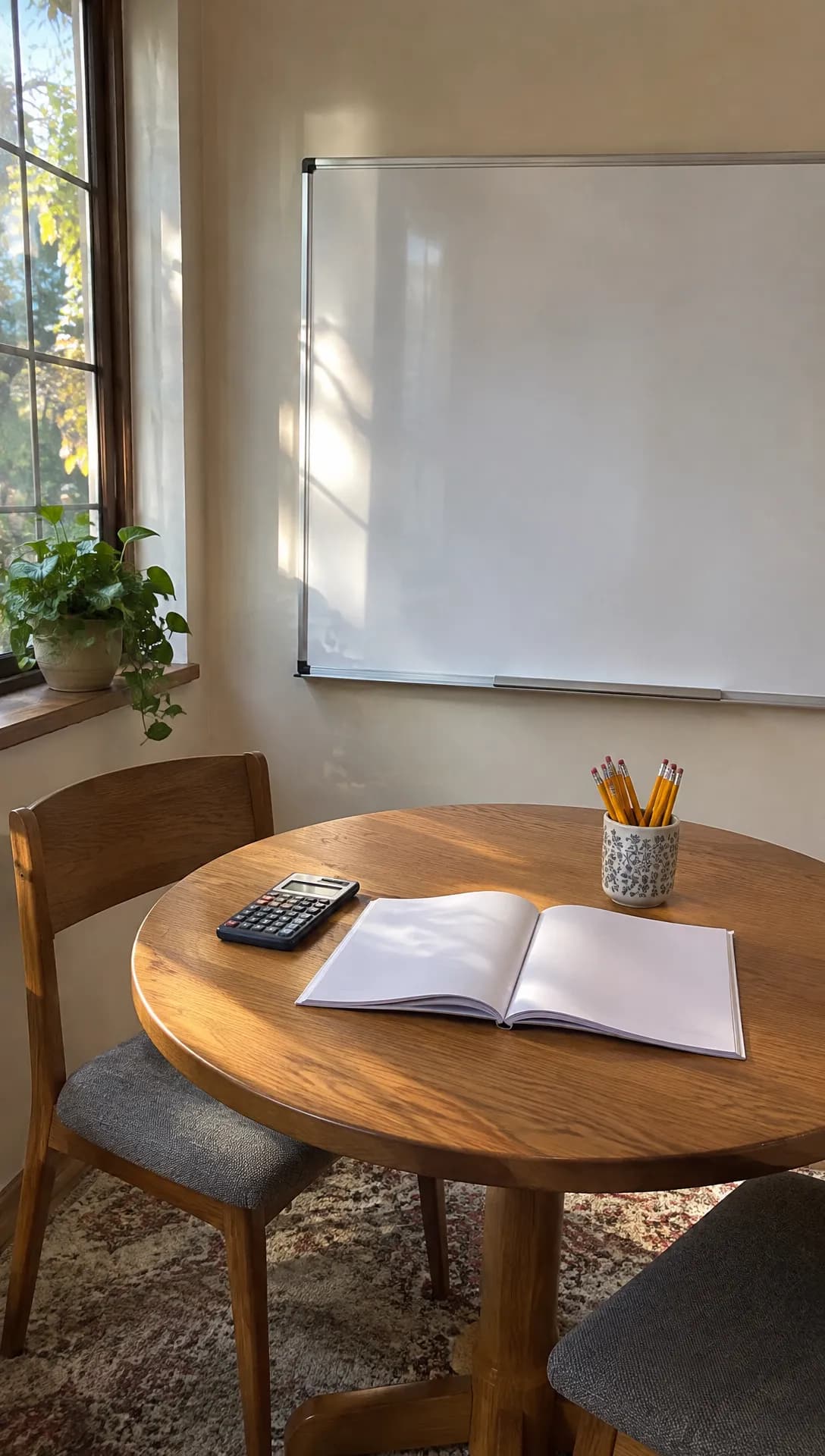 Made in Novoads with GPT Image 2.6 Sunburst · an empty tutoring room as a tutor's own phone photo, standing in for your own photo · 1 credit · 2026-11-17
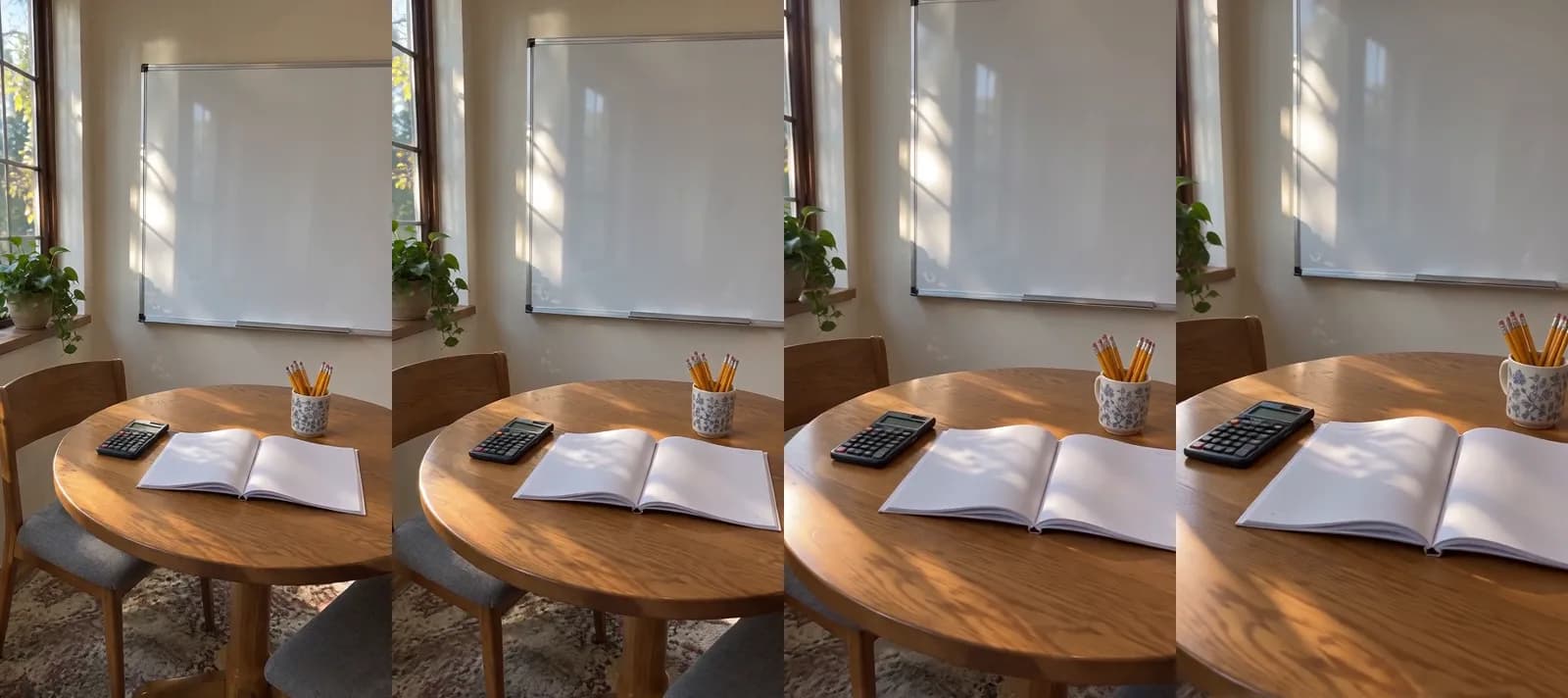 Made in Novoads with Seedance 2.0 Mini · the room picture above as its start picture, a slow push toward the table, sound off, 4 seconds at 480p through our Claude connector · 2 credits · 2026-11-17
There's no person, no sign and no writing in any of the four frames.
An AI presenter who reads your script
- Start a new project and pick Talking Actors.
- Click "Add actors" and choose one adult presenter. You pay per actor, so one is enough.
- Type your script where it says "Write what the actor will say...". Write it about your center ("At our center, the first session starts with a short reading check"), never in the first person as a tutor.
- The price line doubles as the size switch. Pick 480p to pay half, or keep 720p, then send it with the round up-arrow button.
You get back the presenter saying your script, with a voice and lip-sync. Captions take one more step. Open Captions under "See more", click "Choose a video" and pick a look. The tool opens on "TikTok, no box", one of six looks that cost 3 credits per started minute. Novoads has voices in 32 languages, which helps when many of your families would rather hear the answer in Spanish. If you've never used an AI presenter, our guide to AI actors explains what they are.
Feed pictures from your room photo
- Pick Image and open "Settings". Under Model, choose GPT Image 2.6 Sunburst (the tool opens on Nano Banana Pro), and set Quality to Medium.
- Set Images to 1 if you want a single picture. Otherwise the tool makes three each time you send.
- Add your room photo with "Reference", and in "Describe your image..." list what the picture should say. Noto's flyer list works here too (your name, subjects, grade levels, one true credential, a phone number and your website).
- Send it with the round up-arrow button, and read every word on the picture before it goes anywhere.
At Medium, each GPT Image 2.6 picture costs 1 credit, and at High it costs 2. Pictures start in the tall 9:16 shape, and you can pick 1:1 for a square post.
What the IRS Says About Tutoring and 529 Plans
None of the four results we opened mentions 529 plans. We think a line about them is the most useful thing a tutoring ad can carry for a parent who has one, as long as the IRS's conditions go with it.
What Topic 313 and Publication 970 say
The IRS's Topic no. 313 page, last reviewed or updated on November 9, 2026, covers 529 plans, which the IRS calls qualified tuition programs. For a student enrolled at or attending a public, private or religious school from kindergarten through grade 12, it lists "tuition for tutoring or educational classes outside of the home, including at a tutoring facility" among the costs a plan can pay. It counts those as qualified higher education expenses even for a student in grade school, and it says "Distributions aren't taxable when used to pay for qualified higher education expenses."
Topic 313 doesn't say who the tutor has to be, but Publication 970, the IRS's guide to education tax benefits (2025 edition), does. Tutoring counts "only if the tutor or instructor is not related to the student, and is licensed as a teacher in any state, has taught at an eligible education institution, or is a subject matter expert in the relevant subject."
As we read it, this is a federal tax rule for the family taking money out of a 529 plan, and it doesn't bind your center. All your ad can do is point parents to it.
Where the rule stops
- Outside the home. Both IRS pages limit it to tutoring "outside of the home", including at a tutoring facility.
- A shared cap. Topic 313 limits these K-12 costs to "a total amount of $20,000 per year" from all of the student's 529 plans. Before December 31, 2025, the limit was $10,000. That ceiling covers tuition, tutoring and every other K-12 cost combined.
- Federal tax only. State rules can differ, so a parent should check how their own state's plan treats a tutoring withdrawal.
- A tutor who doesn't meet the test. Then the cost doesn't qualify, and Publication 970 says "Generally, if you receive a taxable distribution, you must also pay a 10% additional tax on the amount included in income."
- In place since mid-2025. The IRS's Link & Learn Taxes course lists the tutoring change alongside a second one, for credentialing costs, and says "Both changes apply to 529 distributions made after July 4, 2025."
How a tutoring ad can use it
The IRS lists the cost, but what your ad tells parents about it is up to you. We'd frame it as a question for parents to take to their plan, with the test spelled out, and run it on screen and in the caption in words like these.
Paying with a 529 plan? Tutoring outside the home for a K-12 student may qualify when the tutor isn't related to the student and is licensed as a teacher in any state, has taught at an eligible education institution, or is a subject matter expert in the subject. Ask your plan.
That wording is our own suggestion. Run it only if your tutors can show they meet the test, and keep "may qualify" in it. Don't write "529-eligible" across your whole roster, don't put the $20,000 cap in the ad as if it were a tutoring allowance, and don't tell a parent they won't owe tax. For anything beyond that, send parents to Topic no. 313, Publication 970 and their own plan, because none of this is tax advice.
What a Tutoring Ad Costs to Make
Prices as of November 17, 2026. Every Novoads plan is paid from the first month and comes with a set number of credits each month.
- Starter, $15 a month for 200 credits, so 7.5 cents a credit (monthly only)
- Plus, $49 a month for 1,000 credits, so 4.9 cents a credit
- Ultra 3,000, $129 a month for 3,000 credits, so 4.3 cents a credit
Each piece costs the same number of credits on every plan. Only the dollar value of a credit changes, and the dollar figures in the table are our own arithmetic.
| Piece | Model and size | Credits | Starter | Plus | Ultra 3,000 |
|---|---|---|---|---|---|
| Presenter, up to a minute | Talking actor, 480p | 100 | $7.50 | $4.90 | $4.30 |
| Presenter, up to a minute | Talking actor, 720p | 200 | $15.00 | $9.80 | $8.60 |
| 5-second room clip | Wan 3.0, 720p | 9 | about 68 cents | about 44 cents | about 39 cents |
| 5-second room clip | Kling 3.0 | 10 | 75 cents | 49 cents | 43 cents |
| Feed picture | GPT Image 2.6, Medium | 1 | 7.5 cents | 4.9 cents | 4.3 cents |
The presenter is billed per started minute, so a video that runs one second past a minute costs two minutes.
One presenter ad, priced on each plan
The first set we'd make is one presenter at 480p explaining how a first session works. Two Wan 3.0 clips of your room go around it, each 5 seconds at 720p. That comes to 118 credits in all.
- On Starter it's $8.85. A month's 200 credits cover one set, with 82 left over.
- On Plus it's about $5.78. A month's credits cover eight sets, with 56 left over.
- On Ultra 3,000 it's about $5.07. A month's credits cover 25 sets, with 50 left over.
Re-rolls aren't in the 118 credits, since each new take is charged again, and neither are captions, at 3 credits per started minute. Putting the clips together into one ad and adding any voice-over have no listed price, so we left them out. Music, ad spend and the time it takes to check each clip against your real room come on top of that.
What a creator charges for one video
The other way to get a video like this is to hire a creator. Billo's guide "UGC rates: what brands pay per video and what changes the price", dated November 10, 2026, lists three rate bands.
- Beginners "usually charge $75-150 per video".
- "The standard market rate is $200-400."
- Experienced creators "with proven ad results charge $500-1,200 or more".
It isn't a like-for-like comparison, because a creator films a person, while the set above animates your own photos or uses an AI presenter.
Our pricing page lists every plan with its credits and yearly prices, and our AI video ad cost guide goes deeper on credits.
Which Tutoring Ad to Make First
We'd start with the answer to a parent's question. It's the fastest to write, since you already answer it on the phone every week, and it's the one an AI presenter can read without pretending to be anyone. Then make the deadline offer for the next date on your calendar, and save the tutor introduction for footage of your own tutors.
In Novoads, you make the presenter, the room clips and the feed pictures from your own photos and your own script, then run the finished ad wherever the families you serve already are.
Price your first tutoring ad
A presenter answering a parent's question and two clips from photos of your own room, in credits on every plan.
See plans and creditsWrite down the three questions parents asked you this week, and make the first ad from the one you heard most often.
Frequently Asked Questions
Where is the best place to advertise tutoring?
Noto's guide, one of the top results for 'tutoring ads' when we searched on November 17, 2026, points tutors to Google search ads, Facebook and Instagram, a Google Business Profile, local community boards, tutoring marketplaces and partnerships with schools. We'd start where parents already ask about the term, meaning search and the local groups your families use, with an ad that answers one of their questions. Then keep the channels that bring in calls you can trace back to an ad.
What are some catchy phrases for tutoring?
We'd skip slogans and name the moment the parent is in, the subject and grade, and the next step. Lines like 'Report cards are home. What's the plan for the rest of the term?' or 'Algebra this fall? Book a first session this week.' do that. Leave out any promised grade, score or jump, and any credential your tutors don't hold.
Can parents pay for tutoring with a 529 plan?
The IRS's Topic no. 313 lists tuition for tutoring or educational classes outside of the home, including at a tutoring facility, among the K-12 costs a 529 plan can pay with no federal tax on the withdrawal. Publication 970 adds a test for the tutor, who can't be related to the student and has to be licensed as a teacher in any state, have taught at an eligible education institution, or be a subject matter expert in the relevant subject. The limit is $20,000 a year per student, shared with tuition and every other K-12 cost across all of the student's 529 plans. State rules can differ, and this isn't tax advice, so parents should check with their plan and the IRS's own pages.
How much does it cost to make a tutoring ad with AI?
In Novoads, an AI presenter reading up to a minute of your script costs 100 credits at 480p. A Wan 3.0 clip that starts on your own photo costs 9 credits for 5 seconds at 720p, the size the editor starts on. One presenter and two clips come to 118 credits. That's $8.85 on Starter or about $5.78 on Plus (prices as of November 17, 2026). Re-rolls, captions, music and your ad spend cost extra.
Key Takeaways
- The five kinds of ads tutoring businesses run are the tutor introduction, the answer to a parent's question, the deadline offer, the parent review and the feed picture. Each one should show only your own tutors, your own room and results that really happened.
- A clip that has to show your real room starts on your own photo, which in the Novoads editor means Wan 3.0 set to Start / End Frames, or Kling 3.0. An AI presenter reads the script you wrote. Introduce it as a presenter, and never call it a tutor, a teacher or a parent.
- An AI presenter at 480p and two short clips of your room come to 118 credits. That's $8.85 on Starter or about $5.78 on Plus (prices as of November 17, 2026).
- The IRS's Topic no. 313 lists K-12 tutoring outside the home, including at a tutoring facility, among the costs a 529 plan can pay with no federal tax on the withdrawal. The limit is $20,000 a year per student for all K-12 costs combined. Publication 970 adds a test for the tutor, who can't be related to the student and has to be licensed as a teacher in any state, have taught at an eligible education institution, or be a subject matter expert in the relevant subject.
- An ad that mentions 529 plans should say tutoring may qualify, run only for tutors who meet that test, and send parents to their own plan, since state rules can differ. It should never promise a parent the money or the tax result.