Animated Ads: 3D and Claymation Ad Ideas, What One Costs With AI, and Copyright for an AI-Made Mascot
Five kinds of animated ads that small brands run, how to make each one with AI in Novoads, what each piece costs on our plans, and what the U.S. Copyright Office concluded about characters an AI draws.

Mauricio Valdivia
·11 min
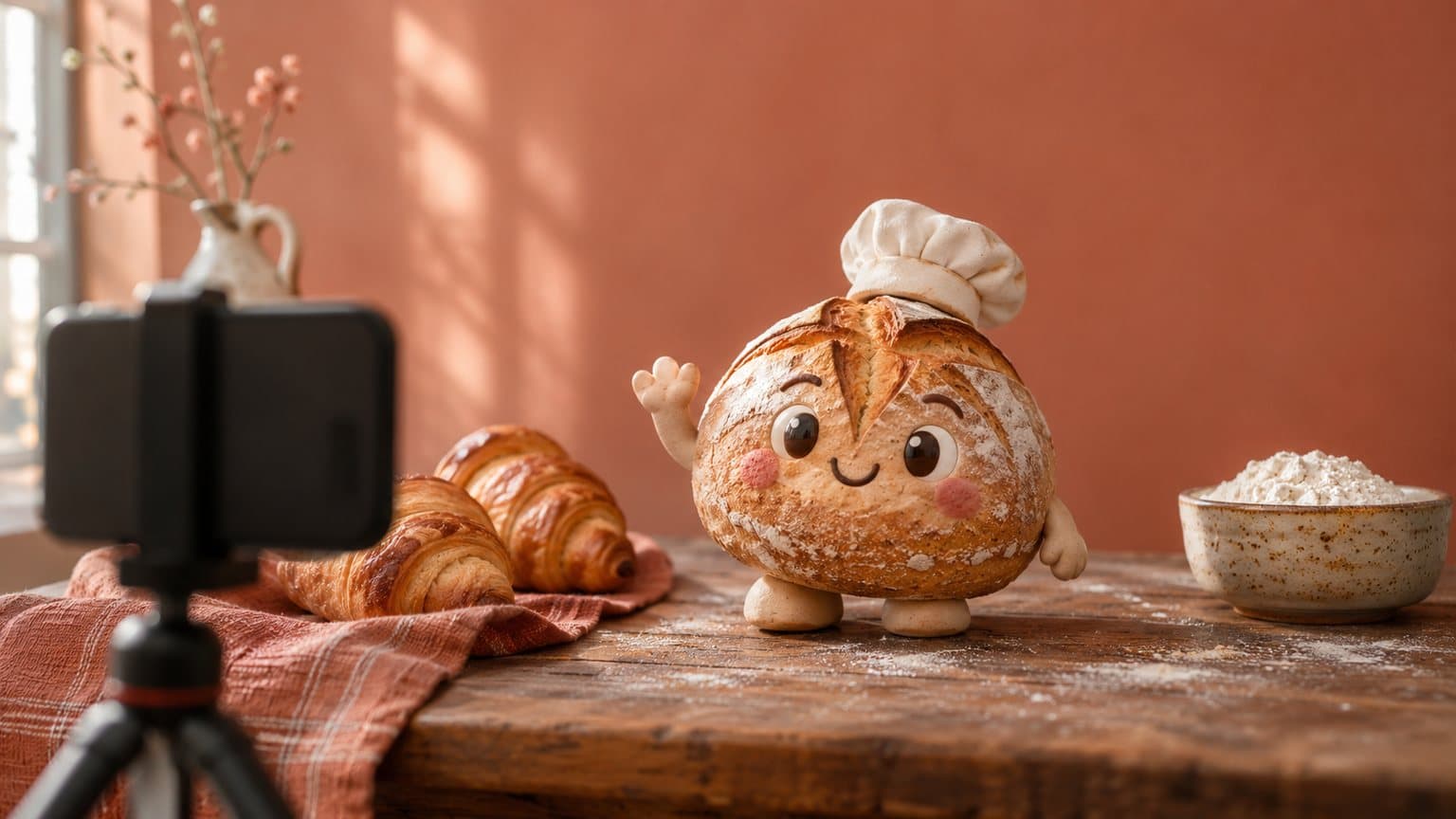
We made a bread mascot wave for 6 credits
We asked Novoads for a made-up mascot, a round sourdough loaf in a white baker's cap, waving from a wooden counter next to two croissants and a bowl of flour. GPT Image 2.6 Sunburst drew it as a 3D animated character for 1 credit. Then our connector handed that picture to Seedance 2.0 Mini as the first frame of a five-second clip, for 5 more credits. Both came back clean on the first try, and in the four frames we pulled from the clip, the loaf keeps its face, its scored crust and its cap.
That loaf is the kind of idea a bakery, a candle shop or a two-person app team sketches on a napkin and then shelves. The holiday promo needs snow you can't film in your shop, and the product looks flat on a phone camera. Animation sounds like a studio job, with a studio's quote and a studio's calendar, so the mascot never leaves the logo.
On November 16, 2026, we read the pages that rank for "animated ads" and "cartoon ads" along with the U.S. Copyright Office's own pages on AI and our own price list. We made the loaf and its clip for this post, but not a full storyboard ad, so the price we give for one below is the sum of its parts. We also haven't bought a studio package or asked the Copyright Office to register anything.
Of the top results we opened, all but one come from animation and video studios, and most of those list famous commercials. One studio sells packages and lists their prices. None of these pages shows how to make an animated ad with AI, and none says how copyright treats a character an AI drew.
Five kinds of animated ads, from mascots to banners
Sorted by the job each ad does, the examples on those pages fall into five kinds. And for each kind, there's something you shouldn't let an AI show.
A mascot with a small story
A mascot ad gives people one character to remember and a few scenes to watch it in, like a loaf that's up before the ovens or a delivery box that finds its way home. Several of the famous commercials on those lists are mascot ads. What AI does well here is add a voice-over and music to the cut and keep one character steady from scene to scene, which works when every scene draws from the same cast picture. Don't let it show someone else's character, whether a rival brand's or a film studio's, or a fantasy result dressed up as what your product really does. A loaf can wave at the camera, but it can't promise that your toast makes anyone fly. Once your mascot takes on a rival's product, it's a comparison ad, so read how to make a us-versus-them video with AI before you name that rival.
Our bread loaf came from a description alone, with no drawing or product photo behind it.
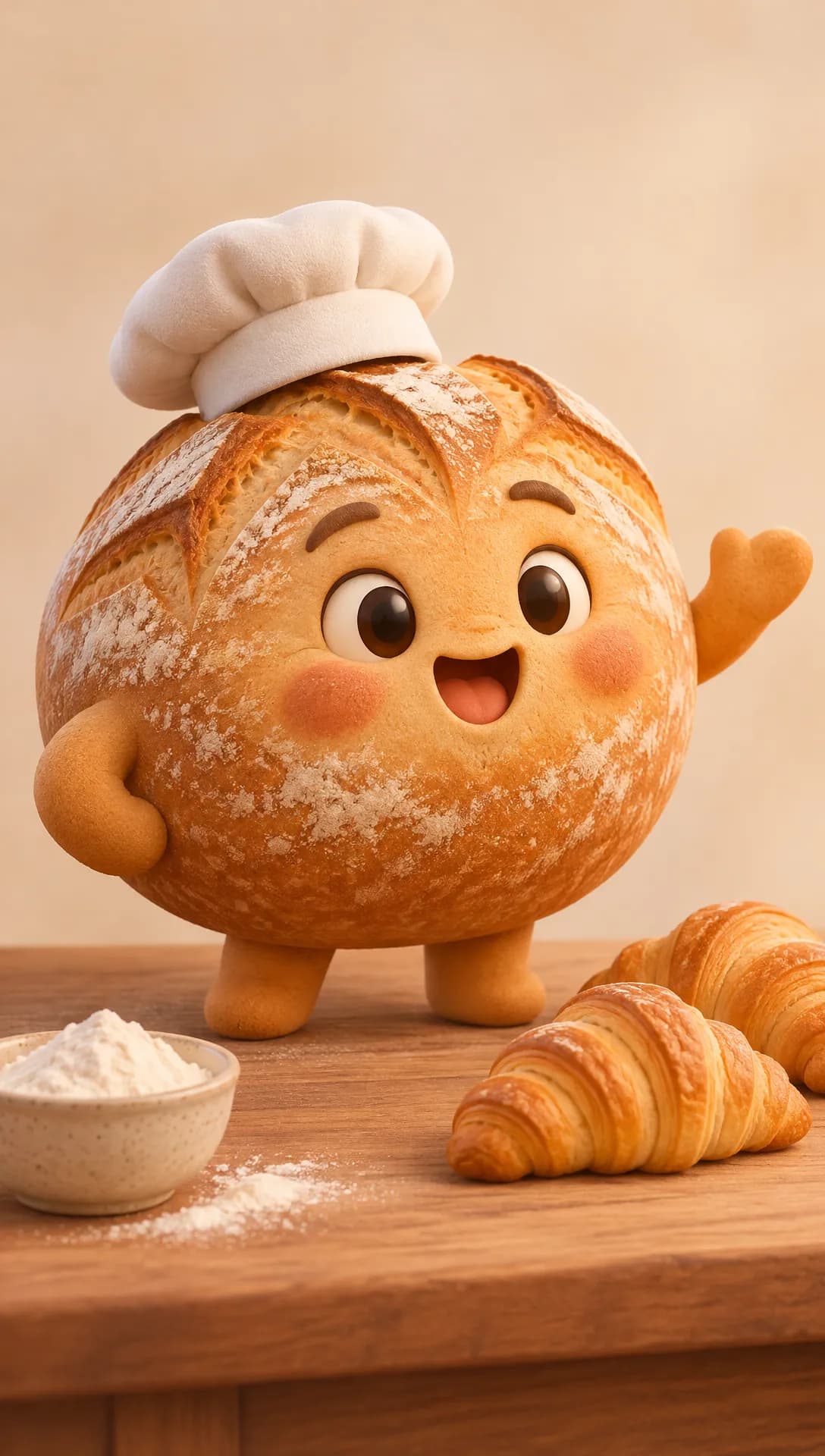 Made in Novoads with GPT Image 2.6 Sunburst · a made-up bakery mascot, drawn as a 3D character picture from a description alone · 1 credit · 2026-11-16
A claymation or stop-motion spot
Clay reads as handmade, and that warmth suits a seasonal promo, like clay snow settling on a storefront or a cake that stacks itself layer by layer. One studio's guide in those results lists stop motion as a style of its own, next to 2D, 3D and motion graphics, and stop-motion commercials show up on the lists. AI gets you the clay look without building a puppet or a set, or shooting one frame at a time, and your own product photo becomes the hero object. Keep two things out of it. A clay version of your product shouldn't change its size, its color or what's inside, and an AI-made ad shouldn't call itself handmade.
An explainer for an app or a service
An explainer walks a buyer through how something works in a few steps, such as book, pay and pick up. The studio lists include explainers for software and for a restaurant app. AI makes quick work of the simple scenes, icons and captions, plus a voice that reads the steps. Keep it honest about the product. An explainer shouldn't show app screens, features or numbers your app doesn't have. And a model will happily draw a dashboard you never built.
A short product ad cut to more than one length
The one shop in those results that shows prices sorts its sample ads by category, from food and drinks to skincare and software, and sells them by length. Build your ad from separate scenes so a short cut and a long cut can share them, and make each scene in the shape of the placement it's for (our TikTok ads guide covers the vertical feed). Don't let the AI show a dish, a drink or a skin result that isn't real. If you sell soup, the soup on screen should look like the soup in the bowl. Our ecommerce video ad examples cover the formats that sell a product in a feed.
An animated banner
The one result that isn't from a studio is a guide to animated banners, the GIF and HTML5 ads that run in display placements. AI does a good job turning a single product photo into that kind of short loop. Keep fake buttons out of it, and don't animate an offer you aren't running.
Making a 3D, clay or single-clip ad in Novoads
There are two ways in. The storyboard recipes run in Claude through our connector and build a whole ad, scene by scene. The Video tab in the app makes one clip at a time from a picture you upload. Either way, Novoads makes the ad and you run it wherever you advertise. If you're new to making ads with AI, start with our guide to AI ads, which covers the basics.
The 3D animated storyboard ad, in Claude
Once you've added our connector in Claude, ask for the 3D animated storyboard ad and give it your product's name, what the product does and a photo of it. The recipe first makes one cast picture that every scene refers back to, with your product photo as its reference. If you want a mascot you can own, hand in your own drawing as that reference.
From there, the recipe works in five steps. It quotes the price of each paid step and waits for your go-ahead before running it.
- It plans four to six scenes with a single action each and draws every scene with GPT Image 2.
- It shows you the cast picture and all the scene pictures together before it makes any clip, so you catch a wrong character while it's still cheap to fix.
- It turns each scene into its own Seedance 2.0 clip that starts on the scene's picture.
- When the connector puts the ad together, it adds music, captions and a voice-over for the narrated lines.
- A word check then compares the words in the finished ad with the script.
You get back one finished vertical ad.
Our bread loaf isn't a cast picture. We drew it from a description with GPT Image 2.6 Sunburst to show the look, while the recipe's cast picture starts from the reference you hand in.
The Claymation storyboard ad
The connector's other storyboard recipe gives the ad a hand-sculpted clay look and tells a named character's small story with narration, music and captions. It draws each scene with GPT Image 2.6 Sunburst and turns each picture into a Seedance 2.0 clip. The short version has five scenes and runs about 35 seconds. The full one has eight and runs about 60. Like the 3D recipe, it quotes the price of each paid step and waits for your go-ahead before it spends anything. We didn't run it for this post, so we don't give a total for it.
One clip from your own drawing or photo, in the app
For a single scene, like a mascot waving in a holiday window, the app's Video tab is quicker. When a model takes a start frame, the clip starts on your picture, and Kling 3.0 takes one.
- Pick Video in the app and choose Kling 3.0 as the model.
- Drop your drawing or product photo where it says "Drop a start frame or click to upload". The editor then shows "The video starts on this picture."
- Write what should move, such as the wave, the camera pushing in or the snow falling.
- Send it with the round up-arrow button.
A five-second Kling 3.0 clip costs 10 credits. Omni Flash and Wan 3.0 also start on your picture once you pick "Start / End Frames" instead of "Reference". With the Seedance models, the editor takes a photo only as a reference you name in the prompt as @Image1, so the clip doesn't open on it. If the clip features your product rather than a character, our walk-through of turning one product photo into a video goes deeper on the motion.
We made our loaf's clip a third way, through our connector, which starts a Seedance 2.0 Mini clip from a start picture for 5 credits. In the four frames below, the loaf waves, then the camera moves in until the loaf fills the frame. Its face, crust and cap don't drift.
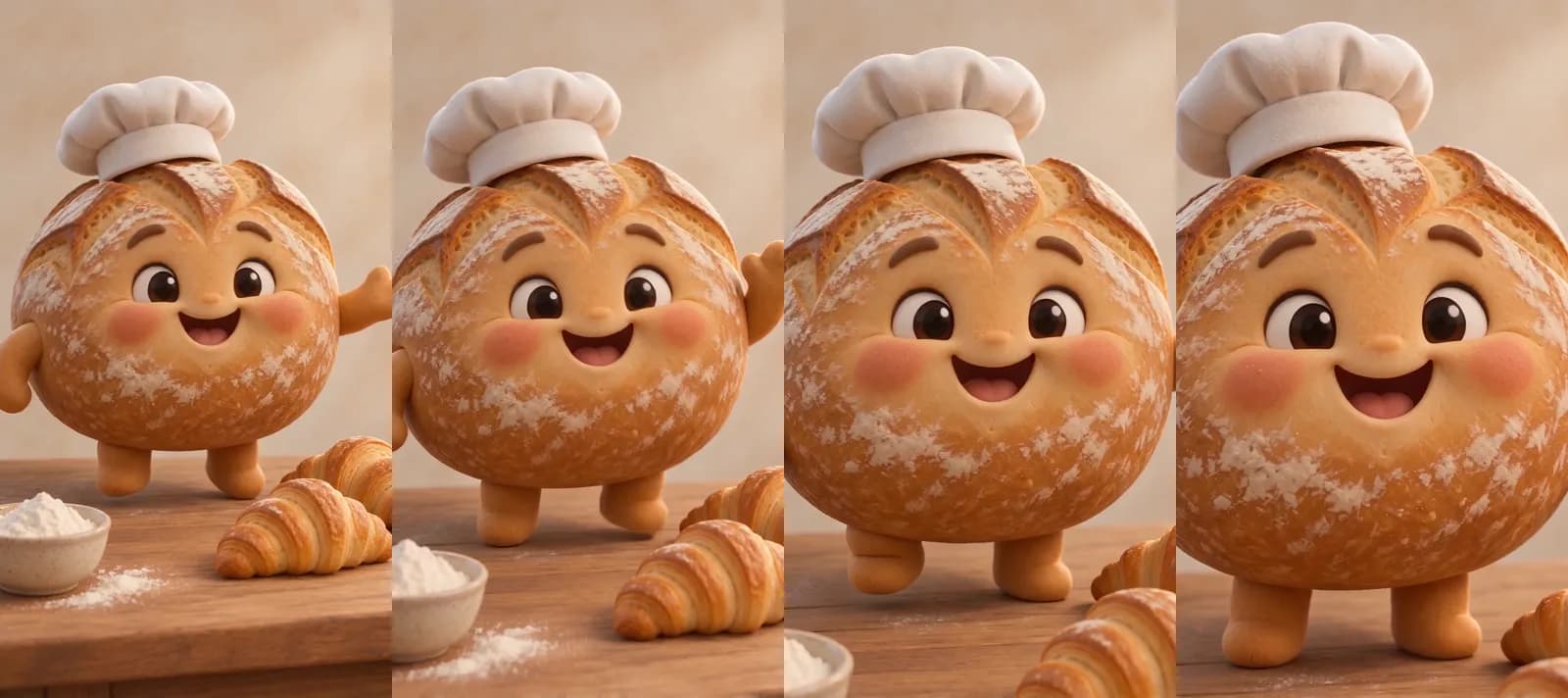 Made in Novoads with Seedance 2.0 Mini · the made-up mascot picture as the first frame, standing in for your own drawing, a wave and a slow push-in, sound off, through our connector · 5 credits · 2026-11-16
For a looping banner, our guide to animated GIF ads made with AI covers how to make the loop in the picture tool.
Explainers with a voice or an AI presenter
An explainer is pictures and a voice. Draw each step in the Image tab with GPT Image 2.6 Sunburst at medium quality, 1 credit a picture, and animate the ones that need motion in the Video tab, the same way as above. Text to Speech, under See more, turns your written narration into speech. If you'd rather have a person on screen between the animated steps, an AI presenter from Talking Actors reads your script on camera. It's an AI actor, so don't pass it off as one of your staff or as a customer. Each started minute costs 200 credits at 720p, and the video comes back with voice and lip-sync.
What an animated ad costs, scene by scene
Our prices here are as of November 16, 2026. What a credit costs you depends on your plan, and each rate below is based on the monthly price.
| Plan | A month | Credits a month | One credit |
|---|---|---|---|
| Starter, billed monthly only | $15 | 200 | $0.075 |
| Plus | $49, or $39 a month billed annually | 1,000 | $0.049 |
| Ultra 3,000 | $129, or $99 a month billed annually | 3,000 | $0.043 |
The dollar figures in the next table are those rates times the credits, rounded to the cent.
| What you make | Credits | Starter | Plus | Ultra 3,000 |
|---|---|---|---|---|
| A GPT Image 2 picture, medium | 1 | about 8 cents | about 5 cents | about 4 cents |
| A Seedance 2.0 scene, 5 s, 720p | 23 | about $1.73 | about $1.13 | about 99 cents |
| Music for one ad | 2 | 15 cents | about 10 cents | about 9 cents |
| 3D storyboard ad, priced cells | 99 | about $7.43 | about $4.85 | about $4.26 |
| A GPT Image 2.6 still, medium | 1 | about 8 cents | about 5 cents | about 4 cents |
| A Seedance 2.0 Mini clip, 5 s, 720p | 5 | about 38 cents | about 25 cents | about 22 cents |
| A Kling 3.0 clip, 5 s | 10 | 75 cents | 49 cents | 43 cents |
| An AI presenter, up to 60 s, 720p | 200 | $15 | $9.80 | $8.60 |
What's in the 3D storyboard price
The 3D storyboard row prices four scenes of five seconds each. It counts the cast picture, a picture for each scene, the four clips and the music. The clips make up 92 of the 99 credits. The voice-over, the word check and putting the ad together with its captions come on top of that, and the connector quotes them before it spends anything. A fifth or sixth scene adds its own picture and clip, and you pay again for any scene you remake. You cover the ad spend yourself, wherever you run the ad.
On Plus, those 99 credits are about a tenth of your monthly credits. On Starter, they're about half. The loaf and its clip in this post cost 6 credits together, about 29 cents on Plus.
What an animation shop charges for 15 seconds
ToonyVision, an animation shop that sells ad packages at fixed prices, lists its 3D package at $1,000 for 15 seconds of character animation. That was the price on its product page when we read it on November 16, 2026. The same page lists what the package includes.
- One sculpted and rigged character.
- Original scripts and storyboards.
- A voice-over.
- Delivery in 14 to 21 days.
- Two revisions.
The two aren't the same thing. ToonyVision's package gets you a rigged character that people script and animate. Our recipe animates pictures that a model drew from your reference, one scene at a time, and you check each scene yourself. Before paying for either, we'd test the character with a 10-credit clip from your own drawing. For live-action-style spots, our guide to AI commercials walks through making one step by step.
What copyright covers in an AI-made mascot
On January 29, 2025, the U.S. Copyright Office published Part 2 of its report on copyright and artificial intelligence, the part on whether AI output can be protected.
What the Office concluded
The Office's announcement says the report "concludes that the outputs of generative AI can be protected by copyright only where a human author has determined sufficient expressive elements." It says this "can include situations where a human-authored work is perceptible in an AI output, or a human makes creative arrangements or modifications of the output, but not the mere provision of prompts."
The finding on prompts is tied to today's technology. The report says that "given current generally available technology, prompts alone do not provide sufficient human control to make users of an AI system the authors of the output." It adds, "There may come a time when prompts can sufficiently control expressive elements in AI-generated outputs to reflect human authorship," and the Office says it keeps watching the technology.
The report also spells out how far that protection reaches. When a person feeds their own copyrightable work into the AI and that work is perceptible in the output, the report says "they will be the author of at least that portion of the output." That copyright "would cover the perceptible human expression" and may also cover the selection and arrangement of the human-made and AI-made material, "even though it would not extend to the AI-generated elements standing alone."
That's the Office's position, set out in its own report, and it isn't a court's ruling. When we read the Office's AI page on November 16, 2026, it still listed Part 2 as published on January 29, 2025.
What it means for a mascot you want to keep
What follows is our reading, and it isn't legal advice. A character you plan to put in every ad for years should start from a person's work. Draw it, or have your designer draw it, and hand that drawing in as the recipe's reference or a clip's start frame, so it stays perceptible in what the model makes. In the Office's view, creative edits and arrangements of the output can count too, though the protection still covers only what a person added and arranged. Our bread loaf came from a description alone. That's the prompts-alone case, and the report says that with today's tools, it doesn't make anyone the author.
Our commercial-use line, and where it stops
The FAQ on our plan screen answers "Can I use the videos for commercial purposes?" with "Absolutely. All videos generated with Novoads are fully licensed for commercial use." That line is about using what you make in your ads. It doesn't settle whether copyright protects the mascot in them, and that's the question the Office's report takes up.
Where to start with your own mascot
Start with the character. If you have a mascot sketch, put it in the Video tab as a Kling 3.0 start frame and ask for one wave. For 10 credits, you'll see whether it holds up in motion before you pay for four scenes. If it does, the 3D animated storyboard ad turns it into a whole spot through our connector, with every paid step priced before it runs. For a holiday promo or a product that's hard to film, start with one clip from your product photo, and move to the Claymation storyboard ad when you want the whole story told in clay.
You pay for Novoads from your first month, and our pricing page lists what each plan costs and how many credits it includes.
Put your mascot in motion
Start from your own drawing or product photo. Plans start at $15 a month for 200 credits.
See plans and creditsWhatever you animate first, check each scene against your drawing before you pay for the next one.
Frequently Asked Questions
Can a mascot made with AI be protected by copyright?
In the U.S. Copyright Office's view, published January 29, 2025, AI output can be protected only where a human author has determined sufficient expressive elements, such as a person's own drawing that stays perceptible in the output, or a person's creative arrangement or editing of the output. Prompts alone aren't enough with current generally available technology, and the protection doesn't reach the AI-made parts standing alone. It's the Office's position, set out in a report, and it isn't a court's ruling. This answer isn't legal advice.
Key Takeaways
- The five kinds of animated ads that small brands run are a mascot with a small story, a claymation or stop-motion spot, an explainer, a short product ad cut to more than one length, and an animated banner.
- In Claude, the 3D animated storyboard ad recipe in our connector builds a whole ad from one cast picture. It quotes the price of every paid step and waits for your go-ahead before it spends anything.
- With four scenes, the recipe's pictures, clips and music come to 99 credits. That's about $4.85 on Plus, before the voice-over, the word check and putting the ad together.
- ToonyVision, an animation shop, lists 15 seconds of 3D character animation at $1,000. That was the price on its page when we read it on November 16, 2026.
- On January 29, 2025, the U.S. Copyright Office concluded that AI output can be protected only where a human author has determined sufficient expressive elements, and that prompts alone aren't enough with current generally available technology. Our reading is that a mascot you want to protect should come from your own drawing or your own edits.