Pinterest Ads: How to Make One With AI, What It Costs, and the AI Mark Pinterest Asks For
The five Pinterest ad formats that fit a small shop, how to make each from your own product photos with AI, what it costs, and the AI mark Ads Manager asks for.

Mauricio Valdivia
·12 min

When the pin gets saved and the mug doesn't sell
A model drew everything in the picture below, from the three speckled cream mugs and the little pitcher to the sprig of eucalyptus and the linen cloth by the window. We made it with GPT Image 2.6 Sunburst for 1 credit, as a stand-in for the photo a ceramics shop takes of its own stock. Then our Claude connector turned it into a five-second Seedance 2.0 Mini clip for 5 credits. The camera glides over the table and closes in on the front mug, and the eucalyptus slides out of the shot. In the four frames we pulled from the clip, the mugs keep their shape and their speckles.
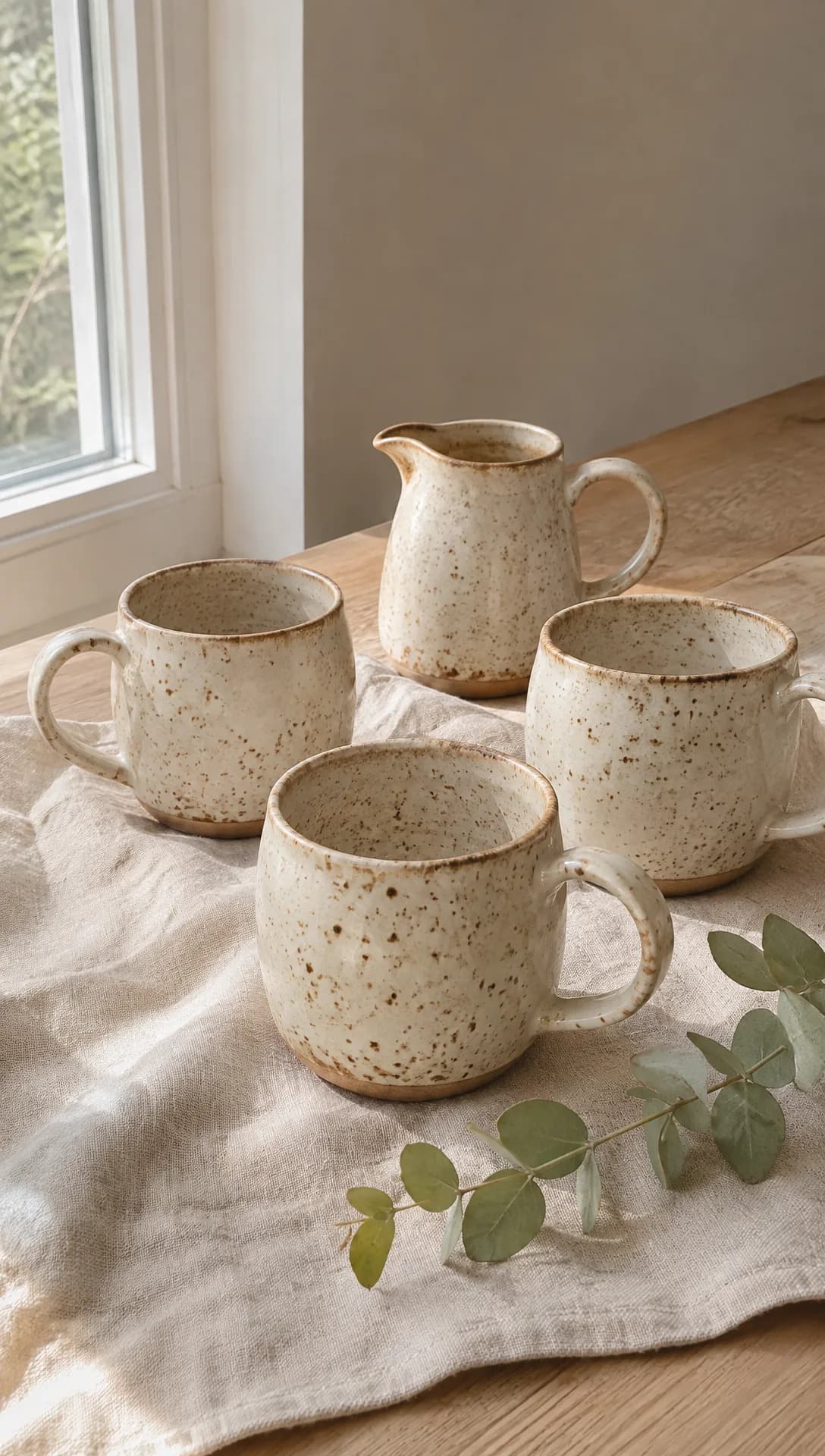 Made in Novoads with GPT Image 2.6 Sunburst · prompt: handmade speckled mugs and a small pitcher on linen by a window, as a small shop's own product photo · 1 credit · made 2026-11-15. It stands in for your own photo, and the shop and its pottery are made up.
If you sell mugs, prints, recipes or linen dresses through Pinterest, you know the kind of pin that looks like a hit. It gets saved to kitchen boards and gift lists all season, and hardly anyone taps through to the shop. Promoting it puts it in front of people who haven't found your boards. But a promoted pin still needs new pictures and clips every time you refresh a seasonal board or drop a new glaze, and a one-person shop can't reshoot the whole line for each one.
Five of Pinterest's ad formats fit a small shop, and AI can make most of what goes into them from photos you already have. Pinterest's own steps for a new campaign in Ads Manager also ask you to mark an ad that AI changed, or one that shows an AI-generated person, if that applies. We opened five guides from the search results, and that step isn't in any of them.
On November 15, 2026, we read Pinterest's help pages on ad specs, ad creation and AI labels, its Advertising Guidelines, the search results for "pinterest ads" and our own code and prices. We made the picture and the clip for this post in our own workspace, and we didn't buy or run a Pinterest ad for it.
Five Pinterest formats that fit a small shop, and where AI should stop
Pinterest's help page on creating an ad says some formats are only available for certain campaign objectives. A brand awareness campaign can use static pins, carousels, video, max video and collections. Pick sales as the objective, and the list shrinks to shopping ads and collections. Visual search ads are a subject of their own, and we covered them in a separate post.
Pinterest's product specs page sets the shapes and lengths for each of the five.
| Format | Shape | Size, count or length |
|---|---|---|
| Standard pin | 2:3 recommended | 1000 x 1500 pixels, one image |
| Video pin, standard width | Square or vertical, 9:16 included | 6 to 15 seconds recommended, at least 4 |
| Video pin, max width | No taller than square, paid only | 6 to 15 seconds recommended, at least 4 |
| Carousel | 1:1 or 2:3 outside sales campaigns | 2 to 5 images |
| Collections | Main picture 1:1 or 2:3, or a video | Three or more smaller pictures recommended, up to 24 |
| Idea ad | 9:16 for full-screen pages | 1080x1920 pixels, up to 5 minutes in all |
The standard pin, one picture at 2:3
It's the workhorse ad, with one product, one picture and one link to the product page. Pinterest's specs page says pins with an aspect ratio greater than 2:3 might get cut off in feeds. Our still above is 9:16, so for a standard pin we'd remake it at the recommended 2:3.
AI is good at putting the product you already shot into a new setting for the season, like the same mug on a holiday table or on a shelf of cookbooks. But don't let it show a glaze, a color or a size you don't sell. Pinterest's Advertising Guidelines prohibit ads that promote "Fictitious or non-existent products, services, or storefronts." We'd treat an invented colorway on a real listing as too close to that line. As for text, the editorial section of the guidelines doesn't allow overly busy images and suggests you "try no more than 4 frames and 2 font styles or colors."
The video pin at standard or max width
A standard-width video ad is the same size as a regular Pin. A max-width one expands across people's whole feed on mobile, and Pinterest offers it only as a paid format.
We think this is where AI saves a small shop the most work, because it turns one still into motion. A slow pass over a table setting, a scarf lifting in a draft or a recipe card sliding into the frame can all start from a single photo. Just make sure the clip never shows the product doing something it can't, like a mug that changes color mid-shot or a dress that drapes like a different fabric. Pinterest prohibits "Ads that intentionally show a different product or service than the one being offered." It doesn't allow "Ads with flashing or strobing effects" either, so check every AI clip for flicker before it goes anywhere.
The carousel, two to five cards to swipe
"Carousel ads feature multiple images for people to swipe through," the specs page says. For a shop, it's the place to show one piece from several sides, or a small collection one piece at a time.
AI helps here because every card can start from the same real photo of the same piece, set in a different room or light. Skip any card with a variant your landing page doesn't sell, because someone who swipes to the blue one and taps expects to find the blue one.
The collections ad, one main picture above three
Pinterest describes collections ads as "one main image above three smaller images, in feeds on mobile devices." A video can take the main slot instead of a picture. It's also the only one of these five formats that a sales campaign can use.
Use AI for the main picture or clip, the part someone sees first. Keep the smaller pictures as your real product photos. They're what people tap to buy, so they should look exactly like what arrives in the box.
The idea ad, several pages in one pin
In Pinterest's words, "Idea ads appear as a set of multiple videos, images, lists and custom text in a single Pin." You can promote an organic Pin as an idea ad where ads are available, or make a new one while you set up a campaign.
It suits a shop that teaches, like a glaze test over three pages or a recipe in five steps. AI can make the opening page, with an AI presenter who introduces the drop, and the short clips of the product that follow. Leave out any step your product doesn't do, any finished result a buyer won't get and any before-and-after you can't stand behind. If a page shows a real buyer's result, our supplement post gets into why a results-not-typical line isn't enough.
Making each format in Novoads from photos you already have
In Novoads, the picture, video and talking-actor tools are all in one editor. The picture and the clip below both start from a photo you took, and the video tool shows an estimated cost before you send anything. If you're new to making ads this way, our guide to AI ads covers the whole process in five steps.
A 2:3 picture for a standard pin or a carousel card
- Open the editor and choose Image.
- Click Reference and upload your product photo.
- Open Settings, pick GPT Image 2.6 Sunburst as the Model, set Aspect ratio to 2:3 (1024×1536) and set Quality to Medium.
- In "Describe your image...", say what should change (the table, the light, the season) and that the mug has to stay exactly as it is in your photo.
- Press the round up-arrow button to make the picture.
You get back a picture of 1024 by 1536 pixels. That's a little larger than the 1000 by 1500 Pinterest recommends. It costs 1 credit at Medium quality and 2 at High. Hold it next to the real mug before you use it. A model working from a reference can still move a handle or thin out the speckles, and then your ad shows a different product.
A clip that opens on your photo
- Choose Video, open Settings and pick Kling 3.0 as the Model.
- Drop your photo where the editor reads "Drop a start frame or click to upload." Once it's in, the editor shows "The video starts on this picture."
- Set Duration to 6 or 10 seconds.
- Set Aspect ratio to 9:16 for a standard-width pin, or 1:1 for max width.
- In "Describe your video", ask for one camera move and one thing in the scene that moves, and nothing that changes the product.
- Check the Estimated cost line, then press the up-arrow button.
A Kling 3.0 clip costs 2 credits a second. Generate Audio is on unless you turn it off, and the price is the same either way. Omni Flash and Wan 3.0 clips can open on your photo too, once you pick "Start / End Frames" instead of "Reference." Seedance works differently in the editor. There, your photo becomes a reference, called @Image1 inside the prompt, and the clip doesn't start on it.
Our clip for this post didn't come from the editor. We made it with our Claude connector instead, because the connector can start a Seedance 2.0 Mini clip on a picture you give it. It ran at 720p with the sound off and cost 5 credits.
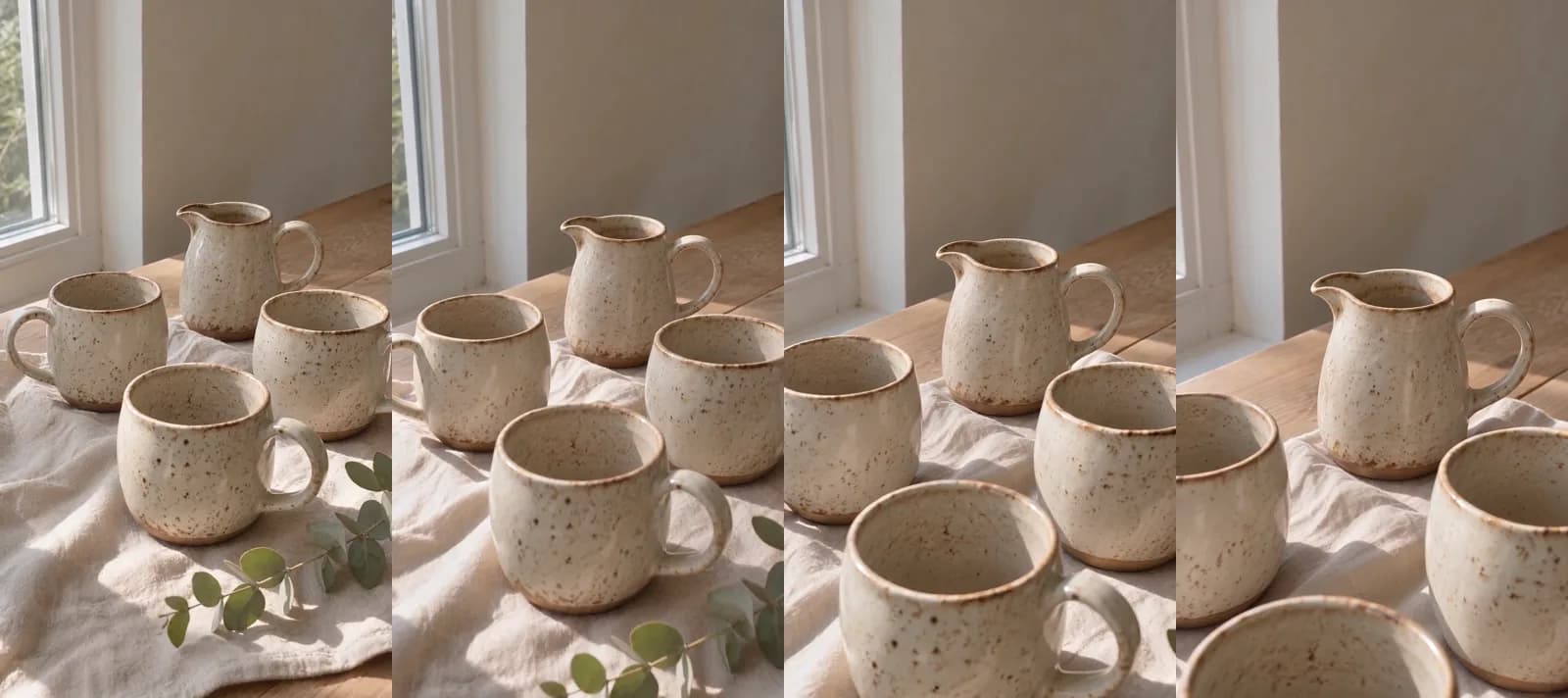 Made in Novoads with Seedance 2.0 Mini · prompt: the camera glides across the mugs and moves closer, from the still above as its start picture, sound off · 5 credits · made 2026-11-15. Four frames of the 5-second clip at 720p, 9:16. Its start picture stands in for your own photo.
Five seconds clears Pinterest's 4-second minimum. It's a second short of the low end of what Pinterest recommends, though. For a pin, we'd ask for 6 or 10 seconds.
An AI presenter for the first page of an idea ad
- Choose Talking Actors, click Add actors and pick one in "Choose an actor."
- In "Write what the actor will say...", type the actor's lines, such as what's new in the drop, when it ships and where to tap.
- The editor's rate line reads 200 credits per started minute at 720p. Switch to 480p, and the rate drops to 100.
- Press the up-arrow button to start the render.
The result is a video of the AI presenter speaking your lines, with voice and lip-sync. Billing goes by the started minute, so a 20-second page costs as much as a 60-second one. Captions are a separate step in the Captions tool, where the Karaoke style costs 0 credits in the app.
The presenter is an AI actor, so we'd never pass them off as you, someone who works with you or a customer. Pinterest's editorial rules don't allow "Low-quality user-generated content like selfies and screenshots." We'd pick an actor whose shot looks framed and well lit, and skip any that reads like a shaky phone selfie.
What to check before it goes to Ads Manager
- The product in every picture and clip matches the listing it links to, in glaze, color and size.
- No letters, logos or price tags the model added on its own.
- No flicker or strobing in any clip.
- Video pins between 6 and 15 seconds, if you want Pinterest's recommended length.
- A note of which parts AI made or changed, so you can answer Pinterest's AI step accurately when you publish.
What a Pinterest ad costs to make in Novoads
Prices as of November 15, 2026. You pay for Novoads from your first month, and three of our plans fit this kind of work.
- Starter, $15 a month for 200 credits
- Plus, $49 a month for 1,000 credits
- Ultra 3,000, $129 a month for 3,000 credits
Our pricing page lists every plan, with a yearly price where the plan has one. For the table, we divided each plan's monthly price by its credits.
| What you make | Model and setting | Credits | Starter ($0.075 a credit) | Plus ($0.049) | Ultra 3,000 ($0.043) |
|---|---|---|---|---|---|
| 2:3 picture for a pin or a carousel card | GPT Image 2.6 Sunburst, Medium | 1 | about 8 cents | about 5 cents | about 4 cents |
| The same picture at High quality | GPT Image 2.6 Sunburst, High | 2 | 15 cents | about 10 cents | about 9 cents |
| 6-second clip that opens on your photo | Kling 3.0, in the editor | 12 | 90 cents | about 59 cents | about 52 cents |
| 10-second clip that opens on your photo | Kling 3.0, in the editor | 20 | $1.50 | 98 cents | 86 cents |
| 8-second clip that opens on your photo | Omni Flash, 720p, Start / End Frames | 24 | $1.80 | about $1.18 | about $1.03 |
| 5-second clip like the one above | Seedance 2.0 Mini, 720p, through our connector | 5 | about 38 cents | about 25 cents | about 22 cents |
| AI presenter page, up to 60 seconds | Talking actor, 480p | 100 | $7.50 | $4.90 | $4.30 |
| AI presenter page, up to 60 seconds | Talking actor, 720p | 200 | $15.00 | $9.80 | $8.60 |
| Captions on a finished video | Karaoke style, in the app | 0 |
A seasonal drop, added up
A standard pin, a four-card carousel and a video pin for one new glaze add up to 25 credits.
- The pin's picture, at Medium quality, is 1 credit.
- The four carousel cards, at Medium quality, are 4 credits.
- A 10-second Kling 3.0 clip for the video pin is 20 credits.
That's about $1.88 on Starter and about $1.23 on Plus. On Ultra 3,000, it's about $1.08. Starter's 200 credits cover eight sets like that a month, if you make nothing else. Add an AI presenter page at 480p for an idea ad, and the set comes to 125 credits. That's about $9.38 on Starter and about $6.13 on Plus.
What a UGC creator charges, for comparison
Insense's guide to UGC creator rates is dated September 14, 2026. It says a beginner-level video runs $50 to $400. For premium work, it gives $500 to $3,000 and up, priced on production effort rather than follower count. The guide covers creator videos in general and doesn't single out Pinterest. A creator does bring what a clip made from a photo can't, like real hands around your mug in a kitchen that's actually theirs. If you need a longer spot, our post on AI commercials prices a 30-second one in credits.
The AI mark in Pinterest's Ads Manager
What the step says
Pinterest's US help page on creating an ad lists the steps for a new campaign in Ads Manager, and the last few go in this order.
- Under your selected Pins, click Review selected Pins.
- Check the ad's name and its destination URL.
- "If applicable, mark whether the ad is AI-modified and if it contains an AI-generated person."
- Click Publish. The page says your Pins then go through Pinterest's ad review.
The page isn't dated, so all we can say is that it read this way on November 15, 2026. Its steps for adding an ad to an existing campaign don't repeat the line. It's an instruction to whoever sets up the ad in Ads Manager.
Where viewers find the disclosure
Pinterest's page on Gen AI labels says an ad's label doesn't show when someone clicks on the Pin. Viewers see it "along with other details about the ad" by clicking or tapping the ellipsis icon next to the Pin. The disclosure says the Pin was modified with AI, or that it contains an AI-generated person, "based on what the content owner has indicated." The same page says that when Pinterest's systems flag the content, the disclosure can instead read that a Pin may be modified with AI.
What it means for the five formats
As we read it, every picture and clip made the way we describe starts from your photo and is changed by AI, which is the first half of what the step asks about. And we'd call a video with an AI presenter the plainest case of the second half. Pinterest gives no test for "if applicable," so we can't tell you the mark is required or that an ad without it gets turned down. We'd mark what's true of each ad, because the disclosure is what a curious viewer opens to see how it was made.
Pinterest's Advertising Guidelines also prohibit ads that promote "Products, services, or offers misrepresented through synthetic media, manipulated content, or other deceptive practices." In our reading, an AI picture that shows a glaze you don't make is the kind of ad that line describes, whether or not it carries the mark.
None of this is legal advice, so check Pinterest's own page before you publish. If the same clip also runs on Meta, TikTok or Google, each of them has its own AI label rules, and we compared them in another post.
The photos from your last drop are enough to start
With the product photos on your phone right now, you can make new 2:3 pins in Novoads, plus short clips that open on your photo. You can add an AI presenter page for an idea ad too, and it's all paid for from your plan's credits. You run the ads yourself in Ads Manager, since Novoads makes ads and never places them. If you sell beyond Pinterest, our guide to ecommerce video ads walks through seven formats, and our product video walkthrough goes deeper on getting the product to look right on camera.
Price your next drop before you make it
A new 2:3 picture is 1 credit. A 10-second clip that opens on your photo is 20 credits. See what each plan's monthly credits cost.
Compare plansFrequently Asked Questions
How do you post an ad on Pinterest?
You do it in Ads Manager, and Pinterest's help page walks through the steps. Choose Create campaign, then Custom create campaign and Get Started, and go to Ads to select the Pins you want to promote (the Pin builder there lets you create a new organic Pin first). Under your selected Pins, click Review selected Pins, check the ad name and the destination URL, and mark whether the ad is AI-modified or contains an AI-generated person, if that applies. Then click Publish, and Pinterest puts the Pins through its ad review.
Does Pinterest require a label on AI-made ads?
Pinterest's US help page says, in its steps for a new campaign, 'If applicable, mark whether the ad is AI-modified and if it contains an AI-generated person.' It doesn't say when that applies, so we can't tell you the mark is required or that an unmarked ad gets refused. Viewers find the disclosure behind the ellipsis icon next to the Pin. We'd mark what's true of the ad. This isn't legal advice, so read the step on Pinterest's page yourself.
How much does it cost to make a Pinterest video ad with AI?
As of November 15, 2026, a Kling 3.0 clip in Novoads that opens on your product photo costs 2 credits a second. A 10-second clip is 20 credits. That's $1.50 on Starter and 98 cents on Plus. A new 2:3 picture is 1 credit at Medium quality. An AI presenter costs 100 credits a started minute at 480p. What you pay Pinterest to show the ad is separate.
Can a Pinterest ad use an AI presenter?
Pinterest's ad steps ask whether an ad contains an AI-generated person, and its labels page says the ad's disclosure can say so, based on what the advertiser indicates. In Novoads, the presenter is an AI actor who reads your lines with voice and lip-sync. Pinterest's guidelines prohibit ads that promote products misrepresented through synthetic media. We'd never pass the AI presenter off as you, someone on your team or a customer.
Key Takeaways
- The five Pinterest ad formats that fit a small shop are a standard pin, a video pin at standard or max width, a carousel, a collections ad and an idea ad. Use AI for the main picture or clip in each, and keep your real photos for the product pictures people tap to buy.
- We made the still under the opening paragraph with GPT Image 2.6 Sunburst for 1 credit, as a stand-in for your own product photo. Our Claude connector turned it into a five-second Seedance 2.0 Mini clip for 5 credits.
- In the editor, a Kling 3.0 clip that opens on your photo costs 2 credits a second. A 10-second clip comes to $1.50 on Starter. A new 2:3 picture for a pin is 1 credit at Medium quality.
- In its steps for a new campaign in Ads Manager, Pinterest's US help page says 'If applicable, mark whether the ad is AI-modified and if it contains an AI-generated person.' Viewers find that disclosure, along with the ad's other details, behind the ellipsis icon next to the Pin.
- The page gives no test for 'if applicable,' so we can't say the mark is required. In our reading, every picture and clip made from your photo with AI is AI-modified, and an ad with an AI presenter also contains an AI-generated person.